

Sign Up
Thank you for Submitting!

Most organizations assume Canva is a low-cost creative tool that requires minimal governance. It is perceived as an easy-to-use design platform for marketing and HR teams and, as a result, often escapes the level of scrutiny applied to larger SaaS platforms. But in 2025, Canva will have grown into a multi-department content engine with premium AI features, rich asset libraries, multi-team workspaces, and advanced collaboration. With this growth comes a new reality. Overspending on Canva is far more common than most IT and procurement teams realize.
Enterprises frequently pay for users who never design, for departments that maintain isolated Canva Teams, for premium features that go unused, and for editor seats for people who only review content. Even small inefficiencies compound because Canva pricing scales across teams, business units, and geographies.
This blog helps you identify the silent overspend patterns inside your Canva environment and provides direct, actionable steps your teams can take to reduce costs immediately. You will also find a sample overspend trajectory graph, real examples, and practical ways to take control before your next renewal.
CloudNuro gives IT teams a fast path to value. Book a 15-minute setup and achieve measurable results in under 24 hours.
Many organizations do not realize they are overspending because waste does not appear in a single location. It spreads across teams quietly. If you notice any of these signals, overspend is already happening:
These signals indicate a structural overspend problem rather than a pricing issue.
Use this checklist to evaluate your current state. If you answer “yes” to more than three, overspend is likely significant.
This quick diagnostic helps you understand whether you are paying for unnecessary seats, features, or tiers.
Overspending happens due to predictable patterns across enterprises. Understanding them helps you take immediate corrective action.
Users who only view, approve, or occasionally modify templates often receive full editor licenses.
Departments purchase their own accounts rather than consolidating them into a single workspace.
Brand Kits, Magic Resize, AI tools, and Background Remover are often enabled broadly, even when only a few individuals use them.
Marketing may have Teams while HR purchases Pro plans, leading to split administration and double billing.
Premium elements, stock images, AI enhancements, and template licenses accumulate incremental costs.
Departed employees, interns, and contractors often remain active in Canva for months.
Each of these patterns contributes to unnecessary recurring costs.
A structured 60-minute audit can reveal the majority of overspend.
Step 1: Export full user and role lists
Identify all editors, viewers, and contributors.
Step 2: Review last login activity
Mark users as inactive at 30-, 60-, and 90-day intervals.
Step 3: Identify department-level subscriptions
Search for invoices in expense reports and finance tools.
Step 4: Check premium feature usage
Determine which features drive actual value.
Step 5: Investigate credit purchases
Analyze how often teams buy premium assets.
Step 6: Validate access for contractors
Check if temporary users have retained seats.
This gives you a complete picture of waste.
CloudNuro gives IT, procurement, and finance teams a real-time view of Canva usage. The platform identifies inactive users, duplicate teams, editor seats with no design activity, and premium features that do not justify their cost. With one unified dashboard, you can reduce waste immediately and walk into renewal negotiations with confidence. If you want a data-backed overspend analysis tailored to your environment, CloudNuro can prepare a detailed Canva cost risk report for your team.
CloudNuro gives IT teams a fast path to value. Book a 15-minute setup and achieve measurable results in under 24 hours.
Once overspend areas are identified, use these steps to fix them quickly.
Any user who has been inactive for 45 to 60 days should have their editor seat removed.
This improves governance and reduces duplicate billing.
Move occasional and low-intensity users to the Viewer or Free roles.
Assign premium tools only to heavy creators who need them.
Review user activity every quarter to prevent waste from returning.
Managers should justify why a user needs premium capabilities.
Ensure contractor seats are removed as soon as each project ends.
These steps deliver fast cost reductions without harming design productivity.
You can visualize Canva overspend reductions as teams apply corrective actions.
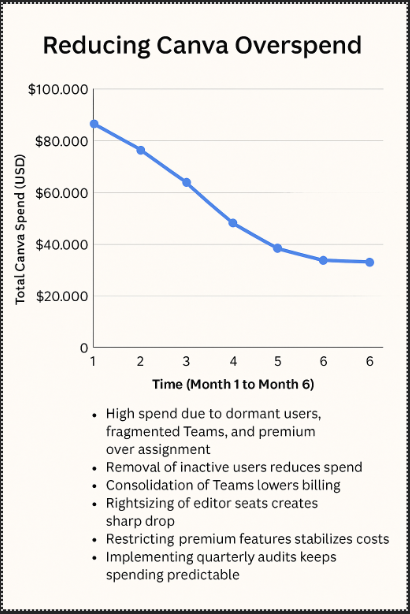
This graph shows a downward slope as cost control improves.
A financial services company realized it was overspending heavily despite having fewer than 200 Canva users. Their internal audit revealed:
After consolidating accounts, rightsizing editor seats, and migrating low-activity users to Free roles, the company reduced Canva spend by 34 percent within 45 days. IT and procurement now receive monthly usage and spend insights to maintain optimization.
Prevention is easier than correction. Establish ongoing governance to maintain stable spend.
Users must meet actual design thresholds to retain editor seats.
Use a central review process for Brand Kit and AI tools.
Review user activity regularly.
Disable decentralized purchases by teams.
Monitor premium element purchases.
Limit uncontrolled workspace creation.
These steps create sustainable cost governance.
Overspend grows silently because Canva is a visually appealing, low-friction tool. Teams adopt it quickly and independently without involving IT or procurement. Over time:
Without continuous visibility into usage patterns, waste grows naturally.
CloudNuro gives IT teams a fast path to value. Book a 15-minute setup and achieve measurable results in under 24 hours.
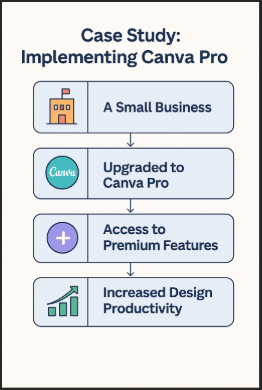
Shows:
Here is a fast action list you can use right now:
| Corrective Step | How to Implement | Impact |
|---|---|---|
| Reclaim dormant users | Remove users who are inactive for 45 to 60 days | 15 to 25 percent savings |
| Rightsize editor seats | Move light users to Free roles | 10 to 20 percent savings |
| Consolidate Teams | Merge all subscriptions into one | 18 to 30 percent savings |
| Restrict premium features | Assign features to active creators only | 8 to 15 percent savings |
| Manage contractors | Remove seats immediately after offboarding | Lower recurring cost |
| Track credit usage | Review monthly premium purchases | Reduce micro spend |
These changes often deliver measurable savings within the first renewal cycle.
A global logistics company relied heavily on Canva for marketing, recruitment, and employee communications. Over time, different regions set up their own Canva Teams, and hundreds of seats were assigned without central oversight. A review revealed:
After consolidating the workspace and enforcing role-based assignments, the company reduced Canva costs by 28 percent in the first quarter.
CloudNuro gives IT, procurement, and finance teams a complete view of Canva activity and cost patterns:
With CloudNuro, organizations eliminate guesswork and ensure Canva remains cost-efficient, governed, and aligned with business value.
Canva overspend does not happen at all at once. It grows quietly as seats accumulate, premium features expand, and Teams operate independently. With clear visibility, structured audits, and data-backed corrective actions, organizations can significantly reduce Canva spend without impacting creativity. CloudNuro provides the intelligence you need to optimize licensing, negotiate renewals, and govern Canva with clarity.
CloudNuro is a leader in Enterprise SaaS Management Platforms, giving enterprises unmatched visibility, governance, and cost optimization. Recognized twice in a row by Gartner in the SaaS Management Platforms Magic Quadrant and named a Leader in the Info-Tech SoftwareReviews Data Quadrant, CloudNuro is trusted by global enterprises and government agencies to bring financial discipline to SaaS and cloud.
Trusted by enterprises such as Konica Minolta and Federal Signal, the solution provides centralized SaaS inventory, license optimization, and renewal management, along with advanced cost allocation and chargeback, giving IT and Finance leaders the visibility, control, and cost-conscious culture needed to drive financial discipline.
As the only FinOps-ready Enterprise SaaS Management Platform, CloudNuro unifies SaaS and IaaS management in a single view. With a 15-minute setup and measurable results in under 24 hours, CloudNuro gives IT teams a fast path to value.
CloudNuro gives IT teams a fast path to value. Book a 15-minute setup and achieve measurable results in under 24 hours.
Request a no cost, no obligation free assessment —just 15 minutes to savings!
Get StartedMost organizations assume Canva is a low-cost creative tool that requires minimal governance. It is perceived as an easy-to-use design platform for marketing and HR teams and, as a result, often escapes the level of scrutiny applied to larger SaaS platforms. But in 2025, Canva will have grown into a multi-department content engine with premium AI features, rich asset libraries, multi-team workspaces, and advanced collaboration. With this growth comes a new reality. Overspending on Canva is far more common than most IT and procurement teams realize.
Enterprises frequently pay for users who never design, for departments that maintain isolated Canva Teams, for premium features that go unused, and for editor seats for people who only review content. Even small inefficiencies compound because Canva pricing scales across teams, business units, and geographies.
This blog helps you identify the silent overspend patterns inside your Canva environment and provides direct, actionable steps your teams can take to reduce costs immediately. You will also find a sample overspend trajectory graph, real examples, and practical ways to take control before your next renewal.
CloudNuro gives IT teams a fast path to value. Book a 15-minute setup and achieve measurable results in under 24 hours.
Many organizations do not realize they are overspending because waste does not appear in a single location. It spreads across teams quietly. If you notice any of these signals, overspend is already happening:
These signals indicate a structural overspend problem rather than a pricing issue.
Use this checklist to evaluate your current state. If you answer “yes” to more than three, overspend is likely significant.
This quick diagnostic helps you understand whether you are paying for unnecessary seats, features, or tiers.
Overspending happens due to predictable patterns across enterprises. Understanding them helps you take immediate corrective action.
Users who only view, approve, or occasionally modify templates often receive full editor licenses.
Departments purchase their own accounts rather than consolidating them into a single workspace.
Brand Kits, Magic Resize, AI tools, and Background Remover are often enabled broadly, even when only a few individuals use them.
Marketing may have Teams while HR purchases Pro plans, leading to split administration and double billing.
Premium elements, stock images, AI enhancements, and template licenses accumulate incremental costs.
Departed employees, interns, and contractors often remain active in Canva for months.
Each of these patterns contributes to unnecessary recurring costs.
A structured 60-minute audit can reveal the majority of overspend.
Step 1: Export full user and role lists
Identify all editors, viewers, and contributors.
Step 2: Review last login activity
Mark users as inactive at 30-, 60-, and 90-day intervals.
Step 3: Identify department-level subscriptions
Search for invoices in expense reports and finance tools.
Step 4: Check premium feature usage
Determine which features drive actual value.
Step 5: Investigate credit purchases
Analyze how often teams buy premium assets.
Step 6: Validate access for contractors
Check if temporary users have retained seats.
This gives you a complete picture of waste.
CloudNuro gives IT, procurement, and finance teams a real-time view of Canva usage. The platform identifies inactive users, duplicate teams, editor seats with no design activity, and premium features that do not justify their cost. With one unified dashboard, you can reduce waste immediately and walk into renewal negotiations with confidence. If you want a data-backed overspend analysis tailored to your environment, CloudNuro can prepare a detailed Canva cost risk report for your team.
CloudNuro gives IT teams a fast path to value. Book a 15-minute setup and achieve measurable results in under 24 hours.
Once overspend areas are identified, use these steps to fix them quickly.
Any user who has been inactive for 45 to 60 days should have their editor seat removed.
This improves governance and reduces duplicate billing.
Move occasional and low-intensity users to the Viewer or Free roles.
Assign premium tools only to heavy creators who need them.
Review user activity every quarter to prevent waste from returning.
Managers should justify why a user needs premium capabilities.
Ensure contractor seats are removed as soon as each project ends.
These steps deliver fast cost reductions without harming design productivity.
You can visualize Canva overspend reductions as teams apply corrective actions.
This graph shows a downward slope as cost control improves.
A financial services company realized it was overspending heavily despite having fewer than 200 Canva users. Their internal audit revealed:
After consolidating accounts, rightsizing editor seats, and migrating low-activity users to Free roles, the company reduced Canva spend by 34 percent within 45 days. IT and procurement now receive monthly usage and spend insights to maintain optimization.
Prevention is easier than correction. Establish ongoing governance to maintain stable spend.
Users must meet actual design thresholds to retain editor seats.
Use a central review process for Brand Kit and AI tools.
Review user activity regularly.
Disable decentralized purchases by teams.
Monitor premium element purchases.
Limit uncontrolled workspace creation.
These steps create sustainable cost governance.
Overspend grows silently because Canva is a visually appealing, low-friction tool. Teams adopt it quickly and independently without involving IT or procurement. Over time:
Without continuous visibility into usage patterns, waste grows naturally.
CloudNuro gives IT teams a fast path to value. Book a 15-minute setup and achieve measurable results in under 24 hours.
Shows:
Here is a fast action list you can use right now:
| Corrective Step | How to Implement | Impact |
|---|---|---|
| Reclaim dormant users | Remove users who are inactive for 45 to 60 days | 15 to 25 percent savings |
| Rightsize editor seats | Move light users to Free roles | 10 to 20 percent savings |
| Consolidate Teams | Merge all subscriptions into one | 18 to 30 percent savings |
| Restrict premium features | Assign features to active creators only | 8 to 15 percent savings |
| Manage contractors | Remove seats immediately after offboarding | Lower recurring cost |
| Track credit usage | Review monthly premium purchases | Reduce micro spend |
These changes often deliver measurable savings within the first renewal cycle.
A global logistics company relied heavily on Canva for marketing, recruitment, and employee communications. Over time, different regions set up their own Canva Teams, and hundreds of seats were assigned without central oversight. A review revealed:
After consolidating the workspace and enforcing role-based assignments, the company reduced Canva costs by 28 percent in the first quarter.
CloudNuro gives IT, procurement, and finance teams a complete view of Canva activity and cost patterns:
With CloudNuro, organizations eliminate guesswork and ensure Canva remains cost-efficient, governed, and aligned with business value.
Canva overspend does not happen at all at once. It grows quietly as seats accumulate, premium features expand, and Teams operate independently. With clear visibility, structured audits, and data-backed corrective actions, organizations can significantly reduce Canva spend without impacting creativity. CloudNuro provides the intelligence you need to optimize licensing, negotiate renewals, and govern Canva with clarity.
CloudNuro is a leader in Enterprise SaaS Management Platforms, giving enterprises unmatched visibility, governance, and cost optimization. Recognized twice in a row by Gartner in the SaaS Management Platforms Magic Quadrant and named a Leader in the Info-Tech SoftwareReviews Data Quadrant, CloudNuro is trusted by global enterprises and government agencies to bring financial discipline to SaaS and cloud.
Trusted by enterprises such as Konica Minolta and Federal Signal, the solution provides centralized SaaS inventory, license optimization, and renewal management, along with advanced cost allocation and chargeback, giving IT and Finance leaders the visibility, control, and cost-conscious culture needed to drive financial discipline.
As the only FinOps-ready Enterprise SaaS Management Platform, CloudNuro unifies SaaS and IaaS management in a single view. With a 15-minute setup and measurable results in under 24 hours, CloudNuro gives IT teams a fast path to value.
CloudNuro gives IT teams a fast path to value. Book a 15-minute setup and achieve measurable results in under 24 hours.
Request a no cost, no obligation free assessment - just 15 minutes to savings!
Get StartedWe're offering complimentary ServiceNow license assessments to only 25 enterprises this quarter who want to unlock immediate savings without disrupting operations.
Get Free AssessmentGet Started




CloudNuro Corp
1755 Park St. Suite 207
Naperville, IL 60563
Phone : +1-630-277-9470
Email: info@cloudnuro.com





.webp)

Recognized Leader in SaaS Management Platforms by Info-Tech SoftwareReviews

.png)

.svg)