

Sign Up
Thank you for Submitting!

Freshservice is known for its flexibility, depth of automation, and intuitive ITSM capabilities, but this same flexibility often leads to hidden inefficiencies that quietly inflate monthly bills.
Enterprises commonly underestimate how licensing tiers, add-on modules, and agent-level mismanagement can drive unexpected cost escalations.
Overspending on Freshservice rarely looks obvious and typically accumulates through unmonitored modules, inactive agents, duplicated workflows, and decentralized billing structures.
As a result, what begins as a modest subscription can quickly scale into a six-figure annual cost.
Common yet subtle signs of overspending include:
Overspending Insight Tip:
CloudNuro automatically detects overspending patterns by correlating Freshservice license, user, and module data, helping enterprises recover wasted spend before renewal cycles.
Recognized by Gartner and Info-Tech, CloudNuro is a FinOps-ready SaaS Management Platform that delivers pricing clarity and cost-saving strategies in one unified view.
Get your personalized pricing audit and optimize your Freshservice bills now.
The following checklist helps executives and IT managers assess whether their organization is overpaying for Freshservice.
If three or more answers are “Yes,” a detailed audit is highly recommended.
Executive Tip:
For CIOs and CFOs, always request a department-wise breakdown of Freshservice spending, as fragmented billing is often the first sign of overspending.
CloudNuro’s automated self-assessment dashboard instantly scores your Freshservice efficiency, revealing dormant users, unused modules, and redundant spend categories.
Get your personalized pricing audit and optimize your Freshservice bills now.
Performing a structured audit is the best way to uncover where your Freshservice budget is being wasted.
Export invoices from the last 12 months and consolidate all subscriptions under a single record.
Identify regional or departmental duplicates across contracts and billing accounts.
In the Freshservice Admin dashboard, pull a list of agents with their last login timestamps.
Deactivate or downgrade agents who have been inactive for 60 days or more.
Match all paid users with HR and identity provider records to identify former employees and contractors.
Remove or downgrade any accounts that no longer align with active employment or role requirements.
Use Analytics → Module Reports to identify modules and features with utilization below 50 percent.
Disable or downgrade unused or lightly used modules to reduce recurring costs.
Review automations to find redundant or overlapping rules that inflate workflow run counts.
Consolidate or streamline these rules to control backend resource usage and associated costs.
Ensure that a single central team, such as IT Procurement or Finance, manages all Freshservice renewals.
This centralization improves visibility, negotiation leverage, and governance.
CloudNuro automates these audit steps and provides real-time license and usage analytics for every Freshservice department, helping you visualize waste instantly.
These signals often reveal unseen inefficiencies in enterprise Freshservice deployments.
1. Declining License Utilization: Utilization below 80 percent suggests that paid seats exceed actual activity.
2. Module Redundancy: Multiple departments using identical Freshservice modules or duplicate third-party apps.
3. Automation Overruns: Increased backend API or workflow executions that indicate inefficient or duplicated processes.
4. Inactive Agents: Employees who left or changed roles but still retain agent seats.
5. Cost Spikes After Renewal: Sharp month-to-month increases in cost despite stable ticket and usage volume.
Insight Tip:
Review your Freshservice license report monthly; even small increases in unused seats can compound into tens of thousands of dollars annually.
CloudNuro continuously monitors Freshservice spending and sends alerts when your utilization ratio drops below target thresholds.
Get your personalized pricing audit and optimize your Freshservice bills now.
A global organization with 1,200 Freshservice agents across IT, HR, Facilities, and Finance discovered that monthly spend had reached $145,000, spread across multiple regional contracts.
Departments independently activated modules and automation without centralized oversight, creating significant hidden waste.
| Department | Agents | Active Modules | Utilization | Key Issue |
|---|---|---|---|---|
| IT | 650 | ITSM + ITOM + Asset | 82% | Redundant automation and idle Power-Ups |
| HR | 200 | ITSM + Project | 63% | Agents performing requester tasks |
| Facilities | 180 | ITSM + Asset | 58% | Multiple unused agent seats |
| Finance | 170 | ITSM only | 69% | Overlapping add-ons and duplicate billing |
| Metric | Before Optimization | After Optimization | Improvement |
|---|---|---|---|
| Total Agents | 1,200 | 930 | 25% license reduction |
| Monthly Spend | $145,000 | $108,750 | 30% cost savings |
| Inactive Accounts | 270 | 0 | 100% reclaimed |
| License Utilization | 72% | 95% | +23-point increase |
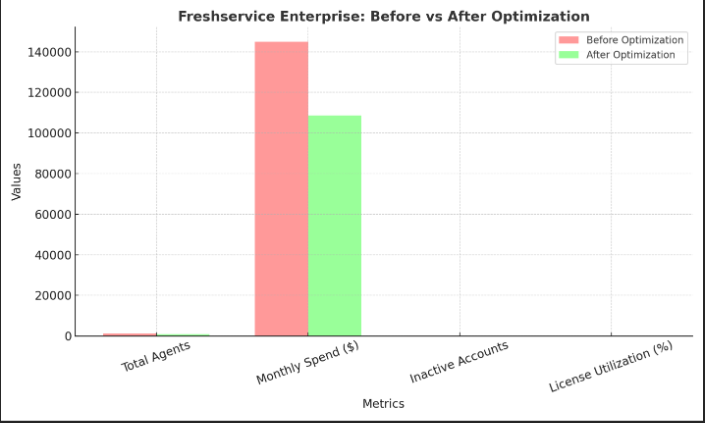
Improvement Summary: 25 percent license reduction, 30 percent cost savings, 100 percent inactive accounts reclaimed, and a 23-point utilization increase.
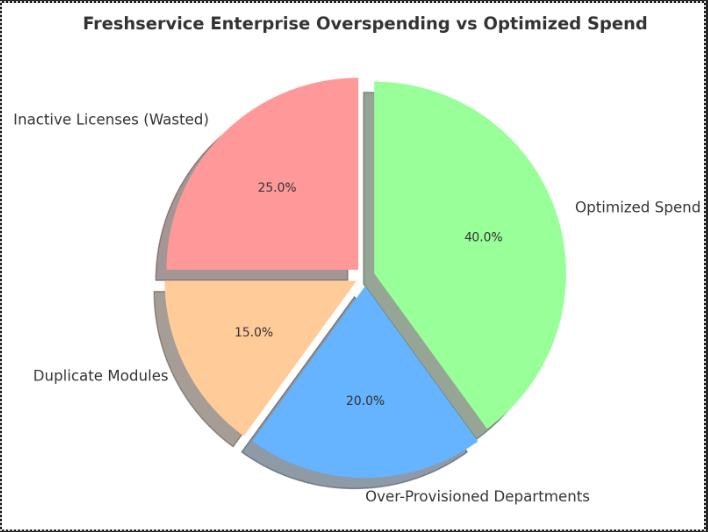
Interpretation: Inactive Licenses (25 percent), Duplicate Modules (15 percent), Over-Provisioned Departments (20 percent), Optimized Spend (40 percent).
After optimization, the enterprise achieved sustainable savings of $36,000 per month, or $432,000 annually, while improving service delivery consistency across IT, HR, and Facilities.
CloudNuro identifies waste across modules, automations, and users in real time, automatically reclaiming idle seats and simplifying Freshservice governance.
Get your personalized pricing audit and optimize your Freshservice bills now.
If your audit reveals overspending, prioritize the following corrective actions.
Corrective Tip:
CloudNuro executes many of these actions automatically and updates your dashboard to reflect new savings in real time.
Get your personalized pricing audit and optimize your Freshservice bills now.
The following tools are common alternatives or complements to Freshservice in the ITSM landscape.
| Tool | Core Focus | Pricing (per user/month) | Key Strength | Ideal For |
|---|---|---|---|---|
| ServiceNow | Enterprise ITSM and workflow automation | Contact sales | Deep customization and scalability | Large global enterprises |
| Jira Service Management | ITSM integrated with DevOps | $47–$97 | Developer-friendly with strong automation | Tech-centric organizations |
| ManageEngine ServiceDesk Plus | Comprehensive IT helpdesk | $10–$25 | Strong on-premise and hybrid support | Mid-size enterprises |
| BMC Helix | AI-driven ITSM platform | Contact sales | Cognitive automation and security focus | Regulated industries and large IT teams |
CloudNuro integrates with all primary ITSM tools, helping organizations track licenses and spend across hybrid environments.
Get your personalized pricing audit and optimize your Freshservice bills now.
1. What causes most Freshservice overspending?
Inactive agents, unmonitored modules, and redundant workflows are the top contributors to overspend.
2. How often should we review Freshservice licenses?
Quarterly audits help keep licenses and modules aligned with real usage.
3. Can CloudNuro detect overspending automatically?
Yes, CloudNuro integrates with Freshservice APIs to continuously analyze user, module, and billing data.
4. What savings can enterprises expect?
Many organizations recover 20–35 percent of their annual Freshservice spend within the first 90 days.
5. Does CloudNuro support Freshservice chargeback?
Yes, CloudNuro offers automated chargeback and showback reporting for department-level accountability.
Overspending in Freshservice is rarely intentional; it is usually the natural outcome of platform growth without sufficient governance and visibility.
Organizations pay for unused modules, over-licensed agents, redundant workflows, and fragmented contracts that collectively inflate ITSM costs.
A structured audit, supported by detailed utilization analytics, can reduce spend significantly while maintaining or improving service quality.
CloudNuro helps enterprises turn Freshservice cost management into a strategic advantage.
With automated license auditing, proactive overspend detection, chargeback automation, and renewal analytics, it keeps your ITSM environment efficient, compliant, and cost-optimized.
Start your Freshservice optimization journey today. Request a 15-minute demo at CloudNuro and see how quickly you can reduce Freshservice costs and optimize your ITSM bills.
Get your personalized pricing audit and optimize your Freshservice bills now.
Request a no cost, no obligation free assessment —just 15 minutes to savings!
Get StartedFreshservice is known for its flexibility, depth of automation, and intuitive ITSM capabilities, but this same flexibility often leads to hidden inefficiencies that quietly inflate monthly bills.
Enterprises commonly underestimate how licensing tiers, add-on modules, and agent-level mismanagement can drive unexpected cost escalations.
Overspending on Freshservice rarely looks obvious and typically accumulates through unmonitored modules, inactive agents, duplicated workflows, and decentralized billing structures.
As a result, what begins as a modest subscription can quickly scale into a six-figure annual cost.
Common yet subtle signs of overspending include:
Overspending Insight Tip:
CloudNuro automatically detects overspending patterns by correlating Freshservice license, user, and module data, helping enterprises recover wasted spend before renewal cycles.
Recognized by Gartner and Info-Tech, CloudNuro is a FinOps-ready SaaS Management Platform that delivers pricing clarity and cost-saving strategies in one unified view.
Get your personalized pricing audit and optimize your Freshservice bills now.
The following checklist helps executives and IT managers assess whether their organization is overpaying for Freshservice.
If three or more answers are “Yes,” a detailed audit is highly recommended.
Executive Tip:
For CIOs and CFOs, always request a department-wise breakdown of Freshservice spending, as fragmented billing is often the first sign of overspending.
CloudNuro’s automated self-assessment dashboard instantly scores your Freshservice efficiency, revealing dormant users, unused modules, and redundant spend categories.
Get your personalized pricing audit and optimize your Freshservice bills now.
Performing a structured audit is the best way to uncover where your Freshservice budget is being wasted.
Export invoices from the last 12 months and consolidate all subscriptions under a single record.
Identify regional or departmental duplicates across contracts and billing accounts.
In the Freshservice Admin dashboard, pull a list of agents with their last login timestamps.
Deactivate or downgrade agents who have been inactive for 60 days or more.
Match all paid users with HR and identity provider records to identify former employees and contractors.
Remove or downgrade any accounts that no longer align with active employment or role requirements.
Use Analytics → Module Reports to identify modules and features with utilization below 50 percent.
Disable or downgrade unused or lightly used modules to reduce recurring costs.
Review automations to find redundant or overlapping rules that inflate workflow run counts.
Consolidate or streamline these rules to control backend resource usage and associated costs.
Ensure that a single central team, such as IT Procurement or Finance, manages all Freshservice renewals.
This centralization improves visibility, negotiation leverage, and governance.
CloudNuro automates these audit steps and provides real-time license and usage analytics for every Freshservice department, helping you visualize waste instantly.
These signals often reveal unseen inefficiencies in enterprise Freshservice deployments.
1. Declining License Utilization: Utilization below 80 percent suggests that paid seats exceed actual activity.
2. Module Redundancy: Multiple departments using identical Freshservice modules or duplicate third-party apps.
3. Automation Overruns: Increased backend API or workflow executions that indicate inefficient or duplicated processes.
4. Inactive Agents: Employees who left or changed roles but still retain agent seats.
5. Cost Spikes After Renewal: Sharp month-to-month increases in cost despite stable ticket and usage volume.
Insight Tip:
Review your Freshservice license report monthly; even small increases in unused seats can compound into tens of thousands of dollars annually.
CloudNuro continuously monitors Freshservice spending and sends alerts when your utilization ratio drops below target thresholds.
Get your personalized pricing audit and optimize your Freshservice bills now.
A global organization with 1,200 Freshservice agents across IT, HR, Facilities, and Finance discovered that monthly spend had reached $145,000, spread across multiple regional contracts.
Departments independently activated modules and automation without centralized oversight, creating significant hidden waste.
| Department | Agents | Active Modules | Utilization | Key Issue |
|---|---|---|---|---|
| IT | 650 | ITSM + ITOM + Asset | 82% | Redundant automation and idle Power-Ups |
| HR | 200 | ITSM + Project | 63% | Agents performing requester tasks |
| Facilities | 180 | ITSM + Asset | 58% | Multiple unused agent seats |
| Finance | 170 | ITSM only | 69% | Overlapping add-ons and duplicate billing |
| Metric | Before Optimization | After Optimization | Improvement |
|---|---|---|---|
| Total Agents | 1,200 | 930 | 25% license reduction |
| Monthly Spend | $145,000 | $108,750 | 30% cost savings |
| Inactive Accounts | 270 | 0 | 100% reclaimed |
| License Utilization | 72% | 95% | +23-point increase |
Improvement Summary: 25 percent license reduction, 30 percent cost savings, 100 percent inactive accounts reclaimed, and a 23-point utilization increase.
Interpretation: Inactive Licenses (25 percent), Duplicate Modules (15 percent), Over-Provisioned Departments (20 percent), Optimized Spend (40 percent).
After optimization, the enterprise achieved sustainable savings of $36,000 per month, or $432,000 annually, while improving service delivery consistency across IT, HR, and Facilities.
CloudNuro identifies waste across modules, automations, and users in real time, automatically reclaiming idle seats and simplifying Freshservice governance.
Get your personalized pricing audit and optimize your Freshservice bills now.
If your audit reveals overspending, prioritize the following corrective actions.
Corrective Tip:
CloudNuro executes many of these actions automatically and updates your dashboard to reflect new savings in real time.
Get your personalized pricing audit and optimize your Freshservice bills now.
The following tools are common alternatives or complements to Freshservice in the ITSM landscape.
| Tool | Core Focus | Pricing (per user/month) | Key Strength | Ideal For |
|---|---|---|---|---|
| ServiceNow | Enterprise ITSM and workflow automation | Contact sales | Deep customization and scalability | Large global enterprises |
| Jira Service Management | ITSM integrated with DevOps | $47–$97 | Developer-friendly with strong automation | Tech-centric organizations |
| ManageEngine ServiceDesk Plus | Comprehensive IT helpdesk | $10–$25 | Strong on-premise and hybrid support | Mid-size enterprises |
| BMC Helix | AI-driven ITSM platform | Contact sales | Cognitive automation and security focus | Regulated industries and large IT teams |
CloudNuro integrates with all primary ITSM tools, helping organizations track licenses and spend across hybrid environments.
Get your personalized pricing audit and optimize your Freshservice bills now.
1. What causes most Freshservice overspending?
Inactive agents, unmonitored modules, and redundant workflows are the top contributors to overspend.
2. How often should we review Freshservice licenses?
Quarterly audits help keep licenses and modules aligned with real usage.
3. Can CloudNuro detect overspending automatically?
Yes, CloudNuro integrates with Freshservice APIs to continuously analyze user, module, and billing data.
4. What savings can enterprises expect?
Many organizations recover 20–35 percent of their annual Freshservice spend within the first 90 days.
5. Does CloudNuro support Freshservice chargeback?
Yes, CloudNuro offers automated chargeback and showback reporting for department-level accountability.
Overspending in Freshservice is rarely intentional; it is usually the natural outcome of platform growth without sufficient governance and visibility.
Organizations pay for unused modules, over-licensed agents, redundant workflows, and fragmented contracts that collectively inflate ITSM costs.
A structured audit, supported by detailed utilization analytics, can reduce spend significantly while maintaining or improving service quality.
CloudNuro helps enterprises turn Freshservice cost management into a strategic advantage.
With automated license auditing, proactive overspend detection, chargeback automation, and renewal analytics, it keeps your ITSM environment efficient, compliant, and cost-optimized.
Start your Freshservice optimization journey today. Request a 15-minute demo at CloudNuro and see how quickly you can reduce Freshservice costs and optimize your ITSM bills.
Get your personalized pricing audit and optimize your Freshservice bills now.
Request a no cost, no obligation free assessment - just 15 minutes to savings!
Get StartedWe're offering complimentary ServiceNow license assessments to only 25 enterprises this quarter who want to unlock immediate savings without disrupting operations.
Get Free AssessmentGet Started




CloudNuro Corp
1755 Park St. Suite 207
Naperville, IL 60563
Phone : +1-630-277-9470
Email: info@cloudnuro.com





.webp)

Recognized Leader in SaaS Management Platforms by Info-Tech SoftwareReviews





.svg)