

Sign Up
Thank you for Submitting!
Slack has become an indispensable collaboration tool across enterprises, but its flexible pricing model and distributed administration often create silent cost leaks. Overspending on Slack rarely happens overnight; it builds gradually through small inefficiencies that go unnoticed in daily operations.
The problem? Most IT and finance teams assume Slack billing is “self-adjusting” because it’s usage-based. In reality, license creep, inactive users, redundant workspaces, and unmonitored add-ons quietly inflate bills.
Here are subtle signs you may be overpaying without realizing it:
If these sound familiar, your organization is likely among the 72% of enterprises that overpay for SaaS collaboration tools every year due to a lack of license visibility.
Slack’s decentralized nature means each workspace owner can add users, apps, and guests without central oversight. Billing data often sits with one team while usage data sits with another, creating a visibility gap. IT leaders rarely see the entire cost picture until the renewal invoice arrives.
Spend Efficiency Check: If you can’t answer “How many active users do we have on Slack this month?” within 60 seconds, you’re flying blind on cost governance.
Discover Hidden Slack Inefficiencies Before Your Next Renewal
CloudNuro surfaces inactive users, duplicate licenses, and underutilized features across all Slack workspaces in one unified dashboard.
👉 Run your free Slack Overspend Discovery Assessment today.
The fastest way to uncover overspending is through self-assessment. The following checklist helps you gauge how efficiently your Slack environment is managed. Answer each with Yes or No:
| # | Self-Assessment Question | Yes/No |
|---|---|---|
| 1 | Do you have visibility into how many users logged in within the last 30 days? | |
| 2 | Do separate departments manage any duplicate workspaces? | |
| 3 | Do you regularly deactivate user accounts after employees are offboarded? | |
| 4 | Are guest and vendor accounts automatically expired after project completion? | |
| 5 | Do you review Slack billing reports monthly? | |
| 6 | Are there active licenses for users who have left or changed departments? | |
| 7 | Do you know which teams use advanced Business+ or Enterprise Grid features? | |
| 8 | Do you track usage of paid add-ons like Slack Atlas or Workflow Builder Premium? | |
| 9 | Do you validate true-up and true-down adjustments before renewal? | |
| 10 | Is Slack cost data integrated into your FinOps or SaaS management tool? |
Scoring:
Pro Tip: Run this checklist before every renewal cycle. It takes less than 10 minutes and reveals the most common inefficiencies instantly.
See Your Slack Overspend Score Instantly
CloudNuro’s Slack Overspend Analyzer runs a 15-minute automated check across all your workspaces, flagging dormant accounts, redundant licenses, and hidden add-ons.
👉 Book your free Slack Spend Efficiency Audit.
If your self-assessment revealed inefficiencies, the next step is a detailed audit. Slack’s billing and analytics tools provide most of the data you need; it just requires structure and consistency.
Objective: Identify reclaimable licenses (often 10–15% of total).
Objective: Prevent duplicate billing for the same users.
Objective: Eliminate redundant subscriptions consuming 5–10% of your bill.
Eliminate Manual Slack Audits Forever
CloudNuro integrates directly with Slack’s APIs to automate every step, from activity tracking to renewal readiness.
👉 Automate your Slack Spend Audit with CloudNuro.
Recognizing overspending is about spotting data patterns that don’t align with usage. These indicators often hide in plain sight:
| Indicator | Where to Find It | What It Means |
|---|---|---|
| Active Seat Count is higher than Logged-In Users | Billing Report | Paying for unused licenses |
| High Guest-to-User Ratio (>15%) | Member Report | Vendor access not revoked |
| Many “Never Logged In” accounts | Analytics → Members | Provisioned but never used |
| Add-on Costs >10% of License Cost | Billing Summary | Redundant or unused integrations |
| Frequent “Seat Adjustment” Notes | Billing Portal | Reactive license adds without true-downs |
| Multiple Department Workspaces | Workspace List | Duplicated costs and fractured governance |
Spend Efficiency Check: If more than two of these appear in your monthly review, you are likely overspending by 15–25%.
Detect Overspending Before It Hits the Invoice
CloudNuro’s Slack Spend Anomaly Detector automatically identifies deviations between active seats and actual users, preventing cost leaks.
👉 Start your free Slack Overspending Scan now.
A 1,200-employee startup discovered that 290 users had not logged in for over 90 days.
Problem: $36,000 annual waste in inactive accounts.
Correction: Implemented CloudNuro’s automated user deactivation and quarterly license review, reducing waste to less than 3%.
The compliance team retained paid Business+ accounts for vendors long after audits closed.
Problem: Guest accounts consumed 8% of total seats.
Correction: Introduced guest expiry automation through CloudNuro, saving $28,000 per year.
Problem Statement: A U.S.-based financial services company with 2,400 Slack users saw its collaboration budget increase 30% year over year despite stable headcount.
Observation: Slack usage data showed 460 dormant users and 180 multi-channel guests still active. Three departments maintained independent workspaces, causing duplication.
CloudNuro’s Strategic Audit Approach:
Saving Opportunity: Identified 25% of paid users as inactive or redundant.
Optimization:
Result: Slack monthly spends reduced from $39,500 to $29,100 within 60 days, a 26% cost reduction.
View Slack overspend recovery chart
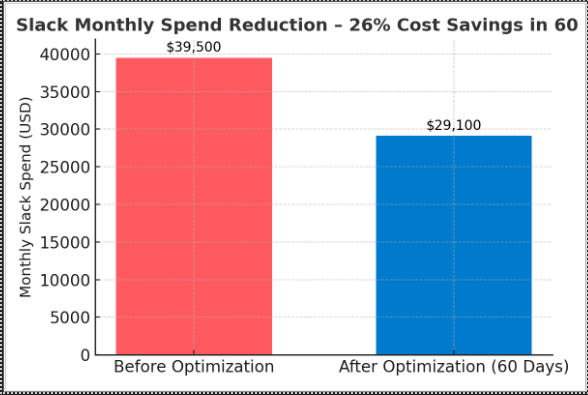
Conclusion: CloudNuro’s real-time visibility and automated chargeback governance transformed a fragmented environment into a sustainable, optimized collaboration model.
Book Your Slack Spend Discovery Audit
Join enterprises saving 20–30% on Slack by uncovering hidden inefficiencies through CloudNuro’s real-time cost visibility platform.
👉 Request a Free Assessment Today.
Here are simple, actionable steps you can apply today to reduce Slack costs and optimize Slack bills:
| # | Corrective Action | Description | Expected Savings |
|---|---|---|---|
| 1 | Deactivate Dormant Users | Disable users who are inactive for 60+ days. | 10–15% |
| 2 | Consolidate Workspaces | Merge departmental workspaces into Enterprise Grid. | 15–25% |
| 3 | Expire Guest Accounts | Set auto-expiry for vendor or external accounts. | 5–10% |
| 4 | Audit Add-Ons | Remove redundant integrations or premium extensions. | 5–8% |
| 5 | Review License Tiers | Downgrade where advanced features are unused. | 8–12% |
| 6 | Adopt Chargeback Reporting | Assign spend accountability to departments. | 10% |
| 7 | Run Quarterly Audits | Review user activity and invoices quarterly. | 5% |
Performing just the top three steps typically yields 20–30% savings in the first quarter.
Automate Slack Overspend Prevention with CloudNuro
CloudNuro continuously monitors user activity, add-ons, and billing data to reclaim wasted spend automatically.
👉 Try CloudNuro’s Slack Spend Guard today, free for enterprise evaluation.
Compare billed seats vs. active users in your analytics dashboard. A 10%+ mismatch means overspending.
Slack doesn’t refund unused seats mid-term, but you can true-down at renewal. CloudNuro tracks these opportunities automatically.
Inactive users and guest account sprawl are the biggest drivers of hidden Slack costs.
Monthly audits are ideal, but automation via CloudNuro makes this continuous.
Yes. CloudNuro connects Slack data with broader SaaS cost governance and chargeback workflows for unified visibility.
Slack overspending isn’t a result of carelessness; it’s a symptom of fragmented visibility. The fastest path to savings is a repeatable audit process backed by automation.
| Action | Frequency | Impact | Tool |
|---|---|---|---|
| Audit Active Users | Monthly | High | Slack Analytics / CloudNuro |
| Review Guests & Vendors | Monthly | Medium | Slack Admin Console |
| Consolidate Workspaces | Annual | High | Enterprise Grid |
| Rationalize Add-Ons | Bi-Annual | Medium | CloudNuro Reports |
| Run Renewal Readiness Audit | Pre-Renewal | High | CloudNuro |
Final Tip: Treat Slack like any other financial asset, track its utilization, measure ROI, and hold departments accountable for waste.
CloudNuro is a leader in Enterprise SaaS Management Platforms, giving enterprises unmatched visibility, governance, and cost optimization. Recognized twice in a row by Gartner in the SaaS Management Platforms Magic Quadrant and named a Leader in the Info-Tech SoftwareReviews Data Quadrant, CloudNuro is trusted by global enterprises and government agencies to bring financial discipline to SaaS and cloud.
Trusted by enterprises such as Konica Minolta and Federal Signal, the solution provides centralized SaaS inventory, license optimization, and renewal management, along with advanced cost allocation and chargeback, giving IT and Finance leaders the visibility, control, and cost-conscious culture needed to drive financial discipline.
As the only FinOps-certified Enterprise SaaS Management Platform, CloudNuro unifies SaaS and IaaS management in a single view. With a 15-minute setup and measurable results in under 24 hours, CloudNuro gives IT teams a fast path to value.
CloudNuro automatically identifies overspending, flags inactive users, and implements corrective actions before renewal deadlines.
Our platform delivers instant visibility, real-time spend alerts, and automated optimization across every Slack workspace.
Reduce Slack costs. Optimize Slack bills. Improve spend efficiency, all in one place.
👉 Schedule your free Slack Overspending Assessment with CloudNuro today.
Request a no cost, no obligation free assessment —just 15 minutes to savings!
Get StartedSlack has become an indispensable collaboration tool across enterprises, but its flexible pricing model and distributed administration often create silent cost leaks. Overspending on Slack rarely happens overnight; it builds gradually through small inefficiencies that go unnoticed in daily operations.
The problem? Most IT and finance teams assume Slack billing is “self-adjusting” because it’s usage-based. In reality, license creep, inactive users, redundant workspaces, and unmonitored add-ons quietly inflate bills.
Here are subtle signs you may be overpaying without realizing it:
If these sound familiar, your organization is likely among the 72% of enterprises that overpay for SaaS collaboration tools every year due to a lack of license visibility.
Slack’s decentralized nature means each workspace owner can add users, apps, and guests without central oversight. Billing data often sits with one team while usage data sits with another, creating a visibility gap. IT leaders rarely see the entire cost picture until the renewal invoice arrives.
Spend Efficiency Check: If you can’t answer “How many active users do we have on Slack this month?” within 60 seconds, you’re flying blind on cost governance.
Discover Hidden Slack Inefficiencies Before Your Next Renewal
CloudNuro surfaces inactive users, duplicate licenses, and underutilized features across all Slack workspaces in one unified dashboard.
👉 Run your free Slack Overspend Discovery Assessment today.
The fastest way to uncover overspending is through self-assessment. The following checklist helps you gauge how efficiently your Slack environment is managed. Answer each with Yes or No:
| # | Self-Assessment Question | Yes/No |
|---|---|---|
| 1 | Do you have visibility into how many users logged in within the last 30 days? | |
| 2 | Do separate departments manage any duplicate workspaces? | |
| 3 | Do you regularly deactivate user accounts after employees are offboarded? | |
| 4 | Are guest and vendor accounts automatically expired after project completion? | |
| 5 | Do you review Slack billing reports monthly? | |
| 6 | Are there active licenses for users who have left or changed departments? | |
| 7 | Do you know which teams use advanced Business+ or Enterprise Grid features? | |
| 8 | Do you track usage of paid add-ons like Slack Atlas or Workflow Builder Premium? | |
| 9 | Do you validate true-up and true-down adjustments before renewal? | |
| 10 | Is Slack cost data integrated into your FinOps or SaaS management tool? |
Scoring:
Pro Tip: Run this checklist before every renewal cycle. It takes less than 10 minutes and reveals the most common inefficiencies instantly.
See Your Slack Overspend Score Instantly
CloudNuro’s Slack Overspend Analyzer runs a 15-minute automated check across all your workspaces, flagging dormant accounts, redundant licenses, and hidden add-ons.
👉 Book your free Slack Spend Efficiency Audit.
If your self-assessment revealed inefficiencies, the next step is a detailed audit. Slack’s billing and analytics tools provide most of the data you need; it just requires structure and consistency.
Objective: Identify reclaimable licenses (often 10–15% of total).
Objective: Prevent duplicate billing for the same users.
Objective: Eliminate redundant subscriptions consuming 5–10% of your bill.
Eliminate Manual Slack Audits Forever
CloudNuro integrates directly with Slack’s APIs to automate every step, from activity tracking to renewal readiness.
👉 Automate your Slack Spend Audit with CloudNuro.
Recognizing overspending is about spotting data patterns that don’t align with usage. These indicators often hide in plain sight:
| Indicator | Where to Find It | What It Means |
|---|---|---|
| Active Seat Count is higher than Logged-In Users | Billing Report | Paying for unused licenses |
| High Guest-to-User Ratio (>15%) | Member Report | Vendor access not revoked |
| Many “Never Logged In” accounts | Analytics → Members | Provisioned but never used |
| Add-on Costs >10% of License Cost | Billing Summary | Redundant or unused integrations |
| Frequent “Seat Adjustment” Notes | Billing Portal | Reactive license adds without true-downs |
| Multiple Department Workspaces | Workspace List | Duplicated costs and fractured governance |
Spend Efficiency Check: If more than two of these appear in your monthly review, you are likely overspending by 15–25%.
Detect Overspending Before It Hits the Invoice
CloudNuro’s Slack Spend Anomaly Detector automatically identifies deviations between active seats and actual users, preventing cost leaks.
👉 Start your free Slack Overspending Scan now.
A 1,200-employee startup discovered that 290 users had not logged in for over 90 days.
Problem: $36,000 annual waste in inactive accounts.
Correction: Implemented CloudNuro’s automated user deactivation and quarterly license review, reducing waste to less than 3%.
The compliance team retained paid Business+ accounts for vendors long after audits closed.
Problem: Guest accounts consumed 8% of total seats.
Correction: Introduced guest expiry automation through CloudNuro, saving $28,000 per year.
Problem Statement: A U.S.-based financial services company with 2,400 Slack users saw its collaboration budget increase 30% year over year despite stable headcount.
Observation: Slack usage data showed 460 dormant users and 180 multi-channel guests still active. Three departments maintained independent workspaces, causing duplication.
CloudNuro’s Strategic Audit Approach:
Saving Opportunity: Identified 25% of paid users as inactive or redundant.
Optimization:
Result: Slack monthly spends reduced from $39,500 to $29,100 within 60 days, a 26% cost reduction.
View Slack overspend recovery chart
Conclusion: CloudNuro’s real-time visibility and automated chargeback governance transformed a fragmented environment into a sustainable, optimized collaboration model.
Book Your Slack Spend Discovery Audit
Join enterprises saving 20–30% on Slack by uncovering hidden inefficiencies through CloudNuro’s real-time cost visibility platform.
👉 Request a Free Assessment Today.
Here are simple, actionable steps you can apply today to reduce Slack costs and optimize Slack bills:
| # | Corrective Action | Description | Expected Savings |
|---|---|---|---|
| 1 | Deactivate Dormant Users | Disable users who are inactive for 60+ days. | 10–15% |
| 2 | Consolidate Workspaces | Merge departmental workspaces into Enterprise Grid. | 15–25% |
| 3 | Expire Guest Accounts | Set auto-expiry for vendor or external accounts. | 5–10% |
| 4 | Audit Add-Ons | Remove redundant integrations or premium extensions. | 5–8% |
| 5 | Review License Tiers | Downgrade where advanced features are unused. | 8–12% |
| 6 | Adopt Chargeback Reporting | Assign spend accountability to departments. | 10% |
| 7 | Run Quarterly Audits | Review user activity and invoices quarterly. | 5% |
Performing just the top three steps typically yields 20–30% savings in the first quarter.
Automate Slack Overspend Prevention with CloudNuro
CloudNuro continuously monitors user activity, add-ons, and billing data to reclaim wasted spend automatically.
👉 Try CloudNuro’s Slack Spend Guard today, free for enterprise evaluation.
Compare billed seats vs. active users in your analytics dashboard. A 10%+ mismatch means overspending.
Slack doesn’t refund unused seats mid-term, but you can true-down at renewal. CloudNuro tracks these opportunities automatically.
Inactive users and guest account sprawl are the biggest drivers of hidden Slack costs.
Monthly audits are ideal, but automation via CloudNuro makes this continuous.
Yes. CloudNuro connects Slack data with broader SaaS cost governance and chargeback workflows for unified visibility.
Slack overspending isn’t a result of carelessness; it’s a symptom of fragmented visibility. The fastest path to savings is a repeatable audit process backed by automation.
| Action | Frequency | Impact | Tool |
|---|---|---|---|
| Audit Active Users | Monthly | High | Slack Analytics / CloudNuro |
| Review Guests & Vendors | Monthly | Medium | Slack Admin Console |
| Consolidate Workspaces | Annual | High | Enterprise Grid |
| Rationalize Add-Ons | Bi-Annual | Medium | CloudNuro Reports |
| Run Renewal Readiness Audit | Pre-Renewal | High | CloudNuro |
Final Tip: Treat Slack like any other financial asset, track its utilization, measure ROI, and hold departments accountable for waste.
CloudNuro is a leader in Enterprise SaaS Management Platforms, giving enterprises unmatched visibility, governance, and cost optimization. Recognized twice in a row by Gartner in the SaaS Management Platforms Magic Quadrant and named a Leader in the Info-Tech SoftwareReviews Data Quadrant, CloudNuro is trusted by global enterprises and government agencies to bring financial discipline to SaaS and cloud.
Trusted by enterprises such as Konica Minolta and Federal Signal, the solution provides centralized SaaS inventory, license optimization, and renewal management, along with advanced cost allocation and chargeback, giving IT and Finance leaders the visibility, control, and cost-conscious culture needed to drive financial discipline.
As the only FinOps-certified Enterprise SaaS Management Platform, CloudNuro unifies SaaS and IaaS management in a single view. With a 15-minute setup and measurable results in under 24 hours, CloudNuro gives IT teams a fast path to value.
CloudNuro automatically identifies overspending, flags inactive users, and implements corrective actions before renewal deadlines.
Our platform delivers instant visibility, real-time spend alerts, and automated optimization across every Slack workspace.
Reduce Slack costs. Optimize Slack bills. Improve spend efficiency, all in one place.
👉 Schedule your free Slack Overspending Assessment with CloudNuro today.
Request a no cost, no obligation free assessment - just 15 minutes to savings!
Get StartedWe're offering complimentary ServiceNow license assessments to only 25 enterprises this quarter who want to unlock immediate savings without disrupting operations.
Get Free AssessmentGet Started




CloudNuro Corp
1755 Park St. Suite 207
Naperville, IL 60563
Phone : +1-630-277-9470
Email: info@cloudnuro.com





.webp)

Recognized Leader in SaaS Management Platforms by Info-Tech SoftwareReviews


.png)

.svg)