

Sign Up
Thank you for Submitting!

Smartsheet has become one of the most widely adopted enterprise platforms for collaborative work management, project delivery, PMO standardization, portfolio governance, resource planning, and automation.
As deployments grow and organizations expand usage across departments, overspending becomes almost inevitable because costs hide across multiple dimensions, including user roles, sheet ownership, workspace sprawl, automation triggers, Premier add-on usage, Advance bundles, and integration behavior.
Overspending affects both organizations still on the legacy Smartsheet plans (Pro, Individual, Business, Enterprise, Premier Apps) and those using the newer 2024/2025 Standard–Business–Enterprise plus Advance bundle model.
In hybrid environments, which are the most common in large enterprises, overspending can compound even further due to overlapping entitlements and inconsistent governance.
Many organizations do not realize they are overpaying until renewal discrepancies are exposed, but the signs are visible much earlier if you know what to look for.
With a 15-minute setup and measurable results in under 24 hours, CloudNuro gives IT teams a fast path to value. Request a demo with CloudNuro.
Industry benchmarks suggest that enterprise work management tools often experience 20–45 percent overspend due to unmonitored adoption, governance drift, and unnecessary tier upgrades, and reviews from platforms like G2 and Capterra reinforce that many customers pay for Premier capabilities they barely use.
Understanding overspending indicators is the first step toward reversing them and building a sustainable Smartsheet cost strategy.
If your organization has not performed a Smartsheet audit across roles, sheets, automations, and Premier app usage in the last 60–90 days, overspending is almost guaranteed.
With a 15-minute setup and measurable results in under 24 hours, CloudNuro gives IT teams a fast path to value. Request a demo with CloudNuro.
This quick self-assessment serves as the baseline for any Smartsheet cost-reduction initiative.
With a 15-minute setup and measurable results in under 24 hours, CloudNuro gives IT teams a fast path to value. Request a demo with CloudNuro.
This checklist helps leaders quickly determine if overspending is likely in their Smartsheet environment, whether they are using the legacy model, the new model, or a hybrid of both.
If your answer is “No” or “Not sure” to more than three questions, you are almost certainly overpaying for Smartsheet.
With a 15-minute setup and measurable results in under 24 hours, CloudNuro gives IT teams a fast path to value. Request a demo with CloudNuro.
This section outlines a comprehensive, step-by-step audit workflow that CloudNuro uses with large enterprise clients to reduce Smartsheet overspending.
From the Smartsheet Admin Center, export a full inventory of users and entitlements.
This export becomes your entitlement baseline for subsequent analysis.
Next, extract detailed usage data to map activity against license tiers.
Comparing this data to license levels highlights mismatches between cost and actual usage.
Premier apps under the legacy model typically include:
Under the newer model, many of these capabilities fall under Smartsheet Advance A1, A2, or A3.
For each app, check:
Premier apps are often the largest single overspend category across CloudNuro customers.
Regardless of whether you are on legacy or new plans, automation behavior drives significant cost.
Review who has automation creation privileges, how many automations each user owns, which workflows are redundant, and which automations can be centralized.
Sheet sprawl is a massive cost driver in Smartsheet deployments.
Look for:
Under the new 2025 plans, stricter sheet governance means sheet sprawl can directly drive forced upgrades.
Typical enterprise findings from a Smartsheet audit include:
Addressing this category is usually the fastest savings win.
For each user, assign one of four labels:
Re-tier users accordingly to match license cost with true usage and responsibility.
A well-executed Smartsheet audit can reduce spend by 20–50 percent before renewal, especially in hybrid environments spanning old and new licensing models.
With a 15-minute setup and measurable results in under 24 hours, CloudNuro gives IT teams a fast path to value. Request a demo with CloudNuro.
The following overspending indicators apply broadly across both Smartsheet licensing structures.
High-tier licenses are often assigned to users whose activities do not justify the cost.
This is one of the most common and avoidable drivers of overspend.
Across CloudNuro customers, Premier App utilization is frequently far below entitlement levels.
Analyst reports confirm Premier App underutilization as a top Smartsheet overspend factor.
Redundant automations inflate several dimensions of Smartsheet cost and complexity.
Overconsumption in these areas often forces unexpected plan or tier upgrades.
Under the new licensing model, sheet ownership and cross-sheet relationships directly impact license requirements.
They influence required owner tiers, editor restrictions, blueprint mapping, and dashboard refresh cycles, all of which can compound spend when left unmanaged.
When companies mix old and new Smartsheet plans, complexity increases and hidden costs emerge.
The result is often unexpected upgrades and higher renewal costs.
The most expensive overspending occurs in organizations that do not centralize automation, governance, and blueprint ownership across the Smartsheet estate.
With a 15-minute setup and measurable results in under 24 hours, CloudNuro gives IT teams a fast path to value. Request a demo with CloudNuro.
A global engineering and construction company with 8,500 employees expanded Smartsheet across 14 departments, combining legacy and new licensing elements.
Over time, they accumulated a complex mix of entitlements and usage patterns.
A CloudNuro audit revealed substantial mismatches between license cost and actual usage.
Annual spend: USD 3.8 million.
CloudNuro performed a multi-dimensional optimization review tailored to this environment.
Based on the analysis, the organization implemented a series of targeted corrections.
These actions delivered substantial financial impact.
Annual savings: USD 1.42 million.
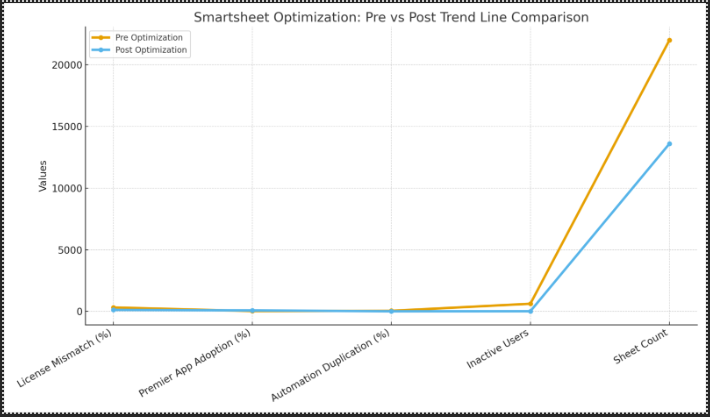
The grouped bar chart compares key metrics before and after optimization.
With a 15-minute setup and measurable results in under 24 hours, CloudNuro gives IT teams a fast path to value. Request a demo with CloudNuro.
The following are fast, high-impact steps you can take today to address Smartsheet overspending.
Identify and remove users who have not logged in or interacted meaningfully with Smartsheet in recent months.
This often yields 10–25 percent savings almost instantly.
Editors drive a significant portion of license costs under both legacy and new models.
Downgrading low-activity editors to lower tiers or viewer roles can dramatically reduce spend.
Avoid assigning apps like Control Center or Dynamic View broadly across entire departments.
Instead, reserve these entitlements for power users whose roles truly require them.
Centralizing automation ownership prevents workflow duplication and reduces the risk of unnecessary tier upgrades.
It also improves governance and troubleshooting.
Archive or retire old workspaces that no longer support active projects.
This reduces governance overhead and helps prevent tier escalation tied to sheet and workspace sprawl.
Under Advance A2 and A3, blueprint owners must be correctly licensed, so misaligned ownership can drive cost.
Reassign ownership where appropriate to align with actual usage and responsibility.
Introduce a chargeback mechanism so departments see and own their Smartsheet costs.
This transparency typically makes teams more conservative and thoughtful about license requests.
Organizations that implement even three of these corrective actions often reduce Smartsheet spend by 20–40 percent.
With a 15-minute setup and measurable results in under 24 hours, CloudNuro gives IT teams a fast path to value. Request a demo with CloudNuro.
Q: How do I know if I am overpaying for Smartsheet?
Perform a user-activity audit combined with a Premier App usage review to uncover mismatches between licenses and actual behavior.
Q: Do old Smartsheet plans cause overspending?
Yes, legacy plans can drive overspending when combined with limited governance, Premier add-ons, and unlimited or poorly managed automations.
Q: Does the new 2025 pricing improve cost visibility?
Partially, but automation behavior and advanced bundles can still inflate costs without active monitoring.
Q: Are Viewers free?
Viewers are generally free, but Editors and automation creators require paid licenses that must be managed carefully.
Q: How can CloudNuro help?
CloudNuro maps every license to actual usage, detects waste, and automates governance recommendations to rightsize your Smartsheet footprint.
Overspending in Smartsheet is rarely intentional; it is the natural outcome of platform growth without adequate governance and visibility.
Companies pay for unused Premier Apps, buy Advance bundles they do not need, upgrade due to automation sprawl, grant too many editor rights, and allow workspaces and sheets to expand without control.
A structured audit across both legacy and new pricing models can reduce spend by 20–50 percent, supported by benchmarks from industry analysts and real-world enterprise experiences.
Use this checklist quarterly to maintain cost control and eliminate hidden Smartsheet waste over time.
With a 15-minute setup and measurable results in under 24 hours, CloudNuro gives IT teams a fast path to value. Request a demo with CloudNuro.
CloudNuro is a leader in Enterprise SaaS Management Platforms, giving enterprises unmatched visibility, governance, and cost optimization across SaaS ecosystems.
Recognized in the SaaS Management Platforms Magic Quadrant and named a Leader in independent data quadrants, CloudNuro is trusted by global enterprises and government agencies to bring financial discipline to SaaS and cloud.
Trusted by enterprises such as Konica Minolta and Federal Signal, CloudNuro provides centralized SaaS inventory, license optimization, and renewal management along with advanced cost allocation and chargeback.
This gives IT and Finance leaders the visibility, control, and cost-conscious culture needed to drive financial discipline at scale.
As a FinOps-ready Enterprise SaaS Management Platform, CloudNuro unifies SaaS and IaaS management into a single, unified view.
CloudNuro identifies overspending, automates Smartsheet audits, detects Premier App underutilization, highlights license drift, flags governance gaps, and provides optimization recommendations to ensure your organization never pays for what it does not use.
With a 15-minute setup and measurable results in under 24 hours, CloudNuro gives IT teams a fast path to value. Request a demo with CloudNuro.
Request a no cost, no obligation free assessment —just 15 minutes to savings!
Get StartedSmartsheet has become one of the most widely adopted enterprise platforms for collaborative work management, project delivery, PMO standardization, portfolio governance, resource planning, and automation.
As deployments grow and organizations expand usage across departments, overspending becomes almost inevitable because costs hide across multiple dimensions, including user roles, sheet ownership, workspace sprawl, automation triggers, Premier add-on usage, Advance bundles, and integration behavior.
Overspending affects both organizations still on the legacy Smartsheet plans (Pro, Individual, Business, Enterprise, Premier Apps) and those using the newer 2024/2025 Standard–Business–Enterprise plus Advance bundle model.
In hybrid environments, which are the most common in large enterprises, overspending can compound even further due to overlapping entitlements and inconsistent governance.
Many organizations do not realize they are overpaying until renewal discrepancies are exposed, but the signs are visible much earlier if you know what to look for.
With a 15-minute setup and measurable results in under 24 hours, CloudNuro gives IT teams a fast path to value. Request a demo with CloudNuro.
Industry benchmarks suggest that enterprise work management tools often experience 20–45 percent overspend due to unmonitored adoption, governance drift, and unnecessary tier upgrades, and reviews from platforms like G2 and Capterra reinforce that many customers pay for Premier capabilities they barely use.
Understanding overspending indicators is the first step toward reversing them and building a sustainable Smartsheet cost strategy.
If your organization has not performed a Smartsheet audit across roles, sheets, automations, and Premier app usage in the last 60–90 days, overspending is almost guaranteed.
With a 15-minute setup and measurable results in under 24 hours, CloudNuro gives IT teams a fast path to value. Request a demo with CloudNuro.
This quick self-assessment serves as the baseline for any Smartsheet cost-reduction initiative.
With a 15-minute setup and measurable results in under 24 hours, CloudNuro gives IT teams a fast path to value. Request a demo with CloudNuro.
This checklist helps leaders quickly determine if overspending is likely in their Smartsheet environment, whether they are using the legacy model, the new model, or a hybrid of both.
If your answer is “No” or “Not sure” to more than three questions, you are almost certainly overpaying for Smartsheet.
With a 15-minute setup and measurable results in under 24 hours, CloudNuro gives IT teams a fast path to value. Request a demo with CloudNuro.
This section outlines a comprehensive, step-by-step audit workflow that CloudNuro uses with large enterprise clients to reduce Smartsheet overspending.
From the Smartsheet Admin Center, export a full inventory of users and entitlements.
This export becomes your entitlement baseline for subsequent analysis.
Next, extract detailed usage data to map activity against license tiers.
Comparing this data to license levels highlights mismatches between cost and actual usage.
Premier apps under the legacy model typically include:
Under the newer model, many of these capabilities fall under Smartsheet Advance A1, A2, or A3.
For each app, check:
Premier apps are often the largest single overspend category across CloudNuro customers.
Regardless of whether you are on legacy or new plans, automation behavior drives significant cost.
Review who has automation creation privileges, how many automations each user owns, which workflows are redundant, and which automations can be centralized.
Sheet sprawl is a massive cost driver in Smartsheet deployments.
Look for:
Under the new 2025 plans, stricter sheet governance means sheet sprawl can directly drive forced upgrades.
Typical enterprise findings from a Smartsheet audit include:
Addressing this category is usually the fastest savings win.
For each user, assign one of four labels:
Re-tier users accordingly to match license cost with true usage and responsibility.
A well-executed Smartsheet audit can reduce spend by 20–50 percent before renewal, especially in hybrid environments spanning old and new licensing models.
With a 15-minute setup and measurable results in under 24 hours, CloudNuro gives IT teams a fast path to value. Request a demo with CloudNuro.
The following overspending indicators apply broadly across both Smartsheet licensing structures.
High-tier licenses are often assigned to users whose activities do not justify the cost.
This is one of the most common and avoidable drivers of overspend.
Across CloudNuro customers, Premier App utilization is frequently far below entitlement levels.
Analyst reports confirm Premier App underutilization as a top Smartsheet overspend factor.
Redundant automations inflate several dimensions of Smartsheet cost and complexity.
Overconsumption in these areas often forces unexpected plan or tier upgrades.
Under the new licensing model, sheet ownership and cross-sheet relationships directly impact license requirements.
They influence required owner tiers, editor restrictions, blueprint mapping, and dashboard refresh cycles, all of which can compound spend when left unmanaged.
When companies mix old and new Smartsheet plans, complexity increases and hidden costs emerge.
The result is often unexpected upgrades and higher renewal costs.
The most expensive overspending occurs in organizations that do not centralize automation, governance, and blueprint ownership across the Smartsheet estate.
With a 15-minute setup and measurable results in under 24 hours, CloudNuro gives IT teams a fast path to value. Request a demo with CloudNuro.
A global engineering and construction company with 8,500 employees expanded Smartsheet across 14 departments, combining legacy and new licensing elements.
Over time, they accumulated a complex mix of entitlements and usage patterns.
A CloudNuro audit revealed substantial mismatches between license cost and actual usage.
Annual spend: USD 3.8 million.
CloudNuro performed a multi-dimensional optimization review tailored to this environment.
Based on the analysis, the organization implemented a series of targeted corrections.
These actions delivered substantial financial impact.
Annual savings: USD 1.42 million.
The grouped bar chart compares key metrics before and after optimization.
With a 15-minute setup and measurable results in under 24 hours, CloudNuro gives IT teams a fast path to value. Request a demo with CloudNuro.
The following are fast, high-impact steps you can take today to address Smartsheet overspending.
Identify and remove users who have not logged in or interacted meaningfully with Smartsheet in recent months.
This often yields 10–25 percent savings almost instantly.
Editors drive a significant portion of license costs under both legacy and new models.
Downgrading low-activity editors to lower tiers or viewer roles can dramatically reduce spend.
Avoid assigning apps like Control Center or Dynamic View broadly across entire departments.
Instead, reserve these entitlements for power users whose roles truly require them.
Centralizing automation ownership prevents workflow duplication and reduces the risk of unnecessary tier upgrades.
It also improves governance and troubleshooting.
Archive or retire old workspaces that no longer support active projects.
This reduces governance overhead and helps prevent tier escalation tied to sheet and workspace sprawl.
Under Advance A2 and A3, blueprint owners must be correctly licensed, so misaligned ownership can drive cost.
Reassign ownership where appropriate to align with actual usage and responsibility.
Introduce a chargeback mechanism so departments see and own their Smartsheet costs.
This transparency typically makes teams more conservative and thoughtful about license requests.
Organizations that implement even three of these corrective actions often reduce Smartsheet spend by 20–40 percent.
With a 15-minute setup and measurable results in under 24 hours, CloudNuro gives IT teams a fast path to value. Request a demo with CloudNuro.
Q: How do I know if I am overpaying for Smartsheet?
Perform a user-activity audit combined with a Premier App usage review to uncover mismatches between licenses and actual behavior.
Q: Do old Smartsheet plans cause overspending?
Yes, legacy plans can drive overspending when combined with limited governance, Premier add-ons, and unlimited or poorly managed automations.
Q: Does the new 2025 pricing improve cost visibility?
Partially, but automation behavior and advanced bundles can still inflate costs without active monitoring.
Q: Are Viewers free?
Viewers are generally free, but Editors and automation creators require paid licenses that must be managed carefully.
Q: How can CloudNuro help?
CloudNuro maps every license to actual usage, detects waste, and automates governance recommendations to rightsize your Smartsheet footprint.
Overspending in Smartsheet is rarely intentional; it is the natural outcome of platform growth without adequate governance and visibility.
Companies pay for unused Premier Apps, buy Advance bundles they do not need, upgrade due to automation sprawl, grant too many editor rights, and allow workspaces and sheets to expand without control.
A structured audit across both legacy and new pricing models can reduce spend by 20–50 percent, supported by benchmarks from industry analysts and real-world enterprise experiences.
Use this checklist quarterly to maintain cost control and eliminate hidden Smartsheet waste over time.
With a 15-minute setup and measurable results in under 24 hours, CloudNuro gives IT teams a fast path to value. Request a demo with CloudNuro.
CloudNuro is a leader in Enterprise SaaS Management Platforms, giving enterprises unmatched visibility, governance, and cost optimization across SaaS ecosystems.
Recognized in the SaaS Management Platforms Magic Quadrant and named a Leader in independent data quadrants, CloudNuro is trusted by global enterprises and government agencies to bring financial discipline to SaaS and cloud.
Trusted by enterprises such as Konica Minolta and Federal Signal, CloudNuro provides centralized SaaS inventory, license optimization, and renewal management along with advanced cost allocation and chargeback.
This gives IT and Finance leaders the visibility, control, and cost-conscious culture needed to drive financial discipline at scale.
As a FinOps-ready Enterprise SaaS Management Platform, CloudNuro unifies SaaS and IaaS management into a single, unified view.
CloudNuro identifies overspending, automates Smartsheet audits, detects Premier App underutilization, highlights license drift, flags governance gaps, and provides optimization recommendations to ensure your organization never pays for what it does not use.
With a 15-minute setup and measurable results in under 24 hours, CloudNuro gives IT teams a fast path to value. Request a demo with CloudNuro.
Request a no cost, no obligation free assessment - just 15 minutes to savings!
Get StartedWe're offering complimentary ServiceNow license assessments to only 25 enterprises this quarter who want to unlock immediate savings without disrupting operations.
Get Free AssessmentGet Started




CloudNuro Corp
1755 Park St. Suite 207
Naperville, IL 60563
Phone : +1-630-277-9470
Email: info@cloudnuro.com





.webp)

Recognized Leader in SaaS Management Platforms by Info-Tech SoftwareReviews



.svg)