

Sign Up
Thank you for Submitting!

Zendesk is a powerful customer experience platform, but as teams grow and new features roll out, what was once an affordable subscription can quickly evolve into an unchecked cost center. Overspending on Zendesk doesn’t always appear as a big jump on your invoice; it often hides in plain sight, buried within inactive licenses, redundant add-ons, or poorly timed renewals. :contentReference[oaicite:0]{index=0}
The most subtle signs of overspending are often missed because they appear to be part of operational normalcy. For instance, extra agent seats are added “just in case” of seasonal peaks, but they are never removed. Add-ons like Guide or Talk Partner Edition stay active long after the teams stop using them. Multi-department setups duplicate instances unnecessarily. These issues compound invisibly until the annual renewal lands with a 25–30% increase.
A G2 2025 SaaS Utilization Report found that nearly 37% of enterprises overpay for Zendesk because they lack visibility into license usage, department-level cost ownership, and renewal triggers. Finance teams see the total invoice, but IT admins rarely correlate it with daily utilization data. The gap between usage and billing becomes the blind spot that drains budgets.
CloudNuro continuously monitors Zendesk billing, utilization, and user activity to detect hidden overspending. Its AI-driven dashboards alert you to inactive accounts, redundant add-ons, and cost anomalies before they escalate.
If you suspect that your Zendesk costs are creeping upward, here’s a quick self-checklist you can use to determine whether your organization might be overpaying:
| Question | Why It Matters |
|---|---|
| Have any Zendesk users not logged in during the last 45 days? | Inactive users still consume paid seats. |
| Are multiple departments using separate Zendesk instances? | Fragmentation leads to missed volume discounts. |
| Do you have more “full agents” than required for your workload? | Oversized license tiers waste budget. |
| Are old add-ons like Talk or Guide still active? | Legacy add-ons often keep billing post-migration. |
| Do renewals occur automatically without data review? | You lose leverage to negotiate or reduce seats. |
| Do invoices fluctuate month-to-month? | Indicates untracked true-ups or mid-term additions. |
| Are you tracking cost-per-ticket or ROI per license? | Essential for benchmarking efficiency. |
If you answered “yes” to three or more of the above, it’s time to audit your Zendesk deployment.
For CTOs: Focus on integrating Zendesk license data with SSO or HR systems to automate deactivation.
For CFOs: Track Zendesk as a cost-per-ticket metric instead of a static contract line item.
For CIOs: Push for cross-departmental consolidation to reduce redundant billing.
CloudNuro provides unified spend and utilization dashboards for Zendesk, enabling IT and finance leaders to align license usage, chargeback, and optimization actions seamlessly.
A well-structured audit helps you systematically uncover hidden costs. Below is a step-by-step approach tailored for Zendesk administrators.
Navigate to Admin Center → Billing → Subscription and export the list of active agents.
Capture details such as license tier, department, and date of last login.
Match exported Zendesk users with your identity directory (Okta, Azure AD, or Google Workspace).
Flag users who’ve left the company or changed roles.
Visit Admin → Marketplace → My Apps to review which add-ons are active.
Deactivate those that have been unused for the last 90 days.
In Zendesk Explore, check each agent’s ticket activity for the last 30 days.
Mark users with zero or low engagement (<10 tickets/month).
Review recent invoices for unexplained increases.
Check for additional seats added mid-cycle (true-ups).
Calculate the cost-per-ticket by dividing monthly Zendesk spend by the number of resolved tickets.
Compare against benchmarks (~$3–$5 per ticket for optimized environments).
CloudNuro automates all these steps through its Zendesk Audit Engine, providing actionable insights like “unused license potential,” “redundant add-ons,” and “cost-per-ticket deviation.”
Identifying overspending early depends on knowing which Zendesk metrics and dashboards to monitor. Here are the top indicators:
| Overspending Indicator | Where to Find It in Zendesk | What It Reveals |
|---|---|---|
| Low Login Frequency | Explore → Agent Activity | Shows dormant licenses. |
| Rising Invoice Trend | Admin → Billing | Indicates unmonitored seat growth. |
| Add-On Billing Growth | Marketplace → My Apps | Reveals unused integrations still charging. |
| Constant Seat Count Despite Staff Changes | Admin → User Management | Signals a lack of deprovisioning. |
| Duplicate Instances | Admin → Account Settings | Suggests fragmentation and lost discounts. |
| Unused Light Agent Slots | Explore | Indicates potential plan misalignment. |
Evidence: According to Gartner’s 2025 SaaS Optimization Outlook, over 40% of enterprises miss these indicators, leading to an average overspend of 22% on Zendesk.
CloudNuro’s Overspend Detection Engine flags anomalies across Zendesk, including inactive licenses and billing variances. You’ll see precisely where and why your Zendesk bills have grown, before finance even notices the increase.
A U.S.-based retail conglomerate with 1,500 Zendesk users noticed its CX budget growing 28% year-over-year despite flat ticket volume.
The finance team had no access to Zendesk utilization reports, and renewals were handled independently by regional departments. The lack of central oversight led to uncontrolled spending growth.
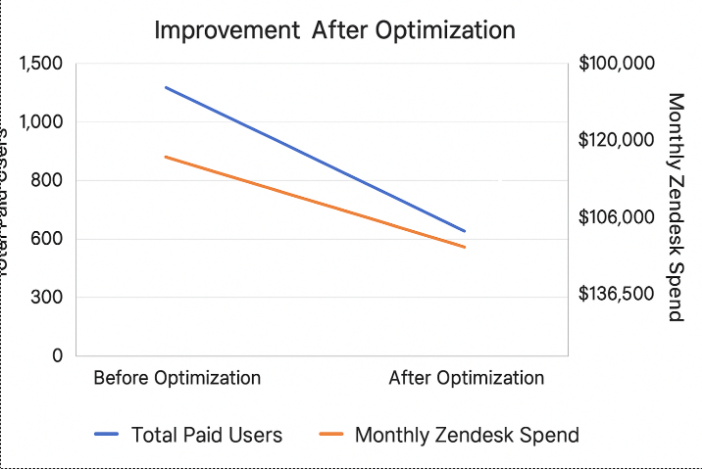
| Metric | Before Optimization | After Optimization | Improvement |
|---|---|---|---|
| Total Paid Users | 1,500 | 1,050 | -30% |
| Monthly Zendesk Spend | $195,000 | $136,500 | -$58,500 (30%) |
| Inactive Accounts | 210 | 0 | 100% reduction |
| License Utilization | 67% | 95% | +28 points |
Within 60 days, the company achieved $700K annualized savings. More importantly, visibility and accountability were restored; each department could now track its Zendesk consumption in real time through CloudNuro dashboards.
If your audit confirms overspending, here are the following steps to take immediately:
| Action | Description | Expected Result |
|---|---|---|
| Deactivate Dormant Agents | Identify users who have not logged in for 45 days. | Immediate cost recovery. |
| Consolidate Multiple Instances | Merge accounts to leverage enterprise discounts. | 15–25% savings potential. |
| Downgrade or Reassign Licenses | Use Light Agents or viewers for low-activity roles. | 10–12% savings. |
| Disable Unused Add-Ons | Turn off unused integrations in Marketplace. | 5–10% savings. |
| Negotiate Renewal Early | Use audit data to adjust seat counts. | Up to 20% discount. |
| Automate Chargeback Reports | Assign cost ownership to departments. | Prevents future overspending. |
CloudNuro automates these corrective actions, deprovisioning dormant accounts, tracking unused add-ons, and producing ready-to-use negotiation insights for renewals.
Because renewals happen automatically, add-ons persist unnoticed, and inactive users aren’t removed in a timely manner.
Quarterly reviews, combined with monthly utilization checks, prevent budget drift.
Deactivate dormant licenses, consolidate instances, and use Light Agents for non-core users.
Yes. Data-backed audits strengthen your negotiation leverage.
By continuously monitoring spend, usage, and renewals, and automating corrective actions to optimize Zendesk bills and reduce Zendesk costs instantly.
Run a free Zendesk Overspend Scan with CloudNuro
| Step | Action | Outcome |
|---|---|---|
| 1 | Run a Zendesk spend audit | Identify overspending sources |
| 2 | Review user logins and deactivate dormant accounts | Recover wasted license spend |
| 3 | Consolidate duplicate instances | Unlock volume discounts |
| 4 | Analyze add-on usage | Eliminate unnecessary modules |
| 5 | Benchmark cost-per-ticket | Reveal efficiency gaps |
| 6 | Automate monthly spend tracking | Maintain long-term optimization |
| 7 | Review renewals 90 days early | Strengthen negotiation position |
If any answer is unclear, it’s time to reassess your spend visibility.
CloudNuro helps enterprises reduce Zendesk costs by automating spend audits, identifying license waste, and providing real-time cost optimization recommendations.
Recognized in Gartner’s Magic Quadrant for SaaS Management Platforms and rated a Leader by Info-Tech SoftwareReviews, CloudNuro empowers IT and Finance teams to:
Request a no cost, no obligation free assessment —just 15 minutes to savings!
Get StartedZendesk is a powerful customer experience platform, but as teams grow and new features roll out, what was once an affordable subscription can quickly evolve into an unchecked cost center. Overspending on Zendesk doesn’t always appear as a big jump on your invoice; it often hides in plain sight, buried within inactive licenses, redundant add-ons, or poorly timed renewals. :contentReference[oaicite:0]{index=0}
The most subtle signs of overspending are often missed because they appear to be part of operational normalcy. For instance, extra agent seats are added “just in case” of seasonal peaks, but they are never removed. Add-ons like Guide or Talk Partner Edition stay active long after the teams stop using them. Multi-department setups duplicate instances unnecessarily. These issues compound invisibly until the annual renewal lands with a 25–30% increase.
A G2 2025 SaaS Utilization Report found that nearly 37% of enterprises overpay for Zendesk because they lack visibility into license usage, department-level cost ownership, and renewal triggers. Finance teams see the total invoice, but IT admins rarely correlate it with daily utilization data. The gap between usage and billing becomes the blind spot that drains budgets.
CloudNuro continuously monitors Zendesk billing, utilization, and user activity to detect hidden overspending. Its AI-driven dashboards alert you to inactive accounts, redundant add-ons, and cost anomalies before they escalate.
If you suspect that your Zendesk costs are creeping upward, here’s a quick self-checklist you can use to determine whether your organization might be overpaying:
| Question | Why It Matters |
|---|---|
| Have any Zendesk users not logged in during the last 45 days? | Inactive users still consume paid seats. |
| Are multiple departments using separate Zendesk instances? | Fragmentation leads to missed volume discounts. |
| Do you have more “full agents” than required for your workload? | Oversized license tiers waste budget. |
| Are old add-ons like Talk or Guide still active? | Legacy add-ons often keep billing post-migration. |
| Do renewals occur automatically without data review? | You lose leverage to negotiate or reduce seats. |
| Do invoices fluctuate month-to-month? | Indicates untracked true-ups or mid-term additions. |
| Are you tracking cost-per-ticket or ROI per license? | Essential for benchmarking efficiency. |
If you answered “yes” to three or more of the above, it’s time to audit your Zendesk deployment.
For CTOs: Focus on integrating Zendesk license data with SSO or HR systems to automate deactivation.
For CFOs: Track Zendesk as a cost-per-ticket metric instead of a static contract line item.
For CIOs: Push for cross-departmental consolidation to reduce redundant billing.
CloudNuro provides unified spend and utilization dashboards for Zendesk, enabling IT and finance leaders to align license usage, chargeback, and optimization actions seamlessly.
A well-structured audit helps you systematically uncover hidden costs. Below is a step-by-step approach tailored for Zendesk administrators.
Navigate to Admin Center → Billing → Subscription and export the list of active agents.
Capture details such as license tier, department, and date of last login.
Match exported Zendesk users with your identity directory (Okta, Azure AD, or Google Workspace).
Flag users who’ve left the company or changed roles.
Visit Admin → Marketplace → My Apps to review which add-ons are active.
Deactivate those that have been unused for the last 90 days.
In Zendesk Explore, check each agent’s ticket activity for the last 30 days.
Mark users with zero or low engagement (<10 tickets/month).
Review recent invoices for unexplained increases.
Check for additional seats added mid-cycle (true-ups).
Calculate the cost-per-ticket by dividing monthly Zendesk spend by the number of resolved tickets.
Compare against benchmarks (~$3–$5 per ticket for optimized environments).
CloudNuro automates all these steps through its Zendesk Audit Engine, providing actionable insights like “unused license potential,” “redundant add-ons,” and “cost-per-ticket deviation.”
Identifying overspending early depends on knowing which Zendesk metrics and dashboards to monitor. Here are the top indicators:
| Overspending Indicator | Where to Find It in Zendesk | What It Reveals |
|---|---|---|
| Low Login Frequency | Explore → Agent Activity | Shows dormant licenses. |
| Rising Invoice Trend | Admin → Billing | Indicates unmonitored seat growth. |
| Add-On Billing Growth | Marketplace → My Apps | Reveals unused integrations still charging. |
| Constant Seat Count Despite Staff Changes | Admin → User Management | Signals a lack of deprovisioning. |
| Duplicate Instances | Admin → Account Settings | Suggests fragmentation and lost discounts. |
| Unused Light Agent Slots | Explore | Indicates potential plan misalignment. |
Evidence: According to Gartner’s 2025 SaaS Optimization Outlook, over 40% of enterprises miss these indicators, leading to an average overspend of 22% on Zendesk.
CloudNuro’s Overspend Detection Engine flags anomalies across Zendesk, including inactive licenses and billing variances. You’ll see precisely where and why your Zendesk bills have grown, before finance even notices the increase.
A U.S.-based retail conglomerate with 1,500 Zendesk users noticed its CX budget growing 28% year-over-year despite flat ticket volume.
The finance team had no access to Zendesk utilization reports, and renewals were handled independently by regional departments. The lack of central oversight led to uncontrolled spending growth.
| Metric | Before Optimization | After Optimization | Improvement |
|---|---|---|---|
| Total Paid Users | 1,500 | 1,050 | -30% |
| Monthly Zendesk Spend | $195,000 | $136,500 | -$58,500 (30%) |
| Inactive Accounts | 210 | 0 | 100% reduction |
| License Utilization | 67% | 95% | +28 points |
Within 60 days, the company achieved $700K annualized savings. More importantly, visibility and accountability were restored; each department could now track its Zendesk consumption in real time through CloudNuro dashboards.
If your audit confirms overspending, here are the following steps to take immediately:
| Action | Description | Expected Result |
|---|---|---|
| Deactivate Dormant Agents | Identify users who have not logged in for 45 days. | Immediate cost recovery. |
| Consolidate Multiple Instances | Merge accounts to leverage enterprise discounts. | 15–25% savings potential. |
| Downgrade or Reassign Licenses | Use Light Agents or viewers for low-activity roles. | 10–12% savings. |
| Disable Unused Add-Ons | Turn off unused integrations in Marketplace. | 5–10% savings. |
| Negotiate Renewal Early | Use audit data to adjust seat counts. | Up to 20% discount. |
| Automate Chargeback Reports | Assign cost ownership to departments. | Prevents future overspending. |
CloudNuro automates these corrective actions, deprovisioning dormant accounts, tracking unused add-ons, and producing ready-to-use negotiation insights for renewals.
Because renewals happen automatically, add-ons persist unnoticed, and inactive users aren’t removed in a timely manner.
Quarterly reviews, combined with monthly utilization checks, prevent budget drift.
Deactivate dormant licenses, consolidate instances, and use Light Agents for non-core users.
Yes. Data-backed audits strengthen your negotiation leverage.
By continuously monitoring spend, usage, and renewals, and automating corrective actions to optimize Zendesk bills and reduce Zendesk costs instantly.
Run a free Zendesk Overspend Scan with CloudNuro
| Step | Action | Outcome |
|---|---|---|
| 1 | Run a Zendesk spend audit | Identify overspending sources |
| 2 | Review user logins and deactivate dormant accounts | Recover wasted license spend |
| 3 | Consolidate duplicate instances | Unlock volume discounts |
| 4 | Analyze add-on usage | Eliminate unnecessary modules |
| 5 | Benchmark cost-per-ticket | Reveal efficiency gaps |
| 6 | Automate monthly spend tracking | Maintain long-term optimization |
| 7 | Review renewals 90 days early | Strengthen negotiation position |
If any answer is unclear, it’s time to reassess your spend visibility.
CloudNuro helps enterprises reduce Zendesk costs by automating spend audits, identifying license waste, and providing real-time cost optimization recommendations.
Recognized in Gartner’s Magic Quadrant for SaaS Management Platforms and rated a Leader by Info-Tech SoftwareReviews, CloudNuro empowers IT and Finance teams to:
Request a no cost, no obligation free assessment - just 15 minutes to savings!
Get StartedWe're offering complimentary ServiceNow license assessments to only 25 enterprises this quarter who want to unlock immediate savings without disrupting operations.
Get Free AssessmentGet Started




CloudNuro Corp
1755 Park St. Suite 207
Naperville, IL 60563
Phone : +1-630-277-9470
Email: info@cloudnuro.com





.webp)

Recognized Leader in SaaS Management Platforms by Info-Tech SoftwareReviews


.svg)