

Sign Up
Thank you for Submitting!

Figma has cemented itself as the most critical design and collaboration platform for modern digital teams. Product designers, UX researchers, developers, content strategists, and even business teams rely on Figma for planning, prototyping, and visual workshopping. In most organizations, Figma adoption grows naturally because it encourages collaboration. This is the exact strength that also turns into a financial blind spot.
Teams usually start small with a few paid Editor seats, thinking that spending will remain predictable. Over time, the number of users begins rising quietly through routine collaboration. Marketing joins Figma for brand assets. Engineering joins to inspect components. Product joins to leave comments. Research joins to evaluate prototypes. Customer success begins with using FigJam boards. And external agency partners receive access to shared files.
None of this is harmful on its own. The problem starts when administrators lack proper governance and visibility. Figma's pricing model allows Viewer and Guest roles to convert into paid Editor seats when users accidentally perform editing actions. These auto-upgrades occur silently and increase the invoice amount without manual approval.
In the absence of strong license controls and structured provisioning, companies begin to overspend significantly. The most common patterns include:
As Figma becomes central to product collaboration, these inefficiencies scale to tens or hundreds of thousands of dollars per year. This blog provides a complete and practical roadmap for reducing Figma spend with high-impact, low-effort strategies that preserve creativity and speed while eliminating silent waste.
Book a 15-minute insights demo to see your exact Figma savings potential.
Figma's pricing is simple on the surface but complex in operational reality. What seems like a transparent per-seat model often hides multiple silent cost drivers that inflate overall spend.
Users with Viewer permissions can become Editors by performing seemingly harmless actions that trigger auto-upgrades.
These actions trigger auto-upgrades that are not flagged in real time, so most admins discover them only once the invoice increases.
Most teams have at least 20 to 35 percent of Editor seats belonging to:
These seats continue billing automatically.
Guests are often added for single-use collaboration. Over time, they remain active and accumulate Editor-level permissions, consuming paid licenses.
Without governance, teams create multiple workspaces, each with its own billing stream. This leads to double payment for the same user and fragmented reporting.
When multiple teams maintain separate design libraries, Figma often needs more Editors to manage them. Consolidation can reduce Editor requirements significantly.
Book a 15-minute insights demo to see your exact Figma savings potential.
The single most effective way to reduce Figma spend is an activity-based audit. Most organizations discover that a surprisingly large number of Editor seats have gone unused for weeks.
A thorough audit should include:
Companies usually identify:
By downgrading unnecessary Editor roles to Viewer roles, the average company reduces its paid seats by 20 to 40 percent in the first review alone.
Book a 15-minute insights demo to see your exact Figma savings potential.
Workspaces are one of the most significant sources of inefficiency. When each department manages its own workspace, four issues emerge:
A company with five separate design teams consolidated its workspaces and negotiated an enterprise plan, reducing overall spend by 32 percent within one renewal cycle.
Figma's auto-upgrade mechanism causes the most significant spend leakage. When users perform editing actions, they are converted into Editors with no admin approval required.
Tools like CloudNuro can flag when a Viewer performs editing-like actions, helping you downgrade them before they inflate your invoice.
Book a 15-minute insights demo to see your exact Figma savings potential.
Figma overspend is often the result of missing deprovisioning processes. When HR or IT offboards an employee, their Figma seat often remains active.
Companies typically reclaim 10 to 18 percent of paid seats by automating user lifecycle processes.
Book a 15-minute insights demo to see your exact Figma savings potential.
CloudNuro helps IT, procurement, and finance teams:
Book a 15-minute insights demo to see your exact Figma savings potential.
Old, abandoned, or duplicate files often trigger unwanted user behavior, leading to Editor upgrades. Archiving improves performance and prevents accidental edits.
Cleaner workspace environments reduce the likelihood of accidental edits and lower overall storage-related operations.
Book a 15-minute insights demo to see your exact Figma savings potential.
Companies that wait until the renewal date to review Figma lose negotiation leverage.
Assume your organization has 200 Editor seats at the Organization tier at approximately 55 USD per Editor per month for full seats billed annually.
The combined savings in this example scenario total 52,800 USD per year.
Key Takeaway: By aligning your user roles with actual usage, preventing uncontrolled upgrades, and planning ahead of renewals, you can significantly reduce your Figma license spend while still supporting effective design collaboration.
Teams that run renewal preparation 60 days early often secure 10 to 20 percent better pricing or strategically reduce seat counts.
Book a 15-minute insights demo to see your exact Figma savings potential.
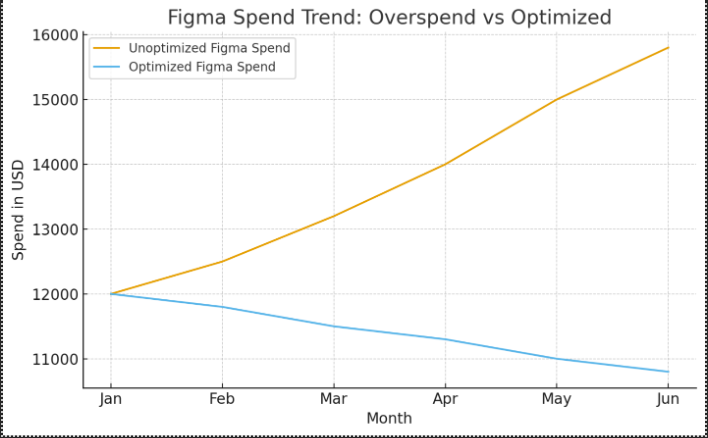
The following visual shows how governance changes Figma spending over time.
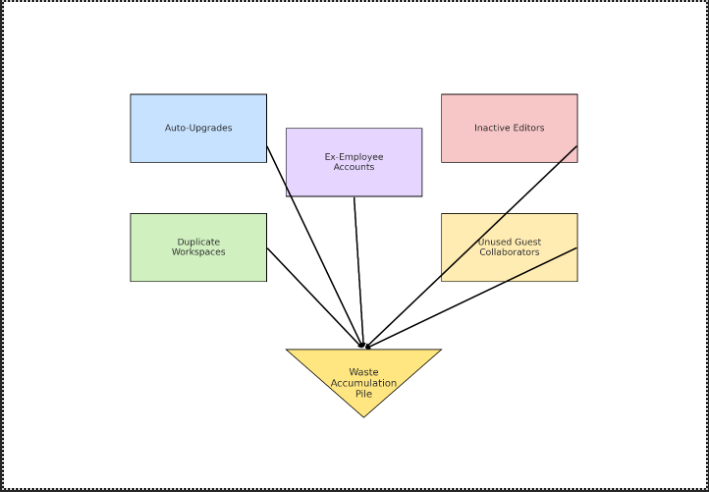
Figma License Waste Flow shows how auto-upgrades, inactive Editors, duplicate workspaces, unused guest collaborators, and ex-employee accounts all feed into a waste accumulation pile.
Book a 15-minute insights demo to see your exact Figma savings potential.
Here are actions you can implement in one week for instant savings.
Locking public component libraries prevents accidental editing by non-designers and reduces unnecessary Editor upgrades.
Use a simple intake mechanism, such as a form or ITSM workflow, to ensure every new Editor seat is justified and approved.
Check weekly for inactive users, role changes, and file-level activity to catch waste before invoices grow.
Remove old collaborators and convert any remaining guests who only need viewing access.
Use consistent naming standards for workspaces to prevent random workspace creation and keep billing centralized.
Book a 15-minute insights demo to see your exact Figma savings potential.
Figma is one of the most powerful collaborative platforms on the market, but without structured governance and real usage visibility, it can quietly become one of the most expensive. Organizations that treat Figma as a strategic platform rather than a simple design tool reduce spend, improve productivity, and regain control of their digital design ecosystem.
You can reduce 25 to 40 percent of your paid Figma cost by:
CloudNuro automates all of this with real-time analytics and actionable recommendations.
CloudNuro is a leader in Enterprise SaaS Management Platforms, giving enterprises unmatched visibility, governance, and cost optimization. Recognized twice in a row by Gartner in the SaaS Management Platforms Magic Quadrant and named a Leader in the Info-Tech SoftwareReviews Data Quadrant, CloudNuro is trusted by global enterprises and government agencies to bring financial discipline to SaaS and cloud.
Trusted by enterprises such as Konica Minolta and Federal Signal, the solution provides centralized SaaS inventory, license optimization, and renewal management, along with advanced cost allocation and chargeback, giving IT and Finance leaders the visibility, control, and cost-conscious culture needed to drive financial discipline.
As the only FinOps-ready Enterprise SaaS Management Platform, CloudNuro unifies SaaS and IaaS management in a single view. With a 15-minute setup and measurable results in under 24 hours, CloudNuro gives IT teams a fast path to value.
Request a no cost, no obligation free assessment —just 15 minutes to savings!
Get StartedFigma has cemented itself as the most critical design and collaboration platform for modern digital teams. Product designers, UX researchers, developers, content strategists, and even business teams rely on Figma for planning, prototyping, and visual workshopping. In most organizations, Figma adoption grows naturally because it encourages collaboration. This is the exact strength that also turns into a financial blind spot.
Teams usually start small with a few paid Editor seats, thinking that spending will remain predictable. Over time, the number of users begins rising quietly through routine collaboration. Marketing joins Figma for brand assets. Engineering joins to inspect components. Product joins to leave comments. Research joins to evaluate prototypes. Customer success begins with using FigJam boards. And external agency partners receive access to shared files.
None of this is harmful on its own. The problem starts when administrators lack proper governance and visibility. Figma's pricing model allows Viewer and Guest roles to convert into paid Editor seats when users accidentally perform editing actions. These auto-upgrades occur silently and increase the invoice amount without manual approval.
In the absence of strong license controls and structured provisioning, companies begin to overspend significantly. The most common patterns include:
As Figma becomes central to product collaboration, these inefficiencies scale to tens or hundreds of thousands of dollars per year. This blog provides a complete and practical roadmap for reducing Figma spend with high-impact, low-effort strategies that preserve creativity and speed while eliminating silent waste.
Book a 15-minute insights demo to see your exact Figma savings potential.
Figma's pricing is simple on the surface but complex in operational reality. What seems like a transparent per-seat model often hides multiple silent cost drivers that inflate overall spend.
Users with Viewer permissions can become Editors by performing seemingly harmless actions that trigger auto-upgrades.
These actions trigger auto-upgrades that are not flagged in real time, so most admins discover them only once the invoice increases.
Most teams have at least 20 to 35 percent of Editor seats belonging to:
These seats continue billing automatically.
Guests are often added for single-use collaboration. Over time, they remain active and accumulate Editor-level permissions, consuming paid licenses.
Without governance, teams create multiple workspaces, each with its own billing stream. This leads to double payment for the same user and fragmented reporting.
When multiple teams maintain separate design libraries, Figma often needs more Editors to manage them. Consolidation can reduce Editor requirements significantly.
Book a 15-minute insights demo to see your exact Figma savings potential.
The single most effective way to reduce Figma spend is an activity-based audit. Most organizations discover that a surprisingly large number of Editor seats have gone unused for weeks.
A thorough audit should include:
Companies usually identify:
By downgrading unnecessary Editor roles to Viewer roles, the average company reduces its paid seats by 20 to 40 percent in the first review alone.
Book a 15-minute insights demo to see your exact Figma savings potential.
Workspaces are one of the most significant sources of inefficiency. When each department manages its own workspace, four issues emerge:
A company with five separate design teams consolidated its workspaces and negotiated an enterprise plan, reducing overall spend by 32 percent within one renewal cycle.
Figma's auto-upgrade mechanism causes the most significant spend leakage. When users perform editing actions, they are converted into Editors with no admin approval required.
Tools like CloudNuro can flag when a Viewer performs editing-like actions, helping you downgrade them before they inflate your invoice.
Book a 15-minute insights demo to see your exact Figma savings potential.
Figma overspend is often the result of missing deprovisioning processes. When HR or IT offboards an employee, their Figma seat often remains active.
Companies typically reclaim 10 to 18 percent of paid seats by automating user lifecycle processes.
Book a 15-minute insights demo to see your exact Figma savings potential.
CloudNuro helps IT, procurement, and finance teams:
Book a 15-minute insights demo to see your exact Figma savings potential.
Old, abandoned, or duplicate files often trigger unwanted user behavior, leading to Editor upgrades. Archiving improves performance and prevents accidental edits.
Cleaner workspace environments reduce the likelihood of accidental edits and lower overall storage-related operations.
Book a 15-minute insights demo to see your exact Figma savings potential.
Companies that wait until the renewal date to review Figma lose negotiation leverage.
Assume your organization has 200 Editor seats at the Organization tier at approximately 55 USD per Editor per month for full seats billed annually.
The combined savings in this example scenario total 52,800 USD per year.
Key Takeaway: By aligning your user roles with actual usage, preventing uncontrolled upgrades, and planning ahead of renewals, you can significantly reduce your Figma license spend while still supporting effective design collaboration.
Teams that run renewal preparation 60 days early often secure 10 to 20 percent better pricing or strategically reduce seat counts.
Book a 15-minute insights demo to see your exact Figma savings potential.
The following visual shows how governance changes Figma spending over time.
Figma License Waste Flow shows how auto-upgrades, inactive Editors, duplicate workspaces, unused guest collaborators, and ex-employee accounts all feed into a waste accumulation pile.
Book a 15-minute insights demo to see your exact Figma savings potential.
Here are actions you can implement in one week for instant savings.
Locking public component libraries prevents accidental editing by non-designers and reduces unnecessary Editor upgrades.
Use a simple intake mechanism, such as a form or ITSM workflow, to ensure every new Editor seat is justified and approved.
Check weekly for inactive users, role changes, and file-level activity to catch waste before invoices grow.
Remove old collaborators and convert any remaining guests who only need viewing access.
Use consistent naming standards for workspaces to prevent random workspace creation and keep billing centralized.
Book a 15-minute insights demo to see your exact Figma savings potential.
Figma is one of the most powerful collaborative platforms on the market, but without structured governance and real usage visibility, it can quietly become one of the most expensive. Organizations that treat Figma as a strategic platform rather than a simple design tool reduce spend, improve productivity, and regain control of their digital design ecosystem.
You can reduce 25 to 40 percent of your paid Figma cost by:
CloudNuro automates all of this with real-time analytics and actionable recommendations.
CloudNuro is a leader in Enterprise SaaS Management Platforms, giving enterprises unmatched visibility, governance, and cost optimization. Recognized twice in a row by Gartner in the SaaS Management Platforms Magic Quadrant and named a Leader in the Info-Tech SoftwareReviews Data Quadrant, CloudNuro is trusted by global enterprises and government agencies to bring financial discipline to SaaS and cloud.
Trusted by enterprises such as Konica Minolta and Federal Signal, the solution provides centralized SaaS inventory, license optimization, and renewal management, along with advanced cost allocation and chargeback, giving IT and Finance leaders the visibility, control, and cost-conscious culture needed to drive financial discipline.
As the only FinOps-ready Enterprise SaaS Management Platform, CloudNuro unifies SaaS and IaaS management in a single view. With a 15-minute setup and measurable results in under 24 hours, CloudNuro gives IT teams a fast path to value.
Request a no cost, no obligation free assessment - just 15 minutes to savings!
Get StartedWe're offering complimentary ServiceNow license assessments to only 25 enterprises this quarter who want to unlock immediate savings without disrupting operations.
Get Free AssessmentGet Started




CloudNuro Corp
1755 Park St. Suite 207
Naperville, IL 60563
Phone : +1-630-277-9470
Email: info@cloudnuro.com





.webp)

Recognized Leader in SaaS Management Platforms by Info-Tech SoftwareReviews




.svg)