

Sign Up
Thank you for Submitting!

Enterprises rely on Canva for content creation, brand management, marketing operations, HR communications, sales enablement, and internal design work.
As adoption spreads across departments, Canva becomes embedded in day-to-day workflows, but this ease of adoption creates a new challenge.
Canva licenses often expand faster than they are reviewed, and teams secure paid seats without coordination, governance, or usage analysis.
The result is a rapid rise in paid editors, unnecessary premium features, barely used advanced capabilities, and multiple Canva Teams operating outside IT oversight.
Most enterprises pay for far more Canva capacity than they need, with overspend hiding in editor seats assigned to passive users, underutilized features like Brand Kit or Content Planner, and premium users who only view or lightly modify templates.
Canva license optimization is not just a design or marketing activity; it is a critical IT governance and procurement task that ensures every paid seat produces measurable value.
This guide outlines an enterprise-grade approach to stop paying for unused Canva capacity and realign licensing with actual usage.
Trusted by enterprises such as Konica Minolta and Federal Signal, CloudNuro provides centralized SaaS inventory, license optimization, and renewal management, along with advanced cost allocation and chargeback to give IT and Finance leaders the visibility, control, and cost-conscious culture needed to drive financial discipline.
As the only FinOps-certified Enterprise SaaS Management Platform, CloudNuro unifies SaaS and IaaS management in a single view.
With a 15-minute setup and measurable results in under 24 hours, CloudNuro gives IT teams a fast path to value.
Optimization begins with complete visibility into all Canva usage across the business.
Most organizations underestimate the number of Canva subscriptions because different business units buy seats independently, often using corporate cards or activating Canva Teams without informing IT.
To optimize licensing, you need a unified list of the following:
This visibility forms the foundation for rightsizing licenses and eliminating waste.
Not every user needs an Editor seat, yet enterprises often assign editor licenses by default even when users only view content, export designs, or leave comments.
To optimize licensing, classify each user into one of these usage segments:
Use Canva daily, design from scratch, work with brand assets, collaborate frequently, and require full editor capabilities.
Modify existing templates, duplicate past assets, or prepare monthly content but do not need premium tools every day.
Use prebuilt templates, change text, adjust images, and export assets, rarely creating designs from scratch.
Primarily review designs, comment, approve content, or download assets.
Access shared content for reference or training but rarely modify designs.
Only categories A and B consistently need paid editor roles, category C sometimes needs them, while categories D and E rarely require paid seats.
Enterprises typically discover that 25 to 40 percent of paid editors fall into categories D and E.
Once users are classified, you can make informed decisions about license assignments and avoid defaulting everyone to editor roles.
Assign editor seats only to individuals who truly create or significantly modify content.
Common savings: Most enterprises reduce editor seat counts by 20 to 35 percent after this review.
Canva offers powerful premium features such as Brand Kit, Magic Resize, Background Remover, premium fonts, and product mockups, but not everyone requires these capabilities.
Premium features are one of the most common sources of Canva overspend.
CloudNuro shows which Canva users create, collaborate, or log in once and never return.
With clear activity patterns, you can remove unused seats, adjust tier assignments, and ensure that every paid editor produces measurable value.
IT and procurement leaders rely on CloudNuro to analyze the distribution of editors, occasional designers, and viewers so licenses reflect real usage rather than assumptions.
If you want a precise breakdown of your Canva user roles and adoption patterns, CloudNuro can prepare a detailed seat intelligence report tailored to your organization.
Fragmentation is one of the most significant barriers to license optimization.
When marketing, sales, HR, operations, and training teams run separate Canva subscriptions, several issues arise.
Enterprises often save 18 to 28 percent simply by merging independent Canva Teams into a single, enterprise-controlled environment.
One of the biggest hidden cost drivers is continued license assignment to users who no longer need access or no longer work at the company.
Examples include:
Run a quarterly license audit to ensure only active, relevant users retain paid seats.
Deactivate all accounts tied to users who have not logged in for 45 to 60 days, unless they are clearly critical.
This one step alone can recover thousands of dollars annually.
Viewers, approvers, basic editors, and occasional users can often be moved to Canva Free without disrupting workflows.
Expected impact: Shifting 15 to 30 percent of users to Canva Free is realistic in most organizations.
License waste often grows because users are granted the same level of access regardless of their job function.
Role-based access control introduces structure and reduces unnecessary seat assignments.
This approach ensures that editor seats are protected and not over-provisioned.
After initial optimization, enterprises need ongoing monitoring to keep Canva licensing efficient.
Usage patterns change as marketing campaigns launch, contractors join and leave, and content projects evolve.
Tracking these metrics helps IT and procurement maintain long-term optimization and avoid license creep.
License optimization is not a one-time clean-up; it is an ongoing operational discipline.
Establish governance processes that keep Canva cost-efficient throughout the year.
Enterprises that adopt lifecycle governance often reduce annual Canva costs by 25 to 40 percent.
A large B2C company experienced uncontrolled Canva expansion initiated by multiple marketing units.
Each team purchased Canva Teams separately, broadly assigned editor seats, and paid for premium features without tracking adoption.
After consolidating all subscriptions into one enterprise-managed system, the organization achieved several key outcomes.
The outcome was a 29 percent reduction in Canva spend alongside higher brand consistency and better governance.
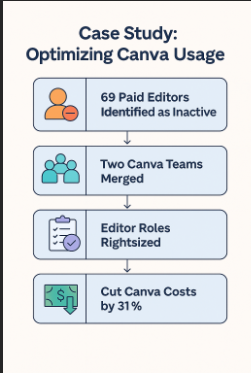
Case Study: Optimizing Canva Usage shows:
CloudNuro transforms Canva optimization into a data-driven process that IT, procurement, and finance teams can rely on.
The platform provides:
Teams use CloudNuro to create a continuous optimization loop that keeps Canva costs predictable and aligned with real business value.
Canva licensing becomes efficient only when organizations understand how their people work, which features they actually use, and which seats provide genuine value.
By adopting a structured optimization model and using CloudNuro as the visibility engine, enterprises can ensure they never pay for more Canva capacity than they need.
CloudNuro is a leader in Enterprise SaaS Management Platforms, giving enterprises unmatched visibility, governance, and cost optimization.
Recognized twice in a row by Gartner in the SaaS Management Platforms Magic Quadrant and named a Leader in the Info-Tech SoftwareReviews Data Quadrant, CloudNuro is trusted by global enterprises and government agencies to bring financial discipline to SaaS and cloud.
Request a no cost, no obligation free assessment —just 15 minutes to savings!
Get StartedEnterprises rely on Canva for content creation, brand management, marketing operations, HR communications, sales enablement, and internal design work.
As adoption spreads across departments, Canva becomes embedded in day-to-day workflows, but this ease of adoption creates a new challenge.
Canva licenses often expand faster than they are reviewed, and teams secure paid seats without coordination, governance, or usage analysis.
The result is a rapid rise in paid editors, unnecessary premium features, barely used advanced capabilities, and multiple Canva Teams operating outside IT oversight.
Most enterprises pay for far more Canva capacity than they need, with overspend hiding in editor seats assigned to passive users, underutilized features like Brand Kit or Content Planner, and premium users who only view or lightly modify templates.
Canva license optimization is not just a design or marketing activity; it is a critical IT governance and procurement task that ensures every paid seat produces measurable value.
This guide outlines an enterprise-grade approach to stop paying for unused Canva capacity and realign licensing with actual usage.
Trusted by enterprises such as Konica Minolta and Federal Signal, CloudNuro provides centralized SaaS inventory, license optimization, and renewal management, along with advanced cost allocation and chargeback to give IT and Finance leaders the visibility, control, and cost-conscious culture needed to drive financial discipline.
As the only FinOps-certified Enterprise SaaS Management Platform, CloudNuro unifies SaaS and IaaS management in a single view.
With a 15-minute setup and measurable results in under 24 hours, CloudNuro gives IT teams a fast path to value.
Optimization begins with complete visibility into all Canva usage across the business.
Most organizations underestimate the number of Canva subscriptions because different business units buy seats independently, often using corporate cards or activating Canva Teams without informing IT.
To optimize licensing, you need a unified list of the following:
This visibility forms the foundation for rightsizing licenses and eliminating waste.
Not every user needs an Editor seat, yet enterprises often assign editor licenses by default even when users only view content, export designs, or leave comments.
To optimize licensing, classify each user into one of these usage segments:
Use Canva daily, design from scratch, work with brand assets, collaborate frequently, and require full editor capabilities.
Modify existing templates, duplicate past assets, or prepare monthly content but do not need premium tools every day.
Use prebuilt templates, change text, adjust images, and export assets, rarely creating designs from scratch.
Primarily review designs, comment, approve content, or download assets.
Access shared content for reference or training but rarely modify designs.
Only categories A and B consistently need paid editor roles, category C sometimes needs them, while categories D and E rarely require paid seats.
Enterprises typically discover that 25 to 40 percent of paid editors fall into categories D and E.
Once users are classified, you can make informed decisions about license assignments and avoid defaulting everyone to editor roles.
Assign editor seats only to individuals who truly create or significantly modify content.
Common savings: Most enterprises reduce editor seat counts by 20 to 35 percent after this review.
Canva offers powerful premium features such as Brand Kit, Magic Resize, Background Remover, premium fonts, and product mockups, but not everyone requires these capabilities.
Premium features are one of the most common sources of Canva overspend.
CloudNuro shows which Canva users create, collaborate, or log in once and never return.
With clear activity patterns, you can remove unused seats, adjust tier assignments, and ensure that every paid editor produces measurable value.
IT and procurement leaders rely on CloudNuro to analyze the distribution of editors, occasional designers, and viewers so licenses reflect real usage rather than assumptions.
If you want a precise breakdown of your Canva user roles and adoption patterns, CloudNuro can prepare a detailed seat intelligence report tailored to your organization.
Fragmentation is one of the most significant barriers to license optimization.
When marketing, sales, HR, operations, and training teams run separate Canva subscriptions, several issues arise.
Enterprises often save 18 to 28 percent simply by merging independent Canva Teams into a single, enterprise-controlled environment.
One of the biggest hidden cost drivers is continued license assignment to users who no longer need access or no longer work at the company.
Examples include:
Run a quarterly license audit to ensure only active, relevant users retain paid seats.
Deactivate all accounts tied to users who have not logged in for 45 to 60 days, unless they are clearly critical.
This one step alone can recover thousands of dollars annually.
Viewers, approvers, basic editors, and occasional users can often be moved to Canva Free without disrupting workflows.
Expected impact: Shifting 15 to 30 percent of users to Canva Free is realistic in most organizations.
License waste often grows because users are granted the same level of access regardless of their job function.
Role-based access control introduces structure and reduces unnecessary seat assignments.
This approach ensures that editor seats are protected and not over-provisioned.
After initial optimization, enterprises need ongoing monitoring to keep Canva licensing efficient.
Usage patterns change as marketing campaigns launch, contractors join and leave, and content projects evolve.
Tracking these metrics helps IT and procurement maintain long-term optimization and avoid license creep.
License optimization is not a one-time clean-up; it is an ongoing operational discipline.
Establish governance processes that keep Canva cost-efficient throughout the year.
Enterprises that adopt lifecycle governance often reduce annual Canva costs by 25 to 40 percent.
A large B2C company experienced uncontrolled Canva expansion initiated by multiple marketing units.
Each team purchased Canva Teams separately, broadly assigned editor seats, and paid for premium features without tracking adoption.
After consolidating all subscriptions into one enterprise-managed system, the organization achieved several key outcomes.
The outcome was a 29 percent reduction in Canva spend alongside higher brand consistency and better governance.
Case Study: Optimizing Canva Usage shows:
CloudNuro transforms Canva optimization into a data-driven process that IT, procurement, and finance teams can rely on.
The platform provides:
Teams use CloudNuro to create a continuous optimization loop that keeps Canva costs predictable and aligned with real business value.
Canva licensing becomes efficient only when organizations understand how their people work, which features they actually use, and which seats provide genuine value.
By adopting a structured optimization model and using CloudNuro as the visibility engine, enterprises can ensure they never pay for more Canva capacity than they need.
CloudNuro is a leader in Enterprise SaaS Management Platforms, giving enterprises unmatched visibility, governance, and cost optimization.
Recognized twice in a row by Gartner in the SaaS Management Platforms Magic Quadrant and named a Leader in the Info-Tech SoftwareReviews Data Quadrant, CloudNuro is trusted by global enterprises and government agencies to bring financial discipline to SaaS and cloud.
Request a no cost, no obligation free assessment - just 15 minutes to savings!
Get StartedWe're offering complimentary ServiceNow license assessments to only 25 enterprises this quarter who want to unlock immediate savings without disrupting operations.
Get Free AssessmentGet Started




CloudNuro Corp
1755 Park St. Suite 207
Naperville, IL 60563
Phone : +1-630-277-9470
Email: info@cloudnuro.com





.webp)

Recognized Leader in SaaS Management Platforms by Info-Tech SoftwareReviews



.png)
.svg)