

Sign Up
Thank you for Submitting!

In many organizations, Freshservice adoption expands rapidly, driven by enthusiastic IT teams and the need for faster ticket resolution. Yet this growth often comes with hidden inefficiencies. Agents remain licensed even after moving to other departments. Modules like ITOM or Project Management stay enabled despite minimal usage. Unmonitored automations consume additional resources, creating unnecessary upgrade pressure.
For IT administrators and SaaS managers, license optimization is the key to turning this sprawl into measurable savings. It ensures that every agent seat, workflow, and module aligns with actual demand. This detailed guide provides practical, step-by-step methods for auditing, reclaiming, and optimizing your Freshservice licenses efficiently.
Insight
CloudNuro.ai helps Freshservice administrators instantly identify inactive agents, unused modules, and redundant workflows, transforming license optimization from manual effort into continuous automation.
Recognized by Gartner and Info-Tech, CloudNuro is the only FinOps-ready SaaS Management Platform that delivers pricing clarity and cost-saving strategies in one unified view.
Schedule your 15-minute setup and start optimizing today.
Freshservice licenses are agent-based. Requesters are free, but every additional agent adds to the recurring cost. Without a consolidated view, dormant or part-time users remain paid indefinitely.
A global airline found 320 inactive agents still assigned paid roles. Reclaiming these seats saved 24 percent of its Freshservice cost within a single quarter.
Tool Tip: Use CloudNuro.ai’s integration with Freshservice API to automatically correlate license status with HR data and flag inactive accounts.
Schedule your 15-minute setup and start optimizing today.
Freshservice offers multiple modules including ITSM, ITOM, Project Management, and Asset Management. Many enterprises subscribe to all of them regardless of adoption.
A manufacturing firm disabled the ITOM module in two business units that rarely used it, reducing their annual cost by 30 percent.
Outcome: Rightsizing modules ensures that each feature directly supports service-delivery value.
Schedule your 15-minute setup and start optimizing today.
Full-time agents are expensive. Light agents or collaborators can perform limited actions at a fraction of the cost.
A financial enterprise moved 150 technicians to Light Agent roles and reduced license cost by 22 percent without affecting SLAs.
Insight
CloudNuro.ai automatically highlights low-activity agents and suggests conversion opportunities that maintain productivity while cutting costs.
Schedule your 15-minute setup and start optimizing today.
Manual off-boarding delays are the most significant cause of zombie licenses. Each unrevoked account continues billing until detected.
A healthcare network automated deprovisioning via Okta and reclaimed 210 licenses in 90 days, saving $27K monthly.
Outcome: Automated reclamation ensures your seat count always matches active users.
Schedule your 15-minute setup and start optimizing today.
Company Size: 1,200 agents across six regions
Problem: No license visibility, overlapping modules, and hundreds of inactive agents.
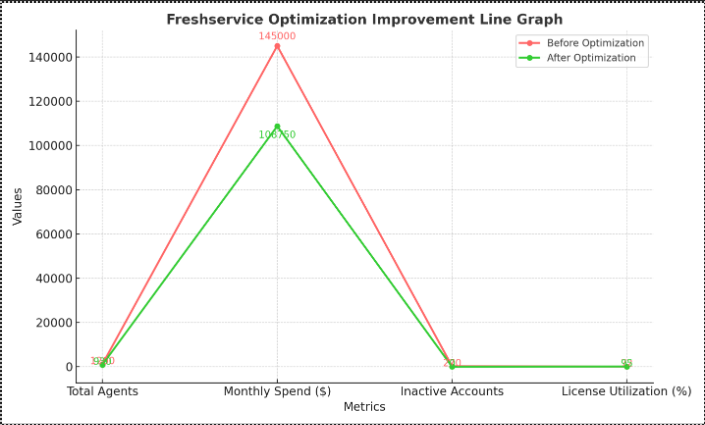
| Metric | Before Optimization | After Optimization | Improvement |
|---|---|---|---|
| Total Agents | 1,200 | 930 | –23 percent |
| Monthly Spend | $145,000 | $108,750 | –25 percent |
| Inactive Accounts | 270 | 0 | 100 percent reclaimed |
| License Utilization | 72 percent | 95 percent | +23 points |
Result: Savings of $36K per month and improved utilization efficiency.
Insight
CloudNuro.ai automates Freshservice license tracking and chargeback to maintain long-term governance and reduce overspend risk.
License optimization turns Freshservice from a cost center into a governed investment. By tracking agent activity, modular usage, and automation efficiency, organizations can align spending with value delivery.
CloudNuro.ai simplifies Freshservice governance with automated audits, AI-driven license insights, and chargeback automation.
Request a no cost, no obligation free assessment —just 15 minutes to savings!
Get StartedIn many organizations, Freshservice adoption expands rapidly, driven by enthusiastic IT teams and the need for faster ticket resolution. Yet this growth often comes with hidden inefficiencies. Agents remain licensed even after moving to other departments. Modules like ITOM or Project Management stay enabled despite minimal usage. Unmonitored automations consume additional resources, creating unnecessary upgrade pressure.
For IT administrators and SaaS managers, license optimization is the key to turning this sprawl into measurable savings. It ensures that every agent seat, workflow, and module aligns with actual demand. This detailed guide provides practical, step-by-step methods for auditing, reclaiming, and optimizing your Freshservice licenses efficiently.
Insight
CloudNuro.ai helps Freshservice administrators instantly identify inactive agents, unused modules, and redundant workflows, transforming license optimization from manual effort into continuous automation.
Recognized by Gartner and Info-Tech, CloudNuro is the only FinOps-ready SaaS Management Platform that delivers pricing clarity and cost-saving strategies in one unified view.
Schedule your 15-minute setup and start optimizing today.
Freshservice licenses are agent-based. Requesters are free, but every additional agent adds to the recurring cost. Without a consolidated view, dormant or part-time users remain paid indefinitely.
A global airline found 320 inactive agents still assigned paid roles. Reclaiming these seats saved 24 percent of its Freshservice cost within a single quarter.
Tool Tip: Use CloudNuro.ai’s integration with Freshservice API to automatically correlate license status with HR data and flag inactive accounts.
Schedule your 15-minute setup and start optimizing today.
Freshservice offers multiple modules including ITSM, ITOM, Project Management, and Asset Management. Many enterprises subscribe to all of them regardless of adoption.
A manufacturing firm disabled the ITOM module in two business units that rarely used it, reducing their annual cost by 30 percent.
Outcome: Rightsizing modules ensures that each feature directly supports service-delivery value.
Schedule your 15-minute setup and start optimizing today.
Full-time agents are expensive. Light agents or collaborators can perform limited actions at a fraction of the cost.
A financial enterprise moved 150 technicians to Light Agent roles and reduced license cost by 22 percent without affecting SLAs.
Insight
CloudNuro.ai automatically highlights low-activity agents and suggests conversion opportunities that maintain productivity while cutting costs.
Schedule your 15-minute setup and start optimizing today.
Manual off-boarding delays are the most significant cause of zombie licenses. Each unrevoked account continues billing until detected.
A healthcare network automated deprovisioning via Okta and reclaimed 210 licenses in 90 days, saving $27K monthly.
Outcome: Automated reclamation ensures your seat count always matches active users.
Schedule your 15-minute setup and start optimizing today.
Company Size: 1,200 agents across six regions
Problem: No license visibility, overlapping modules, and hundreds of inactive agents.
| Metric | Before Optimization | After Optimization | Improvement |
|---|---|---|---|
| Total Agents | 1,200 | 930 | –23 percent |
| Monthly Spend | $145,000 | $108,750 | –25 percent |
| Inactive Accounts | 270 | 0 | 100 percent reclaimed |
| License Utilization | 72 percent | 95 percent | +23 points |
Result: Savings of $36K per month and improved utilization efficiency.
Insight
CloudNuro.ai automates Freshservice license tracking and chargeback to maintain long-term governance and reduce overspend risk.
License optimization turns Freshservice from a cost center into a governed investment. By tracking agent activity, modular usage, and automation efficiency, organizations can align spending with value delivery.
CloudNuro.ai simplifies Freshservice governance with automated audits, AI-driven license insights, and chargeback automation.
Request a no cost, no obligation free assessment - just 15 minutes to savings!
Get StartedWe're offering complimentary ServiceNow license assessments to only 25 enterprises this quarter who want to unlock immediate savings without disrupting operations.
Get Free AssessmentGet Started




CloudNuro Corp
1755 Park St. Suite 207
Naperville, IL 60563
Phone : +1-630-277-9470
Email: info@cloudnuro.com





.webp)

Recognized Leader in SaaS Management Platforms by Info-Tech SoftwareReviews


.svg)