

Sign Up
Thank you for Submitting!

In most organizations, HubSpot becomes the backbone of sales, marketing, and service execution. Yet beneath that efficiency lies a hidden issue that IT administrators and SaaS managers face daily, license inefficiency.
Over time, teams add users, hubs, and premium features as operations expand. Few revisit those decisions. The result? Paid licenses for users who never log in, redundant hub subscriptions across departments, and contact tiers that keep billing for inactive records. According to Gartner's 2025 SaaS Cost Benchmark, enterprises waste between 25% and 35% of their CRM license budgets because of unused or misallocated seats.
License optimization isn't about cutting access. It's about matching cost to value and ensuring every HubSpot seat and tier delivers measurable results. Optimizing HubSpot licenses improves financial efficiency, enhances compliance, and strengthens collaboration between IT and finance teams.
HubSpot's model is straightforward yet easy to misuse. Licenses are purchased per seat per Hub (Sales, Service, Marketing, CMS, Operations), with additional pricing tied to marketing contacts. When roles change, projects end, or users leave, unused licenses continue billing quietly. Without visibility, those costs compound every quarter.
License optimization introduces continuous governance. It tracks real activity, reallocates licenses where needed, and enforces cost accountability through chargeback visibility.
CloudNuro gives IT and SaaS managers real-time visibility into all HubSpot users, hubs, add-ons, and contact tiers. Automatically detect idle seats, track usage trends, and create chargeback-ready reports, all within one unified SaaS management platform.
Book a no-cost assessment →
The first step toward optimization is building a clear inventory. Most admins underestimate how fragmented their license footprint has become.
How to do it:
| License Type | Purchased | Active | Inactive (30–90 days) | Never Logged In | Potential Reclaim |
|---|---|---|---|---|---|
| Sales Hub Pro | 420 | 388 | 22 | 10 | 32 |
| Service Hub Pro | 220 | 207 | 11 | 2 | 13 |
| Marketing Hub Pro | 80 | 76 | 2 | 2 | 4 |
In this example, 49 seats could be reclaimed, roughly $9,000 per year at current list prices.
Practical example:
A global consultancy exported license data and found 12% of Sales Hub users had not logged in for 60 days. Reassigning those seats to new hires and revoking duplicates recovered $11k per quarter.
Gartner Insight: Companies using automated license-discovery tools save 20–30% annually on SaaS seat costs.
Tip: Schedule this export monthly. It's the foundation for every downstream optimization.
CloudNuro automates license discovery and activity mapping, so admins no longer need manual exports or spreadsheets.
After inventory comes analysis. Many organizations pay for Sales Hub Professional or Service Hub Enterprise seats used only for dashboard viewing.
Process:
Example:
A marketing division found 15 dormant Sales Hub Enterprise users. Each license costs $100/month. Downgrading saved $18,000 annually without impacting reporting.
Supporting Data: FinOps Foundation's Usage Alignment Principle confirms that continuous user-activity reviews are the most effective lever for cost control in seat-based SaaS tools.
Insight: CloudNuro's activity analytics detect inactive or minimally active users automatically and alert admins 30 days before renewal.
Uneven distribution often hides waste. Marketing may be short on seats while Sales holds excess. Reallocation maximizes utilization before procurement buys more.
How to implement:
| Department | Seats Owned | Seats Used | Utilization % | Action |
|---|---|---|---|---|
| Sales | 500 | 410 | 82% | Reassign 40 to Marketing |
| Marketing | 120 | 118 | 98% | Request 2 from Sales |
| Support | 90 | 75 | 83% | Release 5 unused licenses |
This approach balances allocation without new spending.
G2 Review Data: High-performing HubSpot admins refresh license distribution quarterly, improving average seat utilization to above 90%.
CloudNuro's chargeback shows license cost by department, enabling proper accountability and cross-team transparency.
The most powerful optimization happens when feature usage is analyzed against the license tier.
Step-by-step:
Example:
A SaaS startup realized it was using only two custom objects and had limited workflow automation in Sales Hub Enterprise. Downgrading to the Professional cut costs by 22% while retaining the needed features.
FinOps Reference: The Right-sizing Principle encourages scaling licenses to consumption patterns rather than theoretical needs.
Insight: CloudNuro compares usage metrics across hubs and recommends optimal downgrade or upgrade paths backed by ROI projections.
Visibility into renewals prevents last-minute renewals at list price and anchors accountability for every dollar spent.
Implementation Steps:
HubSpot Chargeback in practice:
| Department | Monthly Cost | Active Seats | Cost per User |
|---|---|---|---|
| Sales | $18,200 | 420 | $43.33 |
| Marketing | $5,440 | 120 | $45.33 |
| Service | $3,600 | 90 | $40.00 |
Graph Suggestion: A horizontal bar chart showing cost per department clarifies budget accountability.
Business Impact: One enterprise reduced SaaS renewal surprises by 80% after implementing chargeback reporting through CloudNuro.
CloudNuro automates renewal tracking, forecast modeling, and department-wise chargeback, giving IT and finance a unified HubSpot cost view.
Recognized by Gartner and Info-Tech, CloudNuro is the only FinOps-certified SaaS Management Platform that delivers pricing clarity and cost-saving strategies in one unified view.
👉 Get your personalized pricing audit and optimize your HubSpot bills now.
1. Overprovisioning during onboarding
Problem: Bulk-provisioned seats remain unused after initial rollout.
Fix: Issue licenses only after user confirmation and require automatic deactivation for non-logins beyond 30 days.
2. Failing to downgrade post-project users
Problem: Temporary campaign teams retain premium seats.
Fix: Tag project-based users and schedule downgrades at project close.
3. Ignoring contact tier inflation
Problem: Marketing contacts grow unchecked.
Fix: Automate suppression workflows for inactive contacts to avoid overbilling.
4. Lack of renewal visibility
Problem: Missed renewal windows remove negotiation leverage.
Fix: Maintain a shared renewal calendar and enable proactive alerts.
5. No chargeback policy
Problem: Costs stay centralized, reducing accountability.
Fix: Adopt department-level chargeback through CloudNuro dashboards.
CloudNuro automatically detects underused licenses, inactive contacts, and missed renewals across HubSpot. IT and finance teams gain real-time alerts, accurate usage data, and audit-ready chargeback visibility.
Start your free optimization snapshot →
Company: Mid-Market SaaS Startup (U.S. -- B2B Productivity Platform)
Challenge: Rapid headcount growth led to uncontrolled expansion of HubSpot licenses across the Sales and Customer Success teams. After an internal audit, the IT team discovered multiple inactive and duplicate accounts caused by role transitions and contractor turnover.
Problem:
Untracked user churn created 190 unproductive licenses. With 20% of seats either inactive or duplicated, the company spent an estimated $2,720 per month on unused HubSpot access. The lack of automated visibility delayed discovery for 6 months.
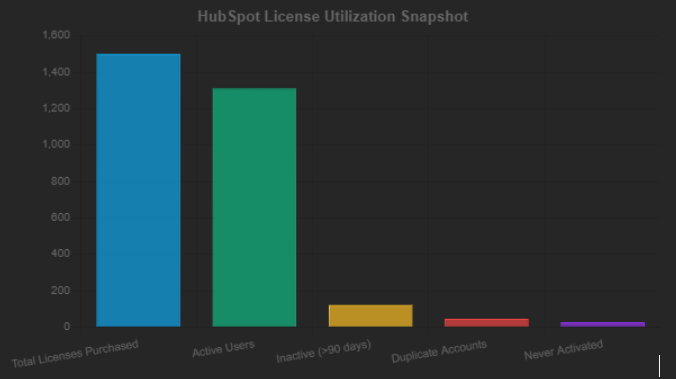
Interpretation
This visualization clearly shows that while 1,310 licenses are actively used,
190 seats (inactive, duplicate, or never activated) contribute directly to wasted spend.
At an average cost of $16 per seat per month, that equates to $2,720 in monthly waste, roughly $32,640 annually.
By reclaiming these licenses and applying CloudNuro's automation, the company achieved:
Optimization Strategy:
Results:

Title: Before vs After HubSpot License Optimization
Interpretation
Before optimization, 190 HubSpot licenses were either inactive or duplicated, resulting in approximately $2,700 in monthly costs.
After implementing CloudNuro's automation for license visibility and chargeback governance:
This visualization reinforces how structured audits and automation can make license optimization measurable and continuous.
Print or bookmark this checklist and revisit it quarterly to sustain optimization.
1. What causes most HubSpot license waste?
Inactive seats, overlapping hub subscriptions, and poor visibility into user activity account for the majority of overspending.
2. How can IT teams optimize HubSpot licenses quickly?
Run a usage export, filter by last login, and downgrade view-only users. Platforms like CloudNuro automate this workflow.
3. What is HubSpot Chargeback?
An internal accounting practice that allocates HubSpot costs to the departments that use them. It promotes accountability and budget ownership.
4. Can optimization reduce productivity?
No. Optimization focuses on matching access to need rather than restricting access. The goal is to keep every user on the right tier.
5. Which tools help track HubSpot utilization?
Native HubSpot activity reports and FinOps platforms such as CloudNuro that provide multi-hub visibility and renewal automation.
6. Does HubSpot refund unused licenses?
Mid-term refunds are uncommon. Reassign seats or plan downgrades ahead of renewal.
7. How does CloudNuro simplify license optimization?
CloudNuro automatically discovers unused seats, visualizes departmental spend, and provides downgrade and renewal recommendations aligned to FinOps best practices.
HubSpot license optimization is not a one-time cleanup; it is a continuous operational practice. By exporting usage data, reallocating licenses, tracking renewals, and applying chargeback discipline, organizations routinely recover 20–35% of annual license spend.
With CloudNuro, these actions become automated. Its unified dashboard delivers the visibility, forecasting, and accountability IT and finance leaders need to sustain results. Optimizing HubSpot licenses no longer requires manual effort, just consistent insight.
CloudNuro helps enterprises streamline HubSpot license management, identify savings, and strengthen compliance. Recognized by Gartner and Info-Tech Software Reviews, CloudNuro delivers unified SaaS visibility, automated license optimization, and chargeback analytics to reduce waste and drive accountability.
Take the next step:
Schedule your 15-minute CloudNuro demo.
See exactly how much you can reclaim from unused HubSpot licenses this quarter.
Trusted by enterprises such as Konica Minolta and Federal Signal, CloudNuro centralizes SaaS inventory, license optimization, renewal management, and advanced cost allocation, giving IT and Finance leaders the visibility, control, and cost-conscious culture needed to transform SaaS management into a measurable business advantage.
Request a no cost, no obligation free assessment —just 15 minutes to savings!
Get StartedIn most organizations, HubSpot becomes the backbone of sales, marketing, and service execution. Yet beneath that efficiency lies a hidden issue that IT administrators and SaaS managers face daily, license inefficiency.
Over time, teams add users, hubs, and premium features as operations expand. Few revisit those decisions. The result? Paid licenses for users who never log in, redundant hub subscriptions across departments, and contact tiers that keep billing for inactive records. According to Gartner's 2025 SaaS Cost Benchmark, enterprises waste between 25% and 35% of their CRM license budgets because of unused or misallocated seats.
License optimization isn't about cutting access. It's about matching cost to value and ensuring every HubSpot seat and tier delivers measurable results. Optimizing HubSpot licenses improves financial efficiency, enhances compliance, and strengthens collaboration between IT and finance teams.
HubSpot's model is straightforward yet easy to misuse. Licenses are purchased per seat per Hub (Sales, Service, Marketing, CMS, Operations), with additional pricing tied to marketing contacts. When roles change, projects end, or users leave, unused licenses continue billing quietly. Without visibility, those costs compound every quarter.
License optimization introduces continuous governance. It tracks real activity, reallocates licenses where needed, and enforces cost accountability through chargeback visibility.
CloudNuro gives IT and SaaS managers real-time visibility into all HubSpot users, hubs, add-ons, and contact tiers. Automatically detect idle seats, track usage trends, and create chargeback-ready reports, all within one unified SaaS management platform.
Book a no-cost assessment →
The first step toward optimization is building a clear inventory. Most admins underestimate how fragmented their license footprint has become.
How to do it:
| License Type | Purchased | Active | Inactive (30–90 days) | Never Logged In | Potential Reclaim |
|---|---|---|---|---|---|
| Sales Hub Pro | 420 | 388 | 22 | 10 | 32 |
| Service Hub Pro | 220 | 207 | 11 | 2 | 13 |
| Marketing Hub Pro | 80 | 76 | 2 | 2 | 4 |
In this example, 49 seats could be reclaimed, roughly $9,000 per year at current list prices.
Practical example:
A global consultancy exported license data and found 12% of Sales Hub users had not logged in for 60 days. Reassigning those seats to new hires and revoking duplicates recovered $11k per quarter.
Gartner Insight: Companies using automated license-discovery tools save 20–30% annually on SaaS seat costs.
Tip: Schedule this export monthly. It's the foundation for every downstream optimization.
CloudNuro automates license discovery and activity mapping, so admins no longer need manual exports or spreadsheets.
After inventory comes analysis. Many organizations pay for Sales Hub Professional or Service Hub Enterprise seats used only for dashboard viewing.
Process:
Example:
A marketing division found 15 dormant Sales Hub Enterprise users. Each license costs $100/month. Downgrading saved $18,000 annually without impacting reporting.
Supporting Data: FinOps Foundation's Usage Alignment Principle confirms that continuous user-activity reviews are the most effective lever for cost control in seat-based SaaS tools.
Insight: CloudNuro's activity analytics detect inactive or minimally active users automatically and alert admins 30 days before renewal.
Uneven distribution often hides waste. Marketing may be short on seats while Sales holds excess. Reallocation maximizes utilization before procurement buys more.
How to implement:
| Department | Seats Owned | Seats Used | Utilization % | Action |
|---|---|---|---|---|
| Sales | 500 | 410 | 82% | Reassign 40 to Marketing |
| Marketing | 120 | 118 | 98% | Request 2 from Sales |
| Support | 90 | 75 | 83% | Release 5 unused licenses |
This approach balances allocation without new spending.
G2 Review Data: High-performing HubSpot admins refresh license distribution quarterly, improving average seat utilization to above 90%.
CloudNuro's chargeback shows license cost by department, enabling proper accountability and cross-team transparency.
The most powerful optimization happens when feature usage is analyzed against the license tier.
Step-by-step:
Example:
A SaaS startup realized it was using only two custom objects and had limited workflow automation in Sales Hub Enterprise. Downgrading to the Professional cut costs by 22% while retaining the needed features.
FinOps Reference: The Right-sizing Principle encourages scaling licenses to consumption patterns rather than theoretical needs.
Insight: CloudNuro compares usage metrics across hubs and recommends optimal downgrade or upgrade paths backed by ROI projections.
Visibility into renewals prevents last-minute renewals at list price and anchors accountability for every dollar spent.
Implementation Steps:
HubSpot Chargeback in practice:
| Department | Monthly Cost | Active Seats | Cost per User |
|---|---|---|---|
| Sales | $18,200 | 420 | $43.33 |
| Marketing | $5,440 | 120 | $45.33 |
| Service | $3,600 | 90 | $40.00 |
Graph Suggestion: A horizontal bar chart showing cost per department clarifies budget accountability.
Business Impact: One enterprise reduced SaaS renewal surprises by 80% after implementing chargeback reporting through CloudNuro.
CloudNuro automates renewal tracking, forecast modeling, and department-wise chargeback, giving IT and finance a unified HubSpot cost view.
Recognized by Gartner and Info-Tech, CloudNuro is the only FinOps-certified SaaS Management Platform that delivers pricing clarity and cost-saving strategies in one unified view.
👉 Get your personalized pricing audit and optimize your HubSpot bills now.
1. Overprovisioning during onboarding
Problem: Bulk-provisioned seats remain unused after initial rollout.
Fix: Issue licenses only after user confirmation and require automatic deactivation for non-logins beyond 30 days.
2. Failing to downgrade post-project users
Problem: Temporary campaign teams retain premium seats.
Fix: Tag project-based users and schedule downgrades at project close.
3. Ignoring contact tier inflation
Problem: Marketing contacts grow unchecked.
Fix: Automate suppression workflows for inactive contacts to avoid overbilling.
4. Lack of renewal visibility
Problem: Missed renewal windows remove negotiation leverage.
Fix: Maintain a shared renewal calendar and enable proactive alerts.
5. No chargeback policy
Problem: Costs stay centralized, reducing accountability.
Fix: Adopt department-level chargeback through CloudNuro dashboards.
CloudNuro automatically detects underused licenses, inactive contacts, and missed renewals across HubSpot. IT and finance teams gain real-time alerts, accurate usage data, and audit-ready chargeback visibility.
Start your free optimization snapshot →
Company: Mid-Market SaaS Startup (U.S. -- B2B Productivity Platform)
Challenge: Rapid headcount growth led to uncontrolled expansion of HubSpot licenses across the Sales and Customer Success teams. After an internal audit, the IT team discovered multiple inactive and duplicate accounts caused by role transitions and contractor turnover.
Problem:
Untracked user churn created 190 unproductive licenses. With 20% of seats either inactive or duplicated, the company spent an estimated $2,720 per month on unused HubSpot access. The lack of automated visibility delayed discovery for 6 months.
Interpretation
This visualization clearly shows that while 1,310 licenses are actively used,
190 seats (inactive, duplicate, or never activated) contribute directly to wasted spend.
At an average cost of $16 per seat per month, that equates to $2,720 in monthly waste, roughly $32,640 annually.
By reclaiming these licenses and applying CloudNuro's automation, the company achieved:
Optimization Strategy:
Results:
Title: Before vs After HubSpot License Optimization
Interpretation
Before optimization, 190 HubSpot licenses were either inactive or duplicated, resulting in approximately $2,700 in monthly costs.
After implementing CloudNuro's automation for license visibility and chargeback governance:
This visualization reinforces how structured audits and automation can make license optimization measurable and continuous.
Print or bookmark this checklist and revisit it quarterly to sustain optimization.
1. What causes most HubSpot license waste?
Inactive seats, overlapping hub subscriptions, and poor visibility into user activity account for the majority of overspending.
2. How can IT teams optimize HubSpot licenses quickly?
Run a usage export, filter by last login, and downgrade view-only users. Platforms like CloudNuro automate this workflow.
3. What is HubSpot Chargeback?
An internal accounting practice that allocates HubSpot costs to the departments that use them. It promotes accountability and budget ownership.
4. Can optimization reduce productivity?
No. Optimization focuses on matching access to need rather than restricting access. The goal is to keep every user on the right tier.
5. Which tools help track HubSpot utilization?
Native HubSpot activity reports and FinOps platforms such as CloudNuro that provide multi-hub visibility and renewal automation.
6. Does HubSpot refund unused licenses?
Mid-term refunds are uncommon. Reassign seats or plan downgrades ahead of renewal.
7. How does CloudNuro simplify license optimization?
CloudNuro automatically discovers unused seats, visualizes departmental spend, and provides downgrade and renewal recommendations aligned to FinOps best practices.
HubSpot license optimization is not a one-time cleanup; it is a continuous operational practice. By exporting usage data, reallocating licenses, tracking renewals, and applying chargeback discipline, organizations routinely recover 20–35% of annual license spend.
With CloudNuro, these actions become automated. Its unified dashboard delivers the visibility, forecasting, and accountability IT and finance leaders need to sustain results. Optimizing HubSpot licenses no longer requires manual effort, just consistent insight.
CloudNuro helps enterprises streamline HubSpot license management, identify savings, and strengthen compliance. Recognized by Gartner and Info-Tech Software Reviews, CloudNuro delivers unified SaaS visibility, automated license optimization, and chargeback analytics to reduce waste and drive accountability.
Take the next step:
Schedule your 15-minute CloudNuro demo.
See exactly how much you can reclaim from unused HubSpot licenses this quarter.
Trusted by enterprises such as Konica Minolta and Federal Signal, CloudNuro centralizes SaaS inventory, license optimization, renewal management, and advanced cost allocation, giving IT and Finance leaders the visibility, control, and cost-conscious culture needed to transform SaaS management into a measurable business advantage.
Request a no cost, no obligation free assessment - just 15 minutes to savings!
Get StartedWe're offering complimentary ServiceNow license assessments to only 25 enterprises this quarter who want to unlock immediate savings without disrupting operations.
Get Free AssessmentGet Started




CloudNuro Corp
1755 Park St. Suite 207
Naperville, IL 60563
Phone : +1-630-277-9470
Email: info@cloudnuro.com





.webp)

Recognized Leader in SaaS Management Platforms by Info-Tech SoftwareReviews




.svg)