

Sign Up
Thank you for Submitting!

Miro has evolved from a simple whiteboarding app to a cornerstone of enterprise collaboration, driving design sprints, product roadmaps, and agile ceremonies across departments. However, this success often hides an operational blind spot: license inefficiency. IT administrators and SaaS managers frequently discover that their organizations are paying for far more Miro licenses than they use.
The problem isn't adoption; it's the lack of visibility into utilization. Miro's role-based structure (Editor, Commenter, Viewer) and multiple tiers (Free, Team, Business, Enterprise) make it easy for licenses to proliferate without governance. What begins as a 100-seat deployment for a design team often turns into a 1,000-seat enterprise subscription, even though only 600 users actively use the platform. According to G2.com data, nearly 28% of Miro users have been inactive for over 90 days, contributing to unnecessary cost inflation.
Common inefficiencies include:
Without structured license optimization, organizations face recurring waste. CloudNuro's FinOps-driven analysis across enterprise collaboration tools shows that Miro license utilization rates typically hover between 70–75%, with 20–30% of paid seats inactive. That's an instant opportunity for savings, if managed correctly.
This guide presents a practical, step-by-step framework for Miro license optimization explicitly designed for IT and SaaS administrators. You'll learn how to identify inefficiencies, right-size licenses, reallocate unused seats, and automate governance, ensuring every dollar spent on Miro directly contributes to collaboration outcomes.
Get the free assessment for your organization
Before optimizing, understand what you already have. The first step in any license optimization program is conducting a comprehensive Miro license audit.
Process:
Example:
In one CloudNuro customer audit, an enterprise with 2,800 Miro licenses identified 340 inactive user accounts and 210 duplicate accounts across departments. That's 550 reclaimable licenses, representing nearly $85,000 in annualized savings.
Evidence:
Gartner's 2024 SaaS Optimization Guide emphasizes that license audits should be repeated quarterly for fast-moving collaborative tools like Miro to maintain 90%+ utilization efficiency.
Tip:
Automate audits with CloudNuro's SaaS License Tracker, which pulls user activity, license type, and login frequency directly from Miro via API.
Need to get the free assessment for your organization? Connect with Us
Once your inventory is mapped, assess usage behavior. The goal is to separate "active contributors" from "passive participants."
Process:
Example:
A U.S.-based retail brand used CloudNuro to evaluate 1,400 Miro users. Findings:
By right-sizing, the company downgraded 290 licenses and removed 130 dormant ones, achieving a 26% reduction in total Miro spend within one quarter.
Insight:
According to FinOps Foundation benchmarks, reducing dormant licenses by even 15% yields a 3–5% annual SaaS cost reduction across the portfolio.
Tool Tip:
Use CloudNuro's License Utilization Heatmap to visualize license activity trends and identify drop-offs in engagement by department.
Need to get the free assessment for your organization? Connect with Us
In many enterprises, specific departments use Miro extensively (e.g., Product, UX, Engineering), while others (e.g., HR, Finance) use it sparingly. This imbalance results in over-allocation in low-usage teams and shortages elsewhere.
Process:
| Department | Licenses Assigned | Active Users | Utilization % | Recommended Action |
|---|---|---|---|---|
| Product | 600 | 580 | 96% | Retain all licenses |
| Marketing | 450 | 270 | 60% | Reallocate 150 to other teams |
| HR | 200 | 85 | 42% | Downgrade to Commenter roles |
| Engineering | 750 | 705 | 94% | Retain |
| Finance | 150 | 65 | 43% | Consolidate and reduce 50 seats |
Result:
Reallocation avoided additional purchases and unlocked $48,000 in deferred license costs.
Tool Tip:
CloudNuro's Departmental Usage Dashboard visualizes license distribution by team, making it easy to identify underused pools of licenses.
Need to get the free assessment for your organization? Connect with Us
Not everyone needs a premium license. Many organizations mistakenly provision all users as Editors on Miro's Business or Enterprise tiers when some could function as Commenters or Viewers.
Process:
Example:
A global logistics company discovered that 35% of its Miro Business users had never created a board. By downgrading them to Team or Commenter licenses, they reduced annual cost per user from $16 to $10, generating a $102,000 saving.
Insight:
G2.com's 2024 SaaS Utilization Index reports that license-tier misalignment accounts for 20–25% of waste in enterprise SaaS portfolios.
Tool Tip:
CloudNuro's Role Optimization View suggests appropriate Miro license tiers automatically based on user activity.
Need to get the free assessment for your organization? Connect with Us
Dormant or offboarded users are among the most significant hidden cost drivers. Manual deactivation often falls through the cracks, especially in large organizations.
Process:
Example:
A pharmaceutical enterprise linked its Miro account with Workday. Upon employee exit, Miro access was automatically deactivated within 24 hours, reclaiming 220 seats and saving $41,800 annually.
Evidence:
FinOps research shows that automated license reclamation can reduce manual audit overhead by 40% and prevent overspend on renewals.
Need to get the free assessment for your organization? Connect with Us
Chargeback transforms license optimization from an IT responsibility to a shared financial culture. Miro chargeback means assigning costs directly to departments based on their license usage.
Process:
Example:
A technology firm with six divisions implemented chargeback reporting. Within three months, idle licenses dropped by 22% as teams became conscious of their monthly costs.
Result:
Cost transparency fostered ownership and saved $60,000 annually through behavioral change alone.
Insight:
According to Gartner's SaaS Governance Report, organizations with chargeback or showback models achieve 20–30% higher license utilization rates than those without accountability frameworks.
Need to get the free assessment for your organization? Connect with Us
Renewal periods are the best time to cut costs. Armed with utilization data, admins can renegotiate Miro contracts from a position of strength.
Process:
Example:
A European manufacturing enterprise with 4,200 Miro seats presented CloudNuro's license utilization report at renewal. The data showed that only 3,200 seats were active. Using this evidence, procurement negotiated a revised pricing plan, resulting in 18% cost savings (≈$124,000 in annual savings).
Tip:
CloudNuro's Renewal Management Module provides a 360° view of upcoming contracts, renewal dates, and utilization benchmarks to support negotiation.
Get the free assessment for your organization? Connect with Us
| Parameter | Before Optimization | After Optimization | Improvement |
|---|---|---|---|
| Total Paid Licenses | 2,800 | 2,050 | -26.8% |
| Monthly Miro Spend | $42,000 | $30,200 | -28.1% |
| Dormant Users (90 Days) | 320 | 60 | -81% |
| Duplicate Accounts | 210 | 0 | -100% |
| Departments Using Chargeback | 0 | 8 | +100% adoption |
| License Utilization Rate | 72% | 94% | +22 points |
Problem:
The company had uncoordinated Miro purchases across departments, resulting in duplicate billing, inactive accounts, and redundant Enterprise plans.
Solution:
Using CloudNuro, IT admins consolidated all workspaces, right-sized licenses based on actual usage, implemented automated offboarding, and introduced departmental chargeback.
Outcome:
Within 60 days, Miro's monthly spending dropped from $42,000 to $30,200, resulting in nearly $142,000 in annualized savings.
Metric: Miro License Optimization Results (Pre vs. Post)
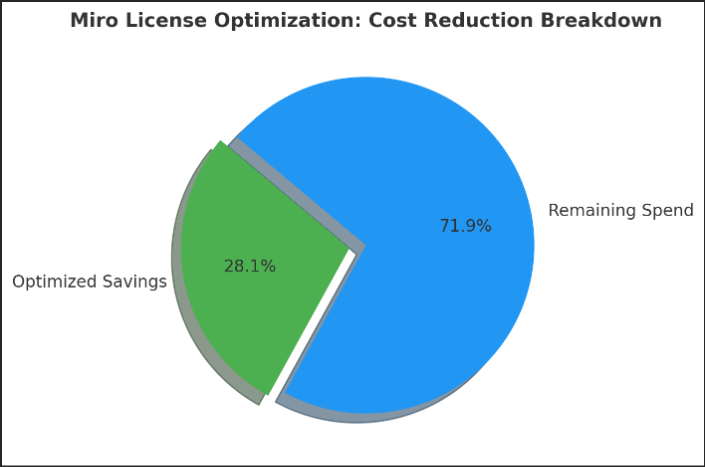
A pie-chart illustrating the improvement metrics (to be included visually in blog): Miro License Optimization: Cost Reduction Breakdown, showing that 28.1% of total Miro spend was successfully optimized and reclaimed as savings.
CloudNuro provides automated dashboards for Miro license optimization, utilization tracking, seat reallocation, and ensuring every license delivers measurable business value. With real-time data, IT admins can prevent overspending, streamline renewals, and enforce accountability effortlessly.
Get the free assessment for your organization? Connect with Us
Even seasoned IT teams make errors that erode the potential for savings. Here are frequent pitfalls, and how to correct them.
| Mistake | Description | Correction |
|---|---|---|
| Overprovisioning licenses | Buying more licenses than active users require | Run quarterly usage audits and automate deactivation workflows |
| Ignoring inactive users | Dormant users continue consuming licenses indefinitely | Track last-login data via CloudNuro's dashboards |
| Over-licensing commenters | Comment-only users assigned as Editors | Downgrade roles to free or viewer tiers |
| Failing to centralize workspaces | Multiple departments are paying for separate instances | Consolidate under enterprise billing |
| No renewal governance | Auto-renewals without analysis lead to waste | Start renewal reviews 90 days prior |
| Lack of accountability | Departments unaware of their Miro spend | Implement chargeback or showback reporting |
| Ignoring integrations and add-ons | Paying for unused connectors | Audit add-on usage quarterly |
Get the free assessment for your organization? Connect with Us
CloudNuro helps IT and SaaS administrators eliminate waste, improve governance, and automate license right-sizing for tools like Miro.
Through AI-powered license optimization, CloudNuro provides:
Trusted by global enterprises and public sector organizations, CloudNuro brings FinOps discipline to every Miro deployment, helping teams achieve transparency, accountability, and measurable ROI.
1. How do I know if my Miro licenses are underused?
Review login frequency and board editing activity in Miro's analytics dashboard or through CloudNuro's License Utilization module.
2. How often should Miro license audits occur?
Quarterly reviews are ideal for fast-moving teams. CloudNuro automates this process, ensuring consistent oversight.
3. What's the best way to optimize Miro licenses without disrupting teams?
Gradually downgrade users based on behavior. Notify departments in advance to maintain transparency.
4. Can CloudNuro automate Miro license right-sizing?
Yes. CloudNuro continuously analyzes user activity and provides AI-based downgrade or deactivation recommendations.
5. How does Miro chargeback improve accountability?
It ties cost ownership to departments, making users mindful of license value and reducing waste.
6. Are free and paid Miro accounts linked for optimization?
Yes, through centralized visibility. Free accounts can supplement light-use departments to reduce paid license load.
7. What's the ROI of Miro license optimization?
On average, CloudNuro customers achieve a 20–30% reduction in license costs within 60 days.
8. How do integrations affect Miro costs?
Each connector (e.g., Jira, Slack, Asana) adds incremental cost. Regularly audit integrations for active usage.
9. Can CloudNuro assist in renewal negotiations?
Absolutely. CloudNuro's Renewal Management feature uses utilization data to secure better vendor terms.
10. How can IT and Finance teams collaborate effectively?
By using CloudNuro's unified dashboard, both teams gain visibility into utilization, spend, and accountability, ensuring governance alignment.
CloudNuro is the leading FinOps-backed SaaS Management Platform recognized by Gartner and Info-Tech SoftwareReviews for driving financial governance across SaaS ecosystems. Trusted by organizations like Konica Minolta and Federal Signal, CloudNuro empowers IT and finance leaders to optimize Miro licenses, automate renewals, and enforce financial discipline across departments.
Take control of your Miro costs with CloudNuro's free FinOps Assessment, discover underused licenses, enforce chargeback visibility, and save up to 30% on your next renewal.
Get the free assessment for your organization? Connect with Us
Request a no cost, no obligation free assessment —just 15 minutes to savings!
Get StartedMiro has evolved from a simple whiteboarding app to a cornerstone of enterprise collaboration, driving design sprints, product roadmaps, and agile ceremonies across departments. However, this success often hides an operational blind spot: license inefficiency. IT administrators and SaaS managers frequently discover that their organizations are paying for far more Miro licenses than they use.
The problem isn't adoption; it's the lack of visibility into utilization. Miro's role-based structure (Editor, Commenter, Viewer) and multiple tiers (Free, Team, Business, Enterprise) make it easy for licenses to proliferate without governance. What begins as a 100-seat deployment for a design team often turns into a 1,000-seat enterprise subscription, even though only 600 users actively use the platform. According to G2.com data, nearly 28% of Miro users have been inactive for over 90 days, contributing to unnecessary cost inflation.
Common inefficiencies include:
Without structured license optimization, organizations face recurring waste. CloudNuro's FinOps-driven analysis across enterprise collaboration tools shows that Miro license utilization rates typically hover between 70–75%, with 20–30% of paid seats inactive. That's an instant opportunity for savings, if managed correctly.
This guide presents a practical, step-by-step framework for Miro license optimization explicitly designed for IT and SaaS administrators. You'll learn how to identify inefficiencies, right-size licenses, reallocate unused seats, and automate governance, ensuring every dollar spent on Miro directly contributes to collaboration outcomes.
Get the free assessment for your organization
Before optimizing, understand what you already have. The first step in any license optimization program is conducting a comprehensive Miro license audit.
Process:
Example:
In one CloudNuro customer audit, an enterprise with 2,800 Miro licenses identified 340 inactive user accounts and 210 duplicate accounts across departments. That's 550 reclaimable licenses, representing nearly $85,000 in annualized savings.
Evidence:
Gartner's 2024 SaaS Optimization Guide emphasizes that license audits should be repeated quarterly for fast-moving collaborative tools like Miro to maintain 90%+ utilization efficiency.
Tip:
Automate audits with CloudNuro's SaaS License Tracker, which pulls user activity, license type, and login frequency directly from Miro via API.
Need to get the free assessment for your organization? Connect with Us
Once your inventory is mapped, assess usage behavior. The goal is to separate "active contributors" from "passive participants."
Process:
Example:
A U.S.-based retail brand used CloudNuro to evaluate 1,400 Miro users. Findings:
By right-sizing, the company downgraded 290 licenses and removed 130 dormant ones, achieving a 26% reduction in total Miro spend within one quarter.
Insight:
According to FinOps Foundation benchmarks, reducing dormant licenses by even 15% yields a 3–5% annual SaaS cost reduction across the portfolio.
Tool Tip:
Use CloudNuro's License Utilization Heatmap to visualize license activity trends and identify drop-offs in engagement by department.
Need to get the free assessment for your organization? Connect with Us
In many enterprises, specific departments use Miro extensively (e.g., Product, UX, Engineering), while others (e.g., HR, Finance) use it sparingly. This imbalance results in over-allocation in low-usage teams and shortages elsewhere.
Process:
| Department | Licenses Assigned | Active Users | Utilization % | Recommended Action |
|---|---|---|---|---|
| Product | 600 | 580 | 96% | Retain all licenses |
| Marketing | 450 | 270 | 60% | Reallocate 150 to other teams |
| HR | 200 | 85 | 42% | Downgrade to Commenter roles |
| Engineering | 750 | 705 | 94% | Retain |
| Finance | 150 | 65 | 43% | Consolidate and reduce 50 seats |
Result:
Reallocation avoided additional purchases and unlocked $48,000 in deferred license costs.
Tool Tip:
CloudNuro's Departmental Usage Dashboard visualizes license distribution by team, making it easy to identify underused pools of licenses.
Need to get the free assessment for your organization? Connect with Us
Not everyone needs a premium license. Many organizations mistakenly provision all users as Editors on Miro's Business or Enterprise tiers when some could function as Commenters or Viewers.
Process:
Example:
A global logistics company discovered that 35% of its Miro Business users had never created a board. By downgrading them to Team or Commenter licenses, they reduced annual cost per user from $16 to $10, generating a $102,000 saving.
Insight:
G2.com's 2024 SaaS Utilization Index reports that license-tier misalignment accounts for 20–25% of waste in enterprise SaaS portfolios.
Tool Tip:
CloudNuro's Role Optimization View suggests appropriate Miro license tiers automatically based on user activity.
Need to get the free assessment for your organization? Connect with Us
Dormant or offboarded users are among the most significant hidden cost drivers. Manual deactivation often falls through the cracks, especially in large organizations.
Process:
Example:
A pharmaceutical enterprise linked its Miro account with Workday. Upon employee exit, Miro access was automatically deactivated within 24 hours, reclaiming 220 seats and saving $41,800 annually.
Evidence:
FinOps research shows that automated license reclamation can reduce manual audit overhead by 40% and prevent overspend on renewals.
Need to get the free assessment for your organization? Connect with Us
Chargeback transforms license optimization from an IT responsibility to a shared financial culture. Miro chargeback means assigning costs directly to departments based on their license usage.
Process:
Example:
A technology firm with six divisions implemented chargeback reporting. Within three months, idle licenses dropped by 22% as teams became conscious of their monthly costs.
Result:
Cost transparency fostered ownership and saved $60,000 annually through behavioral change alone.
Insight:
According to Gartner's SaaS Governance Report, organizations with chargeback or showback models achieve 20–30% higher license utilization rates than those without accountability frameworks.
Need to get the free assessment for your organization? Connect with Us
Renewal periods are the best time to cut costs. Armed with utilization data, admins can renegotiate Miro contracts from a position of strength.
Process:
Example:
A European manufacturing enterprise with 4,200 Miro seats presented CloudNuro's license utilization report at renewal. The data showed that only 3,200 seats were active. Using this evidence, procurement negotiated a revised pricing plan, resulting in 18% cost savings (≈$124,000 in annual savings).
Tip:
CloudNuro's Renewal Management Module provides a 360° view of upcoming contracts, renewal dates, and utilization benchmarks to support negotiation.
Get the free assessment for your organization? Connect with Us
| Parameter | Before Optimization | After Optimization | Improvement |
|---|---|---|---|
| Total Paid Licenses | 2,800 | 2,050 | -26.8% |
| Monthly Miro Spend | $42,000 | $30,200 | -28.1% |
| Dormant Users (90 Days) | 320 | 60 | -81% |
| Duplicate Accounts | 210 | 0 | -100% |
| Departments Using Chargeback | 0 | 8 | +100% adoption |
| License Utilization Rate | 72% | 94% | +22 points |
Problem:
The company had uncoordinated Miro purchases across departments, resulting in duplicate billing, inactive accounts, and redundant Enterprise plans.
Solution:
Using CloudNuro, IT admins consolidated all workspaces, right-sized licenses based on actual usage, implemented automated offboarding, and introduced departmental chargeback.
Outcome:
Within 60 days, Miro's monthly spending dropped from $42,000 to $30,200, resulting in nearly $142,000 in annualized savings.
Metric: Miro License Optimization Results (Pre vs. Post)
A pie-chart illustrating the improvement metrics (to be included visually in blog): Miro License Optimization: Cost Reduction Breakdown, showing that 28.1% of total Miro spend was successfully optimized and reclaimed as savings.
CloudNuro provides automated dashboards for Miro license optimization, utilization tracking, seat reallocation, and ensuring every license delivers measurable business value. With real-time data, IT admins can prevent overspending, streamline renewals, and enforce accountability effortlessly.
Get the free assessment for your organization? Connect with Us
Even seasoned IT teams make errors that erode the potential for savings. Here are frequent pitfalls, and how to correct them.
| Mistake | Description | Correction |
|---|---|---|
| Overprovisioning licenses | Buying more licenses than active users require | Run quarterly usage audits and automate deactivation workflows |
| Ignoring inactive users | Dormant users continue consuming licenses indefinitely | Track last-login data via CloudNuro's dashboards |
| Over-licensing commenters | Comment-only users assigned as Editors | Downgrade roles to free or viewer tiers |
| Failing to centralize workspaces | Multiple departments are paying for separate instances | Consolidate under enterprise billing |
| No renewal governance | Auto-renewals without analysis lead to waste | Start renewal reviews 90 days prior |
| Lack of accountability | Departments unaware of their Miro spend | Implement chargeback or showback reporting |
| Ignoring integrations and add-ons | Paying for unused connectors | Audit add-on usage quarterly |
Get the free assessment for your organization? Connect with Us
CloudNuro helps IT and SaaS administrators eliminate waste, improve governance, and automate license right-sizing for tools like Miro.
Through AI-powered license optimization, CloudNuro provides:
Trusted by global enterprises and public sector organizations, CloudNuro brings FinOps discipline to every Miro deployment, helping teams achieve transparency, accountability, and measurable ROI.
1. How do I know if my Miro licenses are underused?
Review login frequency and board editing activity in Miro's analytics dashboard or through CloudNuro's License Utilization module.
2. How often should Miro license audits occur?
Quarterly reviews are ideal for fast-moving teams. CloudNuro automates this process, ensuring consistent oversight.
3. What's the best way to optimize Miro licenses without disrupting teams?
Gradually downgrade users based on behavior. Notify departments in advance to maintain transparency.
4. Can CloudNuro automate Miro license right-sizing?
Yes. CloudNuro continuously analyzes user activity and provides AI-based downgrade or deactivation recommendations.
5. How does Miro chargeback improve accountability?
It ties cost ownership to departments, making users mindful of license value and reducing waste.
6. Are free and paid Miro accounts linked for optimization?
Yes, through centralized visibility. Free accounts can supplement light-use departments to reduce paid license load.
7. What's the ROI of Miro license optimization?
On average, CloudNuro customers achieve a 20–30% reduction in license costs within 60 days.
8. How do integrations affect Miro costs?
Each connector (e.g., Jira, Slack, Asana) adds incremental cost. Regularly audit integrations for active usage.
9. Can CloudNuro assist in renewal negotiations?
Absolutely. CloudNuro's Renewal Management feature uses utilization data to secure better vendor terms.
10. How can IT and Finance teams collaborate effectively?
By using CloudNuro's unified dashboard, both teams gain visibility into utilization, spend, and accountability, ensuring governance alignment.
CloudNuro is the leading FinOps-backed SaaS Management Platform recognized by Gartner and Info-Tech SoftwareReviews for driving financial governance across SaaS ecosystems. Trusted by organizations like Konica Minolta and Federal Signal, CloudNuro empowers IT and finance leaders to optimize Miro licenses, automate renewals, and enforce financial discipline across departments.
Take control of your Miro costs with CloudNuro's free FinOps Assessment, discover underused licenses, enforce chargeback visibility, and save up to 30% on your next renewal.
Get the free assessment for your organization? Connect with Us
Request a no cost, no obligation free assessment - just 15 minutes to savings!
Get StartedWe're offering complimentary ServiceNow license assessments to only 25 enterprises this quarter who want to unlock immediate savings without disrupting operations.
Get Free AssessmentGet Started




CloudNuro Corp
1755 Park St. Suite 207
Naperville, IL 60563
Phone : +1-630-277-9470
Email: info@cloudnuro.com





.webp)

Recognized Leader in SaaS Management Platforms by Info-Tech SoftwareReviews



.png)
.svg)