

Sign Up
Thank you for Submitting!

SaaS management for remote teams is no longer a “nice to have” process. With remote employees and contractors driving most technology consumption, uncontrolled SaaS access quickly turns into security risk, compliance exposure, and budget overruns.
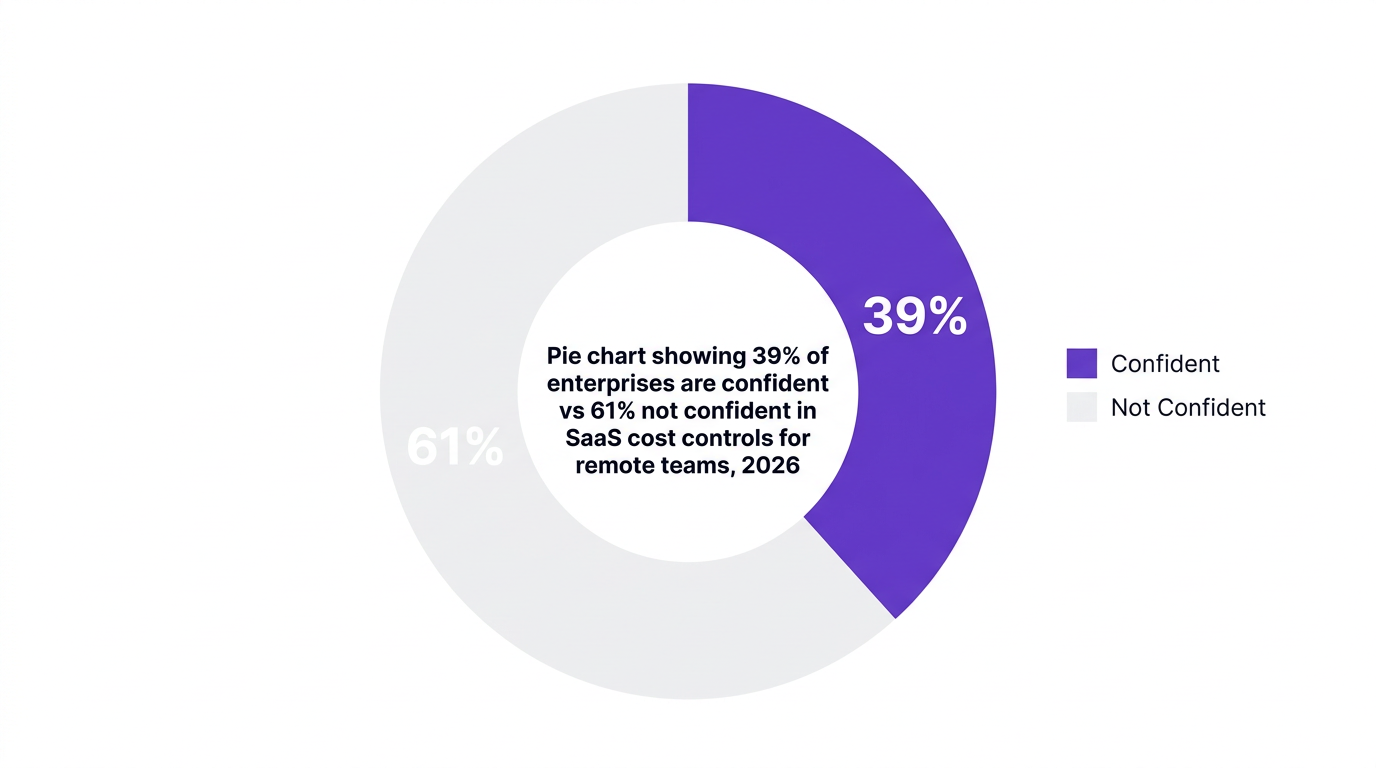
Gartner reports that 82% of enterprises saw SaaS spending increase in 2026 due to remote and contract-based workforces (Gartner, 2026). Yet only 39% of enterprises feel confident in their SaaS cost controls for remote teams (TechRepublic, 2026). That gap is where IT, security, and finance leaders are feeling the most pressure.
This article walks through a practical model for access and cost controls for distributed and contractor-heavy workforces, backed by data, expert perspectives, and real use cases. It also shows how AI-driven governance platforms such as CloudNuro operationalize these practices at scale.
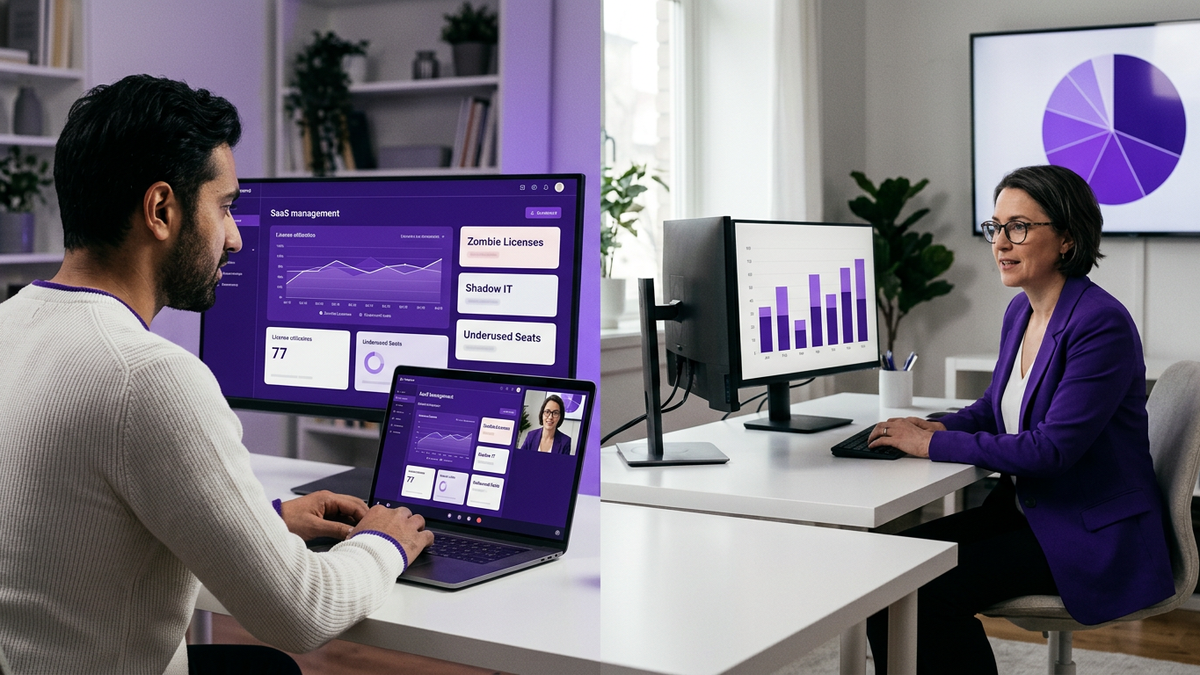
Remote and contractor-heavy environments change the basic math of SaaS operations. Instead of a small set of centrally managed applications, you face a sprawling mix of collaboration tools, CRM instances, HR portals, time tracking SaaS, analytics platforms, and niche point solutions.
A Forrester 2026 survey found that 47% of IT leaders blame shadow IT from remote workers for unsanctioned SaaS usage and increased compliance risks. That risk is amplified when contractors use their own devices and accounts, often outside core IT processes.
Traditional models built around:
are not built for dynamic, project-based, global teams. In a contractor-heavy workforce, access needs change weekly, sometimes daily. Without automation and real-time visibility, three things usually happen:
As a Principal Analyst at Forrester, puts it: “Robust access controls and automated offboarding are non-negotiable for managing SaaS risk in remote and contractor-heavy environments.”
Remote SaaS spend leaks through many small cracks, not just a few big failures. McKinsey’s 2026 research shows 69% of finance leaders cite lack of unified SaaS visibility as the top reason for budget overruns in remote-first enterprises.
Common SaaS cost leak patterns include:
A Deloitte 2026 analysis found that AI-based SaaS monitoring tools improved license utilization rates by 42% in distributed environments, simply by mapping usage to spend and surfacing low-value licenses for remediation.
This creates a clear mandate for SaaS cost optimization for remote teams that is:
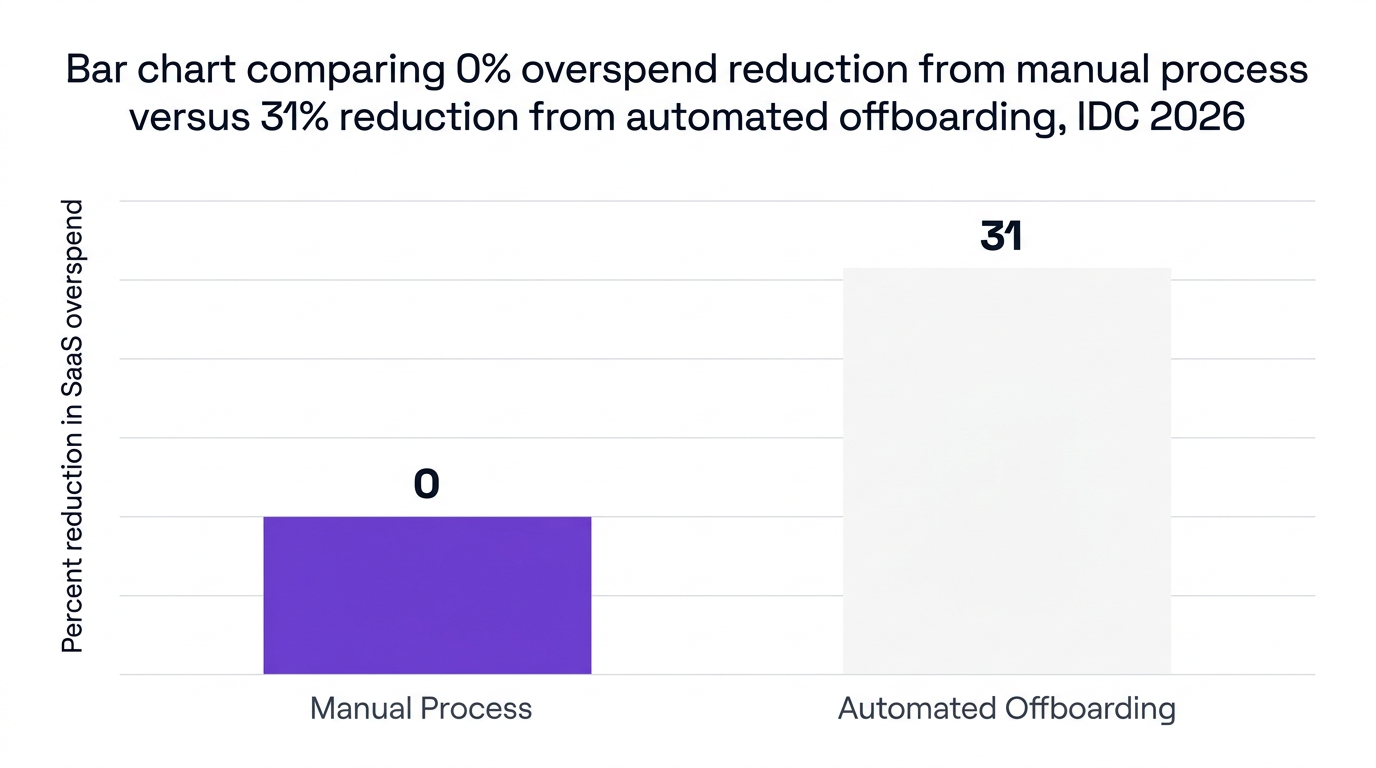
IDC’s 2026 study found that automated onboarding and offboarding solutions reduce SaaS overspend by up to 31% for organizations with large remote and contractor workforces.
This reduction comes from:
For CFOs and CIOs, this is the fastest win: connect HR and contractor management systems to SaaS management so user lifecycle events directly drive access changes and cost controls.
Strong SaaS access controls for remote employees and contractors start with a clear philosophy: identities and roles first, apps and licenses second. Think of access like a building security system, not a collection of individual door keys.
For large remote and contractor populations, role-based access SaaS remote teams is the only sustainable model.
Key practices:
This reduces manual decision-making and enforces consistent user access management for both full-time and contractor populations.
Contractors are often treated “like employees” in SaaS tools, which leads to risk and overspend.
More mature organizations:
As a Director of Cloud Security at Gartner, notes: “Contractor-heavy organizations need automated policy enforcement to maintain compliance and reduce operational friction.”
Manual user lifecycle management frequently fails in remote and distributed environments. Tickets are missed, managers forget to request deprovisioning, and downstream apps remain untouched.
Best practice for user access management SaaS contractors and employees:
This is where automated workflows do more than save time. They directly lower risk and cost by enforcing consistent access decisions.
For sectors like healthcare, finance, and government, SaaS compliance in remote teams is as critical as cost. Distributed workforces introduce complex data movement and access patterns that audit teams must be able to explain and prove.
McKinsey’s 2026 review of SaaS compliance found that regulators are increasingly asking for:
With remote and contractor work, shadow IT is not just personal productivity tools. It includes unsanctioned CRM instances, analytics platforms, code repositories, and file-sharing services.
A 2026 Forrester study found 47% of IT leaders see shadow IT from remote employees as a primary driver of compliance risk. To address this, organizations need:
Audit teams care less about “what tools you use” and more about how consistently you enforce your policies. For remote and contractor users, your control story should show:
Here is where an analogy helps: think of your SaaS ecosystem as an international airport. Security does not track every passenger manually. It runs on rules, scanners, and logs. AI SaaS management 2026 platforms bring that same model to application access and spend.
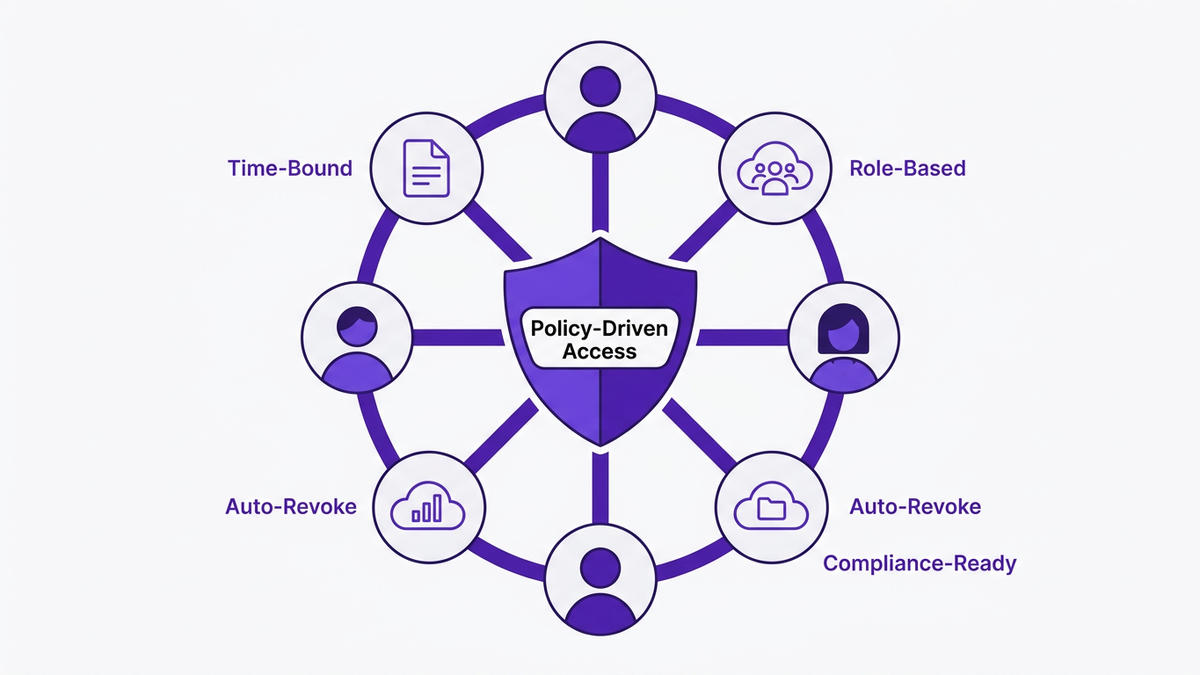
To bring cost, access, and compliance together, enterprises benefit from a simple framework. Below is a five-step model for managing SaaS costs and access for remote teams.
This framework supports both traditional employees and flexible contractor populations while giving CIOs and CFOs a shared view of risk and value.
Theory is helpful, but concrete outcomes convince stakeholders. Two recent case studies highlight what mature SaaS management for remote teams can achieve.
A global financial services firm with thousands of remote contractors faced escalating SaaS spend and a complex landscape of remote workforce SaaS tools. After deploying an AI-driven SaaS management solution:
This delivered both hard savings and a stronger audit narrative for regulators.
A US healthcare provider with distributed clinical and administrative staff used multiple SaaS platforms for patient intake, telehealth, time & attendance remote teams SaaS, and EHR-adjacent tools.
After introducing automated onboarding and offboarding with integrated governance:
In both examples, the combination of automation, visibility, and policy-driven access made remote and contractor-heavy models financially sustainable and compliant.
CloudNuro was built for enterprises that run on SaaS and depend on distributed workforces. Its governance-first architecture and AI capabilities align directly with the access and cost control challenges described above.
CloudNuro’s Unified Cloud Custodian delivers 360° app discovery, combining SSO, finance, and integration data to surface every SaaS application, including those used by remote employees and contractors.
This directly addresses the 47% of IT leaders who say shadow IT among remote workers is a major compliance risk. CloudNuro:
CloudNuro’s AI Custodian connects HR, contractor management systems, and identity providers to automate user lifecycle processes.
For both employees and contractors, IT teams can:
This directly supports the 31% overspend reduction identified by IDC 2026 for automated offboarding and makes SaaS spend management for contractors a continuous process, not a year-end scramble.
CloudNuro’s dashboards quantify SaaS cost controls 2026 in terms that finance understands.
Capabilities include:
This supports SaaS cost optimization remote teams by giving finance leaders hard numbers, such as cost per active user, by app and by business unit.
CloudNuro embeds governance into daily operations.
For cloud SaaS security remote work, it delivers:
This gives risk, security, and compliance leaders confidence that SaaS compliance remote workforce controls are enforced uniformly, not improvised on a per-team basis.
CloudNuro’s AI models highlight anomalies and opportunities, such as:
Enterprises can act on these insights with automated workflows instead of manual campaigns, closing the loop between visibility and control.
Enterprises control costs by combining complete visibility, role-based licensing, and automated offboarding. A SaaS management platform maps spend to actual usage, flags underutilized licenses, and reclaims seats when contractors or employees leave.
Chargeback models and standardized remote workforce SaaS tools catalogs further reduce ad hoc purchases and redundant tools.
Best practices include:
Centralizing policies in a SaaS management tool ensures consistent enforcement and easier audits.
Automated workflows replace manual tickets with event-driven actions. When a user is hired, changes role, or leaves, the workflow provisions or revokes access based on policy.
This reduces human error, limits orphaned accounts, improves SaaS compliance remote teams, and cuts overspend tied to unused licenses.
Enterprises typically use a SaaS management platform that integrates data from SSO, finance systems, HR, and SaaS APIs.
These tools provide visibility into which apps contractors use, how often, and at what cost, enabling right-sizing of licenses, enforcement of contractor-specific policies, and accurate cost allocation.
Key risks include:
Weak access controls also erode trust between IT, security, and finance teams who must jointly manage remote and contractor-heavy models.
A mature SaaS management approach provides:
This gives auditors confidence and significantly reduces the manual work involved in preparing for reviews.
SaaS management for remote teams is ultimately about control with flexibility. Distributed employees and contractors need fast access to the right tools, while IT, security, and finance need continuous oversight of access, risk, and spend.
Data from Gartner, IDC, McKinsey, and others shows that organizations using AI-driven SaaS management can reduce overspend by up to 31%, improve license utilization by over 40%, and materially cut compliance incidents.
CloudNuro operationalizes this model with unified discovery, automated lifecycle workflows, deep cost analytics, and governance-first access controls. To see how CloudNuro can help you simplify SaaS management for remote teams, request a tailored demo for your environment.
CloudNuro is a leader in Enterprise SaaS Management Platforms, giving enterprises unmatched visibility, governance, and cost optimization.
We are proud to be recognized twice in a row by Gartner in the SaaS Management Platforms and named a Leader in the Info-Tech SoftwareReviews Data Quadrant.
Trusted by global enterprises and government agencies, CloudNuro provides centralized SaaS inventory, license optimization, and renewal management. With a 15-minute setup and measurable results in under 24 hours, CloudNuro gives IT teams a fast path to value.
Request a Demo | Get Free Savings Assessment | Explore Product
Request a no cost, no obligation free assessment —just 15 minutes to savings!
Get StartedSaaS management for remote teams is no longer a “nice to have” process. With remote employees and contractors driving most technology consumption, uncontrolled SaaS access quickly turns into security risk, compliance exposure, and budget overruns.
Gartner reports that 82% of enterprises saw SaaS spending increase in 2026 due to remote and contract-based workforces (Gartner, 2026). Yet only 39% of enterprises feel confident in their SaaS cost controls for remote teams (TechRepublic, 2026). That gap is where IT, security, and finance leaders are feeling the most pressure.
This article walks through a practical model for access and cost controls for distributed and contractor-heavy workforces, backed by data, expert perspectives, and real use cases. It also shows how AI-driven governance platforms such as CloudNuro operationalize these practices at scale.
Remote and contractor-heavy environments change the basic math of SaaS operations. Instead of a small set of centrally managed applications, you face a sprawling mix of collaboration tools, CRM instances, HR portals, time tracking SaaS, analytics platforms, and niche point solutions.
A Forrester 2026 survey found that 47% of IT leaders blame shadow IT from remote workers for unsanctioned SaaS usage and increased compliance risks. That risk is amplified when contractors use their own devices and accounts, often outside core IT processes.
Traditional models built around:
are not built for dynamic, project-based, global teams. In a contractor-heavy workforce, access needs change weekly, sometimes daily. Without automation and real-time visibility, three things usually happen:
As a Principal Analyst at Forrester, puts it: “Robust access controls and automated offboarding are non-negotiable for managing SaaS risk in remote and contractor-heavy environments.”
Remote SaaS spend leaks through many small cracks, not just a few big failures. McKinsey’s 2026 research shows 69% of finance leaders cite lack of unified SaaS visibility as the top reason for budget overruns in remote-first enterprises.
Common SaaS cost leak patterns include:
A Deloitte 2026 analysis found that AI-based SaaS monitoring tools improved license utilization rates by 42% in distributed environments, simply by mapping usage to spend and surfacing low-value licenses for remediation.
This creates a clear mandate for SaaS cost optimization for remote teams that is:
IDC’s 2026 study found that automated onboarding and offboarding solutions reduce SaaS overspend by up to 31% for organizations with large remote and contractor workforces.
This reduction comes from:
For CFOs and CIOs, this is the fastest win: connect HR and contractor management systems to SaaS management so user lifecycle events directly drive access changes and cost controls.
Strong SaaS access controls for remote employees and contractors start with a clear philosophy: identities and roles first, apps and licenses second. Think of access like a building security system, not a collection of individual door keys.
For large remote and contractor populations, role-based access SaaS remote teams is the only sustainable model.
Key practices:
This reduces manual decision-making and enforces consistent user access management for both full-time and contractor populations.
Contractors are often treated “like employees” in SaaS tools, which leads to risk and overspend.
More mature organizations:
As a Director of Cloud Security at Gartner, notes: “Contractor-heavy organizations need automated policy enforcement to maintain compliance and reduce operational friction.”
Manual user lifecycle management frequently fails in remote and distributed environments. Tickets are missed, managers forget to request deprovisioning, and downstream apps remain untouched.
Best practice for user access management SaaS contractors and employees:
This is where automated workflows do more than save time. They directly lower risk and cost by enforcing consistent access decisions.
For sectors like healthcare, finance, and government, SaaS compliance in remote teams is as critical as cost. Distributed workforces introduce complex data movement and access patterns that audit teams must be able to explain and prove.
McKinsey’s 2026 review of SaaS compliance found that regulators are increasingly asking for:
With remote and contractor work, shadow IT is not just personal productivity tools. It includes unsanctioned CRM instances, analytics platforms, code repositories, and file-sharing services.
A 2026 Forrester study found 47% of IT leaders see shadow IT from remote employees as a primary driver of compliance risk. To address this, organizations need:
Audit teams care less about “what tools you use” and more about how consistently you enforce your policies. For remote and contractor users, your control story should show:
Here is where an analogy helps: think of your SaaS ecosystem as an international airport. Security does not track every passenger manually. It runs on rules, scanners, and logs. AI SaaS management 2026 platforms bring that same model to application access and spend.
To bring cost, access, and compliance together, enterprises benefit from a simple framework. Below is a five-step model for managing SaaS costs and access for remote teams.
This framework supports both traditional employees and flexible contractor populations while giving CIOs and CFOs a shared view of risk and value.
Theory is helpful, but concrete outcomes convince stakeholders. Two recent case studies highlight what mature SaaS management for remote teams can achieve.
A global financial services firm with thousands of remote contractors faced escalating SaaS spend and a complex landscape of remote workforce SaaS tools. After deploying an AI-driven SaaS management solution:
This delivered both hard savings and a stronger audit narrative for regulators.
A US healthcare provider with distributed clinical and administrative staff used multiple SaaS platforms for patient intake, telehealth, time & attendance remote teams SaaS, and EHR-adjacent tools.
After introducing automated onboarding and offboarding with integrated governance:
In both examples, the combination of automation, visibility, and policy-driven access made remote and contractor-heavy models financially sustainable and compliant.
CloudNuro was built for enterprises that run on SaaS and depend on distributed workforces. Its governance-first architecture and AI capabilities align directly with the access and cost control challenges described above.
CloudNuro’s Unified Cloud Custodian delivers 360° app discovery, combining SSO, finance, and integration data to surface every SaaS application, including those used by remote employees and contractors.
This directly addresses the 47% of IT leaders who say shadow IT among remote workers is a major compliance risk. CloudNuro:
CloudNuro’s AI Custodian connects HR, contractor management systems, and identity providers to automate user lifecycle processes.
For both employees and contractors, IT teams can:
This directly supports the 31% overspend reduction identified by IDC 2026 for automated offboarding and makes SaaS spend management for contractors a continuous process, not a year-end scramble.
CloudNuro’s dashboards quantify SaaS cost controls 2026 in terms that finance understands.
Capabilities include:
This supports SaaS cost optimization remote teams by giving finance leaders hard numbers, such as cost per active user, by app and by business unit.
CloudNuro embeds governance into daily operations.
For cloud SaaS security remote work, it delivers:
This gives risk, security, and compliance leaders confidence that SaaS compliance remote workforce controls are enforced uniformly, not improvised on a per-team basis.
CloudNuro’s AI models highlight anomalies and opportunities, such as:
Enterprises can act on these insights with automated workflows instead of manual campaigns, closing the loop between visibility and control.
Enterprises control costs by combining complete visibility, role-based licensing, and automated offboarding. A SaaS management platform maps spend to actual usage, flags underutilized licenses, and reclaims seats when contractors or employees leave.
Chargeback models and standardized remote workforce SaaS tools catalogs further reduce ad hoc purchases and redundant tools.
Best practices include:
Centralizing policies in a SaaS management tool ensures consistent enforcement and easier audits.
Automated workflows replace manual tickets with event-driven actions. When a user is hired, changes role, or leaves, the workflow provisions or revokes access based on policy.
This reduces human error, limits orphaned accounts, improves SaaS compliance remote teams, and cuts overspend tied to unused licenses.
Enterprises typically use a SaaS management platform that integrates data from SSO, finance systems, HR, and SaaS APIs.
These tools provide visibility into which apps contractors use, how often, and at what cost, enabling right-sizing of licenses, enforcement of contractor-specific policies, and accurate cost allocation.
Key risks include:
Weak access controls also erode trust between IT, security, and finance teams who must jointly manage remote and contractor-heavy models.
A mature SaaS management approach provides:
This gives auditors confidence and significantly reduces the manual work involved in preparing for reviews.
SaaS management for remote teams is ultimately about control with flexibility. Distributed employees and contractors need fast access to the right tools, while IT, security, and finance need continuous oversight of access, risk, and spend.
Data from Gartner, IDC, McKinsey, and others shows that organizations using AI-driven SaaS management can reduce overspend by up to 31%, improve license utilization by over 40%, and materially cut compliance incidents.
CloudNuro operationalizes this model with unified discovery, automated lifecycle workflows, deep cost analytics, and governance-first access controls. To see how CloudNuro can help you simplify SaaS management for remote teams, request a tailored demo for your environment.
CloudNuro is a leader in Enterprise SaaS Management Platforms, giving enterprises unmatched visibility, governance, and cost optimization.
We are proud to be recognized twice in a row by Gartner in the SaaS Management Platforms and named a Leader in the Info-Tech SoftwareReviews Data Quadrant.
Trusted by global enterprises and government agencies, CloudNuro provides centralized SaaS inventory, license optimization, and renewal management. With a 15-minute setup and measurable results in under 24 hours, CloudNuro gives IT teams a fast path to value.
Request a Demo | Get Free Savings Assessment | Explore Product
Request a no cost, no obligation free assessment - just 15 minutes to savings!
Get StartedWe're offering complimentary ServiceNow license assessments to only 25 enterprises this quarter who want to unlock immediate savings without disrupting operations.
Get Free AssessmentGet Started




CloudNuro Corp
1755 Park St. Suite 207
Naperville, IL 60563
Phone : +1-630-277-9470
Email: info@cloudnuro.com





.webp)

Recognized Leader in SaaS Management Platforms by Info-Tech SoftwareReviews


.svg)