

Sign Up
Thank you for Submitting!
SaaS identity management is under pressure. As cloud apps multiply and user lifecycles accelerate, permissions quietly accumulate in the background. This slow, often invisible expansion of access, known as permission drift, is now one of the biggest governance and security risks in enterprise SaaS environments.
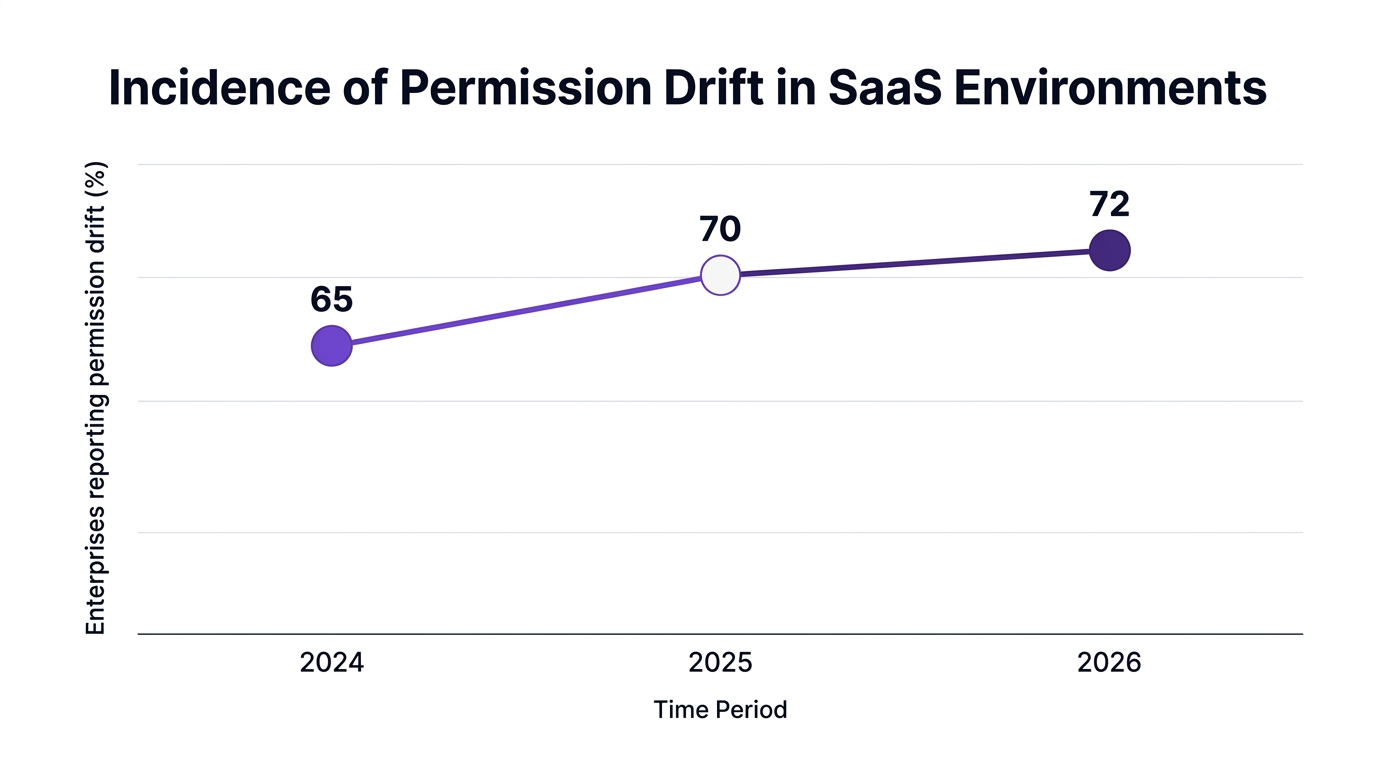
Gartner reports that 72% of enterprises experienced permission drift in their SaaS environments in 2026, directly increasing security exposure (Gartner 2026). For organizations operating under strict regulatory mandates, that is not a theoretical concern; it is a recurring audit finding.
This article explains what permission drift is, why standardizing SaaS roles is central to stopping it, and how to build a practical, automated SaaS identity management strategy that actually holds up over time.
Permission drift happens when a user’s access grows beyond what their role requires, usually through a series of small, uncoordinated changes. A project exception here, a temporary admin override there, and over months or years you end up with powerful, nonstandard access profiles scattered across dozens of SaaS applications.
In many enterprises, IT and security leaders discover permission drift only during an incident or an audit. IDC found that more than 63% of SaaS security breaches in 2025 were linked to misconfigured permissions and role creep (IDC 2026). That means the access model, not the app itself, is often the weak point.
The risk is amplified by modern working patterns:
Over time, this creates a gap between intended access (what your SaaS governance framework says users should have) and actual access (what is configured across apps). That gap is where both security incidents and compliance findings appear.
Standardized roles are to SaaS identity and access management what a chart of accounts is to finance: a shared language that keeps a complex system coherent. Without them, every app team improvises its own access model and permission drift becomes almost guaranteed.
Forrester reported that enterprises that standardized SaaS roles reduced manual permission audits by 67%, freeing scarce IT and security resources for higher value work (Forrester 2026). That is not just operational efficiency; it is also a major risk reduction.

Standardizing SaaS roles matters for four reasons:
A useful analogy: Standard roles are like standardized shipping containers for global logistics. Once the container is defined, ships, trucks, and ports can be optimized around it. In the same way, once SaaS roles are standardized, your IAM SaaS tooling, approval workflows, and monitoring can be tuned around them.
Permission drift in SaaS is rarely the result of a single bad decision. It is usually a series of local optimizations that ignore global governance. Understanding the drivers helps you design controls that stick.
Users get elevated access for a project with no clear expiry. The project ends, the permissions remain. Over time, these become shadow admin accounts.
Managers approve access changes over email or chat, bypassing the formal SaaS access management process and SaaS audit logging. The change goes live but is not reflected in your central identity SaaS records.
Some apps are tightly integrated with your identity provider and role model. Others are managed manually, often by local admins. Fragmented identity and access management creates obvious blind spots.
Accounts are disabled in the HR system or identity provider, but not fully deprovisioned across all SaaS apps. Residual access persists, especially in long-tail cloud app governance scenarios.
Many organizations initially respond to permission drift with more reviews and more spreadsheets. That approach does not scale.
As a SaaS security analyst, put it, "Permission drift is one of the top blind spots in SaaS governance; continuous, automated role standardization is no longer optional for compliance-driven organizations" (Forrester 2026).
The lesson: automation, not effort, is the only sustainable solution.
To prevent permission drift SaaS issues over time, enterprises need a practical, repeatable way to define, enforce, and monitor standardized roles. The following approach is grounded in what we see working in highly regulated environments.
Start with a minimal set of SaaS role templates that map to real job functions, not org chart titles. For example:
Map these templates to specific permissions in each application. This is the foundation of your SaaS identity and access management model.
Best practices:
Zero trust is no longer just a network concept. In SaaS environments, it translates to:
ISACA research shows that organizations using zero trust role management frameworks reported a 48% faster incident response rate (ISACA 2026). Faster response is partly a function of simpler, standardized access models.
Identity provider integration is essential but not sufficient. You need consistency between your IdP groups and the app-level roles configured in your SaaS portfolio.
Practical steps:
This is where IAM SaaS and SaaS access management strategies converge. A unified view of SaaS identity makes it possible to see and correct drift quickly.
SaaS role auditing should not be a once-a-year exercise. Instead, make it part of everyday IT SaaS operations.
Examples of ongoing checks:
This can be supported with compliance automation, where violations trigger workflows rather than static reports.
Manual reviews, emails, and spreadsheets cannot keep pace with hundreds of apps and thousands of users. Automation is required for both consistency and speed.
TechRepublic reported that 82% of IT leaders see automated identity and access management as essential for SaaS security posture (TechRepublic 2026). Market data from Gartner in 2026 shows that more than 60% of enterprises invested in platforms that include automated SaaS role standardization.
Some teams worry that strict automation will slow projects or block legitimate exceptions. That concern is valid if the role model is too rigid.
The answer is to design controlled exception paths:
This preserves agility while still aligning with SaaS governance best practices and your SaaS governance framework.
A global healthcare organization, HealthcareCo (pseudonym), faced recurring audit findings related to inconsistent SaaS access. Multiple clinical, billing, and collaboration systems had grown organically, each with its own permission model. Manual reviews were missing critical issues.
After deploying CloudNuro Unified Cloud Custodian in Q1 2026, they:
The outcomes were measurable:
A financial services customer, FinServe Inc., followed a similar blueprint using CloudNuro’s Microsoft 365 Custodian and Salesforce Custodian. By standardizing roles and automating access reviews, they:
These stories illustrate a key point: SaaS roles standardization is not a theoretical control. When combined with automation, it yields quantifiable risk reduction and operational savings.
CloudNuro was designed around a governance-first model for SaaS identity. Its platform brings together real-time visibility, policy-driven automation, and deep app integrations to keep standardized roles aligned with reality.
CloudNuro’s Unified Cloud Custodian provides centralized, automated role management SaaS capabilities across more than 400 applications. Enterprises can:
This directly reinforces SaaS identity and access management policies at scale.
CloudNuro’s 360° app discovery and IT asset auditing addresses account sprawl and shadow IT. For governance leaders, this supports:
This aligns tightly with data governance SaaS expectations in regulated sectors.
CloudNuro automates SaaS user lifecycle management through:
Because these flows are driven by standardized roles, IT security SaaS leaders gain confidence that least privilege remains intact over time.
CloudNuro AI Custodian helps identify anomalous access patterns and high-risk entitlements across applications. Combined with standard roles, this provides:
The result is a living SaaS governance framework where policy, automation, and monitoring reinforce each other.
Permission drift in SaaS applications occurs when a user’s permissions gradually expand beyond what their job role requires. This often happens due to project-based exceptions, ad hoc approvals, and incomplete offboarding.
Over time, this creates inconsistent access profiles that increase security and compliance risk. Research from Gartner found that 72% of enterprises surveyed experienced permission drift in 2026.
Organizations prevent role creep by combining standardized roles with automation. This usually includes:
Platforms that support policy-driven SaaS role auditing can automatically detect and correct unauthorized changes.
Standardized roles make access control policies testable and repeatable. Auditors can see exactly which roles exist, what each role can do, and who is assigned to them.
KPMG reported that organizations using automated role standardization reduce compliance audit preparation time by up to 54%. This is critical for frameworks tied to SaaS compliance, such as SOC 2 and regional privacy regulations.
Best practices include:
Combining these practices with data governance SaaS policies ensures that sensitive data exposure is minimized.
Automated role management continuously compares actual permissions against defined policies. When deviations occur, it can revoke them automatically or escalate for review.
This reduces the window of exposure for privilege escalation and misconfigurations. It also enables faster incident investigation, particularly in environments aligned to zero trust SaaS principles.
Key capabilities include:
Platforms that combine these with cost and usage insights also help align SaaS governance with financial accountability.
Standardizing SaaS roles is one of the most practical ways to strengthen SaaS identity management and reduce permission drift over time. It supports least privilege, simplifies audits, and gives IT SaaS operations teams a stable foundation for automation.
Enterprises that pair standardized roles with automated SaaS access management, continuous SaaS role auditing, and lifecycle workflows are already seeing measurable gains in security posture and operational efficiency.
If you are looking to modernize your SaaS governance framework, evaluate how your current roles are defined, how consistently they are applied, and where automation can enforce them. Explore how CloudNuro can help you standardize roles and bring your SaaS identity strategy under unified, automated governance.
CloudNuro is a leader in Enterprise SaaS Management Platforms, giving enterprises unmatched visibility, governance, and cost optimization.
We are proud to be recognized twice in a row by Gartner in the SaaS Management Platforms and named a Leader in the Info-Tech SoftwareReviews Data Quadrant.
Trusted by global enterprises and government agencies, CloudNuro provides centralized SaaS inventory, license optimization, and renewal management. With a 15-minute setup and measurable results in under 24 hours, CloudNuro gives IT teams a fast path to value.
Request a Demo | Get Free Savings Assessment | Explore Product
Request a no cost, no obligation free assessment —just 15 minutes to savings!
Get StartedSaaS identity management is under pressure. As cloud apps multiply and user lifecycles accelerate, permissions quietly accumulate in the background. This slow, often invisible expansion of access, known as permission drift, is now one of the biggest governance and security risks in enterprise SaaS environments.
Gartner reports that 72% of enterprises experienced permission drift in their SaaS environments in 2026, directly increasing security exposure (Gartner 2026). For organizations operating under strict regulatory mandates, that is not a theoretical concern; it is a recurring audit finding.
This article explains what permission drift is, why standardizing SaaS roles is central to stopping it, and how to build a practical, automated SaaS identity management strategy that actually holds up over time.
Permission drift happens when a user’s access grows beyond what their role requires, usually through a series of small, uncoordinated changes. A project exception here, a temporary admin override there, and over months or years you end up with powerful, nonstandard access profiles scattered across dozens of SaaS applications.
In many enterprises, IT and security leaders discover permission drift only during an incident or an audit. IDC found that more than 63% of SaaS security breaches in 2025 were linked to misconfigured permissions and role creep (IDC 2026). That means the access model, not the app itself, is often the weak point.
The risk is amplified by modern working patterns:
Over time, this creates a gap between intended access (what your SaaS governance framework says users should have) and actual access (what is configured across apps). That gap is where both security incidents and compliance findings appear.
Standardized roles are to SaaS identity and access management what a chart of accounts is to finance: a shared language that keeps a complex system coherent. Without them, every app team improvises its own access model and permission drift becomes almost guaranteed.
Forrester reported that enterprises that standardized SaaS roles reduced manual permission audits by 67%, freeing scarce IT and security resources for higher value work (Forrester 2026). That is not just operational efficiency; it is also a major risk reduction.
Standardizing SaaS roles matters for four reasons:
A useful analogy: Standard roles are like standardized shipping containers for global logistics. Once the container is defined, ships, trucks, and ports can be optimized around it. In the same way, once SaaS roles are standardized, your IAM SaaS tooling, approval workflows, and monitoring can be tuned around them.
Permission drift in SaaS is rarely the result of a single bad decision. It is usually a series of local optimizations that ignore global governance. Understanding the drivers helps you design controls that stick.
Users get elevated access for a project with no clear expiry. The project ends, the permissions remain. Over time, these become shadow admin accounts.
Managers approve access changes over email or chat, bypassing the formal SaaS access management process and SaaS audit logging. The change goes live but is not reflected in your central identity SaaS records.
Some apps are tightly integrated with your identity provider and role model. Others are managed manually, often by local admins. Fragmented identity and access management creates obvious blind spots.
Accounts are disabled in the HR system or identity provider, but not fully deprovisioned across all SaaS apps. Residual access persists, especially in long-tail cloud app governance scenarios.
Many organizations initially respond to permission drift with more reviews and more spreadsheets. That approach does not scale.
As a SaaS security analyst, put it, "Permission drift is one of the top blind spots in SaaS governance; continuous, automated role standardization is no longer optional for compliance-driven organizations" (Forrester 2026).
The lesson: automation, not effort, is the only sustainable solution.
To prevent permission drift SaaS issues over time, enterprises need a practical, repeatable way to define, enforce, and monitor standardized roles. The following approach is grounded in what we see working in highly regulated environments.
Start with a minimal set of SaaS role templates that map to real job functions, not org chart titles. For example:
Map these templates to specific permissions in each application. This is the foundation of your SaaS identity and access management model.
Best practices:
Zero trust is no longer just a network concept. In SaaS environments, it translates to:
ISACA research shows that organizations using zero trust role management frameworks reported a 48% faster incident response rate (ISACA 2026). Faster response is partly a function of simpler, standardized access models.
Identity provider integration is essential but not sufficient. You need consistency between your IdP groups and the app-level roles configured in your SaaS portfolio.
Practical steps:
This is where IAM SaaS and SaaS access management strategies converge. A unified view of SaaS identity makes it possible to see and correct drift quickly.
SaaS role auditing should not be a once-a-year exercise. Instead, make it part of everyday IT SaaS operations.
Examples of ongoing checks:
This can be supported with compliance automation, where violations trigger workflows rather than static reports.
Manual reviews, emails, and spreadsheets cannot keep pace with hundreds of apps and thousands of users. Automation is required for both consistency and speed.
TechRepublic reported that 82% of IT leaders see automated identity and access management as essential for SaaS security posture (TechRepublic 2026). Market data from Gartner in 2026 shows that more than 60% of enterprises invested in platforms that include automated SaaS role standardization.
Some teams worry that strict automation will slow projects or block legitimate exceptions. That concern is valid if the role model is too rigid.
The answer is to design controlled exception paths:
This preserves agility while still aligning with SaaS governance best practices and your SaaS governance framework.
A global healthcare organization, HealthcareCo (pseudonym), faced recurring audit findings related to inconsistent SaaS access. Multiple clinical, billing, and collaboration systems had grown organically, each with its own permission model. Manual reviews were missing critical issues.
After deploying CloudNuro Unified Cloud Custodian in Q1 2026, they:
The outcomes were measurable:
A financial services customer, FinServe Inc., followed a similar blueprint using CloudNuro’s Microsoft 365 Custodian and Salesforce Custodian. By standardizing roles and automating access reviews, they:
These stories illustrate a key point: SaaS roles standardization is not a theoretical control. When combined with automation, it yields quantifiable risk reduction and operational savings.
CloudNuro was designed around a governance-first model for SaaS identity. Its platform brings together real-time visibility, policy-driven automation, and deep app integrations to keep standardized roles aligned with reality.
CloudNuro’s Unified Cloud Custodian provides centralized, automated role management SaaS capabilities across more than 400 applications. Enterprises can:
This directly reinforces SaaS identity and access management policies at scale.
CloudNuro’s 360° app discovery and IT asset auditing addresses account sprawl and shadow IT. For governance leaders, this supports:
This aligns tightly with data governance SaaS expectations in regulated sectors.
CloudNuro automates SaaS user lifecycle management through:
Because these flows are driven by standardized roles, IT security SaaS leaders gain confidence that least privilege remains intact over time.
CloudNuro AI Custodian helps identify anomalous access patterns and high-risk entitlements across applications. Combined with standard roles, this provides:
The result is a living SaaS governance framework where policy, automation, and monitoring reinforce each other.
Permission drift in SaaS applications occurs when a user’s permissions gradually expand beyond what their job role requires. This often happens due to project-based exceptions, ad hoc approvals, and incomplete offboarding.
Over time, this creates inconsistent access profiles that increase security and compliance risk. Research from Gartner found that 72% of enterprises surveyed experienced permission drift in 2026.
Organizations prevent role creep by combining standardized roles with automation. This usually includes:
Platforms that support policy-driven SaaS role auditing can automatically detect and correct unauthorized changes.
Standardized roles make access control policies testable and repeatable. Auditors can see exactly which roles exist, what each role can do, and who is assigned to them.
KPMG reported that organizations using automated role standardization reduce compliance audit preparation time by up to 54%. This is critical for frameworks tied to SaaS compliance, such as SOC 2 and regional privacy regulations.
Best practices include:
Combining these practices with data governance SaaS policies ensures that sensitive data exposure is minimized.
Automated role management continuously compares actual permissions against defined policies. When deviations occur, it can revoke them automatically or escalate for review.
This reduces the window of exposure for privilege escalation and misconfigurations. It also enables faster incident investigation, particularly in environments aligned to zero trust SaaS principles.
Key capabilities include:
Platforms that combine these with cost and usage insights also help align SaaS governance with financial accountability.
Standardizing SaaS roles is one of the most practical ways to strengthen SaaS identity management and reduce permission drift over time. It supports least privilege, simplifies audits, and gives IT SaaS operations teams a stable foundation for automation.
Enterprises that pair standardized roles with automated SaaS access management, continuous SaaS role auditing, and lifecycle workflows are already seeing measurable gains in security posture and operational efficiency.
If you are looking to modernize your SaaS governance framework, evaluate how your current roles are defined, how consistently they are applied, and where automation can enforce them. Explore how CloudNuro can help you standardize roles and bring your SaaS identity strategy under unified, automated governance.
CloudNuro is a leader in Enterprise SaaS Management Platforms, giving enterprises unmatched visibility, governance, and cost optimization.
We are proud to be recognized twice in a row by Gartner in the SaaS Management Platforms and named a Leader in the Info-Tech SoftwareReviews Data Quadrant.
Trusted by global enterprises and government agencies, CloudNuro provides centralized SaaS inventory, license optimization, and renewal management. With a 15-minute setup and measurable results in under 24 hours, CloudNuro gives IT teams a fast path to value.
Request a Demo | Get Free Savings Assessment | Explore Product
Request a no cost, no obligation free assessment - just 15 minutes to savings!
Get StartedWe're offering complimentary ServiceNow license assessments to only 25 enterprises this quarter who want to unlock immediate savings without disrupting operations.
Get Free AssessmentGet Started




CloudNuro Corp
1755 Park St. Suite 207
Naperville, IL 60563
Phone : +1-630-277-9470
Email: info@cloudnuro.com





.webp)

Recognized Leader in SaaS Management Platforms by Info-Tech SoftwareReviews


.svg)