

Sign Up
Thank you for Submitting!

Enterprises are spending millions on SaaS every year, yet a significant portion of that budget is lost to unused, redundant, or risky applications. Research shows that the average enterprise wastes 22 percent of SaaS spend on underutilized or forgotten apps (Flexera 2026). Structured department-level SaaS reviews, often branded as “App Days”, have emerged as one of the fastest ways to reduce waste and strengthen saas management governance.
This guide explains how to design and run App Days that your business stakeholders will actually support, how to turn them into a repeatable part of your SaaS management strategy, and how CloudNuro helps automate the heavy lifting.
App Days are focused review sessions where a department, IT, and procurement come together to examine every application the department uses. The goal is to validate business value, identify redundancies, and make decisions about license optimization and standardization.
Gartner estimates that enterprises can cut SaaS costs by up to 30 percent when they run systematic SaaS reviews and optimization events such as App Days (Gartner 2026). That is why 84 percent of CIOs plan to make App Days a standard governance practice by 2026 (TechCrunch 2026).
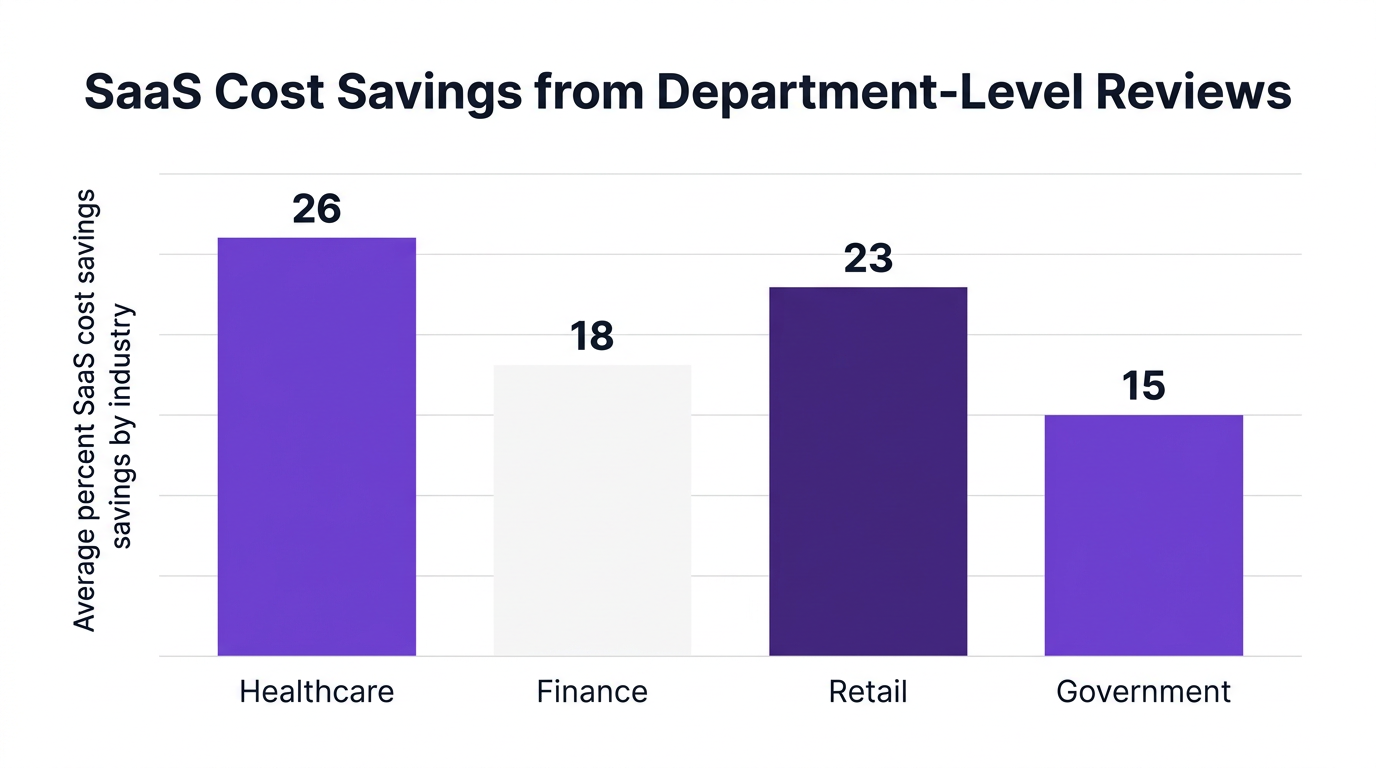
App Days matter for three reasons:
As one analyst puts it, “Departmental SaaS reviews, especially structured as App Days, empower organizations to uncover hidden costs and drive accountability at the business unit level.” (Dr. Priya Natarajan, Gartner VP Analyst, 2026).
Department-level SaaS reviews are more than cost-cutting workshops. They are a governance mechanism that brings IT, security, and the business to the same table.
Everest Group notes that department-driven SaaS reviews yield a 2.8x increase in user engagement with approved, secure business apps (Everest Group 2026). In practice, that translates into fewer workarounds, better data quality, and stronger policy adherence.

This is why AI-powered SaaS management and App Days often go hand in hand. As Forrester’s Alex Zhou notes, “The key to successful SaaS optimization lies in real-time visibility and automated governance. App Days are an excellent catalyst.” (Forrester 2026).
Too many organizations try an App Day once, create a spreadsheet, then never run it again. To turn App Days into a core saas cost optimization practice, you need structure and repeatability.
Think of App Days like a quarterly financial close, but for SaaS. You bring together data, stakeholders, and a consistent workflow, then close out decisions.
Start with clear boundaries so App Days stay focused and efficient.
Scope examples:
Success metrics:
Invite:
App Days succeed or fail based on data quality. Manual spreadsheets slow everything down and cause mistrust. Automated saas management tools should pre-populate:
GigaOm reports that automated SaaS management platforms accelerate cost-savings realization by 40 percent compared to manual reviews (GigaOm 2026). This is where AI-driven saas software management becomes critical, not optional.
During the App Day, classify each app into one of a few clear buckets.
Use a short decision template for each app: business owner, justification, risk, decision, and follow-up actions.
The biggest failure mode is leaving App Day decisions in meeting notes. To avoid that, define what your saas management software will automate:
This is where AI-based saas management services and workflows reduce IT toil and keep departments honest.
IDC reports that 63 percent of IT leaders uncover at least five redundant or unused apps per department during structured SaaS reviews (IDC 2026). When you multiply that across dozens of business units, the savings opportunity is clear.
To operationalize this insight, organizations need more than static lists. They need continuous discovery and analytics.
Core mechanisms to find redundancy and waste:
A useful analogy is network monitoring. You would never manage your network by asking each team to email their router list once a year. Similarly, you cannot manage SaaS by emailing spreadsheets. Continuous discovery and data-driven saas management solutions are the foundation.
With data and design in place, focus on the actual event experience. A well-run App Day is short, focused, and decision-oriented.
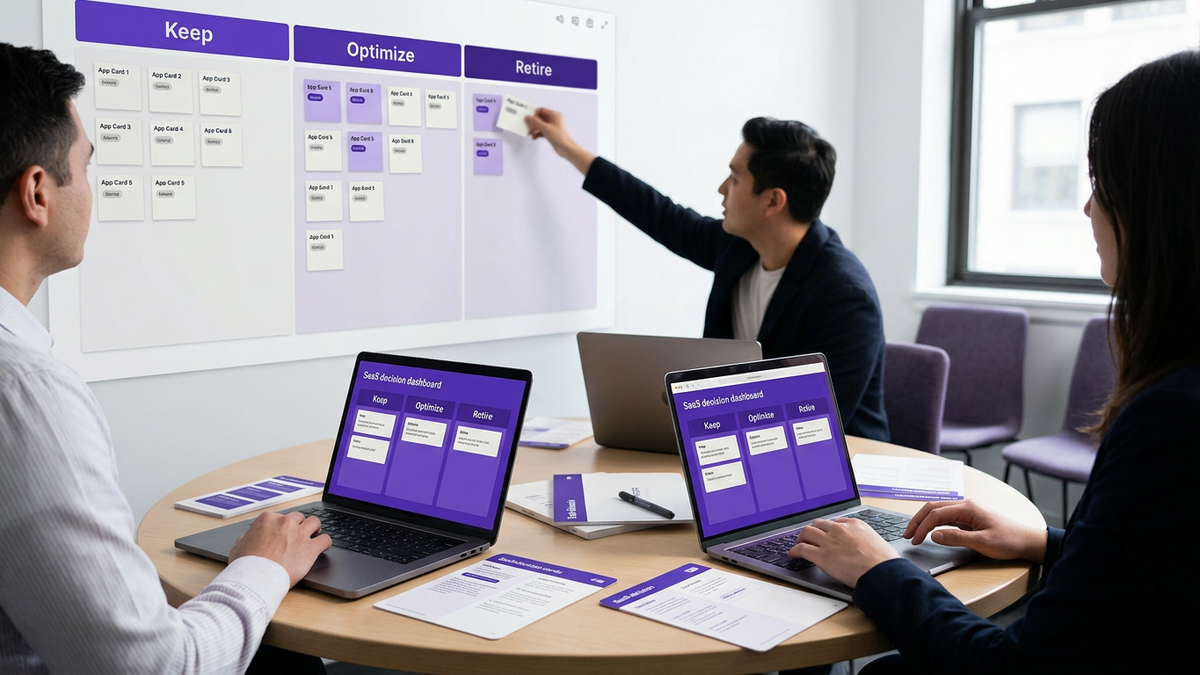
Suggested 90-minute App Day agenda:
Best practices for facilitation:
Common pitfalls and counterarguments:
CloudNuro was designed to make App Days predictable, data-driven, and repeatable. Instead of starting from spreadsheets, IT and procurement start from a single source of truth for saas management.
CloudNuro provides 360° app discovery across SaaS, PaaS, and IaaS so every App Day starts with a complete portfolio, not guesswork. Integrations with 400+ applications feed a real-time inventory with:
This directly addresses the 72 percent of organizations that lack visibility into SaaS usage (Forrester 2026) and dramatically reduces shadow IT.
With CloudNuro Chargeback, finance and procurement can see SaaS spend by department, business unit, or project. This supports:
By surfacing this data in App Day dashboards, CloudNuro turns saas spend management software from a back-office system into a collaborative decision tool.
CloudNuro’s Unified Cloud Custodian and AI Custodian Services transform App Day decisions into automated workflows:
This automation reduces the risk that decisions stay in slide decks instead of impacting the real environment. It also supports continuous governance between App Days.
A global retailer (ShopTrend, per GigaOm 2026) adopted quarterly department-level App Days using an AI-driven SaaS management platform. Within one year, they:
Similarly, a healthcare enterprise (MedicaHealth, Everest Group 2026) reduced SaaS expenditures by $8.4 million after initiating quarterly App Days and retiring more than 50 redundant apps in three months.
CloudNuro is built to make this type of outcome repeatable through automation, compliance-aware workflows, and deep saas visibility.
App Days are structured workshops where departments, IT, procurement, and security review all the applications a department uses. By combining usage data, spend, and risk, teams identify underused licenses, redundant tools, and retire-or-consolidate candidates.
Gartner reports that systematic SaaS reviews and App Days can reduce SaaS costs by up to 30 percent (Gartner 2026). They also improve saas software management maturity and governance.
Most enterprises find that quarterly App Days provide a good balance between responsiveness and effort. This cadence aligns with common renewal schedules and quarterly planning cycles.
High-change environments, such as fast-growing business units or digital transformation programs, may benefit from more frequent, event-driven reviews tied to major changes in headcount or strategy.
At minimum, you need:
Using ai-powered saas management greatly improves the quality and speed of insights, turning App Days into a repeatable governance practice instead of an ad-hoc spreadsheet exercise.
By cataloging all apps a department uses, App Days reveal unapproved tools, risky data flows, and gaps in saas license compliance. Security and compliance teams can then review vendor certifications, data residency, and access patterns.
When paired with saas compliance software and automated risk scoring, App Days become an effective mechanism to enforce security policies and prove continuous control for audits and regulatory requirements.
Successful App Days treat departments as partners. Share the upside, such as budget savings that can be reinvested, simplified workflows, or better supported tools.
Provide transparent data, invite power users, and be flexible where specialized tools are truly required. The combination of saas management solutions and clear governance criteria helps teams feel that decisions are data-driven, not arbitrary.
App Days are not a one-off project. When combined with continuous discovery, automated governance, and clear chargeback, they become a core capability of modern saas management.
By implementing structured App Days, IT and procurement leaders can:
CloudNuro equips you with the visibility, automation, and governance foundation to run high-impact App Days across every department and turn SaaS from a cost center into a controlled, data-driven asset. To see how CloudNuro can support your next App Day, schedule a tailored walkthrough with our team.
We are proud to be recognized twice in a row by Gartner in the SaaS Management Platforms and named a Leader in the Info-Tech SoftwareReviews Data Quadrant.
Trusted by global enterprises and government agencies, CloudNuro provides centralized SaaS inventory, license optimization, and renewal management. With a 15-minute setup and measurable results in under 24 hours, CloudNuro gives IT teams a fast path to value.
Request a Demo | Get Free Savings Assessment | Explore Product
Request a no cost, no obligation free assessment —just 15 minutes to savings!
Get StartedEnterprises are spending millions on SaaS every year, yet a significant portion of that budget is lost to unused, redundant, or risky applications. Research shows that the average enterprise wastes 22 percent of SaaS spend on underutilized or forgotten apps (Flexera 2026). Structured department-level SaaS reviews, often branded as “App Days”, have emerged as one of the fastest ways to reduce waste and strengthen saas management governance.
This guide explains how to design and run App Days that your business stakeholders will actually support, how to turn them into a repeatable part of your SaaS management strategy, and how CloudNuro helps automate the heavy lifting.
App Days are focused review sessions where a department, IT, and procurement come together to examine every application the department uses. The goal is to validate business value, identify redundancies, and make decisions about license optimization and standardization.
Gartner estimates that enterprises can cut SaaS costs by up to 30 percent when they run systematic SaaS reviews and optimization events such as App Days (Gartner 2026). That is why 84 percent of CIOs plan to make App Days a standard governance practice by 2026 (TechCrunch 2026).
App Days matter for three reasons:
As one analyst puts it, “Departmental SaaS reviews, especially structured as App Days, empower organizations to uncover hidden costs and drive accountability at the business unit level.” (Dr. Priya Natarajan, Gartner VP Analyst, 2026).
Department-level SaaS reviews are more than cost-cutting workshops. They are a governance mechanism that brings IT, security, and the business to the same table.
Everest Group notes that department-driven SaaS reviews yield a 2.8x increase in user engagement with approved, secure business apps (Everest Group 2026). In practice, that translates into fewer workarounds, better data quality, and stronger policy adherence.
This is why AI-powered SaaS management and App Days often go hand in hand. As Forrester’s Alex Zhou notes, “The key to successful SaaS optimization lies in real-time visibility and automated governance. App Days are an excellent catalyst.” (Forrester 2026).
Too many organizations try an App Day once, create a spreadsheet, then never run it again. To turn App Days into a core saas cost optimization practice, you need structure and repeatability.
Think of App Days like a quarterly financial close, but for SaaS. You bring together data, stakeholders, and a consistent workflow, then close out decisions.
Start with clear boundaries so App Days stay focused and efficient.
Scope examples:
Success metrics:
Invite:
App Days succeed or fail based on data quality. Manual spreadsheets slow everything down and cause mistrust. Automated saas management tools should pre-populate:
GigaOm reports that automated SaaS management platforms accelerate cost-savings realization by 40 percent compared to manual reviews (GigaOm 2026). This is where AI-driven saas software management becomes critical, not optional.
During the App Day, classify each app into one of a few clear buckets.
Use a short decision template for each app: business owner, justification, risk, decision, and follow-up actions.
The biggest failure mode is leaving App Day decisions in meeting notes. To avoid that, define what your saas management software will automate:
This is where AI-based saas management services and workflows reduce IT toil and keep departments honest.
IDC reports that 63 percent of IT leaders uncover at least five redundant or unused apps per department during structured SaaS reviews (IDC 2026). When you multiply that across dozens of business units, the savings opportunity is clear.
To operationalize this insight, organizations need more than static lists. They need continuous discovery and analytics.
Core mechanisms to find redundancy and waste:
A useful analogy is network monitoring. You would never manage your network by asking each team to email their router list once a year. Similarly, you cannot manage SaaS by emailing spreadsheets. Continuous discovery and data-driven saas management solutions are the foundation.
With data and design in place, focus on the actual event experience. A well-run App Day is short, focused, and decision-oriented.
Suggested 90-minute App Day agenda:
Best practices for facilitation:
Common pitfalls and counterarguments:
CloudNuro was designed to make App Days predictable, data-driven, and repeatable. Instead of starting from spreadsheets, IT and procurement start from a single source of truth for saas management.
CloudNuro provides 360° app discovery across SaaS, PaaS, and IaaS so every App Day starts with a complete portfolio, not guesswork. Integrations with 400+ applications feed a real-time inventory with:
This directly addresses the 72 percent of organizations that lack visibility into SaaS usage (Forrester 2026) and dramatically reduces shadow IT.
With CloudNuro Chargeback, finance and procurement can see SaaS spend by department, business unit, or project. This supports:
By surfacing this data in App Day dashboards, CloudNuro turns saas spend management software from a back-office system into a collaborative decision tool.
CloudNuro’s Unified Cloud Custodian and AI Custodian Services transform App Day decisions into automated workflows:
This automation reduces the risk that decisions stay in slide decks instead of impacting the real environment. It also supports continuous governance between App Days.
A global retailer (ShopTrend, per GigaOm 2026) adopted quarterly department-level App Days using an AI-driven SaaS management platform. Within one year, they:
Similarly, a healthcare enterprise (MedicaHealth, Everest Group 2026) reduced SaaS expenditures by $8.4 million after initiating quarterly App Days and retiring more than 50 redundant apps in three months.
CloudNuro is built to make this type of outcome repeatable through automation, compliance-aware workflows, and deep saas visibility.
App Days are structured workshops where departments, IT, procurement, and security review all the applications a department uses. By combining usage data, spend, and risk, teams identify underused licenses, redundant tools, and retire-or-consolidate candidates.
Gartner reports that systematic SaaS reviews and App Days can reduce SaaS costs by up to 30 percent (Gartner 2026). They also improve saas software management maturity and governance.
Most enterprises find that quarterly App Days provide a good balance between responsiveness and effort. This cadence aligns with common renewal schedules and quarterly planning cycles.
High-change environments, such as fast-growing business units or digital transformation programs, may benefit from more frequent, event-driven reviews tied to major changes in headcount or strategy.
At minimum, you need:
Using ai-powered saas management greatly improves the quality and speed of insights, turning App Days into a repeatable governance practice instead of an ad-hoc spreadsheet exercise.
By cataloging all apps a department uses, App Days reveal unapproved tools, risky data flows, and gaps in saas license compliance. Security and compliance teams can then review vendor certifications, data residency, and access patterns.
When paired with saas compliance software and automated risk scoring, App Days become an effective mechanism to enforce security policies and prove continuous control for audits and regulatory requirements.
Successful App Days treat departments as partners. Share the upside, such as budget savings that can be reinvested, simplified workflows, or better supported tools.
Provide transparent data, invite power users, and be flexible where specialized tools are truly required. The combination of saas management solutions and clear governance criteria helps teams feel that decisions are data-driven, not arbitrary.
App Days are not a one-off project. When combined with continuous discovery, automated governance, and clear chargeback, they become a core capability of modern saas management.
By implementing structured App Days, IT and procurement leaders can:
CloudNuro equips you with the visibility, automation, and governance foundation to run high-impact App Days across every department and turn SaaS from a cost center into a controlled, data-driven asset. To see how CloudNuro can support your next App Day, schedule a tailored walkthrough with our team.
We are proud to be recognized twice in a row by Gartner in the SaaS Management Platforms and named a Leader in the Info-Tech SoftwareReviews Data Quadrant.
Trusted by global enterprises and government agencies, CloudNuro provides centralized SaaS inventory, license optimization, and renewal management. With a 15-minute setup and measurable results in under 24 hours, CloudNuro gives IT teams a fast path to value.
Request a Demo | Get Free Savings Assessment | Explore Product
Request a no cost, no obligation free assessment - just 15 minutes to savings!
Get StartedWe're offering complimentary ServiceNow license assessments to only 25 enterprises this quarter who want to unlock immediate savings without disrupting operations.
Get Free AssessmentGet Started




CloudNuro Corp
1755 Park St. Suite 207
Naperville, IL 60563
Phone : +1-630-277-9470
Email: info@cloudnuro.com





.webp)

Recognized Leader in SaaS Management Platforms by Info-Tech SoftwareReviews



.svg)