

Sign Up
What is best time for the call?
Zoom has become indispensable for modern collaboration, yet many organizations quietly overspend on it. Common causes include unmonitored add-ons, underused licenses, or decentralized purchasing. These inefficiencies often go unnoticed until renewal time, by which point 20–35% of the annual spend may be wasted.
Zoom licensing can be a bit of a maze, and many users, especially businesses, run into common license management pitfalls. Here is a breakdown of the most frequent challenges:
If you are evaluating Zoom for your team or organization, it is worth mapping out your exact needs and comparing them to what each plan offers. Look for the warning signs of overspending.
These issues are so common because Zoom’s billing model makes it easy to add licenses but not to remove or monitor them. Without a continuous audit mechanism, organizations often overspend by 20–35% annually without realizing it.
Use this quick self-assessment to gauge whether your organization might be overpaying for Zoom.
| Question | If Yes | Risk Level |
|---|---|---|
| Do inactive users still hold Pro/Business licenses? | Paying for dormant licenses | High |
| Are multiple departments managing Zoom independently? | Losing bulk pricing benefits | High |
| Are Webinar or add-ons auto-renewing? | Recurring unused costs | Medium |
| Do you review usage reports regularly? | Visibility gap on actual usage | Medium |
| Is the average meeting duration under 30 minutes? | Paid licenses may be excessive | Low |
| Are old recordings inflating storage bills? | Hidden ongoing storage fees | Medium |
| Do you have multiple “Business” or “Enterprise” licenses but are using only a few features? | You might be over-tiered | High |
| Are there former employees still listed as active hosts? | You are directly paying for unused accounts | High |
Interpretation:
If you answered “Yes” to three or more, an immediate audit is recommended.
CloudNuro is a leader in Enterprise SaaS Management Platforms, giving enterprises unmatched visibility, governance, and cost optimization. Recognized twice in a row by Gartner in the SaaS Management Platforms Magic Quadrant and named a Leader in the Info-Tech SoftwareReviews Data Quadrant, CloudNuro is trusted by global enterprises and government agencies to bring financial discipline to SaaS and cloud, with a 15-minute setup and measurable results in under 24 hours.
Performing a structured Zoom spend audit helps uncover where costs accumulate and what corrective measures to take. Follow this step-by-step guide to audit your Zoom environment within 60 minutes.
Example: 230 inactive Pro licenses at $14.99/month = $3,447/month in wasted costs.
As the only FinOps-certified Enterprise SaaS Management Platform, CloudNuro unifies SaaS and IaaS management in a single view. With a 15-minute setup and measurable results in under 24 hours, CloudNuro gives IT teams a fast path to value.
Once you have run your audit, look for these patterns; they almost always indicate financial leakage.
| Overspending Indicator | What It Shows | Impact |
|---|---|---|
| Flat meeting activity, but steady license count | Unused licenses persist | High |
| Add-ons unused for >30 days | Idle subscriptions | Medium |
| Inactive users with paid licenses | “Last login: 60+ days ago” on licensed users | High |
| Duplicate licenses, different billing entities per department | Lost enterprise-level discounts | High |
| Growing storage fees | Old recordings not purged | Medium |
| AI Companion is billed but rarely used | Over-licensed AI usage | Low |
Reclaim opportunities: Dormant, inactive accounts indicate unused paid seats.
Once inefficiencies are found, act immediately using these corrective strategies.
Deactivate dormant users or convert them to Basic accounts.
Impact: Up to 20% reduction in license spend within 30 days.
Assign a single procurement owner to review add-ons monthly.
Impact: Prevents thousands in recurring auto-renewal charges.
Merge all departmental Zoom instances.
Impact: Unlocks enterprise discounts (10–15%) and simplifies governance.
Adopt automated policies (like “inactive for 45 days = reclaim”).
Impact: Continuous, sustainable savings without manual audits.
Allocate Zoom costs by department usage.
Impact: Reduces unnecessary license hoarding.
Delete outdated recordings and assign AI Companion features only to frequent hosts.
Impact: Avoids silent, compounding costs.
Enable automated alerts for license spikes or add-on renewals using a SaaS management platform like CloudNuro.
Impact: Real-time prevention of billing surprises.
A manufacturing firm with 1,500 employees noticed its Zoom spend rising each quarter despite a stable workforce. CloudNuro’s automated audit discovered:
Result: After downgrading and reclaiming licenses, annual savings reached $41,000, and monthly Zoom bills dropped by 28%.
A university system purchased numerous Webinar and Cloud Recording add-ons for one-time academic events. After the events ended, these add-ons auto-renewed quarterly.
Through CloudNuro’s visibility dashboards, the IT team identified:
Result: By enforcing storage limits and canceling inactive add-ons, total annual savings reached $25,000, freeing funds for educational technology upgrades.
An enterprise with 500 employees adopted Zoom for remote collaboration. As operations scaled, they faced challenges managing Zoom licenses across the departments.
Client: U.S.-based Enterprise (500 employees)
Partner: CloudNuro (CN)
Platform: Zoom (used for marketing and field service teams)
| Problem Area | Description | Impact |
|---|---|---|
| SKU Misalignment | Licenses purchased based on sales recommendations, not actual usage | Overspending on unused features |
| No Usage Audits | No tracking of license adoption or feature utilization | Dormant licenses and poor ROI |
| Dormant Users | Inactive users with active licenses | Violated IT policy, wasted spend |
| Orphaned Accounts | Ex-employees still had active Zoom accounts | Security risk and compliance exposure |
| Unused Add-ons | Webinar feature purchased but never used | $6,000/year wasted |
| Category | Description | Data Points | Impact |
|---|---|---|---|
| Usage Audit and License Overlap | Flagged inactive users with active licenses. Multiple departments purchased separate Zoom licenses without coordination. | 30% of licenses are unused monthly; $12,000/year wasted | Redundant spending and poor ROI |
| Feature Misalignment | Teams needed webinar features but had basic licenses. | 60% of the marketing team lacked webinar access | Missed outreach opportunities |
| Renewal Blind Spots | No centralized renewal tracking. | 3 licenses expired unnoticed, disrupting meetings | Business continuity risk |
| Compliance Gaps | Inconsistent license assignment led to audit issues. | 2 failed internal audits due to license mismanagement | Legal and reputational risk |
App Insights: Flagged 150 dormant users
Security Insights: Identified 27 orphaned accounts
Renewal Requisition: Recommended 23% reduction in license volume and removal of unused add-ons
Governance Alignment: Enforced IT policy for license assignment
| Category | Count | Unit Cost | Total Cost Impact |
|---|---|---|---|
| Dormant Licenses | 150 | $239.88 | $35,982 |
| Orphaned Accounts | 27 | $239.88 | $6,476.76 |
| Unused Add-ons | 3 | $2,000 | $6,000 |
| Total Identified Waste | — | — | $48,458.76 |
ROI Analysis
Initial Spend: $119,940/year
Savings: $48,458.76
Net Spend After Optimization: $71,481.24
ROI: Significant savings and improved license efficiency across the environment.
View Zoom cost optimization ROI bar chart
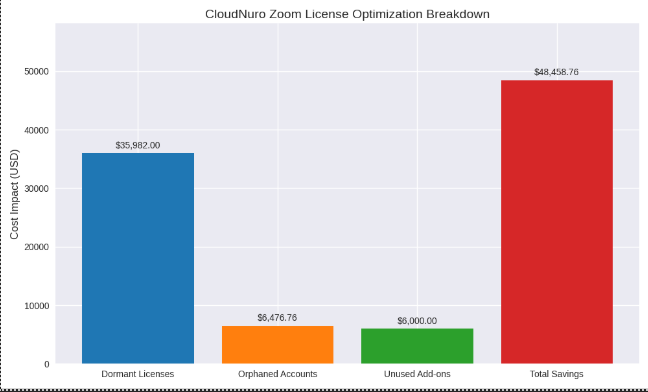
You can view the bar charts above showing:
CloudNuro is a leader in Enterprise SaaS Management Platforms, giving enterprises unmatched visibility, governance, and cost optimization. Recognized twice in a row by Gartner in the SaaS Management Platforms Magic Quadrant and named a Leader in the Info-Tech SoftwareReviews Data Quadrant, CloudNuro is trusted by global enterprises and government agencies to bring financial discipline to SaaS and cloud, with a 15-minute setup and measurable results in under 24 hours.
Here is a simplified checklist to help your team audit and reduce Zoom overspending today:
| Step | Goal | Frequency | Expected Impact |
|---|---|---|---|
| Export user data | Identify unused accounts | Monthly | High |
| Audit add-ons | Cancel idle subscriptions | Monthly | High |
| Right-size, validate license tiers | Match roles to plans | Quarterly | Medium |
| Centralized account management | Consolidate purchase under IT/Procurement | Monthly | High |
| Manage AI/storage | Control incremental costs | Monthly | Medium |
| Consolidate accounts | Get bulk pricing | One-time | High |
| Chargeback | Enhance accountability | Quarterly | High |
| Track renewals proactively | Avoid auto-renewal cost surprises | Quarterly | Medium |
A proactive audit mindset combined with the right technology can reverse overspending. By identifying inefficiencies early, applying structured governance, and automating audit routines, organizations can reclaim up to 30% of their annual Zoom budget.
Zoom overspending rarely stems from neglect; it is usually due to a lack of visibility. With regular audits, proactive governance, and automation, organizations can reduce Zoom costs by up to 30%. Consistent monitoring ensures cost efficiency without disrupting collaboration. Let CloudNuro get you a free Zoom assessment.
CloudNuro empowers organizations to reduce Zoom costs, optimize Zoom bills, and gain real-time visibility across SaaS and cloud ecosystems.
Our AI-powered platform continuously audits Zoom usage, detects dormant licenses, and automates chargeback and reclamation workflows.
With CloudNuro, you can:
Recognized by Gartner and Info-Tech, CloudNuro helps enterprises achieve measurable ROI through intelligent license governance and continuous optimization.
Request a free Zoom Cost Audit from CloudNuro to uncover hidden inefficiencies and automate cost controls. Start optimizing today, and transform your Zoom environment from overspending to efficiency.
Request a no cost, no obligation free assessment —just 15 minutes to savings!
Get StartedZoom has become indispensable for modern collaboration, yet many organizations quietly overspend on it. Common causes include unmonitored add-ons, underused licenses, or decentralized purchasing. These inefficiencies often go unnoticed until renewal time, by which point 20–35% of the annual spend may be wasted.
Zoom licensing can be a bit of a maze, and many users, especially businesses, run into common license management pitfalls. Here is a breakdown of the most frequent challenges:
If you are evaluating Zoom for your team or organization, it is worth mapping out your exact needs and comparing them to what each plan offers. Look for the warning signs of overspending.
These issues are so common because Zoom’s billing model makes it easy to add licenses but not to remove or monitor them. Without a continuous audit mechanism, organizations often overspend by 20–35% annually without realizing it.
Use this quick self-assessment to gauge whether your organization might be overpaying for Zoom.
| Question | If Yes | Risk Level |
|---|---|---|
| Do inactive users still hold Pro/Business licenses? | Paying for dormant licenses | High |
| Are multiple departments managing Zoom independently? | Losing bulk pricing benefits | High |
| Are Webinar or add-ons auto-renewing? | Recurring unused costs | Medium |
| Do you review usage reports regularly? | Visibility gap on actual usage | Medium |
| Is the average meeting duration under 30 minutes? | Paid licenses may be excessive | Low |
| Are old recordings inflating storage bills? | Hidden ongoing storage fees | Medium |
| Do you have multiple “Business” or “Enterprise” licenses but are using only a few features? | You might be over-tiered | High |
| Are there former employees still listed as active hosts? | You are directly paying for unused accounts | High |
Interpretation:
If you answered “Yes” to three or more, an immediate audit is recommended.
CloudNuro is a leader in Enterprise SaaS Management Platforms, giving enterprises unmatched visibility, governance, and cost optimization. Recognized twice in a row by Gartner in the SaaS Management Platforms Magic Quadrant and named a Leader in the Info-Tech SoftwareReviews Data Quadrant, CloudNuro is trusted by global enterprises and government agencies to bring financial discipline to SaaS and cloud, with a 15-minute setup and measurable results in under 24 hours.
Performing a structured Zoom spend audit helps uncover where costs accumulate and what corrective measures to take. Follow this step-by-step guide to audit your Zoom environment within 60 minutes.
Example: 230 inactive Pro licenses at $14.99/month = $3,447/month in wasted costs.
As the only FinOps-certified Enterprise SaaS Management Platform, CloudNuro unifies SaaS and IaaS management in a single view. With a 15-minute setup and measurable results in under 24 hours, CloudNuro gives IT teams a fast path to value.
Once you have run your audit, look for these patterns; they almost always indicate financial leakage.
| Overspending Indicator | What It Shows | Impact |
|---|---|---|
| Flat meeting activity, but steady license count | Unused licenses persist | High |
| Add-ons unused for >30 days | Idle subscriptions | Medium |
| Inactive users with paid licenses | “Last login: 60+ days ago” on licensed users | High |
| Duplicate licenses, different billing entities per department | Lost enterprise-level discounts | High |
| Growing storage fees | Old recordings not purged | Medium |
| AI Companion is billed but rarely used | Over-licensed AI usage | Low |
Reclaim opportunities: Dormant, inactive accounts indicate unused paid seats.
Once inefficiencies are found, act immediately using these corrective strategies.
Deactivate dormant users or convert them to Basic accounts.
Impact: Up to 20% reduction in license spend within 30 days.
Assign a single procurement owner to review add-ons monthly.
Impact: Prevents thousands in recurring auto-renewal charges.
Merge all departmental Zoom instances.
Impact: Unlocks enterprise discounts (10–15%) and simplifies governance.
Adopt automated policies (like “inactive for 45 days = reclaim”).
Impact: Continuous, sustainable savings without manual audits.
Allocate Zoom costs by department usage.
Impact: Reduces unnecessary license hoarding.
Delete outdated recordings and assign AI Companion features only to frequent hosts.
Impact: Avoids silent, compounding costs.
Enable automated alerts for license spikes or add-on renewals using a SaaS management platform like CloudNuro.
Impact: Real-time prevention of billing surprises.
A manufacturing firm with 1,500 employees noticed its Zoom spend rising each quarter despite a stable workforce. CloudNuro’s automated audit discovered:
Result: After downgrading and reclaiming licenses, annual savings reached $41,000, and monthly Zoom bills dropped by 28%.
A university system purchased numerous Webinar and Cloud Recording add-ons for one-time academic events. After the events ended, these add-ons auto-renewed quarterly.
Through CloudNuro’s visibility dashboards, the IT team identified:
Result: By enforcing storage limits and canceling inactive add-ons, total annual savings reached $25,000, freeing funds for educational technology upgrades.
An enterprise with 500 employees adopted Zoom for remote collaboration. As operations scaled, they faced challenges managing Zoom licenses across the departments.
Client: U.S.-based Enterprise (500 employees)
Partner: CloudNuro (CN)
Platform: Zoom (used for marketing and field service teams)
| Problem Area | Description | Impact |
|---|---|---|
| SKU Misalignment | Licenses purchased based on sales recommendations, not actual usage | Overspending on unused features |
| No Usage Audits | No tracking of license adoption or feature utilization | Dormant licenses and poor ROI |
| Dormant Users | Inactive users with active licenses | Violated IT policy, wasted spend |
| Orphaned Accounts | Ex-employees still had active Zoom accounts | Security risk and compliance exposure |
| Unused Add-ons | Webinar feature purchased but never used | $6,000/year wasted |
| Category | Description | Data Points | Impact |
|---|---|---|---|
| Usage Audit and License Overlap | Flagged inactive users with active licenses. Multiple departments purchased separate Zoom licenses without coordination. | 30% of licenses are unused monthly; $12,000/year wasted | Redundant spending and poor ROI |
| Feature Misalignment | Teams needed webinar features but had basic licenses. | 60% of the marketing team lacked webinar access | Missed outreach opportunities |
| Renewal Blind Spots | No centralized renewal tracking. | 3 licenses expired unnoticed, disrupting meetings | Business continuity risk |
| Compliance Gaps | Inconsistent license assignment led to audit issues. | 2 failed internal audits due to license mismanagement | Legal and reputational risk |
App Insights: Flagged 150 dormant users
Security Insights: Identified 27 orphaned accounts
Renewal Requisition: Recommended 23% reduction in license volume and removal of unused add-ons
Governance Alignment: Enforced IT policy for license assignment
| Category | Count | Unit Cost | Total Cost Impact |
|---|---|---|---|
| Dormant Licenses | 150 | $239.88 | $35,982 |
| Orphaned Accounts | 27 | $239.88 | $6,476.76 |
| Unused Add-ons | 3 | $2,000 | $6,000 |
| Total Identified Waste | — | — | $48,458.76 |
ROI Analysis
Initial Spend: $119,940/year
Savings: $48,458.76
Net Spend After Optimization: $71,481.24
ROI: Significant savings and improved license efficiency across the environment.
View Zoom cost optimization ROI bar chart
You can view the bar charts above showing:
CloudNuro is a leader in Enterprise SaaS Management Platforms, giving enterprises unmatched visibility, governance, and cost optimization. Recognized twice in a row by Gartner in the SaaS Management Platforms Magic Quadrant and named a Leader in the Info-Tech SoftwareReviews Data Quadrant, CloudNuro is trusted by global enterprises and government agencies to bring financial discipline to SaaS and cloud, with a 15-minute setup and measurable results in under 24 hours.
Here is a simplified checklist to help your team audit and reduce Zoom overspending today:
| Step | Goal | Frequency | Expected Impact |
|---|---|---|---|
| Export user data | Identify unused accounts | Monthly | High |
| Audit add-ons | Cancel idle subscriptions | Monthly | High |
| Right-size, validate license tiers | Match roles to plans | Quarterly | Medium |
| Centralized account management | Consolidate purchase under IT/Procurement | Monthly | High |
| Manage AI/storage | Control incremental costs | Monthly | Medium |
| Consolidate accounts | Get bulk pricing | One-time | High |
| Chargeback | Enhance accountability | Quarterly | High |
| Track renewals proactively | Avoid auto-renewal cost surprises | Quarterly | Medium |
A proactive audit mindset combined with the right technology can reverse overspending. By identifying inefficiencies early, applying structured governance, and automating audit routines, organizations can reclaim up to 30% of their annual Zoom budget.
Zoom overspending rarely stems from neglect; it is usually due to a lack of visibility. With regular audits, proactive governance, and automation, organizations can reduce Zoom costs by up to 30%. Consistent monitoring ensures cost efficiency without disrupting collaboration. Let CloudNuro get you a free Zoom assessment.
CloudNuro empowers organizations to reduce Zoom costs, optimize Zoom bills, and gain real-time visibility across SaaS and cloud ecosystems.
Our AI-powered platform continuously audits Zoom usage, detects dormant licenses, and automates chargeback and reclamation workflows.
With CloudNuro, you can:
Recognized by Gartner and Info-Tech, CloudNuro helps enterprises achieve measurable ROI through intelligent license governance and continuous optimization.
Request a free Zoom Cost Audit from CloudNuro to uncover hidden inefficiencies and automate cost controls. Start optimizing today, and transform your Zoom environment from overspending to efficiency.
Request a no cost, no obligation free assessment - just 15 minutes to savings!
Get StartedWe're offering complimentary ServiceNow license assessments to only 25 enterprises this quarter who want to unlock immediate savings without disrupting operations.
Get Free AssessmentGet Started




CloudNuro Corp
1755 Park St. Suite 207
Naperville, IL 60563
Phone : +1-630-277-9470
Email: info@cloudnuro.com


.webp)




Recognized Leader in SaaS Management Platforms by Info-Tech SoftwareReviews



.svg)