

Sign Up
Thank you for Submitting!

Across growing organizations, Monday.com quickly becomes an essential part of everyday operations, powering project tracking, automation, and collaboration. Yet beneath that efficiency lies a quiet cost spiral. IT admins and SaaS managers frequently find that license counts keep increasing, even when user activity doesn't. Teams change, projects close, and contractors leave, but licenses often remain assigned, silently draining budgets.
Unlike typical per-seat SaaS models, Monday.com's license cost scales with workspace complexity, including the number of paid users, automation limits, and app integrations. The lack of unified visibility across departments often results in underused or misallocated licenses. A marketing team may have 20 users, but only 12 log in monthly; operations might overprovision Pro licenses when most tasks could run on Standard plans. This operational blind spot means many enterprises pay 10–35% more than they should for the same capabilities.
License optimization ensures that every user, automation, and integration aligns with business value. For IT and finance leaders, this isn't just cost-cutting, it's governance. Effective optimization prevents waste, improves utilization, and strengthens accountability across departments.
CloudNuro helps organizations uncover exactly where license waste hides in Monday.com and other SaaS platforms. Recognized twice in Gartner's SaaS Management Platforms Magic Quadrant and named a Leader in the Info Tech SoftwareReviews Data Quadrant, CloudNuro provides the analytics and automation needed to optimize Monday licenses, reclaim unused accounts, and forecast renewals with confidence.
Book your 15-minute SaaS Optimization Assessment →
Start with visibility. The first step in optimization is understanding how many licenses are purchased versus how many are actively used. Monday.com provides an Admin > Users dashboard that lists user status (active, invited, pending, or deactivated) and last login date.
Step, by, step process:
Example:
An IT admin for a media firm found that out of 1,800 total licenses, only 1,520 users logged in within the last 90 days. That's nearly 280 underused or inactive accounts, totaling $8,400/month in avoidable costs.
Tool Tip: Monday's export reports only show user activity. CloudNuro integrates these data points with HR and SSO systems to automatically flag users who left the company or changed roles.
Not all teams need full access. Marketing or design departments often require automation, heavy Pro licenses, while HR or finance may only need view or comment access.
Step, by, step process:
Example:
A retail organization identified 320 "Viewer" profiles using only dashboards and comments. By downgrading them from Standard to Viewer roles, they saved $42,000 annually.
Tool Tip: Monday's Permission Management Panel helps visualize active usage per department. Combine it with CloudNuro's cross-department mapping for granular chargeback visibility.
Monday's automation recipes (e.g., "When task status changes → notify team") are charged by monthly action limits. Overprovisioning or overlapping recipes can rapidly exhaust quotas, leading to unnecessary plan upgrades.
Step, by, step process:
Example:
An engineering team discovered they used only 40% of their automation quota. Downgrading from Enterprise to Pro saved $6,600/month with zero workflow impact.
A chargeback in Monday.com means assigning license costs to departments based on their usage. While Monday lacks native chargeback features, platforms like CloudNuro automate this by mapping user activity and license ownership to departments or cost centers.
Benefits of chargeback:
Step, by, step process:
Example:
A global consulting firm using Monday adopted chargeback and cut waste by 27% within one quarter by having departments self-regulate unused seats.
Manual provisioning and deprovisioning are error-prone. Connect Monday.com to your Identity Provider (IdP) (e.g., Okta, Azure AD, Google Workspace) for automated lifecycle governance.
Step, by, step process:
Example:
A logistics company using Azure AD auto-deprovisioning reclaimed over 80 unused licenses within a month, worth $9,600 annually, without manual intervention.
Optimization is not one-time. Quarterly reviews ensure sustainability and prepare you for renewal negotiations.
Step, by, step process:
Example:
A professional services firm projected that its license usage would drop by 15% after the project closed. By adjusting renewal counts before invoicing, they saved $22,000 instantly.
CloudNuro makes Monday license optimization continuous, not reactive. By combining usage analytics, chargeback automation, and renewal forecasting, CloudNuro gives IT admins and SaaS managers a single view to optimize Monday licenses in real time.
Request your 15-minute SaaS Optimization Demo →
Scenario:
A design and media agency with 1,500 Monday users across marketing, design, and operations teams.
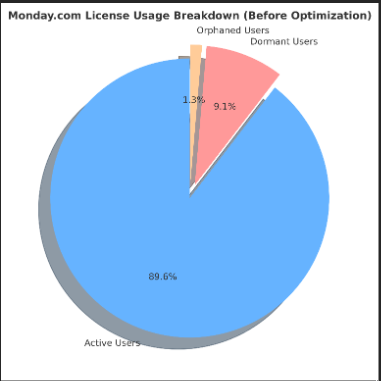
| Department | Licenses Purchased | Active Users | Dormant (60+ Days) | Orphaned | Viewer Accounts | Monthly Cost |
|---|---|---|---|---|---|---|
| Marketing | 600 | 540 | 45 | 5 | 10 | $9,000 |
| Design | 550 | 480 | 60 | 5 | 5 | $8,250 |
| Operations | 350 | 310 | 30 | 10 | 0 | $5,250 |
| Total | 1,500 | 1,330 | 135 | 20 | 15 | $22,500 |
Findings:
Solution:
Outcome:
Annual savings: $31,500 with improved governance transparency.
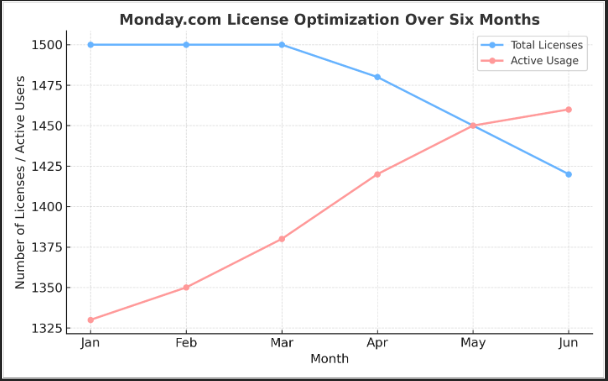
Line Graph Narrative (visual description):
The line graph showed total licenses (1,500) vs. active usage (1,330) over six months. After implementing governance, the active usage line rose to 1,460 while total licenses dropped to 1,420, visually demonstrating better efficiency and alignment.
CloudNuro prevents all five of these pitfalls by combining user lifecycle automation, license visibility, and department-level accountability. It ensures that every Monday seat is justified, used, and billed fairly.
Start your no-cost SaaS Optimization Review →
| Best Practice | Key Objective | Impact |
|---|---|---|
| Conduct a full license audit monthly. | Identify unused and inactive accounts. | Save 10–15% |
| Reallocate licenses by department | Ensure right-sized access per team | Save 20–25% |
| Track automation and integration usage | Prevent unnecessary plan upgrades | Save 10–12% |
| Enable automated user lifecycle management. | Eliminate manual deprovisioning errors. | Save 10% |
| Implement departmental chargeback | Promote ownership and reduce hoarding | Save 15–20% |
| Forecast renewals quarterly | Negotiate data-driven renewals | Save 5–10% |
1. How can I quickly identify unused Monday.com licenses?
Use Monday's Admin reports for last login and role type. For enterprise-level oversight, CloudNuro provides automated inactivity detection integrated with HR and SSO data.
2. Can I downgrade a license tier mid-term?
Yes, Monday supports downgrades at renewal or mid-term via admin request. CloudNuro models the financial impact of tier changes before execution.
3. What's the easiest way to optimize Monday licenses across multiple workspaces?
Consolidate under one enterprise plan and use CloudNuro for centralized license visibility and department-based reporting.
4. Does Monday offer native chargeback functionality?
Not natively. However, CloudNuro automates Monday chargeback using usage data, mapping license cost to each department or project.
5. How does CloudNuro help optimize Monday licenses?
CloudNuro provides continuous monitoring, automatic deprovisioning, and usage-based recommendations, helping IT teams ensure they only pay for what's actively used.
Optimizing Monday licenses is less about cutting costs and more about building visibility, fairness, and accountability. The best IT admins know that license waste compounds silently, and eliminating it strengthens governance, reduces renewals, and aligns IT spending with real business needs.
With real-time data, automation, and chargeback, CloudNuro transforms Monday license management into a measurable, ongoing discipline. Enterprises gain 360° visibility into usage, ensuring every seat is justified and every dollar accounted for.
CloudNuro is trusted by enterprises such as Konica Minolta and Federal Signal to deliver measurable SaaS savings and governance.
Recognized twice by Gartner and named a Leader in Info Tech's SoftwareReviews, CloudNuro brings AI-powered optimization, renewal forecasting, and proper Monday license governance to IT and SaaS leaders.
See how CloudNuro helps you stop paying for what you don't use →
Request a no cost, no obligation free assessment —just 15 minutes to savings!
Get StartedAcross growing organizations, Monday.com quickly becomes an essential part of everyday operations, powering project tracking, automation, and collaboration. Yet beneath that efficiency lies a quiet cost spiral. IT admins and SaaS managers frequently find that license counts keep increasing, even when user activity doesn't. Teams change, projects close, and contractors leave, but licenses often remain assigned, silently draining budgets.
Unlike typical per-seat SaaS models, Monday.com's license cost scales with workspace complexity, including the number of paid users, automation limits, and app integrations. The lack of unified visibility across departments often results in underused or misallocated licenses. A marketing team may have 20 users, but only 12 log in monthly; operations might overprovision Pro licenses when most tasks could run on Standard plans. This operational blind spot means many enterprises pay 10–35% more than they should for the same capabilities.
License optimization ensures that every user, automation, and integration aligns with business value. For IT and finance leaders, this isn't just cost-cutting, it's governance. Effective optimization prevents waste, improves utilization, and strengthens accountability across departments.
CloudNuro helps organizations uncover exactly where license waste hides in Monday.com and other SaaS platforms. Recognized twice in Gartner's SaaS Management Platforms Magic Quadrant and named a Leader in the Info Tech SoftwareReviews Data Quadrant, CloudNuro provides the analytics and automation needed to optimize Monday licenses, reclaim unused accounts, and forecast renewals with confidence.
Book your 15-minute SaaS Optimization Assessment →
Start with visibility. The first step in optimization is understanding how many licenses are purchased versus how many are actively used. Monday.com provides an Admin > Users dashboard that lists user status (active, invited, pending, or deactivated) and last login date.
Step, by, step process:
Example:
An IT admin for a media firm found that out of 1,800 total licenses, only 1,520 users logged in within the last 90 days. That's nearly 280 underused or inactive accounts, totaling $8,400/month in avoidable costs.
Tool Tip: Monday's export reports only show user activity. CloudNuro integrates these data points with HR and SSO systems to automatically flag users who left the company or changed roles.
Not all teams need full access. Marketing or design departments often require automation, heavy Pro licenses, while HR or finance may only need view or comment access.
Step, by, step process:
Example:
A retail organization identified 320 "Viewer" profiles using only dashboards and comments. By downgrading them from Standard to Viewer roles, they saved $42,000 annually.
Tool Tip: Monday's Permission Management Panel helps visualize active usage per department. Combine it with CloudNuro's cross-department mapping for granular chargeback visibility.
Monday's automation recipes (e.g., "When task status changes → notify team") are charged by monthly action limits. Overprovisioning or overlapping recipes can rapidly exhaust quotas, leading to unnecessary plan upgrades.
Step, by, step process:
Example:
An engineering team discovered they used only 40% of their automation quota. Downgrading from Enterprise to Pro saved $6,600/month with zero workflow impact.
A chargeback in Monday.com means assigning license costs to departments based on their usage. While Monday lacks native chargeback features, platforms like CloudNuro automate this by mapping user activity and license ownership to departments or cost centers.
Benefits of chargeback:
Step, by, step process:
Example:
A global consulting firm using Monday adopted chargeback and cut waste by 27% within one quarter by having departments self-regulate unused seats.
Manual provisioning and deprovisioning are error-prone. Connect Monday.com to your Identity Provider (IdP) (e.g., Okta, Azure AD, Google Workspace) for automated lifecycle governance.
Step, by, step process:
Example:
A logistics company using Azure AD auto-deprovisioning reclaimed over 80 unused licenses within a month, worth $9,600 annually, without manual intervention.
Optimization is not one-time. Quarterly reviews ensure sustainability and prepare you for renewal negotiations.
Step, by, step process:
Example:
A professional services firm projected that its license usage would drop by 15% after the project closed. By adjusting renewal counts before invoicing, they saved $22,000 instantly.
CloudNuro makes Monday license optimization continuous, not reactive. By combining usage analytics, chargeback automation, and renewal forecasting, CloudNuro gives IT admins and SaaS managers a single view to optimize Monday licenses in real time.
Request your 15-minute SaaS Optimization Demo →
Scenario:
A design and media agency with 1,500 Monday users across marketing, design, and operations teams.
| Department | Licenses Purchased | Active Users | Dormant (60+ Days) | Orphaned | Viewer Accounts | Monthly Cost |
|---|---|---|---|---|---|---|
| Marketing | 600 | 540 | 45 | 5 | 10 | $9,000 |
| Design | 550 | 480 | 60 | 5 | 5 | $8,250 |
| Operations | 350 | 310 | 30 | 10 | 0 | $5,250 |
| Total | 1,500 | 1,330 | 135 | 20 | 15 | $22,500 |
Findings:
Solution:
Outcome:
Annual savings: $31,500 with improved governance transparency.
Line Graph Narrative (visual description):
The line graph showed total licenses (1,500) vs. active usage (1,330) over six months. After implementing governance, the active usage line rose to 1,460 while total licenses dropped to 1,420, visually demonstrating better efficiency and alignment.
CloudNuro prevents all five of these pitfalls by combining user lifecycle automation, license visibility, and department-level accountability. It ensures that every Monday seat is justified, used, and billed fairly.
Start your no-cost SaaS Optimization Review →
| Best Practice | Key Objective | Impact |
|---|---|---|
| Conduct a full license audit monthly. | Identify unused and inactive accounts. | Save 10–15% |
| Reallocate licenses by department | Ensure right-sized access per team | Save 20–25% |
| Track automation and integration usage | Prevent unnecessary plan upgrades | Save 10–12% |
| Enable automated user lifecycle management. | Eliminate manual deprovisioning errors. | Save 10% |
| Implement departmental chargeback | Promote ownership and reduce hoarding | Save 15–20% |
| Forecast renewals quarterly | Negotiate data-driven renewals | Save 5–10% |
1. How can I quickly identify unused Monday.com licenses?
Use Monday's Admin reports for last login and role type. For enterprise-level oversight, CloudNuro provides automated inactivity detection integrated with HR and SSO data.
2. Can I downgrade a license tier mid-term?
Yes, Monday supports downgrades at renewal or mid-term via admin request. CloudNuro models the financial impact of tier changes before execution.
3. What's the easiest way to optimize Monday licenses across multiple workspaces?
Consolidate under one enterprise plan and use CloudNuro for centralized license visibility and department-based reporting.
4. Does Monday offer native chargeback functionality?
Not natively. However, CloudNuro automates Monday chargeback using usage data, mapping license cost to each department or project.
5. How does CloudNuro help optimize Monday licenses?
CloudNuro provides continuous monitoring, automatic deprovisioning, and usage-based recommendations, helping IT teams ensure they only pay for what's actively used.
Optimizing Monday licenses is less about cutting costs and more about building visibility, fairness, and accountability. The best IT admins know that license waste compounds silently, and eliminating it strengthens governance, reduces renewals, and aligns IT spending with real business needs.
With real-time data, automation, and chargeback, CloudNuro transforms Monday license management into a measurable, ongoing discipline. Enterprises gain 360° visibility into usage, ensuring every seat is justified and every dollar accounted for.
CloudNuro is trusted by enterprises such as Konica Minolta and Federal Signal to deliver measurable SaaS savings and governance.
Recognized twice by Gartner and named a Leader in Info Tech's SoftwareReviews, CloudNuro brings AI-powered optimization, renewal forecasting, and proper Monday license governance to IT and SaaS leaders.
See how CloudNuro helps you stop paying for what you don't use →
Request a no cost, no obligation free assessment - just 15 minutes to savings!
Get StartedWe're offering complimentary ServiceNow license assessments to only 25 enterprises this quarter who want to unlock immediate savings without disrupting operations.
Get Free AssessmentGet Started




CloudNuro Corp
1755 Park St. Suite 207
Naperville, IL 60563
Phone : +1-630-277-9470
Email: info@cloudnuro.com





.webp)

Recognized Leader in SaaS Management Platforms by Info-Tech SoftwareReviews



.png)
.svg)