

Sign Up
Thank you for Submitting!

Smartsheet has rapidly evolved from a simple collaboration tool into an enterprise-wide platform covering project and portfolio management, PMO governance, automation, resource management, workflows, and large-scale execution. With the shift from the legacy plans (Pro, Individual, Business, Enterprise + Premier add-ons) to the newer 2024/2025 Standard-Business-Enterprise model and Advanced Capabilities bundles, licensing inefficiencies have become even more common. Many organizations now operate in a hybrid mode, with some teams still on legacy contracts while others have been migrated to the new structure. This dual landscape often leads to confusion, misaligned provisioning, over-buying, and overspending that compound each renewal cycle.
License optimization in Smartsheet is rarely straightforward. Permissions, collaboration methods, sheet roles, premium capabilities, and integration behavior all influence what license tier a user truly needs. Gartner consistently reports that work management platforms are among the top overspent SaaS categories due to license drift, unmanaged ownership rules, and the high cost of premium add-ons used by a small subset of users. G2 and Capterra reviews echo this pattern, noting that many customers pay for capabilities far beyond their workforce’s actual usage levels.
This blog provides detailed guidance for IT administrators, SaaS managers, PMO leaders, and operations teams who want to regain control of Smartsheet licensing. You will learn how to identify underutilized licenses, reclaim waste, optimize seat allocation, streamline access, and negotiate contract changes backed by usage data. The guide incorporates insights from both the older and new Smartsheet pricing models. It includes a complete case study with realistic data, a visual graph, and actionable recommendations you can implement today.
If your organization is using Smartsheet across PMO, IT, HR, and Operations, a licensing audit today can prevent six-figure overspend before your next renewal.
With a 15-minute setup and measurable results in under 24 hours, CloudNuro gives IT teams a fast path to value. Request a demo with Cloudnuro.
Below are the most comprehensive and practical steps an enterprise can follow to optimize Smartsheet licensing. Each step includes explanations, examples, and references to both legacy and new pricing models.
The foundational step of Smartsheet optimization is understanding what users actually do inside the platform. Whether you’re on the old or new licensing model, functions such as sheet creation, editing, sharing, automation creation, resource management, blueprint management, and data integrations determine what license tier a user truly needs.
A manufacturing client discovered:
Downgrading 100+ users saved USD 280,000 annually.
Reviews repeatedly highlight over-assignment of Business or Enterprise licenses as a top overspend driver.
License alignment is the fastest and most impactful way to optimize Smartsheet costs.
With a 15-minute setup and measurable results in under 24 hours, CloudNuro gives IT teams a fast path to value. Request a demo with Cloudnuro.
Inactive users are the silent killer of Smartsheet budgets. Across CloudNuro engagements, we repeatedly find that 15 to 35 percent of licensed Smartsheet users have shown no meaningful activity in the last 60 to 120 days.
A SaaS company with 450 licenses found:
Actions taken:
Savings: USD 190,000 annually.
Smartsheet’s own documentation encourages quarterly activity reviews to avoid unnecessary license growth.
With a 15-minute setup and measurable results in under 24 hours, CloudNuro gives IT teams a fast path to value. Request a demo with Cloudnuro.
Premier apps such as:
They are extremely powerful but can consume large parts of your budget.
A healthcare organization purchased:
After reviewing logs:
Savings: USD 520,000 annually.
Gartner highlights Premier add-ons as one of the top areas of overspend in Smartsheet due to low adoption and limited ROI tracking.
With a 15-minute setup and measurable results in under 24 hours, CloudNuro gives IT teams a fast path to value. Request a demo with Cloudnuro.
This step is crucial in the new 2025 plan structure.
A construction company reduced the number of editor-level users from 310 to 145 through structured access mapping, saving USD 230,000 annually.
With a 15-minute setup and measurable results in under 24 hours, CloudNuro gives IT teams a fast path to value. Request a demo with Cloudnuro.
Automations in Smartsheet create license upgrades because automation creators require higher-tier licensing. Additionally, redundant workflows increase automation consumption, which can force upgrades under the new plans.
A real estate development company discovered:
Consolidation enabled the downgrading of 56 users, saving USD 160,000 per year.
With a 15-minute setup and measurable results in under 24 hours, CloudNuro gives IT teams a fast path to value. Request a demo with Cloudnuro.
Sheet sprawl forces companies to buy higher-tier licenses simply because users accumulate ownership responsibilities. This becomes expensive under both legacy and new plans.
A European telecom provider reduced workspace size by 30 percent and decreased ungoverned sheet ownership by 72 percent, saving USD 170,000 annually.
With a 15-minute setup and measurable results in under 24 hours, CloudNuro gives IT teams a fast path to value. Request a demo with Cloudnuro.
Chargeback helps prevent uncontrolled license growth by making departments financially accountable for their usage.
Smartsheet chargeback allocates:
to specific business units.
When departments see the cost of:
They automatically reduce overprovisioning.
A global manufacturing enterprise implemented a Smartsheet chargeback model, reducing unnecessary license requests by 38 percent over two quarters.
With a 15-minute setup and measurable results in under 24 hours, CloudNuro gives IT teams a fast path to value. Request a demo with Cloudnuro.
CloudNuro automatically detects underused licenses, flags misaligned permissions, identifies inactive users, analyzes automation patterns, highlights sheet sprawl, and provides optimization recommendations using real-time data.
With a 15-minute setup and measurable results in under 24 hours, CloudNuro gives IT teams a fast path to value. Request a demo with Cloudnuro.
The firm had:
CloudNuro analyzed:
Removed 346 unused licenses
Downgraded 198 users
Removed Dynamic View for 60 users
Consolidated automations
Archived 4,800 unused sheets
Centralized blueprint ownership
USD 920,000 annual reduction
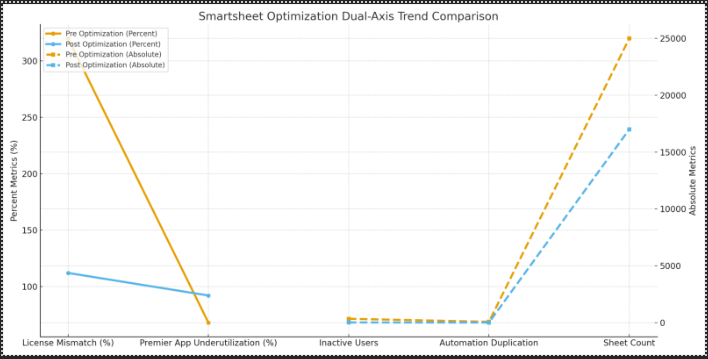
This graph visualizes improvements across two very different metric types:
With a 15-minute setup and measurable results in under 24 hours, CloudNuro gives IT teams a fast path to value. Request a demo with Cloudnuro.
With a 15-minute setup and measurable results in under 24 hours, CloudNuro gives IT teams a fast path to value. Request a demo with Cloudnuro.
Quarterly for large deployments, monthly for Premier capabilities.
Misunderstood collaboration models, sheet sprawl, and redundant automations.
Yes and no; it simplifies some areas but increases complexity in automation and governance.
Yes, with advanced dashboards and license-usage mapping.
CloudNuro is a leader in Enterprise SaaS Management Platforms, giving enterprises unmatched visibility, governance, and cost optimization. Recognized twice in a row by Gartner in the SaaS Management Platforms Magic Quadrant and named a Leader in the Info-Tech SoftwareReviews Data Quadrant, CloudNuro is trusted by global enterprises and government agencies to bring financial discipline to SaaS and cloud. Trusted by enterprises such as Konica Minolta and Federal Signal, CloudNuro provides centralized SaaS inventory, license optimization, and renewal management along with advanced cost allocation and chargeback, giving IT and Finance leaders the visibility, control, and cost-conscious culture needed to drive financial discipline. As the only FinOps-ready Enterprise SaaS Management Platform, CloudNuro brings SaaS and IaaS management into a single unified view.
CloudNuro makes Smartsheet license optimization effortless by identifying misaligned licenses, reclaiming waste, preventing overprovisioning, and enabling accurate renewal planning through real-time usage analytics.
With a 15-minute setup and measurable results in under 24 hours, CloudNuro gives IT teams a fast path to value. Request a demo with Cloudnuro.
Request a no cost, no obligation free assessment —just 15 minutes to savings!
Get StartedSmartsheet has rapidly evolved from a simple collaboration tool into an enterprise-wide platform covering project and portfolio management, PMO governance, automation, resource management, workflows, and large-scale execution. With the shift from the legacy plans (Pro, Individual, Business, Enterprise + Premier add-ons) to the newer 2024/2025 Standard-Business-Enterprise model and Advanced Capabilities bundles, licensing inefficiencies have become even more common. Many organizations now operate in a hybrid mode, with some teams still on legacy contracts while others have been migrated to the new structure. This dual landscape often leads to confusion, misaligned provisioning, over-buying, and overspending that compound each renewal cycle.
License optimization in Smartsheet is rarely straightforward. Permissions, collaboration methods, sheet roles, premium capabilities, and integration behavior all influence what license tier a user truly needs. Gartner consistently reports that work management platforms are among the top overspent SaaS categories due to license drift, unmanaged ownership rules, and the high cost of premium add-ons used by a small subset of users. G2 and Capterra reviews echo this pattern, noting that many customers pay for capabilities far beyond their workforce’s actual usage levels.
This blog provides detailed guidance for IT administrators, SaaS managers, PMO leaders, and operations teams who want to regain control of Smartsheet licensing. You will learn how to identify underutilized licenses, reclaim waste, optimize seat allocation, streamline access, and negotiate contract changes backed by usage data. The guide incorporates insights from both the older and new Smartsheet pricing models. It includes a complete case study with realistic data, a visual graph, and actionable recommendations you can implement today.
If your organization is using Smartsheet across PMO, IT, HR, and Operations, a licensing audit today can prevent six-figure overspend before your next renewal.
With a 15-minute setup and measurable results in under 24 hours, CloudNuro gives IT teams a fast path to value. Request a demo with Cloudnuro.
Below are the most comprehensive and practical steps an enterprise can follow to optimize Smartsheet licensing. Each step includes explanations, examples, and references to both legacy and new pricing models.
The foundational step of Smartsheet optimization is understanding what users actually do inside the platform. Whether you’re on the old or new licensing model, functions such as sheet creation, editing, sharing, automation creation, resource management, blueprint management, and data integrations determine what license tier a user truly needs.
A manufacturing client discovered:
Downgrading 100+ users saved USD 280,000 annually.
Reviews repeatedly highlight over-assignment of Business or Enterprise licenses as a top overspend driver.
License alignment is the fastest and most impactful way to optimize Smartsheet costs.
With a 15-minute setup and measurable results in under 24 hours, CloudNuro gives IT teams a fast path to value. Request a demo with Cloudnuro.
Inactive users are the silent killer of Smartsheet budgets. Across CloudNuro engagements, we repeatedly find that 15 to 35 percent of licensed Smartsheet users have shown no meaningful activity in the last 60 to 120 days.
A SaaS company with 450 licenses found:
Actions taken:
Savings: USD 190,000 annually.
Smartsheet’s own documentation encourages quarterly activity reviews to avoid unnecessary license growth.
With a 15-minute setup and measurable results in under 24 hours, CloudNuro gives IT teams a fast path to value. Request a demo with Cloudnuro.
Premier apps such as:
They are extremely powerful but can consume large parts of your budget.
A healthcare organization purchased:
After reviewing logs:
Savings: USD 520,000 annually.
Gartner highlights Premier add-ons as one of the top areas of overspend in Smartsheet due to low adoption and limited ROI tracking.
With a 15-minute setup and measurable results in under 24 hours, CloudNuro gives IT teams a fast path to value. Request a demo with Cloudnuro.
This step is crucial in the new 2025 plan structure.
A construction company reduced the number of editor-level users from 310 to 145 through structured access mapping, saving USD 230,000 annually.
With a 15-minute setup and measurable results in under 24 hours, CloudNuro gives IT teams a fast path to value. Request a demo with Cloudnuro.
Automations in Smartsheet create license upgrades because automation creators require higher-tier licensing. Additionally, redundant workflows increase automation consumption, which can force upgrades under the new plans.
A real estate development company discovered:
Consolidation enabled the downgrading of 56 users, saving USD 160,000 per year.
With a 15-minute setup and measurable results in under 24 hours, CloudNuro gives IT teams a fast path to value. Request a demo with Cloudnuro.
Sheet sprawl forces companies to buy higher-tier licenses simply because users accumulate ownership responsibilities. This becomes expensive under both legacy and new plans.
A European telecom provider reduced workspace size by 30 percent and decreased ungoverned sheet ownership by 72 percent, saving USD 170,000 annually.
With a 15-minute setup and measurable results in under 24 hours, CloudNuro gives IT teams a fast path to value. Request a demo with Cloudnuro.
Chargeback helps prevent uncontrolled license growth by making departments financially accountable for their usage.
Smartsheet chargeback allocates:
to specific business units.
When departments see the cost of:
They automatically reduce overprovisioning.
A global manufacturing enterprise implemented a Smartsheet chargeback model, reducing unnecessary license requests by 38 percent over two quarters.
With a 15-minute setup and measurable results in under 24 hours, CloudNuro gives IT teams a fast path to value. Request a demo with Cloudnuro.
CloudNuro automatically detects underused licenses, flags misaligned permissions, identifies inactive users, analyzes automation patterns, highlights sheet sprawl, and provides optimization recommendations using real-time data.
With a 15-minute setup and measurable results in under 24 hours, CloudNuro gives IT teams a fast path to value. Request a demo with Cloudnuro.
The firm had:
CloudNuro analyzed:
Removed 346 unused licenses
Downgraded 198 users
Removed Dynamic View for 60 users
Consolidated automations
Archived 4,800 unused sheets
Centralized blueprint ownership
USD 920,000 annual reduction
This graph visualizes improvements across two very different metric types:
With a 15-minute setup and measurable results in under 24 hours, CloudNuro gives IT teams a fast path to value. Request a demo with Cloudnuro.
With a 15-minute setup and measurable results in under 24 hours, CloudNuro gives IT teams a fast path to value. Request a demo with Cloudnuro.
Quarterly for large deployments, monthly for Premier capabilities.
Misunderstood collaboration models, sheet sprawl, and redundant automations.
Yes and no; it simplifies some areas but increases complexity in automation and governance.
Yes, with advanced dashboards and license-usage mapping.
CloudNuro is a leader in Enterprise SaaS Management Platforms, giving enterprises unmatched visibility, governance, and cost optimization. Recognized twice in a row by Gartner in the SaaS Management Platforms Magic Quadrant and named a Leader in the Info-Tech SoftwareReviews Data Quadrant, CloudNuro is trusted by global enterprises and government agencies to bring financial discipline to SaaS and cloud. Trusted by enterprises such as Konica Minolta and Federal Signal, CloudNuro provides centralized SaaS inventory, license optimization, and renewal management along with advanced cost allocation and chargeback, giving IT and Finance leaders the visibility, control, and cost-conscious culture needed to drive financial discipline. As the only FinOps-ready Enterprise SaaS Management Platform, CloudNuro brings SaaS and IaaS management into a single unified view.
CloudNuro makes Smartsheet license optimization effortless by identifying misaligned licenses, reclaiming waste, preventing overprovisioning, and enabling accurate renewal planning through real-time usage analytics.
With a 15-minute setup and measurable results in under 24 hours, CloudNuro gives IT teams a fast path to value. Request a demo with Cloudnuro.
Request a no cost, no obligation free assessment - just 15 minutes to savings!
Get StartedWe're offering complimentary ServiceNow license assessments to only 25 enterprises this quarter who want to unlock immediate savings without disrupting operations.
Get Free AssessmentGet Started




CloudNuro Corp
1755 Park St. Suite 207
Naperville, IL 60563
Phone : +1-630-277-9470
Email: info@cloudnuro.com





.webp)

Recognized Leader in SaaS Management Platforms by Info-Tech SoftwareReviews




.svg)