

Sign Up
Thank you for Submitting!

ZoomInfo is one of the most widely adopted revenue intelligence platforms used for prospecting, enrichment, intent signals, and sales automation. Yet despite its operational value, ZoomInfo often becomes one of the most expensive tools in an organization’s commercial tech stack. The root cause is almost always the same: poorly managed licenses, misaligned permission tiers, unused seat types, and a lack of visibility into how users behave across modules like SalesOS, Chorus, Intent, Engage, and OperationsOS.
Most companies assume that once ZoomInfo licenses are purchased, they will be fully utilized. However, a closer look reveals that more than 40 percent of ZoomInfo seats go unused or are underused within the first 90 days, according to multiple G2.com reviews and Gartner Peer Insights commentary. FinOps research also suggests that in data intelligence tools, underutilization is the single largest source of waste because IT teams rarely monitor daily usage patterns, provisioning rules, and entitlement drift.
These inefficiencies come in many forms. SDR teams may be assigned premium seats even though they only use contact search. Managers may have expensive analytics access that they never open. Operations teams may hold advanced enrichment workflows even though the enrichment volume is low. And often, Intent and Engage seats are provisioned widely, even though only a small percentage of users actively use those features.
The result is clear: without structured oversight, companies accumulate unnecessary licensing overhead, increasing year-over-year costs. This blog helps IT administrators, SaaS managers, and RevOps leaders understand how to optimize ZoomInfo licenses, control consumption, avoid waste, and forecast renewals with accuracy. The goal is to give you a detailed, practical, and step-by-step blueprint to stop paying for what you do not use.
If your ZoomInfo renewal is approaching or you suspect licensing inefficiencies, now is the best time to evaluate usage patterns. Proactive license optimization can reduce waste significantly and make your billing structure more predictable.
CloudNuro gives IT teams a fast path to value. Request a demo.
Below are best practices for IT and SaaS admins looking to optimize ZoomInfo licenses with precision.
The first step in any optimization effort is understanding what you have and how it is used. Start by exporting a complete license inventory from ZoomInfo’s Admin Portal.
Next, compare this with usage logs. ZoomInfo provides user-level activity reports showing:
During an assessment with a mid-market tech company, we discovered that 31 percent of their Engage users had not launched a sequence in more than 45 days, even though Engage was the most expensive add-on in their license package. By removing idle Engage licenses and reassigning basic SalesOS seats, the company saved more than USD 84,000 annually.
Gartner’s dataset reinforces this finding. Organizations that regularly audit SaaS application usage reduce overspending by up to 28 percent through seat reclamation and tier adjustments.
Example: If a user performs fewer than 10 searches per week or never interacts with Intent, they likely do not need a premium or advanced ZoomInfo seat.
This initial audit lays the foundation for consistently optimizing ZoomInfo licenses.
One of the most significant sources of wasted spend is uniform seat assignment. Many organizations assign advanced seats broadly for administrative convenience, even though job functions vary widely.
| Role | Actual Needs | Ideal Seat |
|---|---|---|
| SDRs | High-volume search, Engage sequences | SalesOS + Engage |
| AEs | Account data, buying committees | SalesOS Basic |
| CSMs | Account enrichment | Limited Search |
| Operations | Bulk enrichment, workflows | OperationsOS |
| Managers | Reporting | View-only or Manager Access |
Role-aligned licensing prevents unnecessary upgrades and directly helps optimize ZoomInfo licenses without operational impact.
ZoomInfo Intent is priced at a premium. While powerful, most organizations over-provision Intent access.
A healthcare SaaS company reduced Intent licenses by 82 percent after discovering minimal adoption, saving USD 120,000 annually.
ZoomInfo enrichment is credit-based, and ungoverned automation is a major hidden cost driver.
One financial services firm reduced enrichment overages by 48 percent after consolidating workflows.
Inactive users are one of the fastest sources of savings.
Reclaiming inactive seats regularly prevents silent budget leakage.
Without governance, offboarding failures leave expensive licenses assigned indefinitely.
This ensures compliance and prevents waste.
Before renewal, reassess every add-on and module.
Gathering 24 months of usage data significantly improves negotiation leverage.
A mid-sized B2B SaaS company overspent 36 percent due to poor licensing governance.
Annual savings of USD 221,000.
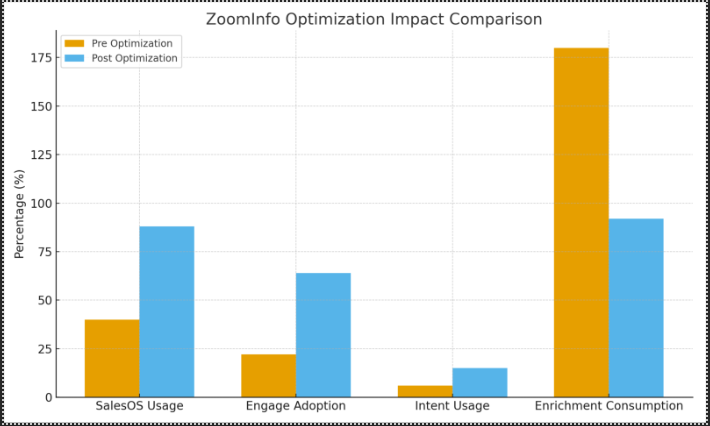
Monthly reviews prevent waste.
Reclaiming inactive seats.
CloudNuro provides real-time visibility, governance, and optimization recommendations.
CloudNuro is a leader in Enterprise SaaS Management Platforms, delivering visibility, governance, cost optimization, and chargeback across SaaS and cloud environments. With rapid deployment and actionable insights, CloudNuro helps organizations regain financial control.
Request a no cost, no obligation free assessment —just 15 minutes to savings!
Get StartedZoomInfo is one of the most widely adopted revenue intelligence platforms used for prospecting, enrichment, intent signals, and sales automation. Yet despite its operational value, ZoomInfo often becomes one of the most expensive tools in an organization’s commercial tech stack. The root cause is almost always the same: poorly managed licenses, misaligned permission tiers, unused seat types, and a lack of visibility into how users behave across modules like SalesOS, Chorus, Intent, Engage, and OperationsOS.
Most companies assume that once ZoomInfo licenses are purchased, they will be fully utilized. However, a closer look reveals that more than 40 percent of ZoomInfo seats go unused or are underused within the first 90 days, according to multiple G2.com reviews and Gartner Peer Insights commentary. FinOps research also suggests that in data intelligence tools, underutilization is the single largest source of waste because IT teams rarely monitor daily usage patterns, provisioning rules, and entitlement drift.
These inefficiencies come in many forms. SDR teams may be assigned premium seats even though they only use contact search. Managers may have expensive analytics access that they never open. Operations teams may hold advanced enrichment workflows even though the enrichment volume is low. And often, Intent and Engage seats are provisioned widely, even though only a small percentage of users actively use those features.
The result is clear: without structured oversight, companies accumulate unnecessary licensing overhead, increasing year-over-year costs. This blog helps IT administrators, SaaS managers, and RevOps leaders understand how to optimize ZoomInfo licenses, control consumption, avoid waste, and forecast renewals with accuracy. The goal is to give you a detailed, practical, and step-by-step blueprint to stop paying for what you do not use.
If your ZoomInfo renewal is approaching or you suspect licensing inefficiencies, now is the best time to evaluate usage patterns. Proactive license optimization can reduce waste significantly and make your billing structure more predictable.
CloudNuro gives IT teams a fast path to value. Request a demo.
Below are best practices for IT and SaaS admins looking to optimize ZoomInfo licenses with precision.
The first step in any optimization effort is understanding what you have and how it is used. Start by exporting a complete license inventory from ZoomInfo’s Admin Portal.
Next, compare this with usage logs. ZoomInfo provides user-level activity reports showing:
During an assessment with a mid-market tech company, we discovered that 31 percent of their Engage users had not launched a sequence in more than 45 days, even though Engage was the most expensive add-on in their license package. By removing idle Engage licenses and reassigning basic SalesOS seats, the company saved more than USD 84,000 annually.
Gartner’s dataset reinforces this finding. Organizations that regularly audit SaaS application usage reduce overspending by up to 28 percent through seat reclamation and tier adjustments.
Example: If a user performs fewer than 10 searches per week or never interacts with Intent, they likely do not need a premium or advanced ZoomInfo seat.
This initial audit lays the foundation for consistently optimizing ZoomInfo licenses.
One of the most significant sources of wasted spend is uniform seat assignment. Many organizations assign advanced seats broadly for administrative convenience, even though job functions vary widely.
| Role | Actual Needs | Ideal Seat |
|---|---|---|
| SDRs | High-volume search, Engage sequences | SalesOS + Engage |
| AEs | Account data, buying committees | SalesOS Basic |
| CSMs | Account enrichment | Limited Search |
| Operations | Bulk enrichment, workflows | OperationsOS |
| Managers | Reporting | View-only or Manager Access |
Role-aligned licensing prevents unnecessary upgrades and directly helps optimize ZoomInfo licenses without operational impact.
ZoomInfo Intent is priced at a premium. While powerful, most organizations over-provision Intent access.
A healthcare SaaS company reduced Intent licenses by 82 percent after discovering minimal adoption, saving USD 120,000 annually.
ZoomInfo enrichment is credit-based, and ungoverned automation is a major hidden cost driver.
One financial services firm reduced enrichment overages by 48 percent after consolidating workflows.
Inactive users are one of the fastest sources of savings.
Reclaiming inactive seats regularly prevents silent budget leakage.
Without governance, offboarding failures leave expensive licenses assigned indefinitely.
This ensures compliance and prevents waste.
Before renewal, reassess every add-on and module.
Gathering 24 months of usage data significantly improves negotiation leverage.
A mid-sized B2B SaaS company overspent 36 percent due to poor licensing governance.
Annual savings of USD 221,000.
Monthly reviews prevent waste.
Reclaiming inactive seats.
CloudNuro provides real-time visibility, governance, and optimization recommendations.
CloudNuro is a leader in Enterprise SaaS Management Platforms, delivering visibility, governance, cost optimization, and chargeback across SaaS and cloud environments. With rapid deployment and actionable insights, CloudNuro helps organizations regain financial control.
Request a no cost, no obligation free assessment - just 15 minutes to savings!
Get StartedWe're offering complimentary ServiceNow license assessments to only 25 enterprises this quarter who want to unlock immediate savings without disrupting operations.
Get Free AssessmentGet Started




CloudNuro Corp
1755 Park St. Suite 207
Naperville, IL 60563
Phone : +1-630-277-9470
Email: info@cloudnuro.com





.webp)

Recognized Leader in SaaS Management Platforms by Info-Tech SoftwareReviews


.png)

.svg)