

Sign Up
Thank you for Submitting!
Most enterprises run some form of Microsoft 365 review, yet a focused Power BI license audit is rarely on the calendar. That blind spot is expensive. Recent enterprise SaaS benchmarks show that a comprehensive license audit centered on usage and rationalization can unlock 15, 30% direct savings in Power BI and Microsoft 365 deployments.
In large environments, Power BI is like a high performance engine dropped into a fleet of cars: powerful, but if you never check who is driving which vehicle, you pay for idle horsepower every month. This post outlines the audit most organizations skip, where the hidden waste lives, and how to institutionalize Power BI license governance so you capture savings every quarter, not once every few years.
A focused Power BI license audit is not just an IT hygiene task. It sits at the intersection of FinOps, data strategy, and compliance.
Recent SaaS market analysis indicates that up to 32% of Power BI licenses in large enterprises are unused or underutilized at any given time. Another cloud software report found that 62% of organizations lack automated license management for Power BI, and they cite this gap as a primary driver of SaaS overspend.
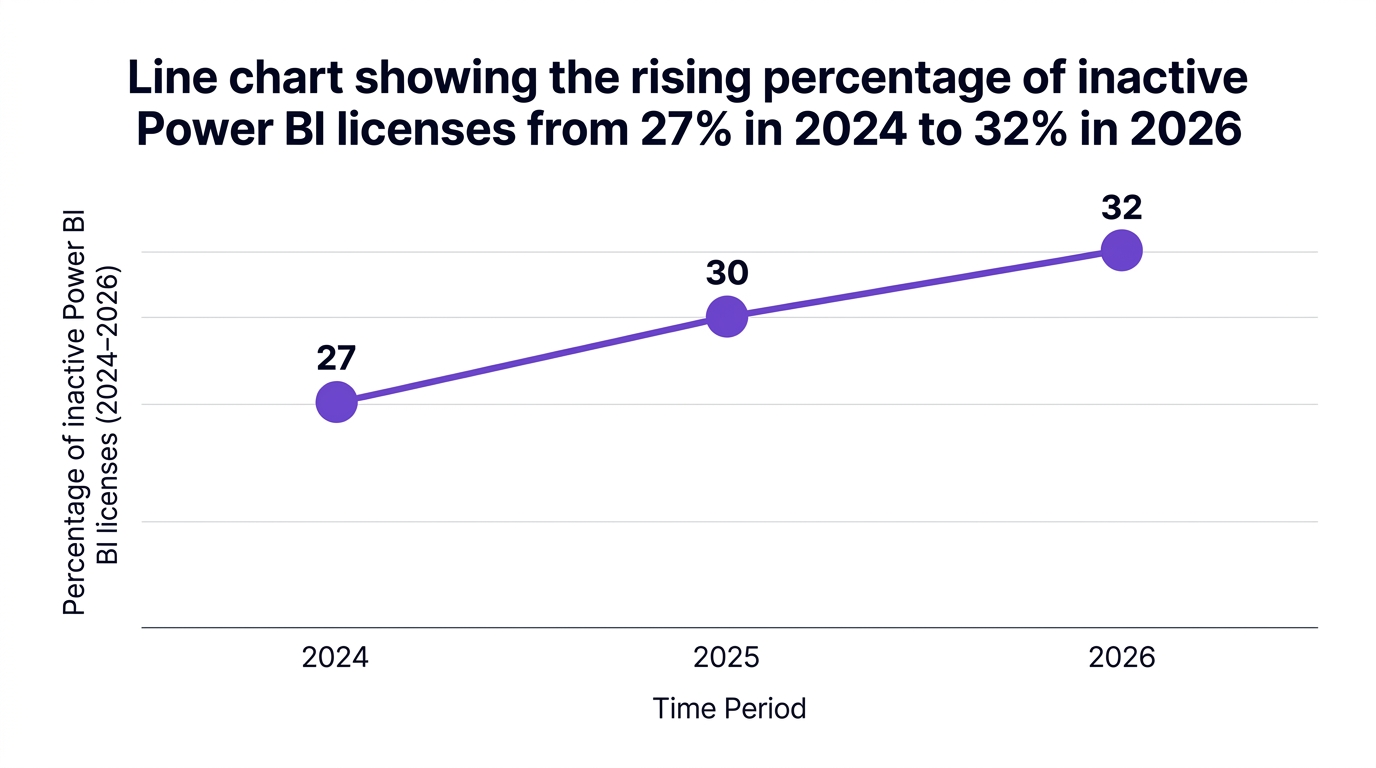
From a FinOps perspective, this is low hanging fruit:
One SaaS cost optimization analyst summarized the issue in 2026: failing to regularly audit Power BI licenses is equivalent to handing a blank check to your cloud provider, and automated reclamation tools provide one of the fastest ROIs in cloud spending.
The implication is clear: a structured Power BI license audit should be a standard control, just like cloud instance right sizing or unused storage cleanup.
To run an effective Power BI license audit, you need a clear view of Power BI license types and typical value leaks.
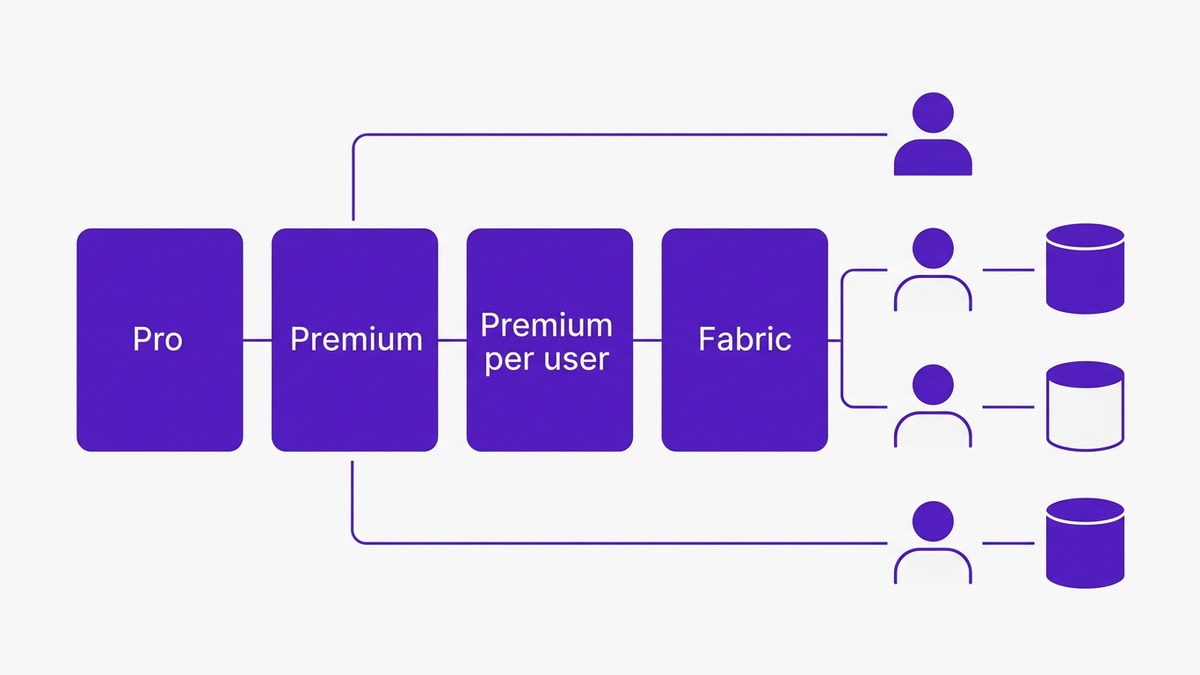
Power BI licensing 2026 for enterprises typically clusters into four buckets:
Each family carries different unit economics. When you combine them with Microsoft 365 bundles, office 365 and power bi licensing overlap becomes a real risk.
A targeted saas license audit power bi view usually exposes several recurring problems:
An enterprise technology strategist noted in 2026 that license sprawl and shadow IT are the most under addressed risks in enterprise Power BI environments, and mature organizations counter that with continuous license optimization.
During an audit, finance leaders focus on:
Your goal is not only to reduce spend, but to align each persona with the lowest cost configuration that supports their workload.
Most organizations think they audit Power BI because they:
That is only the surface. The high yield audit that produces 15, 30% savings goes much deeper.
Use this power bi licensing audit checklist as your baseline:
A cloud governance leader in 2026 observed that the biggest value from Power BI audits is uncovering capacity misallocation, since Premium resources are particularly susceptible to silent overspend.
A single audit yields quick savings, but the real value comes from continuous Power BI license optimization integrated with FinOps workflows.
Recent SaaS management surveys show that over 64% of large organizations now embed monthly Power BI and Microsoft 365 usage reviews into their FinOps practice, and governance forecasts indicate 71% of enterprises plan to increase spend on license governance tools for Microsoft 365 and Power BI in 2026.
To reduce Power BI licensing costs sustainably, enterprises are adopting:
These practices bridge FinOps and BI. They keep Power BI cost optimization aligned with data strategy rather than episodic budget pressure.
Not every audit produces the headline numbers executives expect. Common failure modes include:
The remedy is to treat the audit like changing the flight plan, not just the fuel levels. You must align it with business priorities, analytics roadmaps, and compliance requirements.
The abstract savings percentages become more tangible when translated to real enterprise outcomes.
A global financial services organization conducted a targeted enterprise saas license management power bi initiative across more than 3,000 users.
By combining detailed activity data, power bi inactive user detection, and cross checks against their Microsoft 365 entitlements, they identified 2,800 inactive Power BI licenses. Automated reclamation and rationalization produced annual savings of $315,000, while also improving audit readiness for regulatory reviews.
Key levers:
A healthcare enterprise with over 5,000 users integrated a unified SaaS governance platform as part of a saas license audit power bi initiative.
They automated Power BI license reviews, set up policy based reclamation, and used chargeback to expose BI costs at the department level. Within months they realized a documented 18% reduction in overall SaaS licensing spend and significantly improved visibility into license utilization for business units.
What mattered most:
These examples show that the 15, 30% savings range is not theoretical. It is the expected outcome when you couple robust audit practices with automation.
CloudNuro is built for enterprises that want continuous, automated power bi license governance, not just an annual clean up.
At the core, CloudNuro’s Microsoft 365 Custodian and Unified Cloud Custodian deliver three capabilities that matter most for Power BI cost and compliance.
CloudNuro’s Microsoft 365 Custodian automatically ingests and normalizes Power BI activity and license data to produce granular power bi license usage report views.
Key outcomes:
This capability alone addresses the 32% underutilization problem identified in recent SaaS market analysis and directly supports license cost recovery.
Through Unified Cloud Custodian, CloudNuro provides AI driven power bi license optimization across Pro, Premium, and Fabric workloads.
CloudNuro helps you:
This turns capacity planning from a series of guesswork upgrades into a governed, data driven practice that aligns with capacity planning for Power BI best practices.
CloudNuro was designed with governance first architecture, so it does more than optimize costs.
For Power BI, CloudNuro delivers:
As market trends highlight, orphaned and inactive license detection is now mandated in internal IT frameworks for most organizations with Microsoft 365 and Power BI. CloudNuro operationalizes this requirement, turning it into a recurring, automated control.

The result is a living, automated enterprise saas license management power bi framework. IT, finance, and procurement share a single source of truth for entitlements, usage, and costs, which is essential for a mature FinOps function.
Start by exporting a detailed power bi license usage report covering at least 90 days. Correlate sign in data, report/dashboard interaction, and workspace membership to identify users with no or minimal activity.
Next, cross reference those users with your entitlements to find power bi inactive user licenses that can be downgraded or reclaimed. Automated platforms like CloudNuro’s Microsoft 365 Custodian can perform this correlation continuously, apply inactivity thresholds, and queue licenses for reclamation based on your policies.
The most effective approach combines one time rationalization with ongoing power bi license governance. Use an initial audit to correct power bi license types per persona, remove duplicates, and right size capacities.
Then, implement continuous power bi license optimization: automated inactivity detection, periodic review of power bi license cost per user, ongoing Premium capacity tuning, and chargeback. Integrating these controls into FinOps workflows ensures the 15, 30% savings are sustained year over year.
IT teams should integrate directory data, Power BI usage logs, and Microsoft 365 entitlements into a single view. From there, rules can flag:
With CloudNuro, these rules become automated policies that detect power bi inactive user licenses, route them for approval, and reclaim them, feeding recovered value into your license cost recovery metrics.
Pro is a per user license for authoring and sharing. Premium, whether capacity or per user, adds enterprise grade features like larger datasets, paginated reports, and higher performance guarantees.
Fabric scenarios combine Power BI with other analytics workloads on shared capacities, which changes the cost model. A robust power bi licensing 2026 strategy considers how microsoft fabric power bi pricing interacts with existing Premium investments to avoid double paying for similar capabilities.
Overlapping entitlements are a silent drain on budgets. A recent FinOps trends report noted that 29% of IT leaders see overlapping Microsoft 365 and Power BI licensing as a major double spending source, especially in organizations over 1,000 users.
By aligning your microsoft 365 licensing strategy with your Power BI footprint, you can remove redundant standalone licenses where suite licenses already include Pro rights. CloudNuro makes this overlap visible and provides targeted recommendations to correct it.
Effective power bi capacity planning best practices start with continuous measurement of capacity utilization across CPU, memory, and refresh queues. Use this data to right size Premium capacities, consolidate underused workspaces, and plan for project driven spikes instead of permanent overprovisioning.
Many enterprises now adopt monthly capacity reviews as part of finops and power bi cost control, supported by AI insights from platforms like CloudNuro’s Unified Cloud Custodian.
The data is clear: unused or misaligned Power BI licenses can represent 15, 30% of your analytics spend, with up to 32% of licenses idle or underutilized in large environments.
A structured power bi license audit, backed by continuous governance and automation, converts that waste into recurring savings and stronger compliance. By combining activity driven rationalization, power bi cost optimization policies, and integrated FinOps reporting, organizations can treat Power BI the way they treat any other strategic cloud workload: governed, accountable, and optimized.
CloudNuro helps IT, finance, and procurement teams institutionalize this discipline, moving from reactive license clean ups to proactive, policy driven power bi license governance that pays for itself.
If your organization has not yet run a deep Power BI audit, this quarter is the right time to start.
CloudNuro is a leader in Enterprise SaaS Management Platforms, providing enterprises with unmatched visibility, governance, and cost optimization. Recognized twice in a row in the SaaS Management Platforms category and named a Leader in the SoftwareReviews Data Quadrant, CloudNuro is trusted by global enterprises and government agencies to bring financial discipline to SaaS, cloud, and AI. Trusted by enterprises such as Konica Minolta and Federal Signal, CloudNuro provides centralized SaaS inventory, license optimization, and renewal management along with advanced cost allocation and chargeback, giving IT and Finance leaders the visibility, control, and cost conscious culture needed to drive financial discipline. Request a Demo | Get Free Savings | Explore Product
Request a no cost, no obligation free assessment —just 15 minutes to savings!
Get StartedMost enterprises run some form of Microsoft 365 review, yet a focused Power BI license audit is rarely on the calendar. That blind spot is expensive. Recent enterprise SaaS benchmarks show that a comprehensive license audit centered on usage and rationalization can unlock 15, 30% direct savings in Power BI and Microsoft 365 deployments.
In large environments, Power BI is like a high performance engine dropped into a fleet of cars: powerful, but if you never check who is driving which vehicle, you pay for idle horsepower every month. This post outlines the audit most organizations skip, where the hidden waste lives, and how to institutionalize Power BI license governance so you capture savings every quarter, not once every few years.
A focused Power BI license audit is not just an IT hygiene task. It sits at the intersection of FinOps, data strategy, and compliance.
Recent SaaS market analysis indicates that up to 32% of Power BI licenses in large enterprises are unused or underutilized at any given time. Another cloud software report found that 62% of organizations lack automated license management for Power BI, and they cite this gap as a primary driver of SaaS overspend.
From a FinOps perspective, this is low hanging fruit:
One SaaS cost optimization analyst summarized the issue in 2026: failing to regularly audit Power BI licenses is equivalent to handing a blank check to your cloud provider, and automated reclamation tools provide one of the fastest ROIs in cloud spending.
The implication is clear: a structured Power BI license audit should be a standard control, just like cloud instance right sizing or unused storage cleanup.
To run an effective Power BI license audit, you need a clear view of Power BI license types and typical value leaks.
Power BI licensing 2026 for enterprises typically clusters into four buckets:
Each family carries different unit economics. When you combine them with Microsoft 365 bundles, office 365 and power bi licensing overlap becomes a real risk.
A targeted saas license audit power bi view usually exposes several recurring problems:
An enterprise technology strategist noted in 2026 that license sprawl and shadow IT are the most under addressed risks in enterprise Power BI environments, and mature organizations counter that with continuous license optimization.
During an audit, finance leaders focus on:
Your goal is not only to reduce spend, but to align each persona with the lowest cost configuration that supports their workload.
Most organizations think they audit Power BI because they:
That is only the surface. The high yield audit that produces 15, 30% savings goes much deeper.
Use this power bi licensing audit checklist as your baseline:
A cloud governance leader in 2026 observed that the biggest value from Power BI audits is uncovering capacity misallocation, since Premium resources are particularly susceptible to silent overspend.
A single audit yields quick savings, but the real value comes from continuous Power BI license optimization integrated with FinOps workflows.
Recent SaaS management surveys show that over 64% of large organizations now embed monthly Power BI and Microsoft 365 usage reviews into their FinOps practice, and governance forecasts indicate 71% of enterprises plan to increase spend on license governance tools for Microsoft 365 and Power BI in 2026.
To reduce Power BI licensing costs sustainably, enterprises are adopting:
These practices bridge FinOps and BI. They keep Power BI cost optimization aligned with data strategy rather than episodic budget pressure.
Not every audit produces the headline numbers executives expect. Common failure modes include:
The remedy is to treat the audit like changing the flight plan, not just the fuel levels. You must align it with business priorities, analytics roadmaps, and compliance requirements.
The abstract savings percentages become more tangible when translated to real enterprise outcomes.
A global financial services organization conducted a targeted enterprise saas license management power bi initiative across more than 3,000 users.
By combining detailed activity data, power bi inactive user detection, and cross checks against their Microsoft 365 entitlements, they identified 2,800 inactive Power BI licenses. Automated reclamation and rationalization produced annual savings of $315,000, while also improving audit readiness for regulatory reviews.
Key levers:
A healthcare enterprise with over 5,000 users integrated a unified SaaS governance platform as part of a saas license audit power bi initiative.
They automated Power BI license reviews, set up policy based reclamation, and used chargeback to expose BI costs at the department level. Within months they realized a documented 18% reduction in overall SaaS licensing spend and significantly improved visibility into license utilization for business units.
What mattered most:
These examples show that the 15, 30% savings range is not theoretical. It is the expected outcome when you couple robust audit practices with automation.
CloudNuro is built for enterprises that want continuous, automated power bi license governance, not just an annual clean up.
At the core, CloudNuro’s Microsoft 365 Custodian and Unified Cloud Custodian deliver three capabilities that matter most for Power BI cost and compliance.
CloudNuro’s Microsoft 365 Custodian automatically ingests and normalizes Power BI activity and license data to produce granular power bi license usage report views.
Key outcomes:
This capability alone addresses the 32% underutilization problem identified in recent SaaS market analysis and directly supports license cost recovery.
Through Unified Cloud Custodian, CloudNuro provides AI driven power bi license optimization across Pro, Premium, and Fabric workloads.
CloudNuro helps you:
This turns capacity planning from a series of guesswork upgrades into a governed, data driven practice that aligns with capacity planning for Power BI best practices.
CloudNuro was designed with governance first architecture, so it does more than optimize costs.
For Power BI, CloudNuro delivers:
As market trends highlight, orphaned and inactive license detection is now mandated in internal IT frameworks for most organizations with Microsoft 365 and Power BI. CloudNuro operationalizes this requirement, turning it into a recurring, automated control.
The result is a living, automated enterprise saas license management power bi framework. IT, finance, and procurement share a single source of truth for entitlements, usage, and costs, which is essential for a mature FinOps function.
Start by exporting a detailed power bi license usage report covering at least 90 days. Correlate sign in data, report/dashboard interaction, and workspace membership to identify users with no or minimal activity.
Next, cross reference those users with your entitlements to find power bi inactive user licenses that can be downgraded or reclaimed. Automated platforms like CloudNuro’s Microsoft 365 Custodian can perform this correlation continuously, apply inactivity thresholds, and queue licenses for reclamation based on your policies.
The most effective approach combines one time rationalization with ongoing power bi license governance. Use an initial audit to correct power bi license types per persona, remove duplicates, and right size capacities.
Then, implement continuous power bi license optimization: automated inactivity detection, periodic review of power bi license cost per user, ongoing Premium capacity tuning, and chargeback. Integrating these controls into FinOps workflows ensures the 15, 30% savings are sustained year over year.
IT teams should integrate directory data, Power BI usage logs, and Microsoft 365 entitlements into a single view. From there, rules can flag:
With CloudNuro, these rules become automated policies that detect power bi inactive user licenses, route them for approval, and reclaim them, feeding recovered value into your license cost recovery metrics.
Pro is a per user license for authoring and sharing. Premium, whether capacity or per user, adds enterprise grade features like larger datasets, paginated reports, and higher performance guarantees.
Fabric scenarios combine Power BI with other analytics workloads on shared capacities, which changes the cost model. A robust power bi licensing 2026 strategy considers how microsoft fabric power bi pricing interacts with existing Premium investments to avoid double paying for similar capabilities.
Overlapping entitlements are a silent drain on budgets. A recent FinOps trends report noted that 29% of IT leaders see overlapping Microsoft 365 and Power BI licensing as a major double spending source, especially in organizations over 1,000 users.
By aligning your microsoft 365 licensing strategy with your Power BI footprint, you can remove redundant standalone licenses where suite licenses already include Pro rights. CloudNuro makes this overlap visible and provides targeted recommendations to correct it.
Effective power bi capacity planning best practices start with continuous measurement of capacity utilization across CPU, memory, and refresh queues. Use this data to right size Premium capacities, consolidate underused workspaces, and plan for project driven spikes instead of permanent overprovisioning.
Many enterprises now adopt monthly capacity reviews as part of finops and power bi cost control, supported by AI insights from platforms like CloudNuro’s Unified Cloud Custodian.
The data is clear: unused or misaligned Power BI licenses can represent 15, 30% of your analytics spend, with up to 32% of licenses idle or underutilized in large environments.
A structured power bi license audit, backed by continuous governance and automation, converts that waste into recurring savings and stronger compliance. By combining activity driven rationalization, power bi cost optimization policies, and integrated FinOps reporting, organizations can treat Power BI the way they treat any other strategic cloud workload: governed, accountable, and optimized.
CloudNuro helps IT, finance, and procurement teams institutionalize this discipline, moving from reactive license clean ups to proactive, policy driven power bi license governance that pays for itself.
If your organization has not yet run a deep Power BI audit, this quarter is the right time to start.
CloudNuro is a leader in Enterprise SaaS Management Platforms, providing enterprises with unmatched visibility, governance, and cost optimization. Recognized twice in a row in the SaaS Management Platforms category and named a Leader in the SoftwareReviews Data Quadrant, CloudNuro is trusted by global enterprises and government agencies to bring financial discipline to SaaS, cloud, and AI. Trusted by enterprises such as Konica Minolta and Federal Signal, CloudNuro provides centralized SaaS inventory, license optimization, and renewal management along with advanced cost allocation and chargeback, giving IT and Finance leaders the visibility, control, and cost conscious culture needed to drive financial discipline. Request a Demo | Get Free Savings | Explore Product
Request a no cost, no obligation free assessment - just 15 minutes to savings!
Get StartedWe're offering complimentary ServiceNow license assessments to only 25 enterprises this quarter who want to unlock immediate savings without disrupting operations.
Get Free AssessmentGet Started




CloudNuro Corp
1755 Park St. Suite 207
Naperville, IL 60563
Phone : +1-630-277-9470
Email: info@cloudnuro.com





.webp)

Recognized Leader in SaaS Management Platforms by Info-Tech SoftwareReviews


%20Tools%20for%20Governance%20(2025%20Guide).png)
.png)
.svg)