

Sign Up
Thank you for Submitting!

Optimizing Spark session settings within Microsoft Fabric is no longer just a technical best practice, it is a critical business discipline. With the surging impact of big data analytics, data science, and automated workflows, IT leaders increasingly face runaway cloud bills and resource sprawl, particularly for Spark environments. For enterprises navigating the tradeoffs between agility, security, and cost, granular configuration of Spark sessions can be the decisive lever to unlock cost reductions up to 40%, while building a culture of governance and accountability.
Every active Spark session draws on compute, memory, and storage resources, regardless of workload size or idle state. Default configurations typically leave sessions running far longer than necessary, accumulating billing for little or no productive activity. In large enterprise contexts, multiply this inefficiency by hundreds of users and concurrent pipelines: the result is ballooning costs, wasted vCore hours, and audit gaps in resource usage.
Recent advancements in Microsoft Fabric, including high concurrency session modes and resource profile definitions, empower teams to consolidate workloads, automate life cycles, and right-size environments for both performance and efficiency. For CIOs, FinOps leaders, and cloud architects, tapping these new capabilities can be transformative.
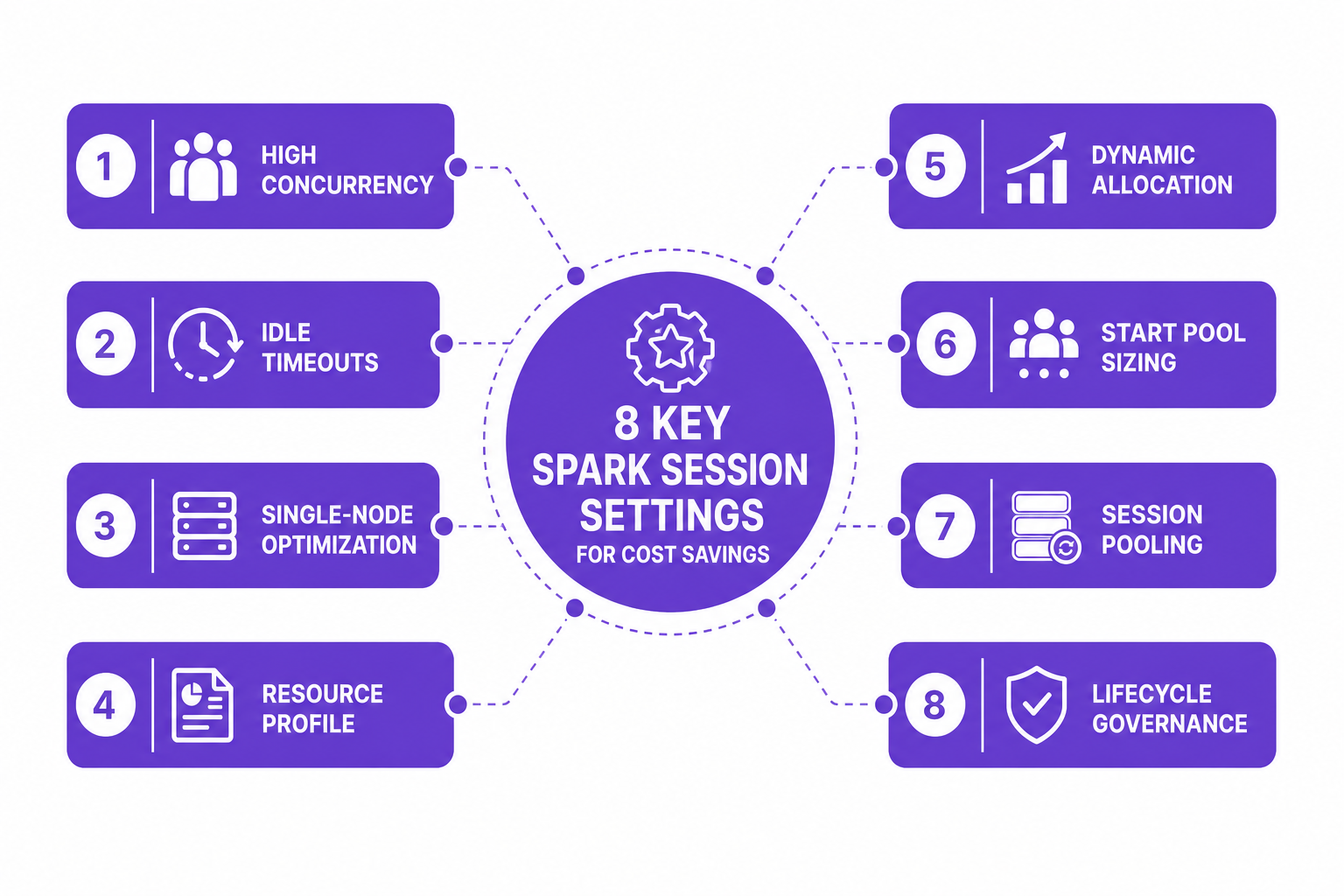
Successful cost reduction hinges on a focused set of tweaks applied at both the environment and session level. CloudNuro, drawing from deep market expertise and real-time usage patterns across global enterprises, recommends prioritizing the following eight Spark configuration levers:
Switch your workspace or pipeline to Fabric high concurrency. This allows up to five notebooks or jobs to share a single running Spark session, yielding up to 80% cost savings by consolidating what would be multiple, isolated compute payloads into a single, highly-utilized session. Most scheduled ETL or data preparation workloads do not require session isolation.
Default Spark session timeouts may be set in hours. Modifying the configuration to terminate sessions after 5-15 minutes of inactivity can slash total compute billing by 20% to 30%. CloudNuro experts consistently find that idle sessions are the top cost sink, especially after hours or within lab environments.
For most ETL, ad-hoc analytics, and data exploration, multi-node clusters are overkill. Configuring pools to operate with one node as both driver and executor, using autoscale min and max at 1, can yield up to 50% capacity savings compared to default multi-node deployments, with no performance loss for standard workloads.
Microsoft Fabric provides built-in resource profiles such as readHeavyForSpark and writeHeavyForSpark. Applying the right profile to each job can improve completion times by up to 35% without increasing spend by aligning resources with actual workload patterns.
Enable dynamic allocation with customized max node bursts to let Spark scale executors in response to demand, and then promptly release them when no longer needed. Enterprises report an additional 20%-40% in savings when combining this with single-node pools or strict scaling policies.
Start pools that are too large cause excessive idle billing as sessions wait for jobs. Establish starter pools that match peak concurrency plus a small buffer, no more. This reduces the interval where unused compute is provisioned but not delivering business value.
Modern usage patterns move away from one-to-one session mapping. Automate grouping by tagging related workloads, which lets you pool sessions for shared compute efficiency and enforce policy-driven scheduling, making your cost trends flatter and more predictable.
Develop automated, policy-based mechanisms that review and terminate orphaned or underused Spark sessions. CloudNuro’s Unified Cloud Custodian, for example, triggers workflows that identify and decommission zombie sessions, stopping silent cost leakage across large teams and long-running projects.
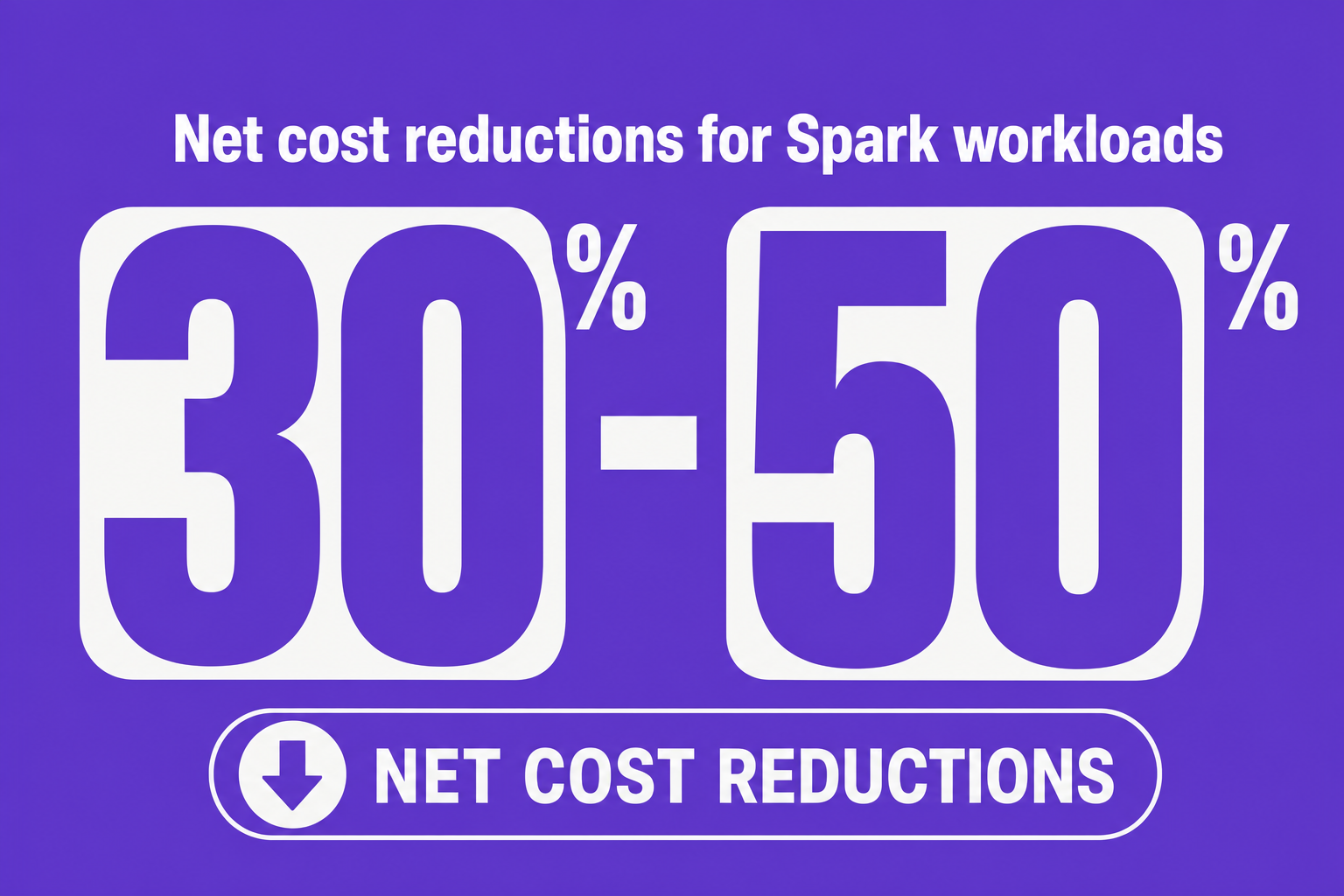
Evidence from CloudNuro deployments and industry benchmarks shows the impact of aggressive Spark session optimization:
Organizations that combine high concurrency, single-node right-sizing, session pooling, and auto-scaling routinely achieve 30%-50% net cloud spend reductions for Spark workloads.
Automated cost optimization features, like those within CloudNuro’s Microsoft 365 Custodian and AI Custodian platforms, routinely surface 10%-20% further savings by rightsizing capacity and proactively reclaiming under-utilized assets.
A healthcare enterprise reduced its annual analytics platform spend by 19% by centralizing inventory and streamlining session lifecycles.
Session configuration in Microsoft Fabric is not just about raw cost optimization. It directly supports both governance and security:
Strict session timeouts and lifecycle policies reduce the window for unauthorized access to sensitive data in shared Spark environments.
Standardized resource profiles enforce workload segregation and limit the scope of exposed compute, supporting your compliance posture.
Centralized cloud cost management platforms such as CloudNuro provide full audit trails for session changes, idle timeouts, and user actions, essential for regulated industries.
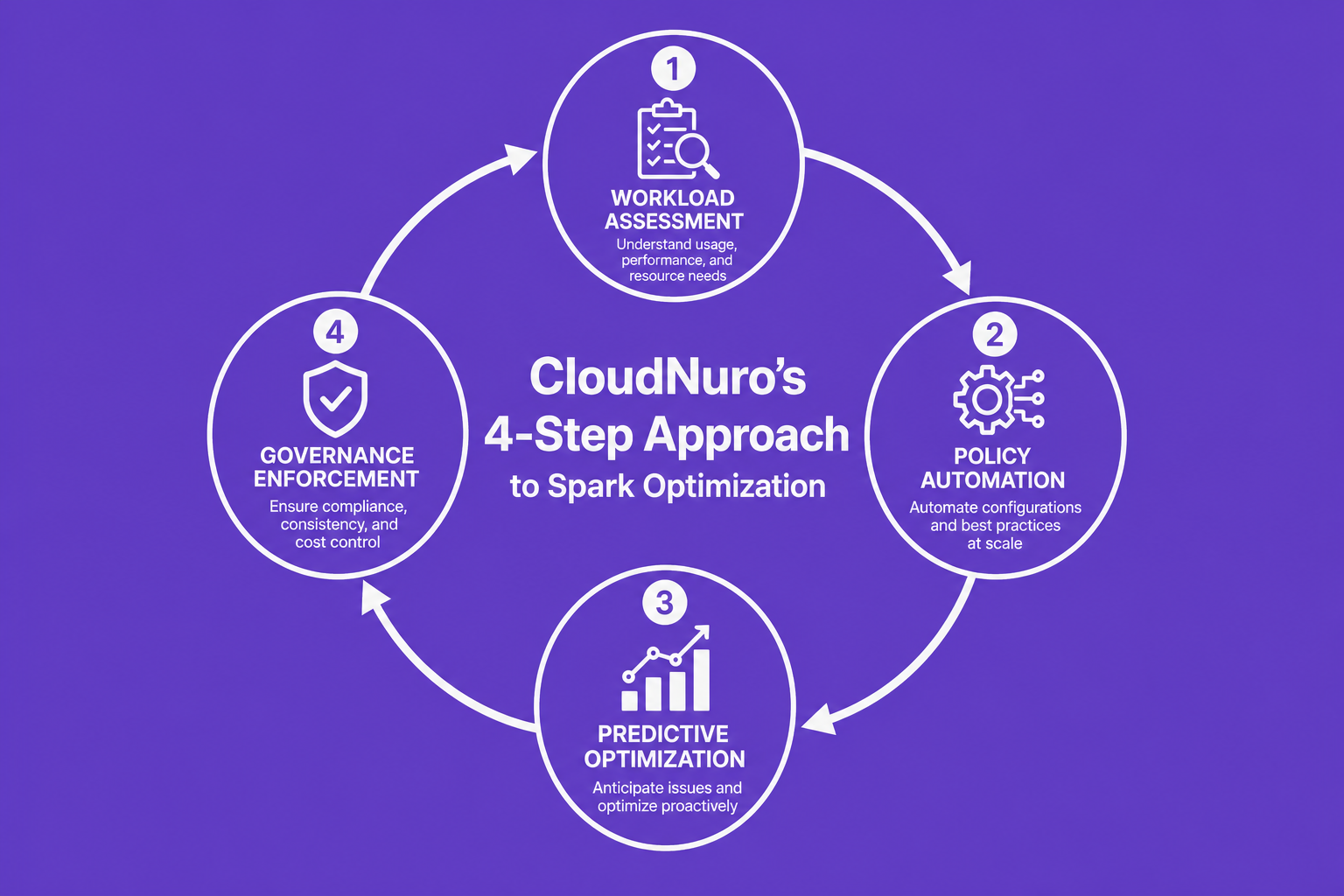
CloudNuro delivers automated controls and expert guidance for Microsoft Fabric workloads using proven strategies:
Unified Visibility: CloudNuro’s Unified Cloud Custodian offers real-time dashboards of active Spark sessions, capacity utilization, and orphaned clusters. IT and finance teams get one source of truth.
Automated Remediation: Policy-driven workflows identify inactive sessions or unused pools, auto-enforcing downgrades, reclamations, or timely terminations.
Workspace Governance: Standardize workspace schemas and enforce access reviews, automating the enforcement of departmental protocols across complex data pipelines.
Predictive Optimization: ML-based recommendation engines analyze query and memory metrics to prescribe right-size SKUs and streamline capacity consolidation, so you only pay for what you truly need.
For IT leaders looking to maximize ROI on Microsoft Fabric Spark, CloudNuro’s FinOps services and automation platforms make sustainable savings achievable, not speculative.
How do I optimize Spark session settings in Microsoft Fabric?
Prioritize eight configuration areas: high concurrency mode, idle session timeouts, right-sizing to single-node pools, matching resource profiles to the workload, enabling dynamic executor allocation, sizing start pools accurately, session pooling/grouping, and enforcing automated lifecycle governance. Review these settings regularly based on real usage data.
What are the best configurations for reducing Microsoft Fabric Spark costs?
Enable high concurrency, aggressive idle timeouts, and dynamic auto-scaling. Standardize single-node pools for default ETL workloads, and set session policies to identify and terminate dormant sessions quickly. Leverage platform tools like CloudNuro’s Unified Custodian for proactive governance.
How can Fabric high concurrency mode impact Spark performance?
High concurrency mode allows multiple Spark jobs or notebooks to run within the same session, drastically reducing redundant compute spin-up and idle time. This means both lower cost (up to 80% for smaller jobs) and more consistent resource usage patterns.
What settings most affect Spark resource utilization and billing?
Idle session timeout, pool sizing, concurrency mode, dynamic executor allocation, and session lifecycle policies have the highest immediate impact. Over-provisioning of clusters and lack of automated reclamation are the leading causes of cloud waste.
For enterprises on Microsoft Fabric, Spark session optimization is not a one-off project; it is a continuous discipline. Fine-tuning the eight core settings, automating monitoring and remediation, and instilling policy-driven governance delivers not only up to 40% billing reduction, but also stronger security and central oversight. Trusted by global organizations, CloudNuro provides the FinOps solutions and actionable insights to operationalize these outcomes at scale.
Put FinOps into action:
Explore CloudNuro’s FinOps services for Microsoft Fabric and beyond
Request a no cost, no obligation free assessment —just 15 minutes to savings!
Get StartedOptimizing Spark session settings within Microsoft Fabric is no longer just a technical best practice, it is a critical business discipline. With the surging impact of big data analytics, data science, and automated workflows, IT leaders increasingly face runaway cloud bills and resource sprawl, particularly for Spark environments. For enterprises navigating the tradeoffs between agility, security, and cost, granular configuration of Spark sessions can be the decisive lever to unlock cost reductions up to 40%, while building a culture of governance and accountability.
Every active Spark session draws on compute, memory, and storage resources, regardless of workload size or idle state. Default configurations typically leave sessions running far longer than necessary, accumulating billing for little or no productive activity. In large enterprise contexts, multiply this inefficiency by hundreds of users and concurrent pipelines: the result is ballooning costs, wasted vCore hours, and audit gaps in resource usage.
Recent advancements in Microsoft Fabric, including high concurrency session modes and resource profile definitions, empower teams to consolidate workloads, automate life cycles, and right-size environments for both performance and efficiency. For CIOs, FinOps leaders, and cloud architects, tapping these new capabilities can be transformative.
Successful cost reduction hinges on a focused set of tweaks applied at both the environment and session level. CloudNuro, drawing from deep market expertise and real-time usage patterns across global enterprises, recommends prioritizing the following eight Spark configuration levers:
Switch your workspace or pipeline to Fabric high concurrency. This allows up to five notebooks or jobs to share a single running Spark session, yielding up to 80% cost savings by consolidating what would be multiple, isolated compute payloads into a single, highly-utilized session. Most scheduled ETL or data preparation workloads do not require session isolation.
Default Spark session timeouts may be set in hours. Modifying the configuration to terminate sessions after 5-15 minutes of inactivity can slash total compute billing by 20% to 30%. CloudNuro experts consistently find that idle sessions are the top cost sink, especially after hours or within lab environments.
For most ETL, ad-hoc analytics, and data exploration, multi-node clusters are overkill. Configuring pools to operate with one node as both driver and executor, using autoscale min and max at 1, can yield up to 50% capacity savings compared to default multi-node deployments, with no performance loss for standard workloads.
Microsoft Fabric provides built-in resource profiles such as readHeavyForSpark and writeHeavyForSpark. Applying the right profile to each job can improve completion times by up to 35% without increasing spend by aligning resources with actual workload patterns.
Enable dynamic allocation with customized max node bursts to let Spark scale executors in response to demand, and then promptly release them when no longer needed. Enterprises report an additional 20%-40% in savings when combining this with single-node pools or strict scaling policies.
Start pools that are too large cause excessive idle billing as sessions wait for jobs. Establish starter pools that match peak concurrency plus a small buffer, no more. This reduces the interval where unused compute is provisioned but not delivering business value.
Modern usage patterns move away from one-to-one session mapping. Automate grouping by tagging related workloads, which lets you pool sessions for shared compute efficiency and enforce policy-driven scheduling, making your cost trends flatter and more predictable.
Develop automated, policy-based mechanisms that review and terminate orphaned or underused Spark sessions. CloudNuro’s Unified Cloud Custodian, for example, triggers workflows that identify and decommission zombie sessions, stopping silent cost leakage across large teams and long-running projects.
Evidence from CloudNuro deployments and industry benchmarks shows the impact of aggressive Spark session optimization:
Organizations that combine high concurrency, single-node right-sizing, session pooling, and auto-scaling routinely achieve 30%-50% net cloud spend reductions for Spark workloads.
Automated cost optimization features, like those within CloudNuro’s Microsoft 365 Custodian and AI Custodian platforms, routinely surface 10%-20% further savings by rightsizing capacity and proactively reclaiming under-utilized assets.
A healthcare enterprise reduced its annual analytics platform spend by 19% by centralizing inventory and streamlining session lifecycles.
Session configuration in Microsoft Fabric is not just about raw cost optimization. It directly supports both governance and security:
Strict session timeouts and lifecycle policies reduce the window for unauthorized access to sensitive data in shared Spark environments.
Standardized resource profiles enforce workload segregation and limit the scope of exposed compute, supporting your compliance posture.
Centralized cloud cost management platforms such as CloudNuro provide full audit trails for session changes, idle timeouts, and user actions, essential for regulated industries.
CloudNuro delivers automated controls and expert guidance for Microsoft Fabric workloads using proven strategies:
Unified Visibility: CloudNuro’s Unified Cloud Custodian offers real-time dashboards of active Spark sessions, capacity utilization, and orphaned clusters. IT and finance teams get one source of truth.
Automated Remediation: Policy-driven workflows identify inactive sessions or unused pools, auto-enforcing downgrades, reclamations, or timely terminations.
Workspace Governance: Standardize workspace schemas and enforce access reviews, automating the enforcement of departmental protocols across complex data pipelines.
Predictive Optimization: ML-based recommendation engines analyze query and memory metrics to prescribe right-size SKUs and streamline capacity consolidation, so you only pay for what you truly need.
For IT leaders looking to maximize ROI on Microsoft Fabric Spark, CloudNuro’s FinOps services and automation platforms make sustainable savings achievable, not speculative.
How do I optimize Spark session settings in Microsoft Fabric?
Prioritize eight configuration areas: high concurrency mode, idle session timeouts, right-sizing to single-node pools, matching resource profiles to the workload, enabling dynamic executor allocation, sizing start pools accurately, session pooling/grouping, and enforcing automated lifecycle governance. Review these settings regularly based on real usage data.
What are the best configurations for reducing Microsoft Fabric Spark costs?
Enable high concurrency, aggressive idle timeouts, and dynamic auto-scaling. Standardize single-node pools for default ETL workloads, and set session policies to identify and terminate dormant sessions quickly. Leverage platform tools like CloudNuro’s Unified Custodian for proactive governance.
How can Fabric high concurrency mode impact Spark performance?
High concurrency mode allows multiple Spark jobs or notebooks to run within the same session, drastically reducing redundant compute spin-up and idle time. This means both lower cost (up to 80% for smaller jobs) and more consistent resource usage patterns.
What settings most affect Spark resource utilization and billing?
Idle session timeout, pool sizing, concurrency mode, dynamic executor allocation, and session lifecycle policies have the highest immediate impact. Over-provisioning of clusters and lack of automated reclamation are the leading causes of cloud waste.
For enterprises on Microsoft Fabric, Spark session optimization is not a one-off project; it is a continuous discipline. Fine-tuning the eight core settings, automating monitoring and remediation, and instilling policy-driven governance delivers not only up to 40% billing reduction, but also stronger security and central oversight. Trusted by global organizations, CloudNuro provides the FinOps solutions and actionable insights to operationalize these outcomes at scale.
Put FinOps into action:
Explore CloudNuro’s FinOps services for Microsoft Fabric and beyond
Request a no cost, no obligation free assessment - just 15 minutes to savings!
Get StartedWe're offering complimentary ServiceNow license assessments to only 25 enterprises this quarter who want to unlock immediate savings without disrupting operations.
Get Free AssessmentGet Started




CloudNuro Corp
1755 Park St. Suite 207
Naperville, IL 60563
Phone : +1-630-277-9470
Email: info@cloudnuro.com





.webp)

Recognized Leader in SaaS Management Platforms by Info-Tech SoftwareReviews


.svg)