

Sign Up
Thank you for Submitting!
Spreadsheet tracking for SaaS is often where SaaS management starts. For a small stack and a single IT owner, the approach can feel simple and controllable. The problem is that SaaS portfolios rarely stay small, and spreadsheets are not designed for dynamic, high-velocity subscription and license data.
As a result, many enterprises discover the limits of a SaaS management spreadsheet only after they experience a renewal surprise, a compliance finding, or an outage caused by a missed deprovisioning. This article explains where spreadsheet tracking for SaaS can work, where it fails, and, critically, what breaks first so you can act before the risk shows up in an audit or a board report.
Most organizations did not choose SaaS spreadsheet tracking after a formal evaluation. It grew organically, usually from an IT manager or finance analyst who needed a quick way to track apps, owners, and costs.
A basic SaaS management spreadsheet often includes columns like:
For a lean portfolio, this works. You get centralized visibility in a familiar tool, minimal onboarding, and no procurement cycle.
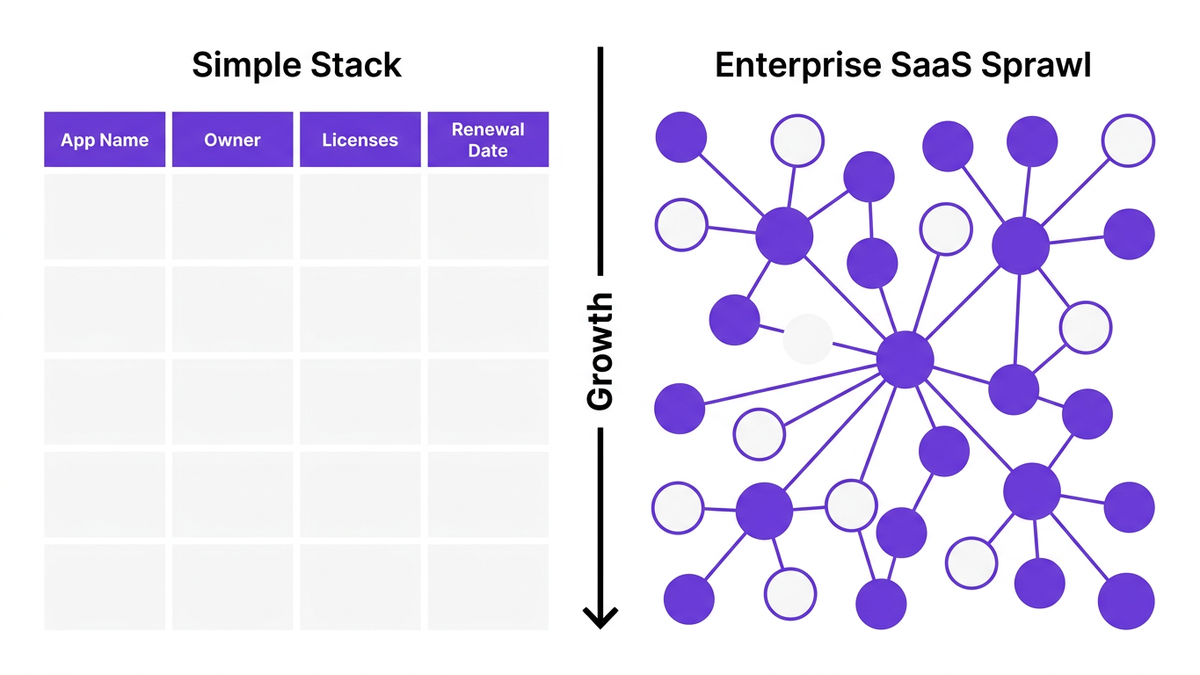
The analogy many IT leaders use is the personal budget: a simple spreadsheet works well when you have a handful of recurring expenses. Once you add multiple accounts, variable pricing, and shared costs, you move to dedicated software. SaaS operations tracking follows the same pattern.
Spreadsheets are not inherently bad for SaaS operations tracking. The issue is scale and complexity, not the tool itself. There are situations where managing SaaS in spreadsheets is still appropriate.
If your organization:
then SaaS spreadsheet tracking can be acceptable as a temporary solution.
In these environments, there are fewer handoffs, fewer integration dependencies, and relatively low compliance pressure. One or two well-maintained files can provide adequate software inventory tracking.
Spreadsheets can be useful for:
Teams often export data from finance systems, identity providers, and expense reports into a SaaS spreadsheet tracking template to identify redundancy and quick-win savings.
Spreadsheets work best for SaaS stack management when:
In other words, the governance model compensates for spreadsheet limitations for SaaS. Once that governance weakens or the organization decentralizes, problems emerge quickly.
Multiple studies show that spreadsheet tracking for SaaS stops working long before most leaders notice.
Gartner reports that 79% of enterprises managing over 50 SaaS applications experience data inconsistencies tied to manual spreadsheet tracking (Gartner 2026). Deloitte found that operational incidents linked to spreadsheet tracking failures increased by 31% in SaaS-heavy organizations (Deloitte 2026).
These failures tend to show up in a predictable order. Understanding this sequence is crucial.
The first thing to break is data accuracy. According to Forrester, IT managers spend 18 hours per month reconciling SaaS usage data in spreadsheets (Forrester 2026). Manual tracking errors creep in through:
As a VP IT Transformation, notes: "The first thing that breaks with spreadsheets as a SaaS tracking tool is trust. Data reliability and real-time visibility collapse when multiple users attempt to manage complex license inventories manually" (Forrester 2026).
Once stakeholders stop trusting the SaaS management spreadsheet, they create shadow versions or personal trackers, which only deepen fragmented SaaS data and version control issues.
The second failure mode is SaaS renewal tracking. IDC reports that only 23% of organizations using spreadsheet-driven SaaS tracking can accurately forecast renewals and license needs (IDC 2026).
Common symptoms include:
Spreadsheets rarely send reliable alerts, incorporate real-time SaaS usage tracking, or tie directly into approval workflows. As a result, SaaS spend management becomes reactive and exposed to vendor pricing pressure.
KPMG notes that 72% of IT leaders cite compliance gaps due to fragmented SaaS tracking via spreadsheets (KPMG 2026). This is especially acute in healthcare, financial services, and government where:
Spreadsheets struggle to provide traceable SaaS license tracking linked to identity systems, HR changes, and policy approvals. As a Director of Risk Advisory, states: "Automation is no longer optional for SaaS lifecycle management. Spreadsheet reliance is a leading indicator of latent compliance and cybersecurity risk" (KPMG 2026).
As SaaS adoption grows, workflows around onboarding, offboarding, and app approvals become multi-step processes spanning HR, IT, security, and finance.
Spreadsheet collaboration problems show up as:
Deloitte observed that organizations relying heavily on spreadsheets for SaaS operations tracking saw a 31% increase in operational incidents tied to incorrect or delayed data (Deloitte 2026). These incidents can include orphaned accounts, unauthorized access, and unmet RTO/RPO commitments due to mismanaged dependencies.
Once data quality, renewals, and workflows begin to crack, shadow IT management becomes nearly impossible. Spreadsheets typically capture only:
They miss:
This blind spot fuels SaaS visibility problems and increases both security and financial risk.
Beyond the initial failure modes, there are structural spreadsheet limitations for SaaS that become impossible to ignore at scale.
SaaS environments are inherently dynamic. Licenses are reassigned daily, new tools appear continuously, and pricing changes over time.
Spreadsheets, by contrast, are static snapshots. They lack:
Gartner projects that automated SaaS management platforms will reach 67% penetration by 2026 because organizations need real-time views that static files cannot provide (Gartner 2026).
Spreadsheets store data, not workflows. They do not inherently manage:
As a result, teams bolt on email threads, chat messages, and tickets around the SaaS management spreadsheet. This fragmented process design directly contradicts the need for reliable SaaS process automation.
Spreadsheets rarely meet enterprise audit standards. Version history is either opaque or limited, and correlations across files are hard to prove.
A Cloud Governance Analyst, summarizes it plainly: "Relying on spreadsheets for critical SaaS operational data opens the door to version control nightmares and audit trail blind spots, especially as SaaS environments scale" (Gartner 2026).
Auditors increasingly expect to see centralized logs, immutable trails, and policy-based controls, not a collection of files maintained manually.
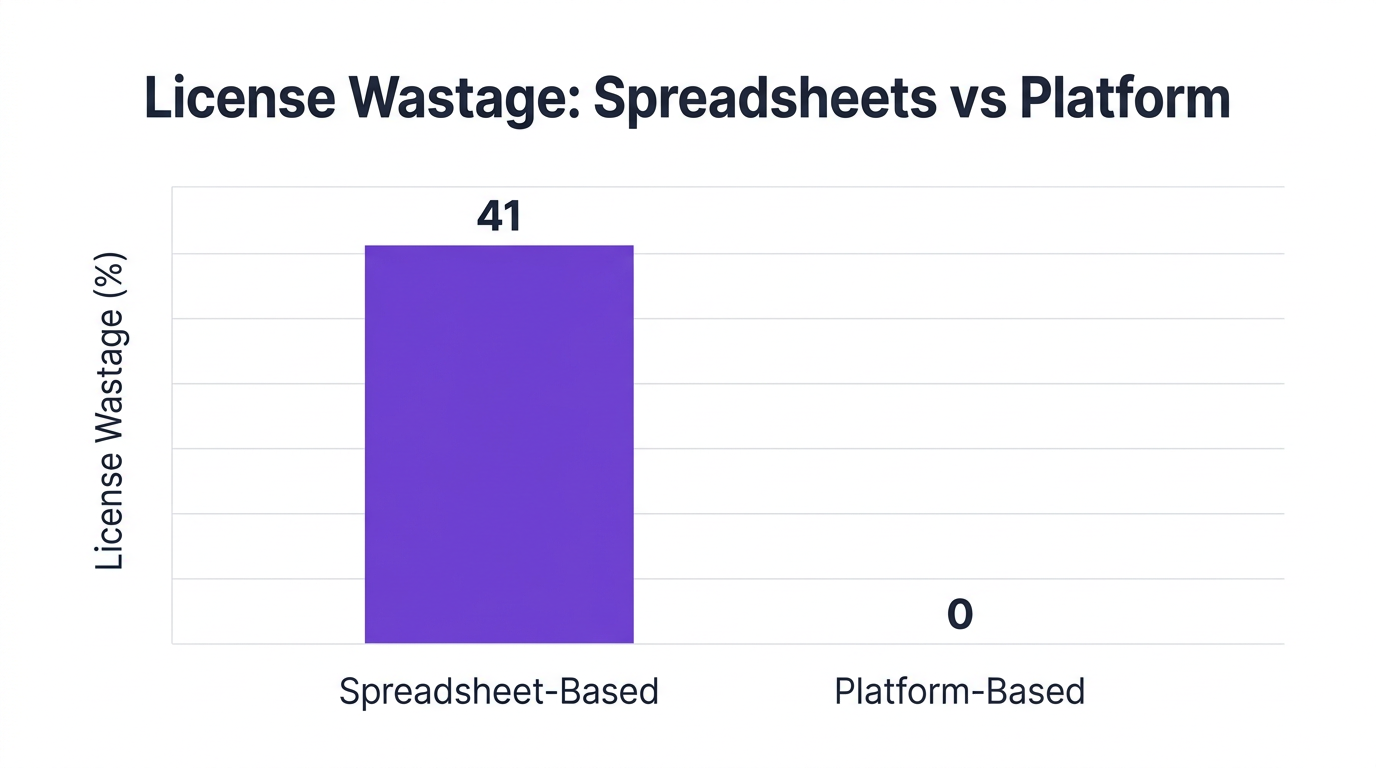
McKinsey found that automated, platform-based SaaS management reduces license wastage by 41% compared to spreadsheet workflows (McKinsey 2026). That gap exists because spreadsheets:
As FinOps practices extend from cloud infrastructure to SaaS, the need for integrated SaaS spend management becomes clear.
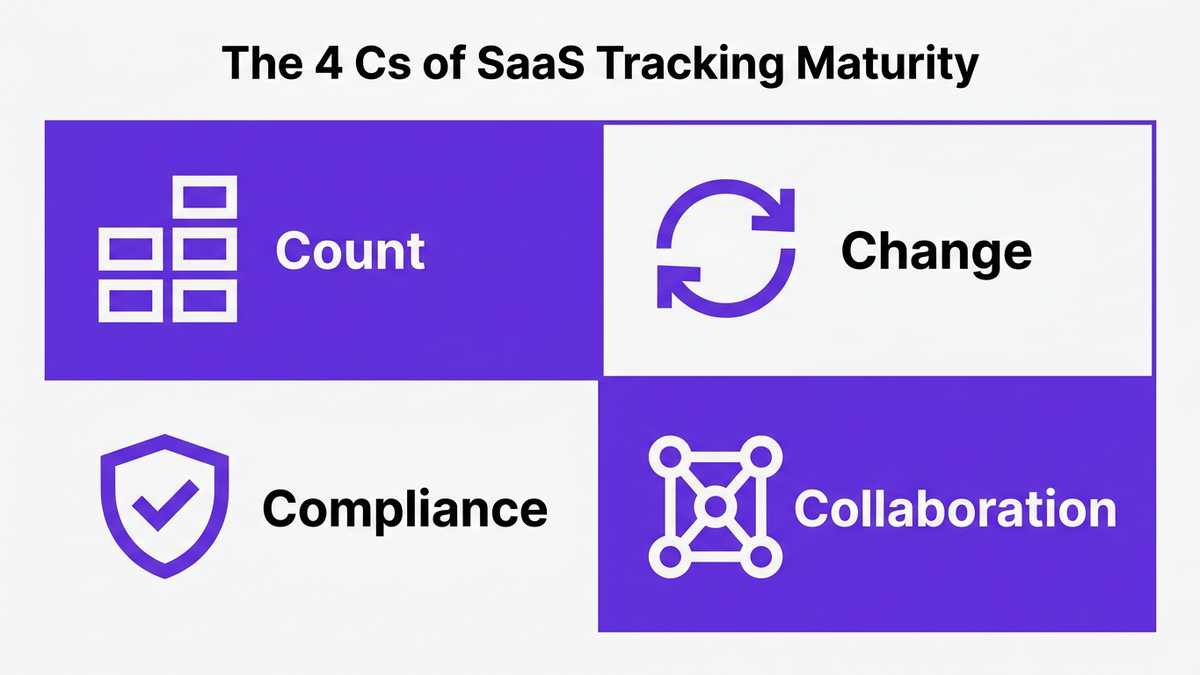
To decide when spreadsheets fail and when to move to dedicated SaaS management tools, it helps to use a simple framework. Think in terms of the 4 Cs of SaaS tracking maturity:
As each of these increases, the viability of a SaaS management spreadsheet decreases.
You are likely still safe with spreadsheet tracking for SaaS if:
Warning signs appear when:
At this stage, spreadsheet vs SaaS management software is not a binary decision. Many organizations introduce point SaaS tracking tools for renewals or spend while still exporting data to spreadsheets for analysis.
Dedicated SaaS management tools become essential when:
By this point, the risk of relying on spreadsheets for SaaS operations tracking far outweighs the simplicity benefit.
CloudNuro is designed for organizations that have outgrown managing SaaS in spreadsheets but still need a single source of truth for SaaS stack management, renewals, and compliance.
CloudNuro’s Unified Cloud Custodian automatically discovers applications across your environment, including:
This real-time software inventory tracking eliminates manual data entry and reduces the data inconsistencies that 79% of enterprises report when relying on spreadsheets (Gartner 2026).
The AI Custodian module brings governance-first automation to SaaS operations tracking:
This addresses spreadsheet compliance risk by creating a reliable, centralized trail that auditors can review without piecing together email threads and file versions.
CloudNuro’s FinOps Services connect SaaS usage tracking, license optimization, and budgeting into a single view:
Automated insights enable the kind of 41% reduction in license wastage that McKinsey attributes to platform-based SaaS management (McKinsey 2026), which spreadsheets struggle to replicate.
CloudNuro provides dedicated custodians for key ecosystems:
These modules bring granular control that a generic SaaS management spreadsheet cannot model, including role-specific entitlements, app engagement metrics, and automated remediation.
Instead of months spent reconciling multiple spreadsheets, CloudNuro is built for fast time to value:
Enterprises that shifted away from spreadsheet tracking for SaaS to an AI-enabled platform reported an 82% improvement in SaaS spend visibility (Forrester 2026), which directly improves negotiations, budgeting, and risk posture.
Excel or similar tools can work for small, low-risk SaaS environments with a limited number of applications, low change frequency, and centralized ownership. However, research shows that as soon as organizations manage more than 50 SaaS apps, 79% experience data inconsistencies tied to manual spreadsheets (Gartner 2026).
For enterprises with regulatory requirements, distributed teams, or complex license models, Excel becomes a liability rather than an asset for SaaS management.
Spreadsheets can store renewal dates, but they are weak as SaaS renewal tracking systems. They do not provide reliable alerts, real-time license usage context, or workflow routing for reviews and approvals.
IDC found that only 23% of organizations using spreadsheet-driven tracking can accurately forecast renewals and license needs (IDC 2026). Dedicated SaaS tracking tools or platforms that integrate renewal data, usage, and financials deliver much higher accuracy and control.
Effective SaaS renewal tracking requires:
A SaaS management platform such as CloudNuro can automate discovery, tie usage to spend, and trigger workflows, which significantly outperforms manual spreadsheet-based calendars or lists.
SaaS management is the practice of governing the full lifecycle of software-as-a-service applications across an organization. This includes:
Spreadsheets can support basic inventory, but comprehensive SaaS management typically requires platform-level automation, policy enforcement, and analytics.
Spreadsheets fail at scale because they are static, manual, and siloed, while SaaS environments are dynamic, automated, and cross-functional. As app counts, user changes, and compliance demands grow, spreadsheets cannot:
This leads to increased operational incidents, underscored by Deloitte’s finding of a 31% rise in incidents linked to spreadsheet tracking failures in SaaS-heavy organizations (Deloitte 2026).
CloudNuro is a leader in Enterprise SaaS Management Platforms, giving enterprises unmatched visibility, governance, and cost optimization.
We are proud to be recognized twice in a row by Gartner in the SaaS Management Platforms and named a Leader in the Info-Tech SoftwareReviews Data Quadrant.
Trusted by global enterprises and government agencies, CloudNuro provides centralized SaaS inventory, license optimization, and renewal management. With a 15-minute setup and measurable results in under 24 hours, CloudNuro gives IT teams a fast path to value.
Request a Demo | Get Free Savings Assessment | Explore Product
Request a no cost, no obligation free assessment —just 15 minutes to savings!
Get StartedSpreadsheet tracking for SaaS is often where SaaS management starts. For a small stack and a single IT owner, the approach can feel simple and controllable. The problem is that SaaS portfolios rarely stay small, and spreadsheets are not designed for dynamic, high-velocity subscription and license data.
As a result, many enterprises discover the limits of a SaaS management spreadsheet only after they experience a renewal surprise, a compliance finding, or an outage caused by a missed deprovisioning. This article explains where spreadsheet tracking for SaaS can work, where it fails, and, critically, what breaks first so you can act before the risk shows up in an audit or a board report.
Most organizations did not choose SaaS spreadsheet tracking after a formal evaluation. It grew organically, usually from an IT manager or finance analyst who needed a quick way to track apps, owners, and costs.
A basic SaaS management spreadsheet often includes columns like:
For a lean portfolio, this works. You get centralized visibility in a familiar tool, minimal onboarding, and no procurement cycle.
The analogy many IT leaders use is the personal budget: a simple spreadsheet works well when you have a handful of recurring expenses. Once you add multiple accounts, variable pricing, and shared costs, you move to dedicated software. SaaS operations tracking follows the same pattern.
Spreadsheets are not inherently bad for SaaS operations tracking. The issue is scale and complexity, not the tool itself. There are situations where managing SaaS in spreadsheets is still appropriate.
If your organization:
then SaaS spreadsheet tracking can be acceptable as a temporary solution.
In these environments, there are fewer handoffs, fewer integration dependencies, and relatively low compliance pressure. One or two well-maintained files can provide adequate software inventory tracking.
Spreadsheets can be useful for:
Teams often export data from finance systems, identity providers, and expense reports into a SaaS spreadsheet tracking template to identify redundancy and quick-win savings.
Spreadsheets work best for SaaS stack management when:
In other words, the governance model compensates for spreadsheet limitations for SaaS. Once that governance weakens or the organization decentralizes, problems emerge quickly.
Multiple studies show that spreadsheet tracking for SaaS stops working long before most leaders notice.
Gartner reports that 79% of enterprises managing over 50 SaaS applications experience data inconsistencies tied to manual spreadsheet tracking (Gartner 2026). Deloitte found that operational incidents linked to spreadsheet tracking failures increased by 31% in SaaS-heavy organizations (Deloitte 2026).
These failures tend to show up in a predictable order. Understanding this sequence is crucial.
The first thing to break is data accuracy. According to Forrester, IT managers spend 18 hours per month reconciling SaaS usage data in spreadsheets (Forrester 2026). Manual tracking errors creep in through:
As a VP IT Transformation, notes: "The first thing that breaks with spreadsheets as a SaaS tracking tool is trust. Data reliability and real-time visibility collapse when multiple users attempt to manage complex license inventories manually" (Forrester 2026).
Once stakeholders stop trusting the SaaS management spreadsheet, they create shadow versions or personal trackers, which only deepen fragmented SaaS data and version control issues.
The second failure mode is SaaS renewal tracking. IDC reports that only 23% of organizations using spreadsheet-driven SaaS tracking can accurately forecast renewals and license needs (IDC 2026).
Common symptoms include:
Spreadsheets rarely send reliable alerts, incorporate real-time SaaS usage tracking, or tie directly into approval workflows. As a result, SaaS spend management becomes reactive and exposed to vendor pricing pressure.
KPMG notes that 72% of IT leaders cite compliance gaps due to fragmented SaaS tracking via spreadsheets (KPMG 2026). This is especially acute in healthcare, financial services, and government where:
Spreadsheets struggle to provide traceable SaaS license tracking linked to identity systems, HR changes, and policy approvals. As a Director of Risk Advisory, states: "Automation is no longer optional for SaaS lifecycle management. Spreadsheet reliance is a leading indicator of latent compliance and cybersecurity risk" (KPMG 2026).
As SaaS adoption grows, workflows around onboarding, offboarding, and app approvals become multi-step processes spanning HR, IT, security, and finance.
Spreadsheet collaboration problems show up as:
Deloitte observed that organizations relying heavily on spreadsheets for SaaS operations tracking saw a 31% increase in operational incidents tied to incorrect or delayed data (Deloitte 2026). These incidents can include orphaned accounts, unauthorized access, and unmet RTO/RPO commitments due to mismanaged dependencies.
Once data quality, renewals, and workflows begin to crack, shadow IT management becomes nearly impossible. Spreadsheets typically capture only:
They miss:
This blind spot fuels SaaS visibility problems and increases both security and financial risk.
Beyond the initial failure modes, there are structural spreadsheet limitations for SaaS that become impossible to ignore at scale.
SaaS environments are inherently dynamic. Licenses are reassigned daily, new tools appear continuously, and pricing changes over time.
Spreadsheets, by contrast, are static snapshots. They lack:
Gartner projects that automated SaaS management platforms will reach 67% penetration by 2026 because organizations need real-time views that static files cannot provide (Gartner 2026).
Spreadsheets store data, not workflows. They do not inherently manage:
As a result, teams bolt on email threads, chat messages, and tickets around the SaaS management spreadsheet. This fragmented process design directly contradicts the need for reliable SaaS process automation.
Spreadsheets rarely meet enterprise audit standards. Version history is either opaque or limited, and correlations across files are hard to prove.
A Cloud Governance Analyst, summarizes it plainly: "Relying on spreadsheets for critical SaaS operational data opens the door to version control nightmares and audit trail blind spots, especially as SaaS environments scale" (Gartner 2026).
Auditors increasingly expect to see centralized logs, immutable trails, and policy-based controls, not a collection of files maintained manually.
McKinsey found that automated, platform-based SaaS management reduces license wastage by 41% compared to spreadsheet workflows (McKinsey 2026). That gap exists because spreadsheets:
As FinOps practices extend from cloud infrastructure to SaaS, the need for integrated SaaS spend management becomes clear.
To decide when spreadsheets fail and when to move to dedicated SaaS management tools, it helps to use a simple framework. Think in terms of the 4 Cs of SaaS tracking maturity:
As each of these increases, the viability of a SaaS management spreadsheet decreases.
You are likely still safe with spreadsheet tracking for SaaS if:
Warning signs appear when:
At this stage, spreadsheet vs SaaS management software is not a binary decision. Many organizations introduce point SaaS tracking tools for renewals or spend while still exporting data to spreadsheets for analysis.
Dedicated SaaS management tools become essential when:
By this point, the risk of relying on spreadsheets for SaaS operations tracking far outweighs the simplicity benefit.
CloudNuro is designed for organizations that have outgrown managing SaaS in spreadsheets but still need a single source of truth for SaaS stack management, renewals, and compliance.
CloudNuro’s Unified Cloud Custodian automatically discovers applications across your environment, including:
This real-time software inventory tracking eliminates manual data entry and reduces the data inconsistencies that 79% of enterprises report when relying on spreadsheets (Gartner 2026).
The AI Custodian module brings governance-first automation to SaaS operations tracking:
This addresses spreadsheet compliance risk by creating a reliable, centralized trail that auditors can review without piecing together email threads and file versions.
CloudNuro’s FinOps Services connect SaaS usage tracking, license optimization, and budgeting into a single view:
Automated insights enable the kind of 41% reduction in license wastage that McKinsey attributes to platform-based SaaS management (McKinsey 2026), which spreadsheets struggle to replicate.
CloudNuro provides dedicated custodians for key ecosystems:
These modules bring granular control that a generic SaaS management spreadsheet cannot model, including role-specific entitlements, app engagement metrics, and automated remediation.
Instead of months spent reconciling multiple spreadsheets, CloudNuro is built for fast time to value:
Enterprises that shifted away from spreadsheet tracking for SaaS to an AI-enabled platform reported an 82% improvement in SaaS spend visibility (Forrester 2026), which directly improves negotiations, budgeting, and risk posture.
Excel or similar tools can work for small, low-risk SaaS environments with a limited number of applications, low change frequency, and centralized ownership. However, research shows that as soon as organizations manage more than 50 SaaS apps, 79% experience data inconsistencies tied to manual spreadsheets (Gartner 2026).
For enterprises with regulatory requirements, distributed teams, or complex license models, Excel becomes a liability rather than an asset for SaaS management.
Spreadsheets can store renewal dates, but they are weak as SaaS renewal tracking systems. They do not provide reliable alerts, real-time license usage context, or workflow routing for reviews and approvals.
IDC found that only 23% of organizations using spreadsheet-driven tracking can accurately forecast renewals and license needs (IDC 2026). Dedicated SaaS tracking tools or platforms that integrate renewal data, usage, and financials deliver much higher accuracy and control.
Effective SaaS renewal tracking requires:
A SaaS management platform such as CloudNuro can automate discovery, tie usage to spend, and trigger workflows, which significantly outperforms manual spreadsheet-based calendars or lists.
SaaS management is the practice of governing the full lifecycle of software-as-a-service applications across an organization. This includes:
Spreadsheets can support basic inventory, but comprehensive SaaS management typically requires platform-level automation, policy enforcement, and analytics.
Spreadsheets fail at scale because they are static, manual, and siloed, while SaaS environments are dynamic, automated, and cross-functional. As app counts, user changes, and compliance demands grow, spreadsheets cannot:
This leads to increased operational incidents, underscored by Deloitte’s finding of a 31% rise in incidents linked to spreadsheet tracking failures in SaaS-heavy organizations (Deloitte 2026).
CloudNuro is a leader in Enterprise SaaS Management Platforms, giving enterprises unmatched visibility, governance, and cost optimization.
We are proud to be recognized twice in a row by Gartner in the SaaS Management Platforms and named a Leader in the Info-Tech SoftwareReviews Data Quadrant.
Trusted by global enterprises and government agencies, CloudNuro provides centralized SaaS inventory, license optimization, and renewal management. With a 15-minute setup and measurable results in under 24 hours, CloudNuro gives IT teams a fast path to value.
Request a Demo | Get Free Savings Assessment | Explore Product
Request a no cost, no obligation free assessment - just 15 minutes to savings!
Get StartedWe're offering complimentary ServiceNow license assessments to only 25 enterprises this quarter who want to unlock immediate savings without disrupting operations.
Get Free AssessmentGet Started




CloudNuro Corp
1755 Park St. Suite 207
Naperville, IL 60563
Phone : +1-630-277-9470
Email: info@cloudnuro.com





.webp)

Recognized Leader in SaaS Management Platforms by Info-Tech SoftwareReviews



.svg)