

Sign Up
Thank you for Submitting!
The accelerating adoption of enterprise BI and AI analytics has made cost control around Microsoft Power BI (and its Fabric stack) a boardroom priority for 2026. Despite Power BI’s position as the go-to SaaS analytics solution for regulated industries, many organizations discover that true cost ownership involves far more than just a headline license fee. Between evolving license models, dynamic cloud capacity charges, and often-overlooked hidden fees, IT and Finance leaders must stay vigilant to protect margins and compliance as usage grows.
This guide breaks down every piece of the Power BI pricing puzzle, exposes hidden costs, and prescribes strategies to optimize expenditure without sacrificing innovation or access.
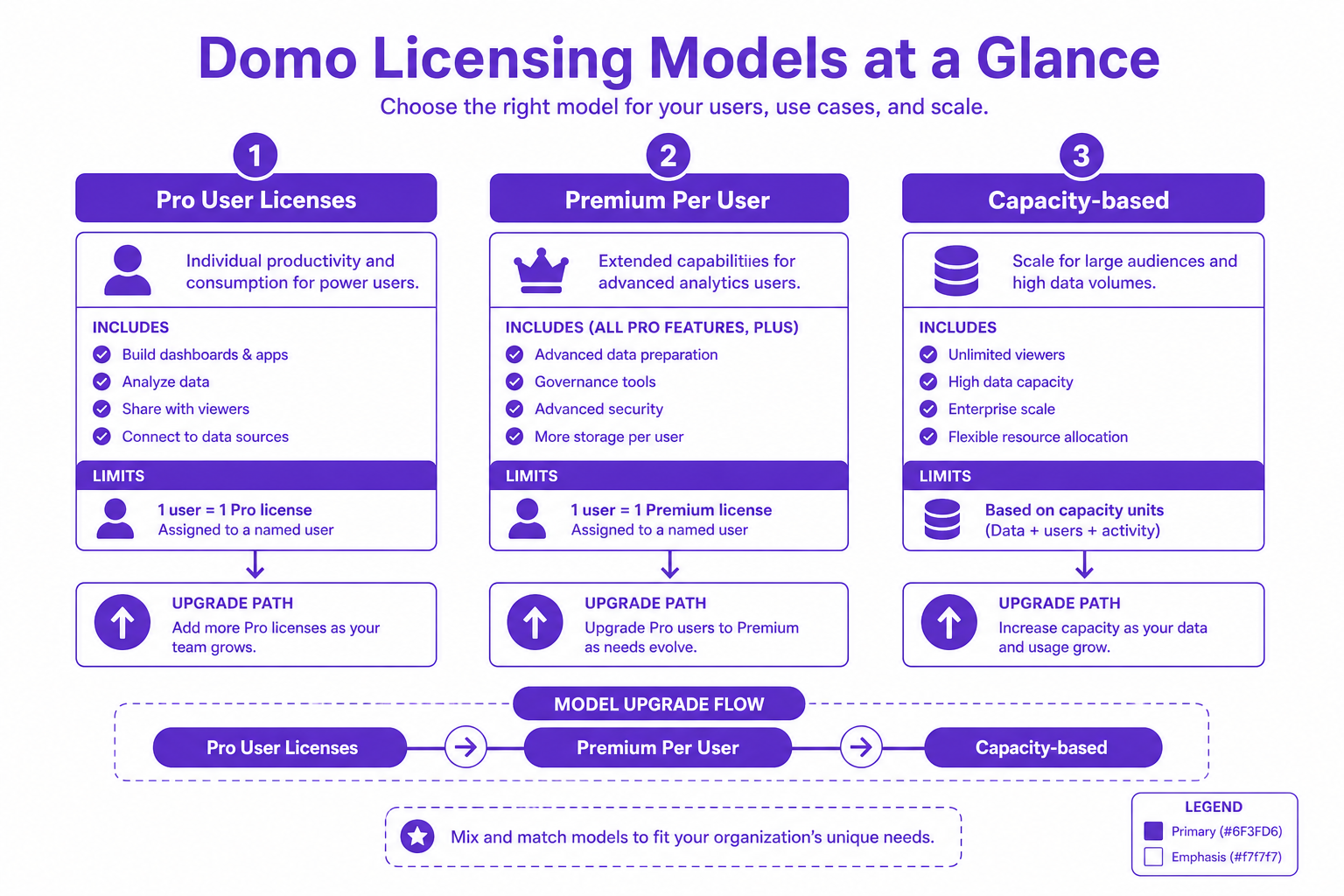
Microsoft Power BI offers several licensing options, each targeting distinct usage patterns and organizational needs. Knowing which combination truly matches your business is step one in controlling spend.
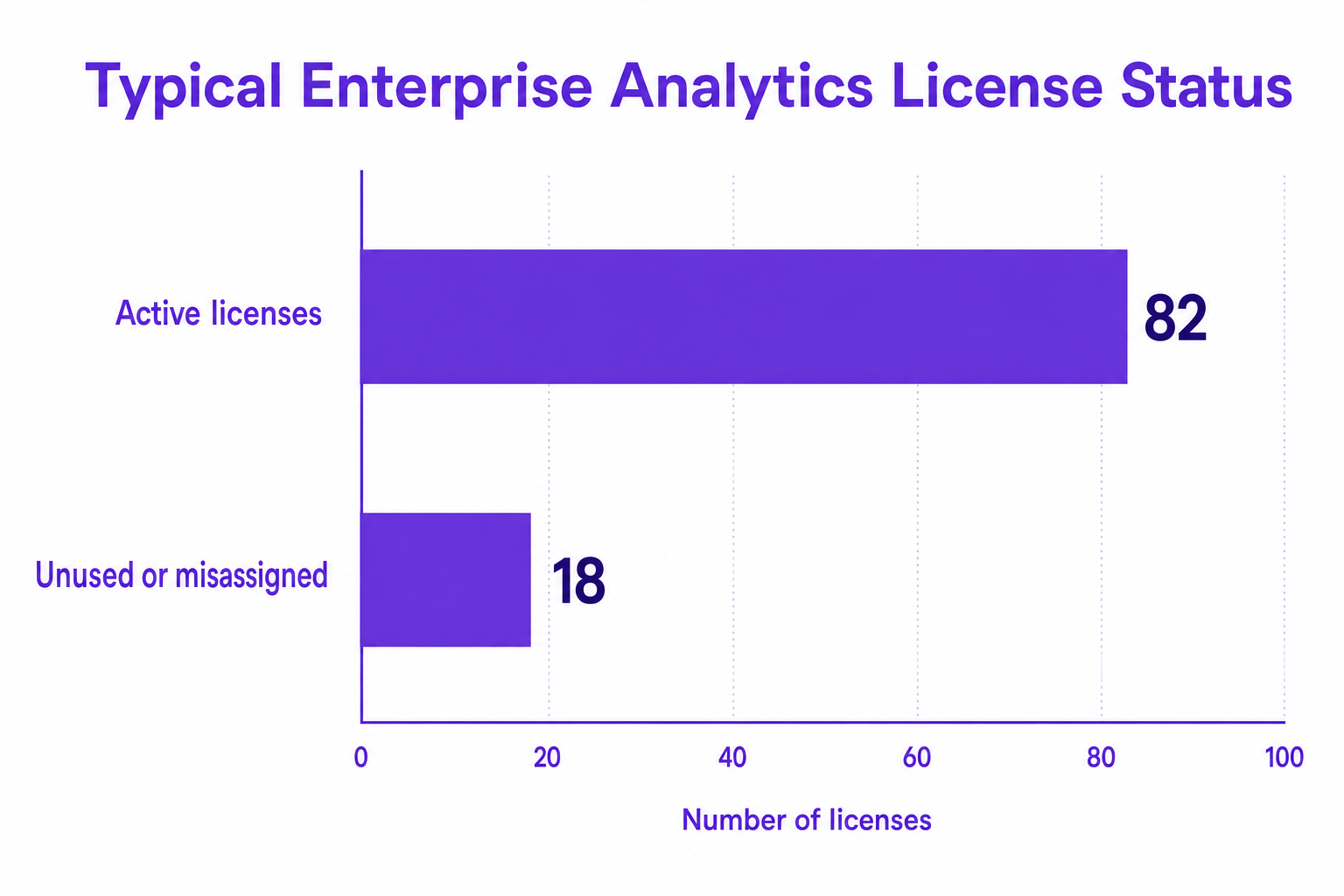
Organizations in 2026 are facing relentless SaaS cost creep from underutilized licenses and overprovisioned resources. In typical BI deployments, 18% of all Power BI licenses are unused or misassigned, leading directly to wasted OPEX. Without active management, BI spending trends upward, regardless of platform innovation.
Why do total BI costs so often exceed forecasts?
Enterprises without robust cost controls can overspend on business intelligence tools by 30% to 50%.
Common Hidden Fees Include:
The next chapter of BI cost control is driven by automation and AI-powered governance. Leading organizations are making transformative advances in 2026:
CloudNuro’s unified governance and FinOps automation platform is built to bring clarity, control, and efficiency to large-scale Power BI deployments.
Proof in Practice: Organizations using CloudNuro see average analytics license cost reductions of 29% within the first month, driven by continuous rightsizing and clear analytics of actual vs. assumed demand.
Explore how CloudNuro’s Microsoft 365 Custodian and AI Custodian modules support Power BI governance at https://www.cloudnuro.ai/services/finops-services.
For most enterprises, Power BI Pro remains $14/user/month, Premium Per User is $24/user/month, and capacity-based Fabric pricing begins at $262/month but varies with actual compute needs.
The primary types are Pro, Premium Per User, and Premium (capacity-based). Pro licenses cover basic creation and sharing, Premium Per User enables advanced features for power users, and Premium capacity assigns resources for organization-wide access.
Pro and Premium Per User are charged per seat, whereas Premium (capacity-based) is billed by dedicated compute resources. The capacity model is ideal for large-scale deployments, but the right choice depends on usage patterns and user roles.
Yes. Hidden fees often arise from AI add-ons, capacity overages, unused licenses, and excess storage or refresh cycles. Rigorous license and usage analytics are essential.
Use automated license audits, segment users, govern AI usage, rightsize capacity with real-time data, and pause compute resources when not needed. Adopt platforms like CloudNuro for complete visibility and proactive, automated cost controls.
1. Run a Dedicated 30-Day Usage Baseline. Let production capacity run for a full month, then analyze actual workloads before making long-term commitments or upsizing SKUs.
2. Segment Licenses and Rightsize Regularly. Assign premium licenses only to high-collaboration users. Move consumers to shared capacity where possible. Reclaim and downgrade dormant user accounts.
3. Automate Pause/Resume for Non-Production Compute. Schedule downtime for dev, test, and non-critical environments, leveraging automated tools or management platforms.
4. Track AI Prompt Usage Closely. AI features and Copilot workloads drive incremental costs. Use platforms that track prompt-level engagement and encourage AI license cleanup.
5. Consolidate Visibility Across SaaS and BI. Integrate Power BI cost data with wider SaaS portfolios to avoid budget silos, shadow IT, and surprise renewals.
For a deeper look at SaaS optimization across the stack, see SaaS Cost Management Trends, Tools, and Tactics for 2025 and Strategies to Reduce Microsoft 365 Costs.
As Power BI continues to be the analytics backbone for regulated, cost-sensitive enterprises, those who pair flexible license planning with real-time usage analytics and continuous governance will not just avoid waste, but actively reinvest savings into new innovation. Platforms like CloudNuro bridge the gap between finance mandates and IT execution, delivering the audit trail and discipline that SaaS governance now demands.
CloudNuro is a leader in Enterprise AI Adoption Management, providing enterprises with unmatched visibility, governance, and cost optimization. Recognized twice in a row in the SaaS Management Platforms category and named a Leader in the SoftwareReviews Data Quadrant, CloudNuro is trusted by global enterprises and government agencies to bring financial discipline to SaaS, cloud, and AI. Trusted by enterprises, CloudNuro provides centralized SaaS inventory, license optimization, and renewal management along with advanced cost allocation and chargeback, giving IT and Finance leaders the visibility, control, and cost-conscious culture needed to drive financial discipline. Request a Demo | Get Free Savings | Explore Product
Request a no cost, no obligation free assessment —just 15 minutes to savings!
Get StartedThe accelerating adoption of enterprise BI and AI analytics has made cost control around Microsoft Power BI (and its Fabric stack) a boardroom priority for 2026. Despite Power BI’s position as the go-to SaaS analytics solution for regulated industries, many organizations discover that true cost ownership involves far more than just a headline license fee. Between evolving license models, dynamic cloud capacity charges, and often-overlooked hidden fees, IT and Finance leaders must stay vigilant to protect margins and compliance as usage grows.
This guide breaks down every piece of the Power BI pricing puzzle, exposes hidden costs, and prescribes strategies to optimize expenditure without sacrificing innovation or access.
Microsoft Power BI offers several licensing options, each targeting distinct usage patterns and organizational needs. Knowing which combination truly matches your business is step one in controlling spend.
Organizations in 2026 are facing relentless SaaS cost creep from underutilized licenses and overprovisioned resources. In typical BI deployments, 18% of all Power BI licenses are unused or misassigned, leading directly to wasted OPEX. Without active management, BI spending trends upward, regardless of platform innovation.
Why do total BI costs so often exceed forecasts?
Enterprises without robust cost controls can overspend on business intelligence tools by 30% to 50%.
Common Hidden Fees Include:
The next chapter of BI cost control is driven by automation and AI-powered governance. Leading organizations are making transformative advances in 2026:
CloudNuro’s unified governance and FinOps automation platform is built to bring clarity, control, and efficiency to large-scale Power BI deployments.
Proof in Practice: Organizations using CloudNuro see average analytics license cost reductions of 29% within the first month, driven by continuous rightsizing and clear analytics of actual vs. assumed demand.
Explore how CloudNuro’s Microsoft 365 Custodian and AI Custodian modules support Power BI governance at https://www.cloudnuro.ai/services/finops-services.
For most enterprises, Power BI Pro remains $14/user/month, Premium Per User is $24/user/month, and capacity-based Fabric pricing begins at $262/month but varies with actual compute needs.
The primary types are Pro, Premium Per User, and Premium (capacity-based). Pro licenses cover basic creation and sharing, Premium Per User enables advanced features for power users, and Premium capacity assigns resources for organization-wide access.
Pro and Premium Per User are charged per seat, whereas Premium (capacity-based) is billed by dedicated compute resources. The capacity model is ideal for large-scale deployments, but the right choice depends on usage patterns and user roles.
Yes. Hidden fees often arise from AI add-ons, capacity overages, unused licenses, and excess storage or refresh cycles. Rigorous license and usage analytics are essential.
Use automated license audits, segment users, govern AI usage, rightsize capacity with real-time data, and pause compute resources when not needed. Adopt platforms like CloudNuro for complete visibility and proactive, automated cost controls.
1. Run a Dedicated 30-Day Usage Baseline. Let production capacity run for a full month, then analyze actual workloads before making long-term commitments or upsizing SKUs.
2. Segment Licenses and Rightsize Regularly. Assign premium licenses only to high-collaboration users. Move consumers to shared capacity where possible. Reclaim and downgrade dormant user accounts.
3. Automate Pause/Resume for Non-Production Compute. Schedule downtime for dev, test, and non-critical environments, leveraging automated tools or management platforms.
4. Track AI Prompt Usage Closely. AI features and Copilot workloads drive incremental costs. Use platforms that track prompt-level engagement and encourage AI license cleanup.
5. Consolidate Visibility Across SaaS and BI. Integrate Power BI cost data with wider SaaS portfolios to avoid budget silos, shadow IT, and surprise renewals.
For a deeper look at SaaS optimization across the stack, see SaaS Cost Management Trends, Tools, and Tactics for 2025 and Strategies to Reduce Microsoft 365 Costs.
As Power BI continues to be the analytics backbone for regulated, cost-sensitive enterprises, those who pair flexible license planning with real-time usage analytics and continuous governance will not just avoid waste, but actively reinvest savings into new innovation. Platforms like CloudNuro bridge the gap between finance mandates and IT execution, delivering the audit trail and discipline that SaaS governance now demands.
CloudNuro is a leader in Enterprise AI Adoption Management, providing enterprises with unmatched visibility, governance, and cost optimization. Recognized twice in a row in the SaaS Management Platforms category and named a Leader in the SoftwareReviews Data Quadrant, CloudNuro is trusted by global enterprises and government agencies to bring financial discipline to SaaS, cloud, and AI. Trusted by enterprises, CloudNuro provides centralized SaaS inventory, license optimization, and renewal management along with advanced cost allocation and chargeback, giving IT and Finance leaders the visibility, control, and cost-conscious culture needed to drive financial discipline. Request a Demo | Get Free Savings | Explore Product
Request a no cost, no obligation free assessment - just 15 minutes to savings!
Get StartedWe're offering complimentary ServiceNow license assessments to only 25 enterprises this quarter who want to unlock immediate savings without disrupting operations.
Get Free AssessmentGet Started




CloudNuro Corp
1755 Park St. Suite 207
Naperville, IL 60563
Phone : +1-630-277-9470
Email: info@cloudnuro.com





.webp)

Recognized Leader in SaaS Management Platforms by Info-Tech SoftwareReviews


.png)
.svg)