

Sign Up
Thank you for Submitting!
Choosing the right Power BI license type is no longer just an IT decision, it is a strategic lever for cost optimization, governance, and enterprise-wide analytics enablement. As leading organizations in healthcare, finance, government, and corporate sectors continue to adopt advanced business intelligence solutions, understanding the nuances of each Power BI license level is critical for maximizing ROI and maintaining compliance. This comprehensive guide unpacks each license type, Free, Pro, Premium Per User (PPU), Premium, and Fabric F-SKU, so IT and procurement leaders can make confident, data-driven choices.
Power BI dominates business intelligence, with 23.22% of the global market, serving 30 million active users in over 375,000 organizations. Its rapid adoption stems from integration with Microsoft 365, low friction for report consumers, and a mature ecosystem for analytics and reporting.
However, evolving licensing models and a broad menu of options, from traditional per-user plans to innovative capacity-based Fabric SKUs, add both flexibility and complexity. As organizations scale analytics usage, misaligned licensing becomes the top driver of wasted spend.
Enterprise BI moving rapidly from per-user premium to flexible, capacity-based licensing.
Tighter integration with unified data engineering and analytics platforms makes cost governance urgent.
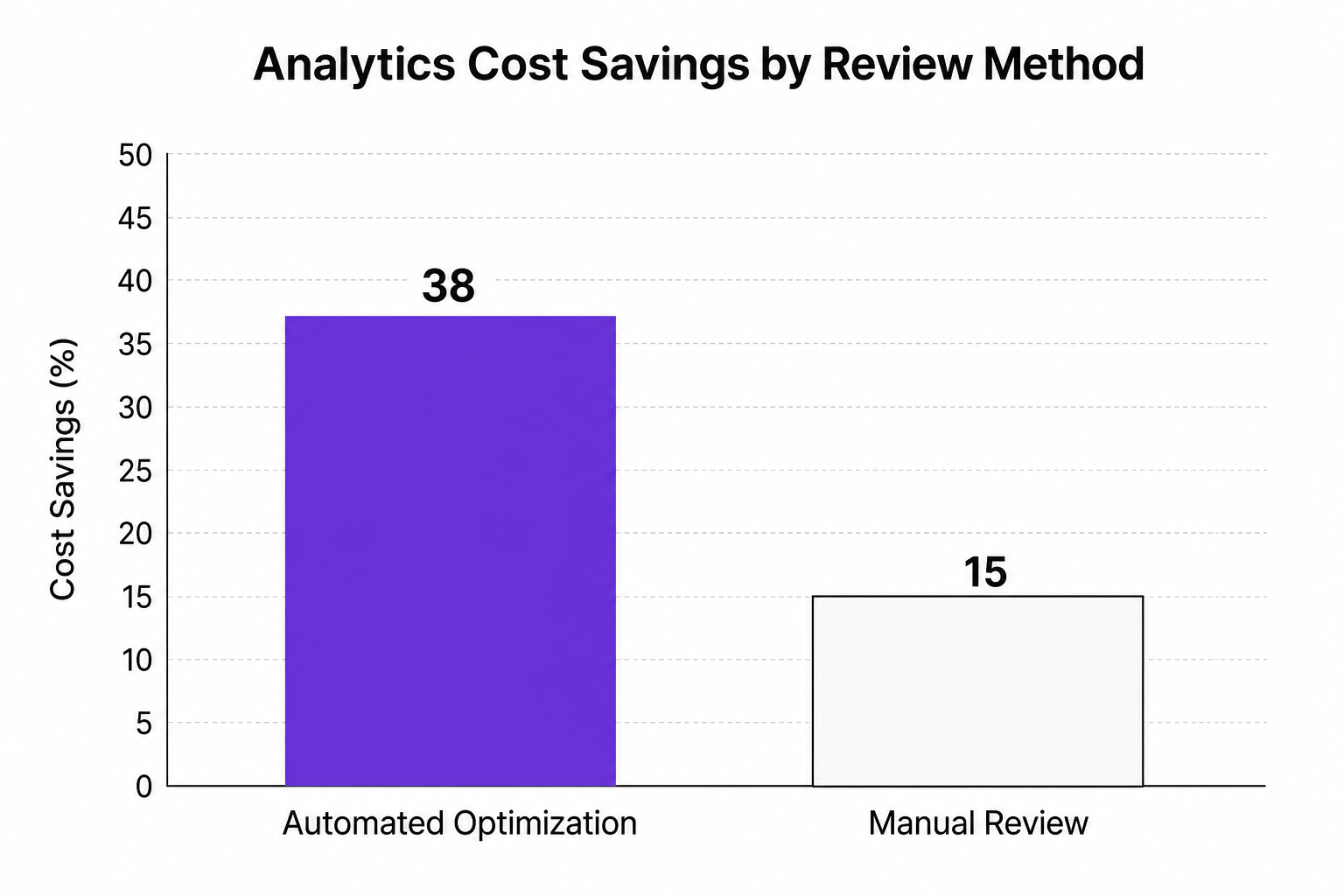
Rightsizing and automation in license management are proving the largest drivers of analytics cost savings.
Power BI offers a spectrum of licenses, each tailored to distinct user needs, access patterns, and consumption models. Here is how the types break down:
|
License Type |
Designed For |
Core Capabilities |
Typical Cost (List) |
|---|---|---|---|
|
Power BI Free |
Individual creators |
Self-service visualizations |
$0 |
|
Power BI Pro |
Collaborative teams |
Sharing, collaboration, 1 GB dataset limit |
$14/user/month |
|
Premium Per User (PPU) |
Advanced/Power users |
AI, paginated reports, 100 GB datasets |
$24/user/month |
|
Power BI Premium |
Enterprise/global orgs |
Dedicated compute, larger models, APIs |
Starts ~$4,995/capacity/mo* |
|
Fabric F-SKU |
Unified analytics workloads |
Capacity-based, unlimited free report viewing |
Starts ~$263/F2/month |
*Premium and Fabric SKUs use capacity units, and total pricing depends on capacity chosen and negotiated discounts.
CloudNuro sees organizations frequently deploying Free licenses for individual contributors or for pilot projects in non-sensitive environments. The Free tier is ideal for personal data exploration, but limited for true organizational collaboration.
Capabilities: Local data modeling, visualization, limited Power BI cloud service access.
Limitations: No ability to share, publish, or collaborate; consumption restricted to personal workspace.
Best fit: Individual analysts, R&D, or users testing out Power BI core features before broader adoption.
Pro remains the foundation for enterprise Power BI deployment. Required for users who publish, share, or collaborate on content, Pro unlocks broad internal distribution, supports 1 GB dataset sizes, and allows up to 8 refreshes per day.
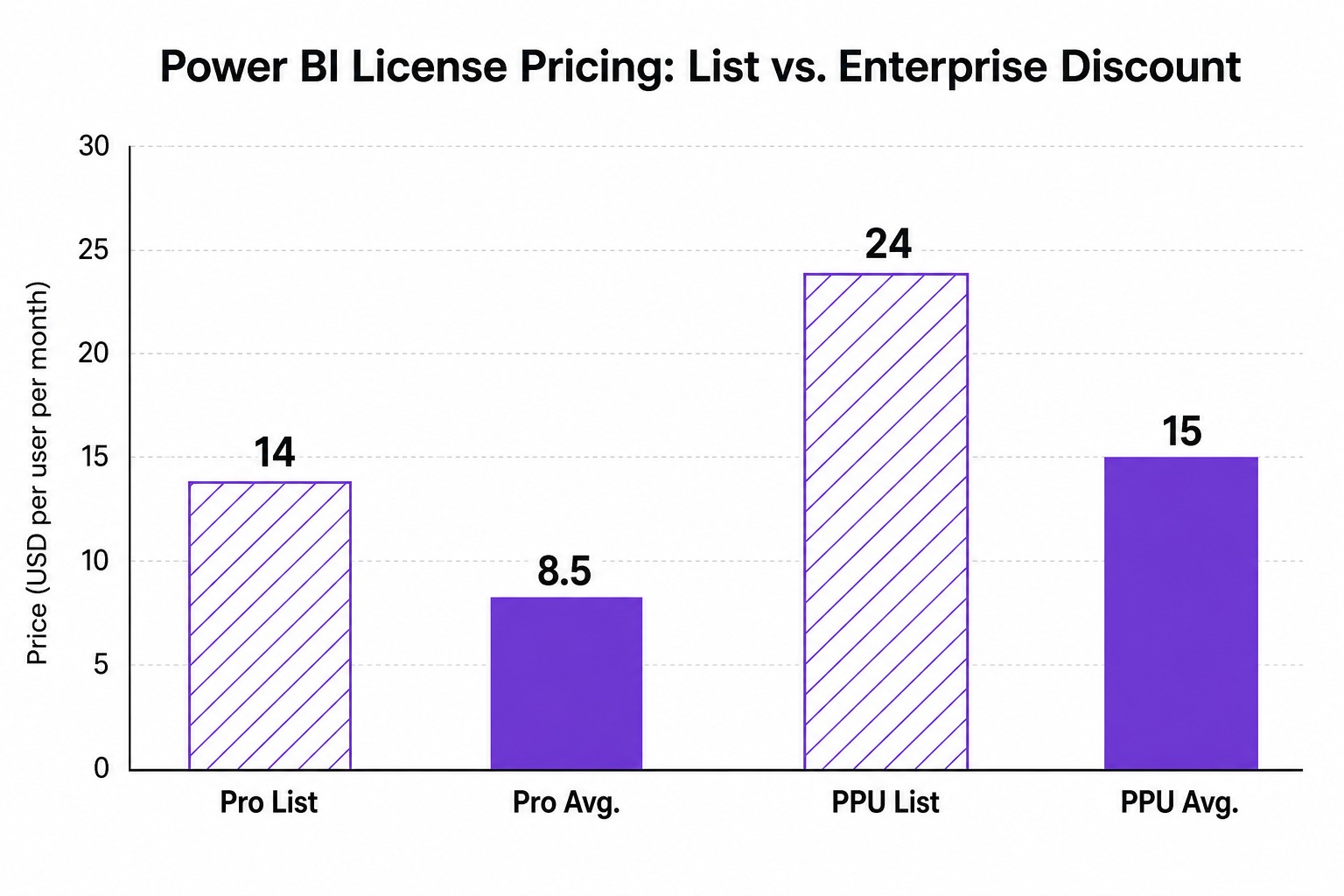
Cost: $14 per user per month (list), with enterprise agreements often lowering costs to ~$8.50.
Use Case: Frontline managers, analysts, and business users needing to view and collaborate on published content.
Governance Factors: CloudNuro’s Microsoft 365 Custodian can auto-detect dormant Pro licenses, pinpointing cost recovery opportunities and supporting automated reclamation.
PPU bridges the gap between Pro and full Premium capacity. It is best suited for advanced report authors and analysts needing premium features, AI-driven analytics, paginated reports, and larger dataset sizes up to 100 GB (with up to 48 refreshes daily).
Cost: $24 per user per month (list), discounted to about $15 via enterprise agreements.
Key Limitation: Every report viewer must also hold a PPU license, restricting use for broad distribution scenarios.
Ideal for: Power users, analytics centers of excellence, or specialized workloads before scaling to Premium or Fabric.
Premium (legacy) and Fabric F-SKU (modern) are capacity-based, empowering organizations to consolidate analytics workloads and unlock unlimited read/view access. This model provides better TCO for large teams, high-frequency report consumers, and unified data science/BI projects.
Starts at: $263/month for F2 capacity; F64 enables unlimited free report viewing.
When is it optimal? Once regular report viewers exceed ~210, shifting to F64 is mathematically most cost-efficient (vs. PPU per user pricing).
CloudNuro’s value: Our automated trend analysis supports precise transitions, modeling real reader counts and advising when to unlock capacity modes vs. per-user licensing.
Differentiator: Fabric unifies data science, analytics, and BI, breaking silos and enabling AI-powered workflows across the enterprise.
Selecting the optimal Power BI license type is about more than features. It demands a holistic view across current usage, scale of report consumption, compliance needs, and financial allocation models. CloudNuro’s Microsoft 365 Custodian delivers actionable analytics to match the right license to every user and department, driving cost discipline.
|
Scenario |
Recommended License Type |
CloudNuro Optimization Angle |
|---|---|---|
|
Small pilots/POCs |
Free or Pro |
Automatically discover when to swap Free/Pro based on sharing needs |
|
Organization-wide analytics |
Premium or Fabric F-SKU |
Rightsize capacity; enable unlimited free viewing |
|
Rapid growth in report viewers |
Fabric F-SKU (F64+) |
Predict tipping point, automate transition from per-user/PPU models |
|
Advanced data science workflows |
Fabric F-SKU |
Unify BI, AI analytics, and data science for all teams |
|
Specialized analytics (few users) |
Premium Per User |
Identify workloads suited to advanced features, avoid overbuying |
|
Cost optimization |
Mix (Pro+Fabric) |
AI-driven modeling, automated license reclamation, real-time alerts |
Organizations leveraging CloudNuro’s platform for Power BI license management have realized substantial savings and improved compliance:
Healthcare leader reclaimed over 7,000 dormant licenses and saved $2.3M in one year via automation.
Multinational bank cut analytics spend by 38% and reduced unused compute by 45%.
Government agency reduced overspend by 19% through policy-driven license environments.
These outcomes are enabled by unifying usage analytics, showback/chargeback, and automated rightsizing, ensuring every Power BI license dollar delivers maximum value.
What are the different Power BI license types?
Power BI offers Free, Pro, Premium Per User (PPU), Premium Capacity, and Fabric F-SKU (capacity-based) licenses. Each aligns with specific usage/consumption models, from individual exploration to large-scale enterprise analytics.
How much does each Power BI license type cost?
Free is $0. Pro lists at $14/user/month, PPU at $24/user/month, with enterprise agreements frequently lowering Pro to ~$8.50/user and PPU to ~$15/user. Fabric F-SKU starts at $263/month for F2 capacity; F64 and above provide enterprise-scale benefits.
Which Power BI license type is right for my organization?
If collaboration and sharing are core, Pro is the minimum. For advanced analytics, PPU fits small power-user teams. Large enterprises with many viewers should consider Fabric F-SKUs once they pass the cost tipping point.
What is the difference between Pro, Premium Per User, Premium Capacity, and Fabric?
Pro unlocks basic sharing and collaboration. PPU adds AI/premium features for individuals. Premium (legacy) and Fabric are capacity-based, providing scalable, unified analytics for large organizations with unlimited viewing (in Fabric F64+).
Can you upgrade or downgrade Power BI license types?
Yes. Organizations can migrate users between tiers or shift from per-user to capacity-based models. CloudNuro automates usage tracking to pinpoint ideal timing, avoid licensing gaps, and reduce administrative effort.
Making informed Power BI license decisions is pivotal for maximizing value, governance, and security in modern enterprise analytics. With flexible license types ranging from Free through Fabric F-SKU, the task of cost control grows complex, but the rewards of optimization are significant.
Automated tools like CloudNuro’s Microsoft 365 Custodian offer real-time, AI-driven insights into usage, cost allocation, and underutilization. This brings actionable, policy-based license management and ensures every investment in Power BI fuels both innovation and prudent financial stewardship.
Ready to accelerate ROI and bring order to Microsoft analytics licensing? Explore CloudNuro’s Microsoft License Optimization or Request a Demo with our team.
CloudNuro is a leader in Enterprise AI Adoption Management, providing enterprises with unmatched visibility, governance, and cost optimization. Recognized twice in a row in the SaaS Management Platforms category and named a Leader in the SoftwareReviews Data Quadrant, CloudNuro is trusted by global enterprises and government agencies to bring financial discipline to SaaS, cloud, and AI. Trusted by enterprises, CloudNuro provides centralized SaaS inventory, license optimization, and renewal management along with advanced cost allocation and chargeback, giving IT and Finance leaders the visibility, control, and cost-conscious culture needed to drive financial discipline.
Request a no cost, no obligation free assessment —just 15 minutes to savings!
Get StartedChoosing the right Power BI license type is no longer just an IT decision, it is a strategic lever for cost optimization, governance, and enterprise-wide analytics enablement. As leading organizations in healthcare, finance, government, and corporate sectors continue to adopt advanced business intelligence solutions, understanding the nuances of each Power BI license level is critical for maximizing ROI and maintaining compliance. This comprehensive guide unpacks each license type, Free, Pro, Premium Per User (PPU), Premium, and Fabric F-SKU, so IT and procurement leaders can make confident, data-driven choices.
Power BI dominates business intelligence, with 23.22% of the global market, serving 30 million active users in over 375,000 organizations. Its rapid adoption stems from integration with Microsoft 365, low friction for report consumers, and a mature ecosystem for analytics and reporting.
However, evolving licensing models and a broad menu of options, from traditional per-user plans to innovative capacity-based Fabric SKUs, add both flexibility and complexity. As organizations scale analytics usage, misaligned licensing becomes the top driver of wasted spend.
Enterprise BI moving rapidly from per-user premium to flexible, capacity-based licensing.
Tighter integration with unified data engineering and analytics platforms makes cost governance urgent.
Rightsizing and automation in license management are proving the largest drivers of analytics cost savings.
Power BI offers a spectrum of licenses, each tailored to distinct user needs, access patterns, and consumption models. Here is how the types break down:
|
License Type |
Designed For |
Core Capabilities |
Typical Cost (List) |
|---|---|---|---|
|
Power BI Free |
Individual creators |
Self-service visualizations |
$0 |
|
Power BI Pro |
Collaborative teams |
Sharing, collaboration, 1 GB dataset limit |
$14/user/month |
|
Premium Per User (PPU) |
Advanced/Power users |
AI, paginated reports, 100 GB datasets |
$24/user/month |
|
Power BI Premium |
Enterprise/global orgs |
Dedicated compute, larger models, APIs |
Starts ~$4,995/capacity/mo* |
|
Fabric F-SKU |
Unified analytics workloads |
Capacity-based, unlimited free report viewing |
Starts ~$263/F2/month |
*Premium and Fabric SKUs use capacity units, and total pricing depends on capacity chosen and negotiated discounts.
CloudNuro sees organizations frequently deploying Free licenses for individual contributors or for pilot projects in non-sensitive environments. The Free tier is ideal for personal data exploration, but limited for true organizational collaboration.
Capabilities: Local data modeling, visualization, limited Power BI cloud service access.
Limitations: No ability to share, publish, or collaborate; consumption restricted to personal workspace.
Best fit: Individual analysts, R&D, or users testing out Power BI core features before broader adoption.
Pro remains the foundation for enterprise Power BI deployment. Required for users who publish, share, or collaborate on content, Pro unlocks broad internal distribution, supports 1 GB dataset sizes, and allows up to 8 refreshes per day.
Cost: $14 per user per month (list), with enterprise agreements often lowering costs to ~$8.50.
Use Case: Frontline managers, analysts, and business users needing to view and collaborate on published content.
Governance Factors: CloudNuro’s Microsoft 365 Custodian can auto-detect dormant Pro licenses, pinpointing cost recovery opportunities and supporting automated reclamation.
PPU bridges the gap between Pro and full Premium capacity. It is best suited for advanced report authors and analysts needing premium features, AI-driven analytics, paginated reports, and larger dataset sizes up to 100 GB (with up to 48 refreshes daily).
Cost: $24 per user per month (list), discounted to about $15 via enterprise agreements.
Key Limitation: Every report viewer must also hold a PPU license, restricting use for broad distribution scenarios.
Ideal for: Power users, analytics centers of excellence, or specialized workloads before scaling to Premium or Fabric.
Premium (legacy) and Fabric F-SKU (modern) are capacity-based, empowering organizations to consolidate analytics workloads and unlock unlimited read/view access. This model provides better TCO for large teams, high-frequency report consumers, and unified data science/BI projects.
Starts at: $263/month for F2 capacity; F64 enables unlimited free report viewing.
When is it optimal? Once regular report viewers exceed ~210, shifting to F64 is mathematically most cost-efficient (vs. PPU per user pricing).
CloudNuro’s value: Our automated trend analysis supports precise transitions, modeling real reader counts and advising when to unlock capacity modes vs. per-user licensing.
Differentiator: Fabric unifies data science, analytics, and BI, breaking silos and enabling AI-powered workflows across the enterprise.
Selecting the optimal Power BI license type is about more than features. It demands a holistic view across current usage, scale of report consumption, compliance needs, and financial allocation models. CloudNuro’s Microsoft 365 Custodian delivers actionable analytics to match the right license to every user and department, driving cost discipline.
|
Scenario |
Recommended License Type |
CloudNuro Optimization Angle |
|---|---|---|
|
Small pilots/POCs |
Free or Pro |
Automatically discover when to swap Free/Pro based on sharing needs |
|
Organization-wide analytics |
Premium or Fabric F-SKU |
Rightsize capacity; enable unlimited free viewing |
|
Rapid growth in report viewers |
Fabric F-SKU (F64+) |
Predict tipping point, automate transition from per-user/PPU models |
|
Advanced data science workflows |
Fabric F-SKU |
Unify BI, AI analytics, and data science for all teams |
|
Specialized analytics (few users) |
Premium Per User |
Identify workloads suited to advanced features, avoid overbuying |
|
Cost optimization |
Mix (Pro+Fabric) |
AI-driven modeling, automated license reclamation, real-time alerts |
Organizations leveraging CloudNuro’s platform for Power BI license management have realized substantial savings and improved compliance:
Healthcare leader reclaimed over 7,000 dormant licenses and saved $2.3M in one year via automation.
Multinational bank cut analytics spend by 38% and reduced unused compute by 45%.
Government agency reduced overspend by 19% through policy-driven license environments.
These outcomes are enabled by unifying usage analytics, showback/chargeback, and automated rightsizing, ensuring every Power BI license dollar delivers maximum value.
What are the different Power BI license types?
Power BI offers Free, Pro, Premium Per User (PPU), Premium Capacity, and Fabric F-SKU (capacity-based) licenses. Each aligns with specific usage/consumption models, from individual exploration to large-scale enterprise analytics.
How much does each Power BI license type cost?
Free is $0. Pro lists at $14/user/month, PPU at $24/user/month, with enterprise agreements frequently lowering Pro to ~$8.50/user and PPU to ~$15/user. Fabric F-SKU starts at $263/month for F2 capacity; F64 and above provide enterprise-scale benefits.
Which Power BI license type is right for my organization?
If collaboration and sharing are core, Pro is the minimum. For advanced analytics, PPU fits small power-user teams. Large enterprises with many viewers should consider Fabric F-SKUs once they pass the cost tipping point.
What is the difference between Pro, Premium Per User, Premium Capacity, and Fabric?
Pro unlocks basic sharing and collaboration. PPU adds AI/premium features for individuals. Premium (legacy) and Fabric are capacity-based, providing scalable, unified analytics for large organizations with unlimited viewing (in Fabric F64+).
Can you upgrade or downgrade Power BI license types?
Yes. Organizations can migrate users between tiers or shift from per-user to capacity-based models. CloudNuro automates usage tracking to pinpoint ideal timing, avoid licensing gaps, and reduce administrative effort.
Making informed Power BI license decisions is pivotal for maximizing value, governance, and security in modern enterprise analytics. With flexible license types ranging from Free through Fabric F-SKU, the task of cost control grows complex, but the rewards of optimization are significant.
Automated tools like CloudNuro’s Microsoft 365 Custodian offer real-time, AI-driven insights into usage, cost allocation, and underutilization. This brings actionable, policy-based license management and ensures every investment in Power BI fuels both innovation and prudent financial stewardship.
Ready to accelerate ROI and bring order to Microsoft analytics licensing? Explore CloudNuro’s Microsoft License Optimization or Request a Demo with our team.
CloudNuro is a leader in Enterprise AI Adoption Management, providing enterprises with unmatched visibility, governance, and cost optimization. Recognized twice in a row in the SaaS Management Platforms category and named a Leader in the SoftwareReviews Data Quadrant, CloudNuro is trusted by global enterprises and government agencies to bring financial discipline to SaaS, cloud, and AI. Trusted by enterprises, CloudNuro provides centralized SaaS inventory, license optimization, and renewal management along with advanced cost allocation and chargeback, giving IT and Finance leaders the visibility, control, and cost-conscious culture needed to drive financial discipline.
Request a no cost, no obligation free assessment - just 15 minutes to savings!
Get StartedWe're offering complimentary ServiceNow license assessments to only 25 enterprises this quarter who want to unlock immediate savings without disrupting operations.
Get Free AssessmentGet Started




CloudNuro Corp
1755 Park St. Suite 207
Naperville, IL 60563
Phone : +1-630-277-9470
Email: info@cloudnuro.com





.webp)

Recognized Leader in SaaS Management Platforms by Info-Tech SoftwareReviews
.png)


.svg)