

Sign Up
Thank you for Submitting!
Power BI is the backbone of data-driven decisions for modern enterprises. Yet, as organizations scale up reporting, refresh times can balloon, leading to lost productivity and spiraling infrastructure costs. CIOs, CTOs, and IT leaders in healthcare, finance, government, and corporate sectors need not just quick dashboards but environments that are always compliant, cost-effective, and ready for exponential growth.
CloudNuro serves executives with a singular mission: to maximize visibility, control, and cost optimization throughout the enterprise analytics stack. In this guide, we reveal 12 Power BI semantic model best practices, real-world design rules, patterns, and tactics, that have consistently cut semantic model refresh times by 50% for customers with even the largest BI workloads.
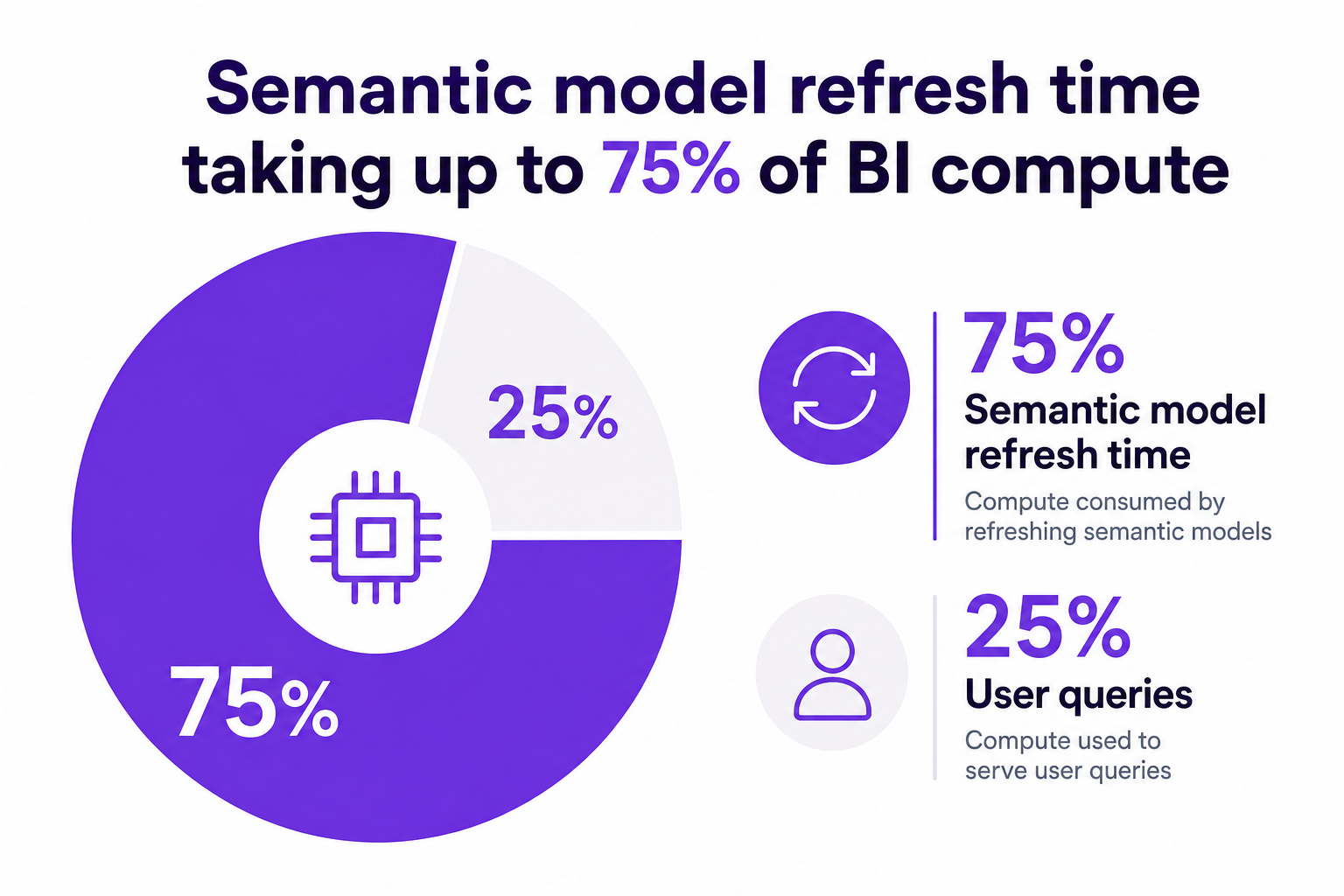
Long-running refreshes are a red flag for BI health. When semantic model processing hogs up to 75% of compute capacity, there is less left for users, and more spent on hardware you might not actually need. Delayed insights, timeout errors, and user complaints can cripple trust in analytics. The core drivers of slow refreshes? Excess model complexity, inefficient dataflows, overprovisioned capacities, and lack of usage-based governance.
Key fact: Semantic model refreshes dominate workloads, accounting for up to 75% of compute consumption, with only 25% left for end-user reporting.
Ditch complex snowflake layouts. Using a strict star schema with narrow fact tables and well-defined dimension tables improves parallel processing and shortens refresh cycles. Flat, wide structures actually throttle Power BI's in-memory engine over time.
Never rely on auto date/time in reports. Disabling these settings and using a single, conformed date table dramatically reduces model bloat, enhances indexing, and smooths time intelligence across all reporting layers.
Swap out text-based joins for integer keys in both fact and dimension tables. This simple swap lightens the processing load, shrinks in-memory size, and makes queries, especially filtering and joins, many times faster.
Every extra column carries memory baggage. Remove any unused columns, disable irrelevant hierarchies, and archive historical attributes no longer actively consumed by reports.
Expert tip: Removing unused columns, disabling unnecessary hierarchies, and switching text keys to numeric IDs consistently yield double-digit percentage reductions in memory footprint.
Keep Power BI models lean. Always move heavy merges, appends, ranking, and row-level logic to the data warehouse, dataflows, or staging layer. Your semantic model should assemble, not transform, data.
Adopt incremental refresh for all large tables. Only process recent or changed partitions rather than a full dataset, reducing compute time for each refresh window.
Market trend: Organizations are embracing incremental refresh so only what changed gets recalculated, minimizing downtime and maximizing available capacity.
Calculated columns run at refresh time and can spike memory use. Shift these to your ETL layer. For dynamic business logic, stick to DAX measures, which only process during report queries, not full refreshes.
High-cardinality columns balloon memory use and crush refresh speeds. Strip IDs and values that are not critical to analytics, and avoid creating many-to-many relationships unless absolutely necessary.
Aggregate large fact tables at common reporting levels (daily, monthly) within the semantic model, linking granular data only as needed. This hybrid approach slashes dataset size and accelerates refresh time.
Regularly monitor segment counts, encoding types, and compression ratios. Use tools and telemetry to set the optimal encoding for each column and compress excessive data granularity, guided by actual usage, not guesswork.
CloudNuro's Unified Cloud Custodian gives engineering teams continuous visibility into these core model characteristics, surfacing actionable optimizations that cut both refresh and compute cost.
Avoid wasteful hardware upgrades. The winning formula: AI-enabled orchestration that staggers, rather than overlaps, dataflow refreshes, especially during business hours. CloudNuro’s orchestration engine ensures refreshes never compete for capacity, flattening demand spikes and reducing the chance of reaching timeout limits.
Case evidence: One multinational bank cut 45% of unused compute capacity and reduced analytics spend by 36% simply by automating rightsizing and orchestrating refresh times without infrastructure expansion.
Hold business units accountable for capacity and refresh costs. CloudNuro’s Chargeback module maps consumption directly to departments, incentivizing teams to maintain streamlined models. Automated license reviews and premium deprovisioning guarantee spend is matched to value delivered.
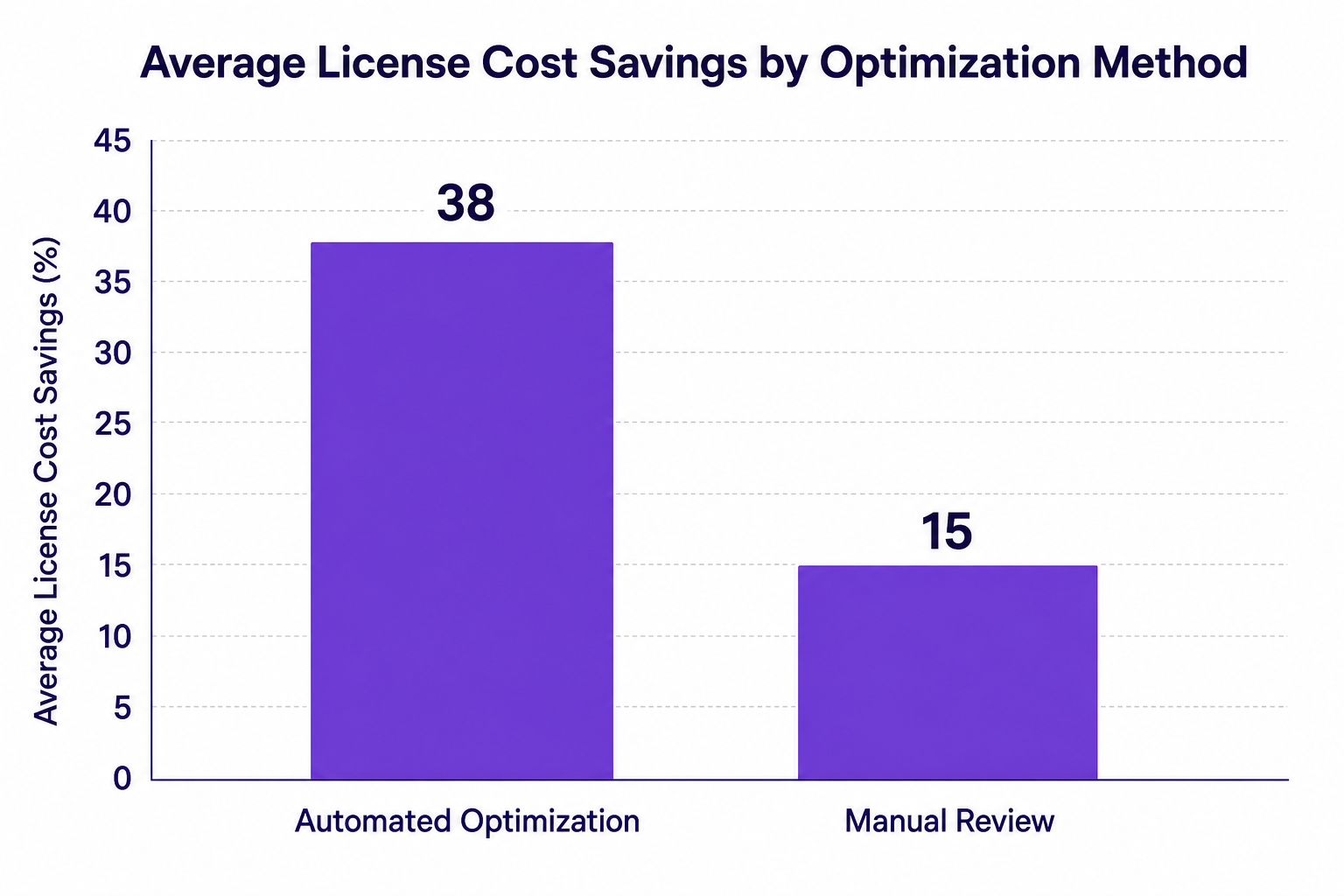
License optimization results are real: Automated reviews yield 35% to 42% higher cost savings than manual processes for enterprise deployments.
What are the best practices for Power BI semantic models?
Stick to strict star schemas, use a centralized date dimension, push transformations upstream, swap text for numeric keys, prune unused columns, leverage aggregations, and automate capacity management to reduce refresh times and control costs.
How do you design a Power BI semantic model for faster refresh times?
Center your model around a semantic layer, enforce incremental refresh, avoid calculated columns at the model level, minimize cardinality, and schedule staggered refresh windows. Automation and proactive monitoring are key to sustained acceleration.
What are the top design rules for Power BI semantic model optimization?
Focus on structure (star schema, numeric keys), process (incremental refresh, upstream transformations), and operational governance (chargeback, license optimization). The combined impact: shorter refreshes and better resource control.
How can I improve the refresh time in Power BI semantic models?
Review segment counts and encoding, prune unnecessary columns, automate refresh scheduling, and leverage optimized compression guided by usage stats. Adjust refresh strategies as data and business needs evolve.
What is Power BI semantic model architecture best for large-scale reporting?
Star schema, robust incremental refresh, minimal calculated columns, controlled cardinality, well-managed aggregations, and automated capacity orchestration form the gold standard for enterprise-scale reporting.
CloudNuro bridges the gap between BI best practices and real-world enterprise optimization. The Unified Cloud Custodian plugs directly into Power BI, cloud, and financial utilization data, flagging inflated semantic models and surfacing targeted tuning actions. AI-powered orchestration ensures refreshes never collide, enforcing optimal workload distribution.
The platform’s Chargeback module maps capacity expenditures right back to business owners, instilling a cost-aware culture. Automated license reviews mean you only pay for what is valuable, no premium access for dormant or light users.
Combined, these guardrails empower IT and Finance leaders to maintain environments that are fast, compliant, cost-optimized, and trusted by every department.
Unlock additional cost savings and full-stack BI governance:
Explore CloudNuro FinOps Services | Free Microsoft Office 365 Assessment
Power BI semantic model best practices are not just for architects or engineers, they are the drivers of analytics agility, financial discipline, and user confidence. By designing for refresh efficiency and operational accountability, your BI deployment can scale with your business, not your hardware budget.
CloudNuro stands ready to help IT leaders accelerate transformation with automated optimization, license right-sizing, and true SaaS governance. Ready to cut refresh times by half? Start your journey toward a leaner, smarter BI stack with CloudNuro today.
About CloudNuro
CloudNuro is a leader in Enterprise AI Adoption Management, providing enterprises with unmatched visibility, governance, and cost optimization. Recognized twice in a row in the SaaS Management Platforms category and named a Leader in the SoftwareReviews Data Quadrant, CloudNuro is trusted by global enterprises and government agencies to bring financial discipline to SaaS, cloud, and AI. Trusted by enterprises, CloudNuro provides centralized SaaS inventory, license optimization, and renewal management along with advanced cost allocation and chargeback, giving IT and Finance leaders the visibility, control, and cost-conscious culture needed to drive financial discipline.
Request a no cost, no obligation free assessment —just 15 minutes to savings!
Get StartedPower BI is the backbone of data-driven decisions for modern enterprises. Yet, as organizations scale up reporting, refresh times can balloon, leading to lost productivity and spiraling infrastructure costs. CIOs, CTOs, and IT leaders in healthcare, finance, government, and corporate sectors need not just quick dashboards but environments that are always compliant, cost-effective, and ready for exponential growth.
CloudNuro serves executives with a singular mission: to maximize visibility, control, and cost optimization throughout the enterprise analytics stack. In this guide, we reveal 12 Power BI semantic model best practices, real-world design rules, patterns, and tactics, that have consistently cut semantic model refresh times by 50% for customers with even the largest BI workloads.
Long-running refreshes are a red flag for BI health. When semantic model processing hogs up to 75% of compute capacity, there is less left for users, and more spent on hardware you might not actually need. Delayed insights, timeout errors, and user complaints can cripple trust in analytics. The core drivers of slow refreshes? Excess model complexity, inefficient dataflows, overprovisioned capacities, and lack of usage-based governance.
Key fact: Semantic model refreshes dominate workloads, accounting for up to 75% of compute consumption, with only 25% left for end-user reporting.
Ditch complex snowflake layouts. Using a strict star schema with narrow fact tables and well-defined dimension tables improves parallel processing and shortens refresh cycles. Flat, wide structures actually throttle Power BI's in-memory engine over time.
Never rely on auto date/time in reports. Disabling these settings and using a single, conformed date table dramatically reduces model bloat, enhances indexing, and smooths time intelligence across all reporting layers.
Swap out text-based joins for integer keys in both fact and dimension tables. This simple swap lightens the processing load, shrinks in-memory size, and makes queries, especially filtering and joins, many times faster.
Every extra column carries memory baggage. Remove any unused columns, disable irrelevant hierarchies, and archive historical attributes no longer actively consumed by reports.
Expert tip: Removing unused columns, disabling unnecessary hierarchies, and switching text keys to numeric IDs consistently yield double-digit percentage reductions in memory footprint.
Keep Power BI models lean. Always move heavy merges, appends, ranking, and row-level logic to the data warehouse, dataflows, or staging layer. Your semantic model should assemble, not transform, data.
Adopt incremental refresh for all large tables. Only process recent or changed partitions rather than a full dataset, reducing compute time for each refresh window.
Market trend: Organizations are embracing incremental refresh so only what changed gets recalculated, minimizing downtime and maximizing available capacity.
Calculated columns run at refresh time and can spike memory use. Shift these to your ETL layer. For dynamic business logic, stick to DAX measures, which only process during report queries, not full refreshes.
High-cardinality columns balloon memory use and crush refresh speeds. Strip IDs and values that are not critical to analytics, and avoid creating many-to-many relationships unless absolutely necessary.
Aggregate large fact tables at common reporting levels (daily, monthly) within the semantic model, linking granular data only as needed. This hybrid approach slashes dataset size and accelerates refresh time.
Regularly monitor segment counts, encoding types, and compression ratios. Use tools and telemetry to set the optimal encoding for each column and compress excessive data granularity, guided by actual usage, not guesswork.
CloudNuro's Unified Cloud Custodian gives engineering teams continuous visibility into these core model characteristics, surfacing actionable optimizations that cut both refresh and compute cost.
Avoid wasteful hardware upgrades. The winning formula: AI-enabled orchestration that staggers, rather than overlaps, dataflow refreshes, especially during business hours. CloudNuro’s orchestration engine ensures refreshes never compete for capacity, flattening demand spikes and reducing the chance of reaching timeout limits.
Case evidence: One multinational bank cut 45% of unused compute capacity and reduced analytics spend by 36% simply by automating rightsizing and orchestrating refresh times without infrastructure expansion.
Hold business units accountable for capacity and refresh costs. CloudNuro’s Chargeback module maps consumption directly to departments, incentivizing teams to maintain streamlined models. Automated license reviews and premium deprovisioning guarantee spend is matched to value delivered.
License optimization results are real: Automated reviews yield 35% to 42% higher cost savings than manual processes for enterprise deployments.
What are the best practices for Power BI semantic models?
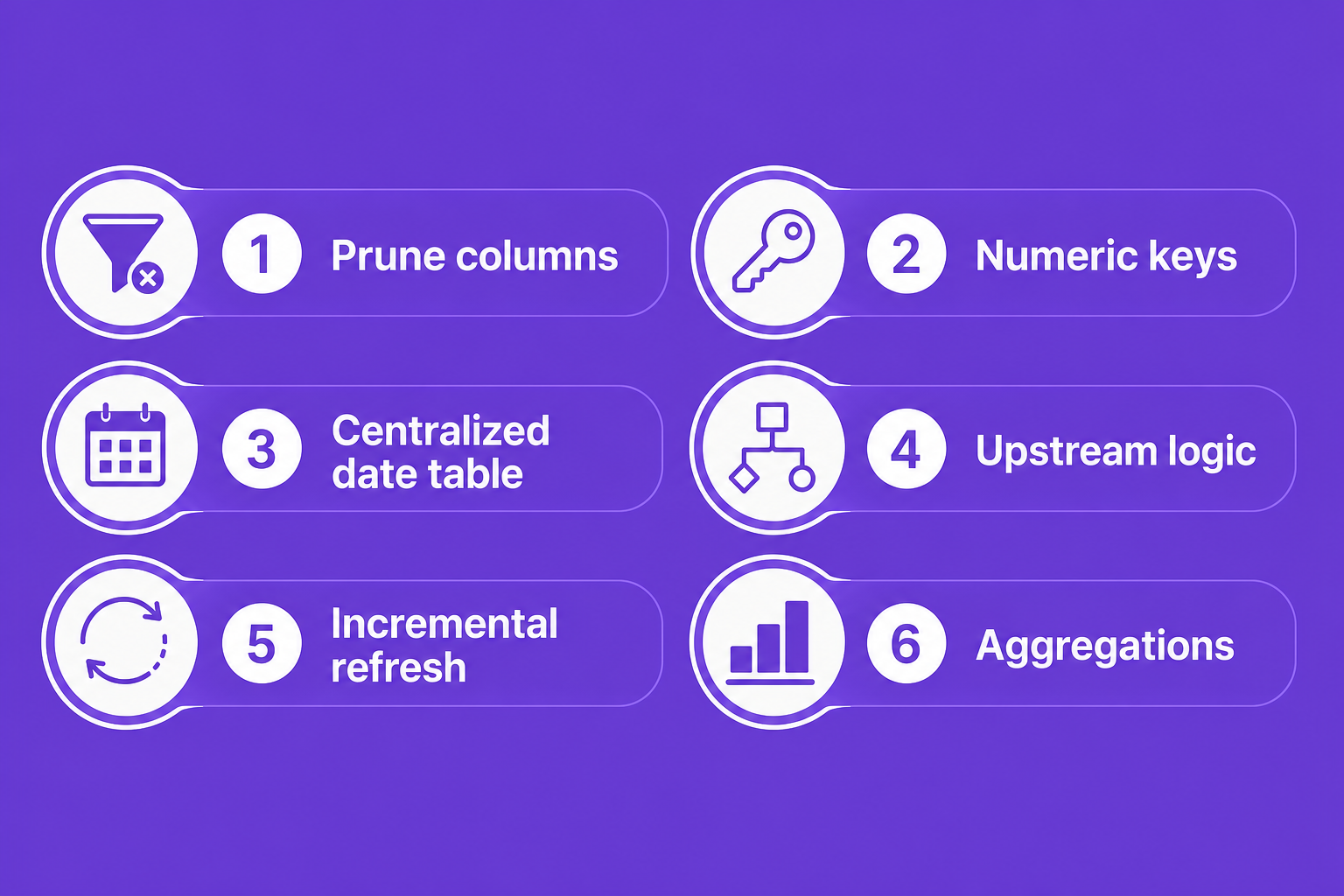
Stick to strict star schemas, use a centralized date dimension, push transformations upstream, swap text for numeric keys, prune unused columns, leverage aggregations, and automate capacity management to reduce refresh times and control costs.
How do you design a Power BI semantic model for faster refresh times?
Center your model around a semantic layer, enforce incremental refresh, avoid calculated columns at the model level, minimize cardinality, and schedule staggered refresh windows. Automation and proactive monitoring are key to sustained acceleration.
What are the top design rules for Power BI semantic model optimization?
Focus on structure (star schema, numeric keys), process (incremental refresh, upstream transformations), and operational governance (chargeback, license optimization). The combined impact: shorter refreshes and better resource control.
How can I improve the refresh time in Power BI semantic models?
Review segment counts and encoding, prune unnecessary columns, automate refresh scheduling, and leverage optimized compression guided by usage stats. Adjust refresh strategies as data and business needs evolve.
What is Power BI semantic model architecture best for large-scale reporting?
Star schema, robust incremental refresh, minimal calculated columns, controlled cardinality, well-managed aggregations, and automated capacity orchestration form the gold standard for enterprise-scale reporting.
CloudNuro bridges the gap between BI best practices and real-world enterprise optimization. The Unified Cloud Custodian plugs directly into Power BI, cloud, and financial utilization data, flagging inflated semantic models and surfacing targeted tuning actions. AI-powered orchestration ensures refreshes never collide, enforcing optimal workload distribution.
The platform’s Chargeback module maps capacity expenditures right back to business owners, instilling a cost-aware culture. Automated license reviews mean you only pay for what is valuable, no premium access for dormant or light users.
Combined, these guardrails empower IT and Finance leaders to maintain environments that are fast, compliant, cost-optimized, and trusted by every department.
Unlock additional cost savings and full-stack BI governance:
Explore CloudNuro FinOps Services | Free Microsoft Office 365 Assessment
Power BI semantic model best practices are not just for architects or engineers, they are the drivers of analytics agility, financial discipline, and user confidence. By designing for refresh efficiency and operational accountability, your BI deployment can scale with your business, not your hardware budget.
CloudNuro stands ready to help IT leaders accelerate transformation with automated optimization, license right-sizing, and true SaaS governance. Ready to cut refresh times by half? Start your journey toward a leaner, smarter BI stack with CloudNuro today.
About CloudNuro
CloudNuro is a leader in Enterprise AI Adoption Management, providing enterprises with unmatched visibility, governance, and cost optimization. Recognized twice in a row in the SaaS Management Platforms category and named a Leader in the SoftwareReviews Data Quadrant, CloudNuro is trusted by global enterprises and government agencies to bring financial discipline to SaaS, cloud, and AI. Trusted by enterprises, CloudNuro provides centralized SaaS inventory, license optimization, and renewal management along with advanced cost allocation and chargeback, giving IT and Finance leaders the visibility, control, and cost-conscious culture needed to drive financial discipline.
Request a no cost, no obligation free assessment - just 15 minutes to savings!
Get StartedWe're offering complimentary ServiceNow license assessments to only 25 enterprises this quarter who want to unlock immediate savings without disrupting operations.
Get Free AssessmentGet Started




CloudNuro Corp
1755 Park St. Suite 207
Naperville, IL 60563
Phone : +1-630-277-9470
Email: info@cloudnuro.com





.webp)

Recognized Leader in SaaS Management Platforms by Info-Tech SoftwareReviews


%20SW.png)

.svg)