

Sign Up
Thank you for Submitting!
Enterprises are spending millions on Microsoft 365 seats that no one is actually using. To reclaim unused M365 licenses at scale, IT leaders need a repeatable process, not ad hoc spreadsheets and one-off scripts.
According to a recent cloud spend forecast, enterprises waste an estimated 30% of their Microsoft 365 license spend on inactive or orphaned accounts in 2026, with global unused spend projected to exceed 7.8 billion dollars. For CIOs and IT finance leaders, that is not a rounding error. It is a material budget line that can fund security, AI, or modernization initiatives.
This guide walks through a step-by-step approach to reclaim unused M365 licenses using PowerShell and automation, then shows how to industrialize the process with CloudNuro.
License optimization is no longer just a quarterly clean up. It is a continuous discipline that ties directly to SaaS cost governance and security.
Recent market analysis shows that centralized license governance with automated reclamation delivers an average 28% year over year cost reduction for organizations using Microsoft 365. Another SaaS trend report notes that 46% of enterprises list automated SaaS license reclamation as a top budget priority for 2026, and 82% plan to increase automation in license management processes.
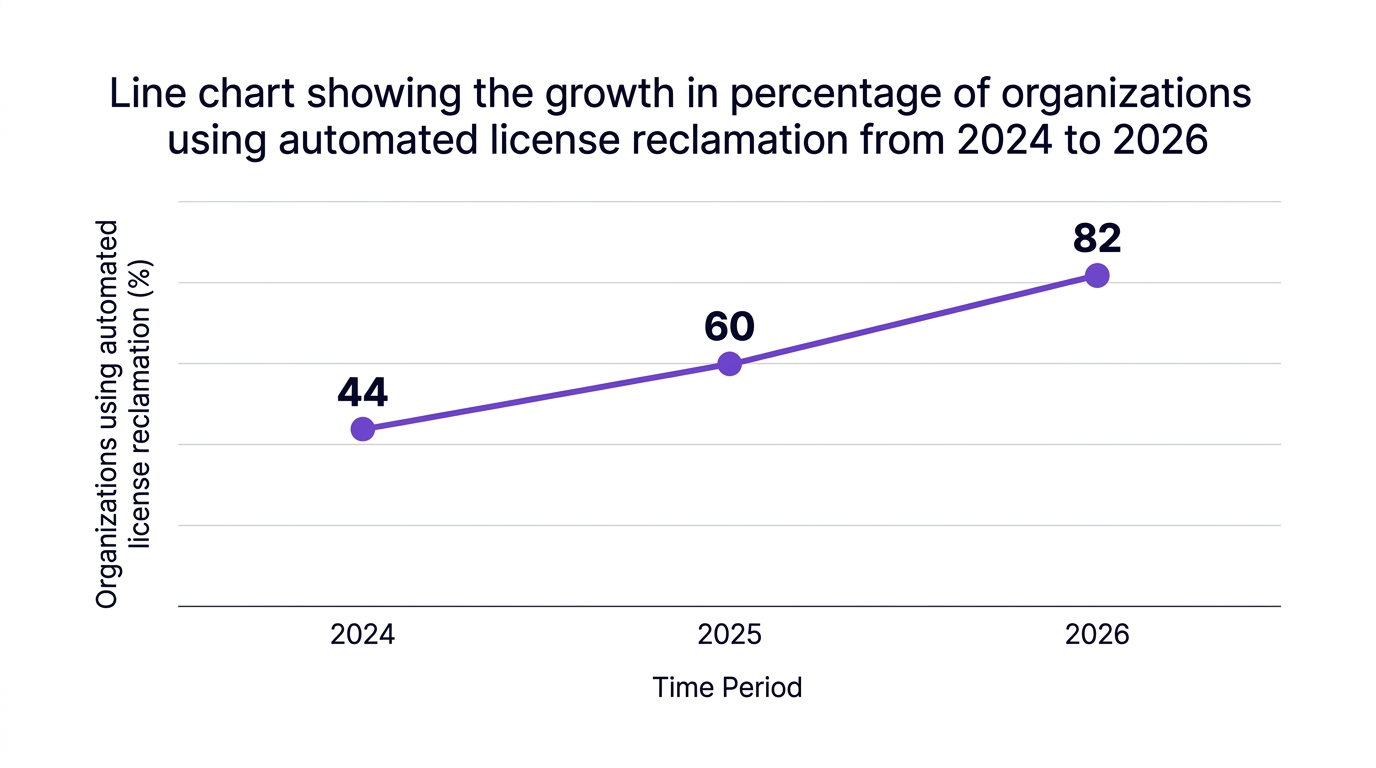
The story is not only about money. Dormant and orphaned accounts increase attack surface, complicate identity and access management, and create compliance headaches. When inactive M365 licenses pile up, you usually see:
A useful analogy is unmonitored cloud storage. You can keep buying more disks, or you can classify data, archive what is stale, and regularly reclaim capacity. M365 license reclamation is the same discipline applied to users and entitlements.
You cannot reclaim unused M365 licenses until you know what you have and how it is being used. A structured M365 license audit should answer three basic questions:
A best practice is to treat this as part of broader user entitlement management, not just a billing exercise. That means capturing ownership, department, cost center, and role for each identity.
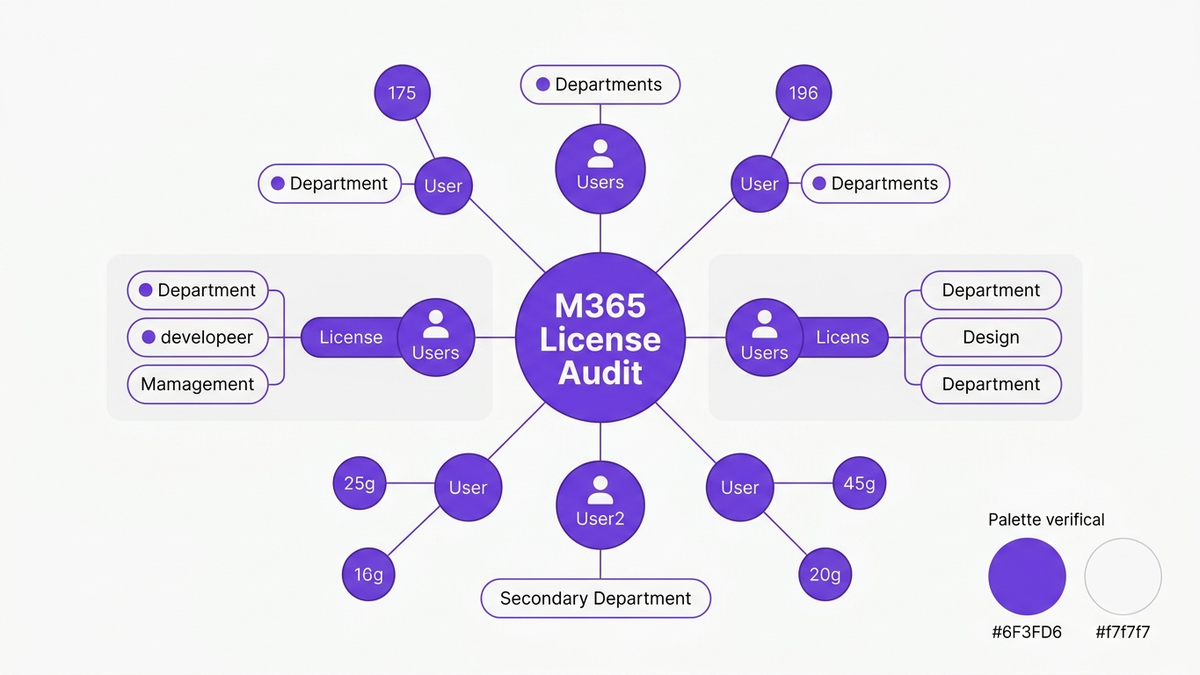
For a manual-first baseline, you can:
However, manual reports age quickly and typically miss nuanced patterns, such as users who have logins but never touch high-cost workloads like Teams, Exchange, or OneDrive.
Once you have a broad inventory, the next move is to identify inactive M365 licenses using sign-in and activity data. This is where PowerShell reclaim M365 license workflows become essential.
At a high level, your script needs to:
A typical pattern for microsoft 365 inactive user management is:
To reduce risk, many IT teams build a two-stage workflow:
A recent industry research report found that IT departments that automate license audits reduce manual M365 management workload by 60%, which directly frees staff to focus on higher-value projects.
With inactive users identified, the next question is what to do with them. Effective M365 license reclamation is more than just removal. You need a repeatable, policy-driven process that determines:
A practical office 365 license reclamation flow with scripts might look like this:
This workflow can reclaim unused M365 licenses efficiently at small scale, but it begins to break when you manage M365 licenses at scale across thousands of users and multiple business units. Scripts proliferate, tribal knowledge grows, and controls become inconsistent.
That is exactly where coordinated saas license management and automation platforms become essential.
As SaaS portfolios expand, IT teams quickly realize that isolated PowerShell scripts are helpful but not sufficient for automated SaaS license reclaim. They need:
A recent automation trends report notes that 78% of enterprises plan to implement AI-driven automation in M365 license management by 2026. Another cloud operations study highlights that integration of centralized SaaS management platforms covering 400+ cloud applications is becoming standard.
With the right tooling, you can:

A common counterargument is that “we already have scripts for this.” Scripts are valuable, but they tend to be brittle. They often rely on a few key engineers, are hard to standardize across teams, and rarely provide the clear audit trails that Finance and Compliance demand.
An automation-first model shifts from manual intervention to policy-driven automation, where scripts run under controlled guardrails and are orchestrated by a central platform.
The impact of this shift is best illustrated by real outcomes.
These stories highlight two important lessons:
Another common concern is risk. Some teams worry that automation might remove licenses from users who still need them. The most effective organizations mitigate this with clear grace periods, notifications, opt-outs for critical roles, and tiered responses such as downgrades before removals.
CloudNuro’s Microsoft 365 Custodian uses deep AI-driven integration to automatically identify:
This provides actionable m365 license usage insights, so IT and Finance can see where licenses are underutilized, misaligned, or unnecessary.
Instead of rebuilding scripts from scratch, CloudNuro ships with out-of-the-box PowerShell and workflow automation tailored for m365 license reclamation. Teams can:
These workflows are designed with cloud cost governance and microsoft 365 compliance in mind, ensuring that reclaim actions are auditable and aligned with internal policies.
CloudNuro also connects to more than 400 SaaS and IaaS applications, enabling a unified view of saas license management and cloud license rightsizing beyond Microsoft 365 alone.
This multi-application view supports:
By combining AI discovery, workflow automation, and deep reporting, CloudNuro helps enterprises achieve continuous license cost reduction Microsoft 365, not just one-time wins after a big audit.
To make this practical, here is a 6-step framework you can start implementing this quarter.
Over time, this framework shifts your organization from reactive clean up to a proactive, automated, and governance-first model.
Start with a m365 license audit that combines license assignment data with activity logs. Focus on users with no sign-ins or workload usage within a defined period, such as 60 or 90 days.
Then, classify them into inactive, dormant, and orphaned categories. Platforms like CloudNuro automate this discovery, continuously updating lists based on activity and HR or identity changes.
Best practices include:
This balances aggressive cost optimization Microsoft 365 with business continuity.
Use PowerShell to:
For scale, embed these scripts into automation platforms that manage scheduling, approvals, and error handling. CloudNuro’s Microsoft 365 Custodian includes prebuilt automation scripts for M365 and workflows that implement this pattern.
Microsoft 365 is often one of the largest SaaS line items. Achieving license cost reduction Microsoft 365 sets the pattern and governance model for other tools.
Enterprises that implement automated SaaS license reclaim for M365 usually extend the same policies to CRM, collaboration, and security tools, driving consistent saas spending reduction across the portfolio.
CloudNuro provides:
This enables IT and Finance to manage m365 inactive user automation as part of a broader, policy-driven SaaS management strategy.
Yes. Many organizations combine existing power automate for M365 flows with CloudNuro’s orchestration and insights. For example, a Power Automate flow might trigger when HR closes an employee record, while CloudNuro handles the downstream inactive account cleanup and license rightsizing across multiple SaaS applications.
Reclaiming unused M365 licenses is one of the most direct levers you have for cost optimization Microsoft 365 and for tightening identity and access control.
By combining structured audits, powershell reclaim M365 license workflows, and platform-level automation, enterprises can:
Organizations that treat reclaim unused M365 licenses as an ongoing, automated process, not a one-time project, see sustained savings and stronger compliance.
To see how CloudNuro can operationalize this for your environment, from Microsoft 365 Custodian to cross-SaaS automation, request a personalized walkthrough today.
CloudNuro is a leader in Enterprise SaaS Management Platforms, providing enterprises with unmatched visibility, governance, and cost optimization. Recognized twice in a row in the SaaS Management Platforms category and named a Leader in the SoftwareReviews Data Quadrant, CloudNuro is trusted by global enterprises and government agencies to bring financial discipline to SaaS, cloud, and AI. Trusted by enterprises such as Konica Minolta and Federal Signal, CloudNuro provides centralized SaaS inventory, license optimization, and renewal management along with advanced cost allocation and chargeback, giving IT and Finance leaders the visibility, control, and cost-conscious culture needed to drive financial discipline. Request a Demo | Get Free Savings | Explore Product
Request a no cost, no obligation free assessment —just 15 minutes to savings!
Get StartedEnterprises are spending millions on Microsoft 365 seats that no one is actually using. To reclaim unused M365 licenses at scale, IT leaders need a repeatable process, not ad hoc spreadsheets and one-off scripts.
According to a recent cloud spend forecast, enterprises waste an estimated 30% of their Microsoft 365 license spend on inactive or orphaned accounts in 2026, with global unused spend projected to exceed 7.8 billion dollars. For CIOs and IT finance leaders, that is not a rounding error. It is a material budget line that can fund security, AI, or modernization initiatives.
This guide walks through a step-by-step approach to reclaim unused M365 licenses using PowerShell and automation, then shows how to industrialize the process with CloudNuro.
License optimization is no longer just a quarterly clean up. It is a continuous discipline that ties directly to SaaS cost governance and security.
Recent market analysis shows that centralized license governance with automated reclamation delivers an average 28% year over year cost reduction for organizations using Microsoft 365. Another SaaS trend report notes that 46% of enterprises list automated SaaS license reclamation as a top budget priority for 2026, and 82% plan to increase automation in license management processes.
The story is not only about money. Dormant and orphaned accounts increase attack surface, complicate identity and access management, and create compliance headaches. When inactive M365 licenses pile up, you usually see:
A useful analogy is unmonitored cloud storage. You can keep buying more disks, or you can classify data, archive what is stale, and regularly reclaim capacity. M365 license reclamation is the same discipline applied to users and entitlements.
You cannot reclaim unused M365 licenses until you know what you have and how it is being used. A structured M365 license audit should answer three basic questions:
A best practice is to treat this as part of broader user entitlement management, not just a billing exercise. That means capturing ownership, department, cost center, and role for each identity.
For a manual-first baseline, you can:
However, manual reports age quickly and typically miss nuanced patterns, such as users who have logins but never touch high-cost workloads like Teams, Exchange, or OneDrive.
Once you have a broad inventory, the next move is to identify inactive M365 licenses using sign-in and activity data. This is where PowerShell reclaim M365 license workflows become essential.
At a high level, your script needs to:
A typical pattern for microsoft 365 inactive user management is:
To reduce risk, many IT teams build a two-stage workflow:
A recent industry research report found that IT departments that automate license audits reduce manual M365 management workload by 60%, which directly frees staff to focus on higher-value projects.
With inactive users identified, the next question is what to do with them. Effective M365 license reclamation is more than just removal. You need a repeatable, policy-driven process that determines:
A practical office 365 license reclamation flow with scripts might look like this:
This workflow can reclaim unused M365 licenses efficiently at small scale, but it begins to break when you manage M365 licenses at scale across thousands of users and multiple business units. Scripts proliferate, tribal knowledge grows, and controls become inconsistent.
That is exactly where coordinated saas license management and automation platforms become essential.
As SaaS portfolios expand, IT teams quickly realize that isolated PowerShell scripts are helpful but not sufficient for automated SaaS license reclaim. They need:
A recent automation trends report notes that 78% of enterprises plan to implement AI-driven automation in M365 license management by 2026. Another cloud operations study highlights that integration of centralized SaaS management platforms covering 400+ cloud applications is becoming standard.
With the right tooling, you can:
A common counterargument is that “we already have scripts for this.” Scripts are valuable, but they tend to be brittle. They often rely on a few key engineers, are hard to standardize across teams, and rarely provide the clear audit trails that Finance and Compliance demand.
An automation-first model shifts from manual intervention to policy-driven automation, where scripts run under controlled guardrails and are orchestrated by a central platform.
The impact of this shift is best illustrated by real outcomes.
These stories highlight two important lessons:
Another common concern is risk. Some teams worry that automation might remove licenses from users who still need them. The most effective organizations mitigate this with clear grace periods, notifications, opt-outs for critical roles, and tiered responses such as downgrades before removals.
CloudNuro’s Microsoft 365 Custodian uses deep AI-driven integration to automatically identify:
This provides actionable m365 license usage insights, so IT and Finance can see where licenses are underutilized, misaligned, or unnecessary.
Instead of rebuilding scripts from scratch, CloudNuro ships with out-of-the-box PowerShell and workflow automation tailored for m365 license reclamation. Teams can:
These workflows are designed with cloud cost governance and microsoft 365 compliance in mind, ensuring that reclaim actions are auditable and aligned with internal policies.
CloudNuro also connects to more than 400 SaaS and IaaS applications, enabling a unified view of saas license management and cloud license rightsizing beyond Microsoft 365 alone.
This multi-application view supports:
By combining AI discovery, workflow automation, and deep reporting, CloudNuro helps enterprises achieve continuous license cost reduction Microsoft 365, not just one-time wins after a big audit.
To make this practical, here is a 6-step framework you can start implementing this quarter.
Over time, this framework shifts your organization from reactive clean up to a proactive, automated, and governance-first model.
Start with a m365 license audit that combines license assignment data with activity logs. Focus on users with no sign-ins or workload usage within a defined period, such as 60 or 90 days.
Then, classify them into inactive, dormant, and orphaned categories. Platforms like CloudNuro automate this discovery, continuously updating lists based on activity and HR or identity changes.
Best practices include:
This balances aggressive cost optimization Microsoft 365 with business continuity.
Use PowerShell to:
For scale, embed these scripts into automation platforms that manage scheduling, approvals, and error handling. CloudNuro’s Microsoft 365 Custodian includes prebuilt automation scripts for M365 and workflows that implement this pattern.
Microsoft 365 is often one of the largest SaaS line items. Achieving license cost reduction Microsoft 365 sets the pattern and governance model for other tools.
Enterprises that implement automated SaaS license reclaim for M365 usually extend the same policies to CRM, collaboration, and security tools, driving consistent saas spending reduction across the portfolio.
CloudNuro provides:
This enables IT and Finance to manage m365 inactive user automation as part of a broader, policy-driven SaaS management strategy.
Yes. Many organizations combine existing power automate for M365 flows with CloudNuro’s orchestration and insights. For example, a Power Automate flow might trigger when HR closes an employee record, while CloudNuro handles the downstream inactive account cleanup and license rightsizing across multiple SaaS applications.
Reclaiming unused M365 licenses is one of the most direct levers you have for cost optimization Microsoft 365 and for tightening identity and access control.
By combining structured audits, powershell reclaim M365 license workflows, and platform-level automation, enterprises can:
Organizations that treat reclaim unused M365 licenses as an ongoing, automated process, not a one-time project, see sustained savings and stronger compliance.
To see how CloudNuro can operationalize this for your environment, from Microsoft 365 Custodian to cross-SaaS automation, request a personalized walkthrough today.
CloudNuro is a leader in Enterprise SaaS Management Platforms, providing enterprises with unmatched visibility, governance, and cost optimization. Recognized twice in a row in the SaaS Management Platforms category and named a Leader in the SoftwareReviews Data Quadrant, CloudNuro is trusted by global enterprises and government agencies to bring financial discipline to SaaS, cloud, and AI. Trusted by enterprises such as Konica Minolta and Federal Signal, CloudNuro provides centralized SaaS inventory, license optimization, and renewal management along with advanced cost allocation and chargeback, giving IT and Finance leaders the visibility, control, and cost-conscious culture needed to drive financial discipline. Request a Demo | Get Free Savings | Explore Product
Request a no cost, no obligation free assessment - just 15 minutes to savings!
Get StartedWe're offering complimentary ServiceNow license assessments to only 25 enterprises this quarter who want to unlock immediate savings without disrupting operations.
Get Free AssessmentGet Started




CloudNuro Corp
1755 Park St. Suite 207
Naperville, IL 60563
Phone : +1-630-277-9470
Email: info@cloudnuro.com





.webp)

Recognized Leader in SaaS Management Platforms by Info-Tech SoftwareReviews


.svg)