

Sign Up
Thank you for Submitting!

Enterprises running Power BI and Microsoft Fabric face a persistent, costly headache: sudden capacity spikes during dataflow refresh cycles. With analytics pipelines merging interactive dashboards and scheduled background refreshes, the result is often overprovisioned infrastructure, failed jobs, and dreaded cost spikes. Yet, most IT leaders are unaware that a zero-cost, AI-enabled scheduling approach, staggered dataflow refresh, cracks the code for operational resilience and financial discipline.
In this in-depth look, we’ll explore how strategic refresh scheduling eliminates unnecessary overages and idle wastage by orchestrating refresh logic across dataflows, using evidence-backed best practices and CloudNuro’s governance-first approach. Learn how real enterprises slashed costs, optimized cloud commitments, and safeguarded business continuity by rethinking Power BI dataflow schedule patterns.
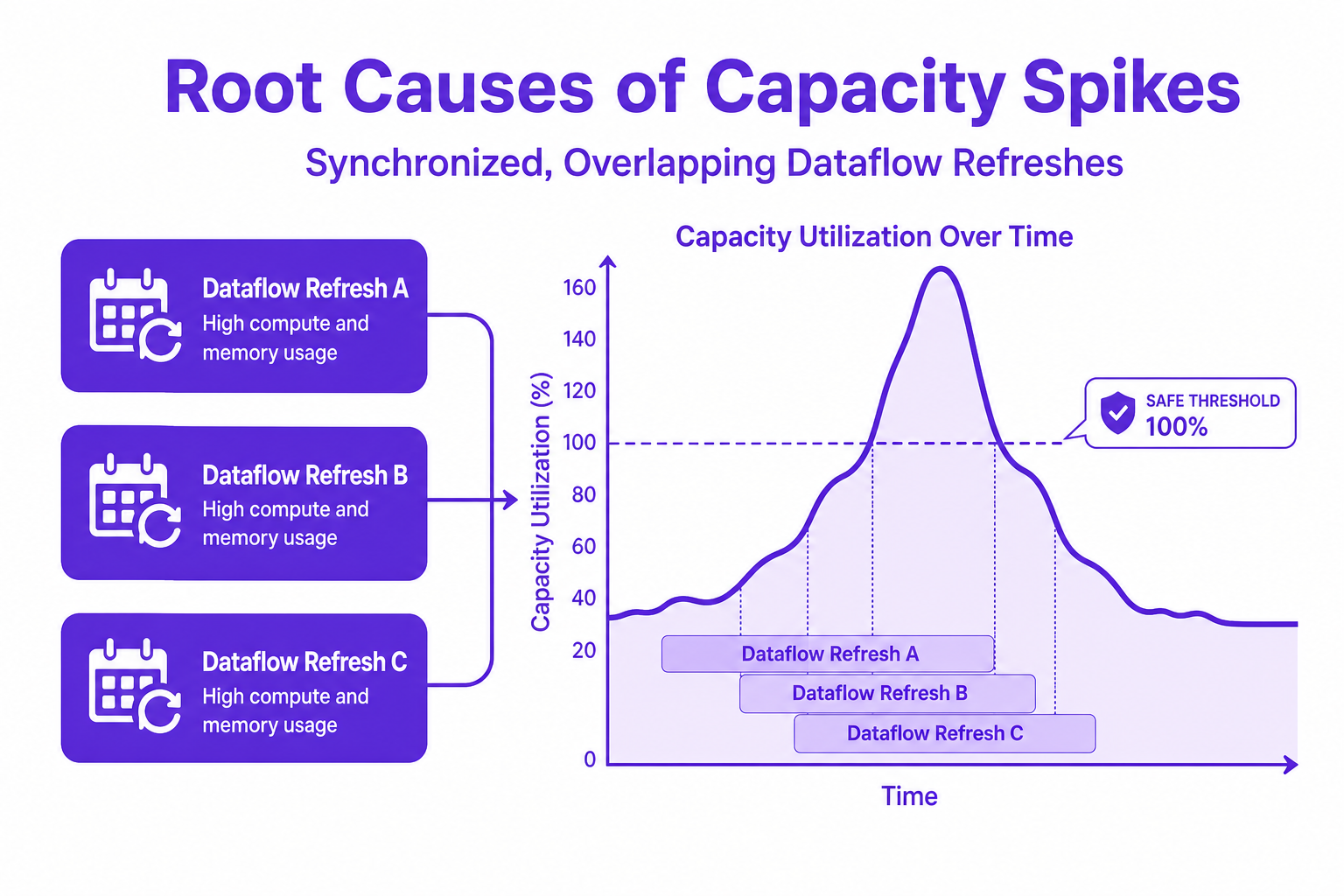
Power BI and Fabric environments thrive on efficient data refresh logic. However, their engines are especially vulnerable to synchronized spikes, especially as background dataflows and interactive workloads pile up.
Capacity Overload Root Causes:
Back-to-back dataflows starting at the top of the hour.
Overlapping refresh windows across datasets and departments.
Lack of orchestration between critical and non-critical workloads.
Background processing percentages surge past 80% to 100% during normal business hours when dataset refreshes collide, leaving no headroom for unscheduled demand.
Sustained capacity overload can hang or block jobs for 24 to 36 hours, hurting reporting SLAs and business continuity.
Overage billing triggers when interactive delay limits surpass total capacity, leading to unavoidable cost events.
Modern capacity management is actively shifting from reactive hardware upgrades to smarter workload scheduling. Enterprises are now orchestrating refreshes by building intentional gaps between major datasets, preventing rush hour chaos and stabilizing capacity utilization.
What Works:
Creating 15 to 60 minute gaps between large refresh operations dampens capacity spikes.
Segmenting refreshes by business unit or pipeline sensitivity allows critical jobs to complete first.
Removing unnecessary near-real-time refreshes improves overall throughput and minimizes wasted compute.
CloudNuro’s Unified Cloud Custodian makes this practical by mapping operational consumption to each business unit, automatically identifying schedules that hog compute and recommending staggered refresh approaches. For example, a multinational bank reduced unused compute by 45% and cut annual spend by 36%.

Traditional manual scripting for refresh scheduling can’t keep up with dynamic, multi-departmental environments. CloudNuro’s platform introduces AI-enabled, governance-first automation for Power BI optimization:
Automated identification of idle or unmanaged refreshes, with proactive pausing during off-peak windows.
Consumption telemetry mapped directly to chargeback systems, isolating noisy neighbor workloads.
Predictive workload management based on historical throughput and event-based triggers.
Case in point: A global financial institution using CloudNuro achieved $2.1 million in annual cost avoidance simply by automating rightsizing and orchestrating refresh times, without expanding infrastructure spend.
Best-in-class SaaS operations adopt a multi-pronged approach:
Start with Governance: Use platforms like Microsoft 365 Custodian to bridge telemetry gaps and provide historical query tracking beyond native retention limits.
Set Safe Utilization Thresholds: Maintain average capacity between 60% to 70% during peak hours to absorb spikes.
Implement Overage Controls: Configure custom budget and operational threshold alerts to flag when workloads approach capacity limits.
Optimize Scheduling Logic: Stagger your Power BI dataflow schedule, run non-critical workloads during non-business hours, and leverage AI for ongoing tuning.
This triggers a culture shift: IT and Finance teams can drive financial discipline by moving from guesswork to automated, data-backed scheduling. One leading national pathology organization, for example, saved 27% on cloud commitments simply by reclaiming resources tied up by poorly timed background jobs.
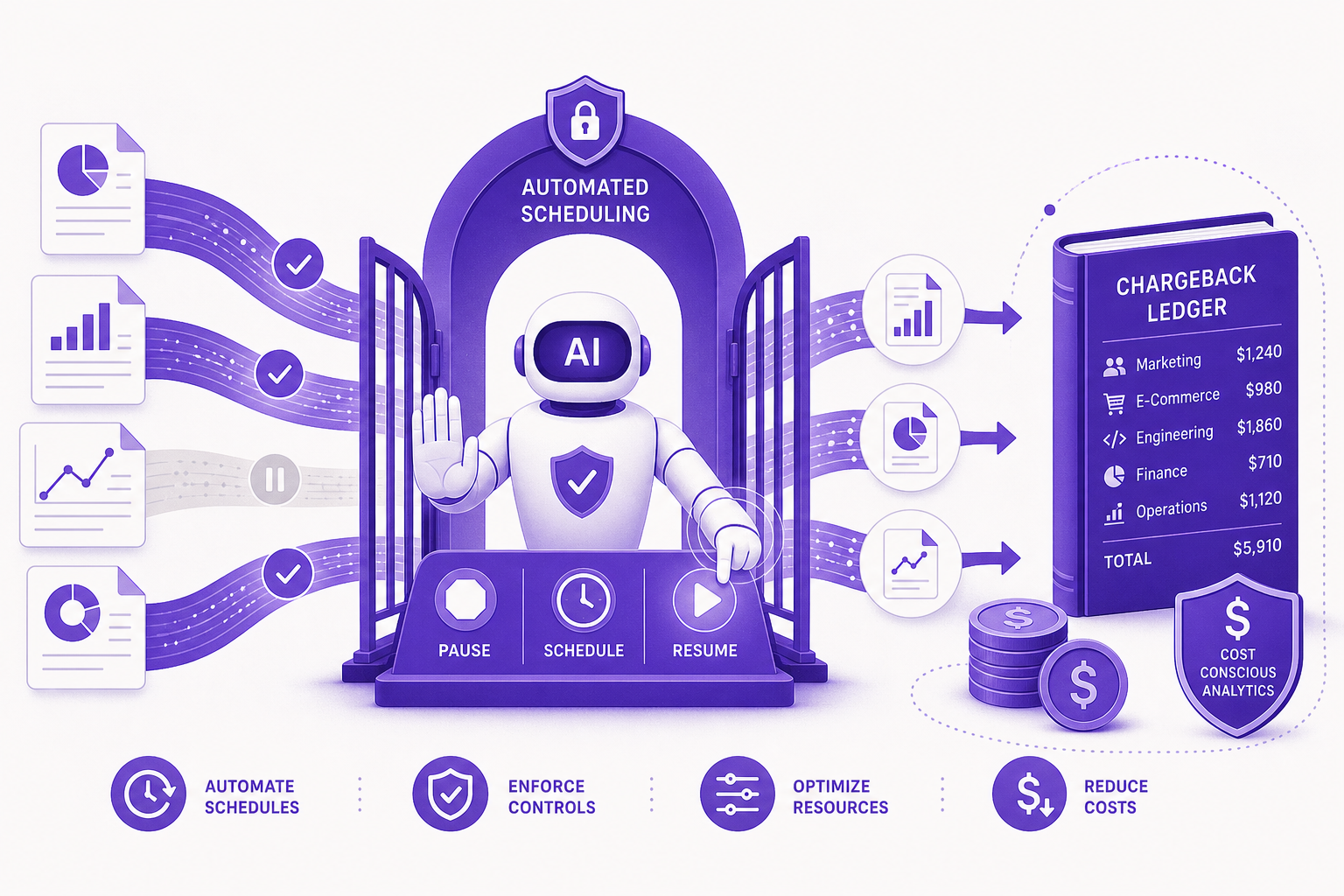
CloudNuro’s unique value comes from automated governance that substitutes costly overprovisioning with smarter, enforced schedule logic:
A single integration with the unified platform led to a 36% reduction in overage costs and automated chargeback across 27 departments for one enterprise.
Organizations managing capacity units with CloudNuro reduced idle time by 25%, generating immediate annual cost avoidance.
These outcomes show the transformative power of zero-cost fabric refresh optimization: smarter analytics at lower operational risk, without new infrastructure purchases.
How can I schedule dataflow refresh in Power BI?
Scheduling a dataflow refresh in Power BI is performed via the dataset settings, where you can specify frequency, start times, and dependencies. However, best practices involve using tools like Power Automate or AI-enabled orchestration in CloudNuro for creating staggered, non-overlapping refresh windows.
What are the best practices for optimizing Power BI dataflow refresh?
Key practices include staggering refresh times, running non-critical jobs outside business hours, enabling governance-first telemetry, maintaining safe capacity headroom, and leveraging automation to dynamically adjust refresh timing based on usage.
How do staggered refresh schedules help with Fabric capacity spikes?
When refresh jobs start at different times, overlapping resource consumption is minimized, preventing simultaneous surges and keeping overall utilization within safe thresholds. This reduces both failed jobs and excess costs from capacity overages.
What is Fabric refresh optimization and why is it important?
Fabric refresh optimization uses scheduling and workload orchestration to maximize analytics throughput without exceeding compute capacity. This is crucial for ensuring stable performance, avoiding outages, and controlling SaaS and cloud operational costs.
Can Power BI dataflow refreshes be automated to avoid capacity spikes?
Yes, platforms like CloudNuro enable full automation of dataflow refresh scheduling, pause and resume cycles, and anomaly detection to proactively defuse capacity issues before they cause cost or downtime events.
Power BI dataflow refresh schedules, when left unchecked, become the hidden drain on analytics capacity and budget. Staggered refresh scheduling, especially when powered by CloudNuro’s AI-enabled governance and optimization modules, offers a true zero-cost fix to the ongoing pains of fabric capacity spikes. With automated, contextual insights and real-world proof of savings, the evolution toward cost-effective, resilient analytics begins with smarter scheduling.
About CloudNuro
CloudNuro is a leader in Enterprise AI Adoption Management, providing enterprises with unmatched visibility, governance, and cost optimization. Recognized twice in a row in the SaaS Management Platforms category and named a Leader in the SoftwareReviews Data Quadrant, CloudNuro is trusted by global enterprises and government agencies to bring financial discipline to SaaS, cloud, and AI. Trusted by enterprises, CloudNuro provides centralized SaaS inventory, license optimization, and renewal management along with advanced cost allocation and chargeback, giving IT and Finance leaders the visibility, control, and cost-conscious culture needed to drive financial discipline.
Request a no cost, no obligation free assessment —just 15 minutes to savings!
Get StartedEnterprises running Power BI and Microsoft Fabric face a persistent, costly headache: sudden capacity spikes during dataflow refresh cycles. With analytics pipelines merging interactive dashboards and scheduled background refreshes, the result is often overprovisioned infrastructure, failed jobs, and dreaded cost spikes. Yet, most IT leaders are unaware that a zero-cost, AI-enabled scheduling approach, staggered dataflow refresh, cracks the code for operational resilience and financial discipline.
In this in-depth look, we’ll explore how strategic refresh scheduling eliminates unnecessary overages and idle wastage by orchestrating refresh logic across dataflows, using evidence-backed best practices and CloudNuro’s governance-first approach. Learn how real enterprises slashed costs, optimized cloud commitments, and safeguarded business continuity by rethinking Power BI dataflow schedule patterns.
Power BI and Fabric environments thrive on efficient data refresh logic. However, their engines are especially vulnerable to synchronized spikes, especially as background dataflows and interactive workloads pile up.
Capacity Overload Root Causes:
Back-to-back dataflows starting at the top of the hour.
Overlapping refresh windows across datasets and departments.
Lack of orchestration between critical and non-critical workloads.
Background processing percentages surge past 80% to 100% during normal business hours when dataset refreshes collide, leaving no headroom for unscheduled demand.
Sustained capacity overload can hang or block jobs for 24 to 36 hours, hurting reporting SLAs and business continuity.
Overage billing triggers when interactive delay limits surpass total capacity, leading to unavoidable cost events.
Modern capacity management is actively shifting from reactive hardware upgrades to smarter workload scheduling. Enterprises are now orchestrating refreshes by building intentional gaps between major datasets, preventing rush hour chaos and stabilizing capacity utilization.
What Works:
Creating 15 to 60 minute gaps between large refresh operations dampens capacity spikes.
Segmenting refreshes by business unit or pipeline sensitivity allows critical jobs to complete first.
Removing unnecessary near-real-time refreshes improves overall throughput and minimizes wasted compute.
CloudNuro’s Unified Cloud Custodian makes this practical by mapping operational consumption to each business unit, automatically identifying schedules that hog compute and recommending staggered refresh approaches. For example, a multinational bank reduced unused compute by 45% and cut annual spend by 36%.
Traditional manual scripting for refresh scheduling can’t keep up with dynamic, multi-departmental environments. CloudNuro’s platform introduces AI-enabled, governance-first automation for Power BI optimization:
Automated identification of idle or unmanaged refreshes, with proactive pausing during off-peak windows.
Consumption telemetry mapped directly to chargeback systems, isolating noisy neighbor workloads.
Predictive workload management based on historical throughput and event-based triggers.
Case in point: A global financial institution using CloudNuro achieved $2.1 million in annual cost avoidance simply by automating rightsizing and orchestrating refresh times, without expanding infrastructure spend.
Best-in-class SaaS operations adopt a multi-pronged approach:
Start with Governance: Use platforms like Microsoft 365 Custodian to bridge telemetry gaps and provide historical query tracking beyond native retention limits.
Set Safe Utilization Thresholds: Maintain average capacity between 60% to 70% during peak hours to absorb spikes.
Implement Overage Controls: Configure custom budget and operational threshold alerts to flag when workloads approach capacity limits.
Optimize Scheduling Logic: Stagger your Power BI dataflow schedule, run non-critical workloads during non-business hours, and leverage AI for ongoing tuning.
This triggers a culture shift: IT and Finance teams can drive financial discipline by moving from guesswork to automated, data-backed scheduling. One leading national pathology organization, for example, saved 27% on cloud commitments simply by reclaiming resources tied up by poorly timed background jobs.
CloudNuro’s unique value comes from automated governance that substitutes costly overprovisioning with smarter, enforced schedule logic:
A single integration with the unified platform led to a 36% reduction in overage costs and automated chargeback across 27 departments for one enterprise.
Organizations managing capacity units with CloudNuro reduced idle time by 25%, generating immediate annual cost avoidance.
These outcomes show the transformative power of zero-cost fabric refresh optimization: smarter analytics at lower operational risk, without new infrastructure purchases.
How can I schedule dataflow refresh in Power BI?
Scheduling a dataflow refresh in Power BI is performed via the dataset settings, where you can specify frequency, start times, and dependencies. However, best practices involve using tools like Power Automate or AI-enabled orchestration in CloudNuro for creating staggered, non-overlapping refresh windows.
What are the best practices for optimizing Power BI dataflow refresh?
Key practices include staggering refresh times, running non-critical jobs outside business hours, enabling governance-first telemetry, maintaining safe capacity headroom, and leveraging automation to dynamically adjust refresh timing based on usage.
How do staggered refresh schedules help with Fabric capacity spikes?
When refresh jobs start at different times, overlapping resource consumption is minimized, preventing simultaneous surges and keeping overall utilization within safe thresholds. This reduces both failed jobs and excess costs from capacity overages.
What is Fabric refresh optimization and why is it important?
Fabric refresh optimization uses scheduling and workload orchestration to maximize analytics throughput without exceeding compute capacity. This is crucial for ensuring stable performance, avoiding outages, and controlling SaaS and cloud operational costs.
Can Power BI dataflow refreshes be automated to avoid capacity spikes?
Yes, platforms like CloudNuro enable full automation of dataflow refresh scheduling, pause and resume cycles, and anomaly detection to proactively defuse capacity issues before they cause cost or downtime events.
Power BI dataflow refresh schedules, when left unchecked, become the hidden drain on analytics capacity and budget. Staggered refresh scheduling, especially when powered by CloudNuro’s AI-enabled governance and optimization modules, offers a true zero-cost fix to the ongoing pains of fabric capacity spikes. With automated, contextual insights and real-world proof of savings, the evolution toward cost-effective, resilient analytics begins with smarter scheduling.
About CloudNuro
CloudNuro is a leader in Enterprise AI Adoption Management, providing enterprises with unmatched visibility, governance, and cost optimization. Recognized twice in a row in the SaaS Management Platforms category and named a Leader in the SoftwareReviews Data Quadrant, CloudNuro is trusted by global enterprises and government agencies to bring financial discipline to SaaS, cloud, and AI. Trusted by enterprises, CloudNuro provides centralized SaaS inventory, license optimization, and renewal management along with advanced cost allocation and chargeback, giving IT and Finance leaders the visibility, control, and cost-conscious culture needed to drive financial discipline.
Request a no cost, no obligation free assessment - just 15 minutes to savings!
Get StartedWe're offering complimentary ServiceNow license assessments to only 25 enterprises this quarter who want to unlock immediate savings without disrupting operations.
Get Free AssessmentGet Started




CloudNuro Corp
1755 Park St. Suite 207
Naperville, IL 60563
Phone : +1-630-277-9470
Email: info@cloudnuro.com





.webp)

Recognized Leader in SaaS Management Platforms by Info-Tech SoftwareReviews


.svg)