

Sign Up
Thank you for Submitting!
Automated provisioning is quickly becoming a non‑negotiable capability for enterprise IT teams that manage hundreds of applications and thousands of identities. Manual user provisioning and deprovisioning consumes valuable IT time, introduces security risk, and makes compliance audits harder than they need to be.
Research confirms this shift. Gartner reports that 78% of organizations reduced access‑related security incidents after implementing automated user provisioning and deprovisioning in 2026. For IT leaders under pressure to secure SaaS, control costs, and support hybrid work, the question is no longer "if" but "how fast" they can modernize user lifecycle management.
This guide explains how automated user provisioning works, why IT needs it, common pitfalls, and how CloudNuro helps enterprises implement governance‑first automation across SaaS, cloud, and AI.
Before evaluating automated user provisioning, it helps to align on the basics of the user provisioning and deprovisioning process.
In simple terms:
Provisioning means giving a user access. IT creates accounts, assigns roles and licenses, and configures permissions when someone joins, changes roles, or needs a new application.
Deprovisioning means removing access. IT disables or deletes accounts, revokes licenses, and terminates sessions when someone leaves or no longer needs a resource.
Together, provisioning and deprovisioning define user lifecycle management: who has access to what, from onboarding to offboarding.
Manual provisioning relies on tickets, spreadsheets, and human follow‑through. A manager submits a request, IT interprets it, clicks through multiple admin consoles, and hopes nothing is missed.
Automated provisioning uses policy‑driven workflows and integrations to create, update, and remove accounts automatically based on trusted data such as HR systems or directories.
Key differences:
Trigger
Manual: Emails or tickets from managers.
Automated: Events in HR or directory systems, such as “new hire in Finance” or “role change to Manager.”
Execution
Manual: IT staff log into each app and perform actions by hand.
Automated: A workflow engine and connectors perform provisioning and deprovisioning.
Consistency
Manual: Varies by person, time, and workload; high error risk.
Automated: Policy‑driven and repeatable, with logging for every action.
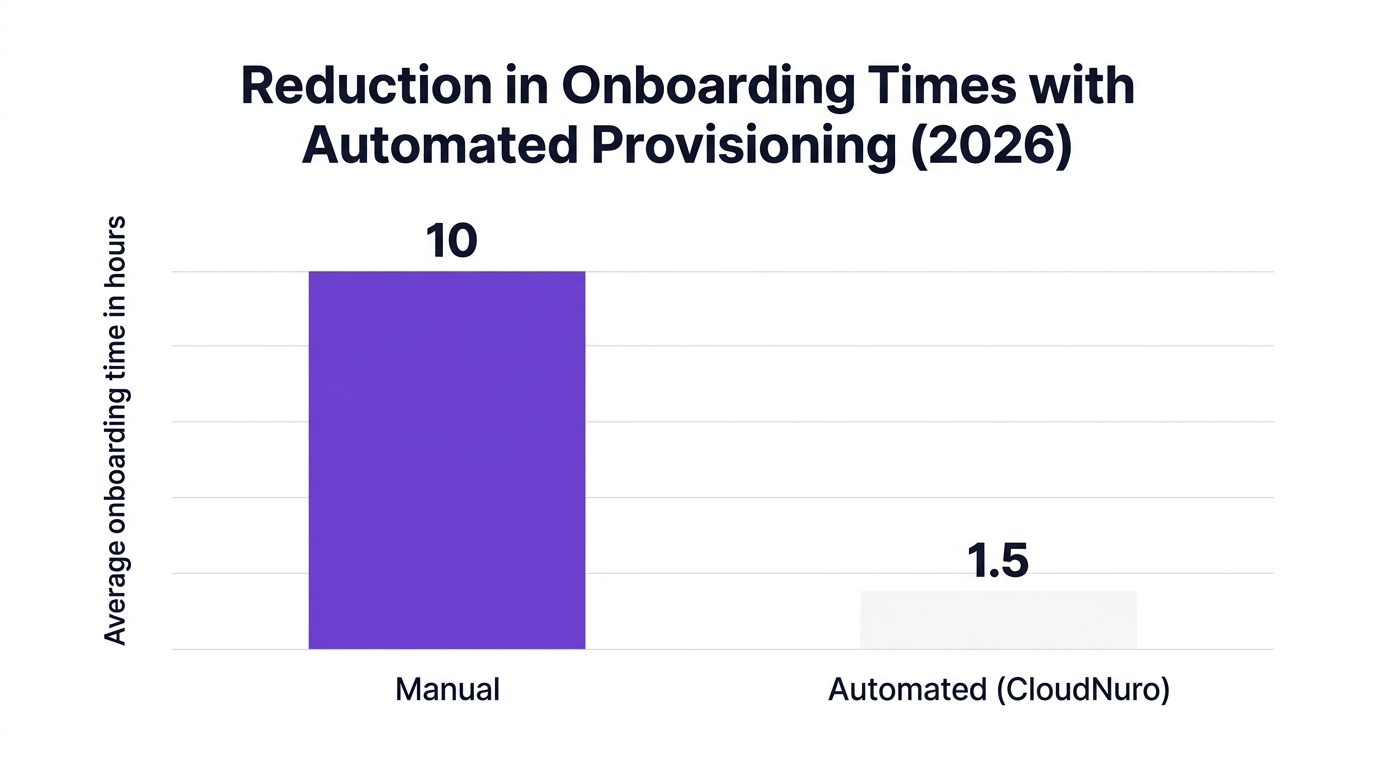
Forrester projects that automated onboarding can reduce IT workload for user account provisioning by up to 67% by 2026. That is a structural change in how IT teams operate.
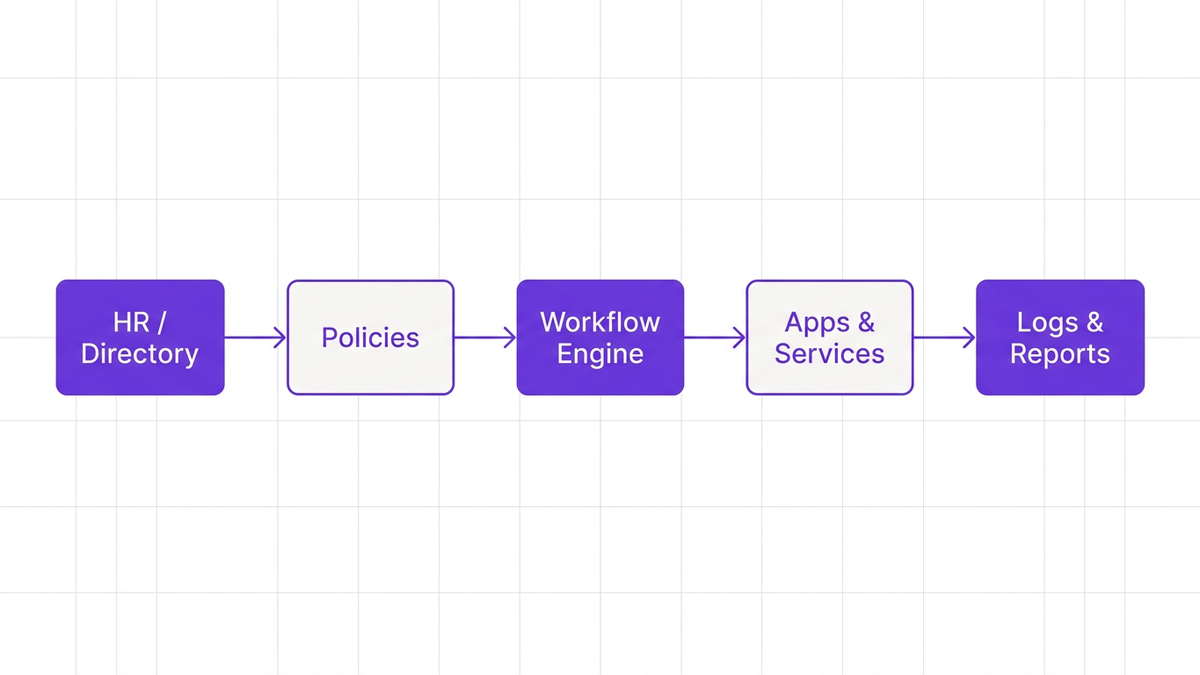
At a high level, automated user provisioning and user deprovisioning follow a predictable pattern. Think of it as a supply chain for digital identity, with HR as the producer, IAM as the warehouse, and SaaS apps as retail shelves.
When the identity supply chain is automated, every change in HR or directory data flows to SaaS systems predictably, with full auditability.
A mature automated user provisioning system usually includes:
Source of truth
Typically an HRIS or identity directory, which stores employee status, department, manager, and location.
Identity and access management (IAM) policies
Rules that map attributes (for example “Department = Finance”) to entitlements (for example “Access to ERP, FP&A tools, shared drives”).
Connectors to SaaS, PaaS, and IaaS
Integrations that handle API‑level account creation, updates, and account deprovisioning across applications.
Workflow engine
Orchestration that runs the user provisioning and deprovisioning process, triggers approvals, and handles exceptions.
Logging and compliance reporting
Detailed activity records, essential for IT governance, audits, and incident response.
Here is how auto provisioning typically functions in a modern enterprise:
Event detected
A new hire record is created in HR, or an employee’s role changes, or a termination is recorded.
Attributes evaluated
IAM automation reads attributes such as role, department, location, and employment type.
Policies applied
The system uses attribute‑based rules to determine which apps, groups, and privileges the user should receive.
Automatic user provisioning executed
Connectors perform automatic user provisioning: creating accounts, assigning roles, and applying least‑privilege access in each application.
Notifications and approvals
Where needed, managers approve exceptions or privileged access requests.
Ongoing updates
When attributes change, the system adjusts access automatically, avoiding the "role change orphaned access" problem.
De provisioning and offboarding
On termination, the system triggers de provisioning workflows, disabling accounts, revoking tokens, and reclaiming licenses.
EMA estimates that automated deprovisioning reduces the average time to revoke access from over 24 hours to under 30 minutes. That reduction significantly lowers the exposure window for insider threats and account misuse.
IT teams typically enable automatic user provisioning in three stages:
Integrate the HR or directory source as the single source of truth for worker status and attributes.
Define access provisioning and deprovisioning policies using groups, roles, and attribute rules instead of manual application lists.
Activate connectors for high‑value and high‑risk SaaS apps first, then expand coverage across the environment.
A practical starting point is to connect the most sensitive apps and those with complex licensing, such as collaboration suites, CRM, service management, and data platforms.
The benefits of automated provisioning and deprovisioning span security, compliance, cost, and productivity. For enterprise IT, these outcomes compound over time.
Manual deprovisioning access is slow and inconsistent. Accounts often remain active for days or weeks after an employee leaves or a contractor’s engagement ends.
Gartner found that 78% of organizations saw fewer security incidents tied to access management after implementing automated provisioning and deprovisioning in 2026.
EMA reports that automation can cut the deprovisioning process from more than 24 hours to less than 30 minutes.
Automated user lifecycle management closes these gaps by:
Enforcing consistent deprovisioning access at termination events.
Reducing orphaned accounts and stale privileges.
Supporting zero trust principles such as least privilege and just‑in‑time access.
Counterargument to consider: Some leaders worry that automation might accidentally remove access for active employees. In practice, this risk is mitigated by approval workflows, exception handling, and clear ownership of source‑of‑truth data.
Regulators and auditors expect clear evidence that only authorized users access sensitive data, and that access is revoked promptly.
According to IDC, organizations that adopted automated provisioning and deprovisioning reported a 49% improvement in compliance audit scores within a year in 2026. This comes from:
Complete logs of every provisioning and deprovisioning event.
Automated access reviews and recertification workflows.
Consistent enforcement of role‑based and attribute‑based access policies.
For heavily regulated sectors such as healthcare, finance, and government, automating the user provisioning and deprovisioning process is central to compliance automation and cyber insurance requirements.
Unused licenses are a silent drain on IT budgets. When user deprovisioning is manual, licenses often remain assigned long after they are needed.
Everest Group reports that organizations using automated user lifecycle management see 34% lower SaaS licensing costs through faster reclamation and optimized allocation.
With automated account provisioning and deprovisioning:
Licenses are reclaimed as soon as users leave or change roles.
IT can right‑size license tiers based on actual usage.
Finance and IT can align on chargeback and cost allocation with accurate data.
This links directly to cost‑optimization initiatives such as enterprise SaaS management and FinOps services.
Slow onboarding hurts productivity and reputation. New hires should have access to core tools on day one, not after a week of tickets.
Forrester forecasts that automated onboarding will reduce IT workload for user account provisioning by up to 67% by 2026. CloudNuro customers have already seen onboarding times drop by as much as 85% when moving to fully automated workflows.
Employees, contractors, and partners benefit from:
Day‑one access to standard applications.
Self‑service onboarding options for approved tools.
Fewer back‑and‑forth IT tickets.
The result is a smoother employee experience, which matters for retention as much as it does for productivity.
SaaS sprawl has made identity and access management more complex than traditional on‑prem environments. Info‑Tech notes that 61% of enterprise IT leaders rank provisioning automation as their top initiative to address SaaS sprawl and shadow IT in 2026.
Automated provisioning and deprovisioning support shadow IT prevention by:
Centralizing visibility into who uses which SaaS apps.
Standardizing approved application catalogs and workflows.
Aligning IT security with business demand, so employees do not feel compelled to bypass IT.
This is where automated provisioning intersects with broader IT operations and IT security strategies.
While the benefits are clear, automation is not magic. Poorly implemented access provisioning and deprovisioning can create new risks.
If HR or directory data is inconsistent, automation will amplify errors.
For example, if a contractor is not correctly marked as inactive, auto user provisioning may keep access active long after engagement ends. This is why data governance and clear rules for status changes are critical.
Mitigation tips:
Establish a single, authoritative source for worker status.
Standardize job codes, departments, and employment types.
Implement validation checks before changes trigger high‑impact workflows.
If your default roles are too broad, automated provisioning simply grants excessive access faster.
Best practice: design roles and groups with least privilege in mind. Use attribute‑based policies so access scales with actual needs rather than one‑size‑fits‑all profiles.
Vendors, interns, and partners often sit outside HR systems. If automation only covers full‑time employees, a major portion of risk remains unmanaged.
Ensure your automated account provisioning strategy includes:
Non‑employee identity records with clear owners.
Expiration policies for external users.
Regular recertification for partner access.
Automating only a handful of core apps can create a false sense of security. Users may still hold access in long‑tail SaaS tools that are not integrated.
A robust automated user provisioning system should:
Integrate with a broad range of SaaS, PaaS, and IaaS.
Support both SCIM‑based and API‑based provisioning.
Include discovery capabilities to identify unmanaged tools.

Counterargument: Some teams argue that manual control for smaller apps reduces complexity. In practice, these unmanaged tools are often where data exfiltration and compliance issues appear, so extending coverage is usually worth the effort.
CloudNuro is built to provide governance‑first automated provisioning across SaaS, cloud, and AI environments. It centralizes visibility, automates workflows, and aligns IT, security, and finance around a single source of truth.
CloudNuro’s platform unifies user lifecycle management through:
Unified Cloud Custodian and AI Custodian that orchestrate automated user provisioning and deprovisioning across more than 400 applications.
Dedicated custodians for Microsoft 365, Salesforce, and ServiceNow that tie directly into collaboration, CRM, and ITSM workflows.
Integration with HR systems and directories to use worker status as the trigger for automation.
This architecture supports:
Zero‑touch onboarding and offboarding.
Real‑time SaaS security integration.
Automated access reviews and recertification.
A Fortune 500 financial services firm implemented automated provisioning using CloudNuro’s Unified Cloud Custodian.
85% reduction in onboarding times, shrinking from days to hours.
38% reduction in audit remediation costs, due to complete visibility and detailed provisioning logs.
For a highly regulated institution, these gains translated into faster project ramp‑ups and smoother regulatory examinations.
A global healthcare provider integrated CloudNuro AI Custodian with its service management workflows to standardize de provisioning access.
Offboarding windows dropped from 10 hours to less than 25 minutes.
No reported access‑related breaches in the subsequent year.
IT teams reallocated time from manual offboarding work to strategic initiatives.
This outcome highlights how automated account deprovisioning directly supports patient data protection and regulatory expectations.
CloudNuro combines automated provisioning and deprovisioning with advanced cost controls:
Real‑time license utilization insights across SaaS and cloud.
Automated reclamation of unused licenses after user deprovisioning events.
Chargeback and cost allocation for business units.
Organizations using CloudNuro tie their identity workflows to IT asset management and FinOps services, aligning access decisions with financial discipline.
You can explore the full CloudNuro product overview or review the reasons enterprises choose the platform in the why CloudNuro section at this page.

To get the most out of automated provisioning and deprovisioning, IT leaders should approach the transition methodically.
Document your provisioning and deprovisioning meaning in business terms:
Which roles exist, and what access does each require?
Which apps have regulatory or data‑sensitivity implications?
How do business units request and approve exceptions?
Use this model to define attribute‑based policies, such as "Sales Manager in EMEA" or "Contractor in Finance".
Begin automation with systems where the impact is largest:
Collaboration suites and email.
CRM and service management.
Data warehouses and analytics platforms.
Then extend coverage to long‑tail SaaS tools discovered through SaaS management capabilities.
For active directory provisioning and deprovisioning and related workflows:
Tie termination events directly to de provisioning process triggers.
Use grace periods and approvals for high‑impact removals.
Ensure sessions, tokens, and API keys are revoked, not just UI logins.
Measure the impact of automation on:
Time to onboard and offboard.
Number of accounts left active post‑termination.
License utilization and cost savings.
Security incidents tied to misconfigured access.
Use these metrics to refine policies and workflows over time, and to demonstrate ROI to executives.
Manual provisioning relies on human‑driven steps such as tickets and console clicks to create and manage accounts. Automated provisioning uses policies, integrations, and workflows to perform these tasks based on trusted data sources like HR or directories.
Automated provisioning is more consistent, faster, and easier to audit. It reduces human error and frees IT from repetitive tasks.
Auto provisioning listens for events such as new hires, role changes, or terminations in a source system. It evaluates user attributes against defined policies to determine required access.
Connectors then perform automated account provisioning in each application, and trigger de provisioning access when users leave or no longer need a resource. All actions are logged for IT governance and audits.
To enable automatic user provisioning:
Connect your HR system or directory as the source of truth.
Define role and attribute‑based access policies.
Implement connectors to key SaaS and cloud platforms.
Pilot with a subset of users and apps, then roll out broadly.
Platforms like CloudNuro accelerate this by providing prebuilt integrations, workflow templates, and AI‑driven insights.
Automating user provisioning and deprovisioning delivers:
Stronger security through faster deprovisioning and fewer orphaned accounts.
Better compliance, with complete logs and automated access reviews.
Lower SaaS and cloud costs through license reclamation.
Improved user experience and reduced IT workload.
Studies from Gartner, Forrester, and IDC show double‑digit improvements in security incidents, IT workload, and audit performance.
Best practices for user deprovisioning include:
Tying deprovisioning directly to HR or termination events.
Removing access across all apps, not just core systems.
Revoking sessions, tokens, and API keys.
Reclaiming or downgrading licenses immediately.
Running periodic access reviews to catch exceptions.
Automated provisioning deprovisioning workflows, supported by a platform like CloudNuro, make these practices consistent and auditable.
Automated provisioning is no longer a niche IAM feature. It is a foundation for secure, efficient, and cost‑controlled digital operations across SaaS, cloud, and AI.
Enterprises that standardize automated user provisioning and deprovisioning gain:
Governance: clear, auditable control of who has access to what, and why.
Security: faster deprovision access and fewer blind spots.
Efficiency: reduced manual workload and faster onboarding.
Financial discipline: optimized license usage and transparent chargeback.
CloudNuro was built for this reality. By combining deep integrations, workflow automation, and AI‑driven insights, CloudNuro helps IT leaders modernize identity operations and align them with security and FinOps goals.
To see how CloudNuro can automate automated provisioning and deprovisioning for your organization, request a demo or a savings assessment today.
CloudNuro is a leader in Enterprise SaaS Management Platforms, providing enterprises with unmatched visibility, governance, and cost optimization. Recognized twice in a row in the SaaS Management Platforms category and named a Leader in the SoftwareReviews Data Quadrant, CloudNuro is trusted by global enterprises and government agencies to bring financial discipline to SaaS, cloud, and AI.
Trusted by enterprises such as Konica Minolta and Federal Signal, CloudNuro provides centralized SaaS inventory, license optimization, and renewal management along with advanced cost allocation and chargeback, giving IT and Finance leaders the visibility, control, and cost‑conscious culture needed to drive financial discipline.
Request a no cost, no obligation free assessment —just 15 minutes to savings!
Get StartedAutomated provisioning is quickly becoming a non‑negotiable capability for enterprise IT teams that manage hundreds of applications and thousands of identities. Manual user provisioning and deprovisioning consumes valuable IT time, introduces security risk, and makes compliance audits harder than they need to be.
Research confirms this shift. Gartner reports that 78% of organizations reduced access‑related security incidents after implementing automated user provisioning and deprovisioning in 2026. For IT leaders under pressure to secure SaaS, control costs, and support hybrid work, the question is no longer "if" but "how fast" they can modernize user lifecycle management.
This guide explains how automated user provisioning works, why IT needs it, common pitfalls, and how CloudNuro helps enterprises implement governance‑first automation across SaaS, cloud, and AI.
Before evaluating automated user provisioning, it helps to align on the basics of the user provisioning and deprovisioning process.
In simple terms:
Provisioning means giving a user access. IT creates accounts, assigns roles and licenses, and configures permissions when someone joins, changes roles, or needs a new application.
Deprovisioning means removing access. IT disables or deletes accounts, revokes licenses, and terminates sessions when someone leaves or no longer needs a resource.
Together, provisioning and deprovisioning define user lifecycle management: who has access to what, from onboarding to offboarding.
Manual provisioning relies on tickets, spreadsheets, and human follow‑through. A manager submits a request, IT interprets it, clicks through multiple admin consoles, and hopes nothing is missed.
Automated provisioning uses policy‑driven workflows and integrations to create, update, and remove accounts automatically based on trusted data such as HR systems or directories.
Key differences:
Trigger
Manual: Emails or tickets from managers.
Automated: Events in HR or directory systems, such as “new hire in Finance” or “role change to Manager.”
Execution
Manual: IT staff log into each app and perform actions by hand.
Automated: A workflow engine and connectors perform provisioning and deprovisioning.
Consistency
Manual: Varies by person, time, and workload; high error risk.
Automated: Policy‑driven and repeatable, with logging for every action.
Forrester projects that automated onboarding can reduce IT workload for user account provisioning by up to 67% by 2026. That is a structural change in how IT teams operate.
At a high level, automated user provisioning and user deprovisioning follow a predictable pattern. Think of it as a supply chain for digital identity, with HR as the producer, IAM as the warehouse, and SaaS apps as retail shelves.
When the identity supply chain is automated, every change in HR or directory data flows to SaaS systems predictably, with full auditability.
A mature automated user provisioning system usually includes:
Source of truth
Typically an HRIS or identity directory, which stores employee status, department, manager, and location.
Identity and access management (IAM) policies
Rules that map attributes (for example “Department = Finance”) to entitlements (for example “Access to ERP, FP&A tools, shared drives”).
Connectors to SaaS, PaaS, and IaaS
Integrations that handle API‑level account creation, updates, and account deprovisioning across applications.
Workflow engine
Orchestration that runs the user provisioning and deprovisioning process, triggers approvals, and handles exceptions.
Logging and compliance reporting
Detailed activity records, essential for IT governance, audits, and incident response.
Here is how auto provisioning typically functions in a modern enterprise:
Event detected
A new hire record is created in HR, or an employee’s role changes, or a termination is recorded.
Attributes evaluated
IAM automation reads attributes such as role, department, location, and employment type.
Policies applied
The system uses attribute‑based rules to determine which apps, groups, and privileges the user should receive.
Automatic user provisioning executed
Connectors perform automatic user provisioning: creating accounts, assigning roles, and applying least‑privilege access in each application.
Notifications and approvals
Where needed, managers approve exceptions or privileged access requests.
Ongoing updates
When attributes change, the system adjusts access automatically, avoiding the "role change orphaned access" problem.
De provisioning and offboarding
On termination, the system triggers de provisioning workflows, disabling accounts, revoking tokens, and reclaiming licenses.
EMA estimates that automated deprovisioning reduces the average time to revoke access from over 24 hours to under 30 minutes. That reduction significantly lowers the exposure window for insider threats and account misuse.
IT teams typically enable automatic user provisioning in three stages:
Integrate the HR or directory source as the single source of truth for worker status and attributes.
Define access provisioning and deprovisioning policies using groups, roles, and attribute rules instead of manual application lists.
Activate connectors for high‑value and high‑risk SaaS apps first, then expand coverage across the environment.
A practical starting point is to connect the most sensitive apps and those with complex licensing, such as collaboration suites, CRM, service management, and data platforms.
The benefits of automated provisioning and deprovisioning span security, compliance, cost, and productivity. For enterprise IT, these outcomes compound over time.
Manual deprovisioning access is slow and inconsistent. Accounts often remain active for days or weeks after an employee leaves or a contractor’s engagement ends.
Gartner found that 78% of organizations saw fewer security incidents tied to access management after implementing automated provisioning and deprovisioning in 2026.
EMA reports that automation can cut the deprovisioning process from more than 24 hours to less than 30 minutes.
Automated user lifecycle management closes these gaps by:
Enforcing consistent deprovisioning access at termination events.
Reducing orphaned accounts and stale privileges.
Supporting zero trust principles such as least privilege and just‑in‑time access.
Counterargument to consider: Some leaders worry that automation might accidentally remove access for active employees. In practice, this risk is mitigated by approval workflows, exception handling, and clear ownership of source‑of‑truth data.
Regulators and auditors expect clear evidence that only authorized users access sensitive data, and that access is revoked promptly.
According to IDC, organizations that adopted automated provisioning and deprovisioning reported a 49% improvement in compliance audit scores within a year in 2026. This comes from:
Complete logs of every provisioning and deprovisioning event.
Automated access reviews and recertification workflows.
Consistent enforcement of role‑based and attribute‑based access policies.
For heavily regulated sectors such as healthcare, finance, and government, automating the user provisioning and deprovisioning process is central to compliance automation and cyber insurance requirements.
Unused licenses are a silent drain on IT budgets. When user deprovisioning is manual, licenses often remain assigned long after they are needed.
Everest Group reports that organizations using automated user lifecycle management see 34% lower SaaS licensing costs through faster reclamation and optimized allocation.
With automated account provisioning and deprovisioning:
Licenses are reclaimed as soon as users leave or change roles.
IT can right‑size license tiers based on actual usage.
Finance and IT can align on chargeback and cost allocation with accurate data.
This links directly to cost‑optimization initiatives such as enterprise SaaS management and FinOps services.
Slow onboarding hurts productivity and reputation. New hires should have access to core tools on day one, not after a week of tickets.
Forrester forecasts that automated onboarding will reduce IT workload for user account provisioning by up to 67% by 2026. CloudNuro customers have already seen onboarding times drop by as much as 85% when moving to fully automated workflows.
Employees, contractors, and partners benefit from:
Day‑one access to standard applications.
Self‑service onboarding options for approved tools.
Fewer back‑and‑forth IT tickets.
The result is a smoother employee experience, which matters for retention as much as it does for productivity.
SaaS sprawl has made identity and access management more complex than traditional on‑prem environments. Info‑Tech notes that 61% of enterprise IT leaders rank provisioning automation as their top initiative to address SaaS sprawl and shadow IT in 2026.
Automated provisioning and deprovisioning support shadow IT prevention by:
Centralizing visibility into who uses which SaaS apps.
Standardizing approved application catalogs and workflows.
Aligning IT security with business demand, so employees do not feel compelled to bypass IT.
This is where automated provisioning intersects with broader IT operations and IT security strategies.
While the benefits are clear, automation is not magic. Poorly implemented access provisioning and deprovisioning can create new risks.
If HR or directory data is inconsistent, automation will amplify errors.
For example, if a contractor is not correctly marked as inactive, auto user provisioning may keep access active long after engagement ends. This is why data governance and clear rules for status changes are critical.
Mitigation tips:
Establish a single, authoritative source for worker status.
Standardize job codes, departments, and employment types.
Implement validation checks before changes trigger high‑impact workflows.
If your default roles are too broad, automated provisioning simply grants excessive access faster.
Best practice: design roles and groups with least privilege in mind. Use attribute‑based policies so access scales with actual needs rather than one‑size‑fits‑all profiles.
Vendors, interns, and partners often sit outside HR systems. If automation only covers full‑time employees, a major portion of risk remains unmanaged.
Ensure your automated account provisioning strategy includes:
Non‑employee identity records with clear owners.
Expiration policies for external users.
Regular recertification for partner access.
Automating only a handful of core apps can create a false sense of security. Users may still hold access in long‑tail SaaS tools that are not integrated.
A robust automated user provisioning system should:
Integrate with a broad range of SaaS, PaaS, and IaaS.
Support both SCIM‑based and API‑based provisioning.
Include discovery capabilities to identify unmanaged tools.
Counterargument: Some teams argue that manual control for smaller apps reduces complexity. In practice, these unmanaged tools are often where data exfiltration and compliance issues appear, so extending coverage is usually worth the effort.
CloudNuro is built to provide governance‑first automated provisioning across SaaS, cloud, and AI environments. It centralizes visibility, automates workflows, and aligns IT, security, and finance around a single source of truth.
CloudNuro’s platform unifies user lifecycle management through:
Unified Cloud Custodian and AI Custodian that orchestrate automated user provisioning and deprovisioning across more than 400 applications.
Dedicated custodians for Microsoft 365, Salesforce, and ServiceNow that tie directly into collaboration, CRM, and ITSM workflows.
Integration with HR systems and directories to use worker status as the trigger for automation.
This architecture supports:
Zero‑touch onboarding and offboarding.
Real‑time SaaS security integration.
Automated access reviews and recertification.
A Fortune 500 financial services firm implemented automated provisioning using CloudNuro’s Unified Cloud Custodian.
85% reduction in onboarding times, shrinking from days to hours.
38% reduction in audit remediation costs, due to complete visibility and detailed provisioning logs.
For a highly regulated institution, these gains translated into faster project ramp‑ups and smoother regulatory examinations.
A global healthcare provider integrated CloudNuro AI Custodian with its service management workflows to standardize de provisioning access.
Offboarding windows dropped from 10 hours to less than 25 minutes.
No reported access‑related breaches in the subsequent year.
IT teams reallocated time from manual offboarding work to strategic initiatives.
This outcome highlights how automated account deprovisioning directly supports patient data protection and regulatory expectations.
CloudNuro combines automated provisioning and deprovisioning with advanced cost controls:
Real‑time license utilization insights across SaaS and cloud.
Automated reclamation of unused licenses after user deprovisioning events.
Chargeback and cost allocation for business units.
Organizations using CloudNuro tie their identity workflows to IT asset management and FinOps services, aligning access decisions with financial discipline.
You can explore the full CloudNuro product overview or review the reasons enterprises choose the platform in the why CloudNuro section at this page.
To get the most out of automated provisioning and deprovisioning, IT leaders should approach the transition methodically.
Document your provisioning and deprovisioning meaning in business terms:
Which roles exist, and what access does each require?
Which apps have regulatory or data‑sensitivity implications?
How do business units request and approve exceptions?
Use this model to define attribute‑based policies, such as "Sales Manager in EMEA" or "Contractor in Finance".
Begin automation with systems where the impact is largest:
Collaboration suites and email.
CRM and service management.
Data warehouses and analytics platforms.
Then extend coverage to long‑tail SaaS tools discovered through SaaS management capabilities.
For active directory provisioning and deprovisioning and related workflows:
Tie termination events directly to de provisioning process triggers.
Use grace periods and approvals for high‑impact removals.
Ensure sessions, tokens, and API keys are revoked, not just UI logins.
Measure the impact of automation on:
Time to onboard and offboard.
Number of accounts left active post‑termination.
License utilization and cost savings.
Security incidents tied to misconfigured access.
Use these metrics to refine policies and workflows over time, and to demonstrate ROI to executives.
Manual provisioning relies on human‑driven steps such as tickets and console clicks to create and manage accounts. Automated provisioning uses policies, integrations, and workflows to perform these tasks based on trusted data sources like HR or directories.
Automated provisioning is more consistent, faster, and easier to audit. It reduces human error and frees IT from repetitive tasks.
Auto provisioning listens for events such as new hires, role changes, or terminations in a source system. It evaluates user attributes against defined policies to determine required access.
Connectors then perform automated account provisioning in each application, and trigger de provisioning access when users leave or no longer need a resource. All actions are logged for IT governance and audits.
To enable automatic user provisioning:
Connect your HR system or directory as the source of truth.
Define role and attribute‑based access policies.
Implement connectors to key SaaS and cloud platforms.
Pilot with a subset of users and apps, then roll out broadly.
Platforms like CloudNuro accelerate this by providing prebuilt integrations, workflow templates, and AI‑driven insights.
Automating user provisioning and deprovisioning delivers:
Stronger security through faster deprovisioning and fewer orphaned accounts.
Better compliance, with complete logs and automated access reviews.
Lower SaaS and cloud costs through license reclamation.
Improved user experience and reduced IT workload.
Studies from Gartner, Forrester, and IDC show double‑digit improvements in security incidents, IT workload, and audit performance.
Best practices for user deprovisioning include:
Tying deprovisioning directly to HR or termination events.
Removing access across all apps, not just core systems.
Revoking sessions, tokens, and API keys.
Reclaiming or downgrading licenses immediately.
Running periodic access reviews to catch exceptions.
Automated provisioning deprovisioning workflows, supported by a platform like CloudNuro, make these practices consistent and auditable.
Automated provisioning is no longer a niche IAM feature. It is a foundation for secure, efficient, and cost‑controlled digital operations across SaaS, cloud, and AI.
Enterprises that standardize automated user provisioning and deprovisioning gain:
Governance: clear, auditable control of who has access to what, and why.
Security: faster deprovision access and fewer blind spots.
Efficiency: reduced manual workload and faster onboarding.
Financial discipline: optimized license usage and transparent chargeback.
CloudNuro was built for this reality. By combining deep integrations, workflow automation, and AI‑driven insights, CloudNuro helps IT leaders modernize identity operations and align them with security and FinOps goals.
To see how CloudNuro can automate automated provisioning and deprovisioning for your organization, request a demo or a savings assessment today.
CloudNuro is a leader in Enterprise SaaS Management Platforms, providing enterprises with unmatched visibility, governance, and cost optimization. Recognized twice in a row in the SaaS Management Platforms category and named a Leader in the SoftwareReviews Data Quadrant, CloudNuro is trusted by global enterprises and government agencies to bring financial discipline to SaaS, cloud, and AI.
Trusted by enterprises such as Konica Minolta and Federal Signal, CloudNuro provides centralized SaaS inventory, license optimization, and renewal management along with advanced cost allocation and chargeback, giving IT and Finance leaders the visibility, control, and cost‑conscious culture needed to drive financial discipline.
Request a no cost, no obligation free assessment - just 15 minutes to savings!
Get StartedWe're offering complimentary ServiceNow license assessments to only 25 enterprises this quarter who want to unlock immediate savings without disrupting operations.
Get Free AssessmentGet Started




CloudNuro Corp
1755 Park St. Suite 207
Naperville, IL 60563
Phone : +1-630-277-9470
Email: info@cloudnuro.com





.webp)

Recognized Leader in SaaS Management Platforms by Info-Tech SoftwareReviews



.svg)