

Sign Up
Thank you for Submitting!
Microsoft Fabric capacity units are quickly becoming one of the most important levers for FinOps and IT finance teams who need to control analytics and data platform costs. Yet many enterprises still treat CUs as a black box, which leads to overprovisioning, inconsistent governance, and surprise invoices.
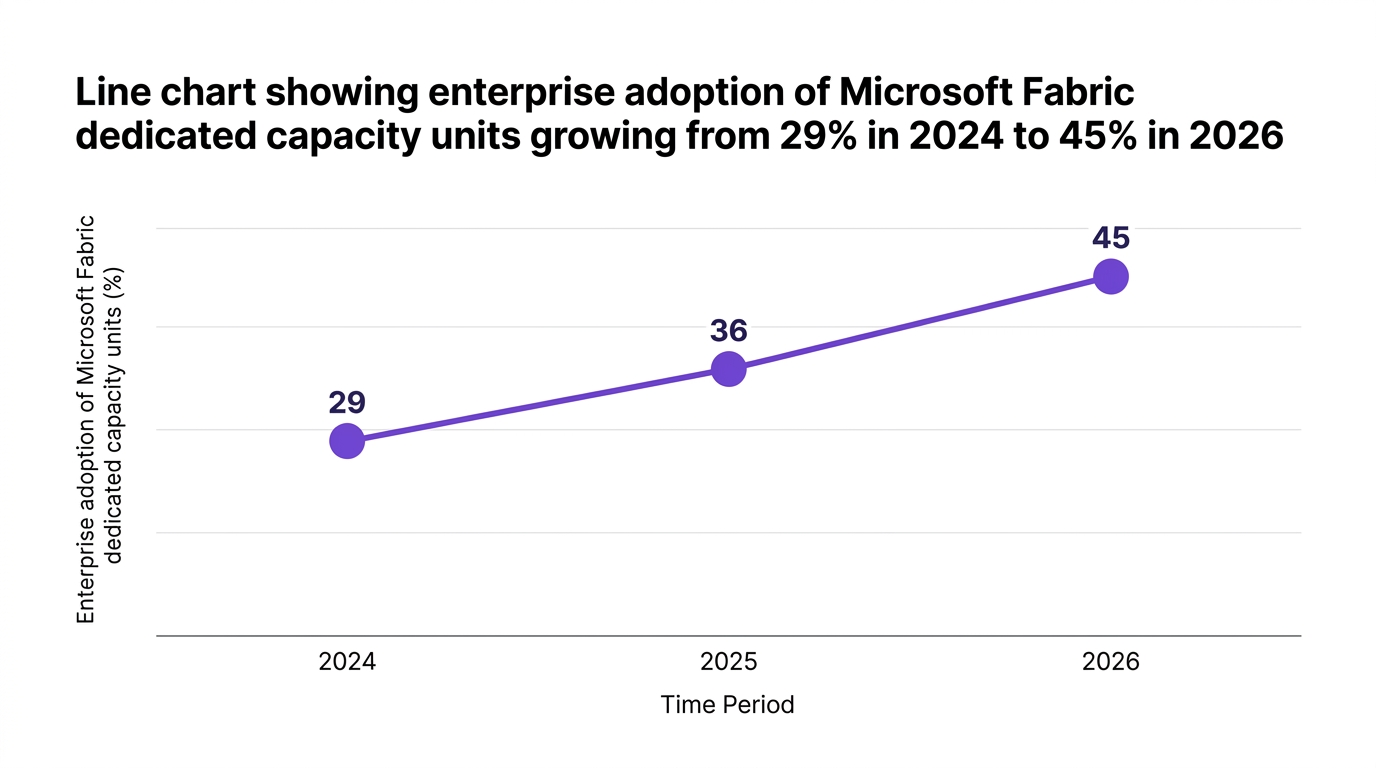
Gartner reports that Microsoft Fabric's enterprise adoption rate has surpassed 45% among large enterprises as they pursue unified analytics strategies (Gartner, 2026). At the same time, 83% of IT leaders now use dedicated Fabric Capacity Units for predictable spending, up from 62% in 2025 (Forrester, 2026). This guide explains what Microsoft Fabric capacity units are, how they work from a FinOps perspective, and how to monitor and optimize them for lower, predictable spend.
Microsoft Fabric capacity units represent the dedicated compute and resource pool that your analytics workloads consume. You can think of them like reserved lanes on a highway: the more lanes you book, the more throughput you get, but the higher your monthly bill.
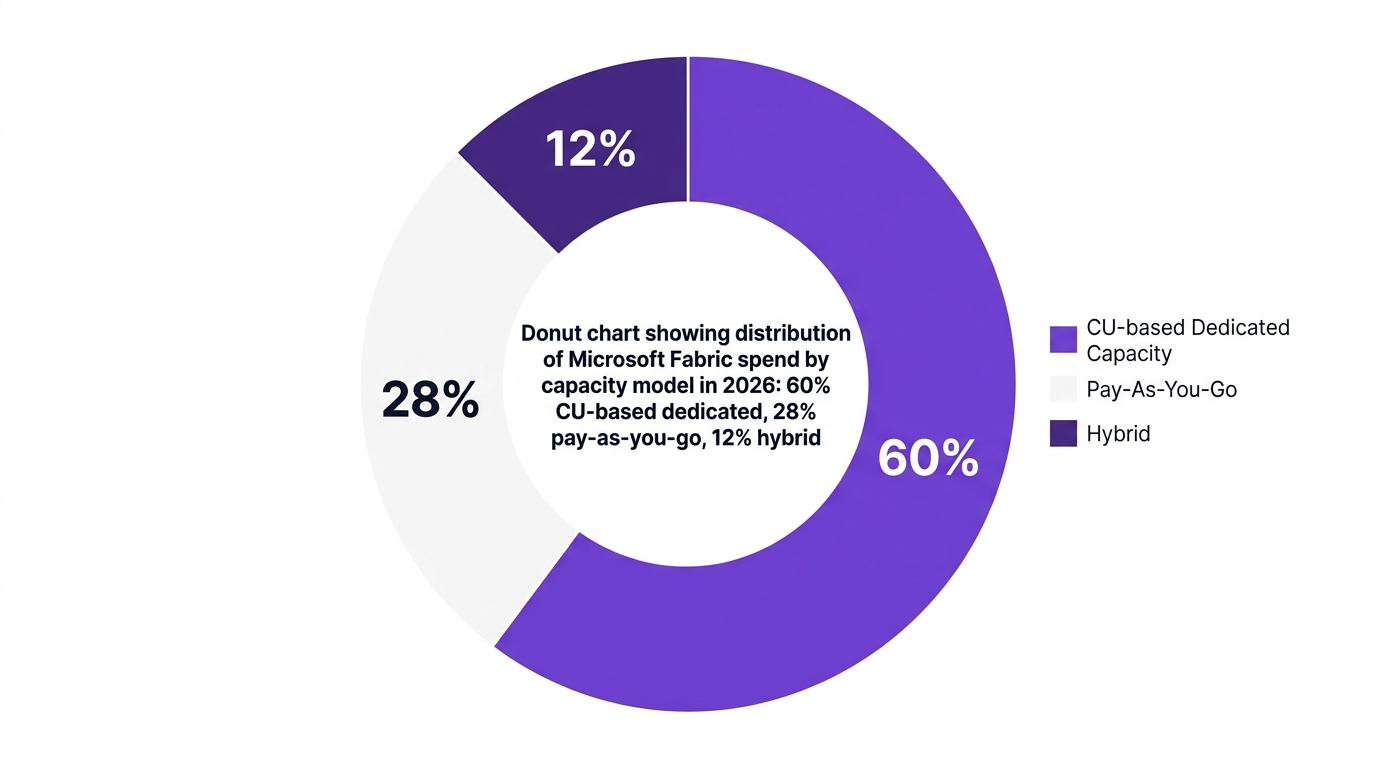
Unlike purely usage-based pricing, fabric capacity units give you a predictable monthly cost tied to a fixed level of capacity. This predictability is exactly why many organizations are shifting away from pure pay-as-you-go models toward CU-based dedicated capacity. According to Gartner, CU pools now account for around 60% of annual Microsoft Fabric spend worldwide.
From a FinOps lens, CUs matter because they:
As Rajesh Patel, Director of Cloud Strategy at Gartner, notes, "The transparency of Fabric's capacity units model enables IT and finance teams to align cloud investments with real business outcomes" (2026). The challenge is turning that transparency into operational discipline.
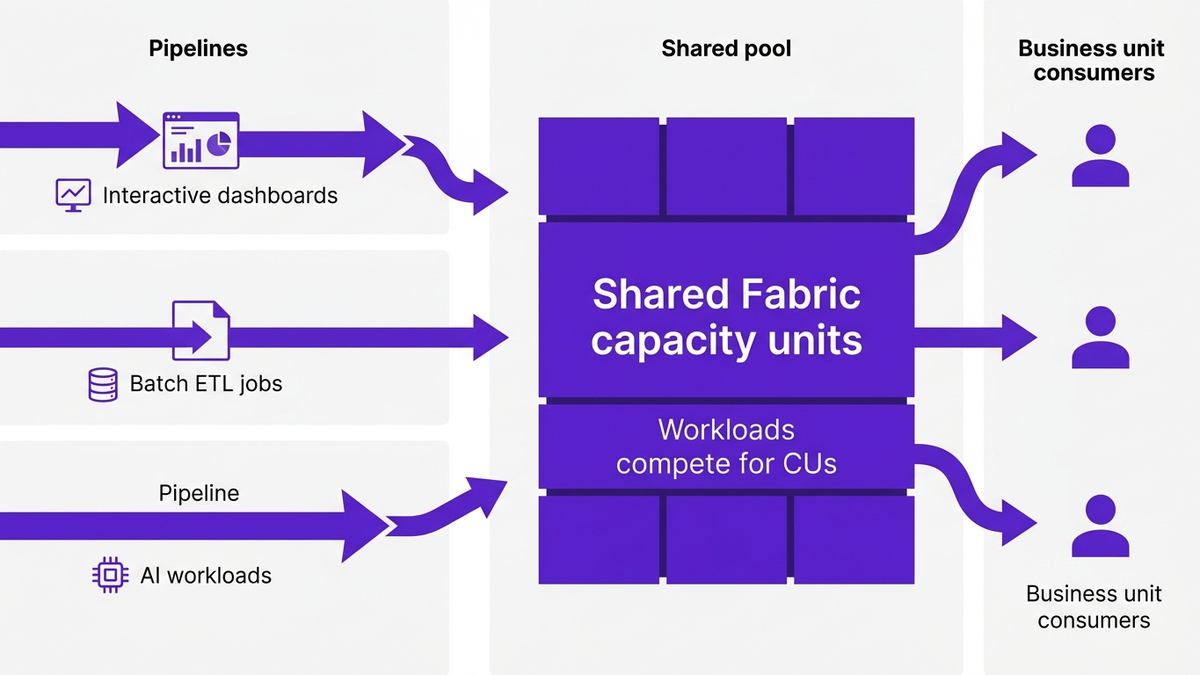
To manage cost, you first need to understand how CUs are actually used. Different Fabric workloads consume capacity at different rates, and patterns can vary by time of day, business cycle, and data volume.
At a high level, CUs are consumed by:
Each of these categories can create bursts, sustained usage, or idle pockets in your capacity. Poorly scheduled jobs or unconstrained experiments are a common source of overspend and fabric throttling cost, where workloads slow or queue because the CU envelope is exhausted.
A useful FinOps analogy is thinking of CUs like a shared corporate credit card limit. The number is fixed, but how teams swipe the card throughout the month determines how close you get to the edge, and whether you need a higher limit or better spending rules.
Key CU consumption concepts for FinOps teams:
Real-time microsoft fabric capacity monitoring lets you see these patterns clearly and start to make policy-based decisions.
Effective microsoft fabric capacity planning is both an art and a science. FinOps teams need a repeatable process that accounts for business demand, historical trends, and risk tolerance.
Here is a four-step C.U.R.E. framework you can use for microsoft fabric capacity sizing:
According to IDC, enterprises that improved CU rightsizing and monitoring saw average Microsoft Fabric overspend drop by 21% in 2026. That is pure optimization gained by better planning and visibility, not by sacrificing performance.
For organizations earlier in their journey, a structured assessment, such as a FinOps maturity assessment, can help benchmark where your current Fabric practices stand.
FinOps leaders frequently ask how microsoft fabric capacity vs pay as you go compares. In reality, most mature organizations adopt a hybrid approach based on workload profile and governance maturity.
According to Gartner, CU-based dedicated capacity, pay-as-you-go, and hybrid models break down roughly as follows in 2026:
Advantages of CU-based dedicated capacity:
Advantages of pay-as-you-go:
A common counterargument is that pay-as-you-go is always cheaper because you "only pay for what you use". In practice, lack of visibility and guardrails often leads to unexpected spikes that offset this theoretical benefit. On the other hand, some argue that CUs always require overprovisioning; yet with strong monitoring and rightsizing, that cushion can be narrowed significantly.
FinOps teams should:
Monitoring is where theory becomes operational practice. Microsoft fabric cu monitoring gives you the observability you need to control cost, performance, and governance.
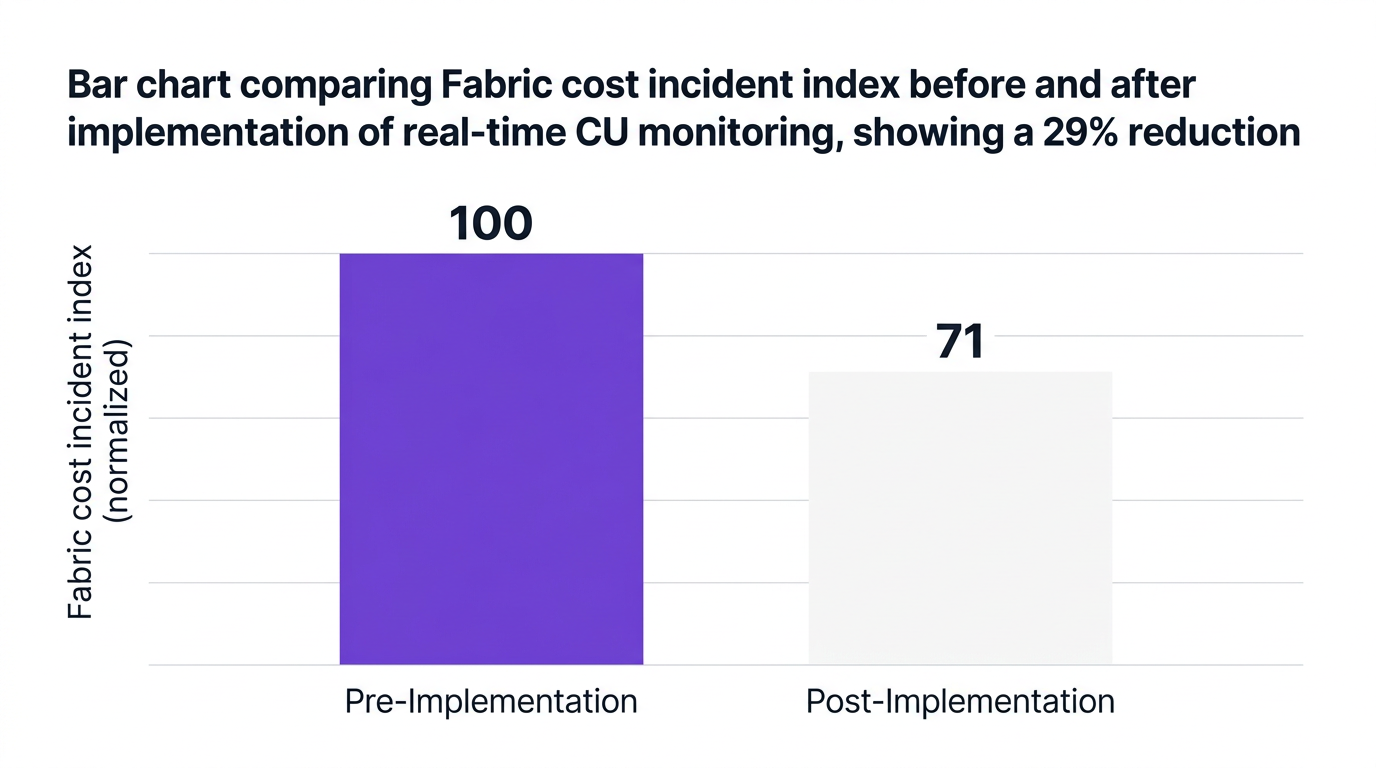
According to InfoTech, real-time CU monitoring has reduced Fabric-related cost incidents by 29% among teams that implemented automated dashboards (2026). Dr. Melissa Kent, Principal Analyst at InfoTech, notes that "Organizations that integrate CU monitoring with FinOps platforms see significantly faster cost optimization and governance results".
FinOps and IT teams should regularly track:
A robust microsoft fabric capacity usage dashboard should show these metrics in near real time. Karen Li, Head of Global DataOps in a large partner program, states that such dashboards are now seen as a baseline requirement.
To monitor fabric capacity units effectively, FinOps teams typically:
Real-time microsoft fabric capacity monitoring is particularly powerful when combined with chargeback. The Cloud Economics Report 2026 notes that 70% of practitioners say CU-based chargeback has improved business unit accountability.
For detailed guidance on instrumentation and metrics, many organizations reference FinOps metrics frameworks similar to those discussed in FinOps metrics best practices.
Once you have observability, you can begin microsoft fabric capacity cost optimization in a disciplined way. Think of this as an ongoing cycle instead of a one-off project.
Here are practical plays FinOps teams can implement immediately:
Enterprises that adopt real-time automation see results quickly. InfoTech reports that automated dashboards and alerting have reduced Fabric cost incidents by nearly a third, and IDC has documented over 20 percent reductions in overspend through CU rightsizing.
For organizations looking to scale their practice faster, external FinOps expertise, such as managed FinOps services, can accelerate design and rollout of these playbooks.
CloudNuro was built for organizations that want strong microsoft fabric cost governance across SaaS, cloud, and AI. Its FinOps and SaaS management capabilities help you optimize microsoft fabric capacity units using automation and finance-first visibility.
Here are specific ways CloudNuro supports microsoft fabric capacity cost optimization:
A recent case from a global enterprise illustrates the impact. A large financial institution adopted dedicated Microsoft Fabric Capacity Units managed via CloudNuro’s Unified Cloud Custodian. Within the first year, they achieved a 25% reduction in idle capacity and $2.1M in annual cost avoidance through automated rightsizing and anomaly detection.
Another Fortune 500 healthcare provider used CloudNuro's AI Custodian for microsoft fabric spend optimization and real-time CU monitoring. By enabling BU-level chargeback to clinical departments, they improved cost accountability and shortened their quarter-close process by 30 percent.
To see how these capabilities work across your SaaS and cloud estate, you can explore the CloudNuro product overview or its dedicated SaaS management capabilities.
Microsoft Fabric capacity units represent the dedicated compute and resource pool your analytics workloads can consume. They behave like a fixed-size lane on a highway, where more CUs provide more throughput and performance but also higher monthly cost. FinOps teams use them as a central lever for governance and budgeting.
Start by classifying workloads, then analyze 3 to 6 months of historical utilization to identify baseline and peak patterns. Use this data to size dedicated capacity for baseline plus a safety margin, and handle spikes with scheduling, queueing, or separate pools. Reassess every quarter as part of your microsoft fabric capacity planning process.
Use microsoft fabric capacity monitoring tools or a FinOps platform to track utilization, throttling, and BU-level consumption in real time. Set alerts for anomalies and build a microsoft fabric capacity usage dashboard that operations and finance teams review weekly. Then apply optimization plays like rightsizing, workload rescheduling, and chargeback.
CU-based microsoft fabric dedicated capacity provides a fixed pool with a fabric capacity units predictable monthly cost, which is ideal for steady, business-critical workloads. Pay-as-you-go charges you based on actual usage, which can work well for experimental or spiky workloads but can be volatile without strong monitoring. Most mature organizations use a hybrid model aligned to workload profiles.
Successful teams combine real-time telemetry, CU rightsizing, and BU-level cost accountability. They implement monitoring microsoft fabric with FinOps tools, adopt showback or chargeback, and put policies in place for job scheduling and capacity changes. Many also partner with FinOps experts to design microsoft fabric finops best practices tailored to their environment.
Connect Fabric logs and metrics into a fabric capacity metrics app or FinOps platform that supports real time monitoring for Microsoft Fabric capacity. Define thresholds for utilization, throttling, and spend deviations, then build dashboards that show capacity by workspace, BU, and workload. Route alerts to both engineering and finance stakeholders so incident response balances performance and cost.
CloudNuro is a leader in Enterprise SaaS Management Platforms, providing enterprises with unmatched visibility, governance, and cost optimization. Recognized twice in a row in the SaaS Management Platforms category and named a Leader in the SoftwareReviews Data Quadrant, CloudNuro is trusted by global enterprises and government agencies to bring financial discipline to SaaS, cloud, and AI. Trusted by enterprises such as Konica Minolta and Federal Signal, CloudNuro provides centralized SaaS inventory, license optimization, and renewal management along with advanced cost allocation and chargeback, giving IT and Finance leaders the visibility, control, and cost-conscious culture needed to drive financial discipline.
Request a no cost, no obligation free assessment —just 15 minutes to savings!
Get StartedMicrosoft Fabric capacity units are quickly becoming one of the most important levers for FinOps and IT finance teams who need to control analytics and data platform costs. Yet many enterprises still treat CUs as a black box, which leads to overprovisioning, inconsistent governance, and surprise invoices.
Gartner reports that Microsoft Fabric's enterprise adoption rate has surpassed 45% among large enterprises as they pursue unified analytics strategies (Gartner, 2026). At the same time, 83% of IT leaders now use dedicated Fabric Capacity Units for predictable spending, up from 62% in 2025 (Forrester, 2026). This guide explains what Microsoft Fabric capacity units are, how they work from a FinOps perspective, and how to monitor and optimize them for lower, predictable spend.
Microsoft Fabric capacity units represent the dedicated compute and resource pool that your analytics workloads consume. You can think of them like reserved lanes on a highway: the more lanes you book, the more throughput you get, but the higher your monthly bill.
Unlike purely usage-based pricing, fabric capacity units give you a predictable monthly cost tied to a fixed level of capacity. This predictability is exactly why many organizations are shifting away from pure pay-as-you-go models toward CU-based dedicated capacity. According to Gartner, CU pools now account for around 60% of annual Microsoft Fabric spend worldwide.
From a FinOps lens, CUs matter because they:
As Rajesh Patel, Director of Cloud Strategy at Gartner, notes, "The transparency of Fabric's capacity units model enables IT and finance teams to align cloud investments with real business outcomes" (2026). The challenge is turning that transparency into operational discipline.
To manage cost, you first need to understand how CUs are actually used. Different Fabric workloads consume capacity at different rates, and patterns can vary by time of day, business cycle, and data volume.
At a high level, CUs are consumed by:
Each of these categories can create bursts, sustained usage, or idle pockets in your capacity. Poorly scheduled jobs or unconstrained experiments are a common source of overspend and fabric throttling cost, where workloads slow or queue because the CU envelope is exhausted.
A useful FinOps analogy is thinking of CUs like a shared corporate credit card limit. The number is fixed, but how teams swipe the card throughout the month determines how close you get to the edge, and whether you need a higher limit or better spending rules.
Key CU consumption concepts for FinOps teams:
Real-time microsoft fabric capacity monitoring lets you see these patterns clearly and start to make policy-based decisions.
Effective microsoft fabric capacity planning is both an art and a science. FinOps teams need a repeatable process that accounts for business demand, historical trends, and risk tolerance.
Here is a four-step C.U.R.E. framework you can use for microsoft fabric capacity sizing:
According to IDC, enterprises that improved CU rightsizing and monitoring saw average Microsoft Fabric overspend drop by 21% in 2026. That is pure optimization gained by better planning and visibility, not by sacrificing performance.
For organizations earlier in their journey, a structured assessment, such as a FinOps maturity assessment, can help benchmark where your current Fabric practices stand.
FinOps leaders frequently ask how microsoft fabric capacity vs pay as you go compares. In reality, most mature organizations adopt a hybrid approach based on workload profile and governance maturity.
According to Gartner, CU-based dedicated capacity, pay-as-you-go, and hybrid models break down roughly as follows in 2026:
Advantages of CU-based dedicated capacity:
Advantages of pay-as-you-go:
A common counterargument is that pay-as-you-go is always cheaper because you "only pay for what you use". In practice, lack of visibility and guardrails often leads to unexpected spikes that offset this theoretical benefit. On the other hand, some argue that CUs always require overprovisioning; yet with strong monitoring and rightsizing, that cushion can be narrowed significantly.
FinOps teams should:
Monitoring is where theory becomes operational practice. Microsoft fabric cu monitoring gives you the observability you need to control cost, performance, and governance.
According to InfoTech, real-time CU monitoring has reduced Fabric-related cost incidents by 29% among teams that implemented automated dashboards (2026). Dr. Melissa Kent, Principal Analyst at InfoTech, notes that "Organizations that integrate CU monitoring with FinOps platforms see significantly faster cost optimization and governance results".
FinOps and IT teams should regularly track:
A robust microsoft fabric capacity usage dashboard should show these metrics in near real time. Karen Li, Head of Global DataOps in a large partner program, states that such dashboards are now seen as a baseline requirement.
To monitor fabric capacity units effectively, FinOps teams typically:
Real-time microsoft fabric capacity monitoring is particularly powerful when combined with chargeback. The Cloud Economics Report 2026 notes that 70% of practitioners say CU-based chargeback has improved business unit accountability.
For detailed guidance on instrumentation and metrics, many organizations reference FinOps metrics frameworks similar to those discussed in FinOps metrics best practices.
Once you have observability, you can begin microsoft fabric capacity cost optimization in a disciplined way. Think of this as an ongoing cycle instead of a one-off project.
Here are practical plays FinOps teams can implement immediately:
Enterprises that adopt real-time automation see results quickly. InfoTech reports that automated dashboards and alerting have reduced Fabric cost incidents by nearly a third, and IDC has documented over 20 percent reductions in overspend through CU rightsizing.
For organizations looking to scale their practice faster, external FinOps expertise, such as managed FinOps services, can accelerate design and rollout of these playbooks.
CloudNuro was built for organizations that want strong microsoft fabric cost governance across SaaS, cloud, and AI. Its FinOps and SaaS management capabilities help you optimize microsoft fabric capacity units using automation and finance-first visibility.
Here are specific ways CloudNuro supports microsoft fabric capacity cost optimization:
A recent case from a global enterprise illustrates the impact. A large financial institution adopted dedicated Microsoft Fabric Capacity Units managed via CloudNuro’s Unified Cloud Custodian. Within the first year, they achieved a 25% reduction in idle capacity and $2.1M in annual cost avoidance through automated rightsizing and anomaly detection.
Another Fortune 500 healthcare provider used CloudNuro's AI Custodian for microsoft fabric spend optimization and real-time CU monitoring. By enabling BU-level chargeback to clinical departments, they improved cost accountability and shortened their quarter-close process by 30 percent.
To see how these capabilities work across your SaaS and cloud estate, you can explore the CloudNuro product overview or its dedicated SaaS management capabilities.
Microsoft Fabric capacity units represent the dedicated compute and resource pool your analytics workloads can consume. They behave like a fixed-size lane on a highway, where more CUs provide more throughput and performance but also higher monthly cost. FinOps teams use them as a central lever for governance and budgeting.
Start by classifying workloads, then analyze 3 to 6 months of historical utilization to identify baseline and peak patterns. Use this data to size dedicated capacity for baseline plus a safety margin, and handle spikes with scheduling, queueing, or separate pools. Reassess every quarter as part of your microsoft fabric capacity planning process.
Use microsoft fabric capacity monitoring tools or a FinOps platform to track utilization, throttling, and BU-level consumption in real time. Set alerts for anomalies and build a microsoft fabric capacity usage dashboard that operations and finance teams review weekly. Then apply optimization plays like rightsizing, workload rescheduling, and chargeback.
CU-based microsoft fabric dedicated capacity provides a fixed pool with a fabric capacity units predictable monthly cost, which is ideal for steady, business-critical workloads. Pay-as-you-go charges you based on actual usage, which can work well for experimental or spiky workloads but can be volatile without strong monitoring. Most mature organizations use a hybrid model aligned to workload profiles.
Successful teams combine real-time telemetry, CU rightsizing, and BU-level cost accountability. They implement monitoring microsoft fabric with FinOps tools, adopt showback or chargeback, and put policies in place for job scheduling and capacity changes. Many also partner with FinOps experts to design microsoft fabric finops best practices tailored to their environment.
Connect Fabric logs and metrics into a fabric capacity metrics app or FinOps platform that supports real time monitoring for Microsoft Fabric capacity. Define thresholds for utilization, throttling, and spend deviations, then build dashboards that show capacity by workspace, BU, and workload. Route alerts to both engineering and finance stakeholders so incident response balances performance and cost.
CloudNuro is a leader in Enterprise SaaS Management Platforms, providing enterprises with unmatched visibility, governance, and cost optimization. Recognized twice in a row in the SaaS Management Platforms category and named a Leader in the SoftwareReviews Data Quadrant, CloudNuro is trusted by global enterprises and government agencies to bring financial discipline to SaaS, cloud, and AI. Trusted by enterprises such as Konica Minolta and Federal Signal, CloudNuro provides centralized SaaS inventory, license optimization, and renewal management along with advanced cost allocation and chargeback, giving IT and Finance leaders the visibility, control, and cost-conscious culture needed to drive financial discipline.
Request a no cost, no obligation free assessment - just 15 minutes to savings!
Get StartedWe're offering complimentary ServiceNow license assessments to only 25 enterprises this quarter who want to unlock immediate savings without disrupting operations.
Get Free AssessmentGet Started




CloudNuro Corp
1755 Park St. Suite 207
Naperville, IL 60563
Phone : +1-630-277-9470
Email: info@cloudnuro.com





.webp)

Recognized Leader in SaaS Management Platforms by Info-Tech SoftwareReviews


.svg)