

Sign Up
Thank you for Submitting!
Modern enterprises face continuous pressure to optimize cloud and SaaS spend, especially as digital transformation extends across every department. CIOs, CTOs, and IT operations teams now evaluate automated solutions that balance agility and savings. Two automation patterns have emerged at the forefront: Fabric Autoscale and Pause/Resume. Both address the need for dynamic capacity management, but each fits very different workload profiles. Which approach is best for your SaaS operations, and how can AI help ensure your chosen strategy delivers cost-efficient results?
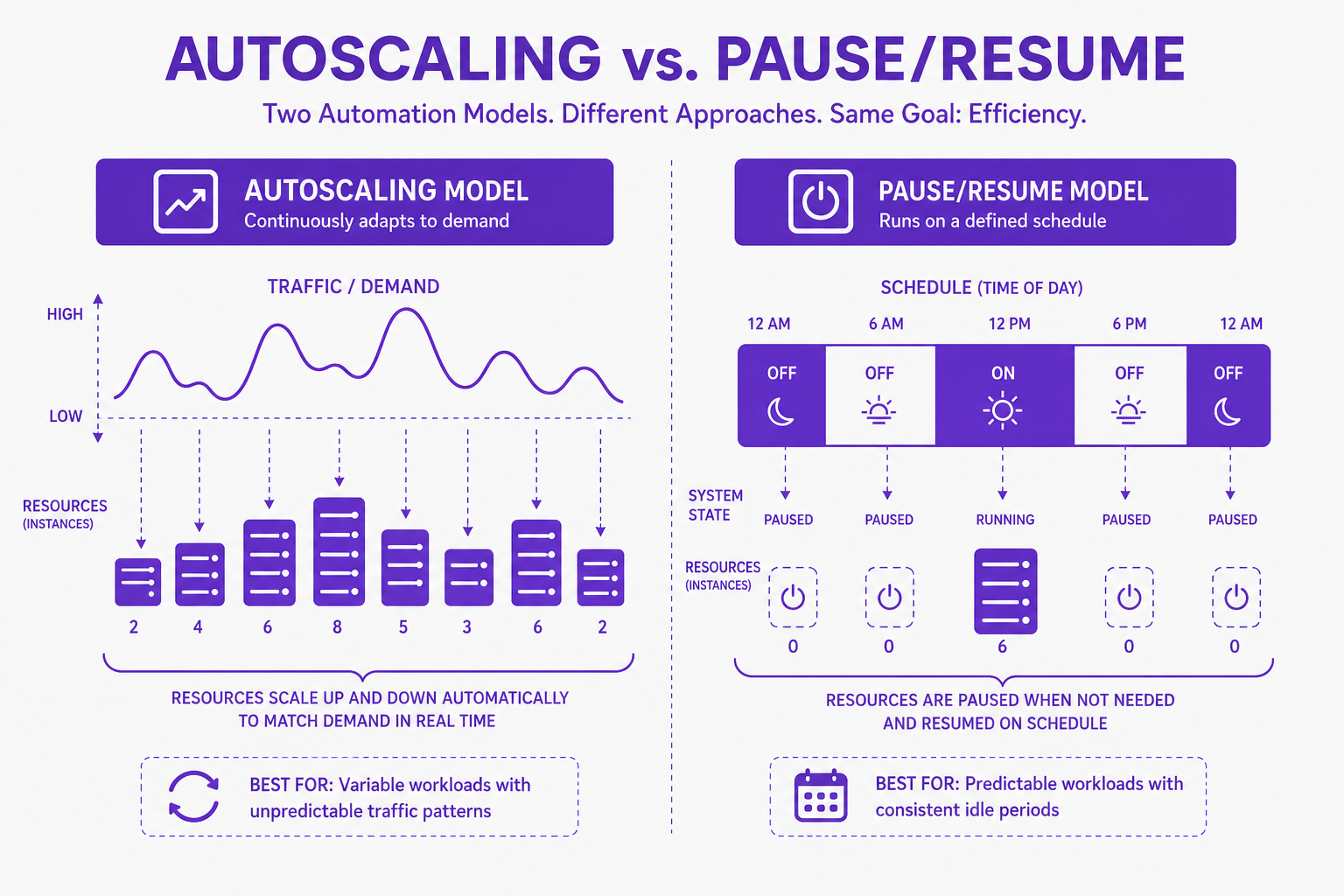
Fabric Autoscale enables infrastructure and SaaS platforms to automatically grow or shrink capacity in response to real-time workload demand. This model suits environments where usage patterns are unpredictable, think customer-facing apps with periodic surges, analytics clusters, or AI workloads with intermittent compute spikes.
Autoscale mechanisms monitor utilization metrics like CPU, memory, or request rate. When demand eclipses a set threshold, the system allocates additional compute or memory; when demand falls, resources are scaled back. Billing matches actual usage, so you pay for what you use rather than static overprovisioning.
Benefits of Fabric Autoscale:
Real-time cost optimization: Pay for additional capacity only during true demand.
Reduced manual intervention: AI-driven triggers respond automatically to usage spikes.
Business continuity: Critical workloads get the capacity needed, minimizing latency or service disruption.
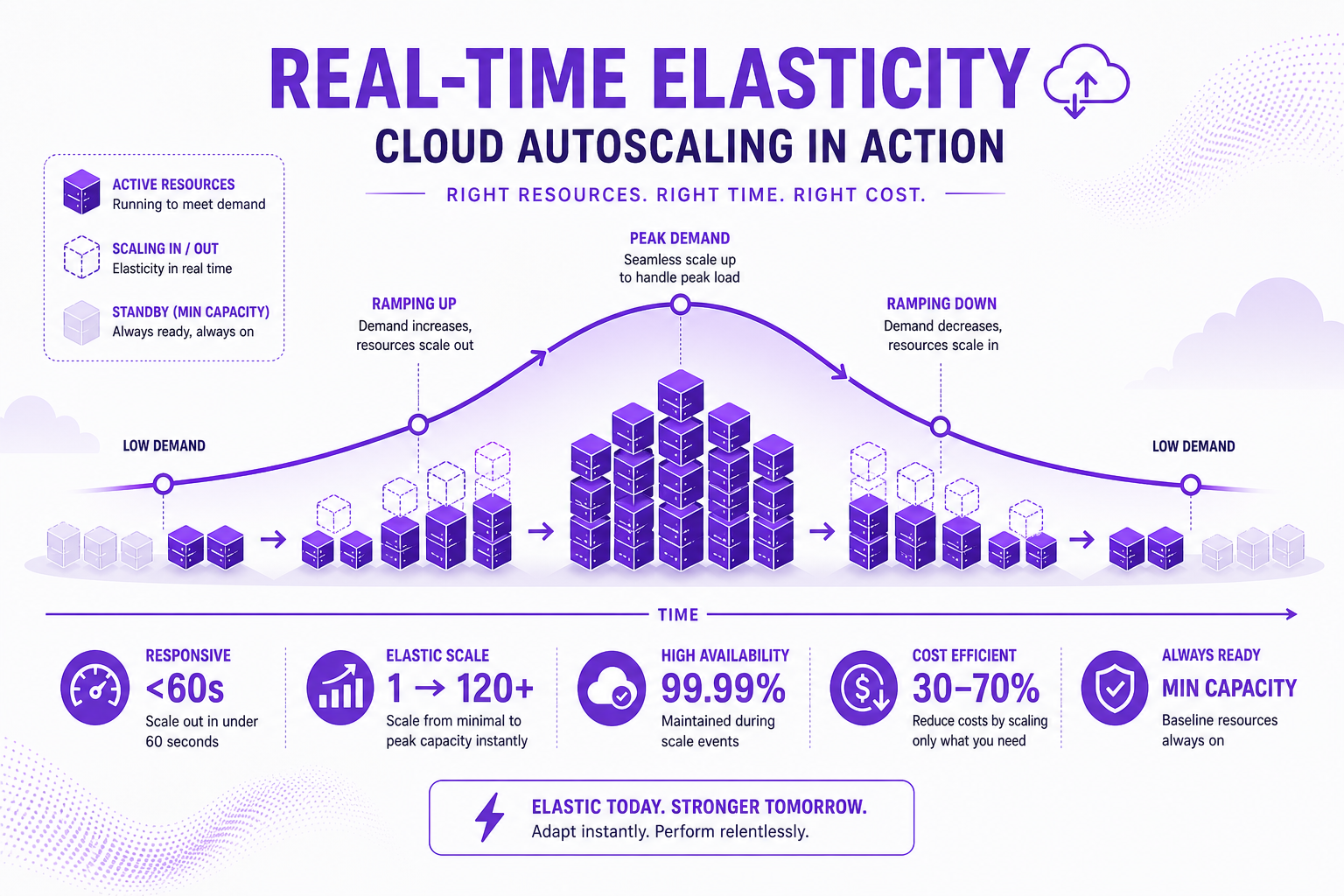
Pause/Resume automation suspends compute capacity during known idle periods, effectively stopping compute charges when workloads are dormant (for example, nights or weekends for development and QA environments). Instead of scaling down incrementally, the platform fully pauses resources when idle and resumes them as needed.
Pause automation is ideal for workloads with clear, predictable usage cycles, think back-office operations, dev/test sandboxes, or data pipelines used only during business hours.
Key Advantages:
Substantial cost reduction: Businesses typically see compute savings between 60% and 70% by pausing environments outside active hours.
Governance control: Policies can automate the suspension of non-production workloads without manual oversight.
Simplified capacity planning: Organizations avoid overprovisioning and never pay for compute that sits unused.
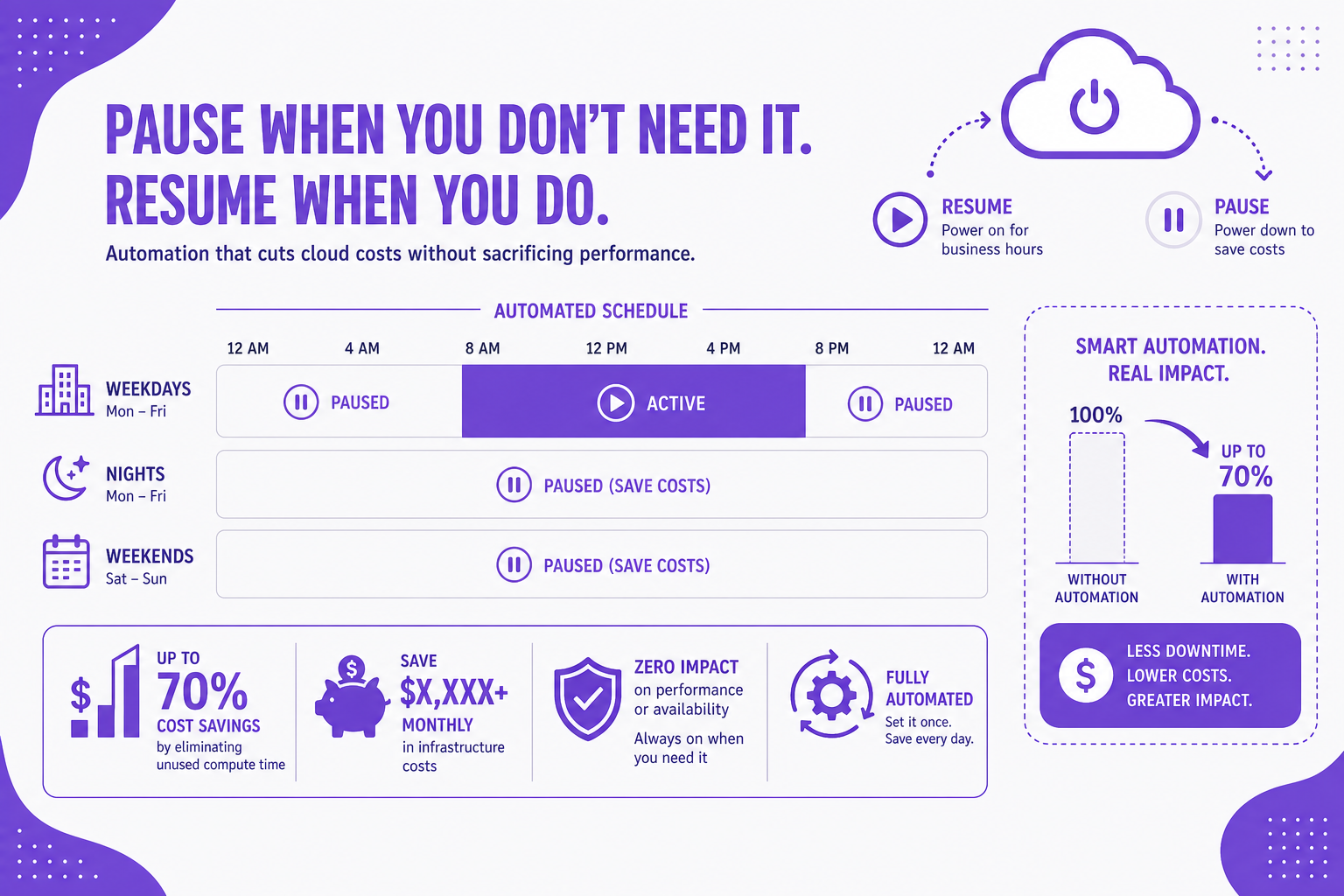
Determining the right cost-control mechanism means understanding both your workload pattern and your business objectives:
Burst-Driven, Unpredictable Workloads:
Best fit: Fabric Autoscale
Examples: Web applications with sporadic peak times, customer-facing services, or any business unit requiring agility.
Repeatable, Predictable Idle Periods:
Best fit: Pause/Resume Automation
Examples: Internal tools for 9-to-5 teams, legacy app QA cycles, project-based analytics.
Industry trends point towards hybrid architectures that layer both automation forms in the same environment, using pause controls during forecastable idle times and autoscaling during business hours. Cost governance is increasingly operationalized through scheduled suspensions, API-based controls, and AI-led metric monitoring, making manual intervention a relic of the past.
While both models deliver cost savings, the mechanics (and the risks) differ:
Pause/Resume Savings:
A typical business-hours-only environment reduces non-production compute costs by 60% to 70%.
Standard 9-to-5 workloads cut billing by over 60% simply by scheduling pauses for nights/weekends.
Note: Storage remains a persistent cost. Pausing compute does not eliminate charges for associated storage.
Autoscale Savings:
No unnecessary idle overprovisioning; spend tracks actual usage.
Essential for workloads with unpredictable demand spikes. The real risk is capacity mismanagement leading to surprise expenses if baseline configuration is excessive.
Governance Challenges:
The biggest hidden risk: "usage debt", when surges are smoothed for uninterrupted operations, leading to built-up overage costs upon next pause/settlement. Robust governance and visibility are essential.
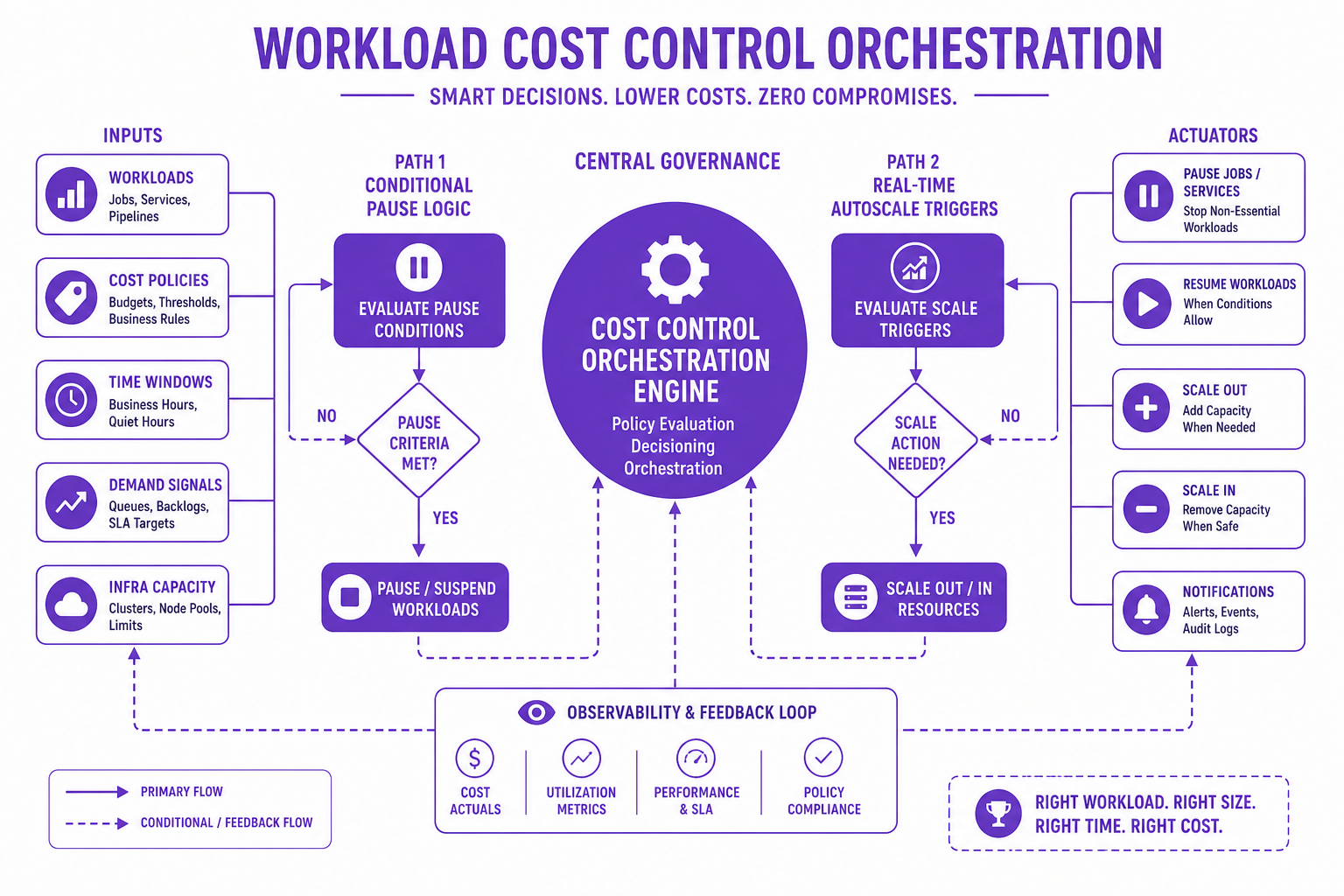
CloudNuro delivers an AI-powered platform explicitly designed to help IT leaders implement and govern both fabric autoscale and pause/resume automation at enterprise scale. Here is how CloudNuro sets itself apart for fabric workload management and cost control:
Unified Visibility & Governance:
Monitor and track cloud resource utilization, cost allocation, and workload scaling across AWS, Azure, GCP, and OCI, all from a single dashboard.
Centralize and automate policy enforcement for both pause and autoscale workflows, reducing manual errors and cost leakage.
AI-Driven Rightsizing & Scheduling:
Advanced algorithms continuously analyze historical CPU, memory, and user behavior patterns.
Receive targeted recommendations for pausing, scaling down, or migrating workloads to burstable options for dynamic savings.
No-Code Workflow Orchestration:
Design or adjust rule-based automations for workload suspension, scaling, and rightsizing with drag-and-drop simplicity.
Build complex logic (e.g., "Pause this group after 6pm unless analytics job is active") with branching and conditional triggers.
Rapid Value Generation:
Most customers identify 20% to 30% savings in their first 90 days by eliminating redundant apps and reclaiming unused licenses.
15 minutes is all it takes to set up; actionable visibility is delivered in under 24 hours.
Proven leaders in SaaS governance pair these strategies:
Profile usage patterns accurately: Invest in visibility tooling to baseline workload demand before committing to an automation fit.
Enforce policies consistently: Use automation with conditional branching, not one-size-fits-all schedules.
Continuously re-evaluate: Your business evolves; so should your automation triggers, based on real usage telemetry.
Centralize cost and governance: Rely on enterprise-scale platforms like CloudNuro to keep compute, storage, and licensing coordinated and optimized across teams.
What is the difference between Fabric Autoscale and Pause/Resume for cost control?
Fabric Autoscale dynamically adjusts resource allocation for real-time demand, ideal for bursty or unpredictable workloads. Pause/Resume stops compute during predictable idle windows, maximizing savings for scheduled, repeatable inactivity.
How does fabric capacity pause help with workload management?
Capacity pause automation can reduce compute billing by 60.70% for non-production or business-hours-only environments, shutting down resources that aren't actively used.
When should I use pause/resume automation vs autoscaling for fabric workloads?
Use autoscale for workloads with variable, unpredictable demand requiring continuous uptime. Employ pause/resume where usage patterns are scheduled and predictable.
What are the benefits of fabric autoscale for SaaS operations?
Autoscale ensures applications have the resources they need during peak times, while avoiding costly, idle overprovisioning during lulls, improving operational resilience and financial efficiency.
How can cost automation optimize cloud resource usage?
Using intelligent, AI-driven automation platforms like CloudNuro centralizes visibility, detects unused or underused resources, and enforces governance, cutting costs while maintaining compliance and performance.
In today’s resource-driven economy, cost optimization demands nimble, adaptive automation. Both Fabric Autoscale and Pause/Resume automation play critical roles, but your business requirements and workload patterns dictate which to adopt, or how best to blend both for optimal results. CloudNuro’s AI Custodian empowers your IT operations to gain unprecedented visibility, automate with confidence, and deliver measurable savings across every cloud and SaaS environment.
About CloudNuro
CloudNuro is a leader in Enterprise AI Adoption Management, providing enterprises with unmatched visibility, governance, and cost optimization. Recognized twice in a row in the SaaS Management Platforms category and named a Leader in the SoftwareReviews Data Quadrant, CloudNuro is trusted by global enterprises and government agencies to bring financial discipline to SaaS, cloud, and AI. Trusted by enterprises, CloudNuro provides centralized SaaS inventory, license optimization, and renewal management along with advanced cost allocation and chargeback, giving IT and Finance leaders the visibility, control, and cost-conscious culture needed to drive financial discipline.
Request a no cost, no obligation free assessment —just 15 minutes to savings!
Get StartedModern enterprises face continuous pressure to optimize cloud and SaaS spend, especially as digital transformation extends across every department. CIOs, CTOs, and IT operations teams now evaluate automated solutions that balance agility and savings. Two automation patterns have emerged at the forefront: Fabric Autoscale and Pause/Resume. Both address the need for dynamic capacity management, but each fits very different workload profiles. Which approach is best for your SaaS operations, and how can AI help ensure your chosen strategy delivers cost-efficient results?
Fabric Autoscale enables infrastructure and SaaS platforms to automatically grow or shrink capacity in response to real-time workload demand. This model suits environments where usage patterns are unpredictable, think customer-facing apps with periodic surges, analytics clusters, or AI workloads with intermittent compute spikes.
Autoscale mechanisms monitor utilization metrics like CPU, memory, or request rate. When demand eclipses a set threshold, the system allocates additional compute or memory; when demand falls, resources are scaled back. Billing matches actual usage, so you pay for what you use rather than static overprovisioning.
Benefits of Fabric Autoscale:
Real-time cost optimization: Pay for additional capacity only during true demand.
Reduced manual intervention: AI-driven triggers respond automatically to usage spikes.
Business continuity: Critical workloads get the capacity needed, minimizing latency or service disruption.
Pause/Resume automation suspends compute capacity during known idle periods, effectively stopping compute charges when workloads are dormant (for example, nights or weekends for development and QA environments). Instead of scaling down incrementally, the platform fully pauses resources when idle and resumes them as needed.
Pause automation is ideal for workloads with clear, predictable usage cycles, think back-office operations, dev/test sandboxes, or data pipelines used only during business hours.
Key Advantages:
Substantial cost reduction: Businesses typically see compute savings between 60% and 70% by pausing environments outside active hours.
Governance control: Policies can automate the suspension of non-production workloads without manual oversight.
Simplified capacity planning: Organizations avoid overprovisioning and never pay for compute that sits unused.
Determining the right cost-control mechanism means understanding both your workload pattern and your business objectives:
Burst-Driven, Unpredictable Workloads:
Best fit: Fabric Autoscale
Examples: Web applications with sporadic peak times, customer-facing services, or any business unit requiring agility.
Repeatable, Predictable Idle Periods:
Best fit: Pause/Resume Automation
Examples: Internal tools for 9-to-5 teams, legacy app QA cycles, project-based analytics.
Industry trends point towards hybrid architectures that layer both automation forms in the same environment, using pause controls during forecastable idle times and autoscaling during business hours. Cost governance is increasingly operationalized through scheduled suspensions, API-based controls, and AI-led metric monitoring, making manual intervention a relic of the past.
While both models deliver cost savings, the mechanics (and the risks) differ:
Pause/Resume Savings:
A typical business-hours-only environment reduces non-production compute costs by 60% to 70%.
Standard 9-to-5 workloads cut billing by over 60% simply by scheduling pauses for nights/weekends.
Note: Storage remains a persistent cost. Pausing compute does not eliminate charges for associated storage.
Autoscale Savings:
No unnecessary idle overprovisioning; spend tracks actual usage.
Essential for workloads with unpredictable demand spikes. The real risk is capacity mismanagement leading to surprise expenses if baseline configuration is excessive.
Governance Challenges:
The biggest hidden risk: "usage debt", when surges are smoothed for uninterrupted operations, leading to built-up overage costs upon next pause/settlement. Robust governance and visibility are essential.
CloudNuro delivers an AI-powered platform explicitly designed to help IT leaders implement and govern both fabric autoscale and pause/resume automation at enterprise scale. Here is how CloudNuro sets itself apart for fabric workload management and cost control:
Unified Visibility & Governance:
Monitor and track cloud resource utilization, cost allocation, and workload scaling across AWS, Azure, GCP, and OCI, all from a single dashboard.
Centralize and automate policy enforcement for both pause and autoscale workflows, reducing manual errors and cost leakage.
AI-Driven Rightsizing & Scheduling:
Advanced algorithms continuously analyze historical CPU, memory, and user behavior patterns.
Receive targeted recommendations for pausing, scaling down, or migrating workloads to burstable options for dynamic savings.
No-Code Workflow Orchestration:
Design or adjust rule-based automations for workload suspension, scaling, and rightsizing with drag-and-drop simplicity.
Build complex logic (e.g., "Pause this group after 6pm unless analytics job is active") with branching and conditional triggers.
Rapid Value Generation:
Most customers identify 20% to 30% savings in their first 90 days by eliminating redundant apps and reclaiming unused licenses.
15 minutes is all it takes to set up; actionable visibility is delivered in under 24 hours.
Proven leaders in SaaS governance pair these strategies:
Profile usage patterns accurately: Invest in visibility tooling to baseline workload demand before committing to an automation fit.
Enforce policies consistently: Use automation with conditional branching, not one-size-fits-all schedules.
Continuously re-evaluate: Your business evolves; so should your automation triggers, based on real usage telemetry.
Centralize cost and governance: Rely on enterprise-scale platforms like CloudNuro to keep compute, storage, and licensing coordinated and optimized across teams.
What is the difference between Fabric Autoscale and Pause/Resume for cost control?
Fabric Autoscale dynamically adjusts resource allocation for real-time demand, ideal for bursty or unpredictable workloads. Pause/Resume stops compute during predictable idle windows, maximizing savings for scheduled, repeatable inactivity.
How does fabric capacity pause help with workload management?
Capacity pause automation can reduce compute billing by 60.70% for non-production or business-hours-only environments, shutting down resources that aren't actively used.
When should I use pause/resume automation vs autoscaling for fabric workloads?
Use autoscale for workloads with variable, unpredictable demand requiring continuous uptime. Employ pause/resume where usage patterns are scheduled and predictable.
What are the benefits of fabric autoscale for SaaS operations?
Autoscale ensures applications have the resources they need during peak times, while avoiding costly, idle overprovisioning during lulls, improving operational resilience and financial efficiency.
How can cost automation optimize cloud resource usage?
Using intelligent, AI-driven automation platforms like CloudNuro centralizes visibility, detects unused or underused resources, and enforces governance, cutting costs while maintaining compliance and performance.
In today’s resource-driven economy, cost optimization demands nimble, adaptive automation. Both Fabric Autoscale and Pause/Resume automation play critical roles, but your business requirements and workload patterns dictate which to adopt, or how best to blend both for optimal results. CloudNuro’s AI Custodian empowers your IT operations to gain unprecedented visibility, automate with confidence, and deliver measurable savings across every cloud and SaaS environment.
About CloudNuro
CloudNuro is a leader in Enterprise AI Adoption Management, providing enterprises with unmatched visibility, governance, and cost optimization. Recognized twice in a row in the SaaS Management Platforms category and named a Leader in the SoftwareReviews Data Quadrant, CloudNuro is trusted by global enterprises and government agencies to bring financial discipline to SaaS, cloud, and AI. Trusted by enterprises, CloudNuro provides centralized SaaS inventory, license optimization, and renewal management along with advanced cost allocation and chargeback, giving IT and Finance leaders the visibility, control, and cost-conscious culture needed to drive financial discipline.
Request a no cost, no obligation free assessment - just 15 minutes to savings!
Get StartedWe're offering complimentary ServiceNow license assessments to only 25 enterprises this quarter who want to unlock immediate savings without disrupting operations.
Get Free AssessmentGet Started




CloudNuro Corp
1755 Park St. Suite 207
Naperville, IL 60563
Phone : +1-630-277-9470
Email: info@cloudnuro.com





.webp)

Recognized Leader in SaaS Management Platforms by Info-Tech SoftwareReviews



.svg)