

Sign Up
Thank you for Submitting!
Microsoft Fabric is quickly becoming the backbone of enterprise analytics, but its capacity-based model can quietly drain budgets if it is not tightly controlled. Many organizations jump to larger F-SKUs "just to be safe" and then discover months later that half of their analytics capacity sits idle.
According to a 2026 analysis by Forrester, up to 40% of Microsoft Fabric customers are overprovisioned, leaving millions in unnecessary spend locked in each year. At the same time, Gartner reports that enterprises that adopt automated cloud capacity rightsizing achieve an average 38% reduction in SaaS and cloud costs.
This guide walks through Microsoft Fabric capacity right sizing, how to pick the right fabric F-SKU such as F64 vs F128, and how to build a repeatable practice so you stop overpaying and start treating Fabric as a governed, accountable shared service.
Fabric uses a capacity-based model for analytics, which gives you predictable performance but also concentrates financial risk. If you overshoot, that mistake is multiplied every hour of every day.
IDC found that 67% of IT leaders rank optimizing cloud workload capacity as their top FinOps initiative for 2026. At the same time, only 32% of organizations review analytics capacity allocations monthly, according to a major cloud management survey in 2026. That gap is exactly where overspend hides.
Right sizing Microsoft Fabric capacity is not just a "nice to have". It directly affects:
As one cloud optimization lead cited by Forrester put it, "The transition to Microsoft Fabric's capacity-based model demands dynamic monitoring and proactive rightsizing to avoid chronic overpayment."
To right size, you need a working mental model of microsoft fabric capacity units and how they map to real workloads.
In simple terms:
This means overprovisioning is persistent. If you are on F128 when F64 would suffice for most hours of the day, the overspend is structural, not accidental. Right sizing is the discipline of matching F-SKU to actual, observed demand, then adjusting it as that demand changes.

A useful analogy is thinking of Fabric capacity as a fleet of vehicles. You would not assign a 40-ton truck to deliver a single envelope every day, but many enterprises do that equivalent with Fabric F-SKUs.
Here is a five-step framework for how to right size Microsoft Fabric capacity and avoid that trap.
Start with visibility. You need a complete inventory of Fabric capacities, their F-SKUs, and attached workspaces.
Gather, for each capacity:
A centralized SaaS or cloud management platform like CloudNuro's SaaS management solution can streamline this discovery across analytics platforms, Microsoft 365, and other tools so you see Fabric usage in the context of broader SaaS costs.
Key goal: Build a 30-day baseline that clearly shows when and where capacity is actually used.
Not every workload deserves the same "truck". Some are latency-sensitive, some are batch-oriented, and some are low-priority experiments.
Create at least three categories:
Map each workspace into these tiers and identify the minimum viable performance it needs. This step prevents overreaction when right sizing, because you will protect Tier 1 while aggressively optimizing Tier 2 and Tier 3.
With telemetry in place, you can move from guesswork to capacity unit optimization.
Look for:
McKinsey's 2026 research links right sized F-SKU selection to a 3x improvement in cost efficiency for analytics workloads. The payoff from even a single F-SKU reduction can be material for the overall analytics budget.
This is where theory becomes a budget proposal. Compare scenarios such as F64 vs F128 using your baseline.
For each scenario, evaluate:
A common pattern:
If simulation shows that F64 handles all workloads with acceptable performance 95% of the time, the savings from that single change often approach 30% to 40% of Fabric capacity spend.
Right sizing is not a one-time optimization. As an IDC analyst observed in 2026, "Selecting the correct F-SKU for Fabric should be a continuous process, informed by real workload telemetry and automated usage forecasting."
Embed that mindset with:
Research cited by ISG in 2026 shows that organizations adopting chargeback models for analytics capacity see a 25% increase in budget adherence and accountability.
One of the most common questions from CIOs and cloud architects is how to compare F64 vs F128 and larger F-SKUs rationally, without overbuying capacity "just in case".
Rather than chasing exact technical specs, use a scenario-driven view that focuses on microsoft fabric workload management and business outcomes.
Start with the business, not the SKU list.
Clarify, per workload tier:
For example, a data warehouse feeding monthly regulatory reporting has a very different SLA than an internal marketing dashboard.
Using your baseline metrics, identify where performance is currently constrained or over-provisioned.
Questions to answer:
This is where data warehouse capacity optimization intersects with overall cloud workload rightsizing best practices. If you are paying for F128 but all your bottlenecks are caused by a single nightly ETL, that is a scheduling problem, not an F-SKU problem.
Instead of a risky big-bang change, pilot downgrades on non-critical capacities.
For example:
If metrics stay healthy, you can standardize that pattern. If not, you have validated that particular environment truly needs the higher tier.
Some executives argue that the cost of a performance incident outweighs any savings from right sizing. There is some truth to this for a small number of tier 1 workloads.
However, Gartner's 2026 research found that enterprises using automated cloud capacity rightsizing did not experience higher incident rates on average than those that overspent. The key is data-driven decision making, not blanket cuts.
The real risk is often the opposite: quietly normalizing 30% to 50% overprovisioning across dozens of capacities.
Effective capacity planning for cloud data platforms like Fabric is a textbook FinOps challenge. The technology is powerful, but budgets are finite, and consumption is shared across teams.
A mature finops for microsoft fabric practice typically includes:
This is very similar to how enterprises manage other high-value shared services such as ERP or CRM platforms, but the variable nature of cloud workloads makes automation and telemetry essential.
To drive behavior change, Fabric capacity must be visible in financial terms.
A practical model for chargeback and showback for fabric capacity should:
Research by ISG in 2026 indicates that chargeback models tied to analytics capacity reduce cost overruns by more than 20% by creating shared accountability across IT and business leaders.
Manual spreadsheet exercises will not keep up with dynamic analytics environments. Gartner notes that organizations using integrated, AI-driven platforms for saas capacity rightsizing realize both immediate and sustained savings.
For Fabric this means:
This combination transforms microsoft fabric saas capacity management from an occasional clean-up task into a governed, continuous process.
CloudNuro was built for exactly this kind of challenge: microsoft fabric capacity cost optimization as part of unified SaaS and cloud governance.
CloudNuro's platform combines discovery, analytics, automation, and financial controls to make microsoft fabric capacity right sizing routine, not heroic.
CloudNuro's Cloud Commitment Optimization and automated rightsizing capabilities continuously monitor Fabric tenants.
They:
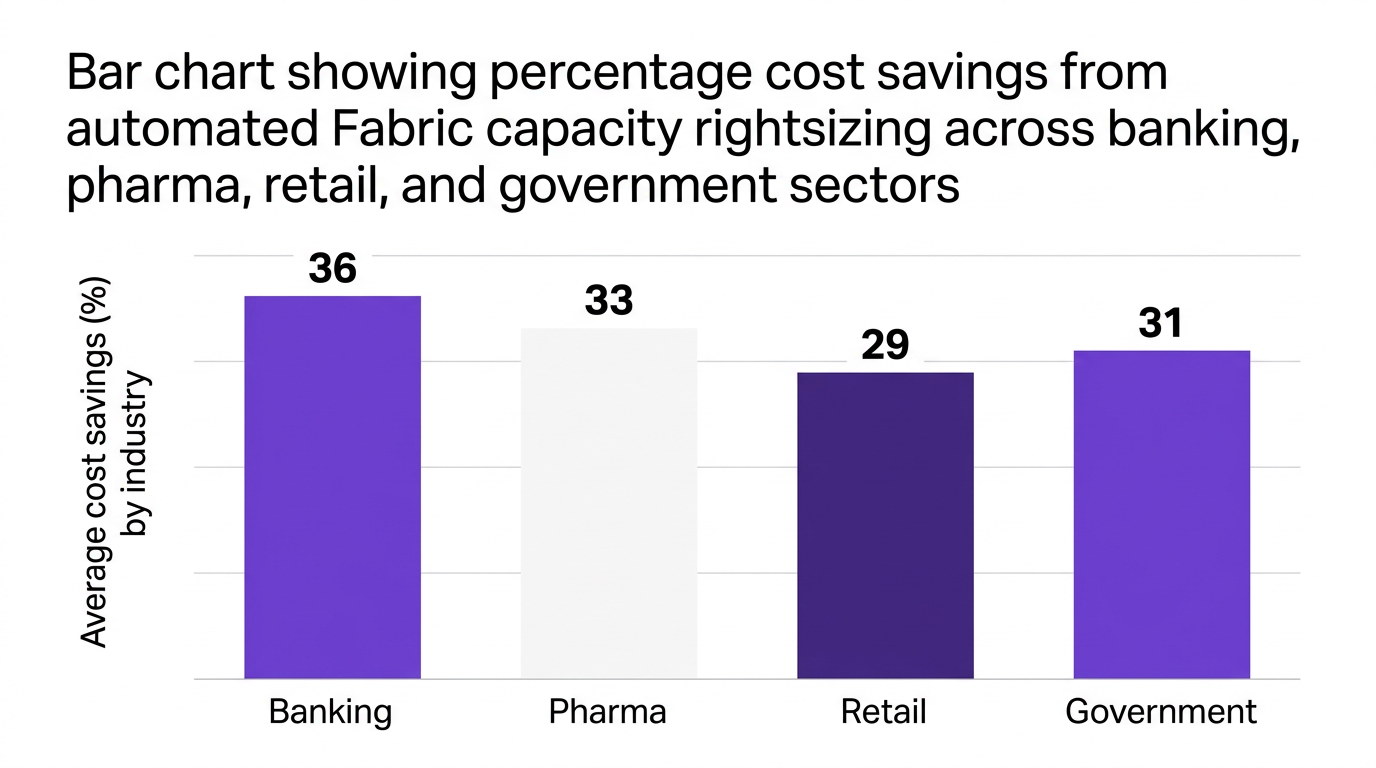
This is true capacity unit optimization. One large multinational bank used CloudNuro to automate Fabric F-SKU rightsizing and achieved a 36% reduction in annual analytics platform spend and a 45% drop in unused capacity hours, according to a joint case study validated in 2026.
CloudNuro's embedded analytics provide a single pane of glass for microsoft fabric workload management alongside other SaaS platforms.
Teams can:
A global pharmaceutical organization used CloudNuro to orchestrate analytics workloads and forecast capacity, cutting SaaS analytics costs by 33% while also improving compliance reporting for regulated data projects.
The CloudNuro Chargeback module links Fabric capacity consumption to budgets.
With CloudNuro, IT and finance leaders can:
This supports a mature FinOps practice that aligns with the findings that chargeback models improve accountability and budget adherence.
You can explore the broader financial governance capabilities in CloudNuro's chargeback solution and discover supporting advisory expertise in CloudNuro's FinOps services.
Fabric does not exist in isolation. It sits alongside Microsoft 365, CRM, ITSM, and other critical platforms.
CloudNuro offers:
This unified perspective means Fabric capacity right sizing becomes part of a broader cloud cost optimization and governance program, not a siloed one-off project.
Start with a 30 to 60 day utilization baseline for your current capacity. Map workloads by criticality, then run scenario modeling that compares costs and performance for candidate F-SKUs.
If an F64 configuration can satisfy performance SLAs for at least 95% of demand with acceptable headroom, it is a strong candidate. Use pilot downgrades and close monitoring before standardizing.
Key best practices include:
Treat Fabric like any other high-value shared service and embed it in your FinOps cadence.
Combine cloud workload rightsizing best practices with governance and automation. Right size F-SKUs, align workloads with the right capacities, and use scheduling for batch jobs.
Augment this with saas capacity rightsizing techniques across your stack so Fabric optimization does not simply shift load and cost to another tool.
In a capacity-based model, you purchase a fixed pool of compute and memory capacity via F-SKUs. You pay for that pool for the duration it is active, regardless of exact usage.
In a pure pay-as-you-go model, every unit of compute is billed individually. Fabric's model offers more predictable performance and cost, but it requires active cloud capacity rightsizing to avoid structural overspend.
CloudNuro ingests telemetry from Fabric capacities, detects underutilization or stress, and recommends or executes F-SKU adjustments. It uses AI-driven analytics and forecasting to guide rightsizing.
Through the CloudNuro Chargeback module, Fabric costs are allocated to business units or projects, enabling chargeback and showback for fabric capacity and boosting accountability for analytics consumption.
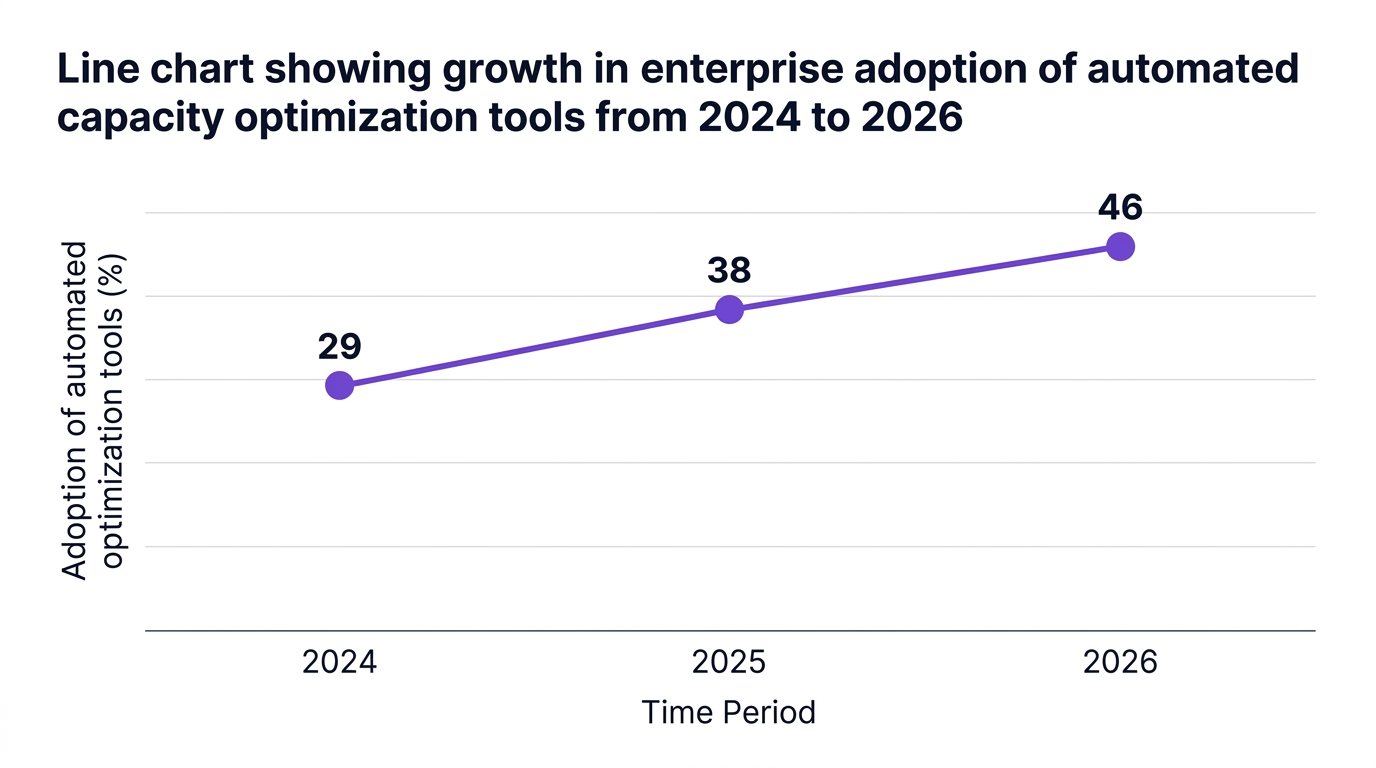
Microsoft Fabric can be a powerful unified SaaS data platform, but its value depends on microsoft fabric capacity right sizing and disciplined governance. Research from multiple analyst firms shows that automated rightsizing and chargeback models can cut analytics costs by 30% to 40% while actually improving internal trust.
By baselining workloads, modeling scenarios like F64 vs F128, automating microsoft fabric capacity units monitoring, and embedding chargeback, you turn Fabric from an opaque cost center into a transparent, governed shared service.
CloudNuro can accelerate this transformation by unifying microsoft fabric capacity cost optimization with broader SaaS governance, delivering measurable savings within weeks instead of quarters.
If you are ready to right size Fabric capacity and build sustainable FinOps discipline around analytics, now is the time to act.
CloudNuro is a leader in Enterprise SaaS Management Platforms, providing enterprises with unmatched visibility, governance, and cost optimization. Recognized twice in a row in the SaaS Management Platforms category and named a Leader in the SoftwareReviews Data Quadrant, CloudNuro is trusted by global enterprises and government agencies to bring financial discipline to SaaS, cloud, and AI. Trusted by enterprises such as Konica Minolta and Federal Signal, CloudNuro provides centralized SaaS inventory, license optimization, and renewal management along with advanced cost allocation and chargeback, giving IT and Finance leaders the visibility, control, and cost-conscious culture needed to drive financial discipline.
Request a no cost, no obligation free assessment —just 15 minutes to savings!
Get StartedMicrosoft Fabric is quickly becoming the backbone of enterprise analytics, but its capacity-based model can quietly drain budgets if it is not tightly controlled. Many organizations jump to larger F-SKUs "just to be safe" and then discover months later that half of their analytics capacity sits idle.
According to a 2026 analysis by Forrester, up to 40% of Microsoft Fabric customers are overprovisioned, leaving millions in unnecessary spend locked in each year. At the same time, Gartner reports that enterprises that adopt automated cloud capacity rightsizing achieve an average 38% reduction in SaaS and cloud costs.
This guide walks through Microsoft Fabric capacity right sizing, how to pick the right fabric F-SKU such as F64 vs F128, and how to build a repeatable practice so you stop overpaying and start treating Fabric as a governed, accountable shared service.
Fabric uses a capacity-based model for analytics, which gives you predictable performance but also concentrates financial risk. If you overshoot, that mistake is multiplied every hour of every day.
IDC found that 67% of IT leaders rank optimizing cloud workload capacity as their top FinOps initiative for 2026. At the same time, only 32% of organizations review analytics capacity allocations monthly, according to a major cloud management survey in 2026. That gap is exactly where overspend hides.
Right sizing Microsoft Fabric capacity is not just a "nice to have". It directly affects:
As one cloud optimization lead cited by Forrester put it, "The transition to Microsoft Fabric's capacity-based model demands dynamic monitoring and proactive rightsizing to avoid chronic overpayment."
To right size, you need a working mental model of microsoft fabric capacity units and how they map to real workloads.
In simple terms:
This means overprovisioning is persistent. If you are on F128 when F64 would suffice for most hours of the day, the overspend is structural, not accidental. Right sizing is the discipline of matching F-SKU to actual, observed demand, then adjusting it as that demand changes.
A useful analogy is thinking of Fabric capacity as a fleet of vehicles. You would not assign a 40-ton truck to deliver a single envelope every day, but many enterprises do that equivalent with Fabric F-SKUs.
Here is a five-step framework for how to right size Microsoft Fabric capacity and avoid that trap.
Start with visibility. You need a complete inventory of Fabric capacities, their F-SKUs, and attached workspaces.
Gather, for each capacity:
A centralized SaaS or cloud management platform like CloudNuro's SaaS management solution can streamline this discovery across analytics platforms, Microsoft 365, and other tools so you see Fabric usage in the context of broader SaaS costs.
Key goal: Build a 30-day baseline that clearly shows when and where capacity is actually used.
Not every workload deserves the same "truck". Some are latency-sensitive, some are batch-oriented, and some are low-priority experiments.
Create at least three categories:
Map each workspace into these tiers and identify the minimum viable performance it needs. This step prevents overreaction when right sizing, because you will protect Tier 1 while aggressively optimizing Tier 2 and Tier 3.
With telemetry in place, you can move from guesswork to capacity unit optimization.
Look for:
McKinsey's 2026 research links right sized F-SKU selection to a 3x improvement in cost efficiency for analytics workloads. The payoff from even a single F-SKU reduction can be material for the overall analytics budget.
This is where theory becomes a budget proposal. Compare scenarios such as F64 vs F128 using your baseline.
For each scenario, evaluate:
A common pattern:
If simulation shows that F64 handles all workloads with acceptable performance 95% of the time, the savings from that single change often approach 30% to 40% of Fabric capacity spend.
Right sizing is not a one-time optimization. As an IDC analyst observed in 2026, "Selecting the correct F-SKU for Fabric should be a continuous process, informed by real workload telemetry and automated usage forecasting."
Embed that mindset with:
Research cited by ISG in 2026 shows that organizations adopting chargeback models for analytics capacity see a 25% increase in budget adherence and accountability.
One of the most common questions from CIOs and cloud architects is how to compare F64 vs F128 and larger F-SKUs rationally, without overbuying capacity "just in case".
Rather than chasing exact technical specs, use a scenario-driven view that focuses on microsoft fabric workload management and business outcomes.
Start with the business, not the SKU list.
Clarify, per workload tier:
For example, a data warehouse feeding monthly regulatory reporting has a very different SLA than an internal marketing dashboard.
Using your baseline metrics, identify where performance is currently constrained or over-provisioned.
Questions to answer:
This is where data warehouse capacity optimization intersects with overall cloud workload rightsizing best practices. If you are paying for F128 but all your bottlenecks are caused by a single nightly ETL, that is a scheduling problem, not an F-SKU problem.
Instead of a risky big-bang change, pilot downgrades on non-critical capacities.
For example:
If metrics stay healthy, you can standardize that pattern. If not, you have validated that particular environment truly needs the higher tier.
Some executives argue that the cost of a performance incident outweighs any savings from right sizing. There is some truth to this for a small number of tier 1 workloads.
However, Gartner's 2026 research found that enterprises using automated cloud capacity rightsizing did not experience higher incident rates on average than those that overspent. The key is data-driven decision making, not blanket cuts.
The real risk is often the opposite: quietly normalizing 30% to 50% overprovisioning across dozens of capacities.
Effective capacity planning for cloud data platforms like Fabric is a textbook FinOps challenge. The technology is powerful, but budgets are finite, and consumption is shared across teams.
A mature finops for microsoft fabric practice typically includes:
This is very similar to how enterprises manage other high-value shared services such as ERP or CRM platforms, but the variable nature of cloud workloads makes automation and telemetry essential.
To drive behavior change, Fabric capacity must be visible in financial terms.
A practical model for chargeback and showback for fabric capacity should:
Research by ISG in 2026 indicates that chargeback models tied to analytics capacity reduce cost overruns by more than 20% by creating shared accountability across IT and business leaders.
Manual spreadsheet exercises will not keep up with dynamic analytics environments. Gartner notes that organizations using integrated, AI-driven platforms for saas capacity rightsizing realize both immediate and sustained savings.
For Fabric this means:
This combination transforms microsoft fabric saas capacity management from an occasional clean-up task into a governed, continuous process.
CloudNuro was built for exactly this kind of challenge: microsoft fabric capacity cost optimization as part of unified SaaS and cloud governance.
CloudNuro's platform combines discovery, analytics, automation, and financial controls to make microsoft fabric capacity right sizing routine, not heroic.
CloudNuro's Cloud Commitment Optimization and automated rightsizing capabilities continuously monitor Fabric tenants.
They:
This is true capacity unit optimization. One large multinational bank used CloudNuro to automate Fabric F-SKU rightsizing and achieved a 36% reduction in annual analytics platform spend and a 45% drop in unused capacity hours, according to a joint case study validated in 2026.
CloudNuro's embedded analytics provide a single pane of glass for microsoft fabric workload management alongside other SaaS platforms.
Teams can:
A global pharmaceutical organization used CloudNuro to orchestrate analytics workloads and forecast capacity, cutting SaaS analytics costs by 33% while also improving compliance reporting for regulated data projects.
The CloudNuro Chargeback module links Fabric capacity consumption to budgets.
With CloudNuro, IT and finance leaders can:
This supports a mature FinOps practice that aligns with the findings that chargeback models improve accountability and budget adherence.
You can explore the broader financial governance capabilities in CloudNuro's chargeback solution and discover supporting advisory expertise in CloudNuro's FinOps services.
Fabric does not exist in isolation. It sits alongside Microsoft 365, CRM, ITSM, and other critical platforms.
CloudNuro offers:
This unified perspective means Fabric capacity right sizing becomes part of a broader cloud cost optimization and governance program, not a siloed one-off project.
Start with a 30 to 60 day utilization baseline for your current capacity. Map workloads by criticality, then run scenario modeling that compares costs and performance for candidate F-SKUs.
If an F64 configuration can satisfy performance SLAs for at least 95% of demand with acceptable headroom, it is a strong candidate. Use pilot downgrades and close monitoring before standardizing.
Key best practices include:
Treat Fabric like any other high-value shared service and embed it in your FinOps cadence.
Combine cloud workload rightsizing best practices with governance and automation. Right size F-SKUs, align workloads with the right capacities, and use scheduling for batch jobs.
Augment this with saas capacity rightsizing techniques across your stack so Fabric optimization does not simply shift load and cost to another tool.
In a capacity-based model, you purchase a fixed pool of compute and memory capacity via F-SKUs. You pay for that pool for the duration it is active, regardless of exact usage.
In a pure pay-as-you-go model, every unit of compute is billed individually. Fabric's model offers more predictable performance and cost, but it requires active cloud capacity rightsizing to avoid structural overspend.
CloudNuro ingests telemetry from Fabric capacities, detects underutilization or stress, and recommends or executes F-SKU adjustments. It uses AI-driven analytics and forecasting to guide rightsizing.
Through the CloudNuro Chargeback module, Fabric costs are allocated to business units or projects, enabling chargeback and showback for fabric capacity and boosting accountability for analytics consumption.
Microsoft Fabric can be a powerful unified SaaS data platform, but its value depends on microsoft fabric capacity right sizing and disciplined governance. Research from multiple analyst firms shows that automated rightsizing and chargeback models can cut analytics costs by 30% to 40% while actually improving internal trust.
By baselining workloads, modeling scenarios like F64 vs F128, automating microsoft fabric capacity units monitoring, and embedding chargeback, you turn Fabric from an opaque cost center into a transparent, governed shared service.
CloudNuro can accelerate this transformation by unifying microsoft fabric capacity cost optimization with broader SaaS governance, delivering measurable savings within weeks instead of quarters.
If you are ready to right size Fabric capacity and build sustainable FinOps discipline around analytics, now is the time to act.
CloudNuro is a leader in Enterprise SaaS Management Platforms, providing enterprises with unmatched visibility, governance, and cost optimization. Recognized twice in a row in the SaaS Management Platforms category and named a Leader in the SoftwareReviews Data Quadrant, CloudNuro is trusted by global enterprises and government agencies to bring financial discipline to SaaS, cloud, and AI. Trusted by enterprises such as Konica Minolta and Federal Signal, CloudNuro provides centralized SaaS inventory, license optimization, and renewal management along with advanced cost allocation and chargeback, giving IT and Finance leaders the visibility, control, and cost-conscious culture needed to drive financial discipline.
Request a no cost, no obligation free assessment - just 15 minutes to savings!
Get StartedWe're offering complimentary ServiceNow license assessments to only 25 enterprises this quarter who want to unlock immediate savings without disrupting operations.
Get Free AssessmentGet Started




CloudNuro Corp
1755 Park St. Suite 207
Naperville, IL 60563
Phone : +1-630-277-9470
Email: info@cloudnuro.com





.webp)

Recognized Leader in SaaS Management Platforms by Info-Tech SoftwareReviews

.png)
.svg)