

Sign Up
Thank you for Submitting!
As enterprises accelerate data-driven transformation, optimizing analytics capacity is crucial for budget control, security, and governance. With the widespread adoption of Microsoft Fabric and Power BI, understanding capacity smoothing, the notorious 24-hour rule, and the mechanics of overage or throttling is central to mastering your cloud bill. This post unpacks how fabric capacity smoothing actually determines your invoice, how penalties are triggered, and how advanced platforms like CloudNuro streamline compliance while maximizing cost efficiency.
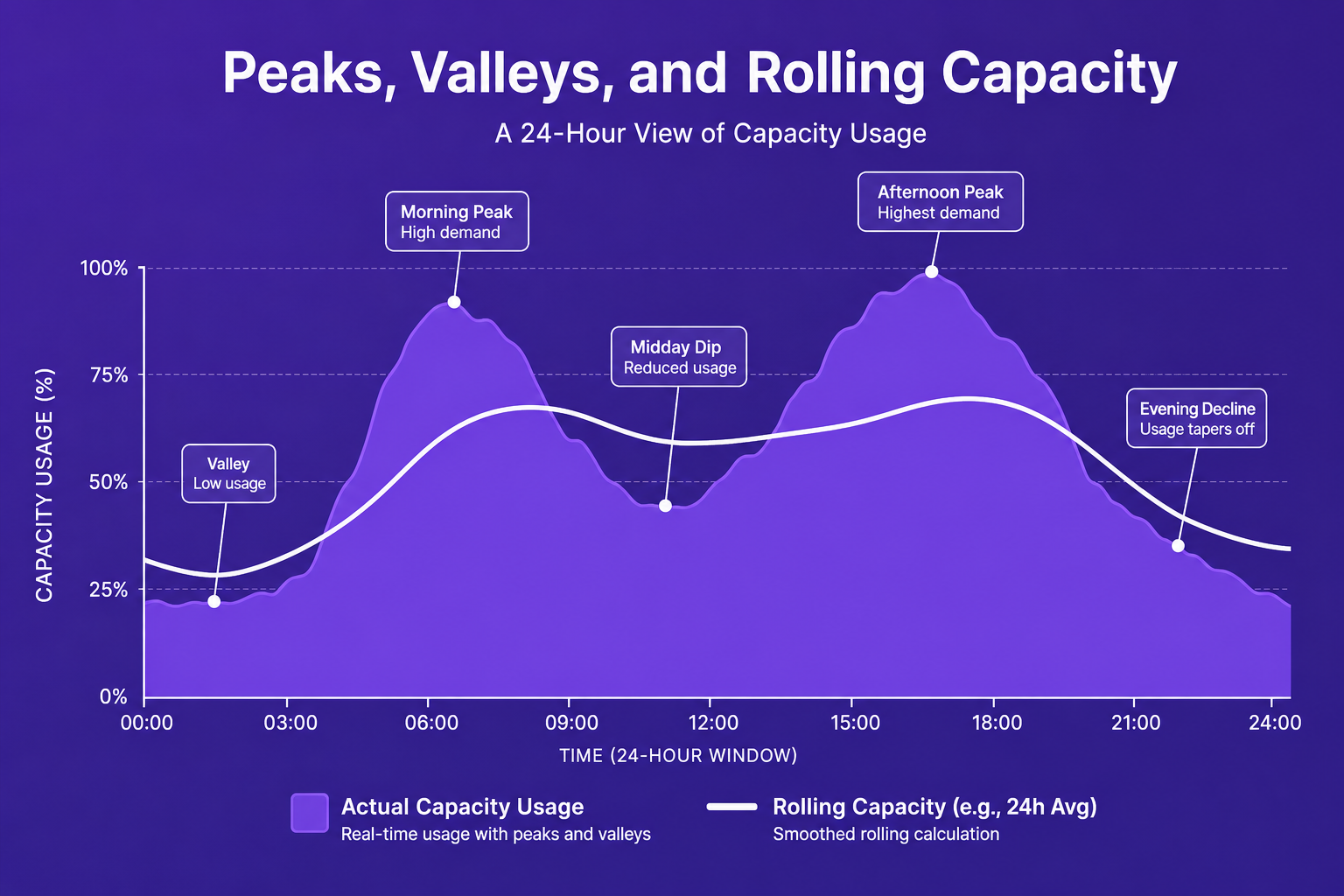
Enterprises today dedicate ever-expanding pools of compute and analytics resources. In Microsoft Fabric, and by extension Power BI, 'capacity units' are the currency for running interactive reports, AI-powered analytics, and background workloads. But usage does not occur in smooth, predictable patterns. Instead, peaks and valleys are the norm, with spikes often short-lived but potentially costly.
Capacity smoothing is the system’s answer to those unpredictable swings. Rather than immediately penalizing brief surges that tip over your purchased limit, Fabric implements a 24-hour capacity smoothing mechanism. This means:
Workload usage is averaged over a rolling 24-hour window.
Bursts are 'smoothed' to avoid immediate penalty charges or throttling.
Larger, sustained overages can still trigger increased fees or performance slowdowns.
This smoothing effect helps IT and finance leaders avoid unnecessary penalties from short spikes, but it also means your true ‘billable’ consumption may not match the output of your busiest hour. Understanding this distinction is vital for budget predictability.
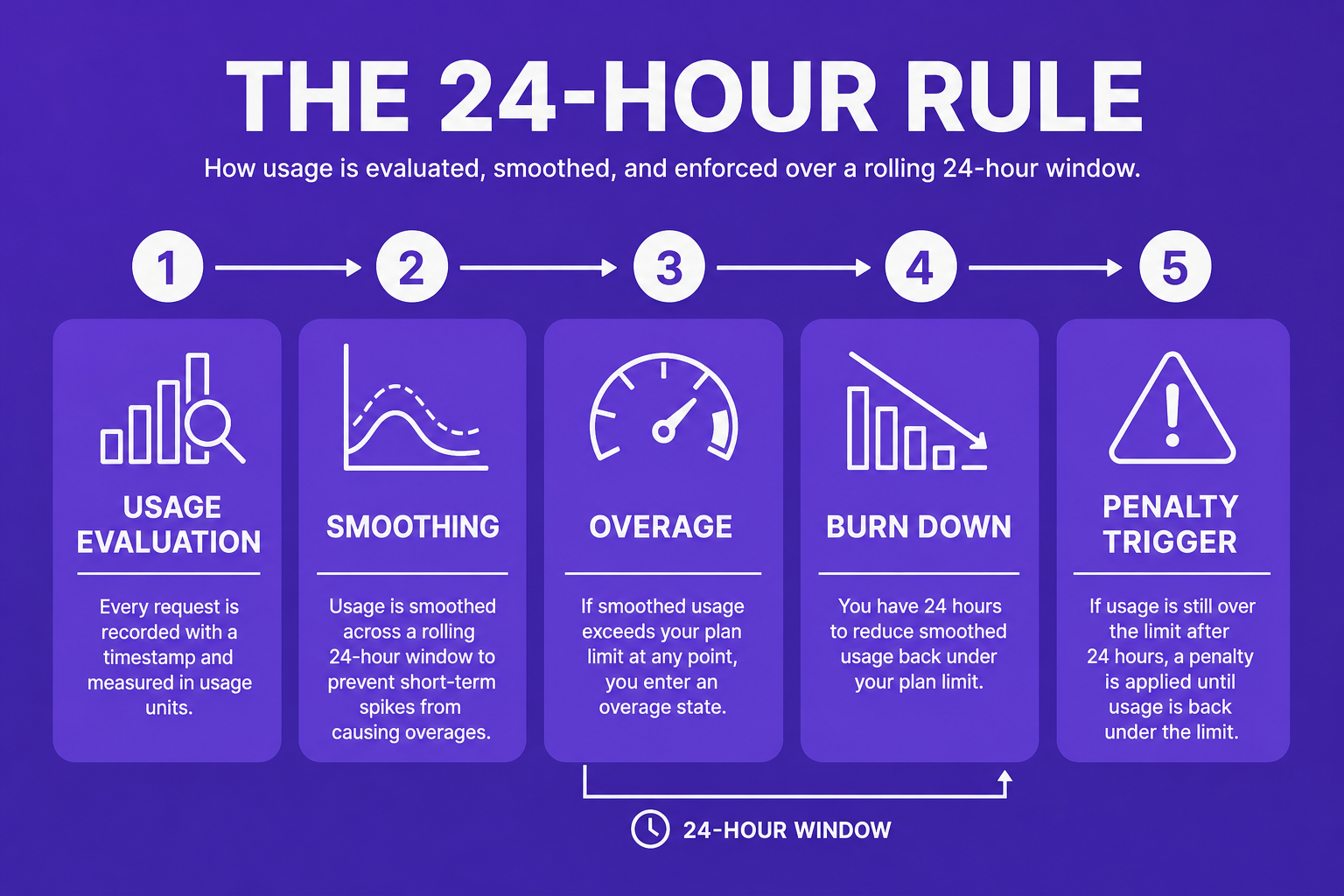
The "24-hour rule" sits at the intersection of technical performance and financial consequence. Here’s how it operates:
Rolling Window: Fabric reevaluates usage every five minutes, comparing current consumption across the previous 24 hours.
Smoothing Algorithm: If you briefly exceed capacity, the extra workload is spread, or 'smoothed', across the window to see if the average stays under your tier’s allowance.
Carry Forward: When overages occur but you subsequently dip below the threshold, idle minutes later in the window can help 'burn down' prior excesses.
Conditional Penalties: If, over 24 hours, your average remains above your allocation, penalties or throttling may apply.
This approach helps IT teams by giving headroom for intensive jobs but also creates risk, sustained overuse does eventually lead to either extra charges (if overage is enabled) or to backend restrictions on analytics workloads.
When usage persistently exceeds entitlement, two things can happen:
With Overage Enabled: You pay a premium, three times the usual rate, for capacity above your entitlement, tracked on a separate 'overage' meter. An organizational spending limit can be set, after which throttling will activate.
Without Overage: Fabric throttling policies kick in. Interactive delays, background job rejections, or scheduled query pauses are used to keep usage within bounds.
Unused capacity cannot be carried forward to future billing cycles; it is strictly "use it or lose it" within each hourly window. This makes planning and governance essential.
With AI workloads surging and baseline analytics use rising due to machine learning, unmanaged overprovisioning has become a pressing issue. Consider:
Up to 40% of organizations are overprovisioned, leaving analytics capacity idle.
Only 32% of organizations review analytics capacity allocation monthly.
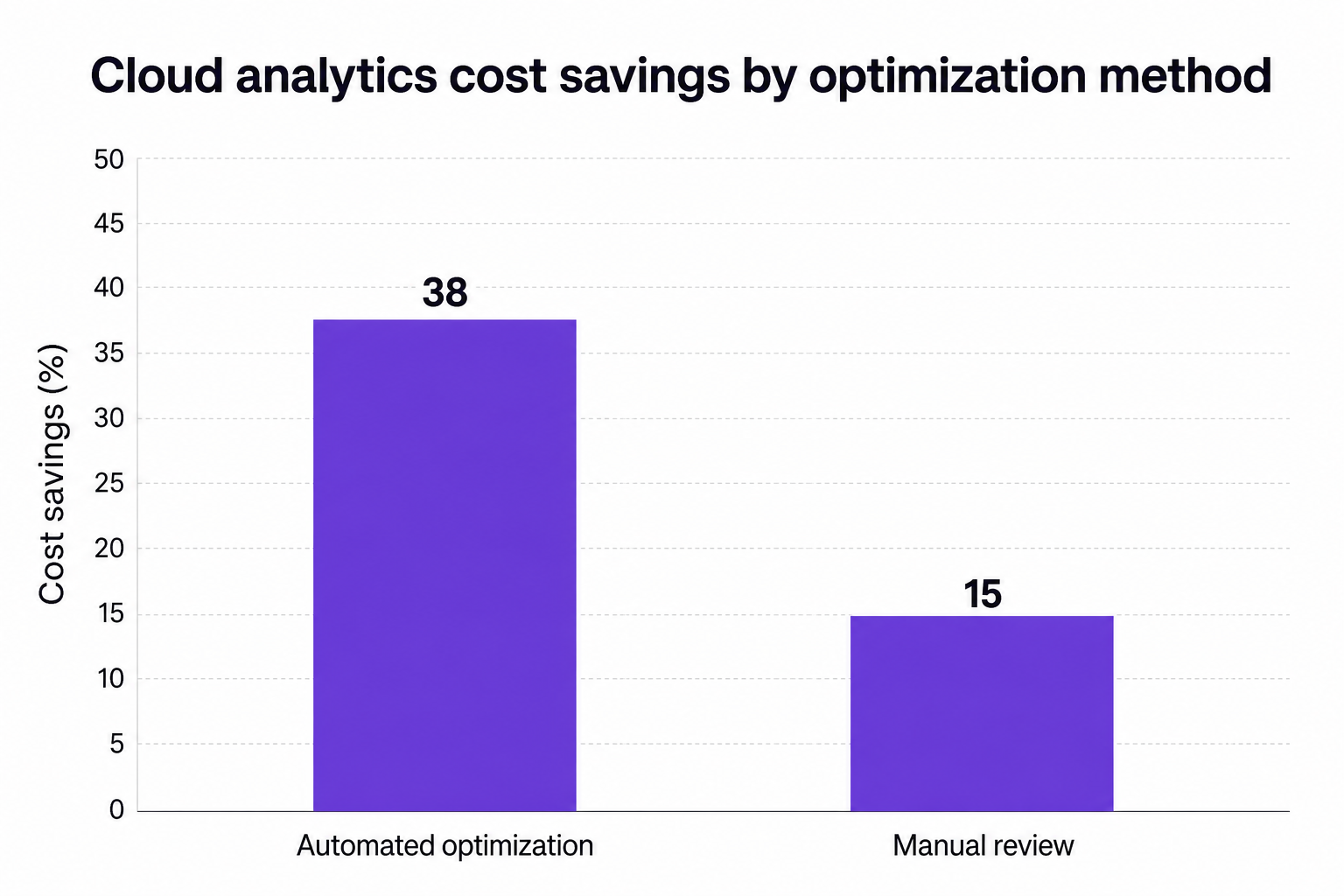
Enabling automated rightsizing and optimization tools results in, on average, 38% lower overall costs compared to manual approaches.
Many enterprises are shifting from manual spreadsheets to continuous, automated monitoring. This dynamic adjustment, right-sizing based on real utilization data, offers the highest ROI as suggested by expert insights.
Achieving financial discipline in a complex, smoothed billing environment requires a platform built for governance and optimization:
CloudNuro’s Commitments Optimization Engine: Flags and intelligently right-sizes underutilized capacity (e.g., scaling down environments running far below their entitlement).
Advanced Chargeback: Maps actual consumption to departments and business units for transparent financial accountability.
Unified Cloud Custodian: Executes automated workflows to pause or scale down non-critical workloads during off-peak times, directly addressing inefficiency and risk.
These solutions have helped CloudNuro customers achieve:
A global pharmaceutical group reduced penalty overage costs by 36% and automated chargebacks across 27 units in a single year.
A multinational bank slashed unused compute capacity hours by 45% and trimmed annual analytics platform spend by 36%.
Enterprises using CloudNuro’s automated approach reach up to 45% higher value at major agreement renewals.
SaaS capacity smoothing rewards those who monitor, forecast, and automate. As more organizations embrace AI and machine learning, cloud bills become less predictable and require more active governance. Chargeback models are growing in popularity, tying analytics capacity directly to business accountability and reducing overruns.
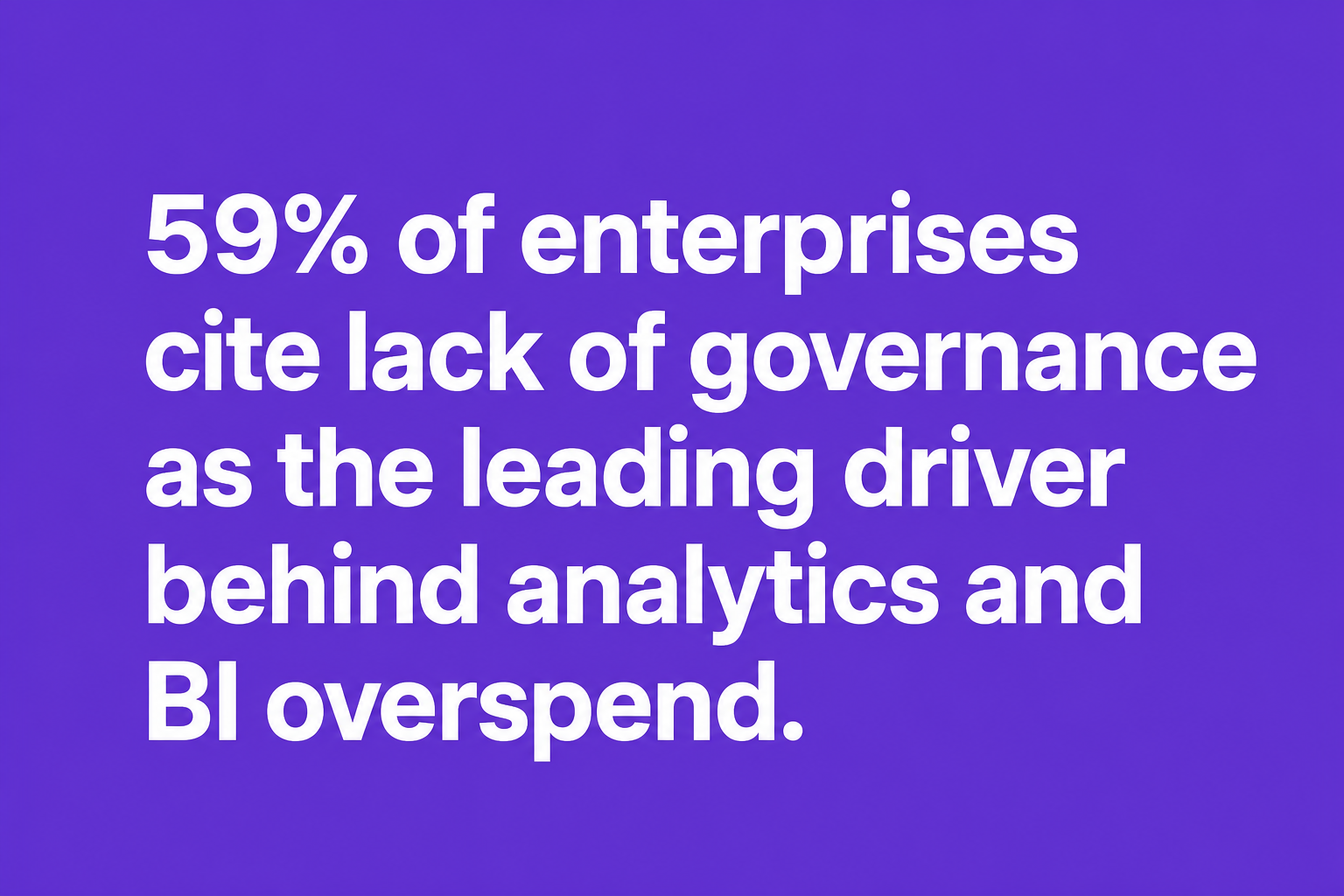
59% of enterprises cite lack of governance as the leading driver behind analytics and BI overspend.
Focused license and capacity audits reduce costs by an average of 29% in the first month.
Automated optimization yields 35.42% better savings compared to manual management.
Behind all of this is the mandate: IT and finance must work together to foster a culture of cost accountability and governance.
The 24-hour rule averages your total capacity usage over a rolling 24-hour window, smoothing out short spikes and only billing or throttling based on the actual average rather than the briefest peaks.
Capacity smoothing can result in a lower bill if peaks are infrequent. But persistent overuse over the full 24-hour window will trigger extra charges or throttle your performance, so continuous monitoring is vital.
If you enable overage, you pay a premium rate, three times standard, for the extra usage, up to a defined spending limit. If overage is disabled, jobs will be delayed or rejected to bring consumption back down.
Unused reserved capacity cannot be carried forward. It must be used within the hour or it expires; overages are tracked and resolved within the same 24-hour window.
Throttling can degrade user experience and analytics reliability, but more critically, overage penalties can create severe budget variance. Without governance, these hidden costs undermine financial predictability.
Optimizing for the 24-hour smoothing rule and navigating the intricacies of Microsoft Fabric billing requires more than just monitoring. You need automation, proactive alerts, and a governance-first architecture that bridges IT and finance. CloudNuro delivers this, integrating with your SaaS and cloud stack to:
Provide centralized inventory, license optimization, and advanced cost allocation
Flag underutilized resources before they drive up costs
Automate chargebacks and renewal management
Ready to ensure compliance, maximize cost savings, and take control of your Microsoft Fabric bill? Request a CloudNuro Demo | Get Free Savings | Explore the Product
About CloudNuro
CloudNuro is a leader in Enterprise AI Adoption Management, providing enterprises with unmatched visibility, governance, and cost optimization. Recognized twice in a row in the SaaS Management Platforms category and named a Leader in the SoftwareReviews Data Quadrant, CloudNuro is trusted by global enterprises and government agencies to bring financial discipline to SaaS, cloud, and AI. Trusted by enterprises, CloudNuro provides centralized SaaS inventory, license optimization, and renewal management along with advanced cost allocation and chargeback, giving IT and Finance leaders the visibility, control, and cost-conscious culture needed to drive financial discipline.
Request a no cost, no obligation free assessment —just 15 minutes to savings!
Get StartedAs enterprises accelerate data-driven transformation, optimizing analytics capacity is crucial for budget control, security, and governance. With the widespread adoption of Microsoft Fabric and Power BI, understanding capacity smoothing, the notorious 24-hour rule, and the mechanics of overage or throttling is central to mastering your cloud bill. This post unpacks how fabric capacity smoothing actually determines your invoice, how penalties are triggered, and how advanced platforms like CloudNuro streamline compliance while maximizing cost efficiency.
Enterprises today dedicate ever-expanding pools of compute and analytics resources. In Microsoft Fabric, and by extension Power BI, 'capacity units' are the currency for running interactive reports, AI-powered analytics, and background workloads. But usage does not occur in smooth, predictable patterns. Instead, peaks and valleys are the norm, with spikes often short-lived but potentially costly.
Capacity smoothing is the system’s answer to those unpredictable swings. Rather than immediately penalizing brief surges that tip over your purchased limit, Fabric implements a 24-hour capacity smoothing mechanism. This means:
Workload usage is averaged over a rolling 24-hour window.
Bursts are 'smoothed' to avoid immediate penalty charges or throttling.
Larger, sustained overages can still trigger increased fees or performance slowdowns.
This smoothing effect helps IT and finance leaders avoid unnecessary penalties from short spikes, but it also means your true ‘billable’ consumption may not match the output of your busiest hour. Understanding this distinction is vital for budget predictability.
The "24-hour rule" sits at the intersection of technical performance and financial consequence. Here’s how it operates:
Rolling Window: Fabric reevaluates usage every five minutes, comparing current consumption across the previous 24 hours.
Smoothing Algorithm: If you briefly exceed capacity, the extra workload is spread, or 'smoothed', across the window to see if the average stays under your tier’s allowance.
Carry Forward: When overages occur but you subsequently dip below the threshold, idle minutes later in the window can help 'burn down' prior excesses.
Conditional Penalties: If, over 24 hours, your average remains above your allocation, penalties or throttling may apply.
This approach helps IT teams by giving headroom for intensive jobs but also creates risk, sustained overuse does eventually lead to either extra charges (if overage is enabled) or to backend restrictions on analytics workloads.
When usage persistently exceeds entitlement, two things can happen:
With Overage Enabled: You pay a premium, three times the usual rate, for capacity above your entitlement, tracked on a separate 'overage' meter. An organizational spending limit can be set, after which throttling will activate.
Without Overage: Fabric throttling policies kick in. Interactive delays, background job rejections, or scheduled query pauses are used to keep usage within bounds.
Unused capacity cannot be carried forward to future billing cycles; it is strictly "use it or lose it" within each hourly window. This makes planning and governance essential.
With AI workloads surging and baseline analytics use rising due to machine learning, unmanaged overprovisioning has become a pressing issue. Consider:
Up to 40% of organizations are overprovisioned, leaving analytics capacity idle.
Only 32% of organizations review analytics capacity allocation monthly.
Enabling automated rightsizing and optimization tools results in, on average, 38% lower overall costs compared to manual approaches.
Many enterprises are shifting from manual spreadsheets to continuous, automated monitoring. This dynamic adjustment, right-sizing based on real utilization data, offers the highest ROI as suggested by expert insights.
Achieving financial discipline in a complex, smoothed billing environment requires a platform built for governance and optimization:
CloudNuro’s Commitments Optimization Engine: Flags and intelligently right-sizes underutilized capacity (e.g., scaling down environments running far below their entitlement).
Advanced Chargeback: Maps actual consumption to departments and business units for transparent financial accountability.
Unified Cloud Custodian: Executes automated workflows to pause or scale down non-critical workloads during off-peak times, directly addressing inefficiency and risk.
These solutions have helped CloudNuro customers achieve:
A global pharmaceutical group reduced penalty overage costs by 36% and automated chargebacks across 27 units in a single year.
A multinational bank slashed unused compute capacity hours by 45% and trimmed annual analytics platform spend by 36%.
Enterprises using CloudNuro’s automated approach reach up to 45% higher value at major agreement renewals.
SaaS capacity smoothing rewards those who monitor, forecast, and automate. As more organizations embrace AI and machine learning, cloud bills become less predictable and require more active governance. Chargeback models are growing in popularity, tying analytics capacity directly to business accountability and reducing overruns.
59% of enterprises cite lack of governance as the leading driver behind analytics and BI overspend.
Focused license and capacity audits reduce costs by an average of 29% in the first month.
Automated optimization yields 35.42% better savings compared to manual management.
Behind all of this is the mandate: IT and finance must work together to foster a culture of cost accountability and governance.
The 24-hour rule averages your total capacity usage over a rolling 24-hour window, smoothing out short spikes and only billing or throttling based on the actual average rather than the briefest peaks.
Capacity smoothing can result in a lower bill if peaks are infrequent. But persistent overuse over the full 24-hour window will trigger extra charges or throttle your performance, so continuous monitoring is vital.
If you enable overage, you pay a premium rate, three times standard, for the extra usage, up to a defined spending limit. If overage is disabled, jobs will be delayed or rejected to bring consumption back down.
Unused reserved capacity cannot be carried forward. It must be used within the hour or it expires; overages are tracked and resolved within the same 24-hour window.
Throttling can degrade user experience and analytics reliability, but more critically, overage penalties can create severe budget variance. Without governance, these hidden costs undermine financial predictability.
Optimizing for the 24-hour smoothing rule and navigating the intricacies of Microsoft Fabric billing requires more than just monitoring. You need automation, proactive alerts, and a governance-first architecture that bridges IT and finance. CloudNuro delivers this, integrating with your SaaS and cloud stack to:
Provide centralized inventory, license optimization, and advanced cost allocation
Flag underutilized resources before they drive up costs
Automate chargebacks and renewal management
Ready to ensure compliance, maximize cost savings, and take control of your Microsoft Fabric bill? Request a CloudNuro Demo | Get Free Savings | Explore the Product
About CloudNuro
CloudNuro is a leader in Enterprise AI Adoption Management, providing enterprises with unmatched visibility, governance, and cost optimization. Recognized twice in a row in the SaaS Management Platforms category and named a Leader in the SoftwareReviews Data Quadrant, CloudNuro is trusted by global enterprises and government agencies to bring financial discipline to SaaS, cloud, and AI. Trusted by enterprises, CloudNuro provides centralized SaaS inventory, license optimization, and renewal management along with advanced cost allocation and chargeback, giving IT and Finance leaders the visibility, control, and cost-conscious culture needed to drive financial discipline.
Request a no cost, no obligation free assessment - just 15 minutes to savings!
Get StartedWe're offering complimentary ServiceNow license assessments to only 25 enterprises this quarter who want to unlock immediate savings without disrupting operations.
Get Free AssessmentGet Started




CloudNuro Corp
1755 Park St. Suite 207
Naperville, IL 60563
Phone : +1-630-277-9470
Email: info@cloudnuro.com





.webp)

Recognized Leader in SaaS Management Platforms by Info-Tech SoftwareReviews



.svg)