

Sign Up
Thank you for Submitting!
A structured Google Workspace access review is no longer optional for enterprises that care about security, compliance, and SaaS spend. As Google Workspace becomes a core identity provider for dozens or hundreds of connected applications, any gap in user reviews creates both risk and waste.
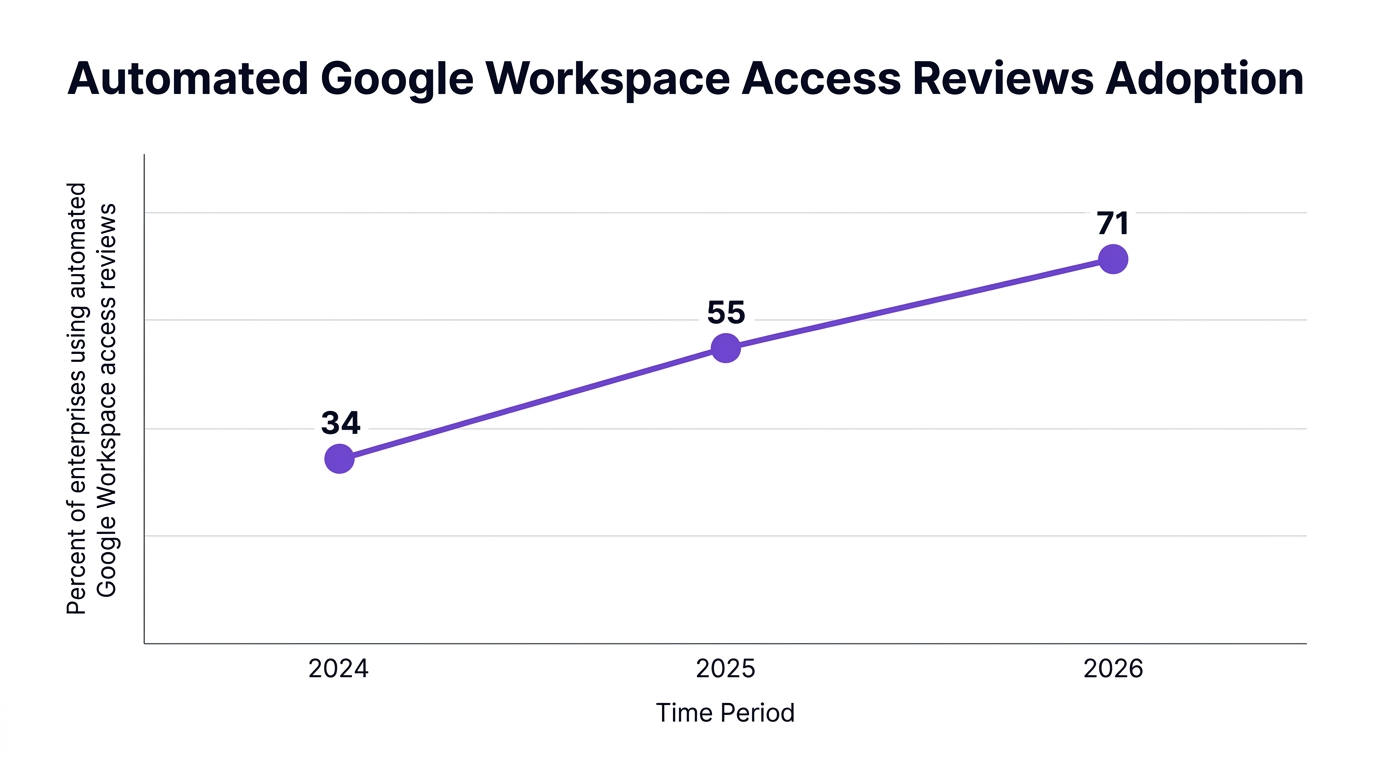
Forrester reports that 71% of enterprises now run SaaS access reviews at least quarterly to address new compliance mandates (2026). Gartner notes that 61% of IT leaders identify unmanaged Google Workspace seats as a top driver of SaaS overspend, costing about $148 per user per year (2026). Done well, a Google Workspace UAR protects your environment and pays for itself through reclaimed licenses and streamlined operations.
This guide walks through what a Google Workspace access review is, how to run it step by step, how to automate it, and how CloudNuro can help you industrialize the process across all SaaS.
A Google Workspace access review is a recurring, structured assessment of who has access to Google Workspace and what level of permissions they hold. It typically covers both core Workspace roles and the broader ecosystem of third party apps and integrations bound to Workspace identities.
At its core, a Google Workspace UAR aims to:
Validate that each user still needs an account.
Confirm that each user has the least privilege required to perform their role.
Identify dormant or orphaned accounts and reclaim licenses.
Prove to auditors that access governance controls are designed and working.
According to ISACA, 84% of security audits in regulated sectors flag weak access review documentation as a key compliance risk (2026). That means the problem is not only who has access, but whether you can prove that you checked.
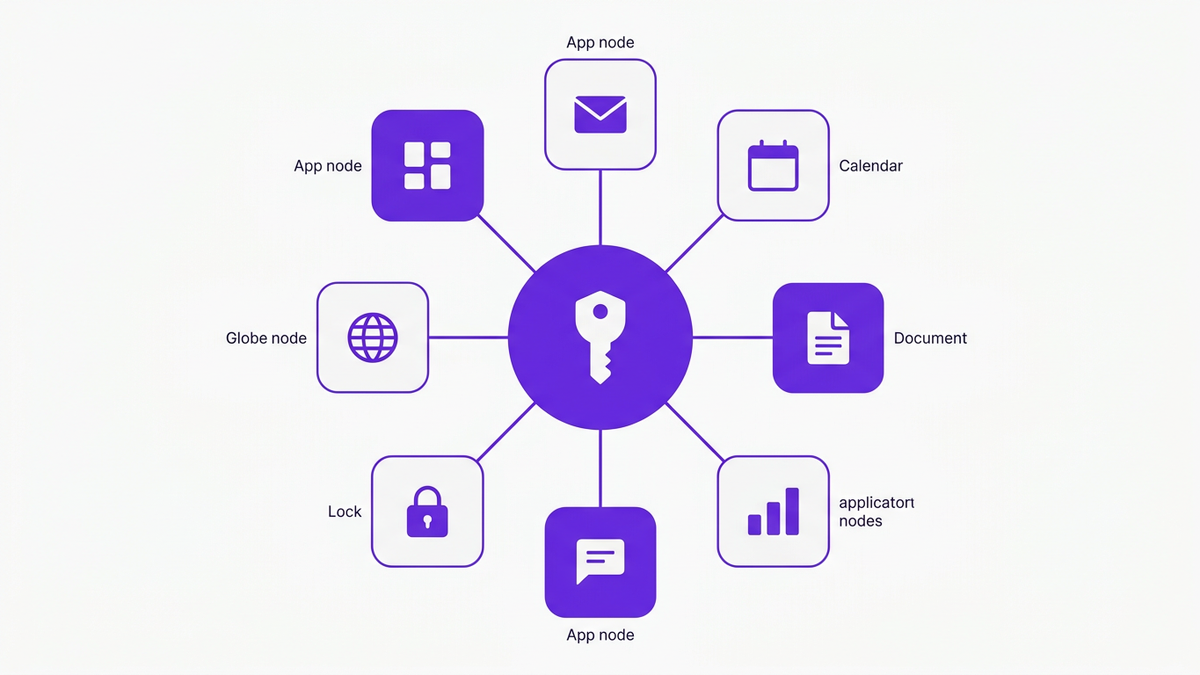
Modern enterprises use Google Workspace as a primary identity provider. A single Workspace account can grant entry to:
Core apps such as Gmail, Drive, Meet, and Calendar.
Workspace Marketplace apps.
Dozens of external SaaS tools that use SSO.
So a GSuite access review (for legacy naming) is effectively a SaaS access review for the broader stack. When you audit Google Workspace, you touch a large percentage of your SaaS estate.
Deloitte notes that 59% of SaaS security incidents involve ex employees retaining access due to failed deprovisioning (2026). If Workspace is the identity backbone, then your Google Workspace audit is where you close that gap.
Think of a UAR as a repeatable workflow, not a one time clean up. CloudNuro uses a simple framework called RACER to describe the lifecycle:
Record: capture the complete, current entitlement picture.
Analyze: find anomalies, risks, and waste.
Certify: have managers and owners attest to access.
Enforce: remove, adjust, or remediate access.
Report: generate an auditor ready SaaS audit trail.
Each cycle builds an evidence base for SaaS access governance and SaaS compliance reporting, while also driving SaaS license optimization.
The first step is complete visibility. Without a reliable inventory, you cannot certify anything.
You should consolidate:
All active and suspended users, including external identities.
Admin roles and custom roles.
Group memberships and resource access.
First and third party Workspace apps and OAuth scopes.
Connected SaaS systems using Workspace SSO or SCIM.
A McKinsey analysis shows that 68% of enterprises cite lack of unified SaaS visibility as their biggest challenge for access governance (2026). This is where many Google Workspace access review projects stall: data is scattered across admin panels, spreadsheets, and ticketing systems.
CloudNuro addresses this by ingesting Google Workspace as one data source within a broader SaaS management view. That allows you to see Google Workspace entitlements alongside other major SaaS platforms.
Once you have an inventory, the next task is to audit Google Workspace for patterns that signal risk or waste:
Users not seen in the last 60 to 90 days.
Shared accounts or generic mailboxes without clear owners.
Users with admin roles inconsistent with their job function.
External collaborators with broad Drive or Shared Drive access.
Apps with overly permissive OAuth scopes.
KPMG found that 92% of organizations using automated Google Workspace user access reviews saw a 36% reduction in orphaned accounts (2026). That reduction typically appears when you actively flag dormant users and accounts untied to HR records or managers.
This is also where Google Workspace license management and Google Workspace seat reclamation begin. Every dormant account is a candidate for user deactivation and license reallocation.
Certification is where managers and application owners attest that access is still appropriate. For a Google Workspace UAR, you typically need certifications at several levels:
User to manager: "Does this person still need a Workspace account and this license tier?"
Group owner: "Does this distribution list or security group still need these members?"
App owner: "Should this app retain its current OAuth scopes and Workspace access?"
For audit ready processes, you also need SaaS entitlement management evidence. Auditors expect to see:
A clear policy describing the review cadence and scope.
Records of who reviewed what, and when.
Decisions taken for each entitlement.
Exceptions and approvals, especially for high privilege roles.
Dr. Alina Rao of ISACA notes that manual audits cannot keep up with cloud scale and recommends automated workflows to preserve a continuous SaaS audit trail (2026).
An access review that never leads to action is just a reporting exercise. Enforcement should be policy driven and automated where possible.
Typical enforcement actions include:
User deactivation for departed or dormant users.
Role downgrade for admins with unnecessary privileges.
Removal from sensitive groups or shared drives.
Revocation of risky OAuth scopes.
License reclaim automation for unused or downgraded seats.
IDC reports that automated entitlement management for Google Workspace cut manual effort by 67% and audit preparation time by 40% in large enterprises (2026). Automating SaaS user deprovisioning, SCIM deprovisioning, and SaaS offboarding automation multiplies the impact of each UAR cycle.
Finally, you need evidence that satisfies internal and external audits. For a mature Google Workspace audit program, reporting typically includes:
Logs of every access review campaign and its scope.
Certifications by manager, app owner, and security.
A SaaS audit trail of remediation actions tied to specific findings.
Metrics that show coverage and timeliness.
For regulated organizations, this is what supports SOC 2, ISO 27001, HIPAA, and similar frameworks. ISACA data shows that organizations with well documented access reviews reduce audit findings related to identity controls by nearly one third (2026).
If you are formalizing your first structured review, use this pragmatic sequence. You can run it quarterly, then evolve toward more continuous verification.
Start with a realistic scope. Trying to review every entitlement across every app at once usually fails.
For most enterprises, a strong first scope is:
All active Google Workspace users and admins.
All super admins and custom admin roles.
All users with high cost license tiers.
Set your cadence based on risk:
High privilege accounts: monthly.
All Workspace users: quarterly.
External collaborators: quarterly or semi annually.
To ensure that departed users do not retain access, you need a reliable join between HR and Workspace. That is the foundation of SaaS identity access management and access governance.
At minimum, align:
Workspace users with HRIS or payroll records.
Manager relationships for certification.
Employment status and start/end dates.
This integration supports automatic flags for UAR, such as "user terminated in HR but still active in Google Workspace". Those users should be prioritized for user deactivation and revoke SaaS access workflows.
Next, group users and access patterns to reduce review fatigue and support least privilege.
Useful dimensions include:
Department or cost center.
Region or legal entity.
License tier (for example, Standard vs Enterprise tier).
Privilege level (user, power user, admin).
Use these classifications to build targeted review tasks such as "all finance admins" or "all users with drive wide sharing enabled". This also lays groundwork for SaaS spend management by tying licenses to cost centers and budgets.
When managers receive review tasks, they need simple, consistent choices. For each user entitlement, present:
Keep as is.
Downgrade access / license.
Remove access.
Reassign to another owner.
This is where many manual processes fail. If decision makers have to email IT or open tickets for every change, the cycle drags. A modern process routes those decisions into automated Google Workspace admin automation workflows.
Access reviews and offboarding must reinforce each other. A robust offboarding checklist should include:
Immediate SaaS user deprovisioning from Google Workspace when HR marks a termination.
SCIM deprovisioning to connected SaaS where supported.
License removal or downgrade for Workspace and downstream apps.
Transfer or archival of ownership for files, calendars, and groups.
Deloitte found that organizations with automated offboarding experienced dramatically fewer incidents involving ex employees retaining access (2026). This is exactly where SaaS offboarding automation pays dividends.
Finally, track metrics that show whether your Google Workspace security review is working:
Count of orphaned accounts over time.
License utilization by SKU.
Time from HR termination to full deprovisioning.
Percentage of UAR tasks completed on time.
Number of high privilege exceptions.
Use these metrics to tune policies and to demonstrate continuous improvement to auditors and executives.
A structured Google Workspace access review program can trigger pushback. Here are common concerns and how to address them.
Some stakeholders may argue that annual reviews are sufficient, especially for smaller teams. However, Forrester notes that most enterprises have already moved to quarterly or more frequent reviews due to regulatory expectations (2026).
Consider a hybrid approach:
Monthly reviews for admins and high risk teams.
Quarterly reviews for the broader user base.
This balances risk and workload, and you can increase cadence gradually as automation matures.
This concern is valid if your process is manual and noisy. Long CSV exports and email reminders are easy to ignore.
To reduce friction:
Pre group users into logical sets (by team, role, license tier).
Auto approve low risk, highly active users within policy, and only escalate anomalies.
Integrate approvals into collaboration tools or manager dashboards.
Automation should shrink manager workloads, not grow them. When CloudNuro customers adopt policy driven reviews, they often cut review effort by more than half while increasing coverage.
A yearly Google Workspace audit provides a snapshot. It does not protect you from risks that accumulate in the other eleven months.
Instead, treat the annual audit as a report on a continuous verification process. Automated, smaller UAR cycles throughout the year give you better security posture and more reliable audit and compliance reporting.
CloudNuro is built to bring automation, governance, and cost discipline to SaaS environments. Its AI enabled platform integrates Google Workspace into a broader SaaS access governance and SaaS spend management strategy.
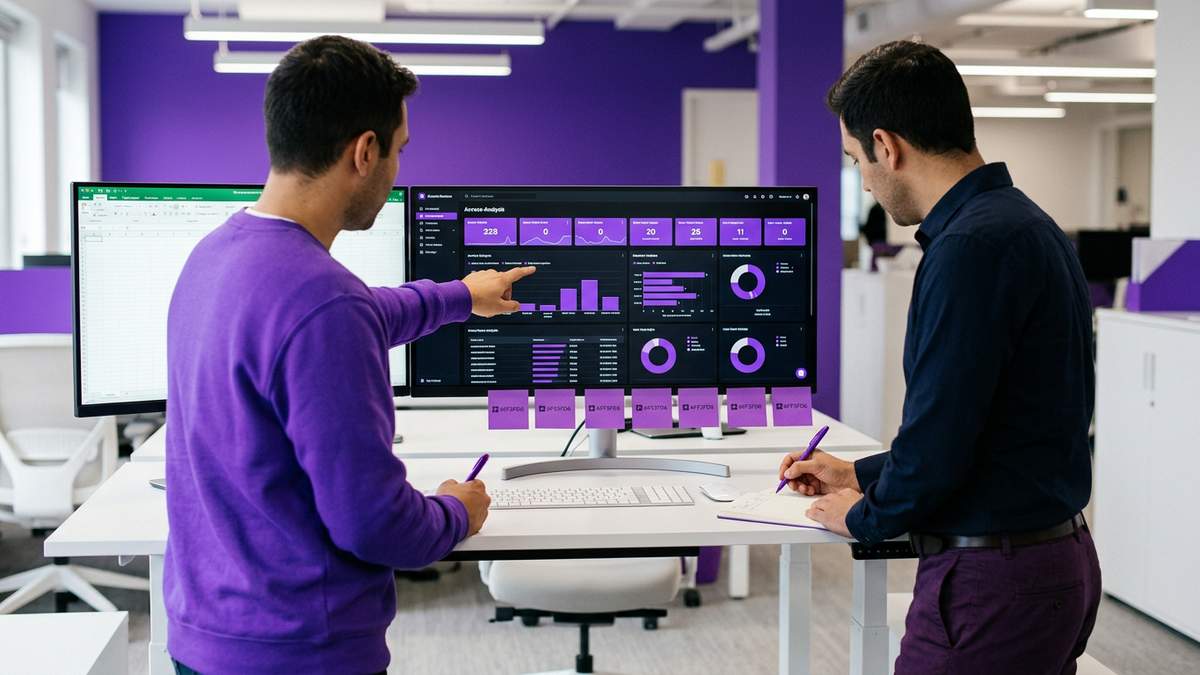
CloudNuro ingests Google Workspace data into a centralized SaaS management view. You see:
All users, admins, and license tiers.
Group memberships and shared drives.
OAuth connected apps and SSO integrations.
Downstream SaaS entitlements tied to Workspace identities.
This addresses the 68% of enterprises that cite lack of unified SaaS visibility as their top governance challenge (Okta 2026). It also helps identify shadow IT discovery patterns where users connect unauthorized apps to Workspace accounts.
Using CloudNuro AI Custodian, IT and security teams can:
Schedule recurring Google Workspace UAR campaigns on monthly or quarterly cadences.
Configure policy based scopes for high risk roles, departments, or geographies.
Route review tasks automatically to managers and application owners.
Capture attestation decisions with full SaaS audit trail detail.
CloudNuro supports automated access reviews for Google Workspace alongside other SaaS, all from a consolidated IT operations focused view.
CloudNuro turns review decisions into action with policy driven workflows that support:
Instant SaaS user deprovisioning when termination events arrive from HR or IAM.
SCIM deprovisioning to integrated SaaS applications.
Google Workspace license reclaim automation to downgrade or remove unused seats.
Cross platform SaaS license optimization by reallocating freed licenses.
This is where customers see significant cost savings. For example, one financial services customer used CloudNuro AI Custodian to automate quarterly Google Workspace user access reviews and offboarding. In 12 months they achieved a 95% audit pass rate and reclaimed $236,000 in unused licenses.
Another healthcare customer used policy based entitlement reviews across Google Workspace and core SaaS systems. They reduced IT workload by 62%, eliminated more than 900 orphaned accounts, and satisfied their HIPAA audit requirements, according to internal post implementation tracking.
CloudNuro produces detailed SaaS compliance reporting that shows:
Every Google Workspace access review campaign and its participants.
Decision logs for each user and entitlement.
Time stamped records of deprovisioning and remediation.
Roll up metrics for coverage, timeliness, and exception handling.
This evidence supports SOC 2, ISO 27001, HIPAA, and other frameworks that demand robust identity controls. Instead of scrambling before an audit, teams export structured reports from CloudNuro and point auditors directly to the SaaS audit trail.
To see how CloudNuro integrates with your environment, explore the dedicated Google Workspace integration overview.
A Google Workspace access review is a structured, recurring process where IT, security, and business managers validate who has access to Google Workspace and what level of privileges they hold.
It aims to enforce least privilege, detect orphaned and dormant accounts, reduce license waste, and provide evidence for audits.
To automate user access reviews you should:
Connect Google Workspace to a SaaS access governance or SaaS identity access management platform.
Define policies for scope, cadence, and risk based prioritization.
Auto assign review tasks to managers and app owners.
Use workflows for SaaS user deprovisioning, role changes, and license reclaim automation.
CloudNuro AI Custodian enables all of these capabilities and adds AI based anomaly detection on top.
Most regulatory frameworks expect periodic access reviews and a provable audit and compliance reporting trail. ISACA reports that 84% of security audits flag insufficient access review documentation as a major risk (2026).
Google Workspace access reviews prove that you both designed and operated identity controls. They also lower the chance of audit findings related to excessive privileges or ex employee access.
You must integrate HR, identity, and SaaS systems so that a single termination event triggers:
Workspace account suspension or deletion.
SCIM deprovisioning to connected SaaS where supported.
License removal across Google Workspace and other apps.
Removal from groups and shared resources.
Platforms like CloudNuro orchestrate these flows with SaaS offboarding automation, ensuring no ex employee retains live access.
Auditors typically look for:
Documented policies for review cadence, scope, and ownership.
Logs of completed Google Workspace access review campaigns.
Detailed decisions for each user, group, and entitlement.
Time stamped records of remediation actions.
Metrics showing coverage and timely completion.
CloudNuro generates exportable reports that map directly to these expectations and maintain a robust SaaS audit trail.
Google Workspace reviews surface:
Unused and dormant accounts.
Over provisioned license tiers.
Duplicate identities and shared accounts.
When tied to automated Google Workspace license management and Google Workspace seat reclamation, these reviews free up licenses, right size entitlements, and contribute directly to SaaS spend management.
A mature Google Workspace access review program protects your organization on three fronts: security, compliance, and cost. You gain confidence that only the right people have the right level of access, you maintain an auditor ready SaaS audit trail, and you reduce wasteful spending on unused or over provisioned licenses.
Manual, spreadsheet driven reviews cannot keep pace with modern SaaS environments. Automated Google Workspace UAR campaigns, policy based SaaS user deprovisioning, and SaaS license optimization workflows are now table stakes for IT, security, and finance leaders who want sustainable control.
CloudNuro brings these capabilities together across Google Workspace and your broader SaaS landscape, giving you unified visibility, automation, and access governance that scales.
Ready to see how automated Google Workspace access reviews could work in your environment?
CloudNuro is a leader in Enterprise SaaS Management Platforms, providing enterprises with unmatched visibility, governance, and cost optimization. Recognized twice in a row in the SaaS Management Platforms category and named a Leader in the SoftwareReviews Data Quadrant, CloudNuro is trusted by global enterprises and government agencies to bring financial discipline to SaaS, cloud, and AI.
Trusted by enterprises such as Konica Minolta and Federal Signal, CloudNuro provides centralized SaaS inventory, license optimization, and renewal management along with advanced cost allocation and chargeback, giving IT and Finance leaders the visibility, control, and cost conscious culture needed to drive financial discipline.
Request a no cost, no obligation free assessment —just 15 minutes to savings!
Get StartedA structured Google Workspace access review is no longer optional for enterprises that care about security, compliance, and SaaS spend. As Google Workspace becomes a core identity provider for dozens or hundreds of connected applications, any gap in user reviews creates both risk and waste.
Forrester reports that 71% of enterprises now run SaaS access reviews at least quarterly to address new compliance mandates (2026). Gartner notes that 61% of IT leaders identify unmanaged Google Workspace seats as a top driver of SaaS overspend, costing about $148 per user per year (2026). Done well, a Google Workspace UAR protects your environment and pays for itself through reclaimed licenses and streamlined operations.
This guide walks through what a Google Workspace access review is, how to run it step by step, how to automate it, and how CloudNuro can help you industrialize the process across all SaaS.
A Google Workspace access review is a recurring, structured assessment of who has access to Google Workspace and what level of permissions they hold. It typically covers both core Workspace roles and the broader ecosystem of third party apps and integrations bound to Workspace identities.
At its core, a Google Workspace UAR aims to:
Validate that each user still needs an account.
Confirm that each user has the least privilege required to perform their role.
Identify dormant or orphaned accounts and reclaim licenses.
Prove to auditors that access governance controls are designed and working.
According to ISACA, 84% of security audits in regulated sectors flag weak access review documentation as a key compliance risk (2026). That means the problem is not only who has access, but whether you can prove that you checked.
Modern enterprises use Google Workspace as a primary identity provider. A single Workspace account can grant entry to:
Core apps such as Gmail, Drive, Meet, and Calendar.
Workspace Marketplace apps.
Dozens of external SaaS tools that use SSO.
So a GSuite access review (for legacy naming) is effectively a SaaS access review for the broader stack. When you audit Google Workspace, you touch a large percentage of your SaaS estate.
Deloitte notes that 59% of SaaS security incidents involve ex employees retaining access due to failed deprovisioning (2026). If Workspace is the identity backbone, then your Google Workspace audit is where you close that gap.
Think of a UAR as a repeatable workflow, not a one time clean up. CloudNuro uses a simple framework called RACER to describe the lifecycle:
Record: capture the complete, current entitlement picture.
Analyze: find anomalies, risks, and waste.
Certify: have managers and owners attest to access.
Enforce: remove, adjust, or remediate access.
Report: generate an auditor ready SaaS audit trail.
Each cycle builds an evidence base for SaaS access governance and SaaS compliance reporting, while also driving SaaS license optimization.
The first step is complete visibility. Without a reliable inventory, you cannot certify anything.
You should consolidate:
All active and suspended users, including external identities.
Admin roles and custom roles.
Group memberships and resource access.
First and third party Workspace apps and OAuth scopes.
Connected SaaS systems using Workspace SSO or SCIM.
A McKinsey analysis shows that 68% of enterprises cite lack of unified SaaS visibility as their biggest challenge for access governance (2026). This is where many Google Workspace access review projects stall: data is scattered across admin panels, spreadsheets, and ticketing systems.
CloudNuro addresses this by ingesting Google Workspace as one data source within a broader SaaS management view. That allows you to see Google Workspace entitlements alongside other major SaaS platforms.
Once you have an inventory, the next task is to audit Google Workspace for patterns that signal risk or waste:
Users not seen in the last 60 to 90 days.
Shared accounts or generic mailboxes without clear owners.
Users with admin roles inconsistent with their job function.
External collaborators with broad Drive or Shared Drive access.
Apps with overly permissive OAuth scopes.
KPMG found that 92% of organizations using automated Google Workspace user access reviews saw a 36% reduction in orphaned accounts (2026). That reduction typically appears when you actively flag dormant users and accounts untied to HR records or managers.
This is also where Google Workspace license management and Google Workspace seat reclamation begin. Every dormant account is a candidate for user deactivation and license reallocation.
Certification is where managers and application owners attest that access is still appropriate. For a Google Workspace UAR, you typically need certifications at several levels:
User to manager: "Does this person still need a Workspace account and this license tier?"
Group owner: "Does this distribution list or security group still need these members?"
App owner: "Should this app retain its current OAuth scopes and Workspace access?"
For audit ready processes, you also need SaaS entitlement management evidence. Auditors expect to see:
A clear policy describing the review cadence and scope.
Records of who reviewed what, and when.
Decisions taken for each entitlement.
Exceptions and approvals, especially for high privilege roles.
Dr. Alina Rao of ISACA notes that manual audits cannot keep up with cloud scale and recommends automated workflows to preserve a continuous SaaS audit trail (2026).
An access review that never leads to action is just a reporting exercise. Enforcement should be policy driven and automated where possible.
Typical enforcement actions include:
User deactivation for departed or dormant users.
Role downgrade for admins with unnecessary privileges.
Removal from sensitive groups or shared drives.
Revocation of risky OAuth scopes.
License reclaim automation for unused or downgraded seats.
IDC reports that automated entitlement management for Google Workspace cut manual effort by 67% and audit preparation time by 40% in large enterprises (2026). Automating SaaS user deprovisioning, SCIM deprovisioning, and SaaS offboarding automation multiplies the impact of each UAR cycle.
Finally, you need evidence that satisfies internal and external audits. For a mature Google Workspace audit program, reporting typically includes:
Logs of every access review campaign and its scope.
Certifications by manager, app owner, and security.
A SaaS audit trail of remediation actions tied to specific findings.
Metrics that show coverage and timeliness.
For regulated organizations, this is what supports SOC 2, ISO 27001, HIPAA, and similar frameworks. ISACA data shows that organizations with well documented access reviews reduce audit findings related to identity controls by nearly one third (2026).
If you are formalizing your first structured review, use this pragmatic sequence. You can run it quarterly, then evolve toward more continuous verification.
Start with a realistic scope. Trying to review every entitlement across every app at once usually fails.
For most enterprises, a strong first scope is:
All active Google Workspace users and admins.
All super admins and custom admin roles.
All users with high cost license tiers.
Set your cadence based on risk:
High privilege accounts: monthly.
All Workspace users: quarterly.
External collaborators: quarterly or semi annually.
To ensure that departed users do not retain access, you need a reliable join between HR and Workspace. That is the foundation of SaaS identity access management and access governance.
At minimum, align:
Workspace users with HRIS or payroll records.
Manager relationships for certification.
Employment status and start/end dates.
This integration supports automatic flags for UAR, such as "user terminated in HR but still active in Google Workspace". Those users should be prioritized for user deactivation and revoke SaaS access workflows.
Next, group users and access patterns to reduce review fatigue and support least privilege.
Useful dimensions include:
Department or cost center.
Region or legal entity.
License tier (for example, Standard vs Enterprise tier).
Privilege level (user, power user, admin).
Use these classifications to build targeted review tasks such as "all finance admins" or "all users with drive wide sharing enabled". This also lays groundwork for SaaS spend management by tying licenses to cost centers and budgets.
When managers receive review tasks, they need simple, consistent choices. For each user entitlement, present:
Keep as is.
Downgrade access / license.
Remove access.
Reassign to another owner.
This is where many manual processes fail. If decision makers have to email IT or open tickets for every change, the cycle drags. A modern process routes those decisions into automated Google Workspace admin automation workflows.
Access reviews and offboarding must reinforce each other. A robust offboarding checklist should include:
Immediate SaaS user deprovisioning from Google Workspace when HR marks a termination.
SCIM deprovisioning to connected SaaS where supported.
License removal or downgrade for Workspace and downstream apps.
Transfer or archival of ownership for files, calendars, and groups.
Deloitte found that organizations with automated offboarding experienced dramatically fewer incidents involving ex employees retaining access (2026). This is exactly where SaaS offboarding automation pays dividends.
Finally, track metrics that show whether your Google Workspace security review is working:
Count of orphaned accounts over time.
License utilization by SKU.
Time from HR termination to full deprovisioning.
Percentage of UAR tasks completed on time.
Number of high privilege exceptions.
Use these metrics to tune policies and to demonstrate continuous improvement to auditors and executives.
A structured Google Workspace access review program can trigger pushback. Here are common concerns and how to address them.
Some stakeholders may argue that annual reviews are sufficient, especially for smaller teams. However, Forrester notes that most enterprises have already moved to quarterly or more frequent reviews due to regulatory expectations (2026).
Consider a hybrid approach:
Monthly reviews for admins and high risk teams.
Quarterly reviews for the broader user base.
This balances risk and workload, and you can increase cadence gradually as automation matures.
This concern is valid if your process is manual and noisy. Long CSV exports and email reminders are easy to ignore.
To reduce friction:
Pre group users into logical sets (by team, role, license tier).
Auto approve low risk, highly active users within policy, and only escalate anomalies.
Integrate approvals into collaboration tools or manager dashboards.
Automation should shrink manager workloads, not grow them. When CloudNuro customers adopt policy driven reviews, they often cut review effort by more than half while increasing coverage.
A yearly Google Workspace audit provides a snapshot. It does not protect you from risks that accumulate in the other eleven months.
Instead, treat the annual audit as a report on a continuous verification process. Automated, smaller UAR cycles throughout the year give you better security posture and more reliable audit and compliance reporting.
CloudNuro is built to bring automation, governance, and cost discipline to SaaS environments. Its AI enabled platform integrates Google Workspace into a broader SaaS access governance and SaaS spend management strategy.
CloudNuro ingests Google Workspace data into a centralized SaaS management view. You see:
All users, admins, and license tiers.
Group memberships and shared drives.
OAuth connected apps and SSO integrations.
Downstream SaaS entitlements tied to Workspace identities.
This addresses the 68% of enterprises that cite lack of unified SaaS visibility as their top governance challenge (Okta 2026). It also helps identify shadow IT discovery patterns where users connect unauthorized apps to Workspace accounts.
Using CloudNuro AI Custodian, IT and security teams can:
Schedule recurring Google Workspace UAR campaigns on monthly or quarterly cadences.
Configure policy based scopes for high risk roles, departments, or geographies.
Route review tasks automatically to managers and application owners.
Capture attestation decisions with full SaaS audit trail detail.
CloudNuro supports automated access reviews for Google Workspace alongside other SaaS, all from a consolidated IT operations focused view.
CloudNuro turns review decisions into action with policy driven workflows that support:
Instant SaaS user deprovisioning when termination events arrive from HR or IAM.
SCIM deprovisioning to integrated SaaS applications.
Google Workspace license reclaim automation to downgrade or remove unused seats.
Cross platform SaaS license optimization by reallocating freed licenses.
This is where customers see significant cost savings. For example, one financial services customer used CloudNuro AI Custodian to automate quarterly Google Workspace user access reviews and offboarding. In 12 months they achieved a 95% audit pass rate and reclaimed $236,000 in unused licenses.
Another healthcare customer used policy based entitlement reviews across Google Workspace and core SaaS systems. They reduced IT workload by 62%, eliminated more than 900 orphaned accounts, and satisfied their HIPAA audit requirements, according to internal post implementation tracking.
CloudNuro produces detailed SaaS compliance reporting that shows:
Every Google Workspace access review campaign and its participants.
Decision logs for each user and entitlement.
Time stamped records of deprovisioning and remediation.
Roll up metrics for coverage, timeliness, and exception handling.
This evidence supports SOC 2, ISO 27001, HIPAA, and other frameworks that demand robust identity controls. Instead of scrambling before an audit, teams export structured reports from CloudNuro and point auditors directly to the SaaS audit trail.
To see how CloudNuro integrates with your environment, explore the dedicated Google Workspace integration overview.
A Google Workspace access review is a structured, recurring process where IT, security, and business managers validate who has access to Google Workspace and what level of privileges they hold.
It aims to enforce least privilege, detect orphaned and dormant accounts, reduce license waste, and provide evidence for audits.
To automate user access reviews you should:
Connect Google Workspace to a SaaS access governance or SaaS identity access management platform.
Define policies for scope, cadence, and risk based prioritization.
Auto assign review tasks to managers and app owners.
Use workflows for SaaS user deprovisioning, role changes, and license reclaim automation.
CloudNuro AI Custodian enables all of these capabilities and adds AI based anomaly detection on top.
Most regulatory frameworks expect periodic access reviews and a provable audit and compliance reporting trail. ISACA reports that 84% of security audits flag insufficient access review documentation as a major risk (2026).
Google Workspace access reviews prove that you both designed and operated identity controls. They also lower the chance of audit findings related to excessive privileges or ex employee access.
You must integrate HR, identity, and SaaS systems so that a single termination event triggers:
Workspace account suspension or deletion.
SCIM deprovisioning to connected SaaS where supported.
License removal across Google Workspace and other apps.
Removal from groups and shared resources.
Platforms like CloudNuro orchestrate these flows with SaaS offboarding automation, ensuring no ex employee retains live access.
Auditors typically look for:
Documented policies for review cadence, scope, and ownership.
Logs of completed Google Workspace access review campaigns.
Detailed decisions for each user, group, and entitlement.
Time stamped records of remediation actions.
Metrics showing coverage and timely completion.
CloudNuro generates exportable reports that map directly to these expectations and maintain a robust SaaS audit trail.
Google Workspace reviews surface:
Unused and dormant accounts.
Over provisioned license tiers.
Duplicate identities and shared accounts.
When tied to automated Google Workspace license management and Google Workspace seat reclamation, these reviews free up licenses, right size entitlements, and contribute directly to SaaS spend management.
A mature Google Workspace access review program protects your organization on three fronts: security, compliance, and cost. You gain confidence that only the right people have the right level of access, you maintain an auditor ready SaaS audit trail, and you reduce wasteful spending on unused or over provisioned licenses.
Manual, spreadsheet driven reviews cannot keep pace with modern SaaS environments. Automated Google Workspace UAR campaigns, policy based SaaS user deprovisioning, and SaaS license optimization workflows are now table stakes for IT, security, and finance leaders who want sustainable control.
CloudNuro brings these capabilities together across Google Workspace and your broader SaaS landscape, giving you unified visibility, automation, and access governance that scales.
Ready to see how automated Google Workspace access reviews could work in your environment?
CloudNuro is a leader in Enterprise SaaS Management Platforms, providing enterprises with unmatched visibility, governance, and cost optimization. Recognized twice in a row in the SaaS Management Platforms category and named a Leader in the SoftwareReviews Data Quadrant, CloudNuro is trusted by global enterprises and government agencies to bring financial discipline to SaaS, cloud, and AI.
Trusted by enterprises such as Konica Minolta and Federal Signal, CloudNuro provides centralized SaaS inventory, license optimization, and renewal management along with advanced cost allocation and chargeback, giving IT and Finance leaders the visibility, control, and cost conscious culture needed to drive financial discipline.
Request a no cost, no obligation free assessment - just 15 minutes to savings!
Get StartedWe're offering complimentary ServiceNow license assessments to only 25 enterprises this quarter who want to unlock immediate savings without disrupting operations.
Get Free AssessmentGet Started




CloudNuro Corp
1755 Park St. Suite 207
Naperville, IL 60563
Phone : +1-630-277-9470
Email: info@cloudnuro.com





.webp)

Recognized Leader in SaaS Management Platforms by Info-Tech SoftwareReviews



.svg)