

Sign Up
Thank you for Submitting!
If you are responsible for security, compliance, or IT operations, you already feel the pressure to audit Salesforce more frequently and with greater depth. Gartner reports that 83% of organizations increased their Salesforce user access review cadence due to heightened regulatory scrutiny in 2026. At the same time, 69% of companies say manual Salesforce permission audits still miss excessive access rights.
This guide walks you through a modern, practical approach to Salesforce user access reviews, from core concepts to automation. You will see what auditors expect, how to design a repeatable Salesforce audit program, and how platforms like CloudNuro’s Salesforce Custodian help you move from spreadsheet chaos to continuous governance.
A Salesforce user access review (Salesforce UAR) is a formal, auditable process to validate that every Salesforce user has the right access at the right time. It covers profiles, permission sets, role hierarchy, object and field-level permissions, and integration users.
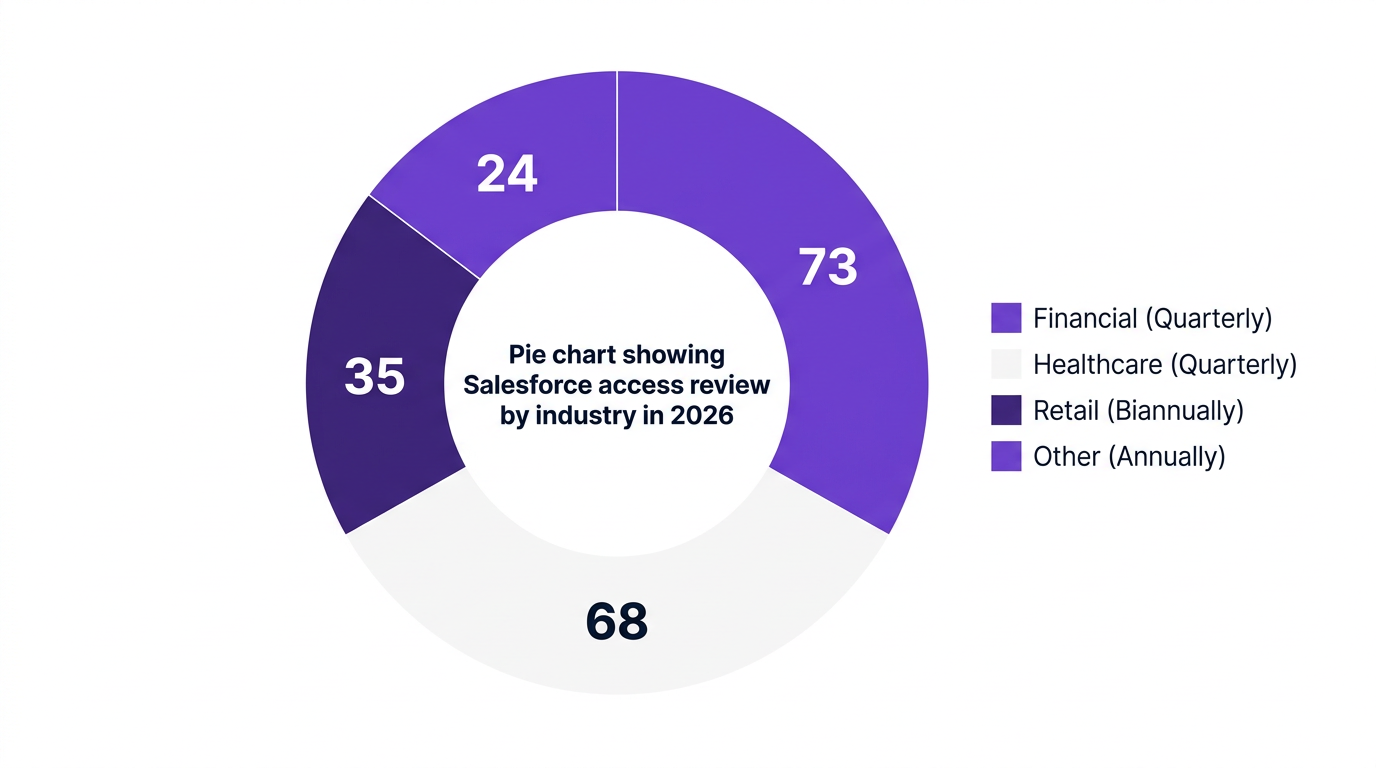
For regulated industries, this is more than good hygiene. ISACA notes that more than 73% of financial organizations now require quarterly Salesforce access reviews to meet SOX expectations. ISO 27001 and SOC 2 also expect periodic access certification as a core control.
A Salesforce UAR typically aims to:
Identify and remove stale or orphaned accounts
Tighten excessive access, especially admin-level privileges
Validate object-level and field-level security in Salesforce against least-privilege policies
Confirm that integration and guest accounts are properly restricted
Produce evidence for Salesforce auditors and internal risk teams
Priya Menon, Principal Analyst at Gartner, states that automating Salesforce user access reviews is no longer optional for compliance-driven industries and is now a critical control to reduce risk and prove continuous governance.
Before you can effectively audit Salesforce, you need a clear map of what constitutes "access". Salesforce is deceptively flexible; access can be granted through multiple overlapping mechanisms. Missing just one layer can undermine your Salesforce security audit.
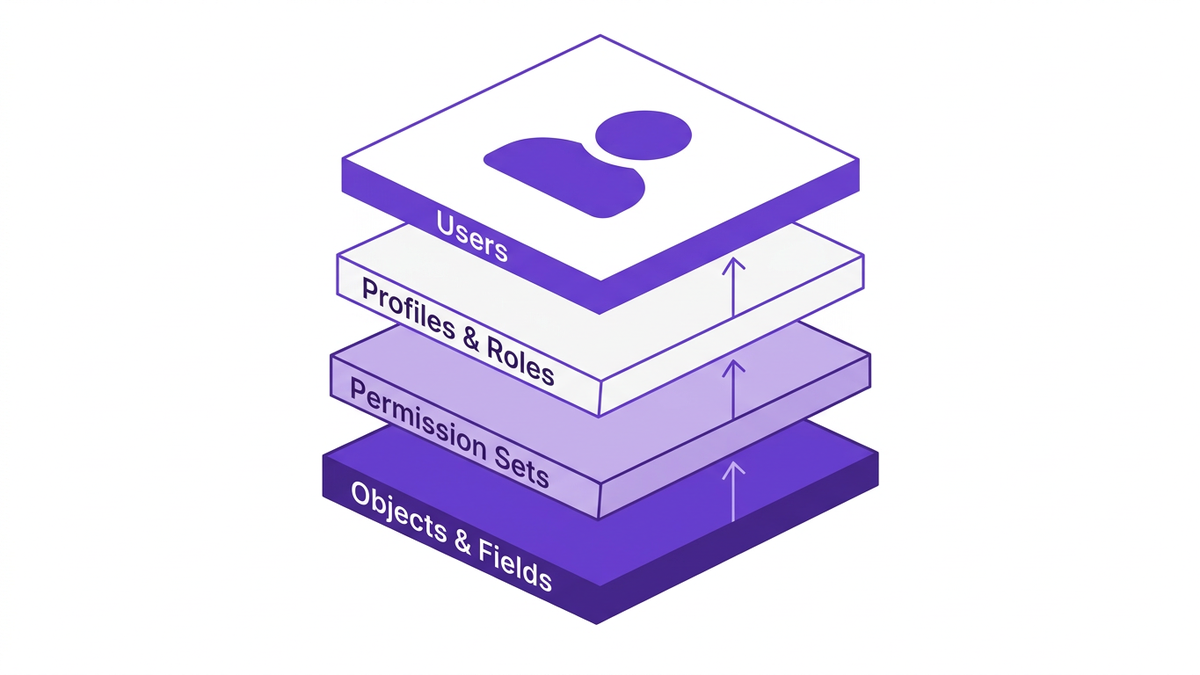
The key building blocks you must include in every Salesforce user audit are:
Profiles remain the primary baseline for Salesforce user access.
You should:
List all active users and their profiles
Map each profile to the Salesforce role hierarchy
Flag any profile that grants administrative or broad "Modify All Data" type rights
A robust Salesforce role audit checks that role hierarchy aligns with your organizational structure and that privileged roles are tightly controlled and periodically recertified.
Most access creep in 2026 happens through permission sets, not profiles. Info-Tech research notes that demand for permission set governance and field-level audits has doubled due to stricter SOC 2 and Salesforce ISO 27001 enforcement.
Review permission sets to:
Identify high-risk permissions (e.g., export reports, manage users, API access)
Consolidate redundant or overlapping permission sets
Confirm that assignment criteria are documented and approved
Your Salesforce permission audit should treat permission sets as first-class citizens, not an afterthought.
Object-level security and field-level security in Salesforce are where many SOX and privacy findings occur.
You must:
Review who has read, create, edit, delete access on critical objects (Accounts, Opportunities, custom financial or PHI objects)
Identify sensitive fields (e.g., SSN, bank account numbers, salary, health data)
Confirm that only approved roles and profiles can see or edit those fields
Walter Zheng from ISACA notes that real-time visibility into object and field-level access is now the standard for SOX and ISO 27001 audits in Salesforce.
Over 50% of Salesforce-related breaches originate from misconfigured permissions or stale accounts, according to ENISA. Integration users and guest users are frequent culprits.
You need to:
Perform a dedicated Salesforce integration user audit for all API and middleware accounts
Review Connected Apps OAuth usage and scopes
Audit Salesforce Experience Cloud and guest user access
Treat each integration user like a privileged admin, with strict least-privilege controls, monitored credentials, and clear ownership.
This section provides a practical recipe you can use to audit Salesforce with confidence. You can use it for your next Salesforce quarterly access review or to build a repeatable Salesforce audit program.
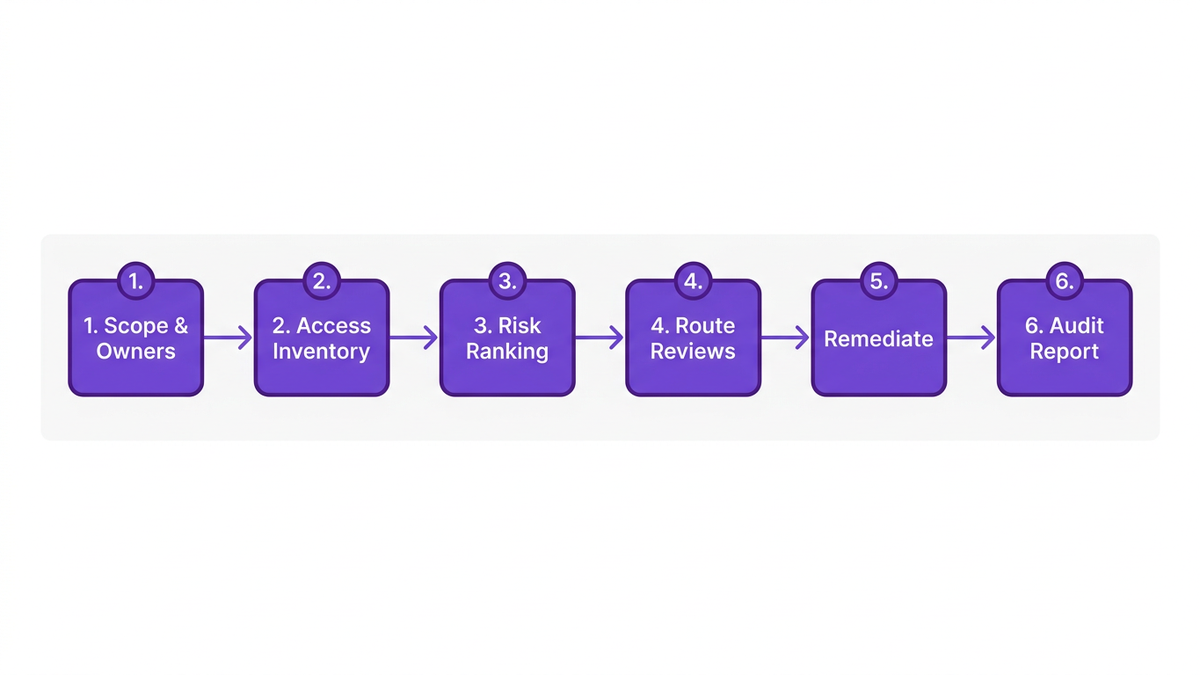
Start by defining:
Scope: Which Salesforce orgs, sandboxes, and business units are in scope
Owners: Who signs off on access for each team, region, or business function
Frequency: Quarterly for SOX-critical roles, semi-annual or annual for lower risk
PwC reports that 60% of CIOs now prioritize integrating Salesforce custodians and UAR automation as a top SaaS compliance investment. That reflects how central Salesforce has become to audit and risk agendas.
To perform a credible Salesforce user audit, you need a single, consolidated inventory.
At minimum, extract:
User list with status, profile, role, and manager
Permission set and permission set group assignments
Object-level and field-level permissions per user or role
Integration users, Connected Apps, and guest accounts
Manual exports often involve multiple reports, CSV merges, and lookup formulas. This is one reason 69% of organizations say manual Salesforce permission audits miss excessive access. Platforms like CloudNuro centralize this into a unified view.
Not all users are equal. Treat your Salesforce UAR as risk-based.
Create a simple risk model based on:
Admin or super-user privileges
Access to financial or regulated data
Integration and service accounts
Users with cross-functional or cross-region access
High-risk cohorts should be reviewed more frequently and scrutinized more deeply, especially for Salesforce SOX compliance.
Compliance teams cannot realistically validate every entitlement. They need the business to confirm "who still needs what".
Design workflows to:
Send each manager a list of their direct reports and entitlements
Route admin and integration-user reviews to system owners
Escalate non-responses before the review window closes
Hannah Gleeson from Forrester highlights that organizations using pre-built UAR workflows for Salesforce achieve compliance with a fraction of the manual effort previously required.
A Salesforce access review is only effective if decisions lead to action.
After approvals and revocations are captured:
Deactivate users who have left or changed roles
Remove unneeded permission sets and high-risk object access
Tighten field-level access on sensitive data
Adjust Salesforce admin access review scope based on identified risks
You should also maintain an approval log that ties each change to a reviewer and timestamp, ready for Salesforce auditors during your next SOC 2 or SOX cycle.
Finally, package your work into a Salesforce audit report.
For each review cycle, include:
Scope and timeframe
Population of in-scope users and systems
Review completion statistics and exceptions
Evidence of approvals, revocations, and remediation tasks
This report becomes a central artifact in your Salesforce audit program and should be easy to regenerate for future cycles. CloudNuro customers often combine this with broader SaaS management reporting for Microsoft 365, ServiceNow, and other platforms.
Many teams still attempt to audit in Salesforce using native reports and spreadsheets. That can work at small scale, but it rarely survives growth, M&A, or rising compliance expectations.
Forrester found that automated Salesforce user access reviews reduce audit preparation time by an average of 48% for enterprise IT teams. At the same time, Cloud Security Alliance data shows a 57% reduction in access-related non-compliance incidents when organizations adopt AI-driven UAR automation.
Manual processes typically suffer from:
Fragmented exports across multiple orgs and sandboxes
Error-prone VLOOKUP and pivot table logic
Difficulty mapping object and field-level security in Salesforce to real users
Weak or missing evidence trails
A common pattern looks like "UAR by spreadsheet" followed by weeks of chasing managers for sign-off. This is fragile and hard to defend in a Salesforce security audit.
Automated platforms provide:
Real-time access inventory across profiles, permission sets, roles, and objects
Pre-built Salesforce access review workflows and reminders
Integration with HRIS and identity systems to detect leavers and movers
Audit-ready exports tailored for SOX, SOC 2, and Salesforce ISO 27001 evidence
Gartner notes that AI-driven UAR automation is the fastest-growing segment in Salesforce security tooling, with 38% year-over-year adoption among large enterprises.
A leading U.S. healthcare provider adopted CloudNuro’s Salesforce Custodian to centralize UAR across multiple Salesforce orgs. By automating quarterly reviews and connecting to HR and identity systems, they achieved a 65% faster completion of quarterly access reviews and passed both SOX and HITRUST audits without major findings.
Similarly, a global finance firm replaced manual Salesforce permission audits with CloudNuro’s real-time UAR automation. They reduced excessive access by 72% and cut audit reporting time from two weeks to three days, according to Info-Tech research.
These examples show that automation is not only about convenience. It is about sustainable, defensible access governance across your entire SaaS estate.
CloudNuro was built for organizations that need to audit Salesforce with rigor and repeatability across multiple entities and regions. Its Salesforce Custodian combines deep technical visibility with workflow automation and analytics tailored to compliance teams.
Here is how CloudNuro helps modernize your Salesforce user access review program.
CloudNuro connects to your Salesforce orgs and automatically maps:
Users, profiles, and roles
Permission sets and permission set groups
Object and field-level security in Salesforce
Integration users, Connected Apps, and guest accounts
This creates a single source of truth for Salesforce user audit activities, instead of juggling multiple manual exports. Within 24 hours, many customers see a complete picture of who has access to what, across Salesforce and other key SaaS platforms.
CloudNuro’s User Access Review automation lets you:
Configure Salesforce quarterly access review cycles
Route review tasks to the correct business or system owners
Capture decisions for each entitlement (approve, revoke, modify)
Generate an auditable log of every decision and associated change
These workflows align with SOX, SOC 2, and Salesforce ISO 27001 expectations. They also reduce manual follow-up, since reminders and escalations are built in.
For an expanded checklist that spans all SaaS applications, see CloudNuro’s complete user access review checklist.
CloudNuro’s embedded analytics provide:
Risk scoring for users, roles, and permission sets
Visualizations of over-privileged users and toxic combinations
Drill-down into Salesforce audit report data for specific objects or fields
Security and compliance teams can prioritize mitigation based on real risk, not guesswork. For example, they can quickly identify all users with export rights on financial objects and initiate a targeted Salesforce admin access review.
Salesforce rarely exists in isolation. CloudNuro integrates with over 400 SaaS and cloud platforms through its Custodian and Unified Cloud offerings.
This means you can:
Run a consistent Salesforce audit program alongside Microsoft 365 and other key apps
Use FinOps Services to align license optimization with access governance
View connected app usage and cross-system entitlements from a single pane of glass
For organizations looking to audit Salesforce and broader SaaS spend together, CloudNuro’s guidance on SaaS spend audits in Microsoft 365 and Salesforce is a useful companion resource.
Finally, CloudNuro streamlines interactions with Salesforce auditors.
Teams can produce:
Evidence packets for SOX audit Salesforce reviews
ISO 27001 Annex A control mappings for access management
SOC 2 trust principle reports that include Salesforce as a key in-scope system
This shortens audit timelines and improves confidence that your Salesforce security audit will pass without late surprises.
To see how this works in your own environment, you can request a free Salesforce assessment or review the product overview.
A Salesforce User Access Review is a formal process to validate that each user’s access, including profiles, permission sets, object permissions, and field-level security, is appropriate for their role. It typically occurs on a recurring schedule, such as quarterly, and generates evidence for SOX, SOC 2, and ISO 27001 audits.
A robust Salesforce UAR includes business owner review, remediation of excessive access, and clear audit trails.
To perform a Salesforce permission audit for SOX or SOC 2, start by scoping your in-scope orgs and critical objects, especially those tied to financial reporting. Extract a full access inventory, including profiles, roles, permission sets, and field-level permissions.
Then, run a structured review where business and system owners approve or revoke access, with a specific focus on admin privileges, integration users, and export rights. Use automation where possible to maintain evidence and reduce manual errors.
Natively, you can review object-level and field-level access through Salesforce setup and permission reports, although this can be complex at scale. Many teams export profile and permission set metadata into spreadsheets, then correlate it with user assignments.
Platforms like CloudNuro simplify this by providing a direct view of who can access a given object or field, across multiple orgs, and by showing how that access is granted, for example via profile, permission set, or permission set group.
To automate Salesforce access review, you need a platform that connects to Salesforce, builds a complete entitlement inventory, and orchestrates review workflows. Automation should handle reviewer assignment, reminders, escalations, and evidence capture.
CloudNuro’s Salesforce Custodian does exactly this, allowing you to schedule recurring UAR campaigns, route them to managers and system owners, and then automatically generate audit-ready Salesforce audit reports.
Three big shifts define Salesforce access reviews in 2026. First, regulators and boards expect quarterly Salesforce access reviews for high-risk roles, not annual spot checks. Second, auditors focus more intensely on field-level security in Salesforce and integration user permissions.
Third, AI-driven UAR automation is quickly becoming the norm: Gartner reports a 38% adoption rate among large enterprises, and Cloud Security Alliance data shows a 57% reduction in access-related non-compliance incidents where automation is in place.
If you only audit Salesforce once a year, you are accepting unnecessary risk. Access changes daily as people join, move, leave, and as integrations and projects evolve. Quarterly Salesforce access reviews, combined with continuous monitoring and automation, are rapidly becoming the baseline for SOX, SOC 2, and ISO 27001 expectations.
CloudNuro helps you move from reactive, spreadsheet-based Salesforce user audits to a continuous, automated model that scales across all your SaaS and cloud platforms. If you are ready to modernize how you audit Salesforce and bring real discipline to SaaS governance, the next step is simple.
Take action today:
CloudNuro is a leader in Enterprise SaaS Management Platforms, providing enterprises with unmatched visibility, governance, and cost optimization. Recognized twice in a row in the SaaS Management Platforms category and named a Leader in the SoftwareReviews Data Quadrant, CloudNuro is trusted by global enterprises and government agencies to bring financial discipline to SaaS, cloud, and AI.
Trusted by enterprises such as Konica Minolta and Federal Signal, CloudNuro provides centralized SaaS inventory, license optimization, and renewal management along with advanced cost allocation and chargeback, giving IT and Finance leaders the visibility, control, and cost-conscious culture needed to drive financial discipline.
Request a no cost, no obligation free assessment —just 15 minutes to savings!
Get StartedIf you are responsible for security, compliance, or IT operations, you already feel the pressure to audit Salesforce more frequently and with greater depth. Gartner reports that 83% of organizations increased their Salesforce user access review cadence due to heightened regulatory scrutiny in 2026. At the same time, 69% of companies say manual Salesforce permission audits still miss excessive access rights.
This guide walks you through a modern, practical approach to Salesforce user access reviews, from core concepts to automation. You will see what auditors expect, how to design a repeatable Salesforce audit program, and how platforms like CloudNuro’s Salesforce Custodian help you move from spreadsheet chaos to continuous governance.
A Salesforce user access review (Salesforce UAR) is a formal, auditable process to validate that every Salesforce user has the right access at the right time. It covers profiles, permission sets, role hierarchy, object and field-level permissions, and integration users.
For regulated industries, this is more than good hygiene. ISACA notes that more than 73% of financial organizations now require quarterly Salesforce access reviews to meet SOX expectations. ISO 27001 and SOC 2 also expect periodic access certification as a core control.
A Salesforce UAR typically aims to:
Identify and remove stale or orphaned accounts
Tighten excessive access, especially admin-level privileges
Validate object-level and field-level security in Salesforce against least-privilege policies
Confirm that integration and guest accounts are properly restricted
Produce evidence for Salesforce auditors and internal risk teams
Priya Menon, Principal Analyst at Gartner, states that automating Salesforce user access reviews is no longer optional for compliance-driven industries and is now a critical control to reduce risk and prove continuous governance.
Before you can effectively audit Salesforce, you need a clear map of what constitutes "access". Salesforce is deceptively flexible; access can be granted through multiple overlapping mechanisms. Missing just one layer can undermine your Salesforce security audit.
The key building blocks you must include in every Salesforce user audit are:
Profiles remain the primary baseline for Salesforce user access.
You should:
List all active users and their profiles
Map each profile to the Salesforce role hierarchy
Flag any profile that grants administrative or broad "Modify All Data" type rights
A robust Salesforce role audit checks that role hierarchy aligns with your organizational structure and that privileged roles are tightly controlled and periodically recertified.
Most access creep in 2026 happens through permission sets, not profiles. Info-Tech research notes that demand for permission set governance and field-level audits has doubled due to stricter SOC 2 and Salesforce ISO 27001 enforcement.
Review permission sets to:
Identify high-risk permissions (e.g., export reports, manage users, API access)
Consolidate redundant or overlapping permission sets
Confirm that assignment criteria are documented and approved
Your Salesforce permission audit should treat permission sets as first-class citizens, not an afterthought.
Object-level security and field-level security in Salesforce are where many SOX and privacy findings occur.
You must:
Review who has read, create, edit, delete access on critical objects (Accounts, Opportunities, custom financial or PHI objects)
Identify sensitive fields (e.g., SSN, bank account numbers, salary, health data)
Confirm that only approved roles and profiles can see or edit those fields
Walter Zheng from ISACA notes that real-time visibility into object and field-level access is now the standard for SOX and ISO 27001 audits in Salesforce.
Over 50% of Salesforce-related breaches originate from misconfigured permissions or stale accounts, according to ENISA. Integration users and guest users are frequent culprits.
You need to:
Perform a dedicated Salesforce integration user audit for all API and middleware accounts
Review Connected Apps OAuth usage and scopes
Audit Salesforce Experience Cloud and guest user access
Treat each integration user like a privileged admin, with strict least-privilege controls, monitored credentials, and clear ownership.
This section provides a practical recipe you can use to audit Salesforce with confidence. You can use it for your next Salesforce quarterly access review or to build a repeatable Salesforce audit program.
Start by defining:
Scope: Which Salesforce orgs, sandboxes, and business units are in scope
Owners: Who signs off on access for each team, region, or business function
Frequency: Quarterly for SOX-critical roles, semi-annual or annual for lower risk
PwC reports that 60% of CIOs now prioritize integrating Salesforce custodians and UAR automation as a top SaaS compliance investment. That reflects how central Salesforce has become to audit and risk agendas.
To perform a credible Salesforce user audit, you need a single, consolidated inventory.
At minimum, extract:
User list with status, profile, role, and manager
Permission set and permission set group assignments
Object-level and field-level permissions per user or role
Integration users, Connected Apps, and guest accounts
Manual exports often involve multiple reports, CSV merges, and lookup formulas. This is one reason 69% of organizations say manual Salesforce permission audits miss excessive access. Platforms like CloudNuro centralize this into a unified view.
Not all users are equal. Treat your Salesforce UAR as risk-based.
Create a simple risk model based on:
Admin or super-user privileges
Access to financial or regulated data
Integration and service accounts
Users with cross-functional or cross-region access
High-risk cohorts should be reviewed more frequently and scrutinized more deeply, especially for Salesforce SOX compliance.
Compliance teams cannot realistically validate every entitlement. They need the business to confirm "who still needs what".
Design workflows to:
Send each manager a list of their direct reports and entitlements
Route admin and integration-user reviews to system owners
Escalate non-responses before the review window closes
Hannah Gleeson from Forrester highlights that organizations using pre-built UAR workflows for Salesforce achieve compliance with a fraction of the manual effort previously required.
A Salesforce access review is only effective if decisions lead to action.
After approvals and revocations are captured:
Deactivate users who have left or changed roles
Remove unneeded permission sets and high-risk object access
Tighten field-level access on sensitive data
Adjust Salesforce admin access review scope based on identified risks
You should also maintain an approval log that ties each change to a reviewer and timestamp, ready for Salesforce auditors during your next SOC 2 or SOX cycle.
Finally, package your work into a Salesforce audit report.
For each review cycle, include:
Scope and timeframe
Population of in-scope users and systems
Review completion statistics and exceptions
Evidence of approvals, revocations, and remediation tasks
This report becomes a central artifact in your Salesforce audit program and should be easy to regenerate for future cycles. CloudNuro customers often combine this with broader SaaS management reporting for Microsoft 365, ServiceNow, and other platforms.
Many teams still attempt to audit in Salesforce using native reports and spreadsheets. That can work at small scale, but it rarely survives growth, M&A, or rising compliance expectations.
Forrester found that automated Salesforce user access reviews reduce audit preparation time by an average of 48% for enterprise IT teams. At the same time, Cloud Security Alliance data shows a 57% reduction in access-related non-compliance incidents when organizations adopt AI-driven UAR automation.
Manual processes typically suffer from:
Fragmented exports across multiple orgs and sandboxes
Error-prone VLOOKUP and pivot table logic
Difficulty mapping object and field-level security in Salesforce to real users
Weak or missing evidence trails
A common pattern looks like "UAR by spreadsheet" followed by weeks of chasing managers for sign-off. This is fragile and hard to defend in a Salesforce security audit.
Automated platforms provide:
Real-time access inventory across profiles, permission sets, roles, and objects
Pre-built Salesforce access review workflows and reminders
Integration with HRIS and identity systems to detect leavers and movers
Audit-ready exports tailored for SOX, SOC 2, and Salesforce ISO 27001 evidence
Gartner notes that AI-driven UAR automation is the fastest-growing segment in Salesforce security tooling, with 38% year-over-year adoption among large enterprises.
A leading U.S. healthcare provider adopted CloudNuro’s Salesforce Custodian to centralize UAR across multiple Salesforce orgs. By automating quarterly reviews and connecting to HR and identity systems, they achieved a 65% faster completion of quarterly access reviews and passed both SOX and HITRUST audits without major findings.
Similarly, a global finance firm replaced manual Salesforce permission audits with CloudNuro’s real-time UAR automation. They reduced excessive access by 72% and cut audit reporting time from two weeks to three days, according to Info-Tech research.
These examples show that automation is not only about convenience. It is about sustainable, defensible access governance across your entire SaaS estate.
CloudNuro was built for organizations that need to audit Salesforce with rigor and repeatability across multiple entities and regions. Its Salesforce Custodian combines deep technical visibility with workflow automation and analytics tailored to compliance teams.
Here is how CloudNuro helps modernize your Salesforce user access review program.
CloudNuro connects to your Salesforce orgs and automatically maps:
Users, profiles, and roles
Permission sets and permission set groups
Object and field-level security in Salesforce
Integration users, Connected Apps, and guest accounts
This creates a single source of truth for Salesforce user audit activities, instead of juggling multiple manual exports. Within 24 hours, many customers see a complete picture of who has access to what, across Salesforce and other key SaaS platforms.
CloudNuro’s User Access Review automation lets you:
Configure Salesforce quarterly access review cycles
Route review tasks to the correct business or system owners
Capture decisions for each entitlement (approve, revoke, modify)
Generate an auditable log of every decision and associated change
These workflows align with SOX, SOC 2, and Salesforce ISO 27001 expectations. They also reduce manual follow-up, since reminders and escalations are built in.
For an expanded checklist that spans all SaaS applications, see CloudNuro’s complete user access review checklist.
CloudNuro’s embedded analytics provide:
Risk scoring for users, roles, and permission sets
Visualizations of over-privileged users and toxic combinations
Drill-down into Salesforce audit report data for specific objects or fields
Security and compliance teams can prioritize mitigation based on real risk, not guesswork. For example, they can quickly identify all users with export rights on financial objects and initiate a targeted Salesforce admin access review.
Salesforce rarely exists in isolation. CloudNuro integrates with over 400 SaaS and cloud platforms through its Custodian and Unified Cloud offerings.
This means you can:
Run a consistent Salesforce audit program alongside Microsoft 365 and other key apps
Use FinOps Services to align license optimization with access governance
View connected app usage and cross-system entitlements from a single pane of glass
For organizations looking to audit Salesforce and broader SaaS spend together, CloudNuro’s guidance on SaaS spend audits in Microsoft 365 and Salesforce is a useful companion resource.
Finally, CloudNuro streamlines interactions with Salesforce auditors.
Teams can produce:
Evidence packets for SOX audit Salesforce reviews
ISO 27001 Annex A control mappings for access management
SOC 2 trust principle reports that include Salesforce as a key in-scope system
This shortens audit timelines and improves confidence that your Salesforce security audit will pass without late surprises.
To see how this works in your own environment, you can request a free Salesforce assessment or review the product overview.
A Salesforce User Access Review is a formal process to validate that each user’s access, including profiles, permission sets, object permissions, and field-level security, is appropriate for their role. It typically occurs on a recurring schedule, such as quarterly, and generates evidence for SOX, SOC 2, and ISO 27001 audits.
A robust Salesforce UAR includes business owner review, remediation of excessive access, and clear audit trails.
To perform a Salesforce permission audit for SOX or SOC 2, start by scoping your in-scope orgs and critical objects, especially those tied to financial reporting. Extract a full access inventory, including profiles, roles, permission sets, and field-level permissions.
Then, run a structured review where business and system owners approve or revoke access, with a specific focus on admin privileges, integration users, and export rights. Use automation where possible to maintain evidence and reduce manual errors.
Natively, you can review object-level and field-level access through Salesforce setup and permission reports, although this can be complex at scale. Many teams export profile and permission set metadata into spreadsheets, then correlate it with user assignments.
Platforms like CloudNuro simplify this by providing a direct view of who can access a given object or field, across multiple orgs, and by showing how that access is granted, for example via profile, permission set, or permission set group.
To automate Salesforce access review, you need a platform that connects to Salesforce, builds a complete entitlement inventory, and orchestrates review workflows. Automation should handle reviewer assignment, reminders, escalations, and evidence capture.
CloudNuro’s Salesforce Custodian does exactly this, allowing you to schedule recurring UAR campaigns, route them to managers and system owners, and then automatically generate audit-ready Salesforce audit reports.
Three big shifts define Salesforce access reviews in 2026. First, regulators and boards expect quarterly Salesforce access reviews for high-risk roles, not annual spot checks. Second, auditors focus more intensely on field-level security in Salesforce and integration user permissions.
Third, AI-driven UAR automation is quickly becoming the norm: Gartner reports a 38% adoption rate among large enterprises, and Cloud Security Alliance data shows a 57% reduction in access-related non-compliance incidents where automation is in place.
If you only audit Salesforce once a year, you are accepting unnecessary risk. Access changes daily as people join, move, leave, and as integrations and projects evolve. Quarterly Salesforce access reviews, combined with continuous monitoring and automation, are rapidly becoming the baseline for SOX, SOC 2, and ISO 27001 expectations.
CloudNuro helps you move from reactive, spreadsheet-based Salesforce user audits to a continuous, automated model that scales across all your SaaS and cloud platforms. If you are ready to modernize how you audit Salesforce and bring real discipline to SaaS governance, the next step is simple.
Take action today:
CloudNuro is a leader in Enterprise SaaS Management Platforms, providing enterprises with unmatched visibility, governance, and cost optimization. Recognized twice in a row in the SaaS Management Platforms category and named a Leader in the SoftwareReviews Data Quadrant, CloudNuro is trusted by global enterprises and government agencies to bring financial discipline to SaaS, cloud, and AI.
Trusted by enterprises such as Konica Minolta and Federal Signal, CloudNuro provides centralized SaaS inventory, license optimization, and renewal management along with advanced cost allocation and chargeback, giving IT and Finance leaders the visibility, control, and cost-conscious culture needed to drive financial discipline.
Request a no cost, no obligation free assessment - just 15 minutes to savings!
Get StartedWe're offering complimentary ServiceNow license assessments to only 25 enterprises this quarter who want to unlock immediate savings without disrupting operations.
Get Free AssessmentGet Started




CloudNuro Corp
1755 Park St. Suite 207
Naperville, IL 60563
Phone : +1-630-277-9470
Email: info@cloudnuro.com





.webp)

Recognized Leader in SaaS Management Platforms by Info-Tech SoftwareReviews
.png)

.png)
.svg)