

Sign Up
Thank you for Submitting!
A Microsoft 365 license audit is no longer a nice-to-have before renewal. With commercial seats surpassing 450 million and prices rising up to 33% on some plans in 2026, even small inefficiencies in your estate can translate into millions in excess spend.
Most enterprises that complete a structured Microsoft 365 license audit uncover 20 to 40 percent overspend on licenses that are unused or misaligned with actual needs, according to multiple audit providers in 2026. Running an intentional, data-backed audit before renewal is now one of the highest ROI activities for IT, finance, and procurement teams.
This guide provides a practical, step-by-step Microsoft 365 license audit checklist you can run ahead of your next true-up or renewal. It also shows where automation, especially with CloudNuro’s Microsoft 365 Custodian, can compress a 6-week manual effort into a repeatable, ongoing discipline.
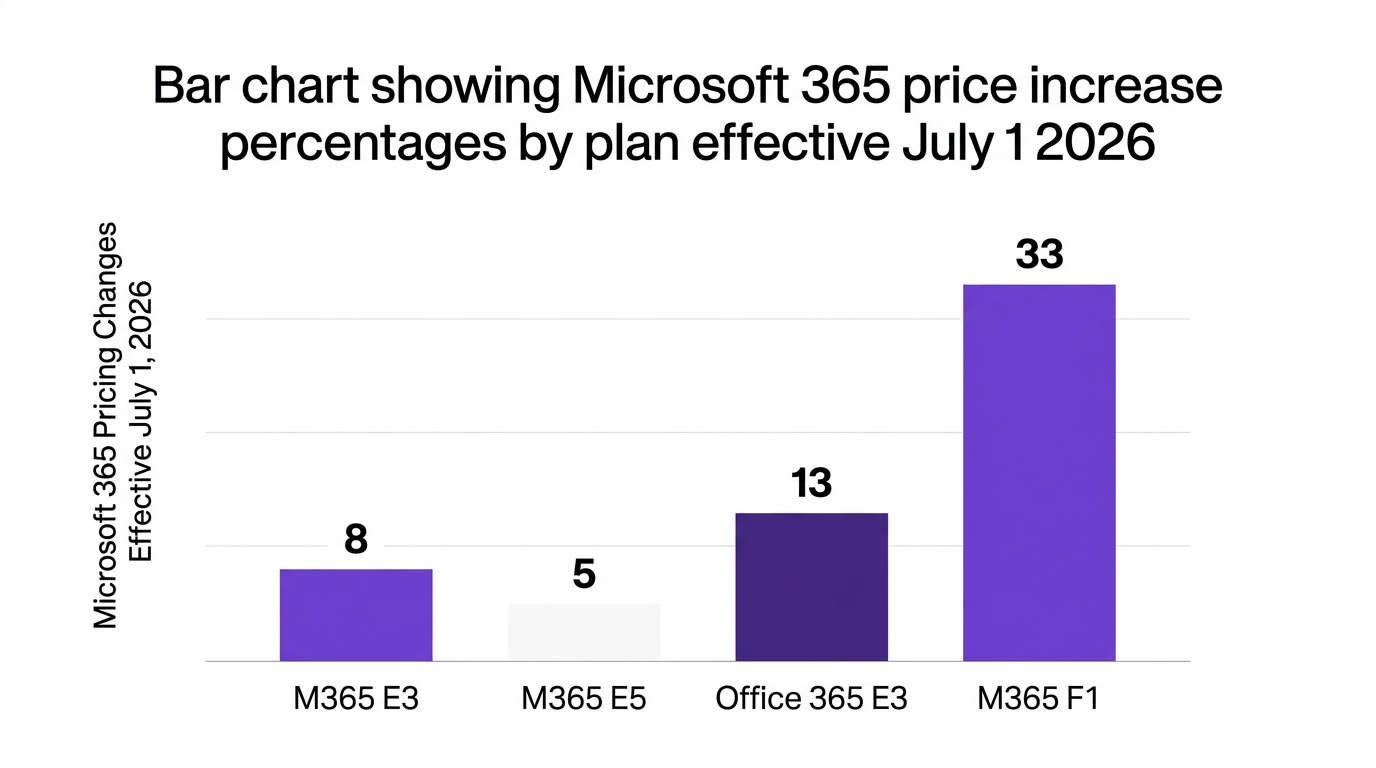
Microsoft 365 adoption keeps climbing, with commercial seats growing 6 percent year over year to exceed 450 million in FY26 Q2 (Microsoft, 2026). At the same time, list prices for plans like E3 and E5 are rising between 5 and 13 percent, with some worker plans increasing up to 33 percent (pricing analysis, 2025).
Put simply, more seats at higher prices magnify any waste. Multiple audit-focused providers report that typical Microsoft 365 audits reveal 20 to 30 percent overspend after the first serious review.
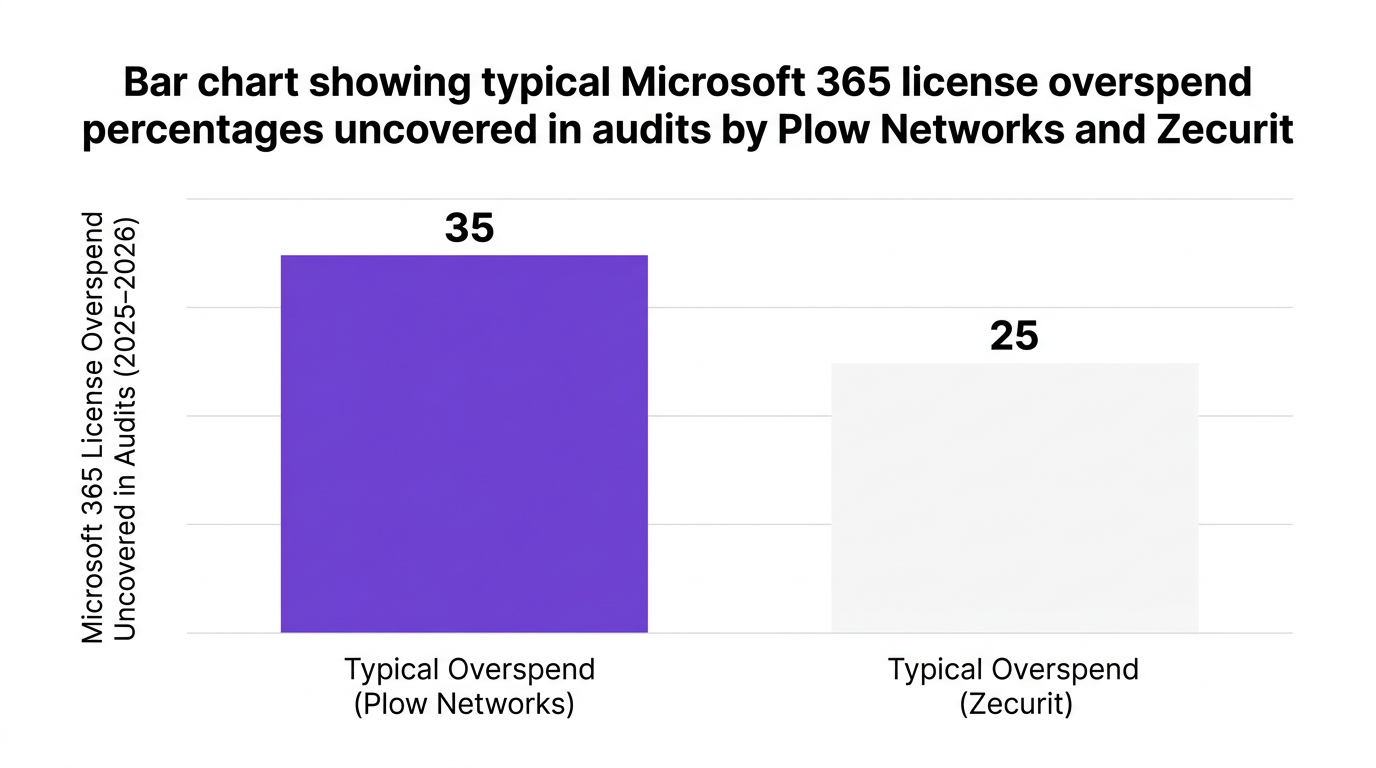
That means a tenant spending $10 million annually on Microsoft 365 could easily be burning $2 to $3 million on:
A structured microsoft 365 license audit addresses four core risks:
Think of your Microsoft 365 estate like a sprawling office campus. If you never walk the halls and check who actually sits where, you end up paying to heat, cool, and secure empty rooms. Your m365 audit checklist is that systematic walk-through.
Every effective m365 audit checklist starts with clarity. Before you pull a single report, define the scope and objectives of your review.
Decide which elements are in-scope:
Be explicit about excluded items, such as legacy systems or disconnected subsidiaries, and document why. This prevents “scope creep” and keeps your microsoft 365 license usage audit focused.
Typical objectives include:
Tie these objectives to owners in IT, finance, and security so all stakeholders are aligned.
Identify where you will pull data from, such as:
Manual exports work for a first pass, but they are fragile and time consuming. Many enterprises move quickly to an automated license optimization platform once they see the scale of the effort.
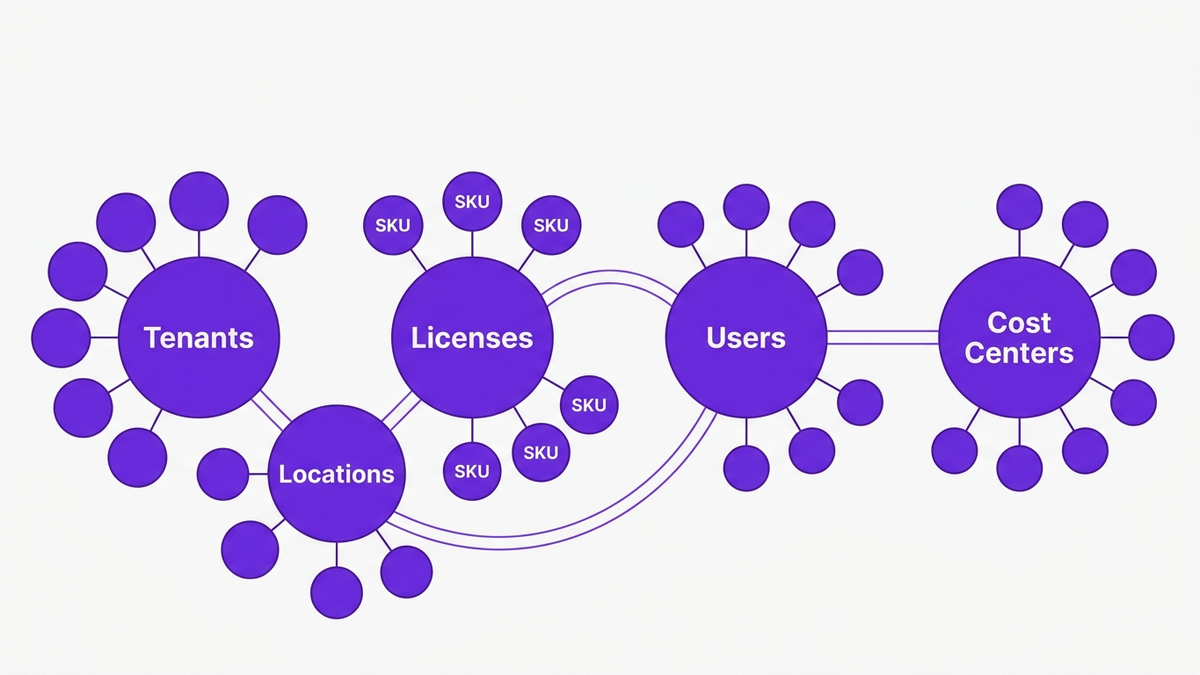
With scope and data sources in place, you can audit Microsoft 365 subscriptions and entitlements in a structured way. Think of this as your “entitlement baseline.”
Start with a full microsoft 365 subscription audit:
Then, perform a microsoft 365 entitlement audit at the user level:
This mapping underpins your entire office 365 license review. Without it, optimization is guesswork.
Not all licenses are equal. Identify SKUs that are:
Many audit specialists recommend running annual Microsoft 365 licensing audits that explicitly focus on high-cost SKUs first, because those users drive the largest savings and risk reduction.
Common subscription anomalies include:
Document these as issues for remediation, with owners and timelines. This becomes part of your m365 renewal prep package for finance and procurement.
Once entitlements are mapped, the next objective is straightforward: find unused Microsoft 365 licenses and misaligned SKUs.
For each license type and major workload, analyze:
This “usage matrix” lets you:
Multiple audit providers report that 20 to 40 percent of licenses are underused or unused when this analysis is done for the first time.
Align IT, HR, and security on what “inactive” means. For example:
Use these definitions to classify:
In one 2026 case study, a multinational financial firm used CloudNuro’s Microsoft 365 Custodian to perform a deep microsoft 365 license usage audit.
By correlating entitlements, HR data, and workload activity, the team:
This is a typical outcome for enterprises that combine granular usage analysis with automated reclamation workflows.
Finding waste is only half the battle. The next step in your audit checklist for M365 is to act on the data with disciplined microsoft 365 license reclamation and right-sizing.
Start with low-risk, high-impact actions:
These actions are usually non-controversial and deliver instant savings.
Next, tackle microsoft 365 license optimization for underused users:
An analogy for IT leaders: treating every user as an E5 “power driver” is like giving every employee a high-end sports car when many only need a reliable sedan. The audit shows who truly needs premium performance.
Manual cleanup through the admin center does not scale for enterprises with tens of thousands of users. This is where license reclamation automation and license cleanup automation matter.
Look for automation that can:
Automation transforms a painful, once-a-year fire drill into continuous control.
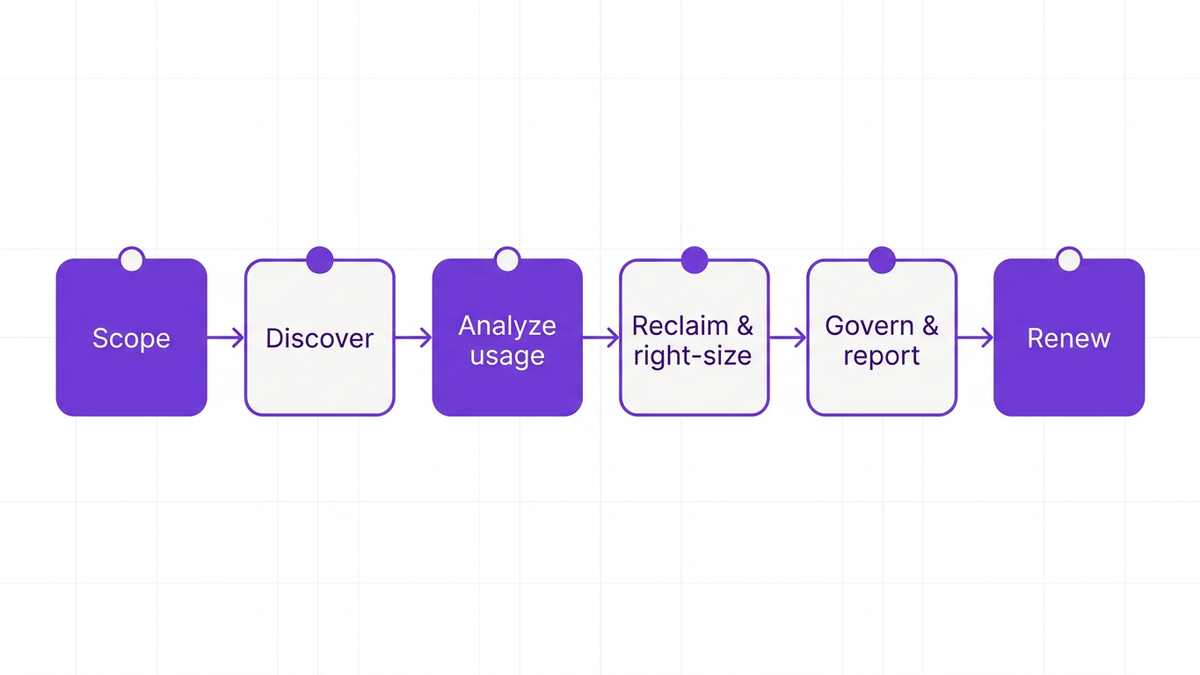
Cost savings are important, but a high-quality microsoft 365 license audit also strengthens IT asset governance and compliance.
Integrate your findings with broader software asset management and security processes:
This strengthens your application governance posture and reduces audit findings later.
Use the audit as an opportunity to:
A major audit advisory firm in 2026 noted that failure to review license assignments before renewal can create immediate access loss and compliance gaps, especially as enforcement tightens.
Implement user access review automation for Microsoft 365:
This closes the loop between cost control, security, and microsoft 365 license governance.
The final step in your checklist is to turn audit findings into negotiation power for your microsoft 365 true-up audit and renewal discussions.
Prepare a package that includes:
This moves your team from reactive scrambling to proactive m365 renewal prep.
Collaborate with finance to model scenarios such as:
Use your microsoft 365 license management and analytics tooling to quantify each option.
Some teams worry that aggressive optimization may:
These are valid risks, but they are manageable with pilots, clear communication, and rollback plans. The bigger risk is ignoring optimization entirely, then absorbing automatic price increases without data.
Manual audits can take 6 to 8 weeks, consume senior IT resources, and still leave blind spots. CloudNuro’s Microsoft 365 Custodian is designed to automate each stage of the microsoft 365 license audit lifecycle.
CloudNuro connects to your tenants and builds a complete microsoft 365 subscription audit automatically:
This foundation supports disciplined microsoft 365 license management at enterprise scale, integrated with broader SaaS management practices.
The Microsoft 365 Custodian provides out-of-the-box analytics for a microsoft 365 license usage audit:
Dashboards quantify potential savings and highlight where you can reduce Microsoft 365 license costs immediately. Many customers pair this with CloudNuro’s Microsoft license optimization guidance.
CloudNuro turns insights into policy-driven actions with automation:
These capabilities minimize microsoft 365 license waste, maintain compliance, and reduce manual effort across IT and security.
CloudNuro supports audit-ready microsoft 365 compliance reporting:
A detailed case study on Microsoft 365 license optimization with CloudNuro shows how one global enterprise turned a fragmented environment into a governed, cost-optimized estate.
For organizations that want additional help, CloudNuro’s services and IT asset management solutions extend these capabilities with expert guidance and managed optimization.
A Microsoft 365 license audit is a structured review of subscriptions, entitlements, and usage to ensure licenses align with actual business needs and compliance requirements. Running this audit before renewal helps organizations reduce Microsoft 365 license costs, eliminate microsoft 365 license waste, and enter negotiations with hard data rather than estimates.
The fastest way is to combine entitlement exports with activity logs and usage analytics. By correlating user assignments with sign-in frequency, workload usage, and HR status, you can find unused Microsoft 365 licenses and underused premium SKUs. Automation platforms like CloudNuro streamline this process and provide ready-made microsoft 365 inactive license detection reports.
A strong m365 audit checklist typically includes:
Automation reduces manual effort and catches issues humans miss. Tools that provide license reclamation automation, user access review automation, and continuous license cleanup automation can reclaim unused seats, right-size SKUs based on real usage, and maintain clean entitlements over time. This creates a sustained reduction in microsoft 365 license waste instead of a one-time savings spike.
Best practices include:
IT teams should prepare:
This level of preparation turns the microsoft 365 true-up audit into a strategic negotiation rather than a reactive process.
A structured microsoft 365 license audit is one of the most effective ways to control SaaS spend, strengthen compliance, and improve IT governance. With prices rising and seats proliferating, relying on rough estimates or one-off spreadsheets is no longer sustainable.
By following the checklist above, you can:
CloudNuro’s Microsoft 365 Custodian makes this process faster, safer, and more repeatable, transforming license audits from a stressful annual ritual into a continuous discipline.
To see how CloudNuro can modernize your Microsoft 365 license management and optimization strategy, request a personalized demo today.
CloudNuro is a leader in Enterprise SaaS Management Platforms, providing enterprises with unmatched visibility, governance, and cost optimization. Recognized twice in a row in the SaaS Management Platforms category and named a Leader in the SoftwareReviews Data Quadrant, CloudNuro is trusted by global enterprises and government agencies to bring financial discipline to SaaS, cloud, and AI.
Trusted by enterprises such as Konica Minolta and Federal Signal, CloudNuro provides centralized SaaS inventory, license optimization, and renewal management along with advanced cost allocation and chargeback, giving IT and Finance leaders the visibility, control, and cost-conscious culture needed to drive financial discipline.
Request a no cost, no obligation free assessment —just 15 minutes to savings!
Get StartedA Microsoft 365 license audit is no longer a nice-to-have before renewal. With commercial seats surpassing 450 million and prices rising up to 33% on some plans in 2026, even small inefficiencies in your estate can translate into millions in excess spend.
Most enterprises that complete a structured Microsoft 365 license audit uncover 20 to 40 percent overspend on licenses that are unused or misaligned with actual needs, according to multiple audit providers in 2026. Running an intentional, data-backed audit before renewal is now one of the highest ROI activities for IT, finance, and procurement teams.
This guide provides a practical, step-by-step Microsoft 365 license audit checklist you can run ahead of your next true-up or renewal. It also shows where automation, especially with CloudNuro’s Microsoft 365 Custodian, can compress a 6-week manual effort into a repeatable, ongoing discipline.
Microsoft 365 adoption keeps climbing, with commercial seats growing 6 percent year over year to exceed 450 million in FY26 Q2 (Microsoft, 2026). At the same time, list prices for plans like E3 and E5 are rising between 5 and 13 percent, with some worker plans increasing up to 33 percent (pricing analysis, 2025).
Put simply, more seats at higher prices magnify any waste. Multiple audit-focused providers report that typical Microsoft 365 audits reveal 20 to 30 percent overspend after the first serious review.
That means a tenant spending $10 million annually on Microsoft 365 could easily be burning $2 to $3 million on:
A structured microsoft 365 license audit addresses four core risks:
Think of your Microsoft 365 estate like a sprawling office campus. If you never walk the halls and check who actually sits where, you end up paying to heat, cool, and secure empty rooms. Your m365 audit checklist is that systematic walk-through.
Every effective m365 audit checklist starts with clarity. Before you pull a single report, define the scope and objectives of your review.
Decide which elements are in-scope:
Be explicit about excluded items, such as legacy systems or disconnected subsidiaries, and document why. This prevents “scope creep” and keeps your microsoft 365 license usage audit focused.
Typical objectives include:
Tie these objectives to owners in IT, finance, and security so all stakeholders are aligned.
Identify where you will pull data from, such as:
Manual exports work for a first pass, but they are fragile and time consuming. Many enterprises move quickly to an automated license optimization platform once they see the scale of the effort.
With scope and data sources in place, you can audit Microsoft 365 subscriptions and entitlements in a structured way. Think of this as your “entitlement baseline.”
Start with a full microsoft 365 subscription audit:
Then, perform a microsoft 365 entitlement audit at the user level:
This mapping underpins your entire office 365 license review. Without it, optimization is guesswork.
Not all licenses are equal. Identify SKUs that are:
Many audit specialists recommend running annual Microsoft 365 licensing audits that explicitly focus on high-cost SKUs first, because those users drive the largest savings and risk reduction.
Common subscription anomalies include:
Document these as issues for remediation, with owners and timelines. This becomes part of your m365 renewal prep package for finance and procurement.
Once entitlements are mapped, the next objective is straightforward: find unused Microsoft 365 licenses and misaligned SKUs.
For each license type and major workload, analyze:
This “usage matrix” lets you:
Multiple audit providers report that 20 to 40 percent of licenses are underused or unused when this analysis is done for the first time.
Align IT, HR, and security on what “inactive” means. For example:
Use these definitions to classify:
In one 2026 case study, a multinational financial firm used CloudNuro’s Microsoft 365 Custodian to perform a deep microsoft 365 license usage audit.
By correlating entitlements, HR data, and workload activity, the team:
This is a typical outcome for enterprises that combine granular usage analysis with automated reclamation workflows.
Finding waste is only half the battle. The next step in your audit checklist for M365 is to act on the data with disciplined microsoft 365 license reclamation and right-sizing.
Start with low-risk, high-impact actions:
These actions are usually non-controversial and deliver instant savings.
Next, tackle microsoft 365 license optimization for underused users:
An analogy for IT leaders: treating every user as an E5 “power driver” is like giving every employee a high-end sports car when many only need a reliable sedan. The audit shows who truly needs premium performance.
Manual cleanup through the admin center does not scale for enterprises with tens of thousands of users. This is where license reclamation automation and license cleanup automation matter.
Look for automation that can:
Automation transforms a painful, once-a-year fire drill into continuous control.
Cost savings are important, but a high-quality microsoft 365 license audit also strengthens IT asset governance and compliance.
Integrate your findings with broader software asset management and security processes:
This strengthens your application governance posture and reduces audit findings later.
Use the audit as an opportunity to:
A major audit advisory firm in 2026 noted that failure to review license assignments before renewal can create immediate access loss and compliance gaps, especially as enforcement tightens.
Implement user access review automation for Microsoft 365:
This closes the loop between cost control, security, and microsoft 365 license governance.
The final step in your checklist is to turn audit findings into negotiation power for your microsoft 365 true-up audit and renewal discussions.
Prepare a package that includes:
This moves your team from reactive scrambling to proactive m365 renewal prep.
Collaborate with finance to model scenarios such as:
Use your microsoft 365 license management and analytics tooling to quantify each option.
Some teams worry that aggressive optimization may:
These are valid risks, but they are manageable with pilots, clear communication, and rollback plans. The bigger risk is ignoring optimization entirely, then absorbing automatic price increases without data.
Manual audits can take 6 to 8 weeks, consume senior IT resources, and still leave blind spots. CloudNuro’s Microsoft 365 Custodian is designed to automate each stage of the microsoft 365 license audit lifecycle.
CloudNuro connects to your tenants and builds a complete microsoft 365 subscription audit automatically:
This foundation supports disciplined microsoft 365 license management at enterprise scale, integrated with broader SaaS management practices.
The Microsoft 365 Custodian provides out-of-the-box analytics for a microsoft 365 license usage audit:
Dashboards quantify potential savings and highlight where you can reduce Microsoft 365 license costs immediately. Many customers pair this with CloudNuro’s Microsoft license optimization guidance.
CloudNuro turns insights into policy-driven actions with automation:
These capabilities minimize microsoft 365 license waste, maintain compliance, and reduce manual effort across IT and security.
CloudNuro supports audit-ready microsoft 365 compliance reporting:
A detailed case study on Microsoft 365 license optimization with CloudNuro shows how one global enterprise turned a fragmented environment into a governed, cost-optimized estate.
For organizations that want additional help, CloudNuro’s services and IT asset management solutions extend these capabilities with expert guidance and managed optimization.
A Microsoft 365 license audit is a structured review of subscriptions, entitlements, and usage to ensure licenses align with actual business needs and compliance requirements. Running this audit before renewal helps organizations reduce Microsoft 365 license costs, eliminate microsoft 365 license waste, and enter negotiations with hard data rather than estimates.
The fastest way is to combine entitlement exports with activity logs and usage analytics. By correlating user assignments with sign-in frequency, workload usage, and HR status, you can find unused Microsoft 365 licenses and underused premium SKUs. Automation platforms like CloudNuro streamline this process and provide ready-made microsoft 365 inactive license detection reports.
A strong m365 audit checklist typically includes:
Automation reduces manual effort and catches issues humans miss. Tools that provide license reclamation automation, user access review automation, and continuous license cleanup automation can reclaim unused seats, right-size SKUs based on real usage, and maintain clean entitlements over time. This creates a sustained reduction in microsoft 365 license waste instead of a one-time savings spike.
Best practices include:
IT teams should prepare:
This level of preparation turns the microsoft 365 true-up audit into a strategic negotiation rather than a reactive process.
A structured microsoft 365 license audit is one of the most effective ways to control SaaS spend, strengthen compliance, and improve IT governance. With prices rising and seats proliferating, relying on rough estimates or one-off spreadsheets is no longer sustainable.
By following the checklist above, you can:
CloudNuro’s Microsoft 365 Custodian makes this process faster, safer, and more repeatable, transforming license audits from a stressful annual ritual into a continuous discipline.
To see how CloudNuro can modernize your Microsoft 365 license management and optimization strategy, request a personalized demo today.
CloudNuro is a leader in Enterprise SaaS Management Platforms, providing enterprises with unmatched visibility, governance, and cost optimization. Recognized twice in a row in the SaaS Management Platforms category and named a Leader in the SoftwareReviews Data Quadrant, CloudNuro is trusted by global enterprises and government agencies to bring financial discipline to SaaS, cloud, and AI.
Trusted by enterprises such as Konica Minolta and Federal Signal, CloudNuro provides centralized SaaS inventory, license optimization, and renewal management along with advanced cost allocation and chargeback, giving IT and Finance leaders the visibility, control, and cost-conscious culture needed to drive financial discipline.
Request a no cost, no obligation free assessment - just 15 minutes to savings!
Get StartedWe're offering complimentary ServiceNow license assessments to only 25 enterprises this quarter who want to unlock immediate savings without disrupting operations.
Get Free AssessmentGet Started




CloudNuro Corp
1755 Park St. Suite 207
Naperville, IL 60563
Phone : +1-630-277-9470
Email: info@cloudnuro.com





.webp)

Recognized Leader in SaaS Management Platforms by Info-Tech SoftwareReviews


.png)
.svg)