

Sign Up
Thank you for Submitting!
Effective Microsoft 365 license management has become a core discipline for IT and finance leaders who are under pressure to cut SaaS costs while protecting productivity.
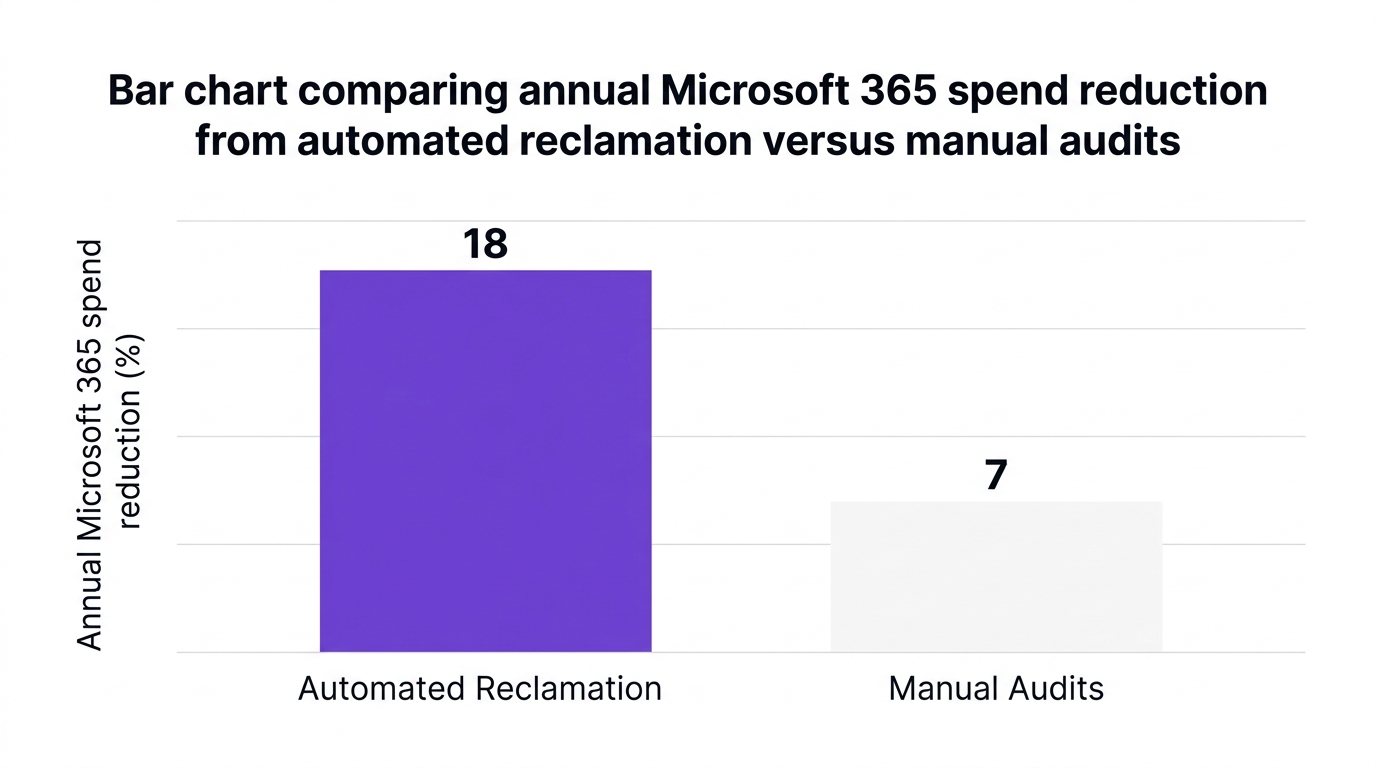
Gartner reports that the average enterprise overspends between 20 and 35 percent on Microsoft 365 licenses due to misaligned license types and inactive users (2026). Forrester adds that automated license reclamation alone can reduce annual Microsoft 365 spend by up to 18 percent for large organizations (2026).
This guide outlines 12 practical Microsoft 365 license management best practices that form a modern license optimization framework. Each tactic is designed to help you reduce Microsoft 365 licensing costs, strengthen governance, and avoid disrupting daily work.
Most organizations began their Office 365 license management journey with simple spreadsheets and annual audits. Those practices were acceptable when M365 usage was relatively static.
Today, license assignments change weekly as employees join, leave, or switch roles. Remote and hybrid work, departmental app purchases, and AI features have all expanded the M365 footprint.
According to IDC, companies that implement quarterly Microsoft 365 access audits see a 40 percent improvement in license utilization rates (2026). CloudNuro Insights finds that 99 percent plus SaaS visibility correlates with a 15 to 22 percent reduction in overall SaaS overspend, with Microsoft 365 often the single largest opportunity (2026).
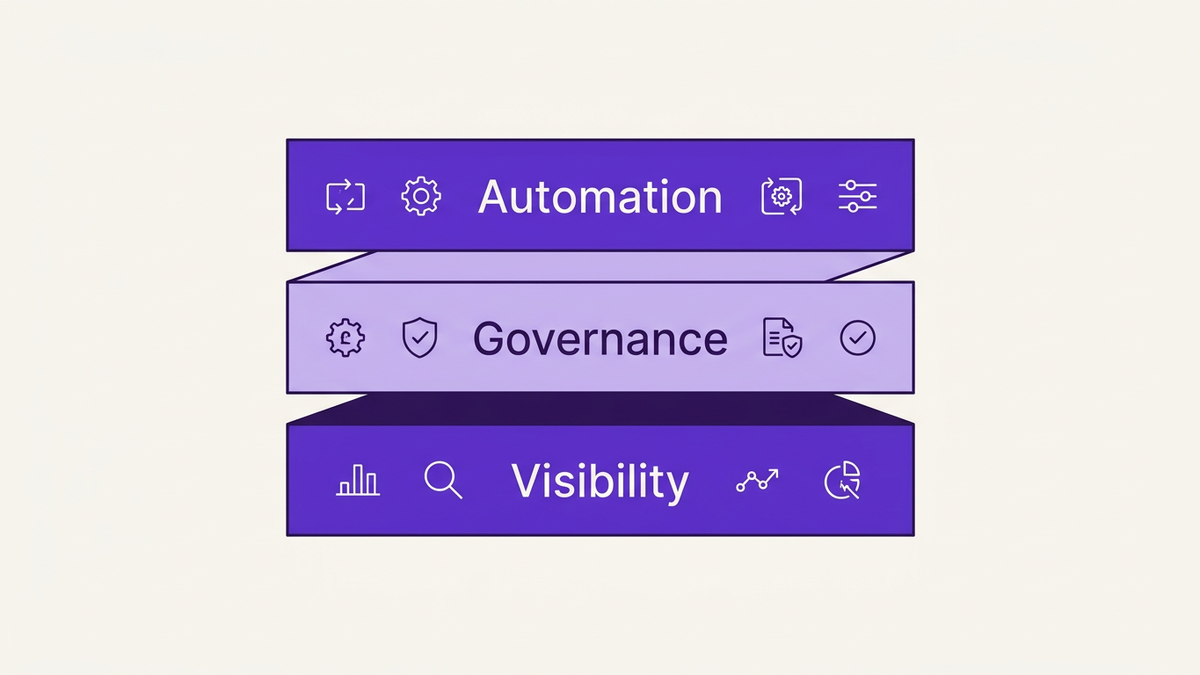
A modern m365 license management guide needs to treat M365 as a living system. That means continuous monitoring, role based Microsoft 365 licensing, automated license reclamation, and tight alignment between IT, security, and finance.
Think of your program as a control tower. These 12 tactics span three layers:
Visibility and data: what you can see and measure.
Control and governance: how you standardize and enforce behavior.
Automation and optimization: how you reduce effort while improving results.
You cannot optimize what you cannot see. Robust saas spend visibility is the foundation for every other Microsoft 365 license optimization 2026 initiative.
Best in class organizations consolidate:
All active licenses by SKU and subscription.
Assigned versus unassigned licenses.
User activity, app usage, and sign in patterns.
Historical changes and renewal dates.
A leading research firm finds that enterprises using AI enabled M365 license management platforms report 26 percent faster time to value on license optimization projects (Everest Group 2026). A unified inventory, ideally fed by APIs, replaces brittle spreadsheets and supports accurate M365 license usage reports.
Key actions:
Integrate Microsoft 365 admin center data, Azure AD, HRIS, and finance systems into one source.
Standardize license naming and tagging for business units, cost centers, and locations.
Align this inventory with your broader SaaS management processes to maintain consistency.
Manual, user by user decisions are a primary cause of overspend. Role based Microsoft 365 licensing replaces ad hoc choices with consistent, policy driven assignments.
Create segmented M365 licensing strategies based on:
Job function and department.
Location and regulatory requirements.
Collaboration and communication needs.
Security and compliance obligations.
For example, a frontline worker may only need a lighter SKU, while a security analyst requires advanced compliance features. Deloitte reports that rightsizing E5 to E3 licenses and aligning with roles can reduce per user costs by an average of 144 dollars per seat annually (2026).
Key actions:
Document 5 to 10 standard license profiles, such as "Information Worker E3", "Frontline F3", "Executive E5".
Map each HR job code to one of these profiles.
Use this as the baseline for all new assignments and m365 license assignment by role.
Group based licensing in Azure AD, when configured correctly, brings order to license assignments. When misconfigured, it becomes a source of shadow overspend.
Adopting azure ad group based licensing best practices includes:
Assigning licenses to security groups that mirror role profiles.
Using dynamic groups tied to attributes like department, location, and employment type.
Avoiding direct user assignments, which are difficult to track and remove.
IDC reports that automated, role based license assignment is used by 47 percent of enterprises and materially improves compliance and consistency (2026).
Key actions:
For each role profile, create a corresponding Azure AD group and assign licenses at the group level.
Use dynamic membership rules where possible, so changes in HR data automatically adjust license assignment.
Periodically run a m365 license usage report to validate that direct assignments are minimized.
One of the highest value m365 license tactics is to strategically mix E1, E3, and E5 licenses instead of defaulting everyone to the most expensive tier. This is the essence of microsoft 365 license rightsizing.
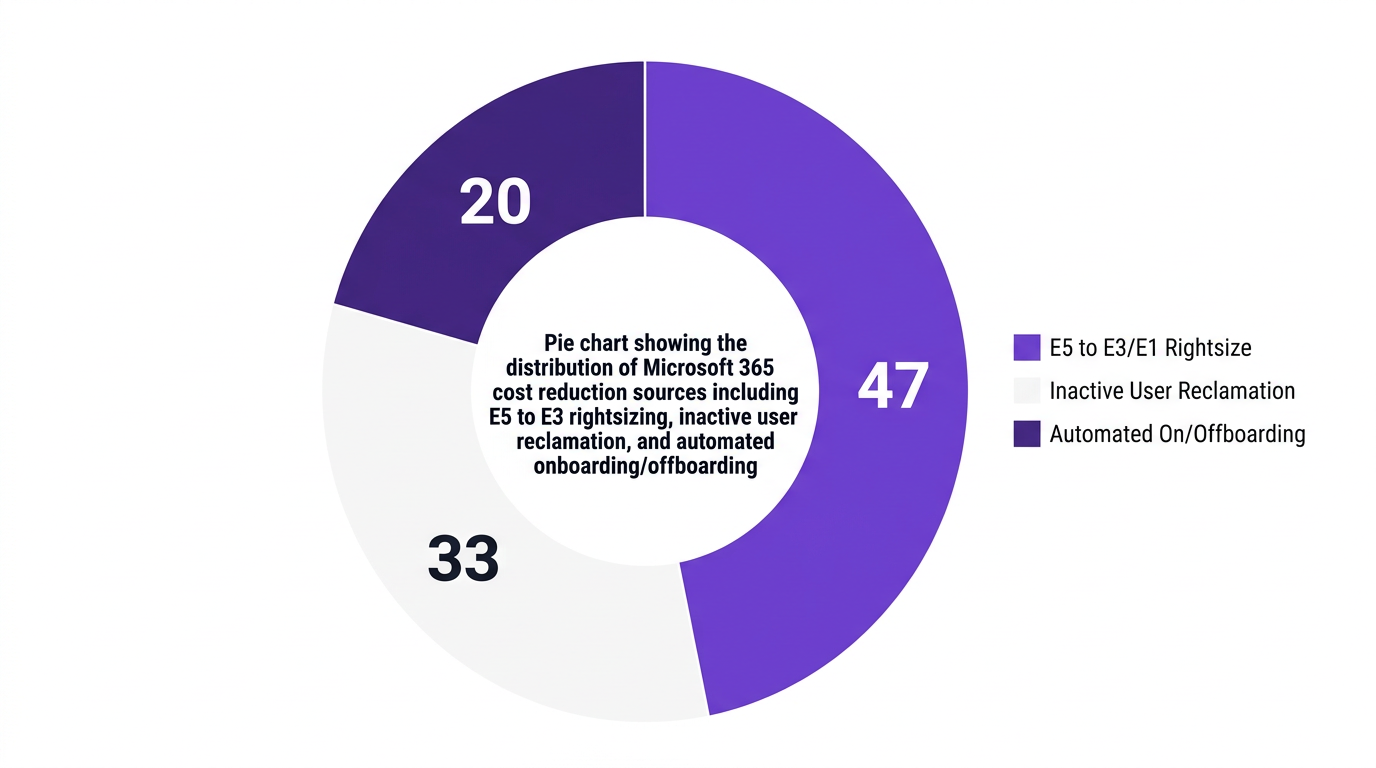
Deloitte’s research indicates that E5 to E3 rightsizing and role based approvals reduce per user costs by an average of 144 dollars per seat annually (2026). CloudNuro case studies show that enterprises often discover that 20 to 30 percent of E5 users can safely move to E3 without any productivity loss.
Key actions:
Build policies for who truly requires E5, such as legal, security, and specific compliance sensitive roles.
Use telemetry to identify users not using advanced features, then pilot downgrades.
Incorporate this into your microsoft 365 renewal optimization planning cycles.
Counterpoint: There will be edge cases where users rely on specific E5 capabilities infrequently but critically. In those cases, a measured policy exception is preferable to a hard cost target.
Organizations with automated workflows for onboarding and offboarding reclaim an average of 30 percent more licenses within the first quarter of adoption (Gartner 2026). This directly supports office 365 cost reduction.
Manual offboarding typically fails due to timing and coordination issues. HR notifies IT late, managers forget optional tools, and licenses sit idle.
Key actions:
Integrate HR systems so that new hires and terminations trigger standardized workflows.
For each role profile, define default license bundles and security settings.
Ensure offboarding workflows remove license assignments, reclaim inactive M365 licenses, and transfer data ownership.
Automation provides two benefits. It prevents over assignment during onboarding and accelerates reclamation when employees leave, which helps cut M365 costs continuously rather than once per year.
According to Forrester, enterprises underestimate the impact of inactive and mis provisioned Microsoft 365 licenses, leading to millions in avoidable spend each year (2026). A targeted reclaim inactive M365 licenses program can change that.
CloudNuro data shows that inactive user reclamation can account for roughly one third of total Microsoft 365 cost reduction in a typical optimization program. Everest Group also notes that quarterly license usage reviews and automated reclamation are replacing manual annual audits (2026).
Key actions:
Define inactivity thresholds, for example no sign in for 60 or 90 days.
Use automated workflows to move inactive users to a staging group, notify managers, and reclaim licenses after a grace period.
Track reclaimed seats and associated savings to demonstrate return on investment.
Annual audits are too slow for dynamic environments. Quarterly microsoft 365 audit best practices keep your environment aligned with real usage.
IDC reports that companies implementing quarterly Microsoft 365 access audits achieve 40 percent improvement in license utilization (2026). This practice also strengthens m365 compliance management and satisfies internal and external audit requirements.
Key actions:
Run themed reviews, such as "all E5 users", "all external users", or "all shared mailboxes".
Include business managers in the review cycle, since they understand actual usage better than central IT.
Document decisions and outcomes to support governance, especially for regulated industries.
Counterpoint: Overly aggressive audits without adequate communication can create friction. Balance rigor with clear messaging so stakeholders understand that the goal is to optimize Microsoft 365 E3 E5 licenses without harming productivity.
A license governance strategy only sticks when financial accountability is shared. CloudNuro Insights reports that 58 percent of enterprises use showback and chargeback modules tying M365 usage to business units (2026).
Chargeback for SaaS does not have to be punitive. Showback reports can be enough to encourage better behavior. When business leaders see their Microsoft 365 consumption and costs, they collaborate more actively on microsoft 365 cost optimization.
Key actions:
Tag licenses and users with cost centers and departments.
Produce monthly or quarterly reports that link usage, license counts, and spend.
Partner with finance and consider FinOps services to align M365 optimization with broader IT asset governance.
Modern Microsoft 365 environments often include AI, security, and compliance add ons. These features can be powerful, but they also introduce new cost and risk profiles.
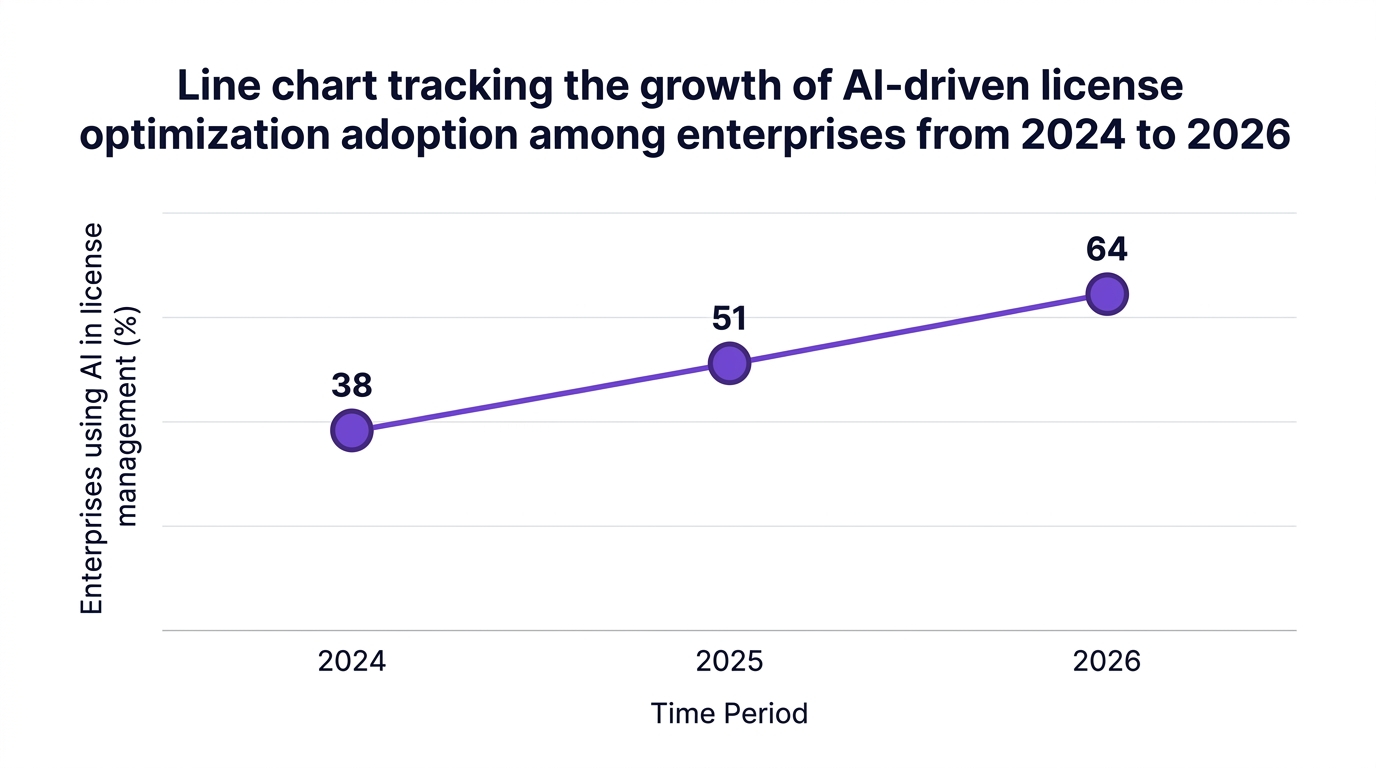
Gartner notes that 64 percent of enterprises report integrated AI in license management workflows by 2026. This creates a new frontier for m365 governance best practices.
Key actions:
Maintain a catalog of all premium and AI related add ons tied to users and groups.
Limit access to pilots and early adopters with clear evaluation timelines.
Regularly validate that add ons are driving measurable value and not simply stacking incremental costs.
Microsoft 365 is rarely the only cloud productivity suite in a large enterprise. Users may have overlapping tools that duplicate M365 capabilities.
A modern license optimization framework integrates M365 with broader IT asset governance. This is where app discovery and cross SaaS analysis reveal redundant tools.
Key actions:
Correlate M365 license data with other collaboration and communication tools.
Identify opportunities to standardize on M365 where adoption is strong and remove redundant platforms.
Use platforms like CloudNuro’s SaaS management capabilities to maintain 99 percent plus visibility across your SaaS and cloud estate.
Manual efforts can only take you so far. AI enabled automation brings scale and consistency to microsoft 365 license optimization 2026.
A leading research firm reports that enterprises with AI enabled license management achieve a 26 percent faster time to value on optimization projects (Everest Group 2026). CloudNuro Insights shows that 99 percent plus visibility correlates with double digit reductions in SaaS overspend.
Key actions:
Use AI to identify patterns, such as roles that consistently under utilize E5 or regions with high inactive license rates.
Automate license reclamation, downgrade recommendations, and exception workflows.
Integrate these insights into your m365 license management guide and governance standards.
Most organizations focus heavily on Microsoft 365 renewals only in the 60 to 90 day window before contract end. By then, options are limited.
A microsoft 365 renewal optimization strategy shifts this mindset. You review usage, rightsizing, and contractual terms throughout the year, so renewal becomes a confirmation of ongoing practices rather than a frantic negotiation.
Key actions:
Maintain a rolling 12 month forecast of M365 usage and license needs.
Feed outcomes from tactics like rightsizing, license reclamation, and role based licensing into renewal discussions.
Use insights from a Microsoft license optimization assessment to benchmark and validate your renewal position.
CloudNuro’s Microsoft 365 Custodian is designed to operationalize all of these microsoft 365 license management best practices. It provides the automation, visibility, and governance needed to reduce Microsoft 365 licensing costs while keeping user productivity intact.
CloudNuro’s automated license reclamation engine continuously monitors activity and enforces your policies for inactive users. It supports quarterly access reviews, with workflows that route approvals to business managers and reclaim inactive M365 licenses safely.
A Fortune 500 pharmaceuticals company used Microsoft 365 Custodian to automate reclamation and institute quarterly reviews. The result was a 19 percent reduction in annual M365 spend and a 42 percent drop in provisioned but unused seats by Q2 2026. You can explore details in the CloudNuro Microsoft 365 license optimization case study.
CloudNuro’s platform enables role based Microsoft 365 licensing and segmented M365 licensing strategies at scale. You define standard license bundles, then AI analyzes usage patterns to optimize Microsoft 365 E3 E5 licenses without risking disruption.
A global financial services organization implemented CloudNuro’s Unified Cloud Custodian and achieved 99.4 percent visibility across their SaaS estate. This clarity delivered an 18 percent cost savings on M365 by rightsizing E5, E3, and E1 assignments, with full ROI realized within three months.
CloudNuro combines Microsoft 365 Custodian with governance and financial accountability modules. You can allocate costs by business unit, run showback and chargeback for SaaS, and integrate with FinOps services and finance systems.
This turns M365 optimization into an ongoing discipline rather than a one time project. CloudNuro’s AI Custodian and Unified Cloud Custodian help embed m365 governance best practices into your broader SaaS management and why CloudNuro strategy.
If you want a structured starting point, you can request a free Microsoft Office 365 assessment directly from CloudNuro at this link.
Core microsoft 365 license management best practices include building a single source of truth for license inventory, adopting role based Microsoft 365 licensing, and using Azure AD group based licensing best practices. You should also implement quarterly audits, automated license reclamation, and ongoing Microsoft 365 renewal optimization.
Overlaying these with strong m365 governance best practices and financial accountability through chargeback or showback ensures that license optimization becomes part of normal operations, not a one off clean up.
Focus on microsoft 365 license rightsizing rather than blunt cuts. Use telemetry to see who uses advanced E5 capabilities, pilot downgrades where usage is low, and reclaim inactive M365 licenses using clear policies and communication.
Also, automate onboarding and offboarding workflows to prevent orphaned licenses, and use segmented M365 licensing strategy models so employees receive the right tools for their role. This protects productivity while you cut M365 costs in a controlled, data driven way.
In 2026, the most effective m365 license tactics revolve around AI enabled analysis, automated reclamation, and integrated governance. This includes continuous M365 license usage reports, dynamic group based assignment, and automated downgrade or deprovision workflows.
Market data shows that automated license reclamation alone can deliver up to an 18 percent reduction in annual M365 spend (Forrester 2026). Combining that with role based licensing and quarterly audits often yields 15 to 25 percent savings without harming productivity.
Common pitfalls include over relying on spreadsheets, delaying actions until renewal, and applying one size fits all cuts. Another frequent issue is failing to coordinate IT, security, and finance, which leads to policy gaps and exceptions.
To avoid these, build an integrated license optimization framework, combine technical controls with m365 compliance management, and clearly communicate changes to business units. Use platforms like CloudNuro to ensure that optimization actions are auditable, reversible where needed, and aligned with regulatory requirements.
Quarterly reviews are emerging as the microsoft 365 audit best practices standard. This cadence balances the need for control with the capacity of IT and business stakeholders.
High change environments, such as rapidly growing or restructuring organizations, may benefit from monthly checks on specific high cost SKUs. Regardless of cadence, success depends on automation, clear decision workflows, and documented outcomes.
Effective microsoft 365 license management is no longer a one time clean up. It is a continuous, data driven discipline that combines visibility, governance, automation, and financial accountability.
By implementing the 12 tactics in this guide, you can:
Reduce Microsoft 365 licensing costs by 15 to 25 percent through rightsizing and reclamation.
Improve utilization and compliance with m365 license optimization and governance.
Support IT, finance, and business leaders with reliable, auditable data and workflows.
CloudNuro’s Microsoft 365 Custodian and broader SaaS management platform are built to help you operationalize these practices, from m365 license assignment by role to automated quarterly reviews and renewal planning. To see what this looks like in your environment, request a tailored assessment and roadmap.
Call to action:
Start your optimization journey by booking a CloudNuro Microsoft 365 license review today so you can cut M365 costs without hurting productivity.
CloudNuro is a leader in Enterprise SaaS Management Platforms, providing enterprises with unmatched visibility, governance, and cost optimization. Recognized twice in a row in the SaaS Management Platforms category and named a Leader in the SoftwareReviews Data Quadrant, CloudNuro is trusted by global enterprises and government agencies to bring financial discipline to SaaS, cloud, and AI.
Trusted by enterprises such as Konica Minolta and Federal Signal, CloudNuro provides centralized SaaS inventory, license optimization, and renewal management along with advanced cost allocation and chargeback, giving IT and Finance leaders the visibility, control, and cost conscious culture needed to drive financial discipline.
Request a no cost, no obligation free assessment —just 15 minutes to savings!
Get StartedEffective Microsoft 365 license management has become a core discipline for IT and finance leaders who are under pressure to cut SaaS costs while protecting productivity.
Gartner reports that the average enterprise overspends between 20 and 35 percent on Microsoft 365 licenses due to misaligned license types and inactive users (2026). Forrester adds that automated license reclamation alone can reduce annual Microsoft 365 spend by up to 18 percent for large organizations (2026).
This guide outlines 12 practical Microsoft 365 license management best practices that form a modern license optimization framework. Each tactic is designed to help you reduce Microsoft 365 licensing costs, strengthen governance, and avoid disrupting daily work.
Most organizations began their Office 365 license management journey with simple spreadsheets and annual audits. Those practices were acceptable when M365 usage was relatively static.
Today, license assignments change weekly as employees join, leave, or switch roles. Remote and hybrid work, departmental app purchases, and AI features have all expanded the M365 footprint.
According to IDC, companies that implement quarterly Microsoft 365 access audits see a 40 percent improvement in license utilization rates (2026). CloudNuro Insights finds that 99 percent plus SaaS visibility correlates with a 15 to 22 percent reduction in overall SaaS overspend, with Microsoft 365 often the single largest opportunity (2026).
A modern m365 license management guide needs to treat M365 as a living system. That means continuous monitoring, role based Microsoft 365 licensing, automated license reclamation, and tight alignment between IT, security, and finance.
Think of your program as a control tower. These 12 tactics span three layers:
Visibility and data: what you can see and measure.
Control and governance: how you standardize and enforce behavior.
Automation and optimization: how you reduce effort while improving results.
You cannot optimize what you cannot see. Robust saas spend visibility is the foundation for every other Microsoft 365 license optimization 2026 initiative.
Best in class organizations consolidate:
All active licenses by SKU and subscription.
Assigned versus unassigned licenses.
User activity, app usage, and sign in patterns.
Historical changes and renewal dates.
A leading research firm finds that enterprises using AI enabled M365 license management platforms report 26 percent faster time to value on license optimization projects (Everest Group 2026). A unified inventory, ideally fed by APIs, replaces brittle spreadsheets and supports accurate M365 license usage reports.
Key actions:
Integrate Microsoft 365 admin center data, Azure AD, HRIS, and finance systems into one source.
Standardize license naming and tagging for business units, cost centers, and locations.
Align this inventory with your broader SaaS management processes to maintain consistency.
Manual, user by user decisions are a primary cause of overspend. Role based Microsoft 365 licensing replaces ad hoc choices with consistent, policy driven assignments.
Create segmented M365 licensing strategies based on:
Job function and department.
Location and regulatory requirements.
Collaboration and communication needs.
Security and compliance obligations.
For example, a frontline worker may only need a lighter SKU, while a security analyst requires advanced compliance features. Deloitte reports that rightsizing E5 to E3 licenses and aligning with roles can reduce per user costs by an average of 144 dollars per seat annually (2026).
Key actions:
Document 5 to 10 standard license profiles, such as "Information Worker E3", "Frontline F3", "Executive E5".
Map each HR job code to one of these profiles.
Use this as the baseline for all new assignments and m365 license assignment by role.
Group based licensing in Azure AD, when configured correctly, brings order to license assignments. When misconfigured, it becomes a source of shadow overspend.
Adopting azure ad group based licensing best practices includes:
Assigning licenses to security groups that mirror role profiles.
Using dynamic groups tied to attributes like department, location, and employment type.
Avoiding direct user assignments, which are difficult to track and remove.
IDC reports that automated, role based license assignment is used by 47 percent of enterprises and materially improves compliance and consistency (2026).
Key actions:
For each role profile, create a corresponding Azure AD group and assign licenses at the group level.
Use dynamic membership rules where possible, so changes in HR data automatically adjust license assignment.
Periodically run a m365 license usage report to validate that direct assignments are minimized.
One of the highest value m365 license tactics is to strategically mix E1, E3, and E5 licenses instead of defaulting everyone to the most expensive tier. This is the essence of microsoft 365 license rightsizing.
Deloitte’s research indicates that E5 to E3 rightsizing and role based approvals reduce per user costs by an average of 144 dollars per seat annually (2026). CloudNuro case studies show that enterprises often discover that 20 to 30 percent of E5 users can safely move to E3 without any productivity loss.
Key actions:
Build policies for who truly requires E5, such as legal, security, and specific compliance sensitive roles.
Use telemetry to identify users not using advanced features, then pilot downgrades.
Incorporate this into your microsoft 365 renewal optimization planning cycles.
Counterpoint: There will be edge cases where users rely on specific E5 capabilities infrequently but critically. In those cases, a measured policy exception is preferable to a hard cost target.
Organizations with automated workflows for onboarding and offboarding reclaim an average of 30 percent more licenses within the first quarter of adoption (Gartner 2026). This directly supports office 365 cost reduction.
Manual offboarding typically fails due to timing and coordination issues. HR notifies IT late, managers forget optional tools, and licenses sit idle.
Key actions:
Integrate HR systems so that new hires and terminations trigger standardized workflows.
For each role profile, define default license bundles and security settings.
Ensure offboarding workflows remove license assignments, reclaim inactive M365 licenses, and transfer data ownership.
Automation provides two benefits. It prevents over assignment during onboarding and accelerates reclamation when employees leave, which helps cut M365 costs continuously rather than once per year.
According to Forrester, enterprises underestimate the impact of inactive and mis provisioned Microsoft 365 licenses, leading to millions in avoidable spend each year (2026). A targeted reclaim inactive M365 licenses program can change that.
CloudNuro data shows that inactive user reclamation can account for roughly one third of total Microsoft 365 cost reduction in a typical optimization program. Everest Group also notes that quarterly license usage reviews and automated reclamation are replacing manual annual audits (2026).
Key actions:
Define inactivity thresholds, for example no sign in for 60 or 90 days.
Use automated workflows to move inactive users to a staging group, notify managers, and reclaim licenses after a grace period.
Track reclaimed seats and associated savings to demonstrate return on investment.
Annual audits are too slow for dynamic environments. Quarterly microsoft 365 audit best practices keep your environment aligned with real usage.
IDC reports that companies implementing quarterly Microsoft 365 access audits achieve 40 percent improvement in license utilization (2026). This practice also strengthens m365 compliance management and satisfies internal and external audit requirements.
Key actions:
Run themed reviews, such as "all E5 users", "all external users", or "all shared mailboxes".
Include business managers in the review cycle, since they understand actual usage better than central IT.
Document decisions and outcomes to support governance, especially for regulated industries.
Counterpoint: Overly aggressive audits without adequate communication can create friction. Balance rigor with clear messaging so stakeholders understand that the goal is to optimize Microsoft 365 E3 E5 licenses without harming productivity.
A license governance strategy only sticks when financial accountability is shared. CloudNuro Insights reports that 58 percent of enterprises use showback and chargeback modules tying M365 usage to business units (2026).
Chargeback for SaaS does not have to be punitive. Showback reports can be enough to encourage better behavior. When business leaders see their Microsoft 365 consumption and costs, they collaborate more actively on microsoft 365 cost optimization.
Key actions:
Tag licenses and users with cost centers and departments.
Produce monthly or quarterly reports that link usage, license counts, and spend.
Partner with finance and consider FinOps services to align M365 optimization with broader IT asset governance.
Modern Microsoft 365 environments often include AI, security, and compliance add ons. These features can be powerful, but they also introduce new cost and risk profiles.
Gartner notes that 64 percent of enterprises report integrated AI in license management workflows by 2026. This creates a new frontier for m365 governance best practices.
Key actions:
Maintain a catalog of all premium and AI related add ons tied to users and groups.
Limit access to pilots and early adopters with clear evaluation timelines.
Regularly validate that add ons are driving measurable value and not simply stacking incremental costs.
Microsoft 365 is rarely the only cloud productivity suite in a large enterprise. Users may have overlapping tools that duplicate M365 capabilities.
A modern license optimization framework integrates M365 with broader IT asset governance. This is where app discovery and cross SaaS analysis reveal redundant tools.
Key actions:
Correlate M365 license data with other collaboration and communication tools.
Identify opportunities to standardize on M365 where adoption is strong and remove redundant platforms.
Use platforms like CloudNuro’s SaaS management capabilities to maintain 99 percent plus visibility across your SaaS and cloud estate.
Manual efforts can only take you so far. AI enabled automation brings scale and consistency to microsoft 365 license optimization 2026.
A leading research firm reports that enterprises with AI enabled license management achieve a 26 percent faster time to value on optimization projects (Everest Group 2026). CloudNuro Insights shows that 99 percent plus visibility correlates with double digit reductions in SaaS overspend.
Key actions:
Use AI to identify patterns, such as roles that consistently under utilize E5 or regions with high inactive license rates.
Automate license reclamation, downgrade recommendations, and exception workflows.
Integrate these insights into your m365 license management guide and governance standards.
Most organizations focus heavily on Microsoft 365 renewals only in the 60 to 90 day window before contract end. By then, options are limited.
A microsoft 365 renewal optimization strategy shifts this mindset. You review usage, rightsizing, and contractual terms throughout the year, so renewal becomes a confirmation of ongoing practices rather than a frantic negotiation.
Key actions:
Maintain a rolling 12 month forecast of M365 usage and license needs.
Feed outcomes from tactics like rightsizing, license reclamation, and role based licensing into renewal discussions.
Use insights from a Microsoft license optimization assessment to benchmark and validate your renewal position.
CloudNuro’s Microsoft 365 Custodian is designed to operationalize all of these microsoft 365 license management best practices. It provides the automation, visibility, and governance needed to reduce Microsoft 365 licensing costs while keeping user productivity intact.
CloudNuro’s automated license reclamation engine continuously monitors activity and enforces your policies for inactive users. It supports quarterly access reviews, with workflows that route approvals to business managers and reclaim inactive M365 licenses safely.
A Fortune 500 pharmaceuticals company used Microsoft 365 Custodian to automate reclamation and institute quarterly reviews. The result was a 19 percent reduction in annual M365 spend and a 42 percent drop in provisioned but unused seats by Q2 2026. You can explore details in the CloudNuro Microsoft 365 license optimization case study.
CloudNuro’s platform enables role based Microsoft 365 licensing and segmented M365 licensing strategies at scale. You define standard license bundles, then AI analyzes usage patterns to optimize Microsoft 365 E3 E5 licenses without risking disruption.
A global financial services organization implemented CloudNuro’s Unified Cloud Custodian and achieved 99.4 percent visibility across their SaaS estate. This clarity delivered an 18 percent cost savings on M365 by rightsizing E5, E3, and E1 assignments, with full ROI realized within three months.
CloudNuro combines Microsoft 365 Custodian with governance and financial accountability modules. You can allocate costs by business unit, run showback and chargeback for SaaS, and integrate with FinOps services and finance systems.
This turns M365 optimization into an ongoing discipline rather than a one time project. CloudNuro’s AI Custodian and Unified Cloud Custodian help embed m365 governance best practices into your broader SaaS management and why CloudNuro strategy.
If you want a structured starting point, you can request a free Microsoft Office 365 assessment directly from CloudNuro at this link.
Core microsoft 365 license management best practices include building a single source of truth for license inventory, adopting role based Microsoft 365 licensing, and using Azure AD group based licensing best practices. You should also implement quarterly audits, automated license reclamation, and ongoing Microsoft 365 renewal optimization.
Overlaying these with strong m365 governance best practices and financial accountability through chargeback or showback ensures that license optimization becomes part of normal operations, not a one off clean up.
Focus on microsoft 365 license rightsizing rather than blunt cuts. Use telemetry to see who uses advanced E5 capabilities, pilot downgrades where usage is low, and reclaim inactive M365 licenses using clear policies and communication.
Also, automate onboarding and offboarding workflows to prevent orphaned licenses, and use segmented M365 licensing strategy models so employees receive the right tools for their role. This protects productivity while you cut M365 costs in a controlled, data driven way.
In 2026, the most effective m365 license tactics revolve around AI enabled analysis, automated reclamation, and integrated governance. This includes continuous M365 license usage reports, dynamic group based assignment, and automated downgrade or deprovision workflows.
Market data shows that automated license reclamation alone can deliver up to an 18 percent reduction in annual M365 spend (Forrester 2026). Combining that with role based licensing and quarterly audits often yields 15 to 25 percent savings without harming productivity.
Common pitfalls include over relying on spreadsheets, delaying actions until renewal, and applying one size fits all cuts. Another frequent issue is failing to coordinate IT, security, and finance, which leads to policy gaps and exceptions.
To avoid these, build an integrated license optimization framework, combine technical controls with m365 compliance management, and clearly communicate changes to business units. Use platforms like CloudNuro to ensure that optimization actions are auditable, reversible where needed, and aligned with regulatory requirements.
Quarterly reviews are emerging as the microsoft 365 audit best practices standard. This cadence balances the need for control with the capacity of IT and business stakeholders.
High change environments, such as rapidly growing or restructuring organizations, may benefit from monthly checks on specific high cost SKUs. Regardless of cadence, success depends on automation, clear decision workflows, and documented outcomes.
Effective microsoft 365 license management is no longer a one time clean up. It is a continuous, data driven discipline that combines visibility, governance, automation, and financial accountability.
By implementing the 12 tactics in this guide, you can:
Reduce Microsoft 365 licensing costs by 15 to 25 percent through rightsizing and reclamation.
Improve utilization and compliance with m365 license optimization and governance.
Support IT, finance, and business leaders with reliable, auditable data and workflows.
CloudNuro’s Microsoft 365 Custodian and broader SaaS management platform are built to help you operationalize these practices, from m365 license assignment by role to automated quarterly reviews and renewal planning. To see what this looks like in your environment, request a tailored assessment and roadmap.
Call to action:
Start your optimization journey by booking a CloudNuro Microsoft 365 license review today so you can cut M365 costs without hurting productivity.
CloudNuro is a leader in Enterprise SaaS Management Platforms, providing enterprises with unmatched visibility, governance, and cost optimization. Recognized twice in a row in the SaaS Management Platforms category and named a Leader in the SoftwareReviews Data Quadrant, CloudNuro is trusted by global enterprises and government agencies to bring financial discipline to SaaS, cloud, and AI.
Trusted by enterprises such as Konica Minolta and Federal Signal, CloudNuro provides centralized SaaS inventory, license optimization, and renewal management along with advanced cost allocation and chargeback, giving IT and Finance leaders the visibility, control, and cost conscious culture needed to drive financial discipline.
Request a no cost, no obligation free assessment - just 15 minutes to savings!
Get StartedWe're offering complimentary ServiceNow license assessments to only 25 enterprises this quarter who want to unlock immediate savings without disrupting operations.
Get Free AssessmentGet Started




CloudNuro Corp
1755 Park St. Suite 207
Naperville, IL 60563
Phone : +1-630-277-9470
Email: info@cloudnuro.com





.webp)

Recognized Leader in SaaS Management Platforms by Info-Tech SoftwareReviews


.svg)