

Sign Up
Thank you for Submitting!
Microsoft 365 license optimization has shifted from a periodic clean-up project to a core discipline for IT, finance, and Software Asset Management (SAM) teams in 2026. Subscription models, changing user needs, and evolving enterprise agreements mean your M365 environment can bleed budget quietly unless you have data, automation, and governance working together.
Recent industry research shows that 31% of Microsoft 365 enterprise licenses remain underutilized or dormant in 2026, even in mature organizations. At scale, that is millions of dollars of waste and a material compliance risk. This guide explains how to tackle Microsoft 365 license optimization strategically, which practices deliver the fastest returns, and how AI-driven platforms like CloudNuro’s Microsoft 365 Custodian help IT and finance teams keep costs, risk, and complexity under control.
Microsoft 365 is often one of the top three line items in the IT budget. Yet many organizations still approach m365 license management with static spreadsheets and annual audits that cannot keep up with reality.
According to a 2026 industry report, only 54% of enterprises conduct regular Microsoft 365 license audits, leaving nearly half exposed to avoidable overspend and compliance gaps. At the same time, new collaboration patterns, frontline worker models, and hybrid work policies continuously change what users actually need.
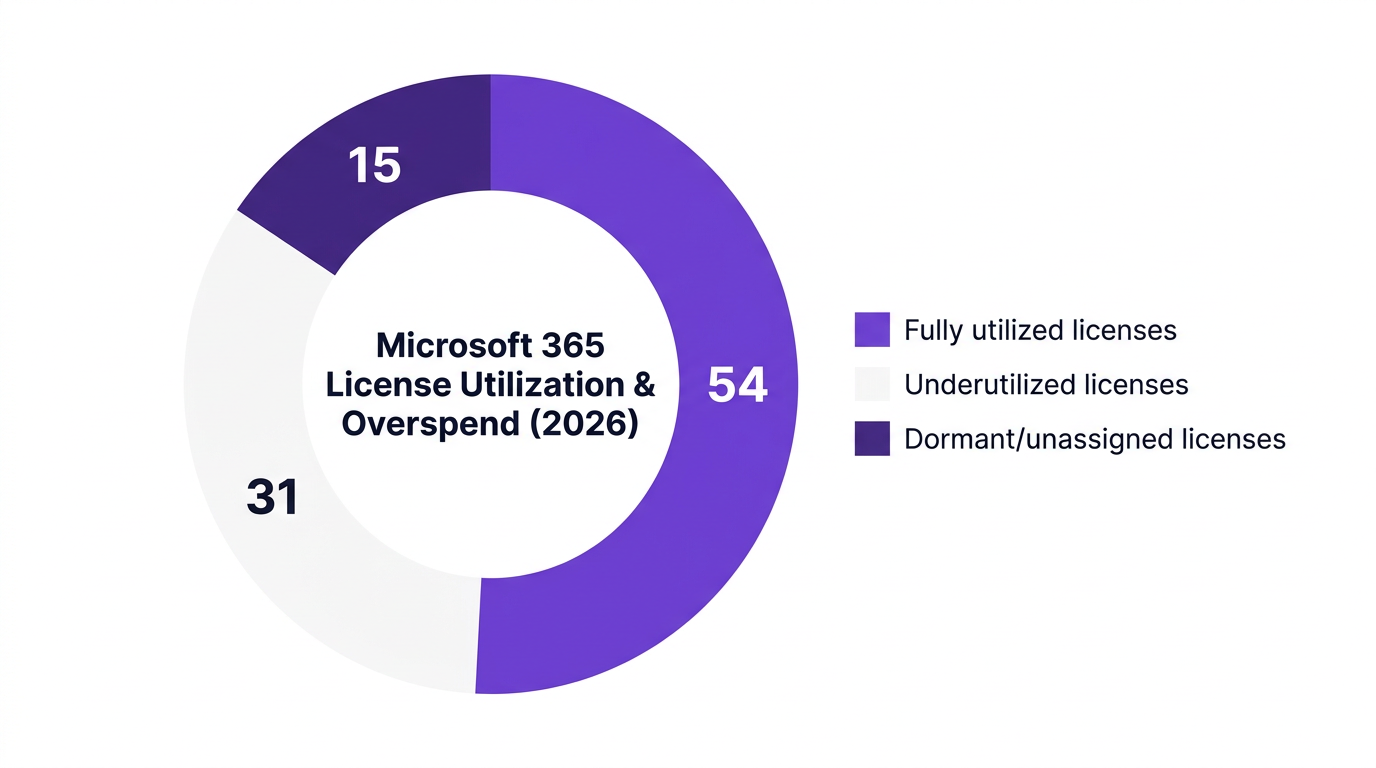
The result looks like this in a typical enterprise M365 estate in 2026:
That pie chart is not only a cost problem. It is also a signal of process weaknesses: onboarding and offboarding gaps, unclear entitlement rules, and limited 365 license visibility across departments.
Microsoft 365 license optimization is the discipline of aligning entitlements, usage, and spend continuously, not just once a year. For CIOs and CFOs, it is one of the most direct routes to license cost reduction and stronger governance without hurting user productivity.

Trying to fix M365 licensing with ad hoc reports is like trying to manage a data center through email threads. You can do it, but the risk and waste accumulate quickly. Mature m365 license management in 2026 usually includes four core building blocks.
You cannot optimize what you cannot see. Enterprises need complete cross-tenant, cross-subscription visibility into:
Without this, shadow assignments, duplicate entitlements, and zombie accounts remain hidden. Industry benchmarks show organizations using integrated cloud subscription management tools cut shadow IT risks in their M365 environments by 27% in 2026.
License counts alone are not enough. SAM teams need license utilization metrics that show:
This is where many spreadsheets fail. According to a 2026 enterprise IT survey, experts emphasize that organizations require dynamic, analytics-driven tools, not static spreadsheets, to manage Microsoft 365 at scale.
Once you know who is using what, you can define policies such as:
M365 right sizing aligns SKU level to user need, then keeps it aligned over time. This is where automation pays off most.
Finally, you need to anchor license decisions in financial reality. In 2026, over 62% of large enterprises have implemented dedicated M365 chargeback and visibility tools to enforce accountability and governance. Best practice is to:
This combination of visibility, analytics, policy, and financial accountability is what turns m365 license management into a repeatable discipline instead of a one-off clean-up.
Once the foundations are in place, IT and SAM teams can apply specific tactics that deliver fast, measurable Microsoft 365 savings.
In a 2026 executive survey, 42% of IT and finance leaders cited automated license reclamation as their most effective Microsoft 365 cost optimization strategy. The logic is simple: user churn and role changes are constant, and manual deprovisioning cannot keep pace.
High-impact automation rules include:
This is the practical side of license reclaim Microsoft 365: rule-based actions that transform license management from a once-a-year project into a daily optimization engine.
Many enterprises still map licenses directly to job titles or past buying decisions. A better approach is to define personas based on behavior:
By mapping real usage to these personas, then aligning SKUs, organizations reduce overspend without impacting productivity. A 2026 survey of organizations using AI-powered saas license optimization tools found an average 18% reduction in Microsoft 365 licensing costs.
Renewal time is often when mistakes are amplified. Common missteps include:
With 2026 changes in enterprise discounts and annual commitment models, it cost reduction Microsoft 365 requires that SAM and finance teams bring real usage data to the table. Best practice is to start a Microsoft 365 license audit 90 to 120 days before renewal, model multiple scenarios, and negotiate from a fact base.
Microsoft 365 is rarely the only major subscription. Treating it in isolation leads to partial optimization. Organizations that connect M365 data into a unified saas spend management practice gain:
This is especially valuable as more workloads shift into other SaaS platforms that complement or overlap with M365.
Every optimization program meets resistance and surprises. Recognizing common pitfalls can prevent stalled projects and missed savings.
Some teams chase license cost reduction so aggressively that they remove essential security or compliance entitlements. This can backfire during audits or incidents.
Balanced optimization means:
A one-off project might reclaim a few thousand licenses, but if joiner, mover, and leaver processes remain manual, the waste returns quickly. A 2026 benchmark study found that organizations using advanced license management solutions see a payback period of under 8 months, precisely because they embed automation into their daily operations.
Optimization must become:
Spreadsheets break when:
Experts in 2026 highlight that analytics-driven, integrated tools are now essential. Fragmented scripts and manual exports inevitably lead to inconsistencies, missed reclamation opportunities, and audit friction.
If departments never see their own license bill, they will continue to over-request and under-report. Effective saas cost optimization depends on:

CloudNuro was designed specifically to address these challenges by unifying data, automation, and governance across Microsoft 365 and other SaaS platforms. The CloudNuro Microsoft 365 Custodian brings a practical, AI-enabled approach to Microsoft 365 license optimization for IT, finance, and SAM teams.
CloudNuro connects to your Microsoft 365 environment to automatically:
This gives SAM teams and IT leaders comprehensive 365 license visibility in a single pane of glass instead of multiple portals and exports.
CloudNuro continuously analyzes license utilization across Exchange, SharePoint, OneDrive, Teams, and other workloads. It identifies users who are:
Using ai-driven saas insight, CloudNuro recommends concrete m365 right sizing actions you can accept, adjust, or automate. Customers using this approach typically see around 18% Microsoft 365 savings, in line with 2026 survey findings on automated optimization.
CloudNuro’s governance-first architecture supports microsoft license governance by letting you define and enforce policies such as:
These policies drive consistent actions across your M365 estate, reducing human error and keeping you audit-ready.
CloudNuro’s chargeback and financial accountability tools give finance and business leaders clear, actionable views of spend:
This enables more disciplined cloud license optimization across your SaaS estate, turning CloudNuro into a central platform for saas spend management.
In 2026, a large healthcare provider implemented an AI-powered Microsoft 365 license management solution with automated reclamation and right-sizing rules. Within one year, the organization:
A government agency in 2026 adopted policy automation and real-time usage analytics across its Microsoft estate. The results included:
These outcomes mirror what CloudNuro customers typically see: rapid value realization, measurable savings, and reduced risk when moving from manual processes to automated saas license optimization.
For IT, finance, and SAM leaders who want to act in the next 90 days, this step-by-step checklist provides a clear path.
Treat this checklist as a feedback loop: measure, optimize, enforce, and repeat. Over a few cycles, Microsoft 365 license optimization becomes a predictable and reliable source of savings and risk reduction.
Organizations optimize costs by combining microsoft 365 license optimization practices with automation and governance. This includes consolidating inventory, analyzing usage, applying persona-based right-sizing rules, and automating license reclamation for inactive or departed users.
When paired with cloudnuro microsoft 365 custodian or similar AI-enabled platforms, enterprises typically see double-digit percentage reductions in annual Microsoft 365 spend, often within the first 6 to 12 months.
Best practices for reclaiming licenses include:
This systematic license reclaim Microsoft 365 approach protects both cost and compliance while avoiding disruptions for active users.
Automated SaaS governance improves security and compliance by enforcing consistent policies across large environments. For Microsoft 365, this means:
With policy-driven governance, organizations reduce manual errors, shrink their attack surface, and respond to audits with confidence.
High-value tools and reports for software asset management Microsoft programs include:
CloudNuro provides these capabilities within its Microsoft 365 Custodian and broader Unified Cloud Custodian platform, enabling SAM teams to shift from reactive reporting to proactive optimization.
Common mistakes include:
Avoiding these traps requires coordinated workflows between IT, SAM, finance, and procurement, backed by reliable data and automation.
Changes in volume discounts and commercial terms in 2026 mean that quantity alone no longer guarantees optimal pricing. Enterprises must:
Organizations that bring accurate, usage-based insights to the table are better positioned to secure favorable terms and avoid overbuying.
Microsoft 365 license optimization is no longer a side project for SAM teams. It is a critical lever for budget control, compliance, and operational resilience. With roughly 31% of licenses underutilized or dormant in typical enterprise estates and automated optimization delivering around 18% cost reductions, the upside is too significant to ignore.
By combining unified visibility, utilization analytics, policy-driven right-sizing, and chargeback, IT and finance leaders can transform Microsoft 365 from a fixed cost into a managed investment. Platforms like CloudNuro’s Microsoft 365 Custodian make it realistic to operationalize this at scale, across complex, multi-tenant environments.
For organizations that want to accelerate Microsoft 365 savings and strengthen governance, the next step is straightforward: connect your environment, measure your true baseline, and let automation work for you.
Ready to take control of Microsoft 365 license optimization and broader SaaS spend? Explore how CloudNuro can help you move from reactive clean-up to continuous, AI-driven optimization.
CloudNuro is a leader in Enterprise SaaS Management Platforms, providing enterprises with unmatched visibility, governance, and cost optimization. Recognized twice in a row in the SaaS Management Platforms category and named a Leader in the SoftwareReviews Data Quadrant, CloudNuro is trusted by global enterprises and government agencies to bring financial discipline to SaaS, cloud, and AI. Trusted by enterprises such as Konica Minolta and Federal Signal, CloudNuro provides centralized SaaS inventory, license optimization, and renewal management along with advanced cost allocation and chargeback, giving IT and Finance leaders the visibility, control, and cost-conscious culture needed to drive financial discipline. Request a Demo | Get Free Savings | Explore Product
Request a no cost, no obligation free assessment —just 15 minutes to savings!
Get StartedMicrosoft 365 license optimization has shifted from a periodic clean-up project to a core discipline for IT, finance, and Software Asset Management (SAM) teams in 2026. Subscription models, changing user needs, and evolving enterprise agreements mean your M365 environment can bleed budget quietly unless you have data, automation, and governance working together.
Recent industry research shows that 31% of Microsoft 365 enterprise licenses remain underutilized or dormant in 2026, even in mature organizations. At scale, that is millions of dollars of waste and a material compliance risk. This guide explains how to tackle Microsoft 365 license optimization strategically, which practices deliver the fastest returns, and how AI-driven platforms like CloudNuro’s Microsoft 365 Custodian help IT and finance teams keep costs, risk, and complexity under control.
Microsoft 365 is often one of the top three line items in the IT budget. Yet many organizations still approach m365 license management with static spreadsheets and annual audits that cannot keep up with reality.
According to a 2026 industry report, only 54% of enterprises conduct regular Microsoft 365 license audits, leaving nearly half exposed to avoidable overspend and compliance gaps. At the same time, new collaboration patterns, frontline worker models, and hybrid work policies continuously change what users actually need.
The result looks like this in a typical enterprise M365 estate in 2026:
That pie chart is not only a cost problem. It is also a signal of process weaknesses: onboarding and offboarding gaps, unclear entitlement rules, and limited 365 license visibility across departments.
Microsoft 365 license optimization is the discipline of aligning entitlements, usage, and spend continuously, not just once a year. For CIOs and CFOs, it is one of the most direct routes to license cost reduction and stronger governance without hurting user productivity.
Trying to fix M365 licensing with ad hoc reports is like trying to manage a data center through email threads. You can do it, but the risk and waste accumulate quickly. Mature m365 license management in 2026 usually includes four core building blocks.
You cannot optimize what you cannot see. Enterprises need complete cross-tenant, cross-subscription visibility into:
Without this, shadow assignments, duplicate entitlements, and zombie accounts remain hidden. Industry benchmarks show organizations using integrated cloud subscription management tools cut shadow IT risks in their M365 environments by 27% in 2026.
License counts alone are not enough. SAM teams need license utilization metrics that show:
This is where many spreadsheets fail. According to a 2026 enterprise IT survey, experts emphasize that organizations require dynamic, analytics-driven tools, not static spreadsheets, to manage Microsoft 365 at scale.
Once you know who is using what, you can define policies such as:
M365 right sizing aligns SKU level to user need, then keeps it aligned over time. This is where automation pays off most.
Finally, you need to anchor license decisions in financial reality. In 2026, over 62% of large enterprises have implemented dedicated M365 chargeback and visibility tools to enforce accountability and governance. Best practice is to:
This combination of visibility, analytics, policy, and financial accountability is what turns m365 license management into a repeatable discipline instead of a one-off clean-up.
Once the foundations are in place, IT and SAM teams can apply specific tactics that deliver fast, measurable Microsoft 365 savings.
In a 2026 executive survey, 42% of IT and finance leaders cited automated license reclamation as their most effective Microsoft 365 cost optimization strategy. The logic is simple: user churn and role changes are constant, and manual deprovisioning cannot keep pace.
High-impact automation rules include:
This is the practical side of license reclaim Microsoft 365: rule-based actions that transform license management from a once-a-year project into a daily optimization engine.
Many enterprises still map licenses directly to job titles or past buying decisions. A better approach is to define personas based on behavior:
By mapping real usage to these personas, then aligning SKUs, organizations reduce overspend without impacting productivity. A 2026 survey of organizations using AI-powered saas license optimization tools found an average 18% reduction in Microsoft 365 licensing costs.
Renewal time is often when mistakes are amplified. Common missteps include:
With 2026 changes in enterprise discounts and annual commitment models, it cost reduction Microsoft 365 requires that SAM and finance teams bring real usage data to the table. Best practice is to start a Microsoft 365 license audit 90 to 120 days before renewal, model multiple scenarios, and negotiate from a fact base.
Microsoft 365 is rarely the only major subscription. Treating it in isolation leads to partial optimization. Organizations that connect M365 data into a unified saas spend management practice gain:
This is especially valuable as more workloads shift into other SaaS platforms that complement or overlap with M365.
Every optimization program meets resistance and surprises. Recognizing common pitfalls can prevent stalled projects and missed savings.
Some teams chase license cost reduction so aggressively that they remove essential security or compliance entitlements. This can backfire during audits or incidents.
Balanced optimization means:
A one-off project might reclaim a few thousand licenses, but if joiner, mover, and leaver processes remain manual, the waste returns quickly. A 2026 benchmark study found that organizations using advanced license management solutions see a payback period of under 8 months, precisely because they embed automation into their daily operations.
Optimization must become:
Spreadsheets break when:
Experts in 2026 highlight that analytics-driven, integrated tools are now essential. Fragmented scripts and manual exports inevitably lead to inconsistencies, missed reclamation opportunities, and audit friction.
If departments never see their own license bill, they will continue to over-request and under-report. Effective saas cost optimization depends on:
CloudNuro was designed specifically to address these challenges by unifying data, automation, and governance across Microsoft 365 and other SaaS platforms. The CloudNuro Microsoft 365 Custodian brings a practical, AI-enabled approach to Microsoft 365 license optimization for IT, finance, and SAM teams.
CloudNuro connects to your Microsoft 365 environment to automatically:
This gives SAM teams and IT leaders comprehensive 365 license visibility in a single pane of glass instead of multiple portals and exports.
CloudNuro continuously analyzes license utilization across Exchange, SharePoint, OneDrive, Teams, and other workloads. It identifies users who are:
Using ai-driven saas insight, CloudNuro recommends concrete m365 right sizing actions you can accept, adjust, or automate. Customers using this approach typically see around 18% Microsoft 365 savings, in line with 2026 survey findings on automated optimization.
CloudNuro’s governance-first architecture supports microsoft license governance by letting you define and enforce policies such as:
These policies drive consistent actions across your M365 estate, reducing human error and keeping you audit-ready.
CloudNuro’s chargeback and financial accountability tools give finance and business leaders clear, actionable views of spend:
This enables more disciplined cloud license optimization across your SaaS estate, turning CloudNuro into a central platform for saas spend management.
In 2026, a large healthcare provider implemented an AI-powered Microsoft 365 license management solution with automated reclamation and right-sizing rules. Within one year, the organization:
A government agency in 2026 adopted policy automation and real-time usage analytics across its Microsoft estate. The results included:
These outcomes mirror what CloudNuro customers typically see: rapid value realization, measurable savings, and reduced risk when moving from manual processes to automated saas license optimization.
For IT, finance, and SAM leaders who want to act in the next 90 days, this step-by-step checklist provides a clear path.
Treat this checklist as a feedback loop: measure, optimize, enforce, and repeat. Over a few cycles, Microsoft 365 license optimization becomes a predictable and reliable source of savings and risk reduction.
Organizations optimize costs by combining microsoft 365 license optimization practices with automation and governance. This includes consolidating inventory, analyzing usage, applying persona-based right-sizing rules, and automating license reclamation for inactive or departed users.
When paired with cloudnuro microsoft 365 custodian or similar AI-enabled platforms, enterprises typically see double-digit percentage reductions in annual Microsoft 365 spend, often within the first 6 to 12 months.
Best practices for reclaiming licenses include:
This systematic license reclaim Microsoft 365 approach protects both cost and compliance while avoiding disruptions for active users.
Automated SaaS governance improves security and compliance by enforcing consistent policies across large environments. For Microsoft 365, this means:
With policy-driven governance, organizations reduce manual errors, shrink their attack surface, and respond to audits with confidence.
High-value tools and reports for software asset management Microsoft programs include:
CloudNuro provides these capabilities within its Microsoft 365 Custodian and broader Unified Cloud Custodian platform, enabling SAM teams to shift from reactive reporting to proactive optimization.
Common mistakes include:
Avoiding these traps requires coordinated workflows between IT, SAM, finance, and procurement, backed by reliable data and automation.
Changes in volume discounts and commercial terms in 2026 mean that quantity alone no longer guarantees optimal pricing. Enterprises must:
Organizations that bring accurate, usage-based insights to the table are better positioned to secure favorable terms and avoid overbuying.
Microsoft 365 license optimization is no longer a side project for SAM teams. It is a critical lever for budget control, compliance, and operational resilience. With roughly 31% of licenses underutilized or dormant in typical enterprise estates and automated optimization delivering around 18% cost reductions, the upside is too significant to ignore.
By combining unified visibility, utilization analytics, policy-driven right-sizing, and chargeback, IT and finance leaders can transform Microsoft 365 from a fixed cost into a managed investment. Platforms like CloudNuro’s Microsoft 365 Custodian make it realistic to operationalize this at scale, across complex, multi-tenant environments.
For organizations that want to accelerate Microsoft 365 savings and strengthen governance, the next step is straightforward: connect your environment, measure your true baseline, and let automation work for you.
Ready to take control of Microsoft 365 license optimization and broader SaaS spend? Explore how CloudNuro can help you move from reactive clean-up to continuous, AI-driven optimization.
CloudNuro is a leader in Enterprise SaaS Management Platforms, providing enterprises with unmatched visibility, governance, and cost optimization. Recognized twice in a row in the SaaS Management Platforms category and named a Leader in the SoftwareReviews Data Quadrant, CloudNuro is trusted by global enterprises and government agencies to bring financial discipline to SaaS, cloud, and AI. Trusted by enterprises such as Konica Minolta and Federal Signal, CloudNuro provides centralized SaaS inventory, license optimization, and renewal management along with advanced cost allocation and chargeback, giving IT and Finance leaders the visibility, control, and cost-conscious culture needed to drive financial discipline. Request a Demo | Get Free Savings | Explore Product
Request a no cost, no obligation free assessment - just 15 minutes to savings!
Get StartedWe're offering complimentary ServiceNow license assessments to only 25 enterprises this quarter who want to unlock immediate savings without disrupting operations.
Get Free AssessmentGet Started




CloudNuro Corp
1755 Park St. Suite 207
Naperville, IL 60563
Phone : +1-630-277-9470
Email: info@cloudnuro.com





.webp)

Recognized Leader in SaaS Management Platforms by Info-Tech SoftwareReviews




.svg)