

Sign Up
Thank you for Submitting!
Microsoft 365 license right sizing has moved from IT housekeeping to a board-level priority. With Microsoft confirming an average 9% price increase across Microsoft 365 licenses effective July 1, 2026 (Microsoft 2026), IT and finance leaders must decide who truly needs F1, F3, E3, or E5, and who can be downgraded without increasing risk.
InfoTech Research estimates that enterprises will waste up to 27% of Microsoft 365 license spend in 2026 due to over-provisioning and misaligned roles. CloudNuro’s data shows that clients who operationalize role-based license decisions achieve documented savings of 18% on Microsoft 365 spend while maintaining or improving compliance.
This guide provides a practical, role-based framework for Microsoft 365 license right sizing, compares F1, F3, E3, and E5 in real-world terms, and shows how to operationalize the model across your hybrid and frontline workforce.
The 2026 price increase is the immediate catalyst, but the structural issue is long-standing: most organizations buy for the exception, then assign E3 or E5 to entire populations “just in case.”
According to InfoTech Research 2026, enterprises will waste up to 27% of Microsoft 365 license spend through over-provisioning. For organizations with 5,000+ seats, Gartner 2026 reports average savings of $210,000 per year when 20% of E3/E5 licenses are transitioned to F3 or F1 using a role-based framework.
Several trends make microsoft 365 license right sizing non-optional in 2026:
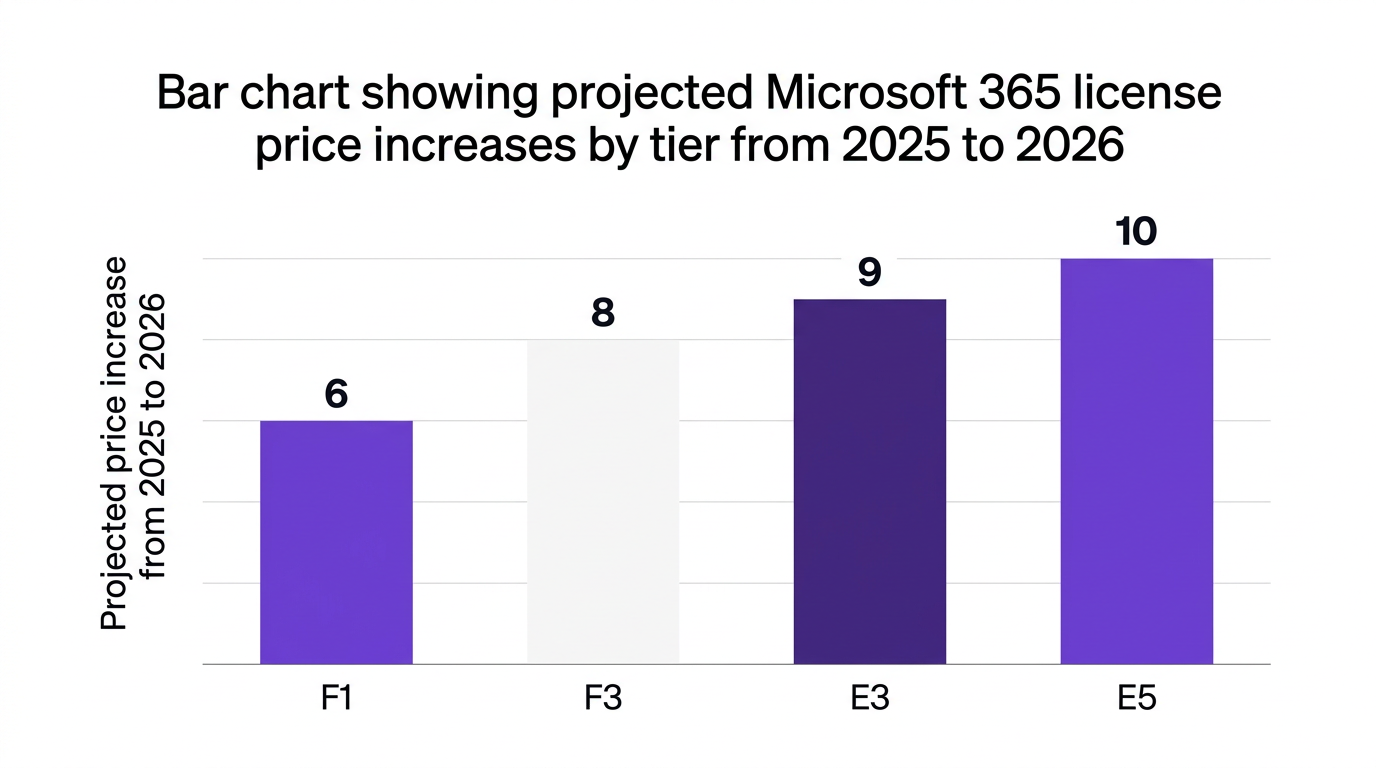
Confirmed price increase: Microsoft has signaled average 6% to 10% increases by tier (Microsoft 2026).
Over-licensed workforce: Only 24% of E5 users fully use advanced security features (Deloitte 2026).
Frontline expansion: Frontline-specific F1 and F3 adoption is forecast to grow 15% in 2026 as firms look to offset cost increases (Canalys 2026).
A Forrester 2026 study notes that 70% of organizations are revising their license tiering strategy in anticipation of the 2026 increase, with frontline and deskless workers as the first optimization target.
Counterpoint: Some CIOs argue that higher-tier licenses are “cheap insurance” against future needs. In reality, unused security and compliance features deliver zero risk reduction, while license sprawl creates governance blind spots. Insurance only works if you actually use the coverage.
Most internal debates about “f1 vs f3 vs e3” or “which Microsoft 365 license for frontline” get stuck in SKU-level minutiae. For right sizing, what matters is capability classes and risk.
At a high level:
F1 (Frontline): For task or kiosk workers who primarily consume content and use mobile or shared devices. Limited storage, no full desktop apps.
F3 (Frontline): For operational supervisors and light knowledge workers who need browser and mobile apps, meetings, and basic collaboration.
E3 (Enterprise): For full knowledge workers who require desktop apps, full compliance features, and advanced device management.
E5 (Enterprise premium): For high-risk roles that require advanced security, analytics, and voice capabilities.
From a m365 frontline license perspective:
F1 is typically suited for:
Store associates
Warehouse staff
Plant operators using shared terminals
F3 works for:
Frontline supervisors
Field service roles needing Teams and email
Some contractors using browser-based access
E3 is justified for:
Corporate staff using full Office apps daily
Roles under strict retention and eDiscovery obligations
The key is aligning what the user actually does with what the license uniquely provides. If a user does not use desktop apps, advanced retention, or high-volume meetings, they are a prime candidate for a downgrade from E3 to F3 license or even F1.
Counterargument: Security teams sometimes insist that only E5 gives them the control they need, so everyone should get E5. Deloitte 2026, however, shows only 24% of E5 users utilize advanced security features. In many enterprises, a targeted E5 footprint for privileged roles plus strong configuration on E3 licenses delivers better value without compromising security.
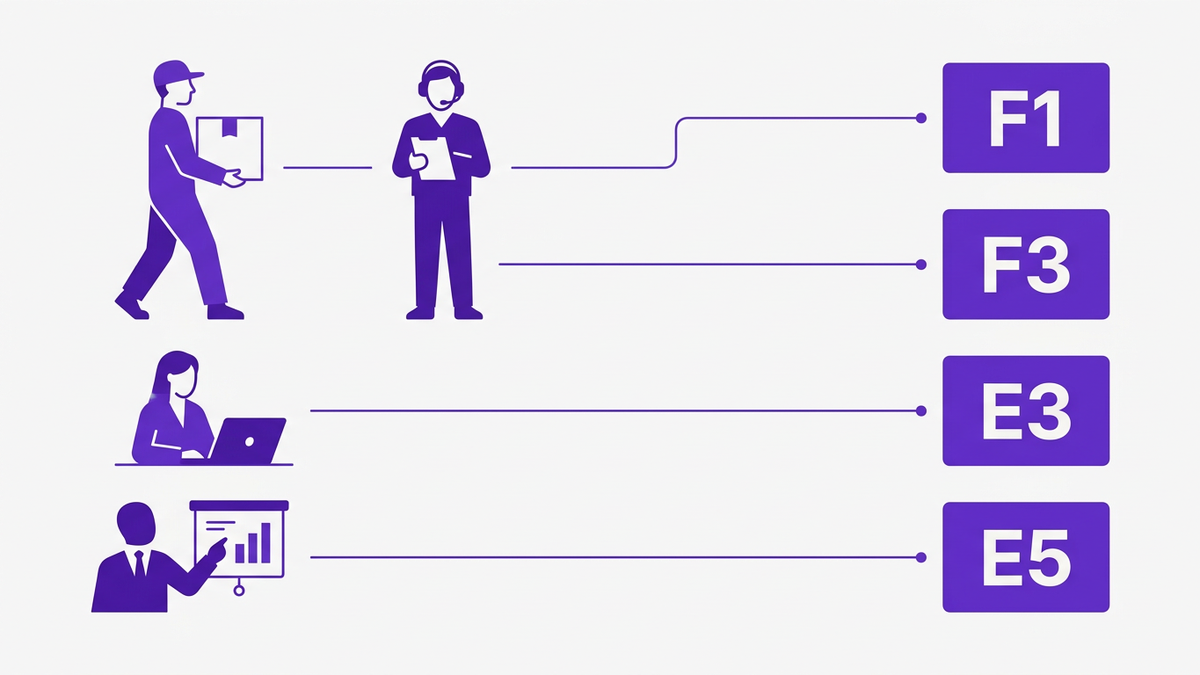
A role-based framework is the difference between a one-time microsoft 365 license audit and sustainable m365 license optimization. Instead of thinking in SKUs, think in personas, each mapped to a baseline license and clear upgrade criteria.
CloudNuro recommends a four-layer User Persona Based License Tiers model:
Core Frontline Persona (F1)
Operational Frontline Persona (F3)
Standard Knowledge Worker Persona (E3)
High-Risk / Executive Persona (E5)
Typical roles: cashiers, line workers, security staff, drivers, call-center agents with fixed toolsets.
Usage pattern:
Mobile-first or shared kiosk access
Basic email or Teams access
Consuming documents, not authoring complex content
License guidance: F1 is usually the best Microsoft 365 license for frontline workers who do not need to create heavy content or store large volumes of files. F1 offers significant savings when applied at scale, especially in retail, logistics, and manufacturing.
Typical roles: team leads, floor supervisors, regional coordinators, schedulers.
Usage pattern:
Runs small Teams or channels
Joins and sometimes hosts meetings
Edits documents in browser
Needs persistent identity and limited storage
License guidance: F3 is ideal for hybrid frontline leaders who orchestrate work but do not require desktop Office apps. Many organizations can downgrade E3 to F3 license for these personas with minimal workflow impact.
Typical roles: analysts, managers, HR, finance, legal, core corporate staff.
Usage pattern:
Heavy use of desktop Office apps
Integrated workflows with local files and line-of-business systems
Subject to retention, legal hold, and data residency requirements
License guidance: E3 remains the default for core knowledge workers who both create and manage content at scale. This tier often overlaps with e3 vs business premium 2026 conversations, but for enterprises already standardized on Microsoft 365, E3 is typically the anchor tier.
Typical roles: executives, security admins, finance controllers, key legal and compliance staff.
Usage pattern:
Access to sensitive financial, legal, or strategic data
Exposure to targeted phishing or social engineering
Need advanced security analytics and investigation tools
License guidance: E5 should be allocated selectively, driven by risk classification, not seniority alone. Gartner 2026 notes that role-based E5 allocation, limited to 5% to 10% of the population, delivers most of the security value without the cost of blanket assignment.
Organizations often underestimate the potential savings from a structured license tiering strategy in SaaS. Gartner 2026 reports that organizations with over 5,000 seats save $210,000 annually on average when they transition 20% of E3/E5 licenses to F3 or F1.
CloudNuro case studies show similar outcomes:
A financial services firm reclassified 3,800 E3 users to F3 or F1 and saved $480,000 in year one.
A healthcare provider with 9,000 seats used automated recommendations to downgrade 1,200 E3 licenses and achieved a 19% reduction in Microsoft 365 spend while passing a major regulatory audit.
E3 to F3 for light content creators
Savings: Significant across large populations.
Risk: Some users may lose desktop app functionality; mitigation is browser-based workflows and targeted exceptions.
E3 to F1 for pure frontline staff
Savings: High in sectors with large deskless populations.
Risk: If F1 limitations are not well understood, teams might lose capabilities they rely on, such as meeting hosting or storage.
E5 to E3 for low-risk users
Savings: High per seat.
Risk: If misapplied, may reduce advanced security coverage for users under targeted attack.
Key principle: Start with usage data and role definitions, not spreadsheets of SKUs. A good analogy is airline ticketing: you do not buy every employee a first-class ticket “just in case” they need extra legroom. You buy different fares based on traveler profile and trip purpose.
A one-time microsoft 365 license audit is useful, but it will not withstand continual org changes, new apps, and evolving regulatory needs. To sustain microsoft 365 license right sizing, you need operational guardrails.
Map user populations into clear role families, for example:
Frontline: core, supervisor, specialist
Corporate: knowledge worker, manager, specialist
High-risk: admin, executive, regulated data owner
Each role family aligns to a baseline license and a small set of approved exceptions.
Use a structured microsoft 365 license audit or a free Microsoft Office 365 assessment to:
Identify underused features by license tier
Detect inactive or duplicate accounts
Highlight candidates for E3 to F3 or E3 to F1 downgrades
Surface over-provisioned E5 allocations
Platforms with deep SaaS management capabilities can automate this discovery across Microsoft 365 and adjacent tools.
Document a saas license tier framework that includes:
Role-to-license mapping rules
Minimal feature requirements per role
Approval workflows for exceptions
Guardrails for frontline vs enterprise licensing
This forms the foundation of a repeatable license tiering strategy in SaaS, not only for Microsoft 365 but also for CRM, collaboration, and security platforms.
M365 license cleanup for departed users is where many organizations find “quick win” savings. Policy-driven workflows should:
Auto-assign baseline licenses at onboarding based on role
Trigger recertification when roles change
Reclaim licenses upon offboarding, including shared mailbox handling
Schedule quarterly user access and license reviews
Forrester 2026 highlights that automated access reviews and compliance dashboards are now a baseline standard for Microsoft 365 governance.
Deloitte 2026 notes that 67% of enterprises are implementing granular cost analytics in 2026. With chargeback and showback models, departments see the direct impact of license sprawl.
This not only supports m365 cost optimization, it also drives behavioral change among business leaders who request upgrades, since they can see cost implications in their own budgets.
CloudNuro was built to operationalize microsoft 365 license right sizing as an ongoing discipline, not a one-time clean-up.
CloudNuro’s Microsoft 365 Custodian module analyzes real-time usage, roles, and risk to recommend ideal license tiers across F1, F3, E3, and E5. It detects:
Over-licensed users who never use desktop apps
Frontline staff mistakenly assigned E3 or E5
E5 users who do not use advanced security capabilities
Orphaned or inactive accounts
These insights feed directly into automated recommendations and policy workflows.
Learn more in the CloudNuro microsoft license optimization overview.
CloudNuro includes workflow automation for:
Role-based license assignment at onboarding
Recertification on role change or manager change
Scheduled user access reviews with attestation
Automated downgrades or de-provisioning when usage falls below thresholds
This connects m365 licensing strategy to day-to-day operations, reducing manual effort and improving audit readiness.
With CloudNuro, IT, finance, and procurement gain a full picture of:
Cost per license tier by department or region
Savings realized from each downgrade wave
m365 cost optimization trends over time
Combined with CloudNuro FinOps services, organizations can align Microsoft 365 with broader cloud and SaaS cost governance, including chargebacks, budget forecasting, and variance analysis.
CloudNuro customers see measurable results:
18% reduction in Microsoft 365 spend through automated license optimization
20% to 35% reduction in overall SaaS overspend
Faster audits through centralized governance and evidence
For example, a large financial institution used CloudNuro’s Microsoft 365 Custodian to implement a role-based framework, reclassify 3,800 users, and save $480,000 in year one, while improving regulatory audit outcomes. Additional stories and vertical-specific results are available in CloudNuro case studies.

Microsoft 365 license right sizing is the practice of aligning each user’s license tier, such as F1, F3, E3, or E5, with their actual role, risk profile, and usage. It goes beyond simple cost cutting, combining microsoft 365 license audit data, security requirements, and role definitions to create sustainable, policy-based allocations.
Microsoft has confirmed an average 9% price increase across Microsoft 365 in 2026, with estimates of 6% to 10% by tier (Microsoft 2026). For large tenants, this can translate into hundreds of thousands of dollars in additional annual spend if no m365 license optimization is performed. A structured m365 renewal strategy that prioritizes downgrades for frontline and low-usage populations can significantly offset that increase.
For pure frontline roles, F1 is typically the best microsoft 365 license for frontline workers, especially when users mainly consume content, check schedules, or access a limited set of apps. F3 is better for frontline supervisors and coordinators who host meetings, manage small teams, or edit documents regularly. A m365 frontline licensing guide should classify frontline personas into at least two tiers and assign F1 or F3 accordingly.
Start by grouping roles into personas, such as frontline, corporate, and high-risk. For each persona, define minimal required capabilities, for example, desktop apps, meeting hosting, retention, or advanced security. Then map each persona to a baseline license and a small set of allowed exceptions. Platforms like CloudNuro can automate this user persona based license tiers mapping using real usage and access data.
The main risks are loss of required functionality, reduced security coverage for high-risk users, and potential compliance gaps for roles that require advanced retention or eDiscovery. These risks can be mitigated by combining a microsoft 365 audit checklist, role definitions, and usage analytics, and by limiting aggressive changes to users whose usage clearly aligns to F1 or F3. Automated monitoring can then flag any drift or emerging exceptions.
Most enterprises benefit from quarterly license reviews, supported by ongoing alerts when usage drops or roles change. Major organizational changes, such as acquisitions or restructures, should trigger immediate reviews. Automated SaaS management platforms make these reviews efficient, repeatable, and fully auditable.
Microsoft 365 license right sizing is no longer a “nice to have.” The 2026 price increase, combined with hybrid and frontline workforce growth, makes a role-based license tiering framework essential for cost control and governance.
By classifying users into clear personas, mapping F1, F3, E3, and E5 accordingly, and operationalizing reviews with automation, enterprises can offset price increases, improve compliance, and strengthen security.
CloudNuro helps you move from one-off cleanups to continuous optimization, with AI-driven recommendations, policy automation, and deep analytics across your Microsoft 365 environment. To take the next step in microsoft 365 license right sizing and broader m365 cost optimization:
Explore the CloudNuro product overview for Microsoft 365 Custodian and broader SaaS management
See how CloudNuro fits into your ecosystem on the integrations page
CloudNuro is a leader in Enterprise SaaS Management Platforms, providing enterprises with unmatched visibility, governance, and cost optimization. Recognized twice in a row in the SaaS Management Platforms category and named a Leader in the SoftwareReviews Data Quadrant, CloudNuro is trusted by global enterprises and government agencies to bring financial discipline to SaaS, cloud, and AI. Trusted by enterprises such as Konica Minolta and Federal Signal, CloudNuro provides centralized SaaS inventory, license optimization, and renewal management along with advanced cost allocation and chargeback, giving IT and Finance leaders the visibility, control, and cost-conscious culture needed to drive financial discipline.
Request a no cost, no obligation free assessment —just 15 minutes to savings!
Get StartedMicrosoft 365 license right sizing has moved from IT housekeeping to a board-level priority. With Microsoft confirming an average 9% price increase across Microsoft 365 licenses effective July 1, 2026 (Microsoft 2026), IT and finance leaders must decide who truly needs F1, F3, E3, or E5, and who can be downgraded without increasing risk.
InfoTech Research estimates that enterprises will waste up to 27% of Microsoft 365 license spend in 2026 due to over-provisioning and misaligned roles. CloudNuro’s data shows that clients who operationalize role-based license decisions achieve documented savings of 18% on Microsoft 365 spend while maintaining or improving compliance.
This guide provides a practical, role-based framework for Microsoft 365 license right sizing, compares F1, F3, E3, and E5 in real-world terms, and shows how to operationalize the model across your hybrid and frontline workforce.
The 2026 price increase is the immediate catalyst, but the structural issue is long-standing: most organizations buy for the exception, then assign E3 or E5 to entire populations “just in case.”
According to InfoTech Research 2026, enterprises will waste up to 27% of Microsoft 365 license spend through over-provisioning. For organizations with 5,000+ seats, Gartner 2026 reports average savings of $210,000 per year when 20% of E3/E5 licenses are transitioned to F3 or F1 using a role-based framework.
Several trends make microsoft 365 license right sizing non-optional in 2026:
Confirmed price increase: Microsoft has signaled average 6% to 10% increases by tier (Microsoft 2026).
Over-licensed workforce: Only 24% of E5 users fully use advanced security features (Deloitte 2026).
Frontline expansion: Frontline-specific F1 and F3 adoption is forecast to grow 15% in 2026 as firms look to offset cost increases (Canalys 2026).
A Forrester 2026 study notes that 70% of organizations are revising their license tiering strategy in anticipation of the 2026 increase, with frontline and deskless workers as the first optimization target.
Counterpoint: Some CIOs argue that higher-tier licenses are “cheap insurance” against future needs. In reality, unused security and compliance features deliver zero risk reduction, while license sprawl creates governance blind spots. Insurance only works if you actually use the coverage.
Most internal debates about “f1 vs f3 vs e3” or “which Microsoft 365 license for frontline” get stuck in SKU-level minutiae. For right sizing, what matters is capability classes and risk.
At a high level:
F1 (Frontline): For task or kiosk workers who primarily consume content and use mobile or shared devices. Limited storage, no full desktop apps.
F3 (Frontline): For operational supervisors and light knowledge workers who need browser and mobile apps, meetings, and basic collaboration.
E3 (Enterprise): For full knowledge workers who require desktop apps, full compliance features, and advanced device management.
E5 (Enterprise premium): For high-risk roles that require advanced security, analytics, and voice capabilities.
From a m365 frontline license perspective:
F1 is typically suited for:
Store associates
Warehouse staff
Plant operators using shared terminals
F3 works for:
Frontline supervisors
Field service roles needing Teams and email
Some contractors using browser-based access
E3 is justified for:
Corporate staff using full Office apps daily
Roles under strict retention and eDiscovery obligations
The key is aligning what the user actually does with what the license uniquely provides. If a user does not use desktop apps, advanced retention, or high-volume meetings, they are a prime candidate for a downgrade from E3 to F3 license or even F1.
Counterargument: Security teams sometimes insist that only E5 gives them the control they need, so everyone should get E5. Deloitte 2026, however, shows only 24% of E5 users utilize advanced security features. In many enterprises, a targeted E5 footprint for privileged roles plus strong configuration on E3 licenses delivers better value without compromising security.
A role-based framework is the difference between a one-time microsoft 365 license audit and sustainable m365 license optimization. Instead of thinking in SKUs, think in personas, each mapped to a baseline license and clear upgrade criteria.
CloudNuro recommends a four-layer User Persona Based License Tiers model:
Core Frontline Persona (F1)
Operational Frontline Persona (F3)
Standard Knowledge Worker Persona (E3)
High-Risk / Executive Persona (E5)
Typical roles: cashiers, line workers, security staff, drivers, call-center agents with fixed toolsets.
Usage pattern:
Mobile-first or shared kiosk access
Basic email or Teams access
Consuming documents, not authoring complex content
License guidance: F1 is usually the best Microsoft 365 license for frontline workers who do not need to create heavy content or store large volumes of files. F1 offers significant savings when applied at scale, especially in retail, logistics, and manufacturing.
Typical roles: team leads, floor supervisors, regional coordinators, schedulers.
Usage pattern:
Runs small Teams or channels
Joins and sometimes hosts meetings
Edits documents in browser
Needs persistent identity and limited storage
License guidance: F3 is ideal for hybrid frontline leaders who orchestrate work but do not require desktop Office apps. Many organizations can downgrade E3 to F3 license for these personas with minimal workflow impact.
Typical roles: analysts, managers, HR, finance, legal, core corporate staff.
Usage pattern:
Heavy use of desktop Office apps
Integrated workflows with local files and line-of-business systems
Subject to retention, legal hold, and data residency requirements
License guidance: E3 remains the default for core knowledge workers who both create and manage content at scale. This tier often overlaps with e3 vs business premium 2026 conversations, but for enterprises already standardized on Microsoft 365, E3 is typically the anchor tier.
Typical roles: executives, security admins, finance controllers, key legal and compliance staff.
Usage pattern:
Access to sensitive financial, legal, or strategic data
Exposure to targeted phishing or social engineering
Need advanced security analytics and investigation tools
License guidance: E5 should be allocated selectively, driven by risk classification, not seniority alone. Gartner 2026 notes that role-based E5 allocation, limited to 5% to 10% of the population, delivers most of the security value without the cost of blanket assignment.
Organizations often underestimate the potential savings from a structured license tiering strategy in SaaS. Gartner 2026 reports that organizations with over 5,000 seats save $210,000 annually on average when they transition 20% of E3/E5 licenses to F3 or F1.
CloudNuro case studies show similar outcomes:
A financial services firm reclassified 3,800 E3 users to F3 or F1 and saved $480,000 in year one.
A healthcare provider with 9,000 seats used automated recommendations to downgrade 1,200 E3 licenses and achieved a 19% reduction in Microsoft 365 spend while passing a major regulatory audit.
E3 to F3 for light content creators
Savings: Significant across large populations.
Risk: Some users may lose desktop app functionality; mitigation is browser-based workflows and targeted exceptions.
E3 to F1 for pure frontline staff
Savings: High in sectors with large deskless populations.
Risk: If F1 limitations are not well understood, teams might lose capabilities they rely on, such as meeting hosting or storage.
E5 to E3 for low-risk users
Savings: High per seat.
Risk: If misapplied, may reduce advanced security coverage for users under targeted attack.
Key principle: Start with usage data and role definitions, not spreadsheets of SKUs. A good analogy is airline ticketing: you do not buy every employee a first-class ticket “just in case” they need extra legroom. You buy different fares based on traveler profile and trip purpose.
A one-time microsoft 365 license audit is useful, but it will not withstand continual org changes, new apps, and evolving regulatory needs. To sustain microsoft 365 license right sizing, you need operational guardrails.
Map user populations into clear role families, for example:
Frontline: core, supervisor, specialist
Corporate: knowledge worker, manager, specialist
High-risk: admin, executive, regulated data owner
Each role family aligns to a baseline license and a small set of approved exceptions.
Use a structured microsoft 365 license audit or a free Microsoft Office 365 assessment to:
Identify underused features by license tier
Detect inactive or duplicate accounts
Highlight candidates for E3 to F3 or E3 to F1 downgrades
Surface over-provisioned E5 allocations
Platforms with deep SaaS management capabilities can automate this discovery across Microsoft 365 and adjacent tools.
Document a saas license tier framework that includes:
Role-to-license mapping rules
Minimal feature requirements per role
Approval workflows for exceptions
Guardrails for frontline vs enterprise licensing
This forms the foundation of a repeatable license tiering strategy in SaaS, not only for Microsoft 365 but also for CRM, collaboration, and security platforms.
M365 license cleanup for departed users is where many organizations find “quick win” savings. Policy-driven workflows should:
Auto-assign baseline licenses at onboarding based on role
Trigger recertification when roles change
Reclaim licenses upon offboarding, including shared mailbox handling
Schedule quarterly user access and license reviews
Forrester 2026 highlights that automated access reviews and compliance dashboards are now a baseline standard for Microsoft 365 governance.
Deloitte 2026 notes that 67% of enterprises are implementing granular cost analytics in 2026. With chargeback and showback models, departments see the direct impact of license sprawl.
This not only supports m365 cost optimization, it also drives behavioral change among business leaders who request upgrades, since they can see cost implications in their own budgets.
CloudNuro was built to operationalize microsoft 365 license right sizing as an ongoing discipline, not a one-time clean-up.
CloudNuro’s Microsoft 365 Custodian module analyzes real-time usage, roles, and risk to recommend ideal license tiers across F1, F3, E3, and E5. It detects:
Over-licensed users who never use desktop apps
Frontline staff mistakenly assigned E3 or E5
E5 users who do not use advanced security capabilities
Orphaned or inactive accounts
These insights feed directly into automated recommendations and policy workflows.
Learn more in the CloudNuro microsoft license optimization overview.
CloudNuro includes workflow automation for:
Role-based license assignment at onboarding
Recertification on role change or manager change
Scheduled user access reviews with attestation
Automated downgrades or de-provisioning when usage falls below thresholds
This connects m365 licensing strategy to day-to-day operations, reducing manual effort and improving audit readiness.
With CloudNuro, IT, finance, and procurement gain a full picture of:
Cost per license tier by department or region
Savings realized from each downgrade wave
m365 cost optimization trends over time
Combined with CloudNuro FinOps services, organizations can align Microsoft 365 with broader cloud and SaaS cost governance, including chargebacks, budget forecasting, and variance analysis.
CloudNuro customers see measurable results:
18% reduction in Microsoft 365 spend through automated license optimization
20% to 35% reduction in overall SaaS overspend
Faster audits through centralized governance and evidence
For example, a large financial institution used CloudNuro’s Microsoft 365 Custodian to implement a role-based framework, reclassify 3,800 users, and save $480,000 in year one, while improving regulatory audit outcomes. Additional stories and vertical-specific results are available in CloudNuro case studies.
Microsoft 365 license right sizing is the practice of aligning each user’s license tier, such as F1, F3, E3, or E5, with their actual role, risk profile, and usage. It goes beyond simple cost cutting, combining microsoft 365 license audit data, security requirements, and role definitions to create sustainable, policy-based allocations.
Microsoft has confirmed an average 9% price increase across Microsoft 365 in 2026, with estimates of 6% to 10% by tier (Microsoft 2026). For large tenants, this can translate into hundreds of thousands of dollars in additional annual spend if no m365 license optimization is performed. A structured m365 renewal strategy that prioritizes downgrades for frontline and low-usage populations can significantly offset that increase.
For pure frontline roles, F1 is typically the best microsoft 365 license for frontline workers, especially when users mainly consume content, check schedules, or access a limited set of apps. F3 is better for frontline supervisors and coordinators who host meetings, manage small teams, or edit documents regularly. A m365 frontline licensing guide should classify frontline personas into at least two tiers and assign F1 or F3 accordingly.
Start by grouping roles into personas, such as frontline, corporate, and high-risk. For each persona, define minimal required capabilities, for example, desktop apps, meeting hosting, retention, or advanced security. Then map each persona to a baseline license and a small set of allowed exceptions. Platforms like CloudNuro can automate this user persona based license tiers mapping using real usage and access data.
The main risks are loss of required functionality, reduced security coverage for high-risk users, and potential compliance gaps for roles that require advanced retention or eDiscovery. These risks can be mitigated by combining a microsoft 365 audit checklist, role definitions, and usage analytics, and by limiting aggressive changes to users whose usage clearly aligns to F1 or F3. Automated monitoring can then flag any drift or emerging exceptions.
Most enterprises benefit from quarterly license reviews, supported by ongoing alerts when usage drops or roles change. Major organizational changes, such as acquisitions or restructures, should trigger immediate reviews. Automated SaaS management platforms make these reviews efficient, repeatable, and fully auditable.
Microsoft 365 license right sizing is no longer a “nice to have.” The 2026 price increase, combined with hybrid and frontline workforce growth, makes a role-based license tiering framework essential for cost control and governance.
By classifying users into clear personas, mapping F1, F3, E3, and E5 accordingly, and operationalizing reviews with automation, enterprises can offset price increases, improve compliance, and strengthen security.
CloudNuro helps you move from one-off cleanups to continuous optimization, with AI-driven recommendations, policy automation, and deep analytics across your Microsoft 365 environment. To take the next step in microsoft 365 license right sizing and broader m365 cost optimization:
Explore the CloudNuro product overview for Microsoft 365 Custodian and broader SaaS management
See how CloudNuro fits into your ecosystem on the integrations page
CloudNuro is a leader in Enterprise SaaS Management Platforms, providing enterprises with unmatched visibility, governance, and cost optimization. Recognized twice in a row in the SaaS Management Platforms category and named a Leader in the SoftwareReviews Data Quadrant, CloudNuro is trusted by global enterprises and government agencies to bring financial discipline to SaaS, cloud, and AI. Trusted by enterprises such as Konica Minolta and Federal Signal, CloudNuro provides centralized SaaS inventory, license optimization, and renewal management along with advanced cost allocation and chargeback, giving IT and Finance leaders the visibility, control, and cost-conscious culture needed to drive financial discipline.
Request a no cost, no obligation free assessment - just 15 minutes to savings!
Get StartedWe're offering complimentary ServiceNow license assessments to only 25 enterprises this quarter who want to unlock immediate savings without disrupting operations.
Get Free AssessmentGet Started




CloudNuro Corp
1755 Park St. Suite 207
Naperville, IL 60563
Phone : +1-630-277-9470
Email: info@cloudnuro.com





.webp)

Recognized Leader in SaaS Management Platforms by Info-Tech SoftwareReviews
.png)


.png)
.svg)