

Sign Up
Thank you for Submitting!

Enterprise analytics is transforming rapidly as organizations assess the evolving Microsoft ecosystem. Where Power BI Premium once dominated business intelligence, Microsoft Fabric is now at the forefront, promising unified analytics, AI-driven insights, and a holistic data platform. But what does this shift mean for enterprise IT, finance, and procurement leaders tasked with balancing data-driven decision-making with SaaS governance, security, and cost discipline?
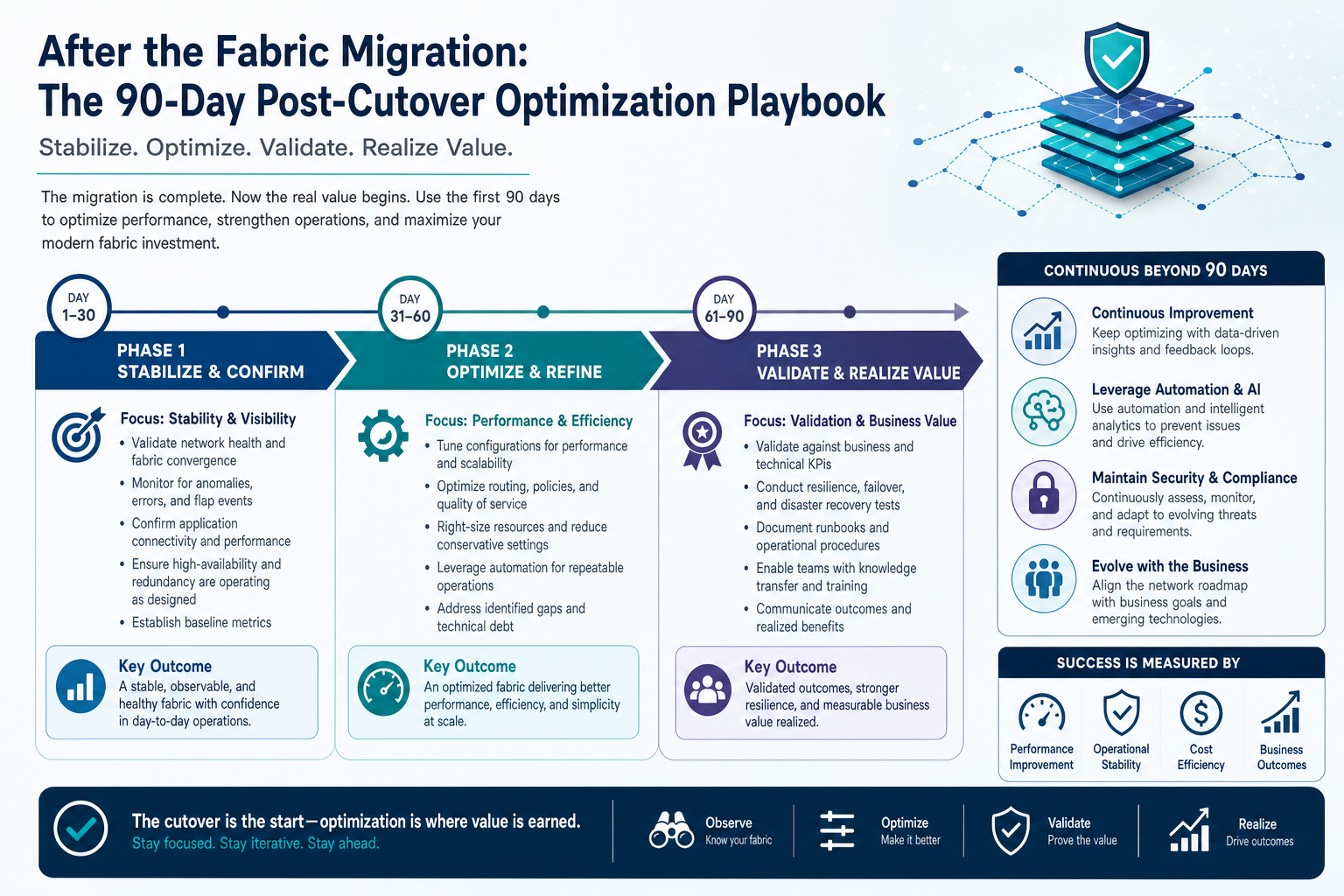
This in-depth comparison of Microsoft Fabric vs Power BI will clarify:
Key differences in architecture, capability, and use cases
Cost and licensing implications
Governance and optimization before, during, and after migration
How CloudNuro empowers organizations to gain visibility, automate governance, and drive SaaS cost reduction
The right analytics platform is not just a tool, it is a strategic lever for innovation, compliance, and long-term value.
Power BI is a leading business intelligence tool, renowned for its robust visualization and reporting functions. With approximately 30 million monthly active users and a 22.86 percent share of the BI category, Power BI is deeply embedded in modern enterprise reporting. Architecturally, Power BI Premium (P-SKUs) historically provided dedicated compute and advanced governance, but the paradigm is shifting.
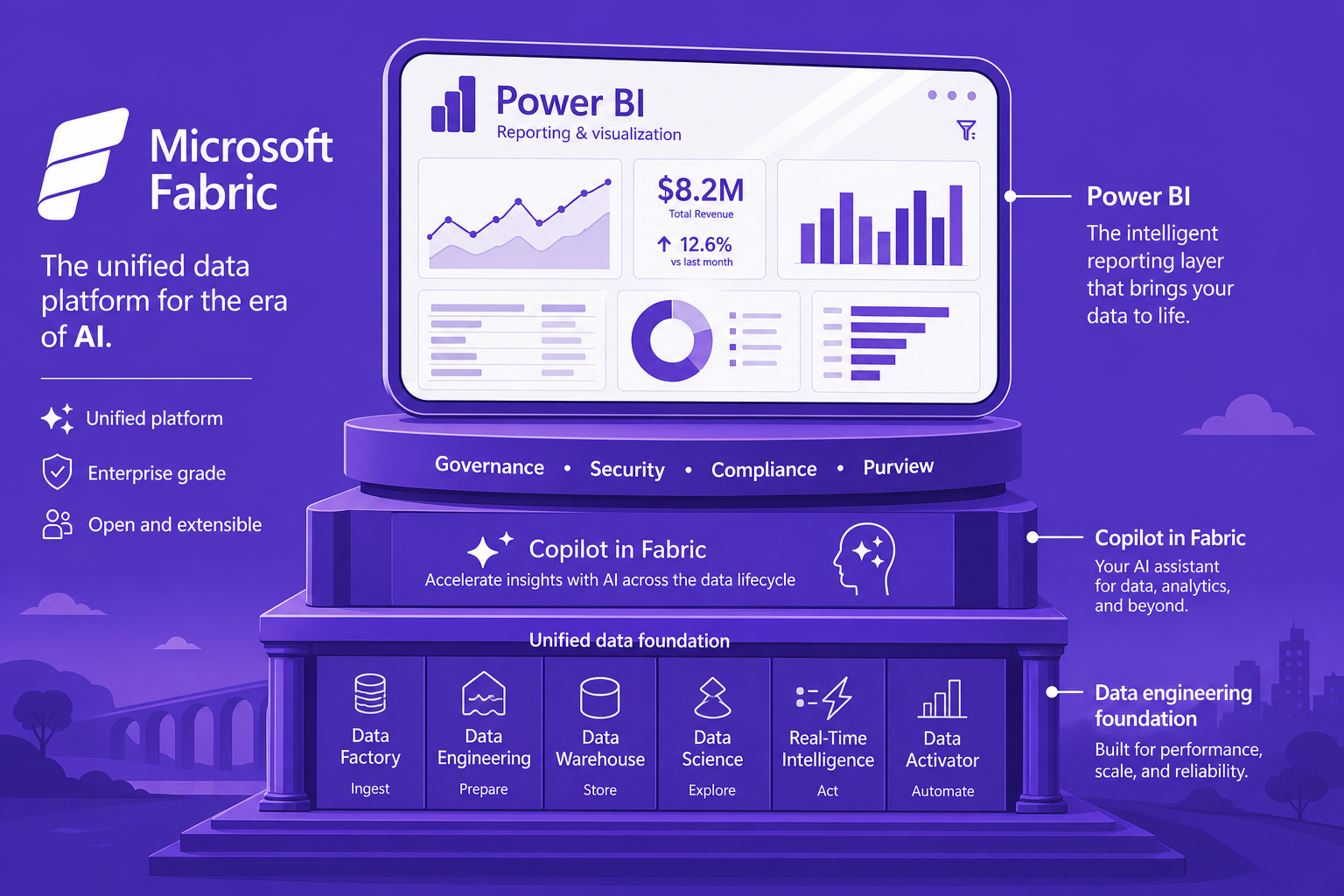
Microsoft Fabric is a comprehensive data and analytics platform that consolidates lakehouse, data engineering, data science, and real-time analytics in one unified capacity. Rather than replacing Power BI, Fabric integrates it as the reporting window atop a scalable, governed data foundation. Key Fabric advantages include:
Integration of data engineering, warehousing, science, and reporting
Fabric F-SKU capacities that can be flexibly allocated and optimized
AI and Copilot features delivered directly through Fabric’s capacity model
"Microsoft Fabric is the foundation, while Power BI is the window; they are complementary solutions where Fabric supercharges reporting rather than replacing it."
|
Area |
Power BI Premium |
Microsoft Fabric |
|---|---|---|
|
Core Strength |
Reporting & Visualization |
End-to-End Data Analytics |
|
Licensing |
P-SKU per capacity |
F-SKU unified capacity |
|
AI Features |
Limited, add-on required |
Integrated Copilot, native AI |
|
Data Science |
External, minimal |
Built-in, scalable |
|
Governance |
Role-based access |
Cross-domain, unified policies |
Use Power BI Premium for:
Advanced organizational reports
DAX and Power Query-centric modeling
Adopt Microsoft Fabric for:
Data lakehouse and lake-centric architectures
Unified data engineering, warehousing, science
Scaling analytics across multi-cloud or hybrid environments
Hybrid approaches are common: organizations keep Power BI as the reporting front end but transition underlying capacities and workloads to Fabric for flexibility and cost optimization.
Licensing is the biggest inflection point. Fabric F-SKUs replace Power BI Premium P-SKUs as the standard for new enterprise analytics deployments. The industry is seeing:
Automatic migration paths for Power BI content to Fabric capacities
Fabric offering more granular capacity allocation, reducing ‘stranded’ compute
Enterprises moving to Fabric F-SKUs see an average 24 percent cost reduction compared to equivalent P-SKUs once workloads are optimized
Combining F-SKUs with reserved capacity and workload tuning cuts 21 percent of monthly spend compared to on-demand equivalents
Key statistic: "Organizations using Microsoft Fabric see a reported ROI of $4.79 for every $1 invested."
However, licensing complexity and dual-running costs during migration put pressure on IT and finance teams to track, optimize, and reassign licenses and capacities in real time.
A major challenge in the transition from Power BI to Fabric is governance:
Knowing exactly which licenses, SKUs, and workloads are in use
Preventing ‘orphaned’ admin rights or unused capacity
Managing compliance and cost allocation across business units
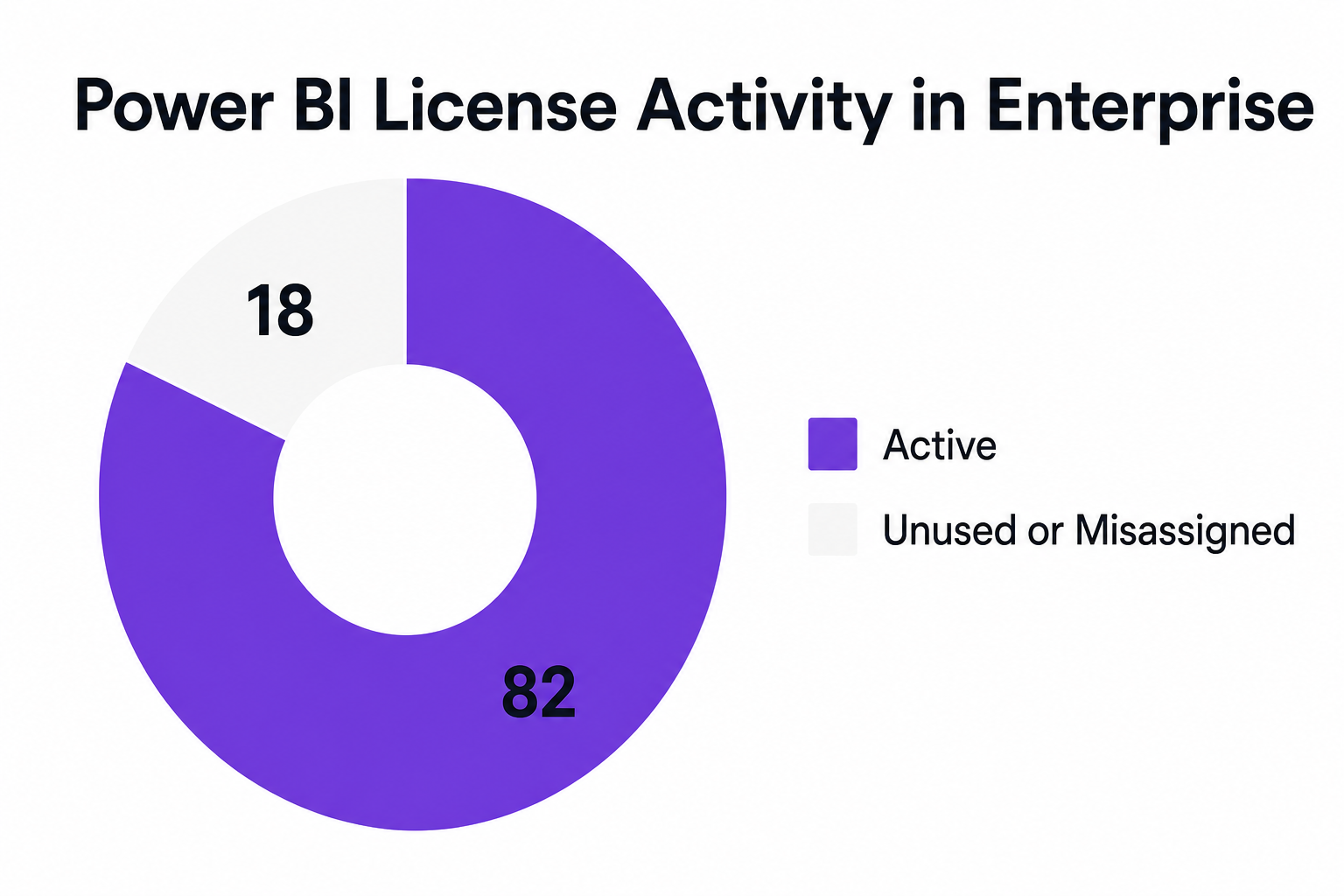
Enterprises often find that, in a typical deployment, 82 percent of Power BI licenses are in active use, while 18 percent are unused or misassigned, creating significant cost and security risks.
CloudNuro addresses these challenges by:
Automatically tracking Fabric and Power BI resource usage, user activity, and inactive licenses. Even beyond Microsoft’s native 14-day data retention limits
Mapping Fabric Capacity Unit consumption directly to departments and projects, automating chargeback and showback
Triggering automated license reviews and deprovisioning workflows to enforce policy and prevent dual-running costs
Flagging anomalies in Fabric usage and spending to support proactive governance
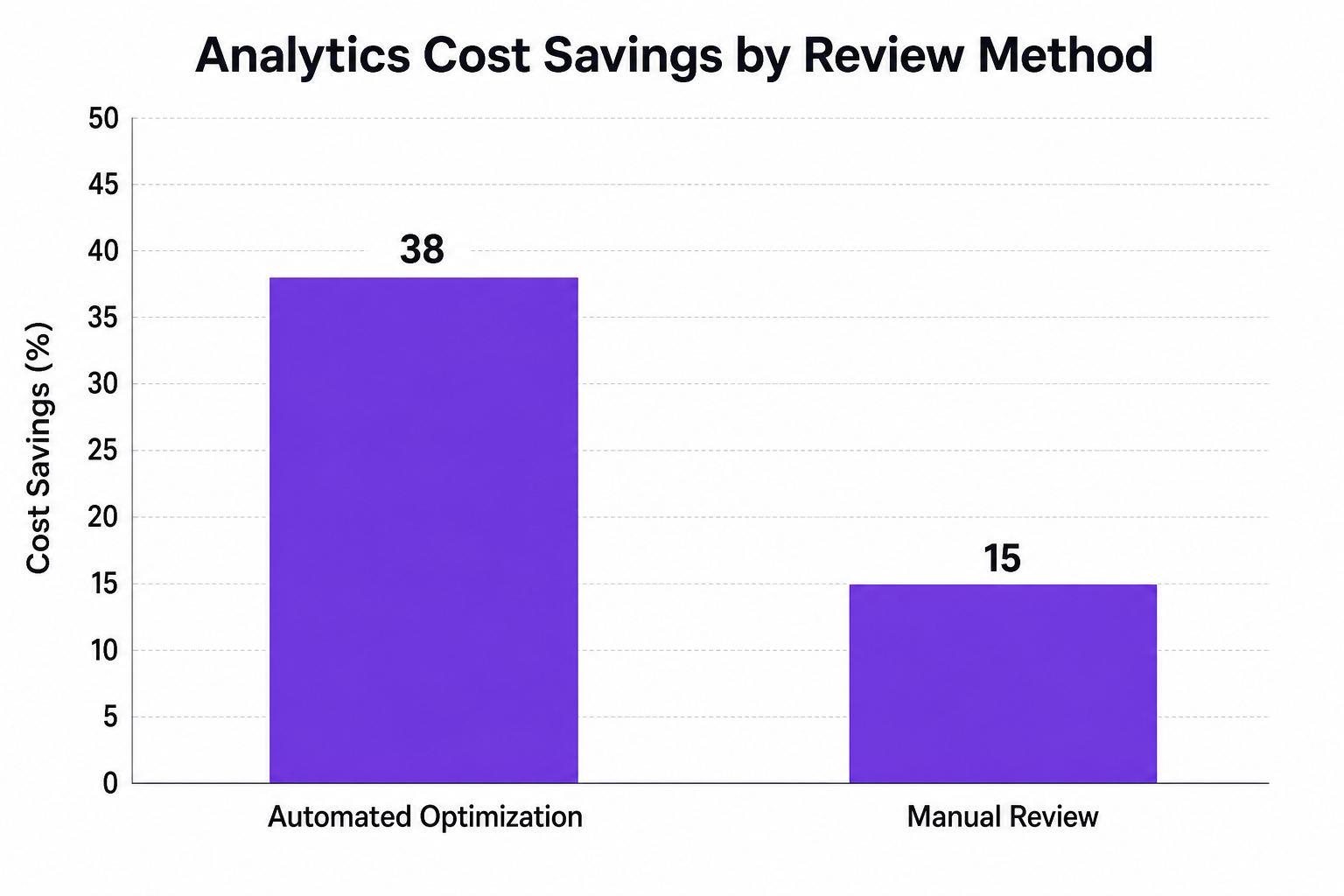
Successful optimization is not a one-time migration. It requires ongoing visibility and automation. CloudNuro enables:
AI-powered optimization of both Power BI and Fabric SKUs, including intelligent downshifting or workspace pauses during off-peak times
Categorization of users (Power, General, Low) for targeted license allocation and ROI tracking
Automated alerts on capacity unit spikes and anomalous refreshes, preventing cost overruns
Customizable dashboards for IT and finance leaders to validate savings and enforce a cost-conscious culture
Proof points:
A multinational bank cut unused compute capacity by 45 percent, saving 36 percent on analytics spend through automated rightsizing
A healthcare firm eliminated 32 percent of orphaned admin licenses and drove SaaS spend down by 19 percent through AI-powered tracking
A financial services enterprise achieved 22 percent reduction in unused license costs and a 71 percent drop in manual governance workload during a Fabric migration
CloudNuro’s Microsoft 365 Custodian and Unified Cloud Custodian platforms ensure enterprises move at speed without sacrificing governance, compliance, or financial discipline.
Migrating from Power BI Premium to Microsoft Fabric is a strategic transformation. Here’s how leading organizations approach it:
Baseline Current Usage: Use CloudNuro to establish license, workload, and cost baselines for accurate sizing of new Fabric capacities.
Plan the Migration: Build a migration checklist including workspace mapping, policy enforcement, and communication with business units; reference CloudNuro's proven workflow templates.
Automate Governance: Configure automated license reviews, chargeback allocation, and compliance alerts to minimize risk during and after migration.
Optimize Continuously: Post-migration, use AI-driven analytics to spot underutilized capacity, downshift as needed, and identify opportunities for ongoing cost reduction.
Empower Finance & IT: Provide finance and IT leaders with unified dashboards for spend validation, ROI calculation, and rapid intervention.
CloudNuro stands out by delivering:
End-to-end SaaS and analytics visibility
Seamless integration with Microsoft 365, Power BI, and over 400 enterprise applications
Governance-first architecture and automation that lets organizations innovate securely and efficiently
What is the difference between Microsoft Fabric and Power BI?
Microsoft Fabric is a unified data and analytics platform that bundles data engineering, science, and reporting (including Power BI) in a single capacity. Power BI is a business intelligence and visualization tool, now integrated as part of the Fabric ecosystem rather than remaining a standalone product.
Which is better for analytics: Microsoft Fabric or Power BI?
They are complementary. Power BI excels at reporting and visualization. Fabric enables end-to-end analytics, including built-in AI, scalable data science, and comprehensive governance. The choice depends on whether you need just reporting or full-spectrum analytics.
Can Microsoft Fabric replace Power BI Premium?
Fabric F-SKUs are replacing P-SKUs for capacity-based licensing. Power BI remains as the reporting front end, but it now runs inside Fabric. Organizations migrating to Fabric benefit from more flexible capacity management and integrated AI.
How do you optimize cost after migrating to Fabric?
By using tools like CloudNuro to automate monitoring, alerting, and license right-sizing. Review Capacity Unit consumption, automate downgrades, and ensure chargeback mechanisms are in place to keep costs aligned with business value.
What are the next steps after Fabric migration?
Establish new governance baselines, monitor capacity usage in real time, and use automated workflows to continuously optimize costs, manage user entitlements, and maintain compliance. CloudNuro’s dashboards simplify this process for both IT and finance teams.
The choice between Microsoft Fabric and Power BI is no longer either-or. In 2026, forward-thinking enterprises are harnessing both, empowering business users with Power BI while managing true end-to-end analytics through Fabric. But governance, compliance, cost, and visibility must be foundational, not afterthoughts.
CloudNuro offers the automation, integration, and dashboards needed to realize the full value of your analytics stack. Now and in the next wave of enterprise SaaS transformation. Ready to modernize, optimize, and govern your analytics investments?
About CloudNuro
CloudNuro is a leader in Enterprise AI Adoption Management, providing enterprises with unmatched visibility, governance, and cost optimization. Recognized twice in a row in the SaaS Management Platforms category and named a Leader in the SoftwareReviews Data Quadrant, CloudNuro is trusted by global enterprises and government agencies to bring financial discipline to SaaS, cloud, and AI. Trusted by enterprises, CloudNuro provides centralized SaaS inventory, license optimization, and renewal management along with advanced cost allocation and chargeback, giving IT and Finance leaders the visibility, control, and cost-conscious culture needed to drive financial discipline.
Request a Demo | Get Free Savings | Explore Product
Request a no cost, no obligation free assessment —just 15 minutes to savings!
Get StartedEnterprise analytics is transforming rapidly as organizations assess the evolving Microsoft ecosystem. Where Power BI Premium once dominated business intelligence, Microsoft Fabric is now at the forefront, promising unified analytics, AI-driven insights, and a holistic data platform. But what does this shift mean for enterprise IT, finance, and procurement leaders tasked with balancing data-driven decision-making with SaaS governance, security, and cost discipline?
This in-depth comparison of Microsoft Fabric vs Power BI will clarify:
Key differences in architecture, capability, and use cases
Cost and licensing implications
Governance and optimization before, during, and after migration
How CloudNuro empowers organizations to gain visibility, automate governance, and drive SaaS cost reduction
The right analytics platform is not just a tool, it is a strategic lever for innovation, compliance, and long-term value.
Power BI is a leading business intelligence tool, renowned for its robust visualization and reporting functions. With approximately 30 million monthly active users and a 22.86 percent share of the BI category, Power BI is deeply embedded in modern enterprise reporting. Architecturally, Power BI Premium (P-SKUs) historically provided dedicated compute and advanced governance, but the paradigm is shifting.
Microsoft Fabric is a comprehensive data and analytics platform that consolidates lakehouse, data engineering, data science, and real-time analytics in one unified capacity. Rather than replacing Power BI, Fabric integrates it as the reporting window atop a scalable, governed data foundation. Key Fabric advantages include:
Integration of data engineering, warehousing, science, and reporting
Fabric F-SKU capacities that can be flexibly allocated and optimized
AI and Copilot features delivered directly through Fabric’s capacity model
"Microsoft Fabric is the foundation, while Power BI is the window; they are complementary solutions where Fabric supercharges reporting rather than replacing it."
|
Area |
Power BI Premium |
Microsoft Fabric |
|---|---|---|
|
Core Strength |
Reporting & Visualization |
End-to-End Data Analytics |
|
Licensing |
P-SKU per capacity |
F-SKU unified capacity |
|
AI Features |
Limited, add-on required |
Integrated Copilot, native AI |
|
Data Science |
External, minimal |
Built-in, scalable |
|
Governance |
Role-based access |
Cross-domain, unified policies |
Use Power BI Premium for:
Advanced organizational reports
DAX and Power Query-centric modeling
Adopt Microsoft Fabric for:
Data lakehouse and lake-centric architectures
Unified data engineering, warehousing, science
Scaling analytics across multi-cloud or hybrid environments
Hybrid approaches are common: organizations keep Power BI as the reporting front end but transition underlying capacities and workloads to Fabric for flexibility and cost optimization.
Licensing is the biggest inflection point. Fabric F-SKUs replace Power BI Premium P-SKUs as the standard for new enterprise analytics deployments. The industry is seeing:
Automatic migration paths for Power BI content to Fabric capacities
Fabric offering more granular capacity allocation, reducing ‘stranded’ compute
Enterprises moving to Fabric F-SKUs see an average 24 percent cost reduction compared to equivalent P-SKUs once workloads are optimized
Combining F-SKUs with reserved capacity and workload tuning cuts 21 percent of monthly spend compared to on-demand equivalents
Key statistic: "Organizations using Microsoft Fabric see a reported ROI of $4.79 for every $1 invested."
However, licensing complexity and dual-running costs during migration put pressure on IT and finance teams to track, optimize, and reassign licenses and capacities in real time.
A major challenge in the transition from Power BI to Fabric is governance:
Knowing exactly which licenses, SKUs, and workloads are in use
Preventing ‘orphaned’ admin rights or unused capacity
Managing compliance and cost allocation across business units
Enterprises often find that, in a typical deployment, 82 percent of Power BI licenses are in active use, while 18 percent are unused or misassigned, creating significant cost and security risks.
CloudNuro addresses these challenges by:
Automatically tracking Fabric and Power BI resource usage, user activity, and inactive licenses. Even beyond Microsoft’s native 14-day data retention limits
Mapping Fabric Capacity Unit consumption directly to departments and projects, automating chargeback and showback
Triggering automated license reviews and deprovisioning workflows to enforce policy and prevent dual-running costs
Flagging anomalies in Fabric usage and spending to support proactive governance
Successful optimization is not a one-time migration. It requires ongoing visibility and automation. CloudNuro enables:
AI-powered optimization of both Power BI and Fabric SKUs, including intelligent downshifting or workspace pauses during off-peak times
Categorization of users (Power, General, Low) for targeted license allocation and ROI tracking
Automated alerts on capacity unit spikes and anomalous refreshes, preventing cost overruns
Customizable dashboards for IT and finance leaders to validate savings and enforce a cost-conscious culture
Proof points:
A multinational bank cut unused compute capacity by 45 percent, saving 36 percent on analytics spend through automated rightsizing
A healthcare firm eliminated 32 percent of orphaned admin licenses and drove SaaS spend down by 19 percent through AI-powered tracking
A financial services enterprise achieved 22 percent reduction in unused license costs and a 71 percent drop in manual governance workload during a Fabric migration
CloudNuro’s Microsoft 365 Custodian and Unified Cloud Custodian platforms ensure enterprises move at speed without sacrificing governance, compliance, or financial discipline.
Migrating from Power BI Premium to Microsoft Fabric is a strategic transformation. Here’s how leading organizations approach it:
Baseline Current Usage: Use CloudNuro to establish license, workload, and cost baselines for accurate sizing of new Fabric capacities.
Plan the Migration: Build a migration checklist including workspace mapping, policy enforcement, and communication with business units; reference CloudNuro's proven workflow templates.
Automate Governance: Configure automated license reviews, chargeback allocation, and compliance alerts to minimize risk during and after migration.
Optimize Continuously: Post-migration, use AI-driven analytics to spot underutilized capacity, downshift as needed, and identify opportunities for ongoing cost reduction.
Empower Finance & IT: Provide finance and IT leaders with unified dashboards for spend validation, ROI calculation, and rapid intervention.
CloudNuro stands out by delivering:
End-to-end SaaS and analytics visibility
Seamless integration with Microsoft 365, Power BI, and over 400 enterprise applications
Governance-first architecture and automation that lets organizations innovate securely and efficiently
What is the difference between Microsoft Fabric and Power BI?
Microsoft Fabric is a unified data and analytics platform that bundles data engineering, science, and reporting (including Power BI) in a single capacity. Power BI is a business intelligence and visualization tool, now integrated as part of the Fabric ecosystem rather than remaining a standalone product.
Which is better for analytics: Microsoft Fabric or Power BI?
They are complementary. Power BI excels at reporting and visualization. Fabric enables end-to-end analytics, including built-in AI, scalable data science, and comprehensive governance. The choice depends on whether you need just reporting or full-spectrum analytics.
Can Microsoft Fabric replace Power BI Premium?
Fabric F-SKUs are replacing P-SKUs for capacity-based licensing. Power BI remains as the reporting front end, but it now runs inside Fabric. Organizations migrating to Fabric benefit from more flexible capacity management and integrated AI.
How do you optimize cost after migrating to Fabric?
By using tools like CloudNuro to automate monitoring, alerting, and license right-sizing. Review Capacity Unit consumption, automate downgrades, and ensure chargeback mechanisms are in place to keep costs aligned with business value.
What are the next steps after Fabric migration?
Establish new governance baselines, monitor capacity usage in real time, and use automated workflows to continuously optimize costs, manage user entitlements, and maintain compliance. CloudNuro’s dashboards simplify this process for both IT and finance teams.
The choice between Microsoft Fabric and Power BI is no longer either-or. In 2026, forward-thinking enterprises are harnessing both, empowering business users with Power BI while managing true end-to-end analytics through Fabric. But governance, compliance, cost, and visibility must be foundational, not afterthoughts.
CloudNuro offers the automation, integration, and dashboards needed to realize the full value of your analytics stack. Now and in the next wave of enterprise SaaS transformation. Ready to modernize, optimize, and govern your analytics investments?
About CloudNuro
CloudNuro is a leader in Enterprise AI Adoption Management, providing enterprises with unmatched visibility, governance, and cost optimization. Recognized twice in a row in the SaaS Management Platforms category and named a Leader in the SoftwareReviews Data Quadrant, CloudNuro is trusted by global enterprises and government agencies to bring financial discipline to SaaS, cloud, and AI. Trusted by enterprises, CloudNuro provides centralized SaaS inventory, license optimization, and renewal management along with advanced cost allocation and chargeback, giving IT and Finance leaders the visibility, control, and cost-conscious culture needed to drive financial discipline.
Request a Demo | Get Free Savings | Explore Product
Request a no cost, no obligation free assessment - just 15 minutes to savings!
Get StartedWe're offering complimentary ServiceNow license assessments to only 25 enterprises this quarter who want to unlock immediate savings without disrupting operations.
Get Free AssessmentGet Started




CloudNuro Corp
1755 Park St. Suite 207
Naperville, IL 60563
Phone : +1-630-277-9470
Email: info@cloudnuro.com





.webp)

Recognized Leader in SaaS Management Platforms by Info-Tech SoftwareReviews



.svg)