

Sign Up
Thank you for Submitting!
Cloud storage costs are rising, especially for organizations running advanced analytics and AI workloads on platforms like Microsoft Fabric's OneLake. However, dramatic cost savings are possible without sacrificing access, compliance, or performance. This guide walks IT and finance leaders through the real-world strategies for leveraging OneLake storage tiering to cut Fabric storage bills by up to 80%. Backed by CloudNuro’s FinOps services, you’ll see how to put automated optimization, governance, and actionable policy into effect for immediate and lasting savings.
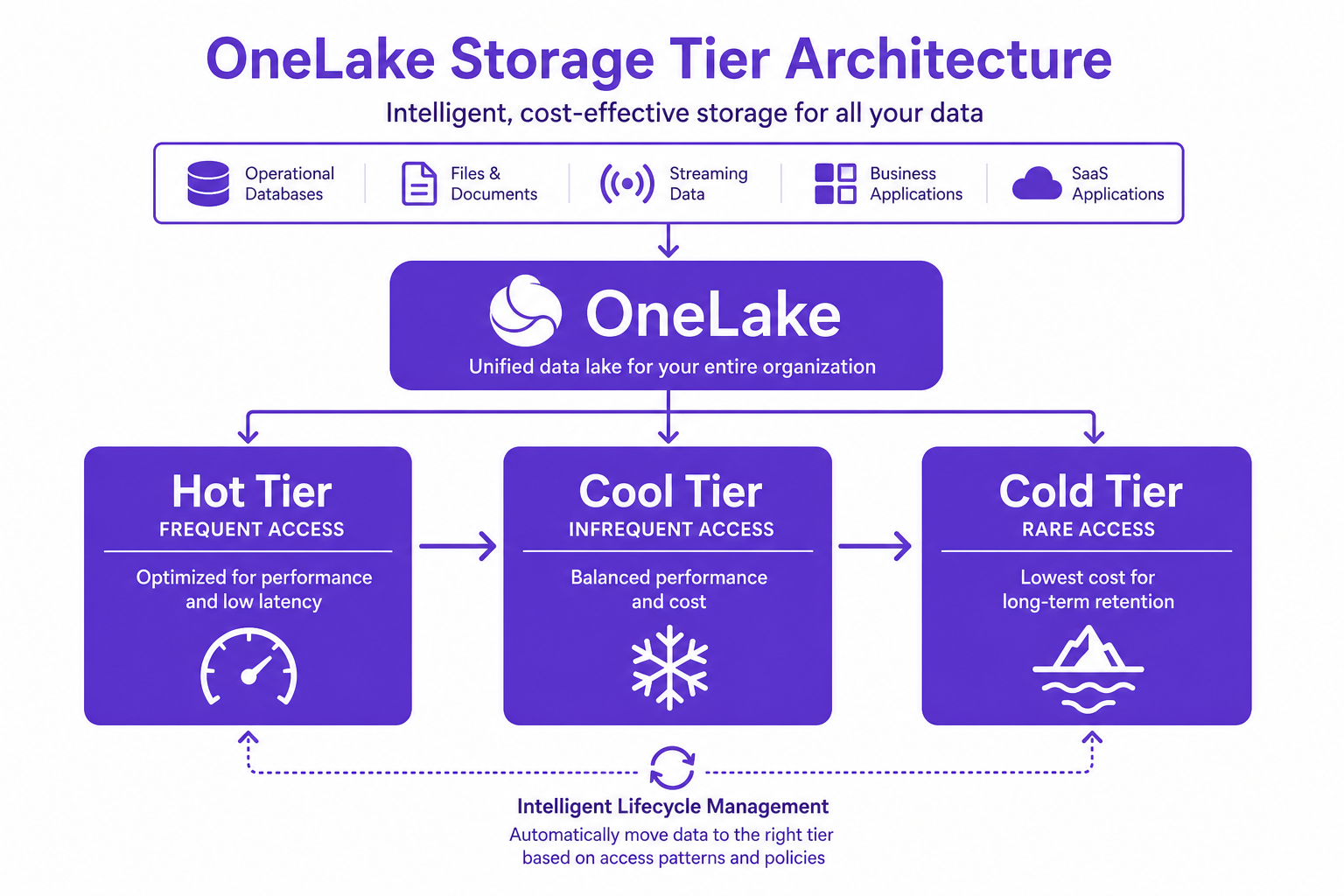
OneLake, Microsoft Fabric’s flagship data lake solution, allows data to be stored in three main storage tiers: hot, cool, and cold (sometimes referred to as archive). Each tier is priced for different access patterns and retention needs:
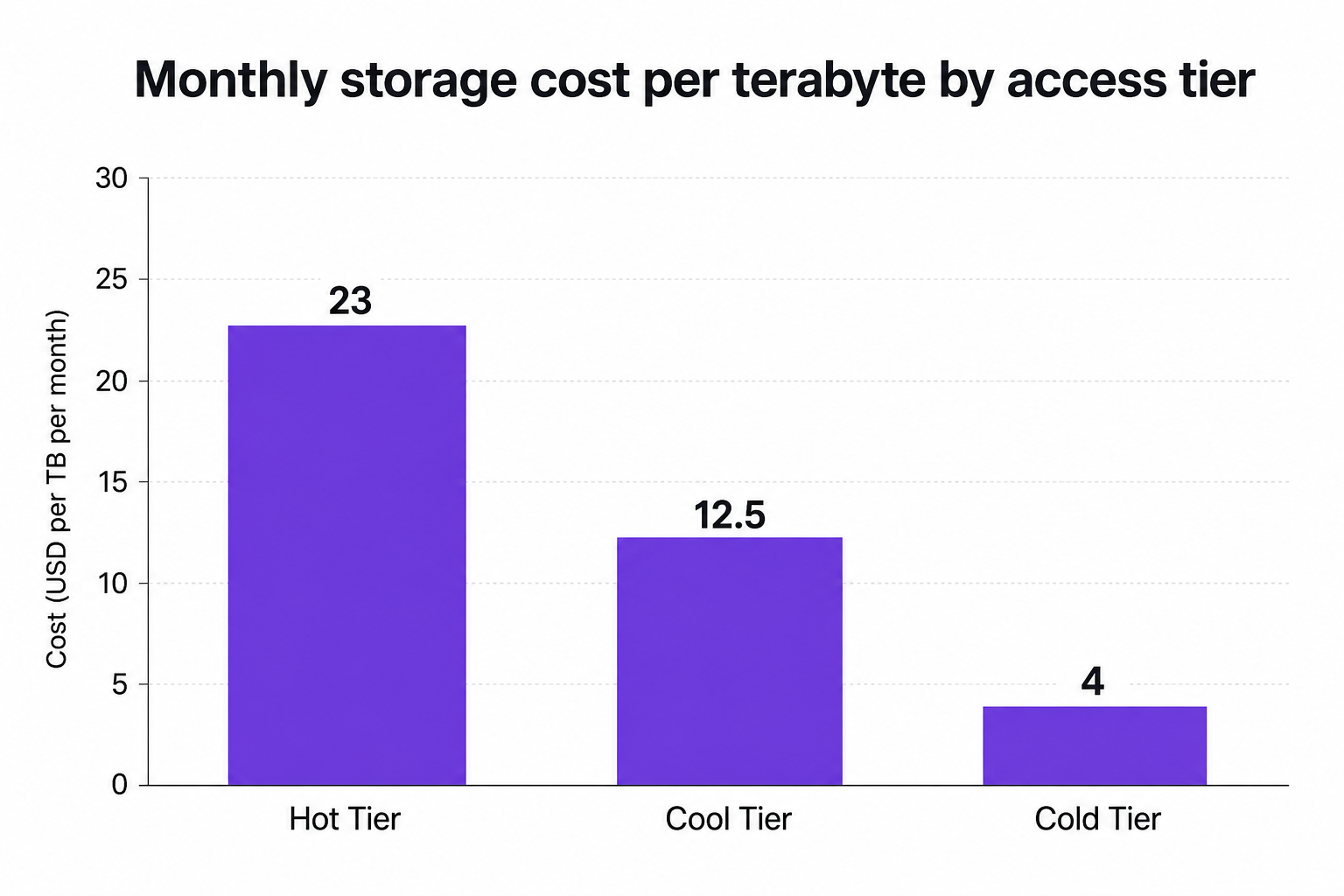
Hot tier: Designed for high-frequency, low-latency operations. It’s optimal for actively queried semantic models and reports. Hot storage costs approximately $0.023 per gigabyte monthly. Keeping too much data here causes costs to skyrocket.
Cool tier: Suited for infrequently accessed data that still requires online availability. It cuts monthly storage expenses by almost half compared to hot, at about $0.0125 per gigabyte.
Cold (archive) tier: Ideal for long-term retention and compliance, where data is rarely read. Storage drops as low as $0.004 per gigabyte, but access comes with penalties and higher per-transaction charges.
A frequent organizational blind spot: leaving compliance or historical data in the hot tier when it could be stored at a fraction of the cost in cool or cold.
The financial advantage of OneLake storage tiering is crystal-clear:
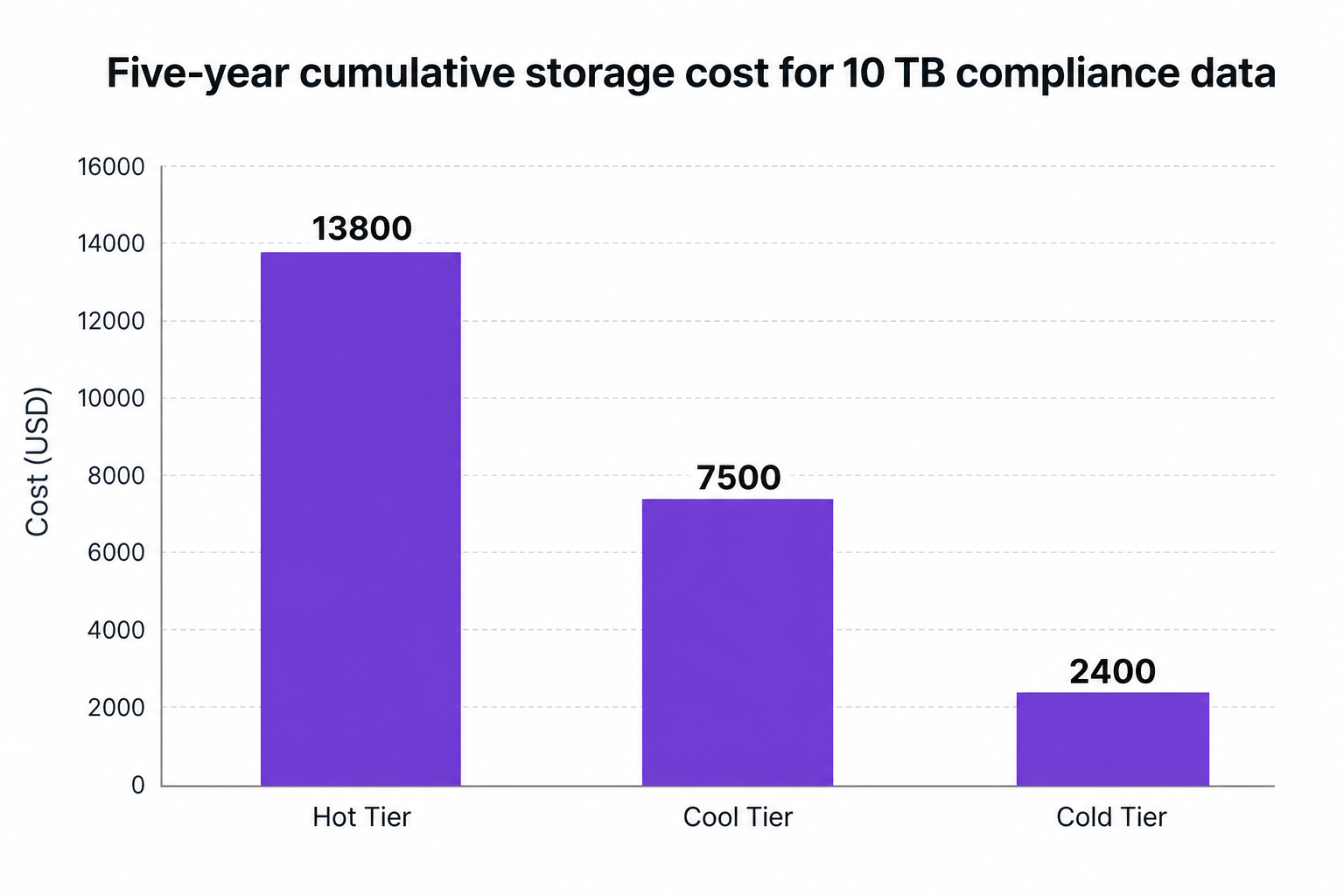
Migrating just 10 terabytes of compliance data from hot to cold storage can cut your storage bill by up to 83%.
Over a five-year span, holding 10 terabytes in the hot tier racks up $13,800 in storage costs. The same data, retained in cold, costs only $2,400.
Moving less immediately needed data from hot to cool tiers slashes your costs by nearly 46.7% over five years, while retaining instant access.
Allocating decommissioned system snapshots straight to the lowest tier cuts long-term spend by 80%.
Cost optimization is not just about moving data, it’s about understanding access patterns:
When to use hot tier: Only keep datasets here if more than 50% are read each month or for compliance with operational SLAs.
Cool and cold tiers: Perfect for rare-access logs, historical reporting, and data retention due to regulations.
However, colder tiers come with nuance. Every read, write, or list operation incurs higher transaction costs and sometimes retrieval delays. Strategic planning minimizes these costs. Loading new, rarely used data directly into the right tier avoids unnecessary move fees.
Expert insight: Storage tier choice directly impacts core compute capacity consumption. Unmanaged workspaces, lingering queries, and orphaned artifacts can silently drain resources and inflate storage bills, even as you believe you’re saving.
Modern enterprise data lakes are rarely one-size-fits-all. Automated lifecycle management is essential. CloudNuro’s governance-first FinOps platform integrates deeply with Microsoft Fabric and OneLake, enabling you to:
Detect idle and orphaned artifacts: Automate the identification and demotion of data, reports, or snapshots no longer actively used.
Set policy-based lifecycle rules: Trigger graduation from hot to cool to cold based on last modified or last accessed timestamps, not guesswork.
Ensure compliance & access control: Move data through tiers without risking audits or breaking retention mandates.
Track and optimize cross-departmental usage: Leverage unified reporting and chargeback modules to accurately attribute costs and prevent budget ambiguity.
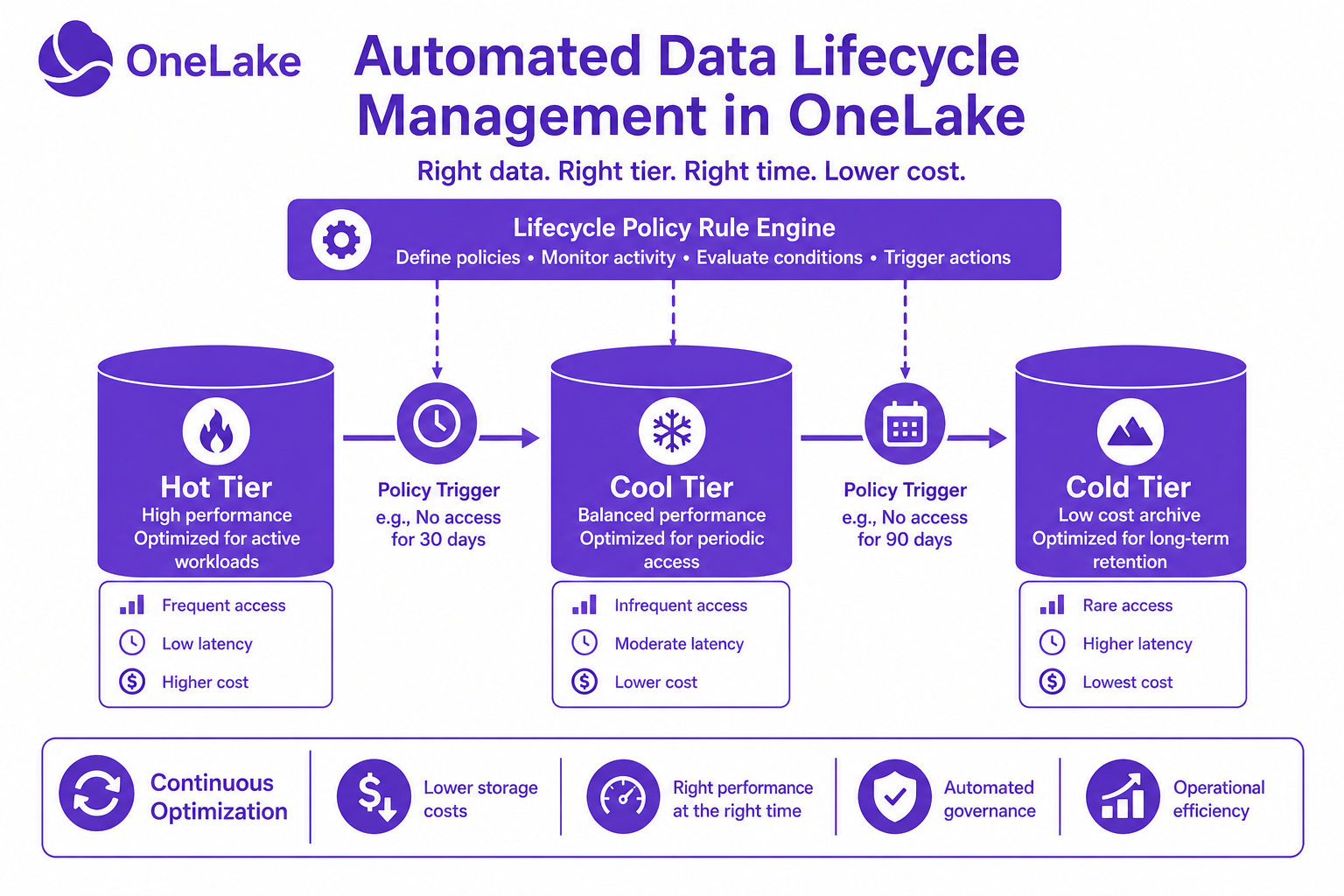
Organizations running CloudNuro’s FinOps engine routinely see penalty overage costs reduced by over 36%, along with automated compliance across multi-tenant analytics platforms.
To achieve maximum savings without compromising on accessibility, follow these battle-tested practices:
Automate tier transitions using last accessed or modified dates. Decommissioned snapshots and dormant data sets should move to cold by default.
Right-size storage tiers to dataset importance. Production workloads go hot, project archives cool, and regulatory backups transition to cold.
Monitor and eliminate unmanaged workspaces that create silent drains on capacity. CloudNuro’s unified operations platform accelerates this with a 15-minute deployment.
Evaluate transaction penalties when planning archive access. Retrieve only what’s needed, when it’s needed.
Implement strict chargeback models to assign storage tier costs to the exact business units responsible, fostering accountability and incentivizing optimization.
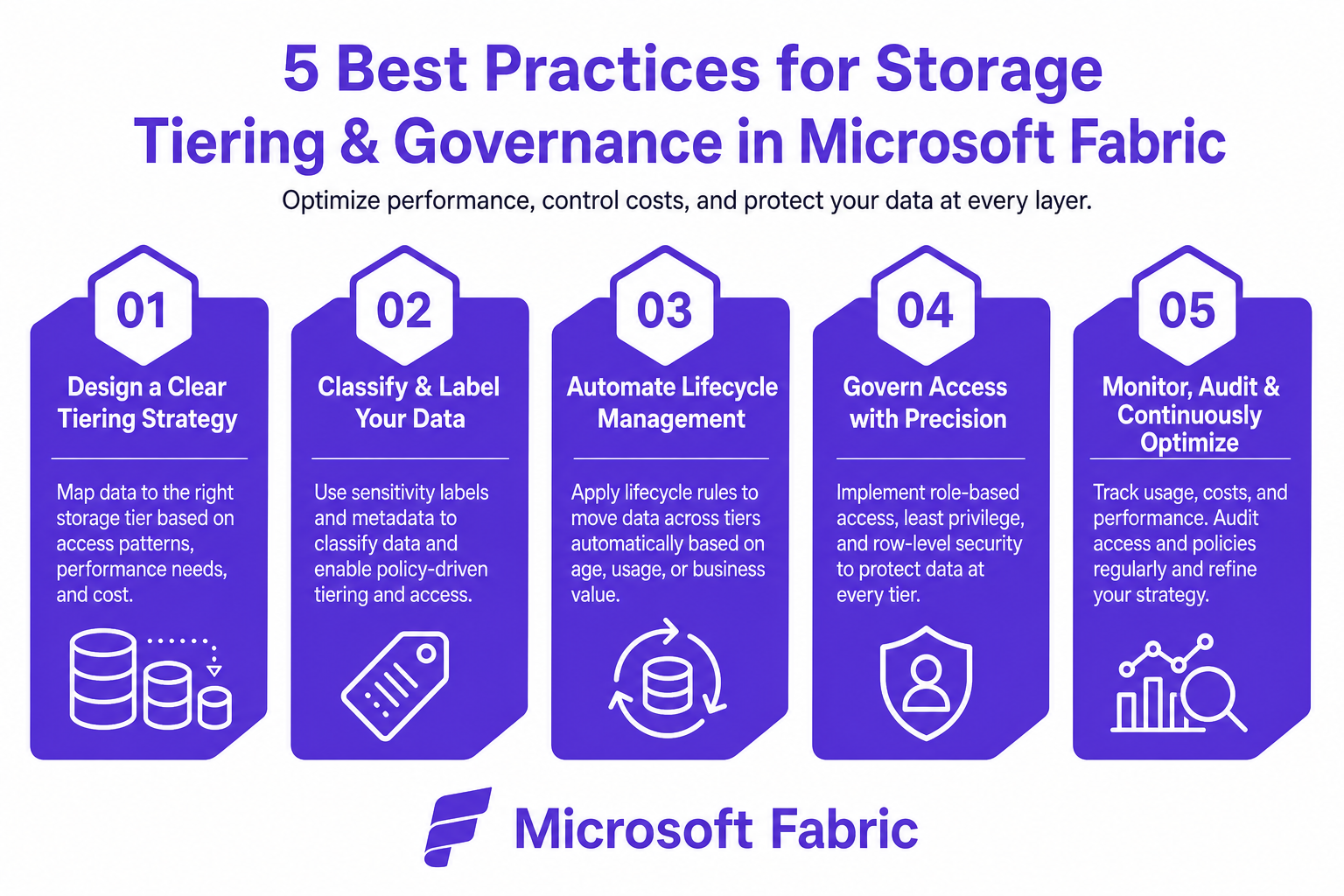
OneLake storage tiering isn’t just about slashing costs; it’s key to ensuring your entire analytics, reporting, and AI footprint is governed, secure, and future-proof. CloudNuro’s governance-first approach includes:
Automated visibility across 400+ SaaS and cloud environments.
Centralized operations, from AI workloads to pure compliance archives.
Integration with regulatory frameworks in finance, healthcare, government, and corporate sectors.
How does OneLake storage tiering reduce Fabric storage bills?
By moving data to lower-cost storage tiers (cool/cold) based on true access patterns, your high-frequency (and most costly) hot storage footprint is minimized, resulting in up to 80% monthly savings with no loss of access.
What is the difference between Hot, Cool, and Archive storage tiers in OneLake?
Hot is for instant access to active data and carries the highest cost. Cool is for infrequently accessed data with slightly reduced performance but half the cost. Cold (archive) is for rarely accessed, long-term retention and is the most cost-effective, but with higher retrieval times and transaction fees.
Can data be accessed instantly from cold or archive tiers in Microsoft Fabric?
Data in cold storage can still be accessed, but retrieval times are longer and transaction costs are higher. For most compliance scenarios, this delay is acceptable, but hot tier is preferable for production analytics.
What are the best practices for configuring OneLake lifecycle rules?
Use automated policies triggered by last access/modified time; match tier to business criticality; eliminate unmanaged assets; and use business-unit chargeback.
How does automatic storage tiering work in Microsoft Fabric?
Automated engine policies monitor data usage and move items from hot to cool or cold without manual intervention, freeing operations teams from routine optimization and enforcing cost governance at scale.
With a robust tiering strategy, organizations can confidently cut Fabric storage bills by up to 80%, fully in line with security and compliance requirements. The key is a blend of automated optimization, policy-based governance, and unified SaaS/cloud visibility. CloudNuro's FinOps services empower enterprises to take the guesswork, and the manual effort, out of storage cost control, so every gigabyte finds its ideal, cost-effective home.
Ready to take control of your OneLake storage costs?
Explore CloudNuro FinOps Services or learn more about AI-driven IT asset management to transform spend into strategic value.
Request a no cost, no obligation free assessment —just 15 minutes to savings!
Get StartedCloud storage costs are rising, especially for organizations running advanced analytics and AI workloads on platforms like Microsoft Fabric's OneLake. However, dramatic cost savings are possible without sacrificing access, compliance, or performance. This guide walks IT and finance leaders through the real-world strategies for leveraging OneLake storage tiering to cut Fabric storage bills by up to 80%. Backed by CloudNuro’s FinOps services, you’ll see how to put automated optimization, governance, and actionable policy into effect for immediate and lasting savings.
OneLake, Microsoft Fabric’s flagship data lake solution, allows data to be stored in three main storage tiers: hot, cool, and cold (sometimes referred to as archive). Each tier is priced for different access patterns and retention needs:
Hot tier: Designed for high-frequency, low-latency operations. It’s optimal for actively queried semantic models and reports. Hot storage costs approximately $0.023 per gigabyte monthly. Keeping too much data here causes costs to skyrocket.
Cool tier: Suited for infrequently accessed data that still requires online availability. It cuts monthly storage expenses by almost half compared to hot, at about $0.0125 per gigabyte.
Cold (archive) tier: Ideal for long-term retention and compliance, where data is rarely read. Storage drops as low as $0.004 per gigabyte, but access comes with penalties and higher per-transaction charges.
A frequent organizational blind spot: leaving compliance or historical data in the hot tier when it could be stored at a fraction of the cost in cool or cold.
The financial advantage of OneLake storage tiering is crystal-clear:
Migrating just 10 terabytes of compliance data from hot to cold storage can cut your storage bill by up to 83%.
Over a five-year span, holding 10 terabytes in the hot tier racks up $13,800 in storage costs. The same data, retained in cold, costs only $2,400.
Moving less immediately needed data from hot to cool tiers slashes your costs by nearly 46.7% over five years, while retaining instant access.
Allocating decommissioned system snapshots straight to the lowest tier cuts long-term spend by 80%.
Cost optimization is not just about moving data, it’s about understanding access patterns:
When to use hot tier: Only keep datasets here if more than 50% are read each month or for compliance with operational SLAs.
Cool and cold tiers: Perfect for rare-access logs, historical reporting, and data retention due to regulations.
However, colder tiers come with nuance. Every read, write, or list operation incurs higher transaction costs and sometimes retrieval delays. Strategic planning minimizes these costs. Loading new, rarely used data directly into the right tier avoids unnecessary move fees.
Expert insight: Storage tier choice directly impacts core compute capacity consumption. Unmanaged workspaces, lingering queries, and orphaned artifacts can silently drain resources and inflate storage bills, even as you believe you’re saving.
Modern enterprise data lakes are rarely one-size-fits-all. Automated lifecycle management is essential. CloudNuro’s governance-first FinOps platform integrates deeply with Microsoft Fabric and OneLake, enabling you to:
Detect idle and orphaned artifacts: Automate the identification and demotion of data, reports, or snapshots no longer actively used.
Set policy-based lifecycle rules: Trigger graduation from hot to cool to cold based on last modified or last accessed timestamps, not guesswork.
Ensure compliance & access control: Move data through tiers without risking audits or breaking retention mandates.
Track and optimize cross-departmental usage: Leverage unified reporting and chargeback modules to accurately attribute costs and prevent budget ambiguity.
Organizations running CloudNuro’s FinOps engine routinely see penalty overage costs reduced by over 36%, along with automated compliance across multi-tenant analytics platforms.
To achieve maximum savings without compromising on accessibility, follow these battle-tested practices:
Automate tier transitions using last accessed or modified dates. Decommissioned snapshots and dormant data sets should move to cold by default.
Right-size storage tiers to dataset importance. Production workloads go hot, project archives cool, and regulatory backups transition to cold.
Monitor and eliminate unmanaged workspaces that create silent drains on capacity. CloudNuro’s unified operations platform accelerates this with a 15-minute deployment.
Evaluate transaction penalties when planning archive access. Retrieve only what’s needed, when it’s needed.
Implement strict chargeback models to assign storage tier costs to the exact business units responsible, fostering accountability and incentivizing optimization.
OneLake storage tiering isn’t just about slashing costs; it’s key to ensuring your entire analytics, reporting, and AI footprint is governed, secure, and future-proof. CloudNuro’s governance-first approach includes:
Automated visibility across 400+ SaaS and cloud environments.
Centralized operations, from AI workloads to pure compliance archives.
Integration with regulatory frameworks in finance, healthcare, government, and corporate sectors.
How does OneLake storage tiering reduce Fabric storage bills?
By moving data to lower-cost storage tiers (cool/cold) based on true access patterns, your high-frequency (and most costly) hot storage footprint is minimized, resulting in up to 80% monthly savings with no loss of access.
What is the difference between Hot, Cool, and Archive storage tiers in OneLake?
Hot is for instant access to active data and carries the highest cost. Cool is for infrequently accessed data with slightly reduced performance but half the cost. Cold (archive) is for rarely accessed, long-term retention and is the most cost-effective, but with higher retrieval times and transaction fees.
Can data be accessed instantly from cold or archive tiers in Microsoft Fabric?
Data in cold storage can still be accessed, but retrieval times are longer and transaction costs are higher. For most compliance scenarios, this delay is acceptable, but hot tier is preferable for production analytics.
What are the best practices for configuring OneLake lifecycle rules?
Use automated policies triggered by last access/modified time; match tier to business criticality; eliminate unmanaged assets; and use business-unit chargeback.
How does automatic storage tiering work in Microsoft Fabric?
Automated engine policies monitor data usage and move items from hot to cool or cold without manual intervention, freeing operations teams from routine optimization and enforcing cost governance at scale.
With a robust tiering strategy, organizations can confidently cut Fabric storage bills by up to 80%, fully in line with security and compliance requirements. The key is a blend of automated optimization, policy-based governance, and unified SaaS/cloud visibility. CloudNuro's FinOps services empower enterprises to take the guesswork, and the manual effort, out of storage cost control, so every gigabyte finds its ideal, cost-effective home.
Ready to take control of your OneLake storage costs?
Explore CloudNuro FinOps Services or learn more about AI-driven IT asset management to transform spend into strategic value.
Request a no cost, no obligation free assessment - just 15 minutes to savings!
Get StartedWe're offering complimentary ServiceNow license assessments to only 25 enterprises this quarter who want to unlock immediate savings without disrupting operations.
Get Free AssessmentGet Started




CloudNuro Corp
1755 Park St. Suite 207
Naperville, IL 60563
Phone : +1-630-277-9470
Email: info@cloudnuro.com





.webp)

Recognized Leader in SaaS Management Platforms by Info-Tech SoftwareReviews


.svg)