

Sign Up
Thank you for Submitting!

Understanding your Power BI license price is essential as analytics and Business Intelligence (BI) continue to drive data-driven business growth. For IT, finance, and operations leaders, budgeting for Microsoft Power BI goes far beyond simply choosing a plan. From fluctuating regional costs across India, the UK, and Australia, to complex license types and the shift toward cloud-based analytics, organizations face mounting pressure to track, optimize, and govern SaaS spend.

This guide explores everything you need to know about Power BI license cost for enterprises: the differences between Pro and Premium (including Per User and Capacity models), cost factors affecting multinational organizations, and proven strategies to ensure cost control, governance, and maximum ROI.
Power BI offers multiple license models tailored to enterprise needs, but choosing the right one can determine whether your analytics environment is both effective and cost-optimized.
Power BI Pro: Designed for individual analysts and small teams. It allows data sets up to 1 GB and supports 8 daily refreshes. Every user who needs to create, share, or collaborate on Power BI reports must have a paid license.
Power BI Premium Per User (PPU): Intended for heavy users or power analysts. This unlocks advanced AI features, paginated reports, support for data sets up to 100 GB, and 48 refreshes per day.
Power BI Premium Capacity: Ideal for organizations with many casual viewers or requiring enterprise-scale distribution. Once you reach the tipping point (often calculated using AI-driven break-even analysis), Premium Capacity enables unlimited read-only viewers.
Embedded and Fabric Capacity Tiers: Purpose-built solutions for ISVs and enterprises requiring advanced integration, automation, or significant scale. Fabric F64 and higher tiers support large-scale analytics at predictable costs.
Understanding licensing nuances is crucial because over-licensing and misassigned seats are rampant issues. Up to 32% of Power BI seats in the typical enterprise are unused or underutilized at any time.
Getting an accurate Power BI license price depends on where your teams are based and how well you negotiate enterprise agreements. Let us break down the published and typical negotiated costs:
Power BI Pro: Priced per user, per month. In the US, this often appears around US$10-$13 per user monthly.
Power BI Premium Per User: Ranges from US$20-$25 per user, per month, unlocking additional advanced features.
|
Region |
Power BI Pro (per user/mo) |
Premium Per User (per user/mo) |
Estimated Enterprise Discount |
|---|---|---|---|
|
US |
$10–$13 |
$20–$25 |
10%–35% |
|
India |
₹750–₹950 |
₹1,450–₹1,700 |
Up to 30% depending on volume |
|
UK |
£7.50–£8.50 |
£15–£18 |
10%–35% |
|
Australia |
AUD 13–AUD 16 |
AUD 25–AUD 28 |
10%–25% |
Capacity-based licenses for enterprises (Premium Capacity, Fabric tiers) often start above US$5,000 per month, but actual spend varies based on capacity sizing and negotiated terms.
Key Point: True license costs vary significantly by region and are further reduced by enterprise agreements, with discounts of 10% to 35% typical for large customers. However, the greatest savings come not from the best price, but from eliminating shelfware and right-sizing license allocations.
Software-as-a-Service (SaaS) now ranks as the second-largest operational expense for most enterprises, with BI platforms like Power BI a major contributor. Beyond list pricing, hidden costs emerge from underutilized licenses, unused capacity, and license sprawl:
Average SaaS renewal price hikes range from 15% to 35% each cycle, with some increases topping 50%.
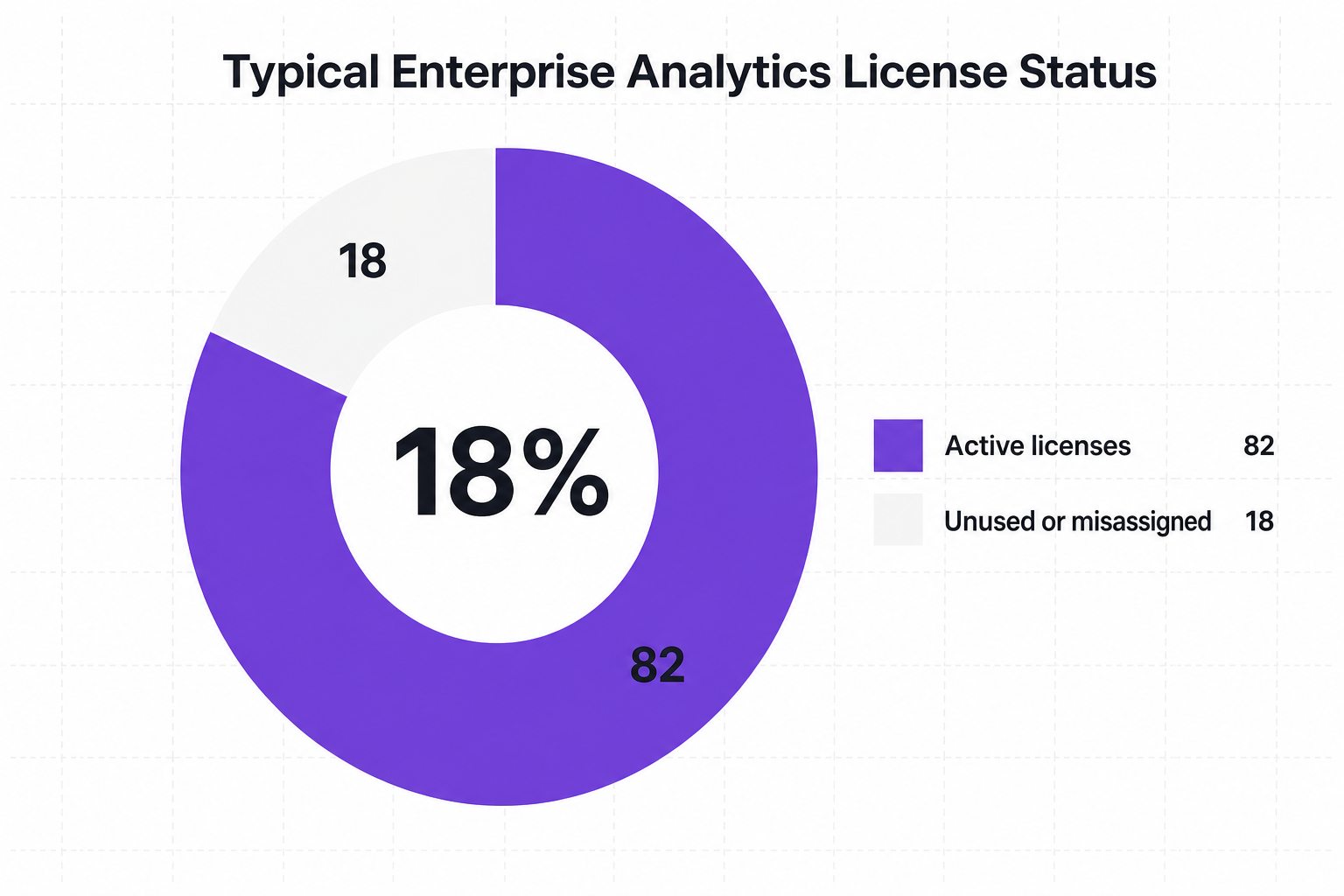
Up to 18% of analytics licenses are either unused or misassigned at large organizations.
Enterprises often pay an enablement tax by holding premium (unused) AI and analytics seats.
A multinational bank cut premium capacity costs by 31% in one month by reallocating idle resources based on real usage analytics.
Without automation and real-time usage analytics, failing to audit Power BI licenses is effectively handing a blank check to providers.
Proactive, automated license management is the single greatest lever for Power BI cost reduction. Leading organizations deploy these practices:
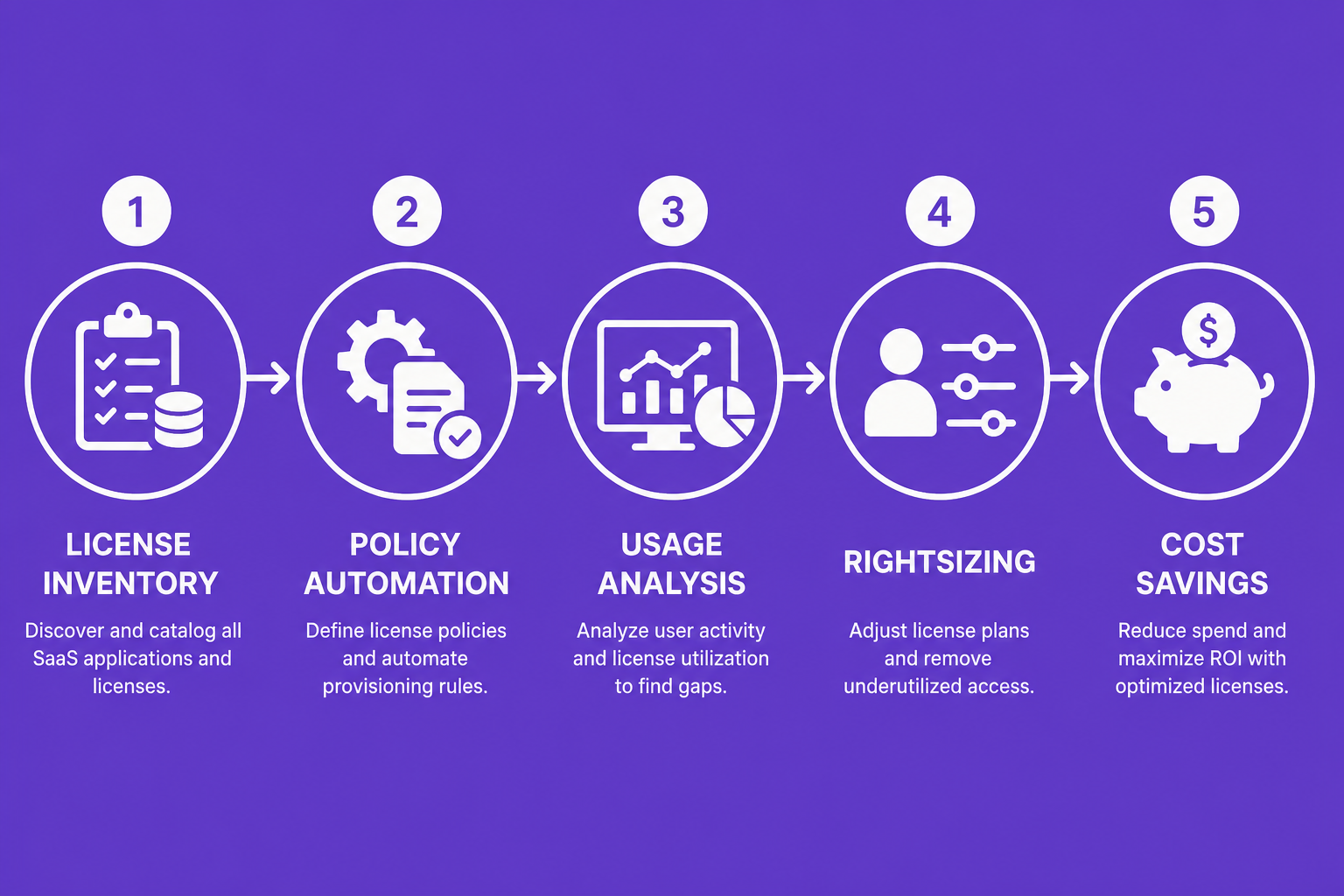
Centralize License Inventory: Use a unified platform to map all assigned users, track actual product usage, and instantly identify dormant or misassigned licenses.
Automated Reclamation and Rightsizing: Leverage tools that reclaim inactive licenses, notify stakeholders of unused seats, and trigger downgrade workflows.
Capacity Analytics: Assess whether shifting from Premium Per User to shared Capacity or Fabric tiers will improve ROI. Automated break-even calculators provide precise guidance.
Policy Automation: Streamline license workflows. Set policies for automatic license assignment on-join, periodic usage review, and auto-reclamation after inactivity.
Benchmark and Renegotiate: Through real-time benchmarking, understand what peer enterprises pay and justify better pricing when renewing enterprise agreements.
Proof Points:
A large healthcare organization reclaimed over 7,000 unused licenses, saving nearly $2.3M annually.
Government agencies using policy automation achieved 19% reduction in overspend.
Enterprises leveraging automated controls see analytics license cost reductions of 29% within the first month.
CloudNuro empowers finance and IT leaders with the tools needed for real Power BI spend control:
Microsoft 365 Custodian Platform: Centralizes SaaS license inventory and tracks genuine user activity across environments.
Automated Policy Enforcement: Defines and enforces policies for auto-reclamation, capacity pause schedules, and audit alerts.
AI-driven Analytics: The Arya AI engine models historical usage and forecasts future license needs for accurate budget planning.
Chargeback and Cost Allocation: Assigns Power BI and wider SaaS costs to business units, cementing a culture of cost control.
Global Price Optimization: Benchmarks license prices for enterprise customers in India, UK, Australia, and US, ensuring the most competitive Power BI license costs.
To create a disciplined analytics environment and maximize Power BI ROI, adopt these enterprise best practices:
Continuous License Audit: Regularly audit usage, not just assignment, across all global regions.
Automate Everything Possible: Increase automation coverage for license workflows, renewals, and usage reviews.
Empower Stakeholders: Deliver self-service dashboards to lines of business, IT, and finance for direct visibility into license consumption and spend.
Plan for AI Growth: Decouple heavy AI and analytics workloads from reporting needs to avoid surprise computing charges.
Link Procurement and IT: Bring procurement, IT, and finance together for collaborative SaaS optimization.
What is the price of a Power BI license?
Power BI Pro ranges from $10–$13 per user monthly (or equivalent in regional currency). Premium Per User is $20–$25 monthly, with additional discounts available through enterprise agreements. Capacity tiers start at roughly $5,000 monthly but vary by requirements and region.
How much does Power BI Pro cost?
Power BI Pro typically costs $10–$13 (or the local equivalent) per user, per month for list pricing. Many enterprises secure 10% to 35% discounts at scale.
What is the difference between Power BI Pro and Premium licenses?
Pro supports individuals and teams with standard features. Premium (Per User or Capacity) unlocks enhanced datasets, AI, paginated reports, and serves unlimited read-only viewers (with Capacity).
What are the regional costs for Power BI licenses in India, UK, and Australia?
India: ₹750–₹950 Pro, ₹1,450–₹1,700 Premium Per User. UK: £7.50–£8.50 Pro, £15–£18 Premium. Australia: AUD 13–16 Pro, AUD 25–28 Premium.
Is Power BI license pricing different for enterprises vs individuals?
Yes. Enterprises often achieve substantial negotiated rate discounts and benefit most from capacity-based models and automated management. Individuals pay list price for either Pro or Premium Per User.
With Power BI now pivotal to enterprise analytics, unchecked license sprawl can quickly overwhelm budgets. Manual audits and periodic reviews are no match for the complexity of large global organizations. The answer is systematized license governance and continuous, AI-driven optimization.
CloudNuro bolsters your financial discipline, giving enterprises unmatched visibility, automated policy workflows, license right-sizing, and cost-saving insights for Power BI and all SaaS apps. Combining global price benchmarking and predictive analytics, CloudNuro is the trusted path to controlling SaaS cost and governance.
Related Reading:
CloudNuro is a leader in Enterprise AI Adoption Management, providing enterprises with unmatched visibility, governance, and cost optimization. Recognized twice in a row in the SaaS Management Platforms category and named a Leader in the SoftwareReviews Data Quadrant, CloudNuro is trusted by global enterprises and government agencies to bring financial discipline to SaaS, cloud, and AI. Trusted by enterprises, CloudNuro provides centralized SaaS inventory, license optimization, and renewal management along with advanced cost allocation and chargeback, giving IT and Finance leaders the visibility, control, and cost-conscious culture needed to drive financial discipline.
Request a no cost, no obligation free assessment —just 15 minutes to savings!
Get StartedUnderstanding your Power BI license price is essential as analytics and Business Intelligence (BI) continue to drive data-driven business growth. For IT, finance, and operations leaders, budgeting for Microsoft Power BI goes far beyond simply choosing a plan. From fluctuating regional costs across India, the UK, and Australia, to complex license types and the shift toward cloud-based analytics, organizations face mounting pressure to track, optimize, and govern SaaS spend.
This guide explores everything you need to know about Power BI license cost for enterprises: the differences between Pro and Premium (including Per User and Capacity models), cost factors affecting multinational organizations, and proven strategies to ensure cost control, governance, and maximum ROI.
Power BI offers multiple license models tailored to enterprise needs, but choosing the right one can determine whether your analytics environment is both effective and cost-optimized.
Power BI Pro: Designed for individual analysts and small teams. It allows data sets up to 1 GB and supports 8 daily refreshes. Every user who needs to create, share, or collaborate on Power BI reports must have a paid license.
Power BI Premium Per User (PPU): Intended for heavy users or power analysts. This unlocks advanced AI features, paginated reports, support for data sets up to 100 GB, and 48 refreshes per day.
Power BI Premium Capacity: Ideal for organizations with many casual viewers or requiring enterprise-scale distribution. Once you reach the tipping point (often calculated using AI-driven break-even analysis), Premium Capacity enables unlimited read-only viewers.
Embedded and Fabric Capacity Tiers: Purpose-built solutions for ISVs and enterprises requiring advanced integration, automation, or significant scale. Fabric F64 and higher tiers support large-scale analytics at predictable costs.
Understanding licensing nuances is crucial because over-licensing and misassigned seats are rampant issues. Up to 32% of Power BI seats in the typical enterprise are unused or underutilized at any time.
Getting an accurate Power BI license price depends on where your teams are based and how well you negotiate enterprise agreements. Let us break down the published and typical negotiated costs:
Power BI Pro: Priced per user, per month. In the US, this often appears around US$10-$13 per user monthly.
Power BI Premium Per User: Ranges from US$20-$25 per user, per month, unlocking additional advanced features.
|
Region |
Power BI Pro (per user/mo) |
Premium Per User (per user/mo) |
Estimated Enterprise Discount |
|---|---|---|---|
|
US |
$10–$13 |
$20–$25 |
10%–35% |
|
India |
₹750–₹950 |
₹1,450–₹1,700 |
Up to 30% depending on volume |
|
UK |
£7.50–£8.50 |
£15–£18 |
10%–35% |
|
Australia |
AUD 13–AUD 16 |
AUD 25–AUD 28 |
10%–25% |
Capacity-based licenses for enterprises (Premium Capacity, Fabric tiers) often start above US$5,000 per month, but actual spend varies based on capacity sizing and negotiated terms.
Key Point: True license costs vary significantly by region and are further reduced by enterprise agreements, with discounts of 10% to 35% typical for large customers. However, the greatest savings come not from the best price, but from eliminating shelfware and right-sizing license allocations.
Software-as-a-Service (SaaS) now ranks as the second-largest operational expense for most enterprises, with BI platforms like Power BI a major contributor. Beyond list pricing, hidden costs emerge from underutilized licenses, unused capacity, and license sprawl:
Average SaaS renewal price hikes range from 15% to 35% each cycle, with some increases topping 50%.
Up to 18% of analytics licenses are either unused or misassigned at large organizations.
Enterprises often pay an enablement tax by holding premium (unused) AI and analytics seats.
A multinational bank cut premium capacity costs by 31% in one month by reallocating idle resources based on real usage analytics.
Without automation and real-time usage analytics, failing to audit Power BI licenses is effectively handing a blank check to providers.
Proactive, automated license management is the single greatest lever for Power BI cost reduction. Leading organizations deploy these practices:
Centralize License Inventory: Use a unified platform to map all assigned users, track actual product usage, and instantly identify dormant or misassigned licenses.
Automated Reclamation and Rightsizing: Leverage tools that reclaim inactive licenses, notify stakeholders of unused seats, and trigger downgrade workflows.
Capacity Analytics: Assess whether shifting from Premium Per User to shared Capacity or Fabric tiers will improve ROI. Automated break-even calculators provide precise guidance.
Policy Automation: Streamline license workflows. Set policies for automatic license assignment on-join, periodic usage review, and auto-reclamation after inactivity.
Benchmark and Renegotiate: Through real-time benchmarking, understand what peer enterprises pay and justify better pricing when renewing enterprise agreements.
Proof Points:
A large healthcare organization reclaimed over 7,000 unused licenses, saving nearly $2.3M annually.
Government agencies using policy automation achieved 19% reduction in overspend.
Enterprises leveraging automated controls see analytics license cost reductions of 29% within the first month.
CloudNuro empowers finance and IT leaders with the tools needed for real Power BI spend control:
Microsoft 365 Custodian Platform: Centralizes SaaS license inventory and tracks genuine user activity across environments.
Automated Policy Enforcement: Defines and enforces policies for auto-reclamation, capacity pause schedules, and audit alerts.
AI-driven Analytics: The Arya AI engine models historical usage and forecasts future license needs for accurate budget planning.
Chargeback and Cost Allocation: Assigns Power BI and wider SaaS costs to business units, cementing a culture of cost control.
Global Price Optimization: Benchmarks license prices for enterprise customers in India, UK, Australia, and US, ensuring the most competitive Power BI license costs.
To create a disciplined analytics environment and maximize Power BI ROI, adopt these enterprise best practices:
Continuous License Audit: Regularly audit usage, not just assignment, across all global regions.
Automate Everything Possible: Increase automation coverage for license workflows, renewals, and usage reviews.
Empower Stakeholders: Deliver self-service dashboards to lines of business, IT, and finance for direct visibility into license consumption and spend.
Plan for AI Growth: Decouple heavy AI and analytics workloads from reporting needs to avoid surprise computing charges.
Link Procurement and IT: Bring procurement, IT, and finance together for collaborative SaaS optimization.
What is the price of a Power BI license?
Power BI Pro ranges from $10–$13 per user monthly (or equivalent in regional currency). Premium Per User is $20–$25 monthly, with additional discounts available through enterprise agreements. Capacity tiers start at roughly $5,000 monthly but vary by requirements and region.
How much does Power BI Pro cost?
Power BI Pro typically costs $10–$13 (or the local equivalent) per user, per month for list pricing. Many enterprises secure 10% to 35% discounts at scale.
What is the difference between Power BI Pro and Premium licenses?
Pro supports individuals and teams with standard features. Premium (Per User or Capacity) unlocks enhanced datasets, AI, paginated reports, and serves unlimited read-only viewers (with Capacity).
What are the regional costs for Power BI licenses in India, UK, and Australia?
India: ₹750–₹950 Pro, ₹1,450–₹1,700 Premium Per User. UK: £7.50–£8.50 Pro, £15–£18 Premium. Australia: AUD 13–16 Pro, AUD 25–28 Premium.
Is Power BI license pricing different for enterprises vs individuals?
Yes. Enterprises often achieve substantial negotiated rate discounts and benefit most from capacity-based models and automated management. Individuals pay list price for either Pro or Premium Per User.
With Power BI now pivotal to enterprise analytics, unchecked license sprawl can quickly overwhelm budgets. Manual audits and periodic reviews are no match for the complexity of large global organizations. The answer is systematized license governance and continuous, AI-driven optimization.
CloudNuro bolsters your financial discipline, giving enterprises unmatched visibility, automated policy workflows, license right-sizing, and cost-saving insights for Power BI and all SaaS apps. Combining global price benchmarking and predictive analytics, CloudNuro is the trusted path to controlling SaaS cost and governance.
Related Reading:
CloudNuro is a leader in Enterprise AI Adoption Management, providing enterprises with unmatched visibility, governance, and cost optimization. Recognized twice in a row in the SaaS Management Platforms category and named a Leader in the SoftwareReviews Data Quadrant, CloudNuro is trusted by global enterprises and government agencies to bring financial discipline to SaaS, cloud, and AI. Trusted by enterprises, CloudNuro provides centralized SaaS inventory, license optimization, and renewal management along with advanced cost allocation and chargeback, giving IT and Finance leaders the visibility, control, and cost-conscious culture needed to drive financial discipline.
Request a no cost, no obligation free assessment - just 15 minutes to savings!
Get StartedWe're offering complimentary ServiceNow license assessments to only 25 enterprises this quarter who want to unlock immediate savings without disrupting operations.
Get Free AssessmentGet Started




CloudNuro Corp
1755 Park St. Suite 207
Naperville, IL 60563
Phone : +1-630-277-9470
Email: info@cloudnuro.com





.webp)

Recognized Leader in SaaS Management Platforms by Info-Tech SoftwareReviews
.png)



.svg)