

Sign Up
Thank you for Submitting!
A strong user access review template is no longer a nice-to-have compliance document. It is a recurring control that security, IT, and audit teams must execute with consistency across an exploding SaaS and cloud estate.
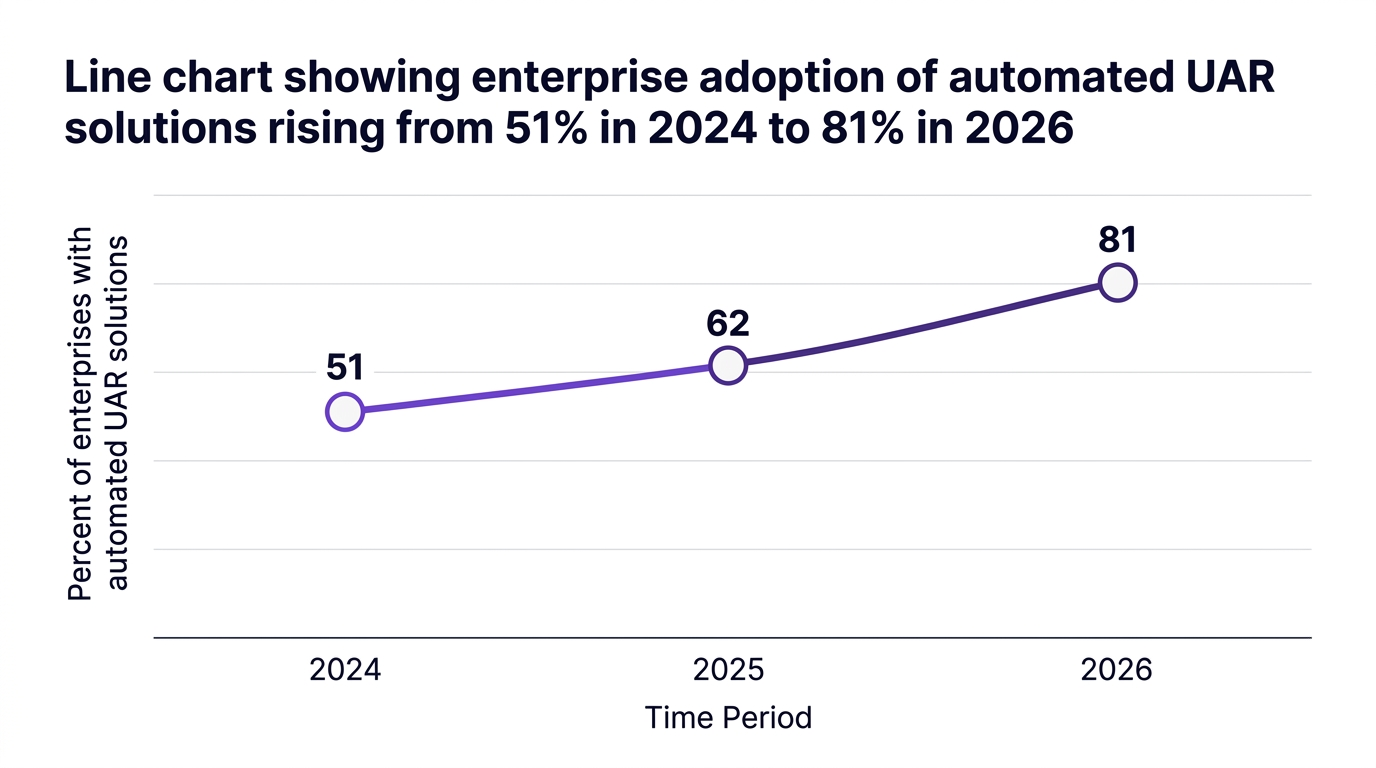
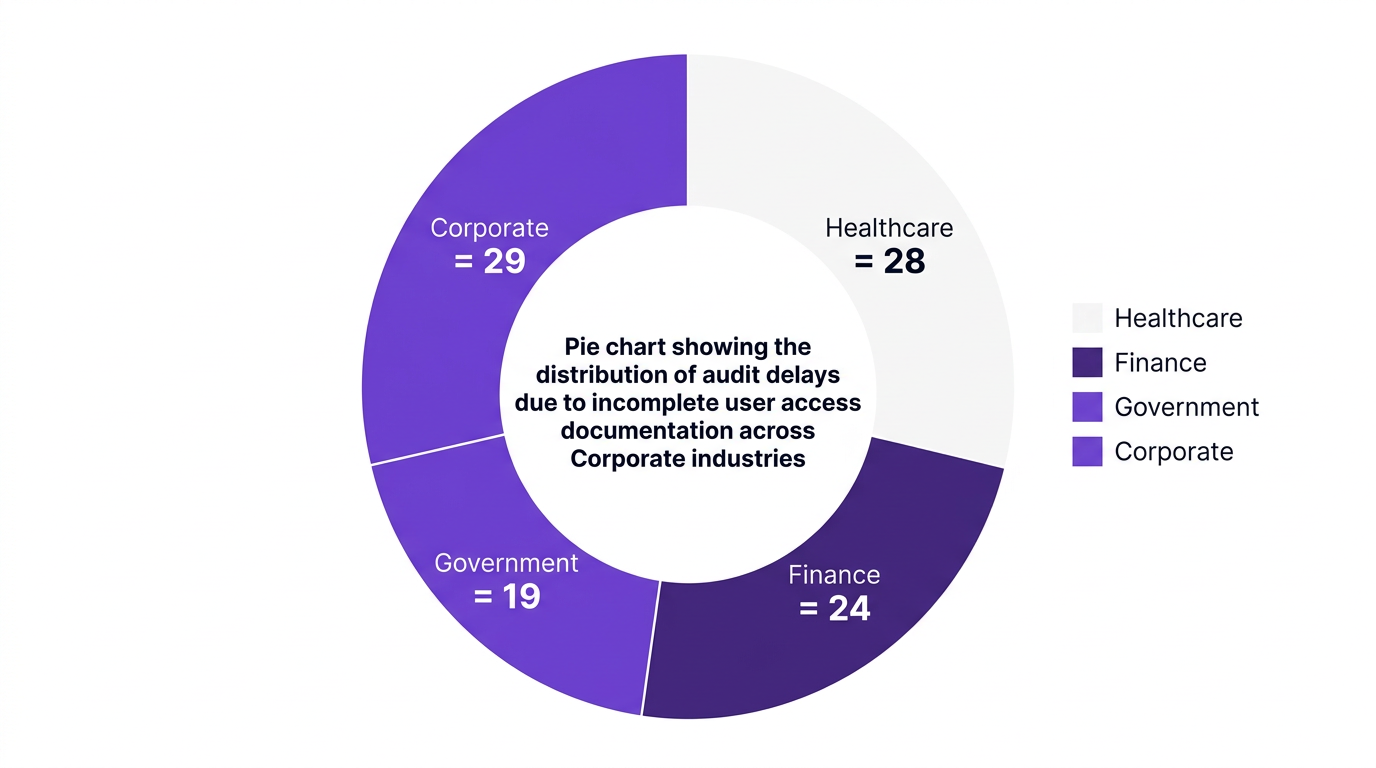
According to Deloitte 2026 research, 63% of compliance officers say periodic user access reviews are now a board-level priority. Yet IDC reports that 74% of organizations experienced audit delays in the last 12 months due to incomplete user access documentation.
This guide breaks down the 8 essential components of an audit-ready user access review template, explains how to operationalize them, and shows how CloudNuro automates review cycles across your SaaS stack.
A user access review template is a standardized access review form used to validate which users have access to which systems, data, and roles, and whether those entitlements remain appropriate.
It operationalizes your user access review policy template by defining the fields, workflow, and evidence required so that each review cycle is consistent, repeatable, and audit-ready.
The right template supports:
Access governance and least privilege
Regulatory and SaaS compliance requirements
Efficient, low-friction collaboration between IT, security, managers, and auditors
Gartner estimates that organizations using AI-driven user access reviews see a 38% reduction in compliance violations (2026). A structured UAR template is the foundation that makes this automation reliable.
Think of your user access review template as an engineered checklist, not a blank form. Each component should drive clarity, ownership, and evidence.
Below are the 8 core sections every access review template should include.
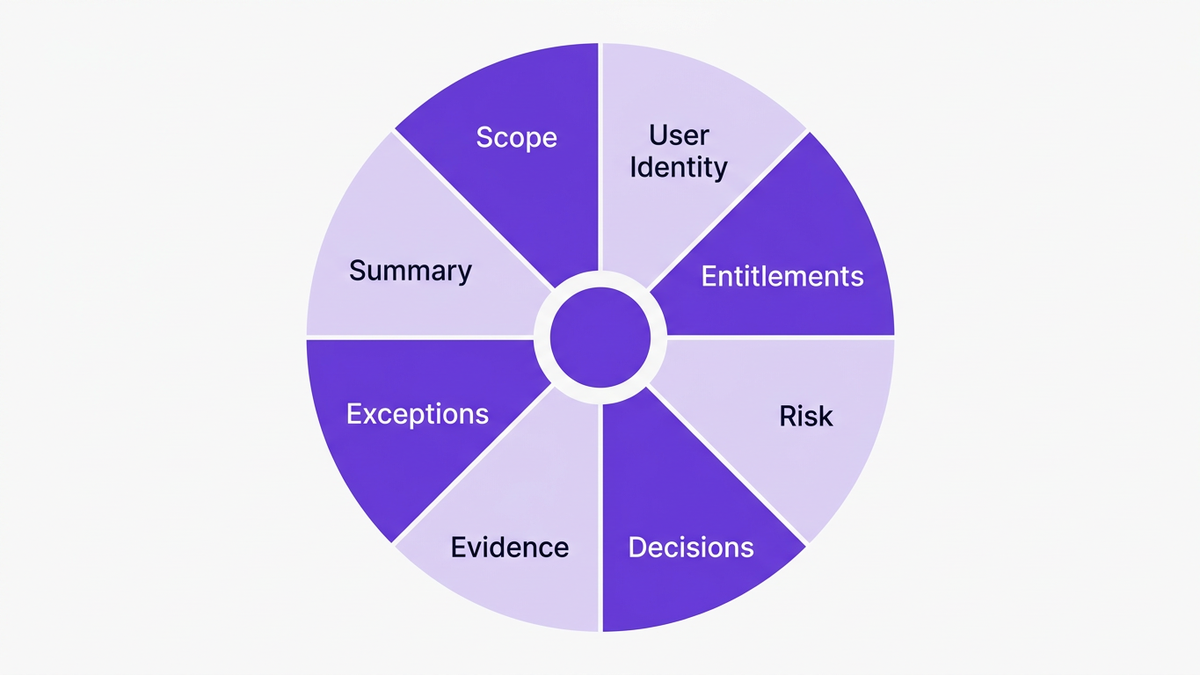
Every review must start with clear scope definition so auditors can see exactly what was in or out of bounds.
Your user access review template should capture:
Application or system name
Environment (production, staging, test)
Data classification level (public, internal, confidential, regulated)
Review period (quarterly, semi-annual, annual)
Business owner and technical owner
This section becomes the anchor for your user access review report template and avoids disputes later about what was actually reviewed.
Best practice: Pre-populate these fields from your identity management or SaaS inventory system to prevent manual errors and scope drift.
The next section describes who is being reviewed.
Your periodic user access review template should include at least:
User ID and full name
Department and cost center
Manager or approver
Employment status (employee, contractor, vendor)
Join date and, if applicable, termination date
This is where many organizations fall down. According to KPMG 2026 data, only 31% of large enterprises maintain audit-ready user access review templates across all critical SaaS applications, often because user metadata is inconsistent.
Tip: Use a single source of truth for identity, then sync these fields automatically into your user access rights review template.
This is the core of the entitlement review.
Each line item in your user entitlement review template should capture:
Role or profile (for example, admin, power user, read-only)
Specific permissions or entitlements where applicable
Data scopes (region, business unit, project)
Criticality (high / medium / low)
To support role-based access control, it helps to distinguish between:
Role-based entitlements (inherited from group or role)
Direct entitlements (manually granted)
This distinction is crucial for scaling identity access review. It allows reviewers to question why any direct or one-off entitlements exist that fall outside your standard role catalog.
Not all access is equal. A mature SaaS access audit template tags entitlements by risk and control.
Include fields such as:
Risk rating (high, medium, low) based on data sensitivity
Associated regulations (for example, HIPAA, SOX, GDPR)
Control ID from your IT compliance form or control framework
Segregation of duties flags or conflicts
This mapping ties each line item in your audit access template directly to a control objective. It also makes it far easier for auditors to trace how your user access review procedure template enforces specific compliance requirements.
Framework idea: Use a simple 3x3 risk matrix that blends data sensitivity and privilege level. For instance:
High: privileged access to regulated or financial data
Medium: standard access to regulated data
Low: access to internal-only, non-sensitive information
This is where managers and application owners make the call.
An effective access recertification form should include structured decision options such as:
Approve: Access remains appropriate
Modify: Adjust role or entitlements
Revoke: Remove access entirely
Reassign: Transfer ownership or account to another user
For each decision, require reviewers to provide:
Business justification (free text with guardrails)
Effective date for change
Priority or SLA for remediation
To keep this scalable, your user access review excel template or workflow tool should:
Default to “revoke” for inactive users or terminated employees
Flag dormant accounts for extra scrutiny
Automatically track completion status and timestamps
A user access review is only as strong as its evidence.
Your security compliance template should support:
System-generated entitlement snapshots at the start and end of the review
Logs of who performed the review and when
Comments thread for disputes or clarifications
Attachments such as approval emails or tickets
According to IDC 2026 research, 74% of global organizations experienced audit delays because user access documentation was incomplete or scattered.
By embedding evidence directly into your user access review policy example and workflow, you remove last-minute scramble and reduce the risk of findings that could have been avoided.
No environment is perfect. There will always be exceptions, legacy accounts, or temporary elevation of privileges.
Your role review checklist and user access review checklist should explicitly track:
Open segregation of duties (SoD) conflicts
Temporary exception approvals, with expiry dates
Compensating controls, such as enhanced logging or dual approval
Risk owner and remediation owner
This section is vital for regulated industries like healthcare, finance, and government. It turns exceptions from informal workarounds into documented, time-bound decisions that auditors can understand and test.
The final component turns raw decisions into audit-ready reporting.
Include summary fields in your user access review report template such as:
Number of users reviewed
Percentage of accounts with changed or revoked access
Number of exceptions and SoD conflicts
Time taken to complete the review cycle
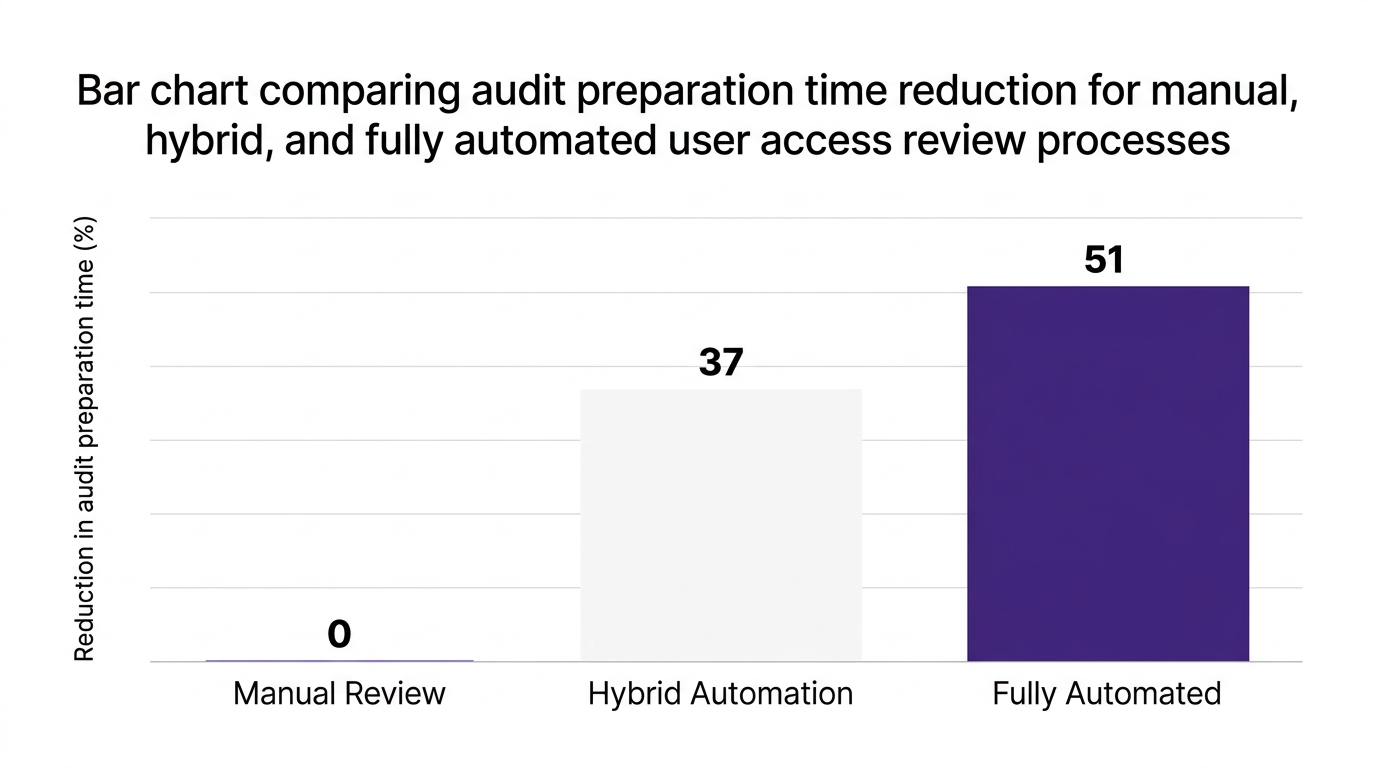
ISG 2026 reports that 81% of enterprises say automating user access reviews cuts audit prep time by more than 50%. Capturing consistent summary metrics is what enables that automation and trend analysis across quarters.
Frequency depends on data sensitivity, regulatory demands, and your access governance maturity.
Common patterns include:
Quarterly reviews for privileged access and regulated data
Semi-annual reviews for standard business applications
Annual reviews for low-risk and internal-only tools
Deloitte 2026 notes that periodic user access reviews are now a board-level topic for 63% of enterprises, especially where SaaS sprawl is accelerating.
A practical rule: tie your periodic user access review template schedule to your risk appetite. Higher risk means more frequent identity access review, with continuous monitoring for critical systems.
A document-only user access review template quickly hits limits once you manage hundreds of SaaS apps and thousands of users.
Market data shows the shift:
Forrester 2026: 68% of large organizations are adopting AI-first access review automation by 2026
TechRepublic 2026: 92% of IT leaders consider real-time visibility into SaaS access critical for compliance audits
To evolve from manual reviews to intelligent automation, organizations are adopting:
Real-time SaaS discovery for complete inventory
Integrated onboarding/offboarding automation to maintain least privilege
Continuous access recertification and monitoring instead of one-off campaigns
This transforms your SaaS access audit template from a static document into a living workflow that constantly validates access.

A large healthcare provider running over 200 SaaS applications struggled with semi-annual reviews.
Manual spreadsheets, disconnected identity systems, and ad hoc emails meant reviews took months, and findings repeated year after year.
By implementing AI-driven review templates integrated across its SaaS stack, the provider:
Standardized a single user access review template across all critical apps
Automated entitlement collection and reviewer assignments
Embedded approver decisions, evidence, and timestamps directly into the workflow
According to Deloitte 2026, the organization achieved 100% audit compliance for user access controls and reduced manual effort by 64%.
A multinational bank saw similar results. KPMG 2026 reports that by integrating automated reviews for key SaaS platforms, audit preparation time fell from three months to two weeks, and repeat findings were eliminated.
These outcomes are now common among enterprises that connect their user access review procedure template directly to modern identity management and SaaS management platforms.
CloudNuro is built to turn your user access review template into a fully automated, audit-ready workflow across your SaaS and cloud estate.
Our platform is an AI-enabled hub for SaaS management, cost optimization, and access governance, with a governance-first architecture and SOC 2 posture.
Here is how CloudNuro supports the 8 components described above.
CloudNuro's Unified Cloud Custodian delivers real-time SaaS discovery across more than 400 applications.
You can define review scope based on:
Application criticality and data classification
Region or business unit
Integration type or ownership
This data flows automatically into your user access review template, so scope is consistent and complete for every cycle.
CloudNuro ingests identity and HR attributes to enrich each account with:
Department, cost center, and manager
Employment type and status
Join and termination dates
This eliminates the manual reconciliation that often breaks traditional access review forms and gives reviewers a clear, contextual view.
For Microsoft 365 and Salesforce, CloudNuro's dedicated Custodian modules provide deep connectors that:
Enumerate all roles, licenses, and entitlements
Distinguish between role-based and direct assignments
Map usage and activity context to each entitlement
This is crucial for effective least privilege and role-based access control, especially in large environments.
CloudNuro allows you to define user access review policy templates that:
Tie each entitlement type to a risk rating
Define review cadences by risk and application tier
Route approvals based on business ownership
The result is a library of security compliance templates that execute automatically, instead of isolated documents on a file share.
Reviewers receive guided tasks that mirror your access recertification form structure.
Within a single screen they can:
Approve, modify, or revoke access
Provide mandatory justification
Trigger automated remediation for revocations or role changes
CloudNuro integrates these controls with IT security workflows and IT operations processes, streamlining remediation.
Every action in CloudNuro generates an immutable audit trail.
The platform provides:
Time-stamped logs of each review event
Snapshots of entitlements before and after changes
Standardized user access review report templates and exportable reports
This documentation directly addresses the root causes of audit delays highlighted by IDC 2026.
CloudNuro supports continuous monitoring by:
Detecting new high-risk entitlements in real time
Flagging SoD conflicts according to your role review checklist
Tracking exceptions with expiry dates and compensating controls
The AI Custodian surfaces these as prioritized tasks, giving security and compliance teams proactive control instead of reactive clean-up.
User access reviews are not only about security. They are also a lever for cost control.
CloudNuro connects entitlements to license usage and cost, enabling IT and finance leaders to:
Identify unused or underused licenses during reviews
Align access decisions with chargeback and budgeting
Tie user access review templates to broader IT asset management and procurement strategies
This turns a regulatory obligation into a recurring opportunity to improve both security and spend.
To keep your audit access template and review processes effective over time:
Standardize templates across apps. Use one master IT compliance form pattern with minor variations, not dozens of bespoke spreadsheets.
Integrate with identity and HR systems. Avoid manual CSV uploads for user attributes wherever possible.
Automate recurring campaigns. Configure your user access review procedure template to trigger campaigns on defined schedules.
Align with your compliance checklist. Map each review field to a control or requirement so you can easily answer auditor questions.
Measure completion and findings. Track completion rates, time to close, and number of revocations as core KPIs.
Over time, this discipline creates a virtuous cycle: cleaner access, fewer exceptions, lower risk, and simpler audits.
A user access review template is a standardized form or workflow that defines the data, steps, and evidence required to review and certify user access to systems.
It typically includes user identity, roles, entitlements, risk levels, review decisions, and audit trail fields.
User access reviews are a key control for proving that only appropriate users have access to sensitive data and systems.
Auditors expect to see a documented process, consistent templates, and evidence that reviews occurred on schedule with clear outcomes and remediation.
Frequency depends on risk and regulatory pressure.
Many enterprises run quarterly reviews for high-risk or privileged access, semi-annual campaigns for standard business apps, and annual checks for low-risk systems, often supported by continuous monitoring for critical platforms.
An effective access review form includes:
Scope and system details
User identity and ownership metadata
Current roles and entitlements
Risk classification and control mapping
Review decisions and justifications
Evidence and audit trails
Exceptions and compensating controls
Summary reporting fields
Automation reduces manual effort, errors, and blind spots.
Research from ISG 2026 shows 81% of enterprises that automate user access reviews cut audit prep time by more than 50%, while Gartner 2026 reports a 38% reduction in compliance violations where AI-driven reviews are in place.
Yes. Automation uses templates as the blueprint for workflows, forms, and reports.
Instead of static documents, you get configurable UAR templates that are enforced consistently by your SaaS management or identity platform.
A well-designed user access review template is a strategic asset for security, compliance, and financial discipline.
By standardizing the 8 essential components and connecting them to automated workflows, enterprises can achieve continuous access governance, stronger SaaS compliance, and materially faster audits.
CloudNuro helps IT and security leaders operationalize these practices across complex SaaS and cloud environments with AI-first automation and complete visibility.
To see how CloudNuro can transform your user access reviews into a repeatable, audit-ready process, request a personalized demo today.
CloudNuro is a leader in Enterprise SaaS Management Platforms, providing enterprises with unmatched visibility, governance, and cost optimization. Recognized twice in a row in the SaaS Management Platforms category and named a Leader in the SoftwareReviews Data Quadrant, CloudNuro is trusted by global enterprises and government agencies to bring financial discipline to SaaS, cloud, and AI. Trusted by enterprises such as Konica Minolta and Federal Signal, CloudNuro provides centralized SaaS inventory, license optimization, and renewal management along with advanced cost allocation and chargeback, giving IT and Finance leaders the visibility, control, and cost-conscious culture needed to drive financial discipline.
Request a Demo | Get Free Savings | Explore Product
Request a no cost, no obligation free assessment —just 15 minutes to savings!
Get StartedA strong user access review template is no longer a nice-to-have compliance document. It is a recurring control that security, IT, and audit teams must execute with consistency across an exploding SaaS and cloud estate.
According to Deloitte 2026 research, 63% of compliance officers say periodic user access reviews are now a board-level priority. Yet IDC reports that 74% of organizations experienced audit delays in the last 12 months due to incomplete user access documentation.
This guide breaks down the 8 essential components of an audit-ready user access review template, explains how to operationalize them, and shows how CloudNuro automates review cycles across your SaaS stack.
A user access review template is a standardized access review form used to validate which users have access to which systems, data, and roles, and whether those entitlements remain appropriate.
It operationalizes your user access review policy template by defining the fields, workflow, and evidence required so that each review cycle is consistent, repeatable, and audit-ready.
The right template supports:
Access governance and least privilege
Regulatory and SaaS compliance requirements
Efficient, low-friction collaboration between IT, security, managers, and auditors
Gartner estimates that organizations using AI-driven user access reviews see a 38% reduction in compliance violations (2026). A structured UAR template is the foundation that makes this automation reliable.
Think of your user access review template as an engineered checklist, not a blank form. Each component should drive clarity, ownership, and evidence.
Below are the 8 core sections every access review template should include.
Every review must start with clear scope definition so auditors can see exactly what was in or out of bounds.
Your user access review template should capture:
Application or system name
Environment (production, staging, test)
Data classification level (public, internal, confidential, regulated)
Review period (quarterly, semi-annual, annual)
Business owner and technical owner
This section becomes the anchor for your user access review report template and avoids disputes later about what was actually reviewed.
Best practice: Pre-populate these fields from your identity management or SaaS inventory system to prevent manual errors and scope drift.
The next section describes who is being reviewed.
Your periodic user access review template should include at least:
User ID and full name
Department and cost center
Manager or approver
Employment status (employee, contractor, vendor)
Join date and, if applicable, termination date
This is where many organizations fall down. According to KPMG 2026 data, only 31% of large enterprises maintain audit-ready user access review templates across all critical SaaS applications, often because user metadata is inconsistent.
Tip: Use a single source of truth for identity, then sync these fields automatically into your user access rights review template.
This is the core of the entitlement review.
Each line item in your user entitlement review template should capture:
Role or profile (for example, admin, power user, read-only)
Specific permissions or entitlements where applicable
Data scopes (region, business unit, project)
Criticality (high / medium / low)
To support role-based access control, it helps to distinguish between:
Role-based entitlements (inherited from group or role)
Direct entitlements (manually granted)
This distinction is crucial for scaling identity access review. It allows reviewers to question why any direct or one-off entitlements exist that fall outside your standard role catalog.
Not all access is equal. A mature SaaS access audit template tags entitlements by risk and control.
Include fields such as:
Risk rating (high, medium, low) based on data sensitivity
Associated regulations (for example, HIPAA, SOX, GDPR)
Control ID from your IT compliance form or control framework
Segregation of duties flags or conflicts
This mapping ties each line item in your audit access template directly to a control objective. It also makes it far easier for auditors to trace how your user access review procedure template enforces specific compliance requirements.
Framework idea: Use a simple 3x3 risk matrix that blends data sensitivity and privilege level. For instance:
High: privileged access to regulated or financial data
Medium: standard access to regulated data
Low: access to internal-only, non-sensitive information
This is where managers and application owners make the call.
An effective access recertification form should include structured decision options such as:
Approve: Access remains appropriate
Modify: Adjust role or entitlements
Revoke: Remove access entirely
Reassign: Transfer ownership or account to another user
For each decision, require reviewers to provide:
Business justification (free text with guardrails)
Effective date for change
Priority or SLA for remediation
To keep this scalable, your user access review excel template or workflow tool should:
Default to “revoke” for inactive users or terminated employees
Flag dormant accounts for extra scrutiny
Automatically track completion status and timestamps
A user access review is only as strong as its evidence.
Your security compliance template should support:
System-generated entitlement snapshots at the start and end of the review
Logs of who performed the review and when
Comments thread for disputes or clarifications
Attachments such as approval emails or tickets
According to IDC 2026 research, 74% of global organizations experienced audit delays because user access documentation was incomplete or scattered.
By embedding evidence directly into your user access review policy example and workflow, you remove last-minute scramble and reduce the risk of findings that could have been avoided.
No environment is perfect. There will always be exceptions, legacy accounts, or temporary elevation of privileges.
Your role review checklist and user access review checklist should explicitly track:
Open segregation of duties (SoD) conflicts
Temporary exception approvals, with expiry dates
Compensating controls, such as enhanced logging or dual approval
Risk owner and remediation owner
This section is vital for regulated industries like healthcare, finance, and government. It turns exceptions from informal workarounds into documented, time-bound decisions that auditors can understand and test.
The final component turns raw decisions into audit-ready reporting.
Include summary fields in your user access review report template such as:
Number of users reviewed
Percentage of accounts with changed or revoked access
Number of exceptions and SoD conflicts
Time taken to complete the review cycle
ISG 2026 reports that 81% of enterprises say automating user access reviews cuts audit prep time by more than 50%. Capturing consistent summary metrics is what enables that automation and trend analysis across quarters.
Frequency depends on data sensitivity, regulatory demands, and your access governance maturity.
Common patterns include:
Quarterly reviews for privileged access and regulated data
Semi-annual reviews for standard business applications
Annual reviews for low-risk and internal-only tools
Deloitte 2026 notes that periodic user access reviews are now a board-level topic for 63% of enterprises, especially where SaaS sprawl is accelerating.
A practical rule: tie your periodic user access review template schedule to your risk appetite. Higher risk means more frequent identity access review, with continuous monitoring for critical systems.
A document-only user access review template quickly hits limits once you manage hundreds of SaaS apps and thousands of users.
Market data shows the shift:
Forrester 2026: 68% of large organizations are adopting AI-first access review automation by 2026
TechRepublic 2026: 92% of IT leaders consider real-time visibility into SaaS access critical for compliance audits
To evolve from manual reviews to intelligent automation, organizations are adopting:
Real-time SaaS discovery for complete inventory
Integrated onboarding/offboarding automation to maintain least privilege
Continuous access recertification and monitoring instead of one-off campaigns
This transforms your SaaS access audit template from a static document into a living workflow that constantly validates access.
A large healthcare provider running over 200 SaaS applications struggled with semi-annual reviews.
Manual spreadsheets, disconnected identity systems, and ad hoc emails meant reviews took months, and findings repeated year after year.
By implementing AI-driven review templates integrated across its SaaS stack, the provider:
Standardized a single user access review template across all critical apps
Automated entitlement collection and reviewer assignments
Embedded approver decisions, evidence, and timestamps directly into the workflow
According to Deloitte 2026, the organization achieved 100% audit compliance for user access controls and reduced manual effort by 64%.
A multinational bank saw similar results. KPMG 2026 reports that by integrating automated reviews for key SaaS platforms, audit preparation time fell from three months to two weeks, and repeat findings were eliminated.
These outcomes are now common among enterprises that connect their user access review procedure template directly to modern identity management and SaaS management platforms.
CloudNuro is built to turn your user access review template into a fully automated, audit-ready workflow across your SaaS and cloud estate.
Our platform is an AI-enabled hub for SaaS management, cost optimization, and access governance, with a governance-first architecture and SOC 2 posture.
Here is how CloudNuro supports the 8 components described above.
CloudNuro's Unified Cloud Custodian delivers real-time SaaS discovery across more than 400 applications.
You can define review scope based on:
Application criticality and data classification
Region or business unit
Integration type or ownership
This data flows automatically into your user access review template, so scope is consistent and complete for every cycle.
CloudNuro ingests identity and HR attributes to enrich each account with:
Department, cost center, and manager
Employment type and status
Join and termination dates
This eliminates the manual reconciliation that often breaks traditional access review forms and gives reviewers a clear, contextual view.
For Microsoft 365 and Salesforce, CloudNuro's dedicated Custodian modules provide deep connectors that:
Enumerate all roles, licenses, and entitlements
Distinguish between role-based and direct assignments
Map usage and activity context to each entitlement
This is crucial for effective least privilege and role-based access control, especially in large environments.
CloudNuro allows you to define user access review policy templates that:
Tie each entitlement type to a risk rating
Define review cadences by risk and application tier
Route approvals based on business ownership
The result is a library of security compliance templates that execute automatically, instead of isolated documents on a file share.
Reviewers receive guided tasks that mirror your access recertification form structure.
Within a single screen they can:
Approve, modify, or revoke access
Provide mandatory justification
Trigger automated remediation for revocations or role changes
CloudNuro integrates these controls with IT security workflows and IT operations processes, streamlining remediation.
Every action in CloudNuro generates an immutable audit trail.
The platform provides:
Time-stamped logs of each review event
Snapshots of entitlements before and after changes
Standardized user access review report templates and exportable reports
This documentation directly addresses the root causes of audit delays highlighted by IDC 2026.
CloudNuro supports continuous monitoring by:
Detecting new high-risk entitlements in real time
Flagging SoD conflicts according to your role review checklist
Tracking exceptions with expiry dates and compensating controls
The AI Custodian surfaces these as prioritized tasks, giving security and compliance teams proactive control instead of reactive clean-up.
User access reviews are not only about security. They are also a lever for cost control.
CloudNuro connects entitlements to license usage and cost, enabling IT and finance leaders to:
Identify unused or underused licenses during reviews
Align access decisions with chargeback and budgeting
Tie user access review templates to broader IT asset management and procurement strategies
This turns a regulatory obligation into a recurring opportunity to improve both security and spend.
To keep your audit access template and review processes effective over time:
Standardize templates across apps. Use one master IT compliance form pattern with minor variations, not dozens of bespoke spreadsheets.
Integrate with identity and HR systems. Avoid manual CSV uploads for user attributes wherever possible.
Automate recurring campaigns. Configure your user access review procedure template to trigger campaigns on defined schedules.
Align with your compliance checklist. Map each review field to a control or requirement so you can easily answer auditor questions.
Measure completion and findings. Track completion rates, time to close, and number of revocations as core KPIs.
Over time, this discipline creates a virtuous cycle: cleaner access, fewer exceptions, lower risk, and simpler audits.
A user access review template is a standardized form or workflow that defines the data, steps, and evidence required to review and certify user access to systems.
It typically includes user identity, roles, entitlements, risk levels, review decisions, and audit trail fields.
User access reviews are a key control for proving that only appropriate users have access to sensitive data and systems.
Auditors expect to see a documented process, consistent templates, and evidence that reviews occurred on schedule with clear outcomes and remediation.
Frequency depends on risk and regulatory pressure.
Many enterprises run quarterly reviews for high-risk or privileged access, semi-annual campaigns for standard business apps, and annual checks for low-risk systems, often supported by continuous monitoring for critical platforms.
An effective access review form includes:
Scope and system details
User identity and ownership metadata
Current roles and entitlements
Risk classification and control mapping
Review decisions and justifications
Evidence and audit trails
Exceptions and compensating controls
Summary reporting fields
Automation reduces manual effort, errors, and blind spots.
Research from ISG 2026 shows 81% of enterprises that automate user access reviews cut audit prep time by more than 50%, while Gartner 2026 reports a 38% reduction in compliance violations where AI-driven reviews are in place.
Yes. Automation uses templates as the blueprint for workflows, forms, and reports.
Instead of static documents, you get configurable UAR templates that are enforced consistently by your SaaS management or identity platform.
A well-designed user access review template is a strategic asset for security, compliance, and financial discipline.
By standardizing the 8 essential components and connecting them to automated workflows, enterprises can achieve continuous access governance, stronger SaaS compliance, and materially faster audits.
CloudNuro helps IT and security leaders operationalize these practices across complex SaaS and cloud environments with AI-first automation and complete visibility.
To see how CloudNuro can transform your user access reviews into a repeatable, audit-ready process, request a personalized demo today.
CloudNuro is a leader in Enterprise SaaS Management Platforms, providing enterprises with unmatched visibility, governance, and cost optimization. Recognized twice in a row in the SaaS Management Platforms category and named a Leader in the SoftwareReviews Data Quadrant, CloudNuro is trusted by global enterprises and government agencies to bring financial discipline to SaaS, cloud, and AI. Trusted by enterprises such as Konica Minolta and Federal Signal, CloudNuro provides centralized SaaS inventory, license optimization, and renewal management along with advanced cost allocation and chargeback, giving IT and Finance leaders the visibility, control, and cost-conscious culture needed to drive financial discipline.
Request a Demo | Get Free Savings | Explore Product
Request a no cost, no obligation free assessment - just 15 minutes to savings!
Get StartedWe're offering complimentary ServiceNow license assessments to only 25 enterprises this quarter who want to unlock immediate savings without disrupting operations.
Get Free AssessmentGet Started




CloudNuro Corp
1755 Park St. Suite 207
Naperville, IL 60563
Phone : +1-630-277-9470
Email: info@cloudnuro.com





.webp)

Recognized Leader in SaaS Management Platforms by Info-Tech SoftwareReviews



%20Tools%20for%20Data%20Security%20in%202025.png)
.svg)