
Sign Up
Thank you for Submitting!

Windows 365 Enterprise charges a fixed monthly price per dedicated Cloud PC, while Azure Virtual Desktop (AVD) bills compute, storage, networking, and operations separately.
The deciding variable in any Windows 365 vs AVD cost comparison is session density: an eight-user multi-session AVD pool can run at roughly $9 to $18 per user per month before licensing and operations, against roughly $37 to $41 for a comparable 2 vCPU / 8 GB Windows 365 Cloud PC.
This post breaks down both pricing models, shows where each one wins by deployment size, and gives a break-even formula IT and Finance can run on their own numbers.
A dedicated 2 vCPU / 8 GB Windows 365 Enterprise Cloud PC lists at roughly $37 to $41 per user per month, and that price does not fall as you add users.
Azure Virtual Desktop has no single per-user SKU, so its cost can land far below or well above that figure depending on how many users share each host and how many hours hosts run.
That gap is why the Windows 365 vs AVD cost decision now sits with CIOs, CFOs, and FinOps leads, not only desktop engineers. A choice made per seat compounds across thousands of users and every renewal cycle.
Virtual desktop spend also rarely appears in one place. Cloud PC subscriptions sit in the Microsoft 365 tenant, AVD compute sits in the Azure bill, and the licenses that make AVD eligible sit in yet another agreement, which is why FinOps must cover SaaS, not just cloud infrastructure.
This guide compares both pricing models, shows the scale at which each becomes cheaper, and lays out a decision process you can apply per user persona.
Get a FinOps assessment that prices Windows 365 and AVD against your real usage data.
Get Free Savings AssessmentWindows 365 is a per-user SaaS subscription for a dedicated Cloud PC. AVD is an Azure service where you build, size, and pay for the session hosts yourself.
| Factor | Windows 365 Enterprise | Azure Virtual Desktop |
|---|---|---|
| Pricing model | Fixed monthly price per user per Cloud PC | Pay for Azure compute, storage, and networking consumed |
| Session model | Dedicated, one user per Cloud PC | Single-session or Windows 11 Enterprise multi-session |
| Who runs infrastructure | Microsoft operates hosting and control plane | Your team or a partner sizes, images, and scales hosts |
| Cost predictability | High: same bill every month | Variable: depends on uptime, density, and autoscaling |
| Commitment discounts | Not applicable to the Cloud PC price | Reservations and savings plans on steady compute |
| Fits best | Persistent desktops, smaller teams, limited Azure skills | Shared workloads, shift workers, large estates |
Windows 365 Enterprise pricing is set per configuration. Indicative 2026 monthly figures for common sizes are below; your agreement and region will change the exact amount.
| Configuration | Monthly per user | Annual per user |
|---|---|---|
| 2 vCPU / 8 GB / 128 GB | ~$36.90 to $41 | ~$443 to $492 |
| 4 vCPU / 16 GB / 128 to 256 GB | ~$59.40 to $66 | ~$713 to $792 |
| 8 vCPU / 32 GB / 512 GB | ~$123 to $124 | ~$1,476 to $1,488 |
The subscription covers the Cloud PC compute and storage. Confirm whether your quote assumes Windows Enterprise, Intune, and Entra ID licensing you already hold through Microsoft 365, because that changes the true per-user cost.
The structural weakness is idle time: a Cloud PC used four hours a day costs the same as one used ten. Unassigned or rarely used Cloud PCs behave like any other shelfware, which is why license management software should track them alongside Microsoft 365 seats.
AVD cost is the sum of five components, and each one is a lever you control.
Session host VM runtime is usually the largest line. VM family, region, hours running, and whether hosts deallocate when idle decide most of the bill.
OS disks plus FSLogix profile storage on Azure Files or Azure NetApp Files. In one 2026 model, profile storage added roughly $4 to $6 per user per month in an eight-user pool.
Egress, private connectivity, NAT gateways, and firewalls add cost that teams often leave out of the first estimate.
Image management, monitoring, autoscaling automation, security tooling, and staff or partner time. This is a fixed overhead, and it is the reason AVD often loses at small scale.
The AVD control plane has no separate per-user Microsoft charge, but each user needs a qualifying license such as Windows Enterprise E3/E5, Windows VDA, Microsoft 365 E3/E5, or Business Premium. Check eligibility against your exact agreement.
Rightsizing those session hosts is classic cloud FinOps work. CloudNuro analyzes Azure VM CPU and memory utilization over 30 to 90 days to recommend right-sized instances, part of its FinOps services and cloud optimization capability.
Session density is the single biggest driver. Indicative 2026 AVD infrastructure estimates, before access licensing and operations, look like this:
| Workload | AVD infrastructure per user/month | Assumption | Windows 365 comparison |
|---|---|---|---|
| Light task worker | ~$9 to $11 | Multi-session, about eight users per host, business-hours autoscaling | AVD clearly cheaper |
| Standard knowledge worker | ~$36 to $40 | Multi-session, about four users per host, longer availability | Near parity with a ~$37 to $41 Cloud PC |
| Dedicated power user | ~$170 to $180 | Single-session VM, always on | Windows 365 often simpler and competitive |
Typical multi-session density runs six to 20 users per VM depending on workload. Where utilization is good, higher-density pools can cost roughly 30% to 50% less than comparable Windows 365 Enterprise desktops.
For steady-state pools, reservations or savings plans can cut compute cost by roughly 30% to 60% on one- or three-year commitments. They make less sense when schedules vary, autoscaling deallocates hosts often, or VM families may change.
AVD becomes cheaper than Windows 365 once the per-user savings across all users exceed AVD's fixed operations cost. Written as a formula:
Users × (Windows 365 price − AVD cost per user) > AVD fixed operations cost per month
Worked example: Windows 365 at $41 per user, optimized AVD infrastructure at $18 per user plus $2.50 per user in licensing allocation, and $2,500 per month in AVD operations. The break-even is 2,500 ÷ (41 − 18 − 2.50), or about 122 users.
If density or uptime is worse and AVD costs $35 per user, the break-even rises to roughly 278 users. These are scenario calculations on your inputs, not Microsoft thresholds.
| Deployment size | Typical outcome |
|---|---|
| Under ~50 users | Windows 365 commonly wins on total cost because AVD operations overhead dominates |
| ~50 to 500 users | Depends on session density, hours of operation, licenses already owned, and operations cost |
| 500+ users | AVD more likely to deliver substantial savings for multi-session users; Windows 365 stays competitive for dedicated, high-intensity users |
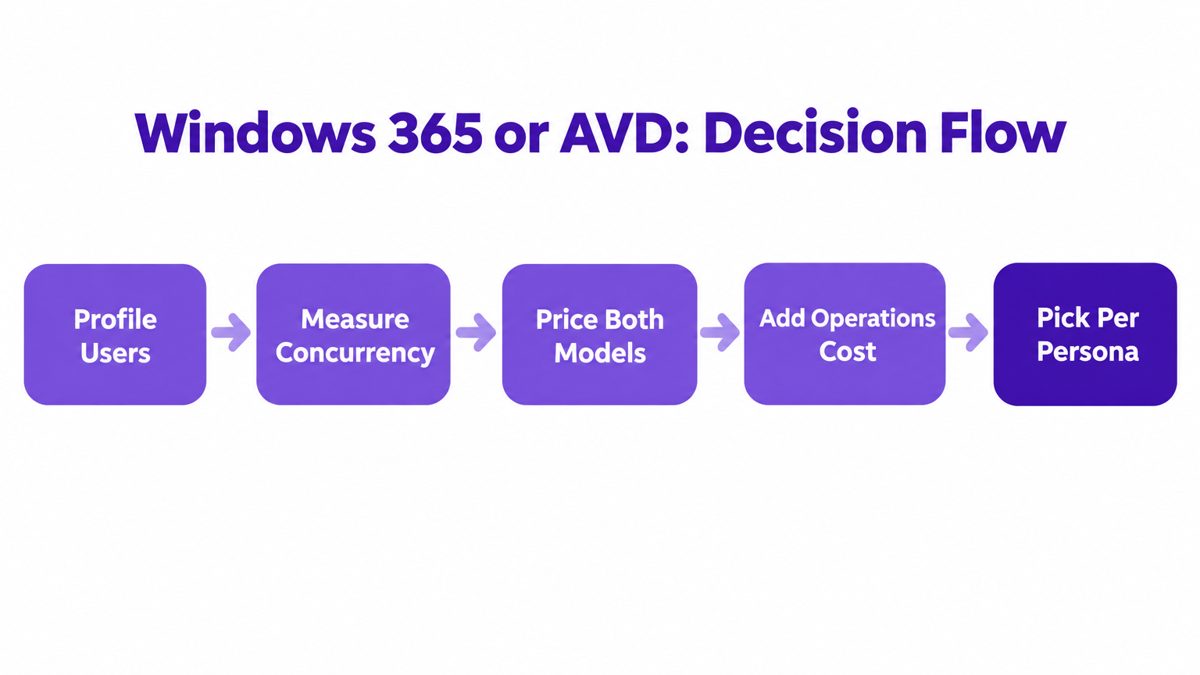
Group users into task workers, knowledge workers, and power users using real login and application data, not job titles.
Peak concurrent sessions, not headcount, decide how many AVD hosts you need. Shift patterns and time zones change density sharply.
Use your negotiated Windows 365 price and Azure rates, including reservations you would realistically commit to.
Put a monthly figure on AVD administration and confirm which access licenses you already own. This step is where most comparisons go wrong.
Most large estates end up hybrid: AVD multi-session for task and shift workers, Windows 365 for persistent or executive desktops. Track both in one SaaS management platform view so the mix stays visible.
CloudNuro maps Cloud PC subscriptions and Azure desktop compute to owners and cost centers.
Request a DemoWhichever model you choose, desktop cost should land on the cost center that consumes it. Windows 365 makes per-user allocation simple; AVD needs tagging of host pools and a rule for splitting shared hosts by session hours or users.
A consistent chargeback and showback strategy turns that allocation into accountability, so departments see the cost of the desktops they request. For broader infrastructure context, see CloudNuro's review of virtualization platforms for resource utilization.
Windows 365 is cheaper than AVD for small deployments and dedicated always-on desktops, because AVD carries fixed operations overhead. AVD becomes cheaper when many users share multi-session hosts and autoscaling keeps idle compute low.
Windows 365 Enterprise costs roughly $37 to $41 per user per month for a 2 vCPU / 8 GB Cloud PC, roughly $59 to $66 for 4 vCPU / 16 GB, and roughly $123 to $124 for 8 vCPU / 32 GB. Exact prices vary by region and agreement.
AVD becomes cheaper at the point where per-user savings cover its fixed operations cost. With $2,500 per month in operations and optimized multi-session hosts, that break-even is about 122 users; with poorer density it can rise to roughly 278.
AVD does not add a separate per-user Microsoft charge for the control plane, but each user needs a qualifying license such as Windows Enterprise E3/E5, Windows VDA, or an eligible Microsoft 365 plan. You still pay for the Azure resources the hosts consume.
Running Windows 365 and AVD together is common in large estates: multi-session AVD for task workers and Windows 365 for persistent desktops. The challenge is tracking both cost streams, which CloudNuro brings into one SaaS management and cloud cost view.
You reduce AVD costs by raising session density, autoscaling hosts outside business hours, rightsizing VMs from utilization data, and committing steady capacity to reservations. Reviewing profile storage and network egress closes the remaining gaps.
Windows 365 buys predictability at a fixed per-seat price; AVD buys efficiency that only appears when density, autoscaling, and operations are managed well.
Organizations that pick one model for everyone overpay on one side of the estate. The better model prices each persona on real usage data and gives every desktop cost an owner across SaaS, cloud, and AI.
Our free assessment compares your Windows 365 and AVD spend against actual utilization.
Get Free Savings AssessmentCloudNuro brings Windows 365 subscriptions, Microsoft 365 licensing, and Azure compute into one governed view, so IT and Finance compare desktop models on the same data. It rightsizes Azure VMs from 30 to 90 days of utilization, flags inactive licenses, and allocates cost to departments through IT asset management and IT operations workflows.
CloudNuro is a leader in Enterprise AI Adoption Management, providing enterprises with unmatched visibility, governance, and cost optimization. Recognized twice in a row by Gartner in the SaaS Management Platforms and named a Leader in the Info-Tech SoftwareReviews Data Quadrant, CloudNuro is trusted by global enterprises and government agencies to bring financial discipline to SaaS, cloud, and AI. Trusted by enterprises, CloudNuro provides centralized SaaS inventory, license optimization, and renewal management along with advanced cost allocation and chargeback, giving IT and Finance leaders the visibility, control, and cost-conscious culture needed to drive financial discipline.
Request a no cost, no obligation free assessment —just 15 minutes to savings!
Get StartedWindows 365 Enterprise charges a fixed monthly price per dedicated Cloud PC, while Azure Virtual Desktop (AVD) bills compute, storage, networking, and operations separately.
The deciding variable in any Windows 365 vs AVD cost comparison is session density: an eight-user multi-session AVD pool can run at roughly $9 to $18 per user per month before licensing and operations, against roughly $37 to $41 for a comparable 2 vCPU / 8 GB Windows 365 Cloud PC.
This post breaks down both pricing models, shows where each one wins by deployment size, and gives a break-even formula IT and Finance can run on their own numbers.
A dedicated 2 vCPU / 8 GB Windows 365 Enterprise Cloud PC lists at roughly $37 to $41 per user per month, and that price does not fall as you add users.
Azure Virtual Desktop has no single per-user SKU, so its cost can land far below or well above that figure depending on how many users share each host and how many hours hosts run.
That gap is why the Windows 365 vs AVD cost decision now sits with CIOs, CFOs, and FinOps leads, not only desktop engineers. A choice made per seat compounds across thousands of users and every renewal cycle.
Virtual desktop spend also rarely appears in one place. Cloud PC subscriptions sit in the Microsoft 365 tenant, AVD compute sits in the Azure bill, and the licenses that make AVD eligible sit in yet another agreement, which is why FinOps must cover SaaS, not just cloud infrastructure.
This guide compares both pricing models, shows the scale at which each becomes cheaper, and lays out a decision process you can apply per user persona.
Get a FinOps assessment that prices Windows 365 and AVD against your real usage data.
Get Free Savings AssessmentWindows 365 is a per-user SaaS subscription for a dedicated Cloud PC. AVD is an Azure service where you build, size, and pay for the session hosts yourself.
| Factor | Windows 365 Enterprise | Azure Virtual Desktop |
|---|---|---|
| Pricing model | Fixed monthly price per user per Cloud PC | Pay for Azure compute, storage, and networking consumed |
| Session model | Dedicated, one user per Cloud PC | Single-session or Windows 11 Enterprise multi-session |
| Who runs infrastructure | Microsoft operates hosting and control plane | Your team or a partner sizes, images, and scales hosts |
| Cost predictability | High: same bill every month | Variable: depends on uptime, density, and autoscaling |
| Commitment discounts | Not applicable to the Cloud PC price | Reservations and savings plans on steady compute |
| Fits best | Persistent desktops, smaller teams, limited Azure skills | Shared workloads, shift workers, large estates |
Windows 365 Enterprise pricing is set per configuration. Indicative 2026 monthly figures for common sizes are below; your agreement and region will change the exact amount.
| Configuration | Monthly per user | Annual per user |
|---|---|---|
| 2 vCPU / 8 GB / 128 GB | ~$36.90 to $41 | ~$443 to $492 |
| 4 vCPU / 16 GB / 128 to 256 GB | ~$59.40 to $66 | ~$713 to $792 |
| 8 vCPU / 32 GB / 512 GB | ~$123 to $124 | ~$1,476 to $1,488 |
The subscription covers the Cloud PC compute and storage. Confirm whether your quote assumes Windows Enterprise, Intune, and Entra ID licensing you already hold through Microsoft 365, because that changes the true per-user cost.
The structural weakness is idle time: a Cloud PC used four hours a day costs the same as one used ten. Unassigned or rarely used Cloud PCs behave like any other shelfware, which is why license management software should track them alongside Microsoft 365 seats.
AVD cost is the sum of five components, and each one is a lever you control.
Session host VM runtime is usually the largest line. VM family, region, hours running, and whether hosts deallocate when idle decide most of the bill.
OS disks plus FSLogix profile storage on Azure Files or Azure NetApp Files. In one 2026 model, profile storage added roughly $4 to $6 per user per month in an eight-user pool.
Egress, private connectivity, NAT gateways, and firewalls add cost that teams often leave out of the first estimate.
Image management, monitoring, autoscaling automation, security tooling, and staff or partner time. This is a fixed overhead, and it is the reason AVD often loses at small scale.
The AVD control plane has no separate per-user Microsoft charge, but each user needs a qualifying license such as Windows Enterprise E3/E5, Windows VDA, Microsoft 365 E3/E5, or Business Premium. Check eligibility against your exact agreement.
Rightsizing those session hosts is classic cloud FinOps work. CloudNuro analyzes Azure VM CPU and memory utilization over 30 to 90 days to recommend right-sized instances, part of its FinOps services and cloud optimization capability.
Session density is the single biggest driver. Indicative 2026 AVD infrastructure estimates, before access licensing and operations, look like this:
| Workload | AVD infrastructure per user/month | Assumption | Windows 365 comparison |
|---|---|---|---|
| Light task worker | ~$9 to $11 | Multi-session, about eight users per host, business-hours autoscaling | AVD clearly cheaper |
| Standard knowledge worker | ~$36 to $40 | Multi-session, about four users per host, longer availability | Near parity with a ~$37 to $41 Cloud PC |
| Dedicated power user | ~$170 to $180 | Single-session VM, always on | Windows 365 often simpler and competitive |
Typical multi-session density runs six to 20 users per VM depending on workload. Where utilization is good, higher-density pools can cost roughly 30% to 50% less than comparable Windows 365 Enterprise desktops.
For steady-state pools, reservations or savings plans can cut compute cost by roughly 30% to 60% on one- or three-year commitments. They make less sense when schedules vary, autoscaling deallocates hosts often, or VM families may change.
AVD becomes cheaper than Windows 365 once the per-user savings across all users exceed AVD's fixed operations cost. Written as a formula:
Users × (Windows 365 price − AVD cost per user) > AVD fixed operations cost per month
Worked example: Windows 365 at $41 per user, optimized AVD infrastructure at $18 per user plus $2.50 per user in licensing allocation, and $2,500 per month in AVD operations. The break-even is 2,500 ÷ (41 − 18 − 2.50), or about 122 users.
If density or uptime is worse and AVD costs $35 per user, the break-even rises to roughly 278 users. These are scenario calculations on your inputs, not Microsoft thresholds.
| Deployment size | Typical outcome |
|---|---|
| Under ~50 users | Windows 365 commonly wins on total cost because AVD operations overhead dominates |
| ~50 to 500 users | Depends on session density, hours of operation, licenses already owned, and operations cost |
| 500+ users | AVD more likely to deliver substantial savings for multi-session users; Windows 365 stays competitive for dedicated, high-intensity users |
Group users into task workers, knowledge workers, and power users using real login and application data, not job titles.
Peak concurrent sessions, not headcount, decide how many AVD hosts you need. Shift patterns and time zones change density sharply.
Use your negotiated Windows 365 price and Azure rates, including reservations you would realistically commit to.
Put a monthly figure on AVD administration and confirm which access licenses you already own. This step is where most comparisons go wrong.
Most large estates end up hybrid: AVD multi-session for task and shift workers, Windows 365 for persistent or executive desktops. Track both in one SaaS management platform view so the mix stays visible.
CloudNuro maps Cloud PC subscriptions and Azure desktop compute to owners and cost centers.
Request a DemoWhichever model you choose, desktop cost should land on the cost center that consumes it. Windows 365 makes per-user allocation simple; AVD needs tagging of host pools and a rule for splitting shared hosts by session hours or users.
A consistent chargeback and showback strategy turns that allocation into accountability, so departments see the cost of the desktops they request. For broader infrastructure context, see CloudNuro's review of virtualization platforms for resource utilization.
Windows 365 is cheaper than AVD for small deployments and dedicated always-on desktops, because AVD carries fixed operations overhead. AVD becomes cheaper when many users share multi-session hosts and autoscaling keeps idle compute low.
Windows 365 Enterprise costs roughly $37 to $41 per user per month for a 2 vCPU / 8 GB Cloud PC, roughly $59 to $66 for 4 vCPU / 16 GB, and roughly $123 to $124 for 8 vCPU / 32 GB. Exact prices vary by region and agreement.
AVD becomes cheaper at the point where per-user savings cover its fixed operations cost. With $2,500 per month in operations and optimized multi-session hosts, that break-even is about 122 users; with poorer density it can rise to roughly 278.
AVD does not add a separate per-user Microsoft charge for the control plane, but each user needs a qualifying license such as Windows Enterprise E3/E5, Windows VDA, or an eligible Microsoft 365 plan. You still pay for the Azure resources the hosts consume.
Running Windows 365 and AVD together is common in large estates: multi-session AVD for task workers and Windows 365 for persistent desktops. The challenge is tracking both cost streams, which CloudNuro brings into one SaaS management and cloud cost view.
You reduce AVD costs by raising session density, autoscaling hosts outside business hours, rightsizing VMs from utilization data, and committing steady capacity to reservations. Reviewing profile storage and network egress closes the remaining gaps.
Windows 365 buys predictability at a fixed per-seat price; AVD buys efficiency that only appears when density, autoscaling, and operations are managed well.
Organizations that pick one model for everyone overpay on one side of the estate. The better model prices each persona on real usage data and gives every desktop cost an owner across SaaS, cloud, and AI.
Our free assessment compares your Windows 365 and AVD spend against actual utilization.
Get Free Savings AssessmentCloudNuro brings Windows 365 subscriptions, Microsoft 365 licensing, and Azure compute into one governed view, so IT and Finance compare desktop models on the same data. It rightsizes Azure VMs from 30 to 90 days of utilization, flags inactive licenses, and allocates cost to departments through IT asset management and IT operations workflows.
CloudNuro is a leader in Enterprise AI Adoption Management, providing enterprises with unmatched visibility, governance, and cost optimization. Recognized twice in a row by Gartner in the SaaS Management Platforms and named a Leader in the Info-Tech SoftwareReviews Data Quadrant, CloudNuro is trusted by global enterprises and government agencies to bring financial discipline to SaaS, cloud, and AI. Trusted by enterprises, CloudNuro provides centralized SaaS inventory, license optimization, and renewal management along with advanced cost allocation and chargeback, giving IT and Finance leaders the visibility, control, and cost-conscious culture needed to drive financial discipline.
Request a no cost, no obligation free assessment - just 15 minutes to savings!
Get StartedWe're offering complimentary ServiceNow license assessments to only 25 enterprises this quarter who want to unlock immediate savings without disrupting operations.
Get Free AssessmentGet Started




CloudNuro Corp
1755 Park St. Suite 207
Naperville, IL 60563
Phone : +1-630-277-9470
Email: info@cloudnuro.com







Recognized Leader in SaaS Management Platforms by Info-Tech SoftwareReviews