

Sign Up
Thank you for Submitting!

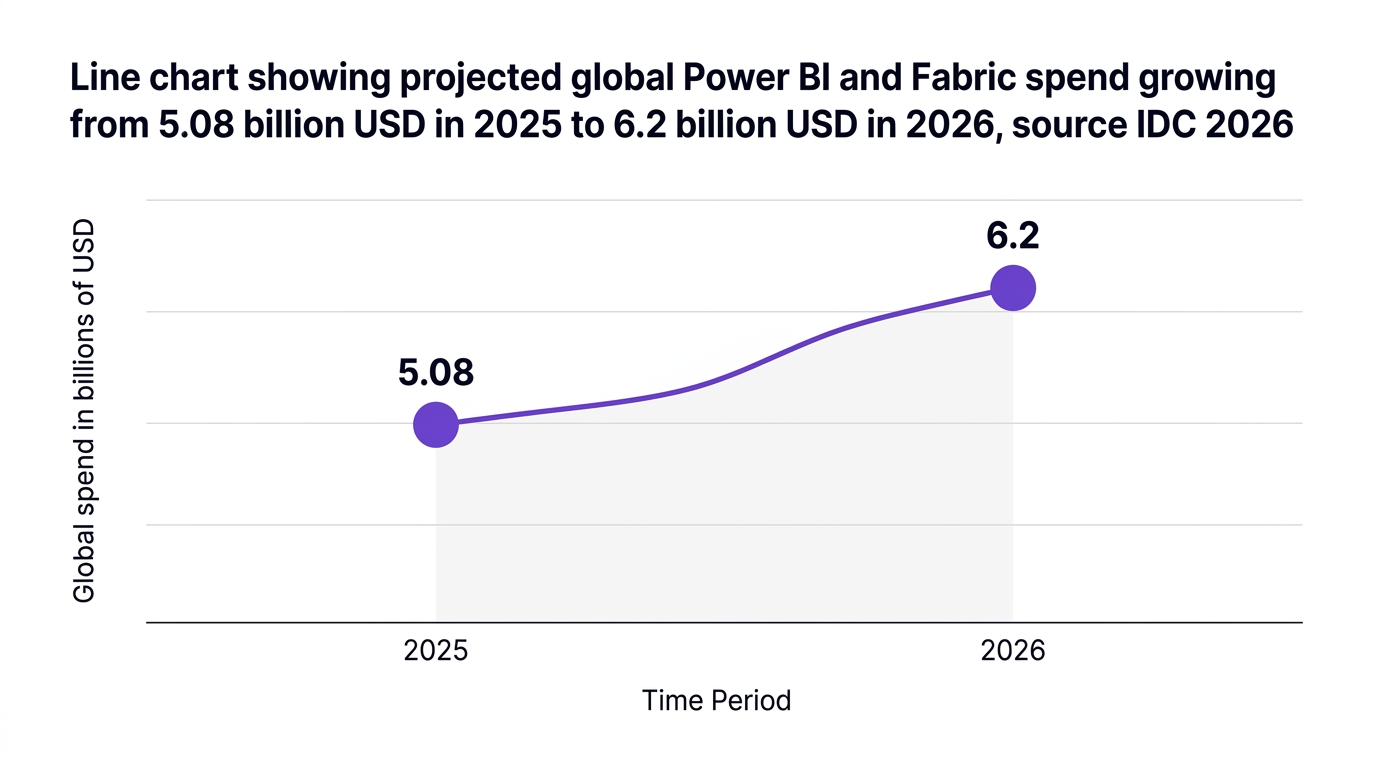
The 30-Day Fabric & Power BI Cost Reduction Plan: Audit, Right-Size, Govern Escalating BI spend has quietly become one of the biggest line items in IT budgets, and Power BI and Microsoft Fabric are at the center of it. IDC projects global Power BI and Fabric spend to surpass 6.2 billion dollars in 2026, up 22 percent from 2025 (IDC 2026), which means ungoverned environments will get very expensive very quickly. The good news: focused power bi cost optimization work can deliver meaningful savings in as little as 30 days. Gartner reports that enterprises can reduce Power BI licensing costs by an average of 29 percent in the first month when they combine targeted audit and rightsizing initiatives (Gartner 2026). This guide lays out a practical 30-day plan built around three pillars: audit, right-size, and govern. It is designed for CIOs, IT Directors, FinOps leaders, and SaaS managers who need to control Power BI and Fabric spend fast, without slowing down the business.
Before you start cutting, it helps to understand why BI costs climb faster than value. Forrester estimates that SaaS waste across BI platforms will reach 3.1 billion dollars in 2026, largely due to under-utilized licenses and overprovisioned capacities (Forrester 2026). In parallel, InfoTech finds that 59 percent of organizations blame lack of governance as the primary driver of escalating Power BI spend (InfoTech 2026). Common cost drivers include:
License sprawl and poor license hygiene: Over time, users accumulate multiple or higher-tier licenses they do not need.
Overprovisioned Premium and Fabric capacity: Capacity is sized for peak scenarios but never revisited, so idle capacity burns budget.
Shadow BI and unmanaged workspaces: Ad hoc workspaces appear outside IT oversight, each adding incremental refresh and storage costs.
Inefficient data models and refresh schedules: Large models and frequent full refreshes inflate compute spend.
Think of an enterprise Power BI deployment like an office building: if nobody tracks who has keys, which rooms are used, or when the lights turn off, the utility bill will always be higher than it should be.
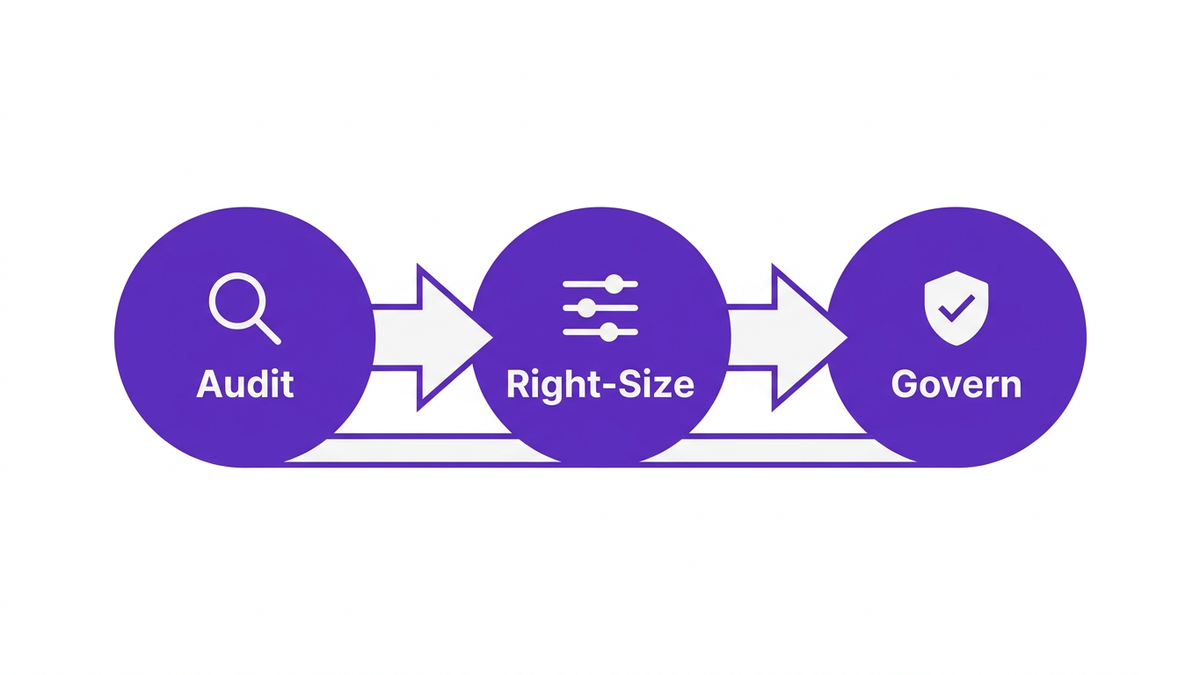
To keep this actionable, we will use a simple three-stage model:
Audit: Gain accurate, complete visibility into licenses, capacity, and usage.
Right-size: Convert findings into changes to licenses, capacity, and refresh behavior.
Govern: Put guardrails in place so savings persist and Power BI cost saving strategies become part of normal operations.
This section outlines the timeline, then the next sections drill into each stage.
Days 1 to 7: Baseline and discovery
- Assemble cross-functional stakeholders from IT, BI, and FinOps.
- Pull inventories of Power BI licenses, workspaces, datasets, and capacities.
- Identify quick-win targets such as obviously inactive users or dormant workspaces.
Days 8 to 20: Right-size licenses and capacity
- Execute a structured power bi license audit.
- Remove unused Power BI licenses or downgrade where appropriate.
- Right size Power BI Fabric capacity using real utilization metrics.
- Optimize refresh schedules and model design to reduce Fabric cost.
Days 21 to 30: Governance and automation
- Establish a governance model to control Power BI costs.
- Implement chargeback and showback for BI spend.
- Automate recurring license reviews and policy enforcement using enterprise SaaS management for Power BI.
The first week is all about clarity. Without a reliable baseline, any attempt to reduce Power BI costs will be guesswork.
Start by extracting a complete list of:
All Power BI license types assigned to users.
Power BI Premium and Fabric capacities, with SKUs and regions.
Power BI Embedded resources currently running.
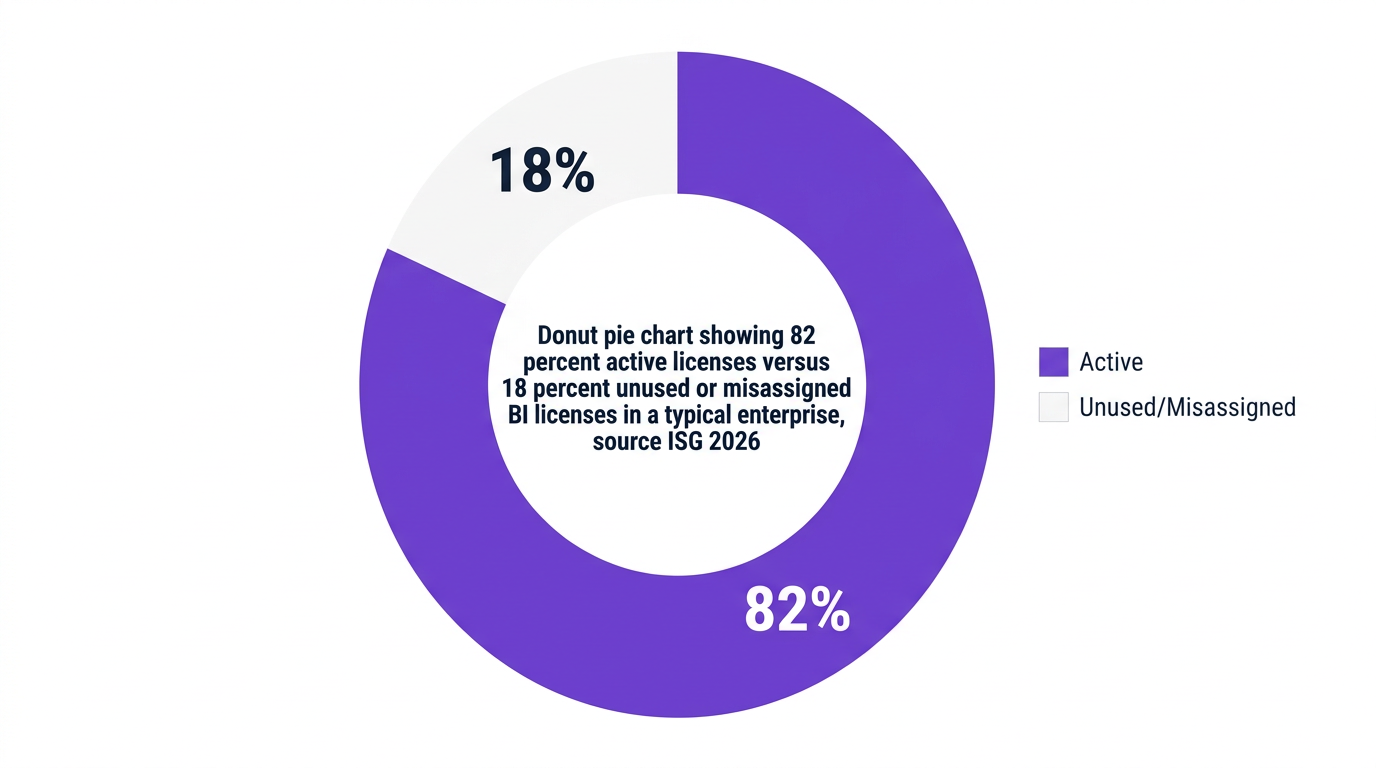
Be sure to distinguish between active employees, contractors, service accounts, and dormant identities. ISG reports the average enterprise deployment contains 18 percent unused or misassigned licenses, which translates directly into waste (ISG 2026).
This is the foundation for any power bi licensing optimization initiative.
Next, correlate license data with real usage. You want to answer:
Who has not signed in or viewed a dashboard in 60 to 90 days.
Which users have Pro or Premium licenses but only view shared reports.
Which workspaces have had no activity in the last 90 days.
Modern SaaS management platforms provide app engagement scores and user-level activity data that can reveal dormant licenses at scale. A conversational marketing study on BI usage notes that automated views of application engagement can surface 20 to 30 percent more savings opportunities than manual spreadsheet analysis.
For capacity, look at:
Average and peak CPU utilization per capacity.
Memory consumption and query wait times.
Refresh failures or throttling events.
Here, the Power BI capacity metrics app cost optimization data is essential. You are looking for capacities that rarely exceed, for example, 30 to 40 percent utilization during business hours. These are prime candidates to optimize Power BI Premium capacity costs by downsizing or consolidating.
By the end of week one, you should have a prioritized list of quick wins, such as:
Users with no activity in 90 days who hold Premium or Pro licenses.
Entire departments with high license counts but low dashboard usage.
Premium capacities that rarely cross 20 percent CPU utilization.
These will drive your first round of changes in week two, which is where the most visible cost reduction occurs.
The middle phase of the 30-day plan focuses on translating insight into savings. This is where you cut Power BI spend without compromising business outcomes.
Start with your power bi license audit results.
Remove unused Power BI licenses: Deprovision or reclaim licenses from inactive users, contractors who have left, and service accounts that no longer need premium features.
Downgrade where appropriate: If a user only consumes reports and never creates content, consider assigning them a lower-tier license or shifting them to app-based consumption.
Eliminate duplicates: In environments that mix Power BI with other analytics tools, clean up cases where users have overlapping high-tier licenses across platforms.
Gartner data indicates that focused license rationalization can reduce Power BI licensing costs by 29 percent in the first 30 days when combined with policy controls (Gartner 2026). This is often the fastest way to reduce Power BI costs.
Capacity is the second major lever. Sarah Linton, BI Optimization Lead at Gartner, notes that “Right-sizing Power BI capacity is the single highest ROI lever for enterprises, particularly when usage patterns fluctuate and growth outpaces governance.”
Use your week-one utilization data to:
Downsize underutilized capacities to lower SKUs where CPU and memory usage are consistently low.
Consolidate lightly used capacities, then monitor performance closely.
Create separate capacities for volatile workloads that can be scaled independently.
When you right size Power BI Fabric capacity, focus on business-critical workloads first. Protect performance for those, then aggressively optimize non-critical workloads.
A multinational bank profiled by Forrester reduced its Power BI Premium capacity costs by 31 percent in one month after deploying real-time capacity analytics and chargeback dashboards to reallocate underused resources (Forrester 2026).
For applications that use Embedded, treat this as a separate workstream:
Monitor API call volumes and refresh patterns for embedded reports.
Identify unused or low-traffic embedded workspaces that can be retired.
Evaluate scale-out settings and reserve capacity only where sustained usage justifies it.
Power BI embedded cost optimization often reveals hidden overspend driven by old proof-of-concept apps and pilots that were never retired.
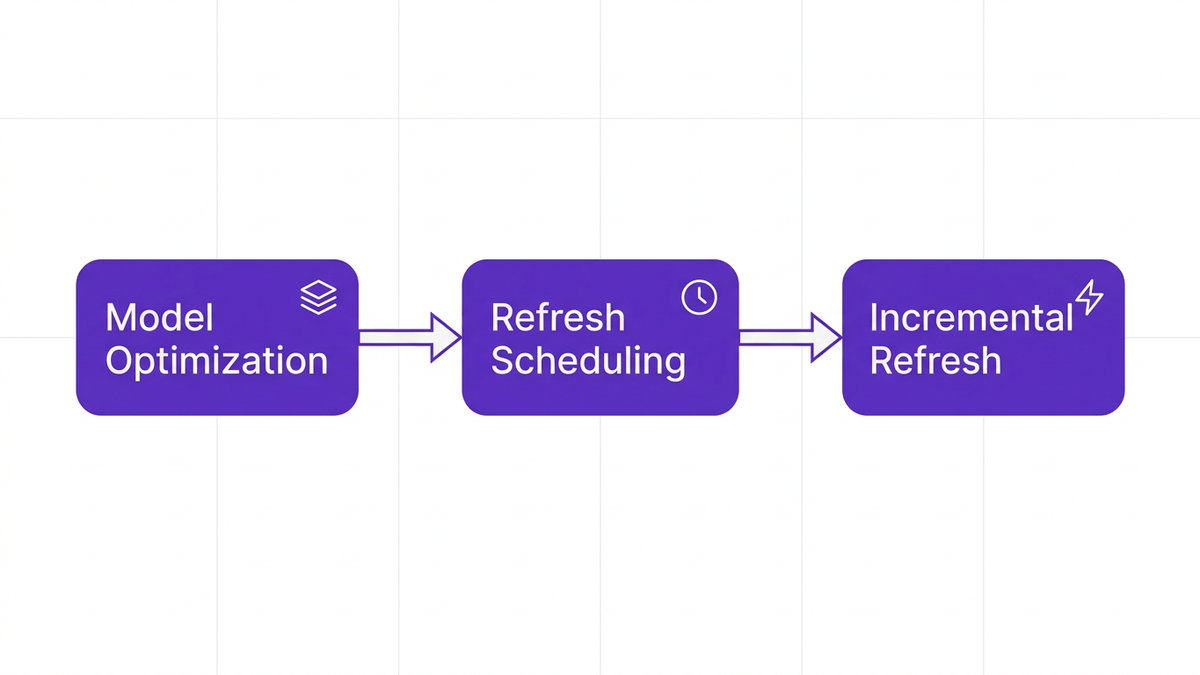
Refresh behavior is a silent cost driver. The more often you process large models, the more Fabric compute you consume.
To reduce Power BI refresh costs incremental refresh is essential:
Enable incremental refresh for large fact tables so only new or changed data is processed.
Stagger refresh schedules so heavy jobs do not collide during peak business hours.
Remove unnecessary hourly or overly frequent refreshes for reports that do not need real-time data.
FinOps Foundation research notes that incremental refresh and data model optimization are increasingly used to minimize Power BI refresh costs and optimize Fabric capacity usage (FinOps Foundation 2026).
The final phase makes savings durable. InfoTech’s research that 59 percent of organizations cite lack of governance as the main driver of Power BI cost growth is a warning that quick wins will evaporate if you stop at rightsizing.
A practical governance model to control Power BI costs should include:
Standard workspace types: Certified, departmental, and personal workspaces, each with clear purpose and owner.
Approval workflows for new Premium capacities or Embedded projects.
Data retention and archival policies so old datasets are not refreshed forever.
Treat governance like a traffic system. Rules and signals may feel restrictive at first, but they keep everyone moving efficiently without accidents.
To align behavior, connect usage to budgets:
Create chargeback Power BI models that allocate capacity and license costs to departments based on usage.
Provide showback dashboards to business leaders that highlight utilization, unused content, and cost per active user.
InfoTech notes that chargeback models and engagement-based license allocation are now recognized best practices for controlling Power BI expenditures in enterprises (InfoTech 2026).
Priya Nair, Head of IT Finance at ISG, summarizes the new standard: “The next generation of BI spend control requires continuous license hygiene, not just periodic audits, to stay ahead of sprawl and shadow IT.”
Automated workflows can:
Trigger license reviews when a user becomes inactive for a defined period.
Escalate access reviews for high-cost roles or Premium features.
Enforce policy-based downgrades or deprovisioning.
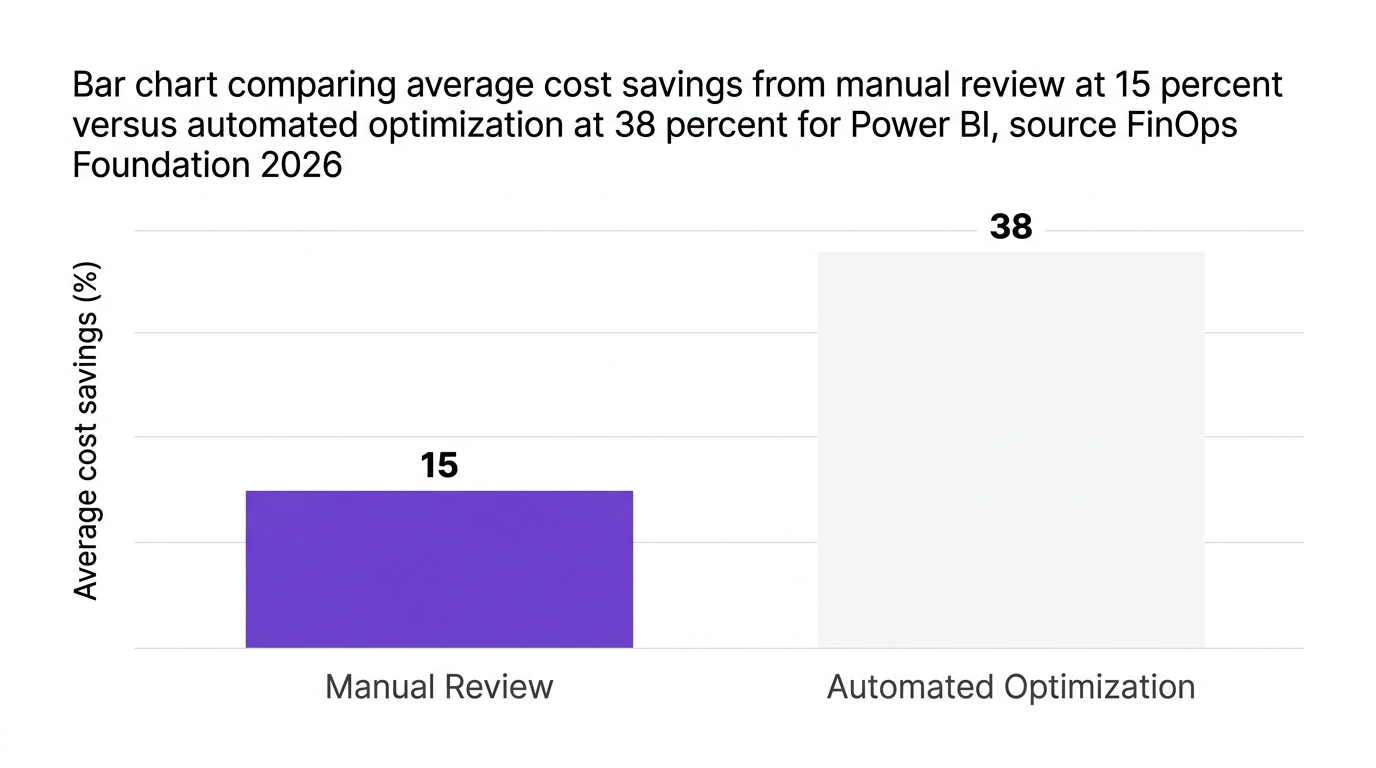
FinOps Foundation research shows automated license optimization yields 35 to 42 percent higher cost savings compared to manual reviews for Power BI in large enterprises (FinOps Foundation 2026). This is where enterprise SaaS management for Power BI becomes critical.
CloudNuro is designed for organizations that want to treat saas spend optimization for Microsoft Power BI as a continuous discipline instead of a once-a-year clean-up.
CloudNuro’s Microsoft 365 Custodian module performs automated power bi license audit and inventorying across Microsoft 365, including Power BI. The platform quickly surfaces:
Inactive users holding Pro or Premium licenses.
Misaligned license tiers based on actual usage patterns.
Orphaned or duplicate licenses created by manual processes.
CloudNuro internal analysis shows customers achieving an 18 percent reduction in Microsoft 365, including Power BI, costs after adopting unified SaaS management and automated rightsizing (CloudNuro internal analysis 2026).
For organizations focusing on microsoft 365 and power bi license optimization, this is an immediate path to remove unused Power BI licenses at scale.
CloudNuro’s Unified Cloud Custodian connects to capacity metrics and financial data to help teams:
Optimize Power BI Premium capacity costs by correlating CPU and memory utilization with business usage.
Right size Power BI Fabric capacity using predictive analytics to suggest optimal SKUs and consolidation strategies.
Surface underutilized or idle Embedded capacities for rationalization.
Financial dashboards support true BI TCO analysis, so leaders can explore power bi tco vs other bi tools using consistent cost and usage data.
CloudNuro’s AI Custodian supports ongoing BI governance with:
Automated user access reviews for BI roles and workspaces.
Policy-driven license downgrades or revocations when engagement falls below defined thresholds.
Workflow automation that embeds BI cost controls into joiner, mover, leaver processes.
This governance-first model aligns tightly with modern FinOps practices and IT asset management Power BI strategies. It also supports chargeback and cost allocation by department, which is essential for durable fabric cost reduction.
To see how CloudNuro approaches broader SaaS governance and optimization, explore the core SaaS management capabilities and the overview of enterprise-wide license optimization. For organizations that want expert guidance, CloudNuro also provides specialized FinOps services for cloud and SaaS.
The fastest levers are usually:
Removing unused and dormant licenses.
Downgrading over-licensed users based on real usage.
Downsizing or consolidating underutilized Premium and Fabric capacities.
Reducing unnecessary refresh frequency and adopting incremental refresh.
Gartner data suggests that a focused 30-day effort combining audit and rightsizing can drive around 29 percent savings on licensing alone (Gartner 2026).
An effective power bi license audit should:
Extract a complete license inventory, including license types and owners.
Correlate each license with user activity over the last 60 to 90 days.
Flag inactive users, low-engagement users with high-tier licenses, and duplicates.
Implement automated workflows to reclaim, downgrade, or reassign licenses.
Using an enterprise SaaS management platform can significantly reduce manual effort and increase coverage.
For large enterprises, cost-effective capacity settings usually feature:
Right-sized Premium and Fabric SKUs based on observed peaks, not assumptions.
Dedicated capacities for critical workloads that need strict performance guarantees.
Separate, lower-cost capacities for development, testing, and ad hoc experimentation.
Optimized refresh schedules and incremental refresh for large models.
Monitoring utilization trends for several weeks after changes is critical to ensure you do not inadvertently impact essential workloads.
Governance tactics influence behavior, which is where structural savings come from. Examples include:
Workspace standards with named owners who are accountable for cost and hygiene.
Approval workflows for Premium capacity requests that include projected cost and ROI.
Automatic archival and retention policies that stop unnecessary refresh and storage.
Chargeback and showback dashboards that surface cost per department and per active user.
Research from InfoTech indicates that organizations with mature governance models see significantly slower BI cost growth compared to peers, even as usage expands.
Automation improves frequency, accuracy, and scope. FinOps Foundation data shows automated license optimization yields 35 to 42 percent higher cost savings than manual reviews for large Power BI deployments (FinOps Foundation 2026).
Automated SaaS management platforms can:
Scan for unused licenses daily instead of quarterly.
Apply policy-based actions at scale without relying on human follow-through.
Generate continuous insights for IT, Finance, and business leaders.
This is especially important as environments grow and manual spreadsheet-based reviews become impractical.
Power BI and Fabric are strategic platforms, but without structured control they quietly erode IT and Finance budgets. By following a disciplined 30-day power bi cost optimization plan built on audit, right-sizing, and governance, enterprises can:
Reduce licensing and capacity waste by double-digit percentages.
Improve transparency through chargeback and engagement-based allocation.
Establish continuous controls that keep power bi cost saving strategies alive beyond a one-time clean-up.
CloudNuro helps organizations operationalize this plan with automated discovery, rightsizing, and governance tailored to Microsoft 365 and Power BI. If you are ready to build a power bi implementation roadmap with cost control baked in from the start, now is the time to act.
Explore how CloudNuro can help you cut BI overspend and strengthen SaaS governance in the next 30 days.
CloudNuro is a leader in Enterprise SaaS Management Platforms, providing enterprises with unmatched visibility, governance, and cost optimization. Recognized twice in a row in the SaaS Management Platforms category and named a Leader in the SoftwareReviews Data Quadrant, CloudNuro is trusted by global enterprises and government agencies to bring financial discipline to SaaS, cloud, and AI.
Trusted by enterprises such as Konica Minolta and Federal Signal, CloudNuro provides centralized SaaS inventory, license optimization, and renewal management along with advanced cost allocation and chargeback, giving IT and Finance leaders the visibility, control, and cost-conscious culture needed to drive financial discipline.
Request a no cost, no obligation free assessment —just 15 minutes to savings!
Get StartedThe 30-Day Fabric & Power BI Cost Reduction Plan: Audit, Right-Size, Govern Escalating BI spend has quietly become one of the biggest line items in IT budgets, and Power BI and Microsoft Fabric are at the center of it. IDC projects global Power BI and Fabric spend to surpass 6.2 billion dollars in 2026, up 22 percent from 2025 (IDC 2026), which means ungoverned environments will get very expensive very quickly. The good news: focused power bi cost optimization work can deliver meaningful savings in as little as 30 days. Gartner reports that enterprises can reduce Power BI licensing costs by an average of 29 percent in the first month when they combine targeted audit and rightsizing initiatives (Gartner 2026). This guide lays out a practical 30-day plan built around three pillars: audit, right-size, and govern. It is designed for CIOs, IT Directors, FinOps leaders, and SaaS managers who need to control Power BI and Fabric spend fast, without slowing down the business.
Before you start cutting, it helps to understand why BI costs climb faster than value. Forrester estimates that SaaS waste across BI platforms will reach 3.1 billion dollars in 2026, largely due to under-utilized licenses and overprovisioned capacities (Forrester 2026). In parallel, InfoTech finds that 59 percent of organizations blame lack of governance as the primary driver of escalating Power BI spend (InfoTech 2026). Common cost drivers include:
License sprawl and poor license hygiene: Over time, users accumulate multiple or higher-tier licenses they do not need.
Overprovisioned Premium and Fabric capacity: Capacity is sized for peak scenarios but never revisited, so idle capacity burns budget.
Shadow BI and unmanaged workspaces: Ad hoc workspaces appear outside IT oversight, each adding incremental refresh and storage costs.
Inefficient data models and refresh schedules: Large models and frequent full refreshes inflate compute spend.
Think of an enterprise Power BI deployment like an office building: if nobody tracks who has keys, which rooms are used, or when the lights turn off, the utility bill will always be higher than it should be.
To keep this actionable, we will use a simple three-stage model:
Audit: Gain accurate, complete visibility into licenses, capacity, and usage.
Right-size: Convert findings into changes to licenses, capacity, and refresh behavior.
Govern: Put guardrails in place so savings persist and Power BI cost saving strategies become part of normal operations.
This section outlines the timeline, then the next sections drill into each stage.
Days 1 to 7: Baseline and discovery
- Assemble cross-functional stakeholders from IT, BI, and FinOps.
- Pull inventories of Power BI licenses, workspaces, datasets, and capacities.
- Identify quick-win targets such as obviously inactive users or dormant workspaces.
Days 8 to 20: Right-size licenses and capacity
- Execute a structured power bi license audit.
- Remove unused Power BI licenses or downgrade where appropriate.
- Right size Power BI Fabric capacity using real utilization metrics.
- Optimize refresh schedules and model design to reduce Fabric cost.
Days 21 to 30: Governance and automation
- Establish a governance model to control Power BI costs.
- Implement chargeback and showback for BI spend.
- Automate recurring license reviews and policy enforcement using enterprise SaaS management for Power BI.
The first week is all about clarity. Without a reliable baseline, any attempt to reduce Power BI costs will be guesswork.
Start by extracting a complete list of:
All Power BI license types assigned to users.
Power BI Premium and Fabric capacities, with SKUs and regions.
Power BI Embedded resources currently running.
Be sure to distinguish between active employees, contractors, service accounts, and dormant identities. ISG reports the average enterprise deployment contains 18 percent unused or misassigned licenses, which translates directly into waste (ISG 2026).
This is the foundation for any power bi licensing optimization initiative.
Next, correlate license data with real usage. You want to answer:
Who has not signed in or viewed a dashboard in 60 to 90 days.
Which users have Pro or Premium licenses but only view shared reports.
Which workspaces have had no activity in the last 90 days.
Modern SaaS management platforms provide app engagement scores and user-level activity data that can reveal dormant licenses at scale. A conversational marketing study on BI usage notes that automated views of application engagement can surface 20 to 30 percent more savings opportunities than manual spreadsheet analysis.
For capacity, look at:
Average and peak CPU utilization per capacity.
Memory consumption and query wait times.
Refresh failures or throttling events.
Here, the Power BI capacity metrics app cost optimization data is essential. You are looking for capacities that rarely exceed, for example, 30 to 40 percent utilization during business hours. These are prime candidates to optimize Power BI Premium capacity costs by downsizing or consolidating.
By the end of week one, you should have a prioritized list of quick wins, such as:
Users with no activity in 90 days who hold Premium or Pro licenses.
Entire departments with high license counts but low dashboard usage.
Premium capacities that rarely cross 20 percent CPU utilization.
These will drive your first round of changes in week two, which is where the most visible cost reduction occurs.
The middle phase of the 30-day plan focuses on translating insight into savings. This is where you cut Power BI spend without compromising business outcomes.
Start with your power bi license audit results.
Remove unused Power BI licenses: Deprovision or reclaim licenses from inactive users, contractors who have left, and service accounts that no longer need premium features.
Downgrade where appropriate: If a user only consumes reports and never creates content, consider assigning them a lower-tier license or shifting them to app-based consumption.
Eliminate duplicates: In environments that mix Power BI with other analytics tools, clean up cases where users have overlapping high-tier licenses across platforms.
Gartner data indicates that focused license rationalization can reduce Power BI licensing costs by 29 percent in the first 30 days when combined with policy controls (Gartner 2026). This is often the fastest way to reduce Power BI costs.
Capacity is the second major lever. Sarah Linton, BI Optimization Lead at Gartner, notes that “Right-sizing Power BI capacity is the single highest ROI lever for enterprises, particularly when usage patterns fluctuate and growth outpaces governance.”
Use your week-one utilization data to:
Downsize underutilized capacities to lower SKUs where CPU and memory usage are consistently low.
Consolidate lightly used capacities, then monitor performance closely.
Create separate capacities for volatile workloads that can be scaled independently.
When you right size Power BI Fabric capacity, focus on business-critical workloads first. Protect performance for those, then aggressively optimize non-critical workloads.
A multinational bank profiled by Forrester reduced its Power BI Premium capacity costs by 31 percent in one month after deploying real-time capacity analytics and chargeback dashboards to reallocate underused resources (Forrester 2026).
For applications that use Embedded, treat this as a separate workstream:
Monitor API call volumes and refresh patterns for embedded reports.
Identify unused or low-traffic embedded workspaces that can be retired.
Evaluate scale-out settings and reserve capacity only where sustained usage justifies it.
Power BI embedded cost optimization often reveals hidden overspend driven by old proof-of-concept apps and pilots that were never retired.
Refresh behavior is a silent cost driver. The more often you process large models, the more Fabric compute you consume.
To reduce Power BI refresh costs incremental refresh is essential:
Enable incremental refresh for large fact tables so only new or changed data is processed.
Stagger refresh schedules so heavy jobs do not collide during peak business hours.
Remove unnecessary hourly or overly frequent refreshes for reports that do not need real-time data.
FinOps Foundation research notes that incremental refresh and data model optimization are increasingly used to minimize Power BI refresh costs and optimize Fabric capacity usage (FinOps Foundation 2026).
The final phase makes savings durable. InfoTech’s research that 59 percent of organizations cite lack of governance as the main driver of Power BI cost growth is a warning that quick wins will evaporate if you stop at rightsizing.
A practical governance model to control Power BI costs should include:
Standard workspace types: Certified, departmental, and personal workspaces, each with clear purpose and owner.
Approval workflows for new Premium capacities or Embedded projects.
Data retention and archival policies so old datasets are not refreshed forever.
Treat governance like a traffic system. Rules and signals may feel restrictive at first, but they keep everyone moving efficiently without accidents.
To align behavior, connect usage to budgets:
Create chargeback Power BI models that allocate capacity and license costs to departments based on usage.
Provide showback dashboards to business leaders that highlight utilization, unused content, and cost per active user.
InfoTech notes that chargeback models and engagement-based license allocation are now recognized best practices for controlling Power BI expenditures in enterprises (InfoTech 2026).
Priya Nair, Head of IT Finance at ISG, summarizes the new standard: “The next generation of BI spend control requires continuous license hygiene, not just periodic audits, to stay ahead of sprawl and shadow IT.”
Automated workflows can:
Trigger license reviews when a user becomes inactive for a defined period.
Escalate access reviews for high-cost roles or Premium features.
Enforce policy-based downgrades or deprovisioning.
FinOps Foundation research shows automated license optimization yields 35 to 42 percent higher cost savings compared to manual reviews for Power BI in large enterprises (FinOps Foundation 2026). This is where enterprise SaaS management for Power BI becomes critical.
CloudNuro is designed for organizations that want to treat saas spend optimization for Microsoft Power BI as a continuous discipline instead of a once-a-year clean-up.
CloudNuro’s Microsoft 365 Custodian module performs automated power bi license audit and inventorying across Microsoft 365, including Power BI. The platform quickly surfaces:
Inactive users holding Pro or Premium licenses.
Misaligned license tiers based on actual usage patterns.
Orphaned or duplicate licenses created by manual processes.
CloudNuro internal analysis shows customers achieving an 18 percent reduction in Microsoft 365, including Power BI, costs after adopting unified SaaS management and automated rightsizing (CloudNuro internal analysis 2026).
For organizations focusing on microsoft 365 and power bi license optimization, this is an immediate path to remove unused Power BI licenses at scale.
CloudNuro’s Unified Cloud Custodian connects to capacity metrics and financial data to help teams:
Optimize Power BI Premium capacity costs by correlating CPU and memory utilization with business usage.
Right size Power BI Fabric capacity using predictive analytics to suggest optimal SKUs and consolidation strategies.
Surface underutilized or idle Embedded capacities for rationalization.
Financial dashboards support true BI TCO analysis, so leaders can explore power bi tco vs other bi tools using consistent cost and usage data.
CloudNuro’s AI Custodian supports ongoing BI governance with:
Automated user access reviews for BI roles and workspaces.
Policy-driven license downgrades or revocations when engagement falls below defined thresholds.
Workflow automation that embeds BI cost controls into joiner, mover, leaver processes.
This governance-first model aligns tightly with modern FinOps practices and IT asset management Power BI strategies. It also supports chargeback and cost allocation by department, which is essential for durable fabric cost reduction.
To see how CloudNuro approaches broader SaaS governance and optimization, explore the core SaaS management capabilities and the overview of enterprise-wide license optimization. For organizations that want expert guidance, CloudNuro also provides specialized FinOps services for cloud and SaaS.
The fastest levers are usually:
Removing unused and dormant licenses.
Downgrading over-licensed users based on real usage.
Downsizing or consolidating underutilized Premium and Fabric capacities.
Reducing unnecessary refresh frequency and adopting incremental refresh.
Gartner data suggests that a focused 30-day effort combining audit and rightsizing can drive around 29 percent savings on licensing alone (Gartner 2026).
An effective power bi license audit should:
Extract a complete license inventory, including license types and owners.
Correlate each license with user activity over the last 60 to 90 days.
Flag inactive users, low-engagement users with high-tier licenses, and duplicates.
Implement automated workflows to reclaim, downgrade, or reassign licenses.
Using an enterprise SaaS management platform can significantly reduce manual effort and increase coverage.
For large enterprises, cost-effective capacity settings usually feature:
Right-sized Premium and Fabric SKUs based on observed peaks, not assumptions.
Dedicated capacities for critical workloads that need strict performance guarantees.
Separate, lower-cost capacities for development, testing, and ad hoc experimentation.
Optimized refresh schedules and incremental refresh for large models.
Monitoring utilization trends for several weeks after changes is critical to ensure you do not inadvertently impact essential workloads.
Governance tactics influence behavior, which is where structural savings come from. Examples include:
Workspace standards with named owners who are accountable for cost and hygiene.
Approval workflows for Premium capacity requests that include projected cost and ROI.
Automatic archival and retention policies that stop unnecessary refresh and storage.
Chargeback and showback dashboards that surface cost per department and per active user.
Research from InfoTech indicates that organizations with mature governance models see significantly slower BI cost growth compared to peers, even as usage expands.
Automation improves frequency, accuracy, and scope. FinOps Foundation data shows automated license optimization yields 35 to 42 percent higher cost savings than manual reviews for large Power BI deployments (FinOps Foundation 2026).
Automated SaaS management platforms can:
Scan for unused licenses daily instead of quarterly.
Apply policy-based actions at scale without relying on human follow-through.
Generate continuous insights for IT, Finance, and business leaders.
This is especially important as environments grow and manual spreadsheet-based reviews become impractical.
Power BI and Fabric are strategic platforms, but without structured control they quietly erode IT and Finance budgets. By following a disciplined 30-day power bi cost optimization plan built on audit, right-sizing, and governance, enterprises can:
Reduce licensing and capacity waste by double-digit percentages.
Improve transparency through chargeback and engagement-based allocation.
Establish continuous controls that keep power bi cost saving strategies alive beyond a one-time clean-up.
CloudNuro helps organizations operationalize this plan with automated discovery, rightsizing, and governance tailored to Microsoft 365 and Power BI. If you are ready to build a power bi implementation roadmap with cost control baked in from the start, now is the time to act.
Explore how CloudNuro can help you cut BI overspend and strengthen SaaS governance in the next 30 days.
CloudNuro is a leader in Enterprise SaaS Management Platforms, providing enterprises with unmatched visibility, governance, and cost optimization. Recognized twice in a row in the SaaS Management Platforms category and named a Leader in the SoftwareReviews Data Quadrant, CloudNuro is trusted by global enterprises and government agencies to bring financial discipline to SaaS, cloud, and AI.
Trusted by enterprises such as Konica Minolta and Federal Signal, CloudNuro provides centralized SaaS inventory, license optimization, and renewal management along with advanced cost allocation and chargeback, giving IT and Finance leaders the visibility, control, and cost-conscious culture needed to drive financial discipline.
Request a no cost, no obligation free assessment - just 15 minutes to savings!
Get StartedWe're offering complimentary ServiceNow license assessments to only 25 enterprises this quarter who want to unlock immediate savings without disrupting operations.
Get Free AssessmentGet Started




CloudNuro Corp
1755 Park St. Suite 207
Naperville, IL 60563
Phone : +1-630-277-9470
Email: info@cloudnuro.com





.webp)

Recognized Leader in SaaS Management Platforms by Info-Tech SoftwareReviews


.svg)