

Sign Up
Thank you for Submitting!

AVD chargeback and showback assign Azure Virtual Desktop costs to the departments and cost centers that consume them.
The hard part is pooled host pools: Azure bills one shared session host, while many users from many departments work on it.
This guide gives IT Finance a working model: tags for ownership, session minutes for consumption, clear rules for shared services, and a showback-first rollout.
Azure Virtual Desktop has shifted desktop spend from a fixed hardware budget into a monthly, consumption-based Azure bill that few departments ever see.
Without AVD chargeback and showback, that bill lands on central IT, and the teams driving session growth have no reason to question host sizes, idle capacity, or always-on personal desktops.
CIOs, CFOs, and FinOps leads all feel it differently: IT defends a rising line item, Finance cannot forecast it, and business units dispute any number that looks like an estimate.
The answer is a defensible cost allocation model, built on the same principles as any chargeback and showback strategy but adapted to how AVD actually bills.
This guide explains why native tooling falls short, lays out the allocation model by host pool type, and gives a phased plan for moving from showback to chargeback.
See how CloudNuro allocates virtual desktop spend to the departments that consume it.
Request a DemoAVD showback reports each department's share of Azure Virtual Desktop cost without moving budget. AVD chargeback uses the same allocation to debit that department's cost center in the general ledger. Both depend on one model that ties Azure charges to the people and teams who used the desktops.
| Dimension | Showback | Chargeback |
|---|---|---|
| What happens | Departments see their AVD cost in a report | Departments are billed internally for their AVD cost |
| Owner | IT and FinOps | Finance, with IT supplying the data |
| Data accuracy needed | Directionally correct | Auditable and agreed in advance |
| Behavior it drives | Awareness of desktop consumption | Budget accountability for desktop consumption |
Azure Cost Management sees resource charges, not user sessions. That works for dedicated resources and breaks for shared ones.
Ten users from four departments can share one multi-session host, and the bill still shows a single VM. Tags can say which host pool it belongs to, but not who used it.
Native cost allocation rules redistribute shared costs by fixed or proportional percentages. They change internal reporting, not the invoice, and they have no view of session activity.
Committed compute discounts are not handled cleanly by allocation rules, so Finance must decide whether departments see the discounted rate or an internal list rate.
AVD access rights usually come through eligible Microsoft 365 or Windows licenses, which sit in a different system. A full per-user cost needs both, as covered in CloudNuro's guide to assigning AVD licenses without waste.
The working principle is simple: tags identify ownership, session data identifies consumption, and the Azure bill supplies the money. Joining the three produces a cost per department that holds up in a budget review.
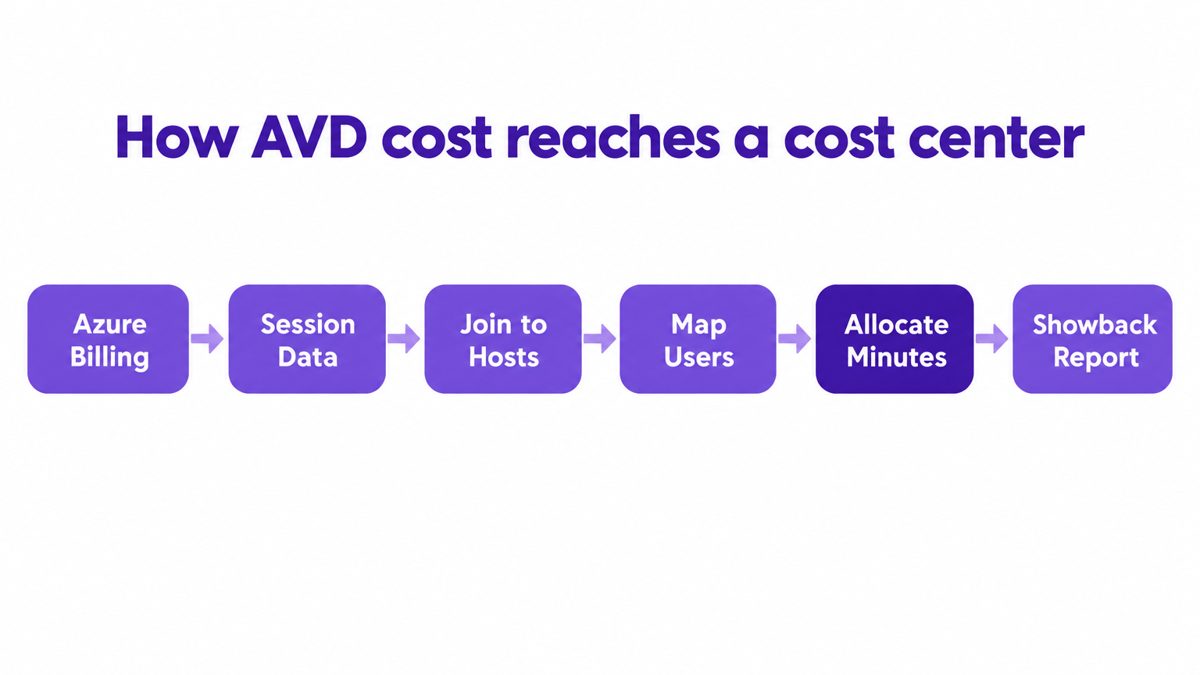
The data path from raw Azure charges to an AVD cost per cost center.
Each personal desktop maps to one named user, so tag the VM, its disks, and attached resources with CostCenter, Department, Owner, and HostPool. Group the bill by those tags and the allocation is direct.
Showback here also makes the price of dedicated desktops visible: personal desktops typically cost two to three times more per user than pooled equivalents.
For shared hosts, split each host's compute and attached storage by each department's share of connected session minutes on that host. Session minutes are the most defensible default because they reflect actual use and follow users who move between hosts.
Department cost = host cost × (department connected minutes on host ÷ all connected minutes on host), summed across every host, plus its share of shared services.
Session and connection records come from AVD Insights in Log Analytics. Join each user to a department or cost center through Entra ID attributes.
Profile containers belong to individual users, so charge them to the user's cost center unless the storage is genuinely shared.
Networking, monitoring, gateways, Key Vaults, and image management serve everyone. Spread them by active users, session minutes, or host pool share, and publish the rule so no department is surprised.
Show licensing as its own line, apart from Azure infrastructure, and disclose how reservation and savings plan discounts are passed through. The same discipline applies across the wider IT cost allocation framework.
| Cost component | Allocation driver | Data source |
|---|---|---|
| Personal session hosts | Tag (owner, cost center) | Azure billing export |
| Pooled session hosts | Connected session minutes | AVD Insights, Log Analytics |
| Profile containers | Named user | Storage records, Entra ID |
| Shared services | Published proportional rule | Azure billing export |
| Licenses | Assigned user | License inventory |
Get a free assessment of where your virtual desktop and cloud spend is going unused.
Get Free Savings AssessmentUntagged disks, storage accounts, and Key Vaults fall into an unallocated bucket that grows every month.
Solution: Tag host pools, session hosts, storage, and supporting resources, and enforce tags with Azure Policy and infrastructure-as-code.
An even split charges light users for heavy users and invites disputes.
Solution: Use connected session minutes per host as the driver.
Billing departments before they trust the numbers turns every invoice into a negotiation.
Solution: Run showback for at least one or two billing cycles first, as described in CloudNuro's guide to simplifying IT chargeback.
Hosts running with no sessions still cost money, and no allocation driver catches them.
Solution: Agree up front whether idle and minimum capacity is charged to the host pool owner or held centrally, and report it as its own line.
You allocate Azure Virtual Desktop costs by tagging dedicated resources to cost centers and splitting pooled session hosts by each department's share of connected session minutes. Shared services are then spread by a published rule.
Azure Cost Management can do resource-level showback for AVD, but not per-user chargeback on pooled hosts. It sees billed resources, so a separate layer must join billing with session data.
Connected session minutes are the most defensible allocation driver for pooled host pools. They reflect actual use and handle users who connect to different hosts during a billing period.
AVD licensing should be reported as a separate line from Azure infrastructure in chargeback. Keeping them apart lets departments see whether cost comes from desktops they use or licenses they hold.
AVD showback should run for at least one or two billing cycles before chargeback. That window lets IT validate session calculations and settle rules for idle capacity and shared services.
CloudNuro supports AVD chargeback by bringing cloud and SaaS costs into one cost allocation layer with chargeback and showback reporting. Its FinOps services help teams design the allocation rules.
Azure Virtual Desktop made desktop cost variable, and variable cost without an owner grows unchecked. Organizations that leave AVD spend with central IT carry idle hosts and oversized desktops that no department feels. AVD chargeback and showback fix that by joining tags, session data, and billing into one model, as part of unified visibility and accountability across SaaS, cloud, and AI.
See CloudNuro's cost allocation and chargeback across cloud and SaaS in one view.
Request a DemoCloudNuro gives IT and Finance one cost allocation layer for SaaS, cloud, and AI, with advanced chargeback and showback across multi-cloud environments. Teams use it to assign every cost an owner, from virtual desktops to SaaS licenses, and its FinOps Center of Excellence consulting helps design rules that hold up in budget reviews.
CloudNuro is a leader in Enterprise AI Adoption Management, providing enterprises with unmatched visibility, governance, and cost optimization. Recognized twice in a row by Gartner in the SaaS Management Platforms and named a Leader in the Info-Tech SoftwareReviews Data Quadrant, CloudNuro is trusted by global enterprises and government agencies to bring financial discipline to SaaS, cloud, and AI. Trusted by enterprises, CloudNuro provides centralized SaaS inventory, license optimization, and renewal management along with advanced cost allocation and chargeback, giving IT and Finance leaders the visibility, control, and cost-conscious culture needed to drive financial discipline.
Request a no cost, no obligation free assessment —just 15 minutes to savings!
Get StartedAVD chargeback and showback assign Azure Virtual Desktop costs to the departments and cost centers that consume them.
The hard part is pooled host pools: Azure bills one shared session host, while many users from many departments work on it.
This guide gives IT Finance a working model: tags for ownership, session minutes for consumption, clear rules for shared services, and a showback-first rollout.
Azure Virtual Desktop has shifted desktop spend from a fixed hardware budget into a monthly, consumption-based Azure bill that few departments ever see.
Without AVD chargeback and showback, that bill lands on central IT, and the teams driving session growth have no reason to question host sizes, idle capacity, or always-on personal desktops.
CIOs, CFOs, and FinOps leads all feel it differently: IT defends a rising line item, Finance cannot forecast it, and business units dispute any number that looks like an estimate.
The answer is a defensible cost allocation model, built on the same principles as any chargeback and showback strategy but adapted to how AVD actually bills.
This guide explains why native tooling falls short, lays out the allocation model by host pool type, and gives a phased plan for moving from showback to chargeback.
See how CloudNuro allocates virtual desktop spend to the departments that consume it.
Request a DemoAVD showback reports each department's share of Azure Virtual Desktop cost without moving budget. AVD chargeback uses the same allocation to debit that department's cost center in the general ledger. Both depend on one model that ties Azure charges to the people and teams who used the desktops.
| Dimension | Showback | Chargeback |
|---|---|---|
| What happens | Departments see their AVD cost in a report | Departments are billed internally for their AVD cost |
| Owner | IT and FinOps | Finance, with IT supplying the data |
| Data accuracy needed | Directionally correct | Auditable and agreed in advance |
| Behavior it drives | Awareness of desktop consumption | Budget accountability for desktop consumption |
Azure Cost Management sees resource charges, not user sessions. That works for dedicated resources and breaks for shared ones.
Ten users from four departments can share one multi-session host, and the bill still shows a single VM. Tags can say which host pool it belongs to, but not who used it.
Native cost allocation rules redistribute shared costs by fixed or proportional percentages. They change internal reporting, not the invoice, and they have no view of session activity.
Committed compute discounts are not handled cleanly by allocation rules, so Finance must decide whether departments see the discounted rate or an internal list rate.
AVD access rights usually come through eligible Microsoft 365 or Windows licenses, which sit in a different system. A full per-user cost needs both, as covered in CloudNuro's guide to assigning AVD licenses without waste.
The working principle is simple: tags identify ownership, session data identifies consumption, and the Azure bill supplies the money. Joining the three produces a cost per department that holds up in a budget review.
The data path from raw Azure charges to an AVD cost per cost center.
Each personal desktop maps to one named user, so tag the VM, its disks, and attached resources with CostCenter, Department, Owner, and HostPool. Group the bill by those tags and the allocation is direct.
Showback here also makes the price of dedicated desktops visible: personal desktops typically cost two to three times more per user than pooled equivalents.
For shared hosts, split each host's compute and attached storage by each department's share of connected session minutes on that host. Session minutes are the most defensible default because they reflect actual use and follow users who move between hosts.
Department cost = host cost × (department connected minutes on host ÷ all connected minutes on host), summed across every host, plus its share of shared services.
Session and connection records come from AVD Insights in Log Analytics. Join each user to a department or cost center through Entra ID attributes.
Profile containers belong to individual users, so charge them to the user's cost center unless the storage is genuinely shared.
Networking, monitoring, gateways, Key Vaults, and image management serve everyone. Spread them by active users, session minutes, or host pool share, and publish the rule so no department is surprised.
Show licensing as its own line, apart from Azure infrastructure, and disclose how reservation and savings plan discounts are passed through. The same discipline applies across the wider IT cost allocation framework.
| Cost component | Allocation driver | Data source |
|---|---|---|
| Personal session hosts | Tag (owner, cost center) | Azure billing export |
| Pooled session hosts | Connected session minutes | AVD Insights, Log Analytics |
| Profile containers | Named user | Storage records, Entra ID |
| Shared services | Published proportional rule | Azure billing export |
| Licenses | Assigned user | License inventory |
Get a free assessment of where your virtual desktop and cloud spend is going unused.
Get Free Savings AssessmentUntagged disks, storage accounts, and Key Vaults fall into an unallocated bucket that grows every month.
Solution: Tag host pools, session hosts, storage, and supporting resources, and enforce tags with Azure Policy and infrastructure-as-code.
An even split charges light users for heavy users and invites disputes.
Solution: Use connected session minutes per host as the driver.
Billing departments before they trust the numbers turns every invoice into a negotiation.
Solution: Run showback for at least one or two billing cycles first, as described in CloudNuro's guide to simplifying IT chargeback.
Hosts running with no sessions still cost money, and no allocation driver catches them.
Solution: Agree up front whether idle and minimum capacity is charged to the host pool owner or held centrally, and report it as its own line.
You allocate Azure Virtual Desktop costs by tagging dedicated resources to cost centers and splitting pooled session hosts by each department's share of connected session minutes. Shared services are then spread by a published rule.
Azure Cost Management can do resource-level showback for AVD, but not per-user chargeback on pooled hosts. It sees billed resources, so a separate layer must join billing with session data.
Connected session minutes are the most defensible allocation driver for pooled host pools. They reflect actual use and handle users who connect to different hosts during a billing period.
AVD licensing should be reported as a separate line from Azure infrastructure in chargeback. Keeping them apart lets departments see whether cost comes from desktops they use or licenses they hold.
AVD showback should run for at least one or two billing cycles before chargeback. That window lets IT validate session calculations and settle rules for idle capacity and shared services.
CloudNuro supports AVD chargeback by bringing cloud and SaaS costs into one cost allocation layer with chargeback and showback reporting. Its FinOps services help teams design the allocation rules.
Azure Virtual Desktop made desktop cost variable, and variable cost without an owner grows unchecked. Organizations that leave AVD spend with central IT carry idle hosts and oversized desktops that no department feels. AVD chargeback and showback fix that by joining tags, session data, and billing into one model, as part of unified visibility and accountability across SaaS, cloud, and AI.
See CloudNuro's cost allocation and chargeback across cloud and SaaS in one view.
Request a DemoCloudNuro gives IT and Finance one cost allocation layer for SaaS, cloud, and AI, with advanced chargeback and showback across multi-cloud environments. Teams use it to assign every cost an owner, from virtual desktops to SaaS licenses, and its FinOps Center of Excellence consulting helps design rules that hold up in budget reviews.
CloudNuro is a leader in Enterprise AI Adoption Management, providing enterprises with unmatched visibility, governance, and cost optimization. Recognized twice in a row by Gartner in the SaaS Management Platforms and named a Leader in the Info-Tech SoftwareReviews Data Quadrant, CloudNuro is trusted by global enterprises and government agencies to bring financial discipline to SaaS, cloud, and AI. Trusted by enterprises, CloudNuro provides centralized SaaS inventory, license optimization, and renewal management along with advanced cost allocation and chargeback, giving IT and Finance leaders the visibility, control, and cost-conscious culture needed to drive financial discipline.
Request a no cost, no obligation free assessment - just 15 minutes to savings!
Get StartedWe're offering complimentary ServiceNow license assessments to only 25 enterprises this quarter who want to unlock immediate savings without disrupting operations.
Get Free AssessmentGet Started




CloudNuro Corp
1755 Park St. Suite 207
Naperville, IL 60563
Phone : +1-630-277-9470
Email: info@cloudnuro.com







Recognized Leader in SaaS Management Platforms by Info-Tech SoftwareReviews