

Sign Up
Thank you for Submitting!

As enterprises accelerate their AI adoption, Copilot for Power BI represents an enticing opportunity for organizations aiming to supercharge data analysis and drive collaborative insight. Yet, under the promise of embedded AI, many IT and finance leaders are grappling with an unexpected challenge: the true cost and surprising enablement tax of enabling Copilot in Power BI environments.
This article breaks down the architecture of Copilot Power BI licensing, exposes the hidden capacity costs, and guides you through actionable steps to optimize your Microsoft 365 and Power BI license spend. We’ll also explore how CloudNuro’s Microsoft 365 Custodian arms enterprises to regain control, predict ROI, and prevent unplanned AI-related license creep.
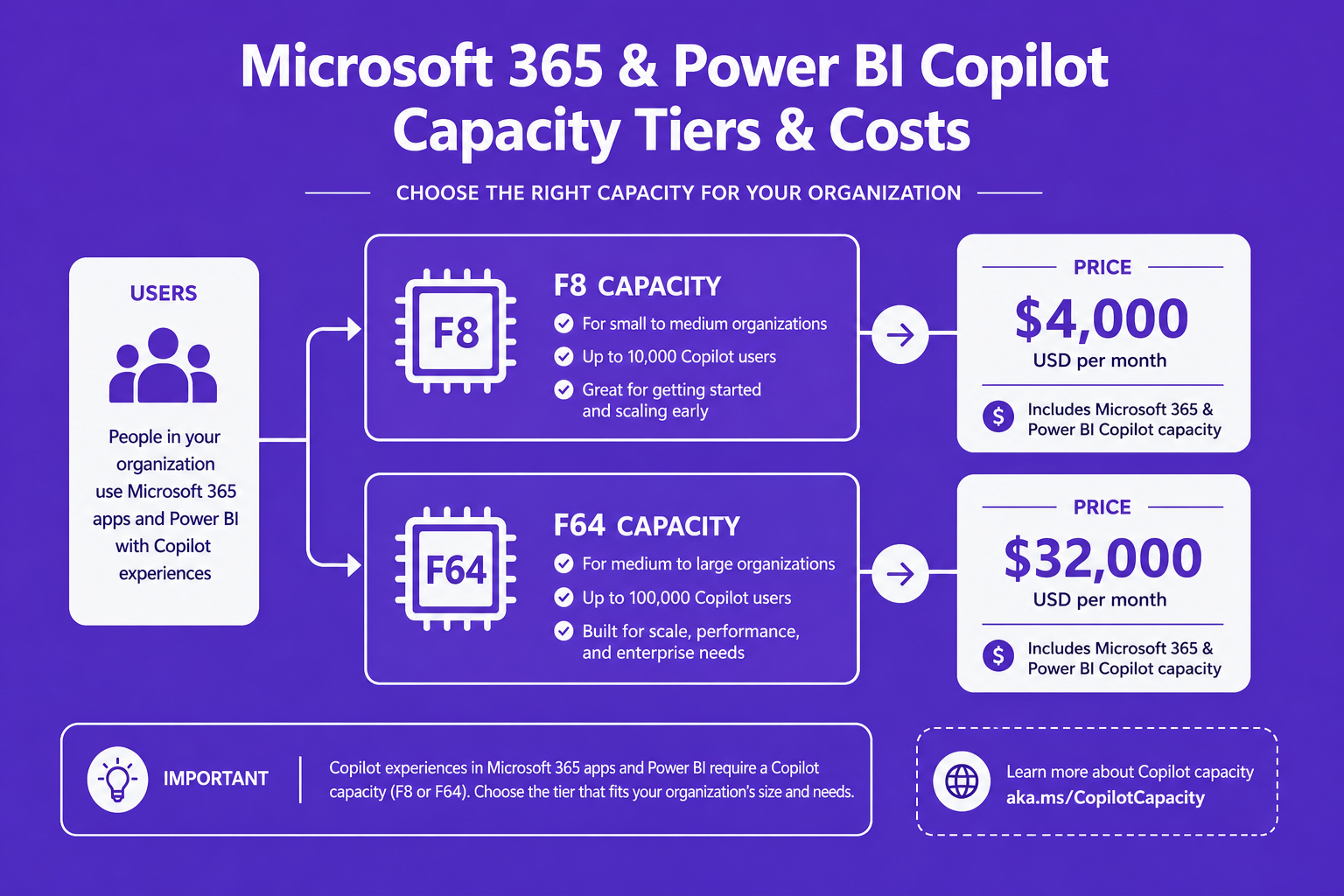
While general productivity Copilot add-ons may seem straightforward at $30 per user per month, enabling Copilot for Power BI is far more complex. Beyond individual add-ons, organizations face a minimum capacity requirement: running Copilot in Power BI Premium costs at least $262/month for the lowest tier. More commonly, organizations enabling Copilot organization-wide encounter capacity upgrades costing between $5,000 and $6,272/month, before counting per-user add-ons or hidden infrastructure drift.
Most critically, Copilot consumption in Power BI is tied to the capacity, not the seat. AI prompt processing leverages the same compute pool used for report refreshes and dataflows, directly competing with core analytics workloads and forcing organizations to upgrade unnecessarily broad capacity blocks just to unlock Copilot’s features.
Organizations often overlook the capacity inflation forced by Copilot enablement. Consider this: moving from Power BI F8 to F64 for Copilot access multiplies your platform spend eightfold, sometimes for minimal actual AI usage. While general Copilot add-ons and Power BI capacity seem separate, their costs stack quickly.
Hidden costs also include infrastructure upgrades triggered by Copilot’s compute hunger. Each prompt can consume approx. 1,800 capacity units, and heavy use throttles existing workflows, often prompting organizations to silently increase capacity tiers without corresponding user adoption.
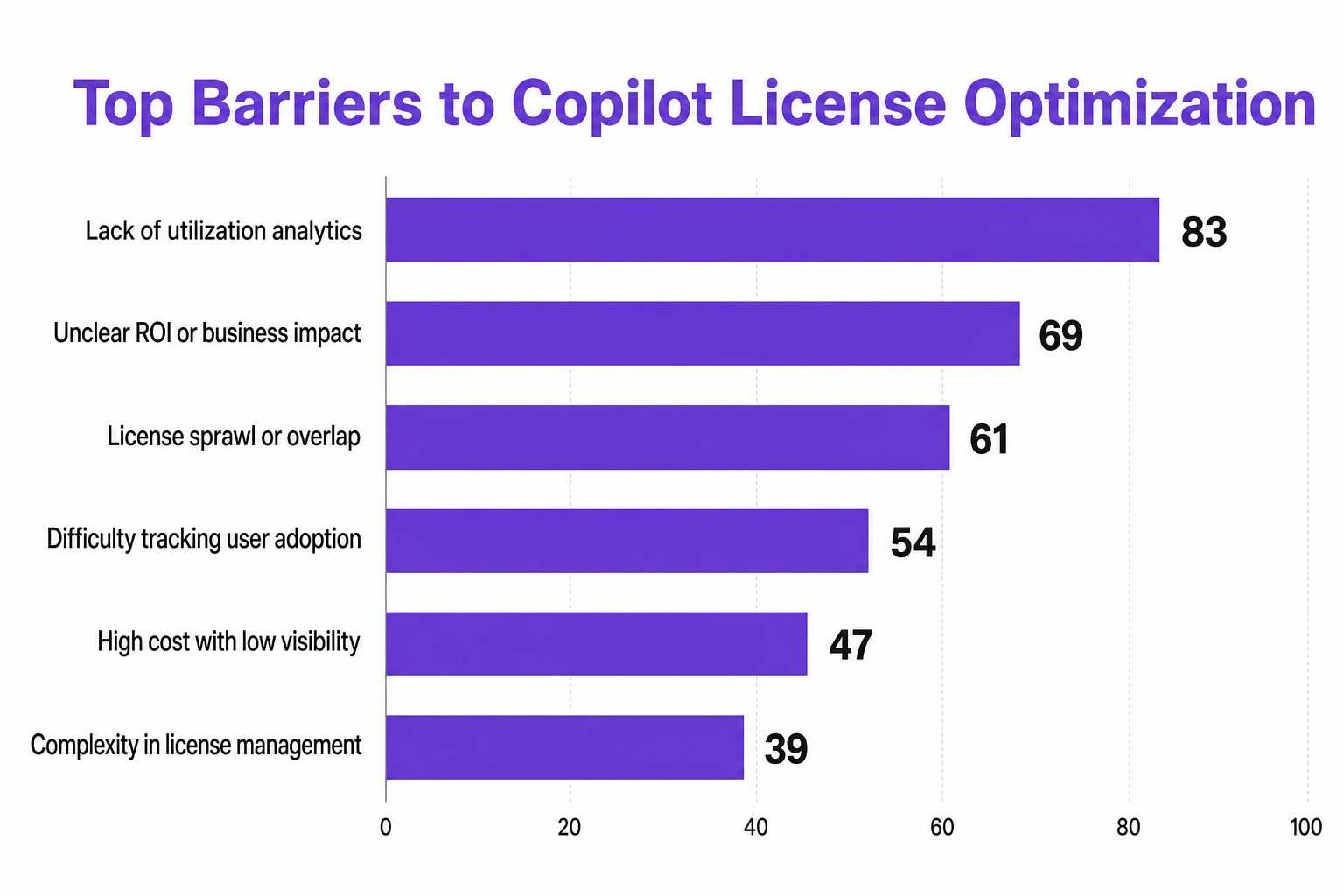
CloudNuro's research shows organizations routinely over-buy both per-user licenses and platform capacity for Copilot. Without granular utilization analytics, most enterprises fail to attribute capacity upgrades to Copilot use, obscuring the true ROI and perpetuating silent overspend.
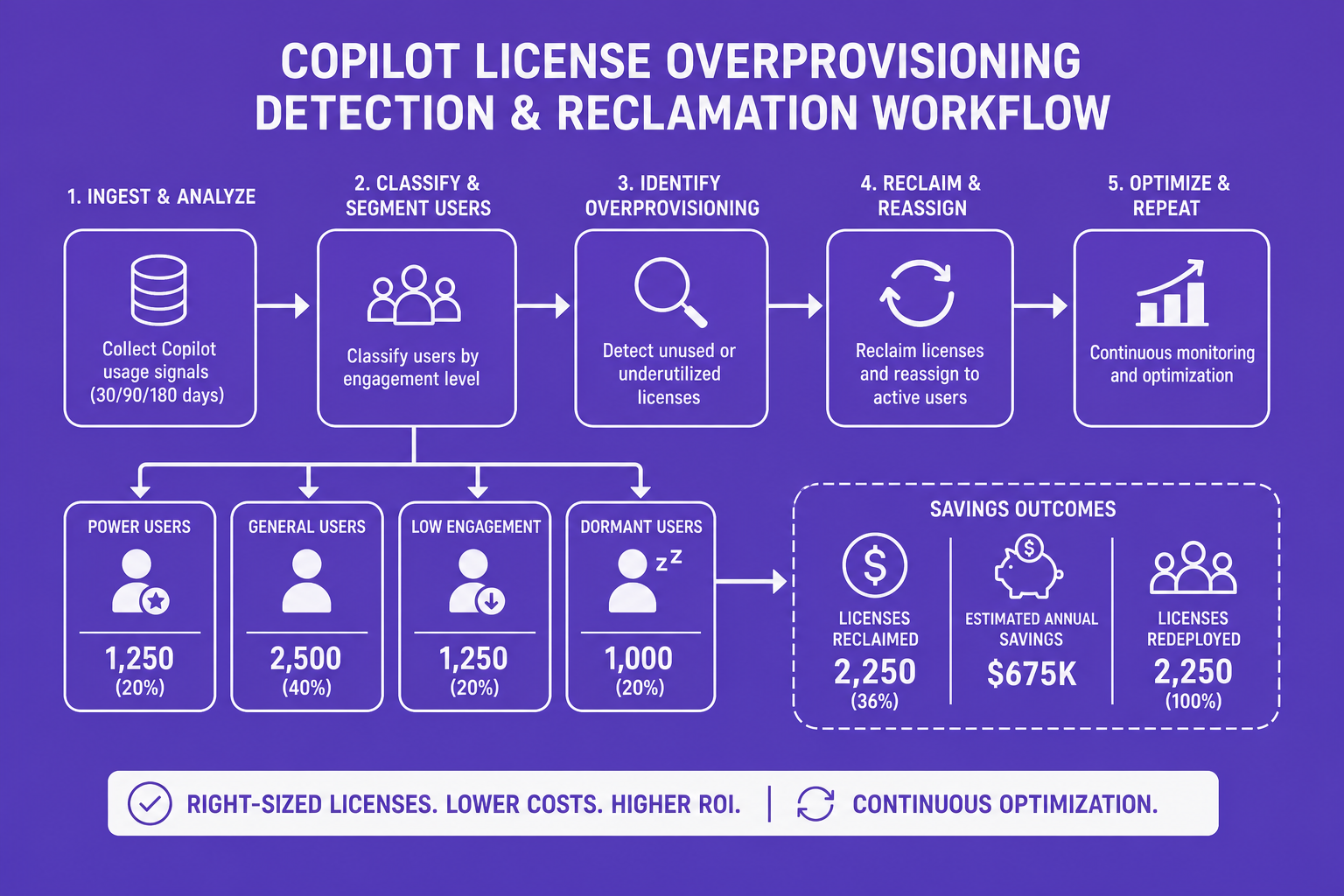
Top Barriers to Copilot License Optimization:
CloudNuro’s hero offering attacks these Copilot cost inefficiencies head-on with:
Proof in practice:
Here’s how leadership can take charge of Copilot Power BI license costs:

What is the cost of a Copilot license for Power BI?
Enabling Copilot functionality in Power BI requires not just a Copilot add-on, but also Power BI Premium capacity starting at $262/month. Most organizations face much higher monthly costs (often $5,000+), especially when enabling Copilot for broad user populations.
How does the Copilot enablement tax impact organizations using Power BI?
The enablement tax is the often-unnoticed extra spend needed for minimum capacity upgrades to unlock Copilot, even if only a few users need it. This tax can multiply your analytics costs before deriving measurable AI benefit.
Is upgrading from F8 to F64 necessary to enable Copilot features in Power BI?
In many cases, yes. Copilot access requires at least F64 capacity for organizational scenarios, escalating monthly costs from $657 to $5,258, regardless of actual prompt volume or user engagement.
How can organizations optimize their Microsoft 365 and Power BI license spend?
Centralize license inventory, implement real-time utilization analytics, link capacity upgrades to actual Copilot usage, and automate license reclamation. CloudNuro delivers all these controls purpose-built for Copilot enablement and Microsoft 365 SaaS optimization.
What are the hidden costs associated with Copilot on Power BI?
Beyond obvious license and add-on spend, costs balloon through silent infrastructure upgrades, AI prompt throttling (forcing extra capacity), and duplicate licenses hanging idle without strong governance or regular usage audits.
Copilot for Power BI offers rich potential, but true enterprise ROI depends on demystifying licensing mechanics, unearthing the real cost of enablement, and committing to strategic, data-driven optimization. Costly enablement tax, license overlap, and invisible capacity inflation compound in the absence of proper governance.
CloudNuro’s Microsoft 365 Custodian puts control, clarity, and confidence back in the hands of IT and finance, enabling sustainable Copilot adoption at the lowest total cost.
About CloudNuro
CloudNuro is a leader in Enterprise AI Adoption Management, providing enterprises with unmatched visibility, governance, and cost optimization. Recognized twice in a row in the SaaS Management Platforms category and named a Leader in the SoftwareReviews Data Quadrant, CloudNuro is trusted by global enterprises and government agencies to bring financial discipline to SaaS, cloud, and AI. Trusted by enterprises, CloudNuro provides centralized SaaS inventory, license optimization, and renewal management along with advanced cost allocation and chargeback, giving IT and Finance leaders the visibility, control, and cost-conscious culture needed to drive financial discipline.
Request a no cost, no obligation free assessment —just 15 minutes to savings!
Get StartedAs enterprises accelerate their AI adoption, Copilot for Power BI represents an enticing opportunity for organizations aiming to supercharge data analysis and drive collaborative insight. Yet, under the promise of embedded AI, many IT and finance leaders are grappling with an unexpected challenge: the true cost and surprising enablement tax of enabling Copilot in Power BI environments.
This article breaks down the architecture of Copilot Power BI licensing, exposes the hidden capacity costs, and guides you through actionable steps to optimize your Microsoft 365 and Power BI license spend. We’ll also explore how CloudNuro’s Microsoft 365 Custodian arms enterprises to regain control, predict ROI, and prevent unplanned AI-related license creep.
While general productivity Copilot add-ons may seem straightforward at $30 per user per month, enabling Copilot for Power BI is far more complex. Beyond individual add-ons, organizations face a minimum capacity requirement: running Copilot in Power BI Premium costs at least $262/month for the lowest tier. More commonly, organizations enabling Copilot organization-wide encounter capacity upgrades costing between $5,000 and $6,272/month, before counting per-user add-ons or hidden infrastructure drift.
Most critically, Copilot consumption in Power BI is tied to the capacity, not the seat. AI prompt processing leverages the same compute pool used for report refreshes and dataflows, directly competing with core analytics workloads and forcing organizations to upgrade unnecessarily broad capacity blocks just to unlock Copilot’s features.
Organizations often overlook the capacity inflation forced by Copilot enablement. Consider this: moving from Power BI F8 to F64 for Copilot access multiplies your platform spend eightfold, sometimes for minimal actual AI usage. While general Copilot add-ons and Power BI capacity seem separate, their costs stack quickly.
Hidden costs also include infrastructure upgrades triggered by Copilot’s compute hunger. Each prompt can consume approx. 1,800 capacity units, and heavy use throttles existing workflows, often prompting organizations to silently increase capacity tiers without corresponding user adoption.
CloudNuro's research shows organizations routinely over-buy both per-user licenses and platform capacity for Copilot. Without granular utilization analytics, most enterprises fail to attribute capacity upgrades to Copilot use, obscuring the true ROI and perpetuating silent overspend.
Top Barriers to Copilot License Optimization:
CloudNuro’s hero offering attacks these Copilot cost inefficiencies head-on with:
Proof in practice:
Here’s how leadership can take charge of Copilot Power BI license costs:
What is the cost of a Copilot license for Power BI?
Enabling Copilot functionality in Power BI requires not just a Copilot add-on, but also Power BI Premium capacity starting at $262/month. Most organizations face much higher monthly costs (often $5,000+), especially when enabling Copilot for broad user populations.
How does the Copilot enablement tax impact organizations using Power BI?
The enablement tax is the often-unnoticed extra spend needed for minimum capacity upgrades to unlock Copilot, even if only a few users need it. This tax can multiply your analytics costs before deriving measurable AI benefit.
Is upgrading from F8 to F64 necessary to enable Copilot features in Power BI?
In many cases, yes. Copilot access requires at least F64 capacity for organizational scenarios, escalating monthly costs from $657 to $5,258, regardless of actual prompt volume or user engagement.
How can organizations optimize their Microsoft 365 and Power BI license spend?
Centralize license inventory, implement real-time utilization analytics, link capacity upgrades to actual Copilot usage, and automate license reclamation. CloudNuro delivers all these controls purpose-built for Copilot enablement and Microsoft 365 SaaS optimization.
What are the hidden costs associated with Copilot on Power BI?
Beyond obvious license and add-on spend, costs balloon through silent infrastructure upgrades, AI prompt throttling (forcing extra capacity), and duplicate licenses hanging idle without strong governance or regular usage audits.
Copilot for Power BI offers rich potential, but true enterprise ROI depends on demystifying licensing mechanics, unearthing the real cost of enablement, and committing to strategic, data-driven optimization. Costly enablement tax, license overlap, and invisible capacity inflation compound in the absence of proper governance.
CloudNuro’s Microsoft 365 Custodian puts control, clarity, and confidence back in the hands of IT and finance, enabling sustainable Copilot adoption at the lowest total cost.
About CloudNuro
CloudNuro is a leader in Enterprise AI Adoption Management, providing enterprises with unmatched visibility, governance, and cost optimization. Recognized twice in a row in the SaaS Management Platforms category and named a Leader in the SoftwareReviews Data Quadrant, CloudNuro is trusted by global enterprises and government agencies to bring financial discipline to SaaS, cloud, and AI. Trusted by enterprises, CloudNuro provides centralized SaaS inventory, license optimization, and renewal management along with advanced cost allocation and chargeback, giving IT and Finance leaders the visibility, control, and cost-conscious culture needed to drive financial discipline.
Request a no cost, no obligation free assessment - just 15 minutes to savings!
Get StartedWe're offering complimentary ServiceNow license assessments to only 25 enterprises this quarter who want to unlock immediate savings without disrupting operations.
Get Free AssessmentGet Started




CloudNuro Corp
1755 Park St. Suite 207
Naperville, IL 60563
Phone : +1-630-277-9470
Email: info@cloudnuro.com





.webp)

Recognized Leader in SaaS Management Platforms by Info-Tech SoftwareReviews




.svg)