

Sign Up
Thank you for Submitting!
Microsoft 365 is the backbone of collaboration and productivity for most enterprises, which makes a disciplined Microsoft 365 access review program a nonnegotiable control for security and compliance. When identities, groups, and guest accounts shift daily, static permissions quickly become a risk surface.
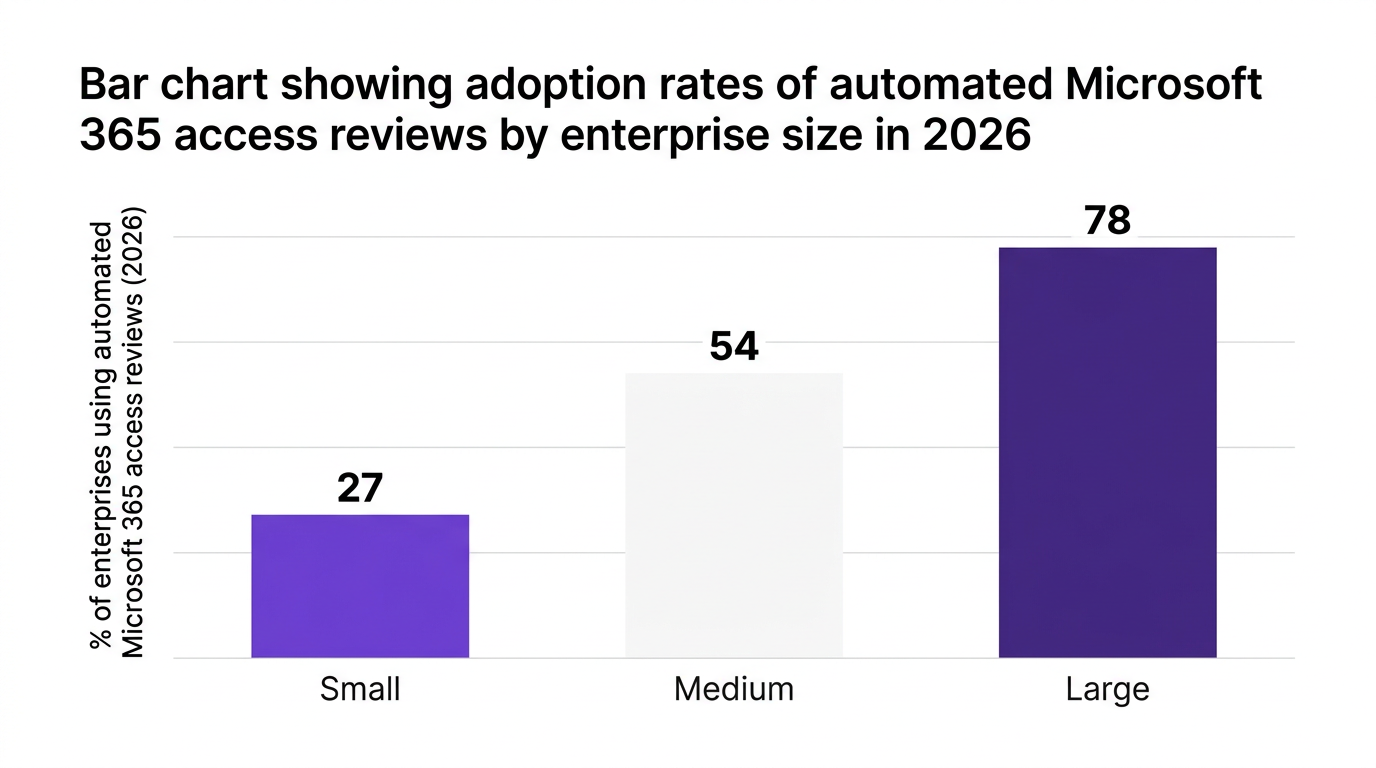
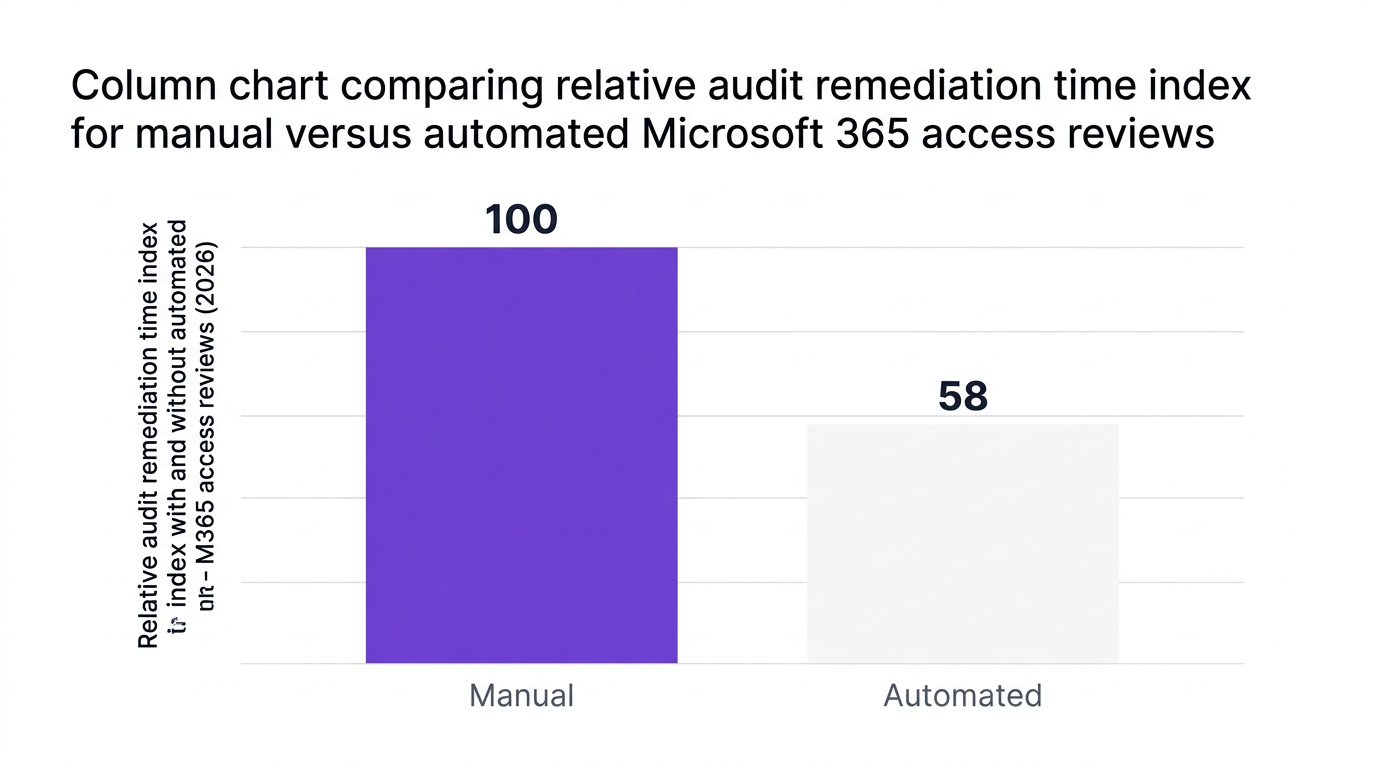
Gartner reported in 2026 that 78% of enterprises perform access reviews for cloud apps like Microsoft 365, with regulatory compliance as the primary driver. At the same time, enterprises using automated access reviews reported a 42% reduction in audit remediation time according to a 2026 study by a leading research firm. The difference is not just tools, it is a repeatable governance model.
This guide gives you a complete, practical approach to Microsoft 365 user access reviews, including Entra ID access reviews, privileged and guest user handling, and how to automate the entire lifecycle.
Access governance used to be an annual checkbox exercise. Hybrid work, SaaS sprawl, and external collaboration have made that model obsolete.
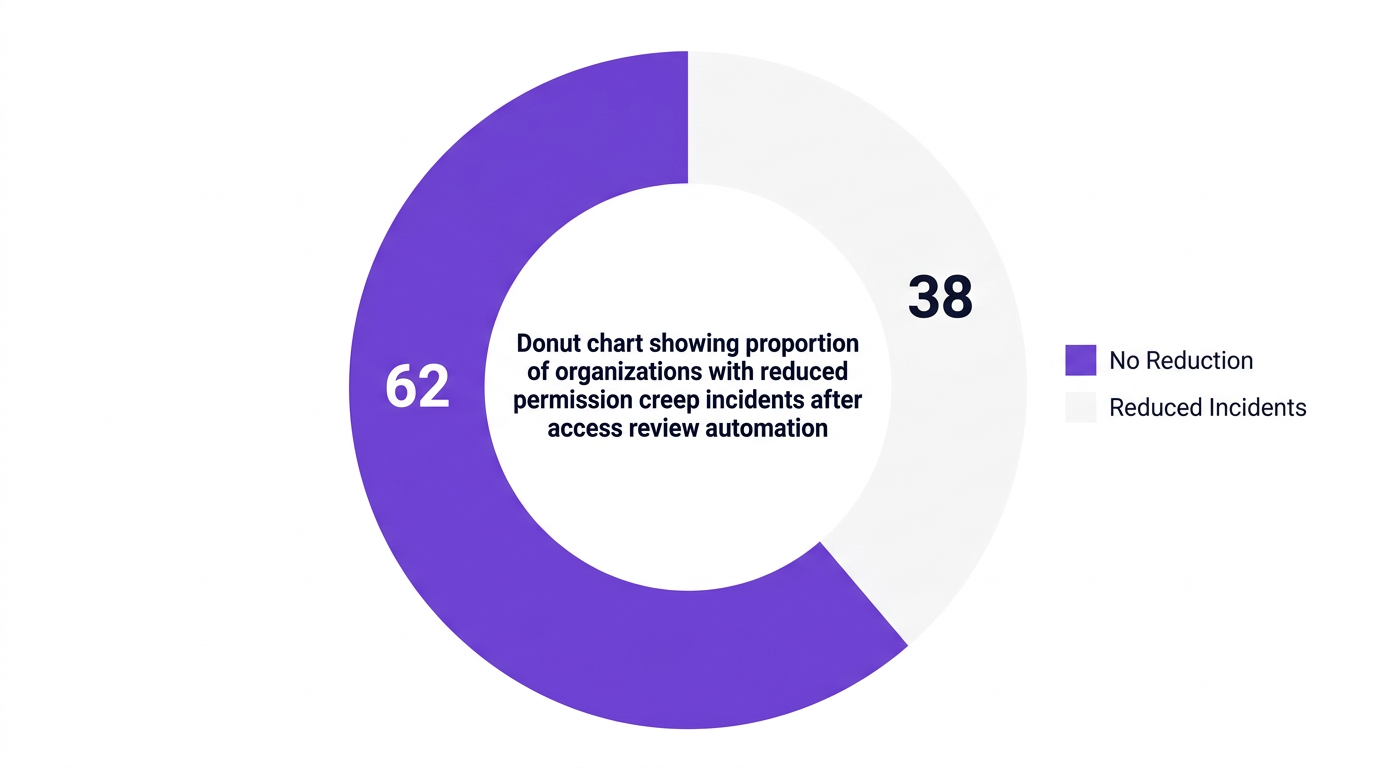
A 2026 survey by a major research publisher found that 62% of compliance leaders consider Microsoft 365 access reviews a top control for SOX and ISO 27001. Another 2026 analysis showed permission creep incidents dropped by 38% in large enterprises that automated Microsoft 365 user and privileged access review cycles.
Regular microsoft 365 user access review cycles support several critical outcomes:
Reduce permission creep by identifying unused roles, stale group memberships, and orphaned accounts.
Enforce least privilege across SharePoint, Teams, Exchange, and Entra roles.
Prove compliance for SOX, ISO 27001, HIPAA, and internal policies through auditable evidence.
Contain external risk by cleaning up guest access and inactive B2B accounts.
As one 2026 identity governance advisory leader from Gartner puts it, "Continuous access certification, especially for privileged and guest accounts, is the backbone of modern identity governance in Microsoft 365."

Before running your first Microsoft 365 access review, align on a shared vocabulary and model. Without this, reviews become inconsistent and hard to defend during audits.
Anchor your program on these identity governance basics:
Identity governance: Policies and processes that ensure the right people have the right access at the right time.
Access certification: Formal review and signoff that a user’s access is appropriate.
Privileged access management: Oversight for administrators and highimpact roles.
Least privilege principle: Users have only the minimum access needed to perform their job.
User lifecycle management: Joiner, mover, leaver processes that adjust access over time.
A 2026 service provider study reported that 91% of organizations view least privilege enforcement in Microsoft 365 as a primary outcome of access reviews. That means your m365 permission review design must be tightly coupled to role definitions and data sensitivity.
For clarity and auditability, define a taxonomy of review types:
Userbased reviews: Managers or data owners review access for users in their scope.
Groupbased reviews: Owners certify membership of security and Microsoft 365 groups.
Applicationbased reviews: Owners review user consent and access to enterprise apps.
Privileged role reviews: Focused access review for privileged roles in Microsoft 365 such as global admins, security admins, and custom highimpact roles.
Guest and external user reviews: Periodic entra access review for guest users to validate ongoing need.
Treat these as building blocks for your entra id governance access review framework.
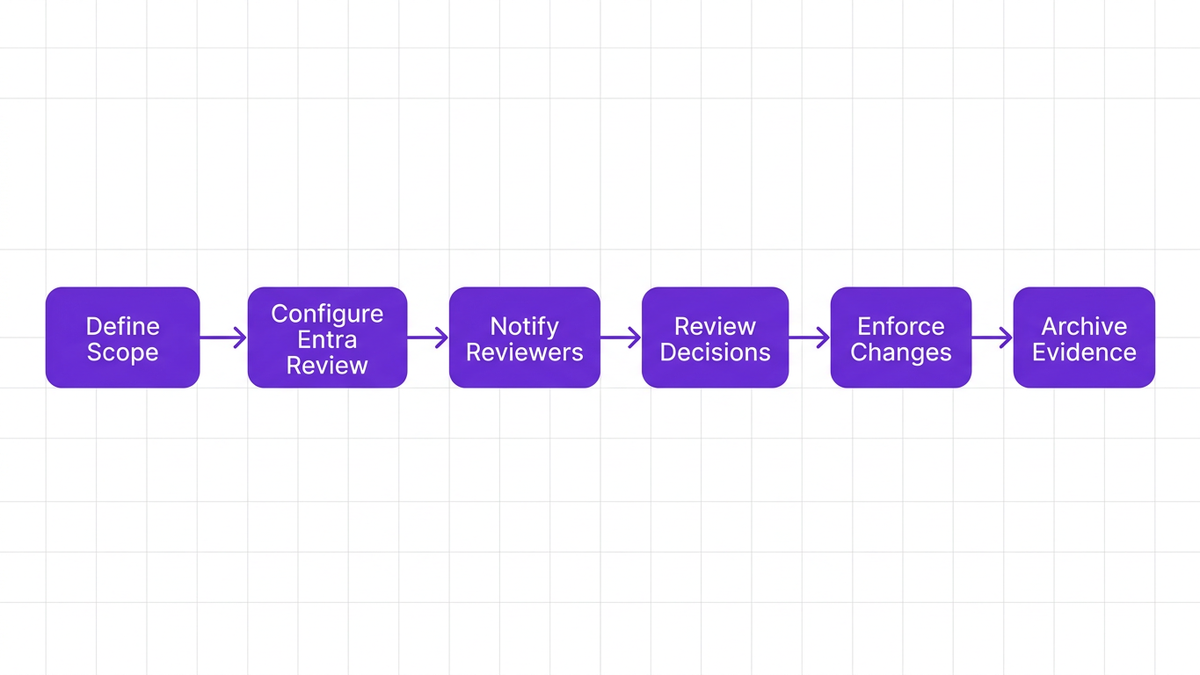
This section walks through a pragmatic, repeatable process you can apply to any microsoft 365 access review or office 365 access review campaign.
Start with the “why.” A Microsoft 365 access review for SOX will look different from a review focused on internal zero trust maturity.
Clarify:
Which regulations or standards apply (for example, sox compliance, iso 27001, sector regulations).
Which business processes and data domains are in scope.
Which controls the review supports (for example, quarterly saas access certification for auditors).
Map each objective to one or more review types. For example, SOX might focus on finance site collections, Exchange shared mailboxes, and related privileged roles.
Define what exactly you will review and who will own each part. This is where many saas user access review programs fail.
Decide:
Scope of identities: Internal employees, contractors, guests, service accounts.
Scope of resources: Teams, SharePoint sites, mailboxes, admin roles, applications.
Review owners: Line managers, application owners, data owners, or security.
Use a RACI model: Responsible, Accountable, Consulted, Informed. A simple rule is that managers review direct reports, and resource owners review access to their data or application.
Microsoft Entra provides native entra id access reviews that integrate deeply with Microsoft 365. Use these to orchestrate baseline checks, then layer enterprisegrade controls on top when needed.
Key patterns when configuring microsoft entra access reviews:
Create recurring campaigns for highrisk resources, monthly or quarterly rather than yearly.
Use scope filters to target only active users or those with specific roles.
Choose reviewers based on manager, group owner, or specific individuals.
Set autoapply outcomes, for example remove access if not reviewed within a defined period.
This is effective for an initial entra access review campaign for saas apps that use Microsoft Entra as their identity provider.
A common failure mode is overloading reviewers with noisy, contextfree certification tasks. This creates rubberstamping instead of real access certification.
Design reviews so approvers see:
Who the user is (role, department, manager).
What they are accessing (sites, teams, apps, privileged roles).
Why access was granted originally (request justification, ticket ID, policy).
When the access was last used (critical for highrisk permissions).
If your approvers lack usage context, they will default to “approve all” to avoid disrupting the business. That undermines least privilege and audit quality.
Once the campaign is live, monitor progress, chase nonresponders, and make sure outcomes are applied consistently.
Key practices:
Use automated reminders rather than manual followups.
Track completion rates by business unit and reviewer.
Apply decisions automatically where possible, especially for revocations.
Require justification for continued access to privileged roles and sensitive data.
An analogy many CISOs use: a Microsoft 365 access review is like a quarterly fire drill. If people do not treat the exercise seriously and follow the process, the “real event” will go poorly.
From a compliance audit lens, if you cannot show the evidence, the control did not happen.
Capture and retain:
Review definitions and scope.
Reviewer assignments and completions.
Decisions, timestamps, and justifications.
Proof that revocations were implemented.
A 2026 study by a financial sector advisory firm noted that organizations using automated Microsoft 365 access reviews reduced audit remediation time by 42%, largely because they could present complete, exportable review evidence on demand.
Not all access is created equal. Privileged roles and guest users represent asymmetric risk, so your m365 uar design must treat them as firstclass citizens.
Access review for privileged roles in Microsoft 365 should run more frequently and with more context than standard reviews.
Prioritize:
Global administrators
Security and compliance admins
Exchange, SharePoint, and Teams administrators
Custom highprivilege roles and role groups
Best practices:
Enforce strict privileged access management and limit standing privileged roles.
Require short justification for retaining any privileged role during reviews.
Integrate with zero trust policies, such as conditional access.
A 2026 case study of a global finance firm highlighted that continuous user access reviews for Microsoft 365, especially for privileged accounts, achieved 99% access certification rates and reduced audit resource hours by 30%.
External users multiply quickly across Teams and SharePoint. Without disciplined review, you accumulate longterm guest access to sensitive data.
For entra access review for guest users:
Run shorter cycles, for example monthly or bimonthly, for highrisk workspaces.
Autoremove guests who do not respond or whose sponsors do not reaffirm access.
Require explicit confirmation for guests with elevated permissions or access to regulated data.
This is core to access governance and identity governance for saas applications, where external sharing is often the soft underbelly of your controls.
Even mature enterprises struggle with microsoft 365 access certification and microsoft 365 entitlement review programs. Recognizing the traps helps you avoid them.
Manual exports and spreadsheets may work for a handful of groups, but they collapse at enterprise scale. They are errorprone, poorly versioned, and hard to defend during audit.
As a counterargument, some smaller teams argue that manual processes give them more control. In practice, these processes usually break once you exceed a few hundred users or when auditors request historical evidence across multiple periods.
Reviewing every permission, for every user, every quarter is neither realistic nor valuable. Approvers will rubberstamp.
Segment your m365 permission review by risk and business criticality. Highimpact resources and privileged roles get more frequent, detailed reviews. Lowrisk areas can be covered by lighter, usagebased controls.
If access reviews are siloed from user lifecycle management and zero trust enforcement, decisions do not stick. Access removed today might be regranted tomorrow through a broken joiner or transfer process.
Tie your saas least privilege access goals into provisioning workflows and policy automation, so review outcomes create durable change.
Microsoft 365 lives inside a broader SaaS ecosystem. Reviewing access in isolation can hide toxic combinations of permissions across CRM, ITSM, and collaboration tools.
This is where saas user access review and saas access certification concepts matter. Aim for a unified view that covers both Microsoft 365 and the rest of your SaaS portfolio.

Market trends show a decisive move away from periodic, manual reviews.
Gartner reported in 2026 that adoption of AIdriven access review tooling for cloud environments grew 56%, with Microsoft 365 and Entra ID at the forefront. Another 2026 survey found that 45% of financial sector organizations accelerated Entra ID access reviews to keep up with hybrid workforces.
A modern microsoft 365 access review for compliance strategy blends scheduled and eventdriven checks:
Scheduled reviews: Quarterly campaigns for privileged roles, sensitive sites, and guest users.
Eventdriven reviews: Triggered when a user changes department, manager, or geography.
Usagebased reviews: Autorevoke access unused for a defined period.
This continuous model matches how dynamic Microsoft 365 environments operate and aligns with audit expectations.
To move toward user access review automation for microsoft 365, focus on:
Centralizing identity data and group memberships.
Integrating Microsoft Entra APIs for review definitions and results.
Using workflow engines to orchestrate approvals, reminders, and revocations.
Building dashboards and exports for auditorready evidence.
Think of your automation layer as “control fabric” that sits across campaigns, lifecycle events, and identity governance for saas applications beyond Microsoft 365.
CloudNuro was built for enterprises that need consistent, auditable governance across Microsoft 365 and their broader SaaS estate. The Microsoft 365 Custodian product turns fragmented microsoft 365 access review efforts into a unified, automated program.
Here is how CloudNuro addresses the hardest parts of m365 uar and microsoft 365 access certification.
CloudNuro’s Microsoft 365 Custodian automates:
User and guest microsoft 365 entitlement review campaigns with recurring schedules.
Entra id governance access review definitions for highrisk groups and privileged roles.
Reviewer notifications, reminders, and escalation workflows.
Automatic enforcement of decisions, including removals and role downgrades.
A Fortune 100 healthcare provider used an automated access review solution integrated with Microsoft 365 and Entra ID to cut quarterly review cycle time by 60% and reduce privilegecreep related audit exceptions by 41% in 2026. CloudNuro was designed to deliver that level of outcome as a standard pattern.
CloudNuro aggregates:
Complete inventories of users, groups, roles, and external identities in Microsoft 365.
Historical review records, including decisions, timestamps, and justifications.
CrossSaaS context that reveals risk combinations outside Microsoft 365.
This enables microsoft 365 access review for compliance objectives across SOX, ISO 27001, and sector regulations, and provides saas access certification for auditors with one exportable, consistent evidence set.
You can explore how this fits into CloudNuro’s broader governance strategy on the product overview page and the dedicated SaaS management solution hub.
Beyond Microsoft 365, CloudNuro’s Unified Cloud Custodian and AI Custodian help you:
Discover shadow IT and unmanaged SaaS connected to Microsoft 365.
Apply saas least privilege access principles consistently across applications.
Integrate findings into FinOps Services and cost optimization programs.
This combines access governance with financial discipline, so you reduce risk and overspend together. Many enterprises pair Microsoft 365 Custodian with FinOps services and Microsoft license optimization to connect access rights with real license and usage data.
CloudNuro provides dedicated workspaces and selfservice SaaS governance portals so security, IT operations, and finance teams share a single view of:
Who has access to what in Microsoft 365.
How that access maps to cost, risk, and policy.
Which actions have been taken and which are pending.
This directly supports IT security objectives highlighted in the IT security solution area and creates an accountable, auditready culture around Microsoft 365 and SaaS access.
To conduct a microsoft 365 user access review, define the objectives and compliance scope, decide which users and resources are in scope, then configure campaigns in Entra ID or an external governance platform. Assign reviewers such as managers or resource owners, provide context on each user’s access, and set automated outcomes for approvals or revocations.
Finally, export and store evidence that the review ran, decisions were made, and access changes were implemented.
For microsoft entra access reviews, you create a new review in the Entra admin center, specify the resource (group, application, or directory role), choose which users are included, and assign reviewers. You can configure the recurrence, duration, and what happens when reviewers do not respond.
Many enterprises integrate Entra reviews with a broader identity governance platform like CloudNuro to standardize campaigns and centralize evidence.
Automation for user access review automation for microsoft 365 usually involves:
Using Entra ID APIs or governance tools to generate campaigns on a schedule.
Autodiscovering resources and privileged roles that require review.
Automating reminders, escalations, and access revocations.
Feeding results into SIEM, GRC, and audit systems.
CloudNuro’s Microsoft 365 Custodian handles these tasks at scale, with crossSaaS visibility and prebuilt workflows for managers, application owners, and auditors.
Regular microsoft 365 access review for compliance helps address controls in sox compliance, iso 27001, and sectorspecific frameworks that require periodic access certification and privileged access management. Reviews also support internal zero trust mandates and regulator expectations for ongoing monitoring.
The key is maintaining traceable evidence that reviews were performed on schedule, decisions were riskinformed, and access changes were enforced.
Treat privileged and guest users as separate, higher risk populations. Run more frequent access review for privileged roles in microsoft 365, require detailed justification for continued access, and consider timebound or justintime elevation.
For entra access review for guest users, run shorter review cycles, automatically expire access without sponsor affirmation, and be especially strict for guests with access to regulated or sensitive data.
Typical pitfalls in microsoft 365 access certification include relying on manual spreadsheets, scoping reviews too broadly, failing to connect outcomes to lifecycle management, and treating Microsoft 365 in isolation from other SaaS apps. Another common issue is not providing reviewers enough context, which leads to rubberstamping.
Addressing these challenges usually requires automation, clearer ownership, and a unified governance platform like CloudNuro.
A mature microsoft 365 access review program is more than a compliance checkbox. When designed around least privilege, lifecycle events, and crossSaaS visibility, it becomes a central pillar of identity governance and zero trust.
Automated access reviews in Microsoft 365 have already been shown to reduce audit remediation time by doubldigit percentages and cut permission creep incidents by more than a third. With CloudNuro’s Microsoft 365 Custodian and Unified Cloud Custodian, enterprises can turn these outcomes into repeatable practice, combining access governance with cost optimization and Shadow IT control.
To move from ad hoc campaigns to continuous, automated governance, explore CloudNuro’s platform and see how your Microsoft 365 reviews can become faster, cleaner, and more defensible.
CloudNuro is a leader in Enterprise SaaS Management Platforms, providing enterprises with unmatched visibility, governance, and cost optimization. Recognized twice in a row in the SaaS Management Platforms category and named a Leader in the SoftwareReviews Data Quadrant, CloudNuro is trusted by global enterprises and government agencies to bring financial discipline to SaaS, cloud, and AI.
CloudNuro provides centralized SaaS inventory, license optimization, and renewal management along with advanced cost allocation and chargeback, giving IT and Finance leaders the visibility, control, and costconscious culture needed to drive financial discipline.
Request a no cost, no obligation free assessment —just 15 minutes to savings!
Get StartedMicrosoft 365 is the backbone of collaboration and productivity for most enterprises, which makes a disciplined Microsoft 365 access review program a nonnegotiable control for security and compliance. When identities, groups, and guest accounts shift daily, static permissions quickly become a risk surface.
Gartner reported in 2026 that 78% of enterprises perform access reviews for cloud apps like Microsoft 365, with regulatory compliance as the primary driver. At the same time, enterprises using automated access reviews reported a 42% reduction in audit remediation time according to a 2026 study by a leading research firm. The difference is not just tools, it is a repeatable governance model.
This guide gives you a complete, practical approach to Microsoft 365 user access reviews, including Entra ID access reviews, privileged and guest user handling, and how to automate the entire lifecycle.
Access governance used to be an annual checkbox exercise. Hybrid work, SaaS sprawl, and external collaboration have made that model obsolete.
A 2026 survey by a major research publisher found that 62% of compliance leaders consider Microsoft 365 access reviews a top control for SOX and ISO 27001. Another 2026 analysis showed permission creep incidents dropped by 38% in large enterprises that automated Microsoft 365 user and privileged access review cycles.
Regular microsoft 365 user access review cycles support several critical outcomes:
Reduce permission creep by identifying unused roles, stale group memberships, and orphaned accounts.
Enforce least privilege across SharePoint, Teams, Exchange, and Entra roles.
Prove compliance for SOX, ISO 27001, HIPAA, and internal policies through auditable evidence.
Contain external risk by cleaning up guest access and inactive B2B accounts.
As one 2026 identity governance advisory leader from Gartner puts it, "Continuous access certification, especially for privileged and guest accounts, is the backbone of modern identity governance in Microsoft 365."
Before running your first Microsoft 365 access review, align on a shared vocabulary and model. Without this, reviews become inconsistent and hard to defend during audits.
Anchor your program on these identity governance basics:
Identity governance: Policies and processes that ensure the right people have the right access at the right time.
Access certification: Formal review and signoff that a user’s access is appropriate.
Privileged access management: Oversight for administrators and highimpact roles.
Least privilege principle: Users have only the minimum access needed to perform their job.
User lifecycle management: Joiner, mover, leaver processes that adjust access over time.
A 2026 service provider study reported that 91% of organizations view least privilege enforcement in Microsoft 365 as a primary outcome of access reviews. That means your m365 permission review design must be tightly coupled to role definitions and data sensitivity.
For clarity and auditability, define a taxonomy of review types:
Userbased reviews: Managers or data owners review access for users in their scope.
Groupbased reviews: Owners certify membership of security and Microsoft 365 groups.
Applicationbased reviews: Owners review user consent and access to enterprise apps.
Privileged role reviews: Focused access review for privileged roles in Microsoft 365 such as global admins, security admins, and custom highimpact roles.
Guest and external user reviews: Periodic entra access review for guest users to validate ongoing need.
Treat these as building blocks for your entra id governance access review framework.
This section walks through a pragmatic, repeatable process you can apply to any microsoft 365 access review or office 365 access review campaign.
Start with the “why.” A Microsoft 365 access review for SOX will look different from a review focused on internal zero trust maturity.
Clarify:
Which regulations or standards apply (for example, sox compliance, iso 27001, sector regulations).
Which business processes and data domains are in scope.
Which controls the review supports (for example, quarterly saas access certification for auditors).
Map each objective to one or more review types. For example, SOX might focus on finance site collections, Exchange shared mailboxes, and related privileged roles.
Define what exactly you will review and who will own each part. This is where many saas user access review programs fail.
Decide:
Scope of identities: Internal employees, contractors, guests, service accounts.
Scope of resources: Teams, SharePoint sites, mailboxes, admin roles, applications.
Review owners: Line managers, application owners, data owners, or security.
Use a RACI model: Responsible, Accountable, Consulted, Informed. A simple rule is that managers review direct reports, and resource owners review access to their data or application.
Microsoft Entra provides native entra id access reviews that integrate deeply with Microsoft 365. Use these to orchestrate baseline checks, then layer enterprisegrade controls on top when needed.
Key patterns when configuring microsoft entra access reviews:
Create recurring campaigns for highrisk resources, monthly or quarterly rather than yearly.
Use scope filters to target only active users or those with specific roles.
Choose reviewers based on manager, group owner, or specific individuals.
Set autoapply outcomes, for example remove access if not reviewed within a defined period.
This is effective for an initial entra access review campaign for saas apps that use Microsoft Entra as their identity provider.
A common failure mode is overloading reviewers with noisy, contextfree certification tasks. This creates rubberstamping instead of real access certification.
Design reviews so approvers see:
Who the user is (role, department, manager).
What they are accessing (sites, teams, apps, privileged roles).
Why access was granted originally (request justification, ticket ID, policy).
When the access was last used (critical for highrisk permissions).
If your approvers lack usage context, they will default to “approve all” to avoid disrupting the business. That undermines least privilege and audit quality.
Once the campaign is live, monitor progress, chase nonresponders, and make sure outcomes are applied consistently.
Key practices:
Use automated reminders rather than manual followups.
Track completion rates by business unit and reviewer.
Apply decisions automatically where possible, especially for revocations.
Require justification for continued access to privileged roles and sensitive data.
An analogy many CISOs use: a Microsoft 365 access review is like a quarterly fire drill. If people do not treat the exercise seriously and follow the process, the “real event” will go poorly.
From a compliance audit lens, if you cannot show the evidence, the control did not happen.
Capture and retain:
Review definitions and scope.
Reviewer assignments and completions.
Decisions, timestamps, and justifications.
Proof that revocations were implemented.
A 2026 study by a financial sector advisory firm noted that organizations using automated Microsoft 365 access reviews reduced audit remediation time by 42%, largely because they could present complete, exportable review evidence on demand.
Not all access is created equal. Privileged roles and guest users represent asymmetric risk, so your m365 uar design must treat them as firstclass citizens.
Access review for privileged roles in Microsoft 365 should run more frequently and with more context than standard reviews.
Prioritize:
Global administrators
Security and compliance admins
Exchange, SharePoint, and Teams administrators
Custom highprivilege roles and role groups
Best practices:
Enforce strict privileged access management and limit standing privileged roles.
Require short justification for retaining any privileged role during reviews.
Integrate with zero trust policies, such as conditional access.
A 2026 case study of a global finance firm highlighted that continuous user access reviews for Microsoft 365, especially for privileged accounts, achieved 99% access certification rates and reduced audit resource hours by 30%.
External users multiply quickly across Teams and SharePoint. Without disciplined review, you accumulate longterm guest access to sensitive data.
For entra access review for guest users:
Run shorter cycles, for example monthly or bimonthly, for highrisk workspaces.
Autoremove guests who do not respond or whose sponsors do not reaffirm access.
Require explicit confirmation for guests with elevated permissions or access to regulated data.
This is core to access governance and identity governance for saas applications, where external sharing is often the soft underbelly of your controls.
Even mature enterprises struggle with microsoft 365 access certification and microsoft 365 entitlement review programs. Recognizing the traps helps you avoid them.
Manual exports and spreadsheets may work for a handful of groups, but they collapse at enterprise scale. They are errorprone, poorly versioned, and hard to defend during audit.
As a counterargument, some smaller teams argue that manual processes give them more control. In practice, these processes usually break once you exceed a few hundred users or when auditors request historical evidence across multiple periods.
Reviewing every permission, for every user, every quarter is neither realistic nor valuable. Approvers will rubberstamp.
Segment your m365 permission review by risk and business criticality. Highimpact resources and privileged roles get more frequent, detailed reviews. Lowrisk areas can be covered by lighter, usagebased controls.
If access reviews are siloed from user lifecycle management and zero trust enforcement, decisions do not stick. Access removed today might be regranted tomorrow through a broken joiner or transfer process.
Tie your saas least privilege access goals into provisioning workflows and policy automation, so review outcomes create durable change.
Microsoft 365 lives inside a broader SaaS ecosystem. Reviewing access in isolation can hide toxic combinations of permissions across CRM, ITSM, and collaboration tools.
This is where saas user access review and saas access certification concepts matter. Aim for a unified view that covers both Microsoft 365 and the rest of your SaaS portfolio.
Market trends show a decisive move away from periodic, manual reviews.
Gartner reported in 2026 that adoption of AIdriven access review tooling for cloud environments grew 56%, with Microsoft 365 and Entra ID at the forefront. Another 2026 survey found that 45% of financial sector organizations accelerated Entra ID access reviews to keep up with hybrid workforces.
A modern microsoft 365 access review for compliance strategy blends scheduled and eventdriven checks:
Scheduled reviews: Quarterly campaigns for privileged roles, sensitive sites, and guest users.
Eventdriven reviews: Triggered when a user changes department, manager, or geography.
Usagebased reviews: Autorevoke access unused for a defined period.
This continuous model matches how dynamic Microsoft 365 environments operate and aligns with audit expectations.
To move toward user access review automation for microsoft 365, focus on:
Centralizing identity data and group memberships.
Integrating Microsoft Entra APIs for review definitions and results.
Using workflow engines to orchestrate approvals, reminders, and revocations.
Building dashboards and exports for auditorready evidence.
Think of your automation layer as “control fabric” that sits across campaigns, lifecycle events, and identity governance for saas applications beyond Microsoft 365.
CloudNuro was built for enterprises that need consistent, auditable governance across Microsoft 365 and their broader SaaS estate. The Microsoft 365 Custodian product turns fragmented microsoft 365 access review efforts into a unified, automated program.
Here is how CloudNuro addresses the hardest parts of m365 uar and microsoft 365 access certification.
CloudNuro’s Microsoft 365 Custodian automates:
User and guest microsoft 365 entitlement review campaigns with recurring schedules.
Entra id governance access review definitions for highrisk groups and privileged roles.
Reviewer notifications, reminders, and escalation workflows.
Automatic enforcement of decisions, including removals and role downgrades.
A Fortune 100 healthcare provider used an automated access review solution integrated with Microsoft 365 and Entra ID to cut quarterly review cycle time by 60% and reduce privilegecreep related audit exceptions by 41% in 2026. CloudNuro was designed to deliver that level of outcome as a standard pattern.
CloudNuro aggregates:
Complete inventories of users, groups, roles, and external identities in Microsoft 365.
Historical review records, including decisions, timestamps, and justifications.
CrossSaaS context that reveals risk combinations outside Microsoft 365.
This enables microsoft 365 access review for compliance objectives across SOX, ISO 27001, and sector regulations, and provides saas access certification for auditors with one exportable, consistent evidence set.
You can explore how this fits into CloudNuro’s broader governance strategy on the product overview page and the dedicated SaaS management solution hub.
Beyond Microsoft 365, CloudNuro’s Unified Cloud Custodian and AI Custodian help you:
Discover shadow IT and unmanaged SaaS connected to Microsoft 365.
Apply saas least privilege access principles consistently across applications.
Integrate findings into FinOps Services and cost optimization programs.
This combines access governance with financial discipline, so you reduce risk and overspend together. Many enterprises pair Microsoft 365 Custodian with FinOps services and Microsoft license optimization to connect access rights with real license and usage data.
CloudNuro provides dedicated workspaces and selfservice SaaS governance portals so security, IT operations, and finance teams share a single view of:
Who has access to what in Microsoft 365.
How that access maps to cost, risk, and policy.
Which actions have been taken and which are pending.
This directly supports IT security objectives highlighted in the IT security solution area and creates an accountable, auditready culture around Microsoft 365 and SaaS access.
To conduct a microsoft 365 user access review, define the objectives and compliance scope, decide which users and resources are in scope, then configure campaigns in Entra ID or an external governance platform. Assign reviewers such as managers or resource owners, provide context on each user’s access, and set automated outcomes for approvals or revocations.
Finally, export and store evidence that the review ran, decisions were made, and access changes were implemented.
For microsoft entra access reviews, you create a new review in the Entra admin center, specify the resource (group, application, or directory role), choose which users are included, and assign reviewers. You can configure the recurrence, duration, and what happens when reviewers do not respond.
Many enterprises integrate Entra reviews with a broader identity governance platform like CloudNuro to standardize campaigns and centralize evidence.
Automation for user access review automation for microsoft 365 usually involves:
Using Entra ID APIs or governance tools to generate campaigns on a schedule.
Autodiscovering resources and privileged roles that require review.
Automating reminders, escalations, and access revocations.
Feeding results into SIEM, GRC, and audit systems.
CloudNuro’s Microsoft 365 Custodian handles these tasks at scale, with crossSaaS visibility and prebuilt workflows for managers, application owners, and auditors.
Regular microsoft 365 access review for compliance helps address controls in sox compliance, iso 27001, and sectorspecific frameworks that require periodic access certification and privileged access management. Reviews also support internal zero trust mandates and regulator expectations for ongoing monitoring.
The key is maintaining traceable evidence that reviews were performed on schedule, decisions were riskinformed, and access changes were enforced.
Treat privileged and guest users as separate, higher risk populations. Run more frequent access review for privileged roles in microsoft 365, require detailed justification for continued access, and consider timebound or justintime elevation.
For entra access review for guest users, run shorter review cycles, automatically expire access without sponsor affirmation, and be especially strict for guests with access to regulated or sensitive data.
Typical pitfalls in microsoft 365 access certification include relying on manual spreadsheets, scoping reviews too broadly, failing to connect outcomes to lifecycle management, and treating Microsoft 365 in isolation from other SaaS apps. Another common issue is not providing reviewers enough context, which leads to rubberstamping.
Addressing these challenges usually requires automation, clearer ownership, and a unified governance platform like CloudNuro.
A mature microsoft 365 access review program is more than a compliance checkbox. When designed around least privilege, lifecycle events, and crossSaaS visibility, it becomes a central pillar of identity governance and zero trust.
Automated access reviews in Microsoft 365 have already been shown to reduce audit remediation time by doubldigit percentages and cut permission creep incidents by more than a third. With CloudNuro’s Microsoft 365 Custodian and Unified Cloud Custodian, enterprises can turn these outcomes into repeatable practice, combining access governance with cost optimization and Shadow IT control.
To move from ad hoc campaigns to continuous, automated governance, explore CloudNuro’s platform and see how your Microsoft 365 reviews can become faster, cleaner, and more defensible.
CloudNuro is a leader in Enterprise SaaS Management Platforms, providing enterprises with unmatched visibility, governance, and cost optimization. Recognized twice in a row in the SaaS Management Platforms category and named a Leader in the SoftwareReviews Data Quadrant, CloudNuro is trusted by global enterprises and government agencies to bring financial discipline to SaaS, cloud, and AI.
CloudNuro provides centralized SaaS inventory, license optimization, and renewal management along with advanced cost allocation and chargeback, giving IT and Finance leaders the visibility, control, and costconscious culture needed to drive financial discipline.
Request a no cost, no obligation free assessment - just 15 minutes to savings!
Get StartedWe're offering complimentary ServiceNow license assessments to only 25 enterprises this quarter who want to unlock immediate savings without disrupting operations.
Get Free AssessmentGet Started




CloudNuro Corp
1755 Park St. Suite 207
Naperville, IL 60563
Phone : +1-630-277-9470
Email: info@cloudnuro.com





.webp)

Recognized Leader in SaaS Management Platforms by Info-Tech SoftwareReviews




.svg)