

Sign Up
Thank you for Submitting!
Microsoft 365 Copilot promises substantial productivity gains, but at $30 per user every month, waste accumulates quickly if licenses are not managed with rigor. Effective Microsoft 365 Copilot license optimization is now a core priority for CIOs, IT finance, and SaaS operations leaders who need to prove AI ROI, not just fund experimentation.
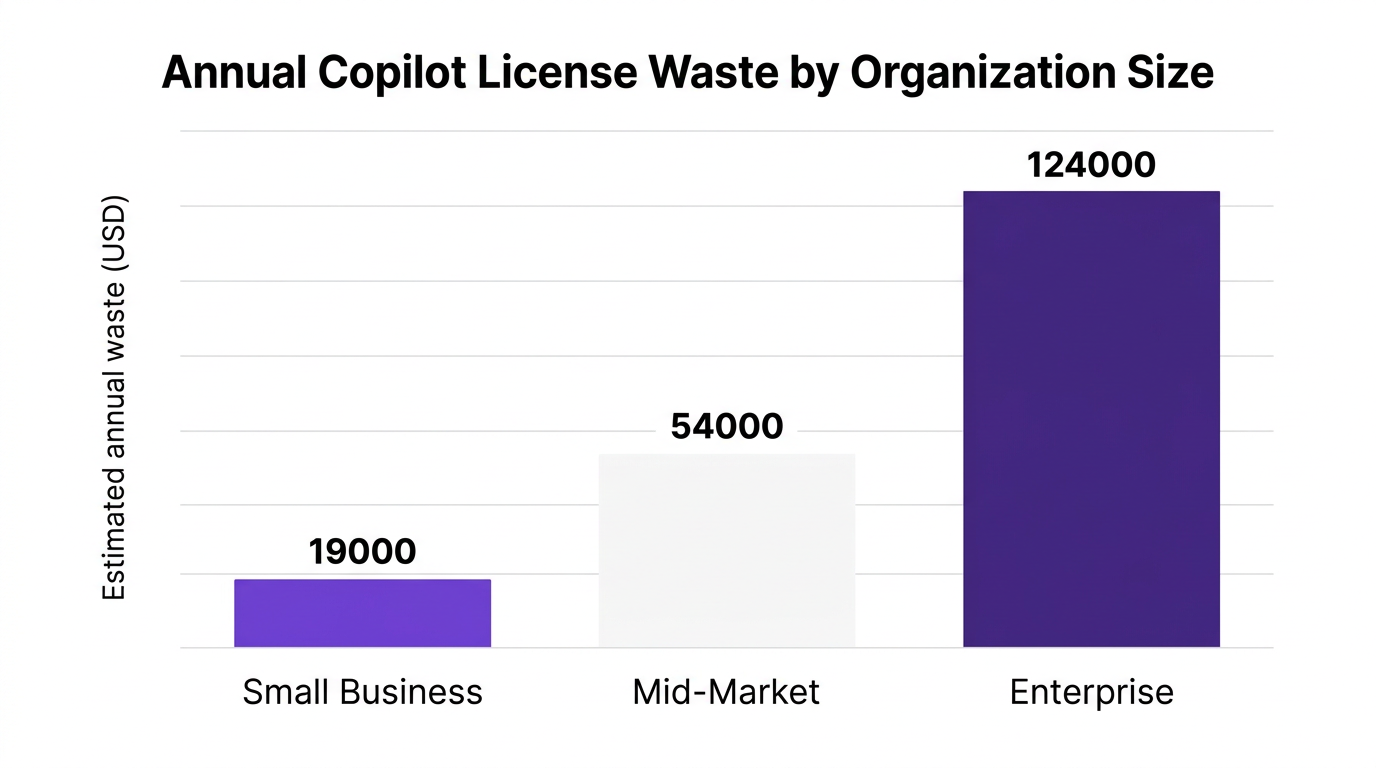
According to IDC in 2026, 49 percent of organizations found at least 10 percent of their Copilot licenses unused during a routine audit. At enterprise scale, Gartner estimates Copilot license waste averages $124,000 per year due to misassigned or underutilized seats. That is budget you could redirect to innovation, security, or headcount.
This guide breaks down how to spot Copilot license waste early, build a repeatable optimization motion, and connect the dots from usage to value before $30 per user turns into a seven-figure line item.
Copilot behaves more like a utility than a discrete app. Users touch it inside Word, Excel, Teams, Outlook, and PowerPoint, often without realizing they are using Copilot at all. That invisible usage pattern is exactly why copilot license waste grows quietly if you do not have clear visibility.
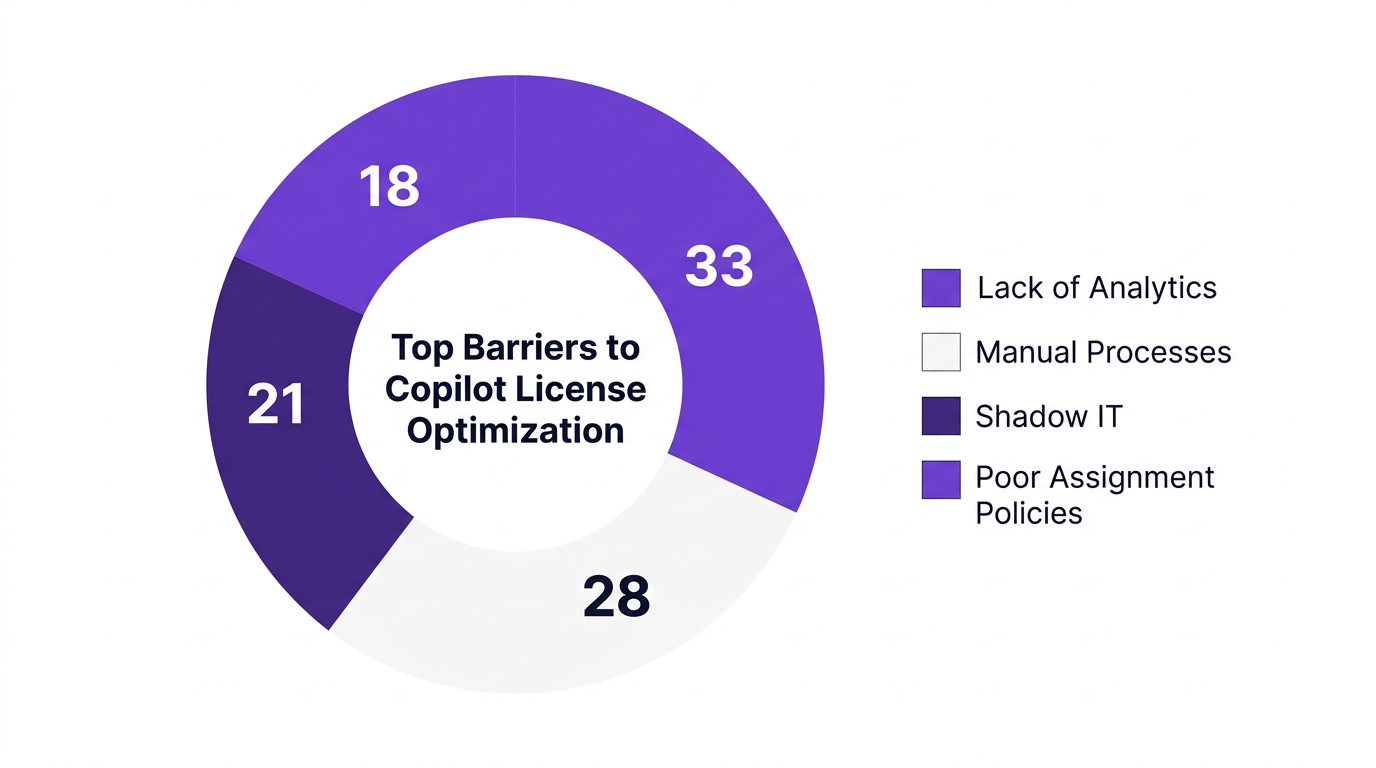
A Forrester 2026 analysis found that enterprises conducting monthly Copilot license audits reduced SaaS overprovisioning by 22 percent. Yet, in a 2026 survey reported by TechRepublic, 83 percent of IT leaders cited lack of Copilot utilization analytics as the top barrier to effective seat optimization.
Your finance team sees the spend, but your IT team cannot easily prove who is using what, how often, and at what value.
Think of Copilot like electricity in a factory. You would never leave machines running all night with no output. Yet that is what many organizations do with Copilot seats. To build an effective Microsoft copilot cost optimization strategy, you need to expose the most common waste patterns.
Routine audits show a surprising number of Copilot licenses sitting unassigned or assigned to inactive accounts. IDC in 2026 reported that 49 percent of organizations had at least 10 percent of Copilot seats unused.
These are classic low-hanging fruit. Every unassigned Copilot license is a direct $30 monthly hit with zero chance of value creation.
Look for:
Not all active accounts are equal. Some users are technically "enabled" but barely engage with Copilot. A 2026 study from a major HR software provider showed that automation tools often see median utilization below 40 percent without targeted enablement.
For Copilot, underutilization typically shows up as:
This is where m365 copilot adoption metrics such as prompts per day, tasks completed with AI assistance, and cross-app engagement become critical.
Many organizations start with a blanket Copilot rollout to knowledge workers, then refine from there. Without clear copilot license assignment best practices, the result is:
A Forrester 2026 expert described it simply: "Many organizations underestimate shadow Copilot assignments; without automated audits, 15 percent or more of licenses often go unused or underused." Role clarity is a governance problem, not just a technical one.
If Copilot is not integrated into your copilot user provisioning and deprovisioning workflows, every employee lifecycle event becomes a risk point.
Typical issues include:
Deloitte reported in 2026 that automated seat reclamation saved enterprises an average of $37 per user per month across Copilot and related SaaS tools. Automation is the difference between steady optimization and periodic fire drills.
When official Copilot rollout is slow or restrictive, teams sometimes adopt alternate AI tools on expense cards. That shadow AI spend can mask low Copilot value because users gravitate to whatever is easiest to access.
This creates a double hit:
The fix is copilot governance for enterprises: clear guardrails, approved tools, and usage analytics that connect activity to business outcomes.
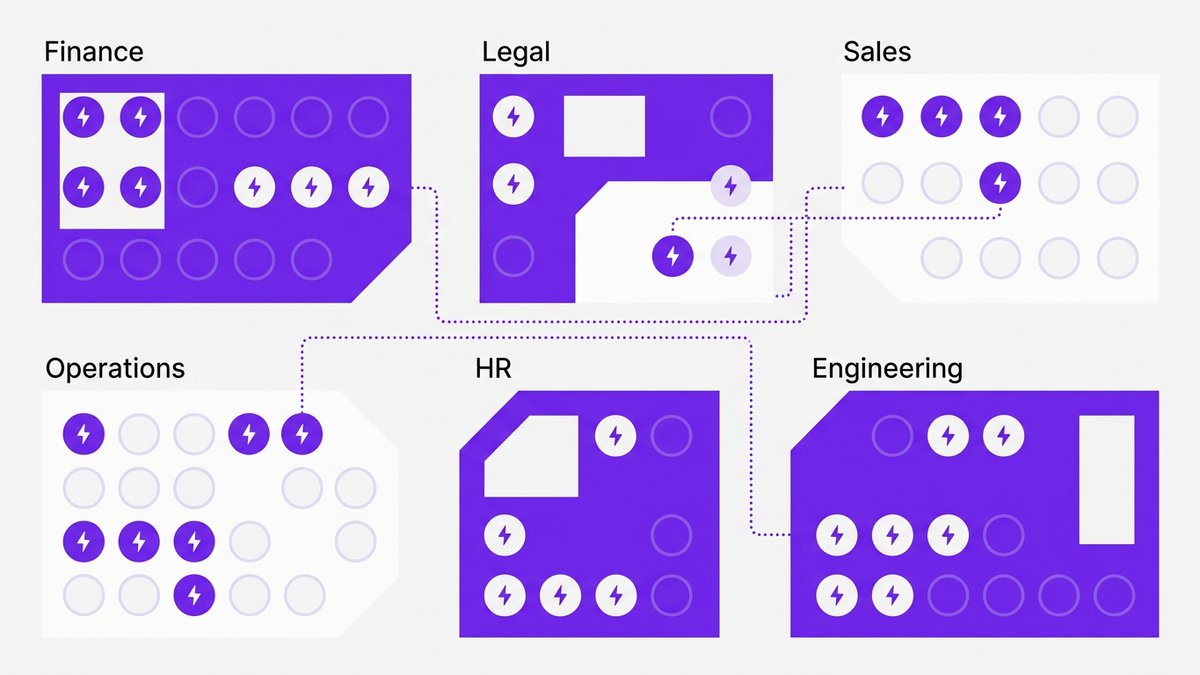
To avoid treating Microsoft 365 Copilot license optimization as a one-off project, you need a flywheel: a repeatable cycle that gets more effective as data improves. CloudNuro recommends a four-stage framework used by leading SaaS operations teams.
Start with a single source of truth for your Copilot estate. This should include:
This is the foundation for accurate copilot seat audit workflows. Many organizations combine Microsoft 365 admin data with SaaS management tools to enrich user context and cost centers.
Next, activate copilot adoption tracking. At a minimum, you want:
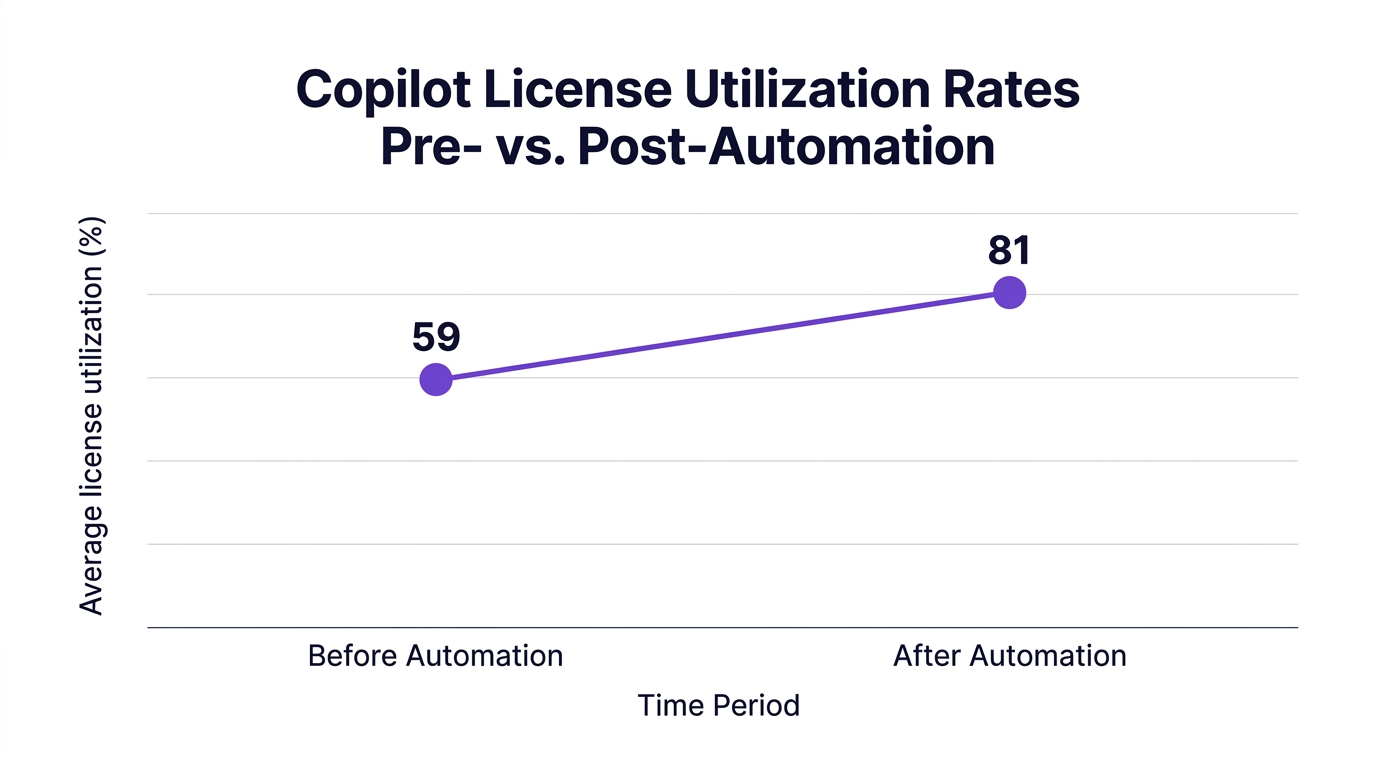
Forrester in 2026 reported that enterprises using automation increased average license utilization from 59 percent to 81 percent. Reliable copilot usage analytics turn intuition into measurable action.
With inventory and metrics in place, optimization becomes a recurring operational motion. Actions typically include:
Here, your copilot ROI calculator can be as simple as: incremental value per user compared to the $30 monthly cost. For example, if a financial analyst can produce one additional client-ready report per week, the value likely exceeds the license cost many times over.
Finally, governance locks in the gains:
PwC in 2026 noted that 68 percent of finance leaders prioritize Copilot cost containment due to rising AI SaaS budgets. Chargeback ties cost to behavior, which reduces unused Microsoft Copilot licenses over time.
Not all metrics are equal. If you only track active users, you will miss patterns that drive real copilot productivity gains and cost efficiency.
Here are the metrics that advanced teams use to reduce Microsoft 365 Copilot costs while protecting value.
These tell you if seats are being used at all.
Combined, these offer a nuanced view of copilot license utilization that goes beyond "on" versus "off".
This is where your copilot business value story comes to life.
Some organizations map Copilot usage to revenue or risk outcomes, for example, faster proposal turnaround or reduced compliance review cycles.
To operationalize microsoft copilot license management, finance leaders look for:
Gartner in 2026 estimated that average Copilot license waste per enterprise is $124,000 annually. When you track reclamation and reassignment as financial line items, those savings become visible and defensible.
Even sophisticated IT teams run into recurring pitfalls when managing Copilot at scale. Recognizing them early helps you design controls that work in the real world.
Many organizations treat Copilot like a version upgrade: deploy once, then move on. AI usage shifts rapidly as users learn, teams change, and Microsoft adds new capabilities.
Market data shows a shift to monthly and even weekly automated Copilot license audits among large enterprises. Standing still for even a quarter can create unexpected copilot license waste.
Manual spreadsheets cannot keep up with dynamic environments. According to Deloitte in 2026, automated seat reclamation drives average savings of $37 per user per month across AI SaaS tools.
Manual workflows fail when:
Some leaders worry that aggressive optimization will hurt adoption or stifle experimentation. This concern is valid.
Two points help resolve the tension:
Copilot sits at the intersection of IT, HR, and finance. Without clear owners, copilot seat management tasks fall through the cracks.
Mature organizations:
CloudNuro was purpose-built for enterprise-grade SaaS governance, so Copilot optimization fits naturally into its architecture. The platform combines Microsoft copilot license management, financial analytics, and automation to prevent waste before it compounds.
CloudNuro’s Microsoft 365 Custodian automates license and seat management for Microsoft 365 and Copilot.
Key capabilities include:
Combined, these features make copilot seat reclamation and assignment a continuous, policy-driven process instead of a quarterly scramble.
You can learn more about CloudNuro’s broader Microsoft capabilities in the detailed overview on Microsoft license optimization and the blog on how to optimize Microsoft 365 licenses.
Most organizations run Copilot alongside dozens or hundreds of other SaaS and AI tools. CloudNuro’s Unified Cloud Custodian extends visibility across 400 plus SaaS applications, enabling:
This is where cloud cost governance and saas spend reduction strategies converge. Copilot is managed as part of a broader AI productivity budget instead of an isolated project.
CloudNuro customers often start with a free Microsoft Office 365 assessment before expanding into full SaaS management. The Microsoft 365 optimization case study available at this link illustrates typical savings patterns.
Data alone does not change behavior. CloudNuro’s FinOps Services help enterprises translate insights into financial and governance outcomes, including:
A 2026 Gartner case study highlighted a Fortune 500 financial institution that deployed automated discovery and audit workflows across Microsoft 365 Copilot licenses, reclaiming 4,100 unused seats in one quarter and saving $1.48 million annually. Outcomes like this are achievable when technology and FinOps discipline work in tandem.
You can explore CloudNuro’s dedicated FinOps services to see how this translates into your environment.
Start with a unified inventory of all Copilot licenses and their assignment status, then overlay m365 copilot adoption metrics such as active users, prompts per user, and cross-app usage. Automated alerts on unassigned or inactive seats, combined with periodic copilot seat audit routines, help detect waste before it becomes a budget issue.
Tools that integrate Microsoft 365 admin data with richer user and cost-center context provide best results. CloudNuro’s Microsoft 365 Custodian is designed for this kind of continuous monitoring.
Effective copilot seat reclamation policies typically define thresholds for reclaiming licenses based on inactivity or low usage. Seats are then reallocated to roles or teams that have strong Copilot use cases, such as analysts, legal, sales, and operations leaders.
Embedding Copilot in standard copilot user provisioning and offboarding workflows ensures seats follow employees through role changes and termination events. Many organizations also maintain a small innovation pool for experimentation while enforcing tight policies elsewhere.
IT and finance teams should treat usage data as a copilot ROI calculator. For example, if a department shows high prompts per user, cross-app usage, and strong qualitative feedback, that department is a good candidate for additional investment.
Conversely, departments with low copilot adoption tracking metrics may need targeted enablement, training, or seat reduction. By correlating usage with business outcomes such as time saved, cycle-time reduction, or revenue impact, teams can defend spend and plan renewals with confidence.
Common pitfalls include treating Copilot as a one-time rollout instead of a continuous program, relying on manual reporting, and lacking clear ownership between IT and finance. Another frequent issue is failing to align copilot license assignment best practices with actual roles and workflows.
Without robust microsoft copilot license management processes and regular automation-driven audits, organizations quickly accumulate unassigned, underutilized, or misaligned seats that inflate costs.
Gartner in 2026 estimated that average Copilot license waste per enterprise is $124,000 annually, while Deloitte reported $37 per user per month in savings from automated seat reclamation across Copilot and similar AI tools.
In practice, large organizations often uncover six- or seven-figure savings in the first year of rigorous saas license optimization and AI-specific microsoft copilot cost optimization programs. Those funds can be redirected to additional AI initiatives, security, or headcount.
Key capabilities include real-time inventory synchronization, usage telemetry ingestion, policy-based seat reclamation, role-aware assignment rules, and visual dashboards that show copilot license utilization trends.
Platforms such as CloudNuro provide microsoft 365 admin controls integrated with financial analytics and workflow automation, turning Copilot management into a predictable process instead of a manual chore.
AI is no longer a discretionary experiment. It is a material line item in your technology budget. Microsoft 365 Copilot license optimization ensures every $30 seat is assigned to the right user, used consistently, and connected to measurable business outcomes.
Organizations that pair accurate utilization data with automation and governance frameworks consistently reduce Microsoft 365 Copilot costs while expanding AI value. The faster you establish this discipline, the less waste compounds and the stronger your AI business case becomes.
CloudNuro gives CIOs, IT, and finance leaders the visibility, automation, and financial accountability required to treat Copilot like the strategic utility it is, not just another SKU. To see what this could look like in your environment, consider a Microsoft 365 focused review or join an upcoming session, such as the webinar on Microsoft 365 license optimization.
CloudNuro is a leader in Enterprise SaaS Management Platforms, providing enterprises with unmatched visibility, governance, and cost optimization. Recognized twice in a row in the SaaS Management Platforms category and named a Leader in the SoftwareReviews Data Quadrant, CloudNuro is trusted by global enterprises and government agencies to bring financial discipline to SaaS, cloud, and AI.
Trusted by enterprises such as Konica Minolta and Federal Signal, CloudNuro provides centralized SaaS inventory, license optimization, and renewal management along with advanced cost allocation and chargeback, giving IT and Finance leaders the visibility, control, and cost-conscious culture needed to drive financial discipline.
Request a no cost, no obligation free assessment —just 15 minutes to savings!
Get StartedMicrosoft 365 Copilot promises substantial productivity gains, but at $30 per user every month, waste accumulates quickly if licenses are not managed with rigor. Effective Microsoft 365 Copilot license optimization is now a core priority for CIOs, IT finance, and SaaS operations leaders who need to prove AI ROI, not just fund experimentation.
According to IDC in 2026, 49 percent of organizations found at least 10 percent of their Copilot licenses unused during a routine audit. At enterprise scale, Gartner estimates Copilot license waste averages $124,000 per year due to misassigned or underutilized seats. That is budget you could redirect to innovation, security, or headcount.
This guide breaks down how to spot Copilot license waste early, build a repeatable optimization motion, and connect the dots from usage to value before $30 per user turns into a seven-figure line item.
Copilot behaves more like a utility than a discrete app. Users touch it inside Word, Excel, Teams, Outlook, and PowerPoint, often without realizing they are using Copilot at all. That invisible usage pattern is exactly why copilot license waste grows quietly if you do not have clear visibility.
A Forrester 2026 analysis found that enterprises conducting monthly Copilot license audits reduced SaaS overprovisioning by 22 percent. Yet, in a 2026 survey reported by TechRepublic, 83 percent of IT leaders cited lack of Copilot utilization analytics as the top barrier to effective seat optimization.
Your finance team sees the spend, but your IT team cannot easily prove who is using what, how often, and at what value.
Think of Copilot like electricity in a factory. You would never leave machines running all night with no output. Yet that is what many organizations do with Copilot seats. To build an effective Microsoft copilot cost optimization strategy, you need to expose the most common waste patterns.
Routine audits show a surprising number of Copilot licenses sitting unassigned or assigned to inactive accounts. IDC in 2026 reported that 49 percent of organizations had at least 10 percent of Copilot seats unused.
These are classic low-hanging fruit. Every unassigned Copilot license is a direct $30 monthly hit with zero chance of value creation.
Look for:
Not all active accounts are equal. Some users are technically "enabled" but barely engage with Copilot. A 2026 study from a major HR software provider showed that automation tools often see median utilization below 40 percent without targeted enablement.
For Copilot, underutilization typically shows up as:
This is where m365 copilot adoption metrics such as prompts per day, tasks completed with AI assistance, and cross-app engagement become critical.
Many organizations start with a blanket Copilot rollout to knowledge workers, then refine from there. Without clear copilot license assignment best practices, the result is:
A Forrester 2026 expert described it simply: "Many organizations underestimate shadow Copilot assignments; without automated audits, 15 percent or more of licenses often go unused or underused." Role clarity is a governance problem, not just a technical one.
If Copilot is not integrated into your copilot user provisioning and deprovisioning workflows, every employee lifecycle event becomes a risk point.
Typical issues include:
Deloitte reported in 2026 that automated seat reclamation saved enterprises an average of $37 per user per month across Copilot and related SaaS tools. Automation is the difference between steady optimization and periodic fire drills.
When official Copilot rollout is slow or restrictive, teams sometimes adopt alternate AI tools on expense cards. That shadow AI spend can mask low Copilot value because users gravitate to whatever is easiest to access.
This creates a double hit:
The fix is copilot governance for enterprises: clear guardrails, approved tools, and usage analytics that connect activity to business outcomes.
To avoid treating Microsoft 365 Copilot license optimization as a one-off project, you need a flywheel: a repeatable cycle that gets more effective as data improves. CloudNuro recommends a four-stage framework used by leading SaaS operations teams.
Start with a single source of truth for your Copilot estate. This should include:
This is the foundation for accurate copilot seat audit workflows. Many organizations combine Microsoft 365 admin data with SaaS management tools to enrich user context and cost centers.
Next, activate copilot adoption tracking. At a minimum, you want:
Forrester in 2026 reported that enterprises using automation increased average license utilization from 59 percent to 81 percent. Reliable copilot usage analytics turn intuition into measurable action.
With inventory and metrics in place, optimization becomes a recurring operational motion. Actions typically include:
Here, your copilot ROI calculator can be as simple as: incremental value per user compared to the $30 monthly cost. For example, if a financial analyst can produce one additional client-ready report per week, the value likely exceeds the license cost many times over.
Finally, governance locks in the gains:
PwC in 2026 noted that 68 percent of finance leaders prioritize Copilot cost containment due to rising AI SaaS budgets. Chargeback ties cost to behavior, which reduces unused Microsoft Copilot licenses over time.
Not all metrics are equal. If you only track active users, you will miss patterns that drive real copilot productivity gains and cost efficiency.
Here are the metrics that advanced teams use to reduce Microsoft 365 Copilot costs while protecting value.
These tell you if seats are being used at all.
Combined, these offer a nuanced view of copilot license utilization that goes beyond "on" versus "off".
This is where your copilot business value story comes to life.
Some organizations map Copilot usage to revenue or risk outcomes, for example, faster proposal turnaround or reduced compliance review cycles.
To operationalize microsoft copilot license management, finance leaders look for:
Gartner in 2026 estimated that average Copilot license waste per enterprise is $124,000 annually. When you track reclamation and reassignment as financial line items, those savings become visible and defensible.
Even sophisticated IT teams run into recurring pitfalls when managing Copilot at scale. Recognizing them early helps you design controls that work in the real world.
Many organizations treat Copilot like a version upgrade: deploy once, then move on. AI usage shifts rapidly as users learn, teams change, and Microsoft adds new capabilities.
Market data shows a shift to monthly and even weekly automated Copilot license audits among large enterprises. Standing still for even a quarter can create unexpected copilot license waste.
Manual spreadsheets cannot keep up with dynamic environments. According to Deloitte in 2026, automated seat reclamation drives average savings of $37 per user per month across AI SaaS tools.
Manual workflows fail when:
Some leaders worry that aggressive optimization will hurt adoption or stifle experimentation. This concern is valid.
Two points help resolve the tension:
Copilot sits at the intersection of IT, HR, and finance. Without clear owners, copilot seat management tasks fall through the cracks.
Mature organizations:
CloudNuro was purpose-built for enterprise-grade SaaS governance, so Copilot optimization fits naturally into its architecture. The platform combines Microsoft copilot license management, financial analytics, and automation to prevent waste before it compounds.
CloudNuro’s Microsoft 365 Custodian automates license and seat management for Microsoft 365 and Copilot.
Key capabilities include:
Combined, these features make copilot seat reclamation and assignment a continuous, policy-driven process instead of a quarterly scramble.
You can learn more about CloudNuro’s broader Microsoft capabilities in the detailed overview on Microsoft license optimization and the blog on how to optimize Microsoft 365 licenses.
Most organizations run Copilot alongside dozens or hundreds of other SaaS and AI tools. CloudNuro’s Unified Cloud Custodian extends visibility across 400 plus SaaS applications, enabling:
This is where cloud cost governance and saas spend reduction strategies converge. Copilot is managed as part of a broader AI productivity budget instead of an isolated project.
CloudNuro customers often start with a free Microsoft Office 365 assessment before expanding into full SaaS management. The Microsoft 365 optimization case study available at this link illustrates typical savings patterns.
Data alone does not change behavior. CloudNuro’s FinOps Services help enterprises translate insights into financial and governance outcomes, including:
A 2026 Gartner case study highlighted a Fortune 500 financial institution that deployed automated discovery and audit workflows across Microsoft 365 Copilot licenses, reclaiming 4,100 unused seats in one quarter and saving $1.48 million annually. Outcomes like this are achievable when technology and FinOps discipline work in tandem.
You can explore CloudNuro’s dedicated FinOps services to see how this translates into your environment.
Start with a unified inventory of all Copilot licenses and their assignment status, then overlay m365 copilot adoption metrics such as active users, prompts per user, and cross-app usage. Automated alerts on unassigned or inactive seats, combined with periodic copilot seat audit routines, help detect waste before it becomes a budget issue.
Tools that integrate Microsoft 365 admin data with richer user and cost-center context provide best results. CloudNuro’s Microsoft 365 Custodian is designed for this kind of continuous monitoring.
Effective copilot seat reclamation policies typically define thresholds for reclaiming licenses based on inactivity or low usage. Seats are then reallocated to roles or teams that have strong Copilot use cases, such as analysts, legal, sales, and operations leaders.
Embedding Copilot in standard copilot user provisioning and offboarding workflows ensures seats follow employees through role changes and termination events. Many organizations also maintain a small innovation pool for experimentation while enforcing tight policies elsewhere.
IT and finance teams should treat usage data as a copilot ROI calculator. For example, if a department shows high prompts per user, cross-app usage, and strong qualitative feedback, that department is a good candidate for additional investment.
Conversely, departments with low copilot adoption tracking metrics may need targeted enablement, training, or seat reduction. By correlating usage with business outcomes such as time saved, cycle-time reduction, or revenue impact, teams can defend spend and plan renewals with confidence.
Common pitfalls include treating Copilot as a one-time rollout instead of a continuous program, relying on manual reporting, and lacking clear ownership between IT and finance. Another frequent issue is failing to align copilot license assignment best practices with actual roles and workflows.
Without robust microsoft copilot license management processes and regular automation-driven audits, organizations quickly accumulate unassigned, underutilized, or misaligned seats that inflate costs.
Gartner in 2026 estimated that average Copilot license waste per enterprise is $124,000 annually, while Deloitte reported $37 per user per month in savings from automated seat reclamation across Copilot and similar AI tools.
In practice, large organizations often uncover six- or seven-figure savings in the first year of rigorous saas license optimization and AI-specific microsoft copilot cost optimization programs. Those funds can be redirected to additional AI initiatives, security, or headcount.
Key capabilities include real-time inventory synchronization, usage telemetry ingestion, policy-based seat reclamation, role-aware assignment rules, and visual dashboards that show copilot license utilization trends.
Platforms such as CloudNuro provide microsoft 365 admin controls integrated with financial analytics and workflow automation, turning Copilot management into a predictable process instead of a manual chore.
AI is no longer a discretionary experiment. It is a material line item in your technology budget. Microsoft 365 Copilot license optimization ensures every $30 seat is assigned to the right user, used consistently, and connected to measurable business outcomes.
Organizations that pair accurate utilization data with automation and governance frameworks consistently reduce Microsoft 365 Copilot costs while expanding AI value. The faster you establish this discipline, the less waste compounds and the stronger your AI business case becomes.
CloudNuro gives CIOs, IT, and finance leaders the visibility, automation, and financial accountability required to treat Copilot like the strategic utility it is, not just another SKU. To see what this could look like in your environment, consider a Microsoft 365 focused review or join an upcoming session, such as the webinar on Microsoft 365 license optimization.
CloudNuro is a leader in Enterprise SaaS Management Platforms, providing enterprises with unmatched visibility, governance, and cost optimization. Recognized twice in a row in the SaaS Management Platforms category and named a Leader in the SoftwareReviews Data Quadrant, CloudNuro is trusted by global enterprises and government agencies to bring financial discipline to SaaS, cloud, and AI.
Trusted by enterprises such as Konica Minolta and Federal Signal, CloudNuro provides centralized SaaS inventory, license optimization, and renewal management along with advanced cost allocation and chargeback, giving IT and Finance leaders the visibility, control, and cost-conscious culture needed to drive financial discipline.
Request a no cost, no obligation free assessment - just 15 minutes to savings!
Get StartedWe're offering complimentary ServiceNow license assessments to only 25 enterprises this quarter who want to unlock immediate savings without disrupting operations.
Get Free AssessmentGet Started




CloudNuro Corp
1755 Park St. Suite 207
Naperville, IL 60563
Phone : +1-630-277-9470
Email: info@cloudnuro.com





.webp)

Recognized Leader in SaaS Management Platforms by Info-Tech SoftwareReviews
.png)


.svg)