

Sign Up
Thank you for Submitting!

Organizations are investing more than ever in modern analytics, yet optimizing license spend on tools like Power BI, Fabric, and the broader Microsoft 365 stack has never been more complex. If your IT, finance, or data teams need a clear, actionable Power BI license comparison, complete with ROI, feature breakdowns, and a view into the next wave of licensing models, you are in the right place.
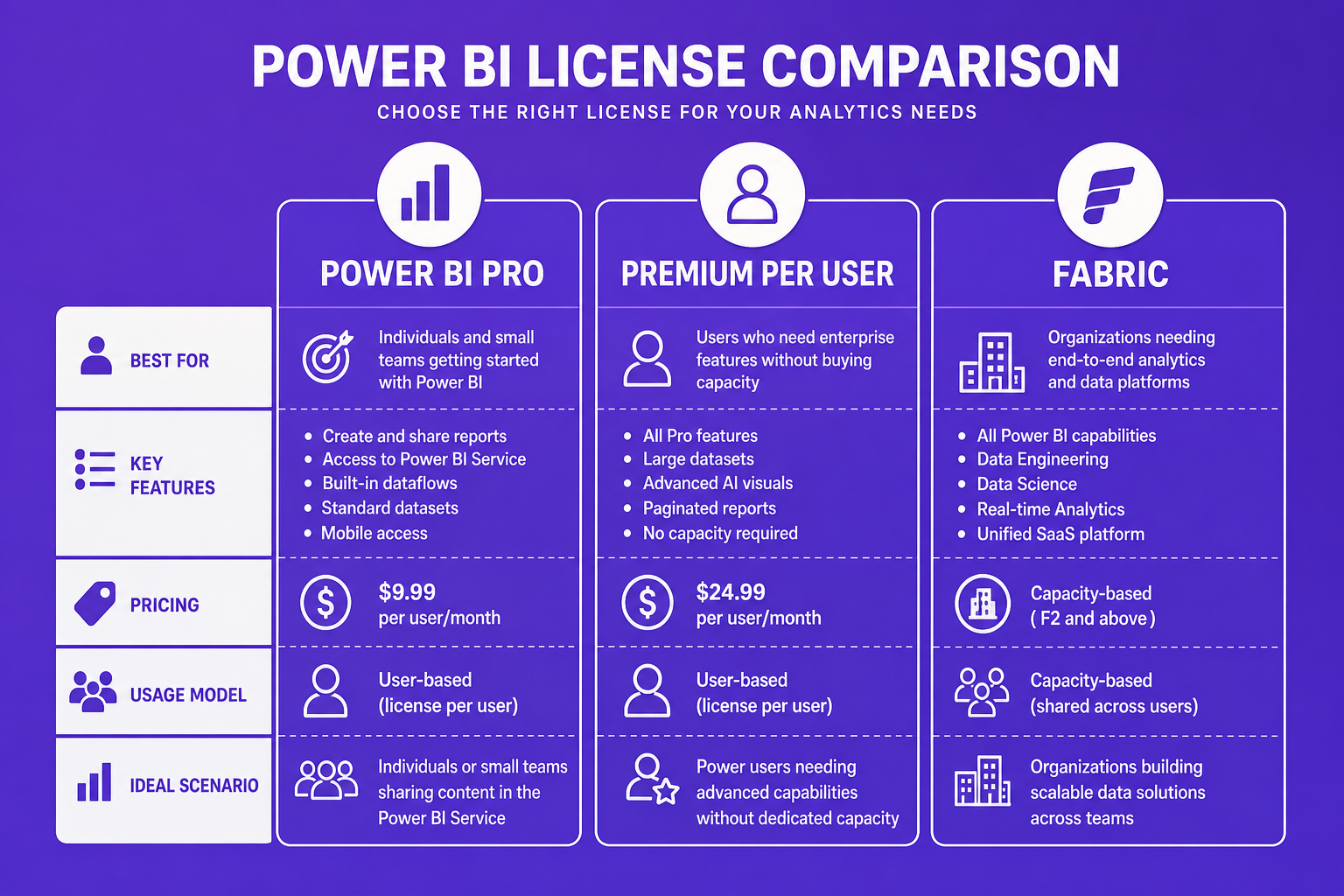
This guide walks you through:
Power BI’s licensing framework now sits within a broader analytics and data ecosystem, with licenses aligning by:
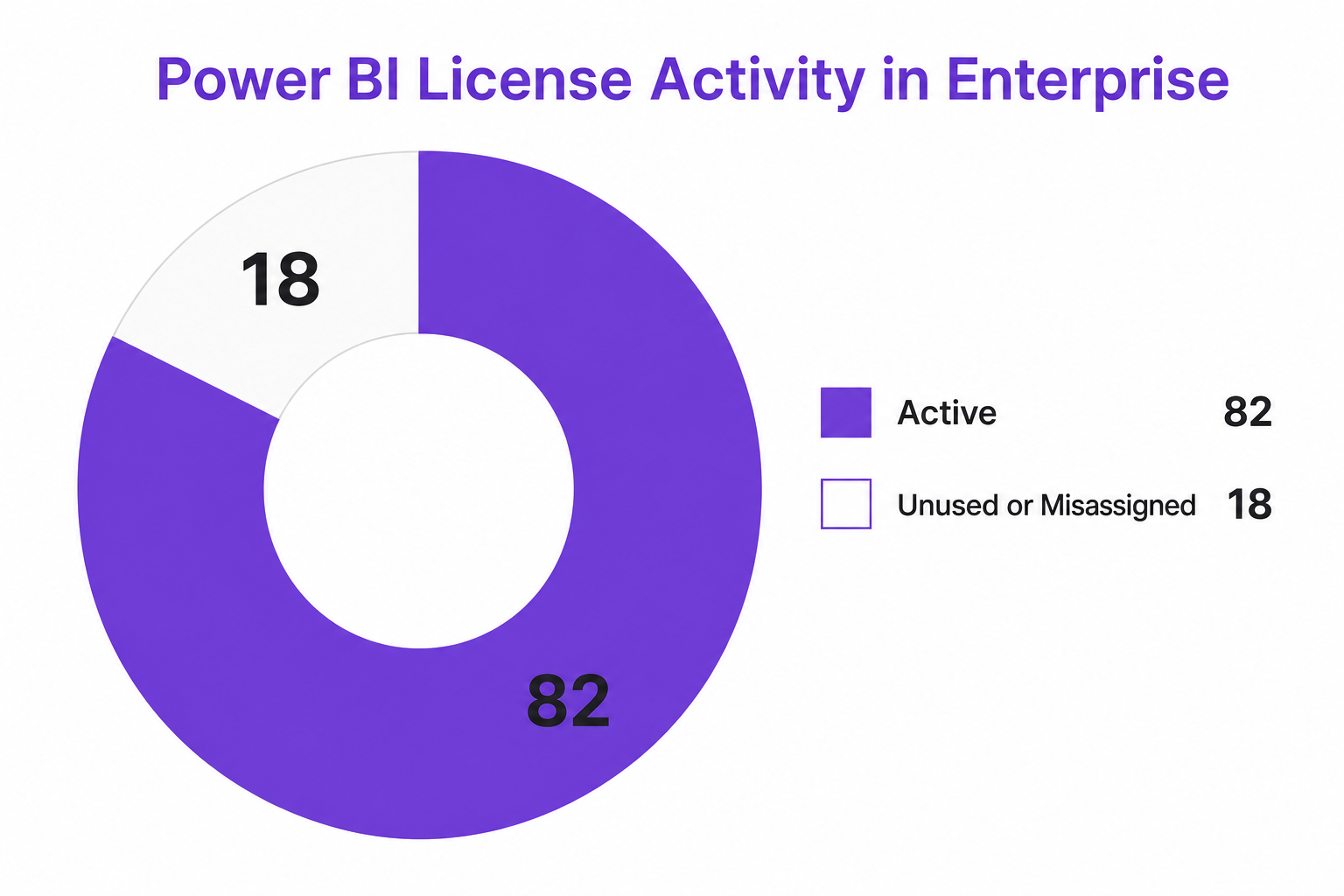
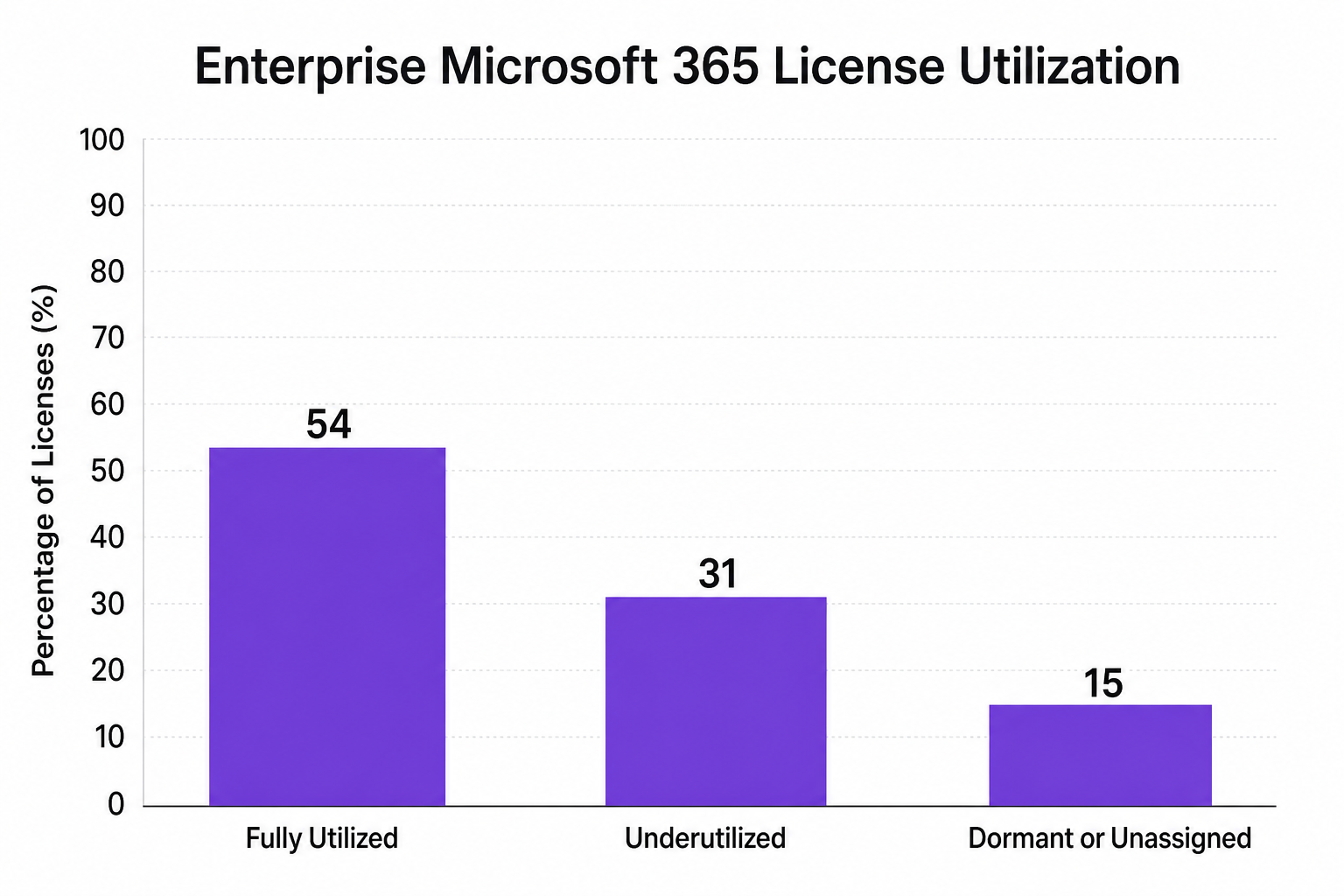
But the best fit is not always obvious. Organizational size, user mix, compliance, and governance shape the right answer. Here is a visual snapshot of real enterprise license activity:
| License Type | Suitable For | Monthly Price* | Dataset Limit | Max Refreshes/Day | Sharing Options | View-Only Users |
|---|---|---|---|---|---|---|
| Pro | Small teams, core creators | $14/user | 1 GB | 8 | Share within org | All need Pro |
| Premium Per User | Power users, larger teams | $24/user | 100 GB | 48 | Share org-wide, advanced pipeline | All need PPU |
| Fabric F2+ | Enterprise, hybrid models | $263+ per capacity | Unlimited | Unlimited | Unlimited, workspace-wide, supports other Fabric workloads | Unlimited, free* |
*Approximate 2026 pricing; Fabric allows unlimited free view consumption with F64 and above
Key takeaways:
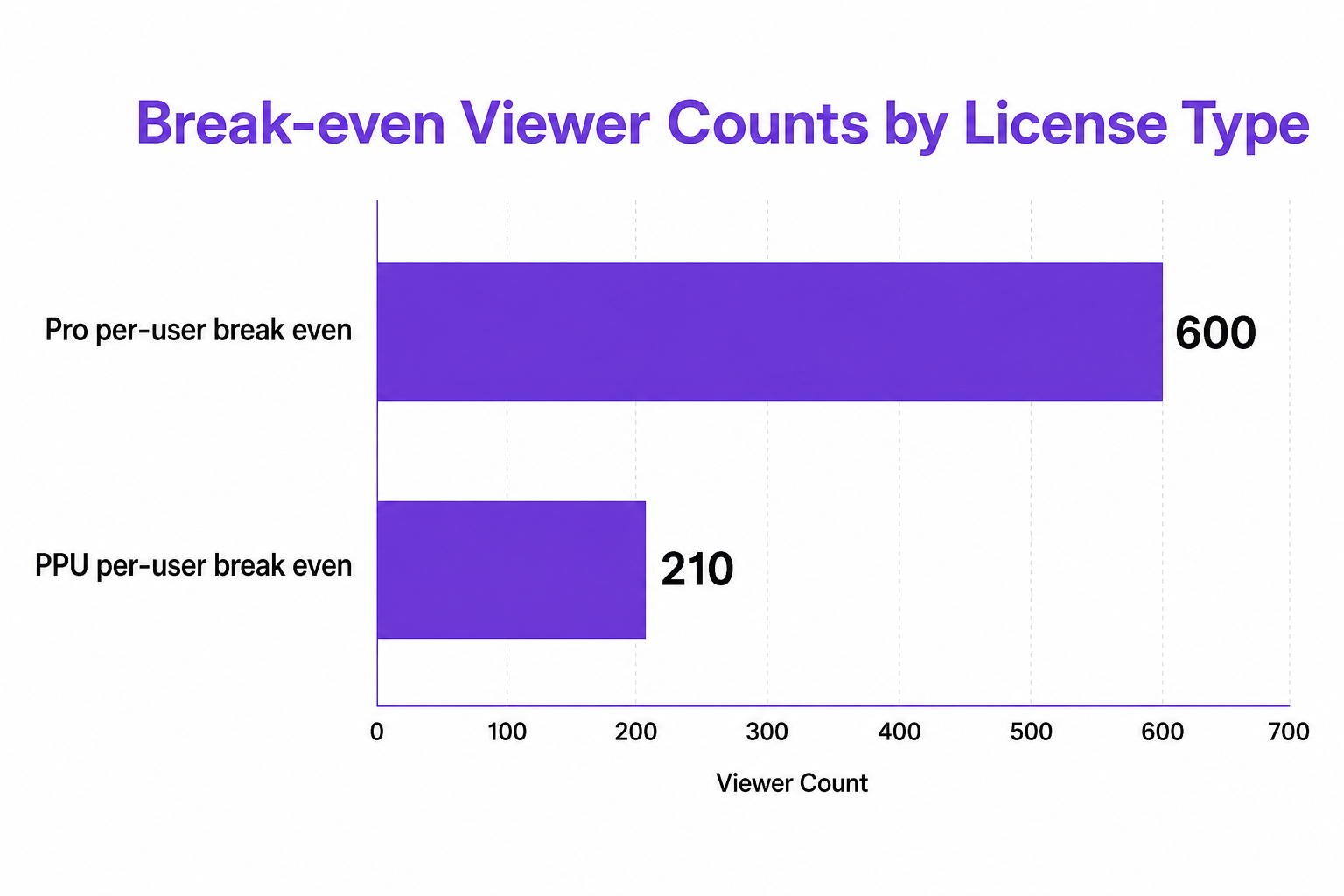
Modern enterprises face waste and surprises from dual-running costs, orphaned admin licenses, and misaligned capacity provisioning. How do you prevent this?
Evidence from CloudNuro deployments:
Stick with Power BI Pro or Premium Per User. Simplicity and cost predictability rule, with little operational lift.
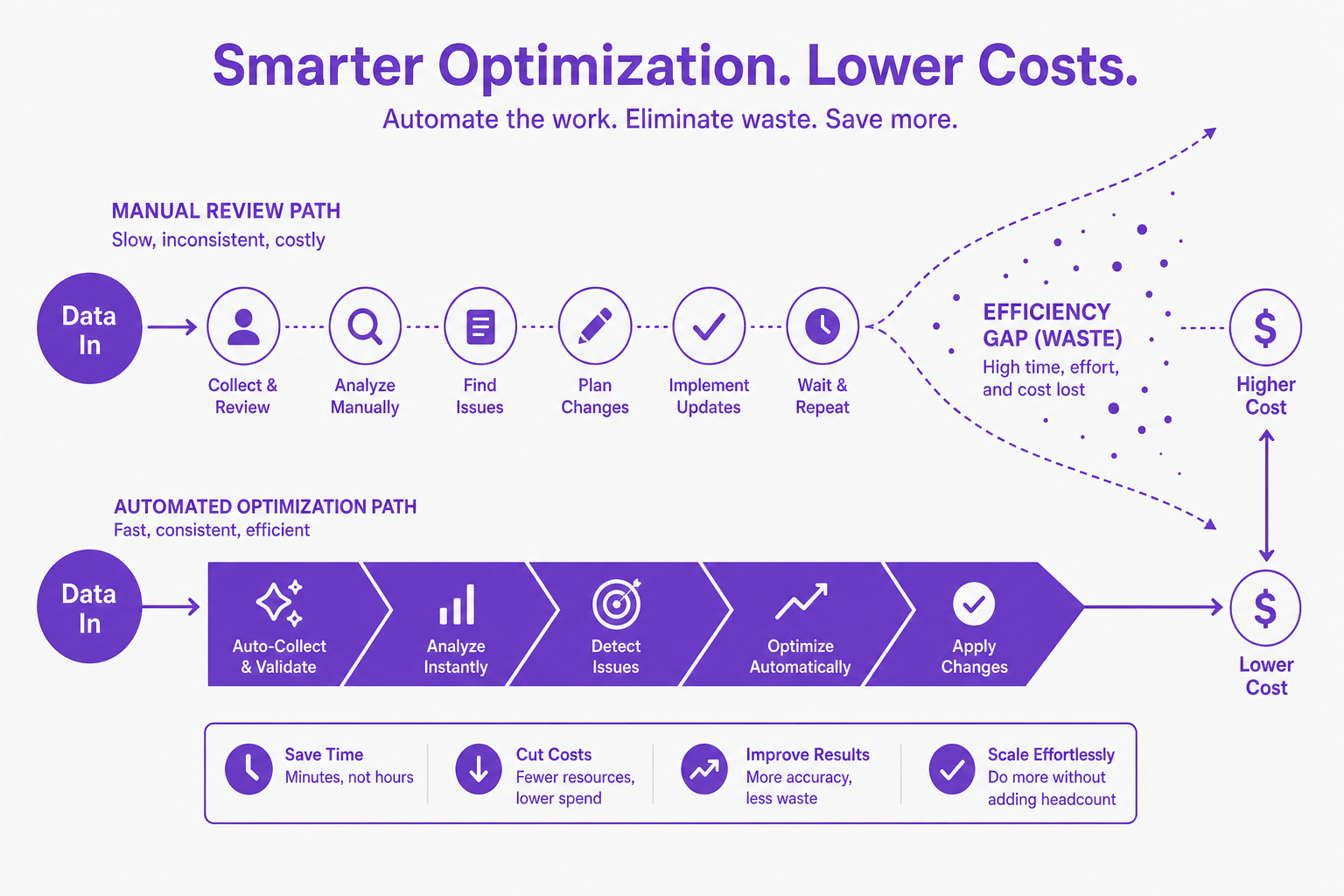
CloudNuro’s Microsoft 365 Custodian platform bridges the gap between license assignment, usage insights, and financial discipline:
With CloudNuro, organizations eliminate dual-running costs, automate compliance, and achieve cost-conscious, policy-driven SaaS management. A healthcare provider was able to reclaim over 7,000 unused licenses and realize $2.3M in annual cost savings within a year, evidence that robust governance pays off at scale.
What is the difference between Power BI Pro and Power BI Premium Per User?
Power BI Pro is designed for typical creators and users at $14/user/month, supporting smaller datasets and basic sharing. Premium Per User ($24/user/month) unlocks advanced features, large datasets (up to 100 GB), and more refreshes, but every user who consumes a PPU report also requires a PPU license.
How much does Power BI Premium Per User (PPU) cost?
PPU is $24 per user per month. Cost may increase if your consumption patterns require capacity-based scaling or if users need to consume content at higher concurrency or volume levels.
Is Power BI PPU worth it compared to other licenses?
For teams with fewer than 100.200 users needing premium features, PPU is substantially easier to manage than capacity licenses and offers rapid time to value. After that threshold, capacity-based licenses often deliver superior ROI.
Can you compare Power BI PPU vs Fabric licenses?
PPU gives premium features per user, but still charges for every report viewer. Fabric licensing charges per capacity, allows unlimited viewing (F64 and above), and includes advanced engineering and analytics workloads. For hybrid use cases (data engineering plus analytics) or many viewers, Fabric almost always wins.
What is the best Power BI license for my organization?
It depends! Small orgs gain most from per-user licenses. Mid-size and large companies with lots of report viewers or advanced workloads see rapid ROI from Fabric’s capacity-based approach. Use tools like CloudNuro to rightsize and model costs based on real user patterns.
A Power BI license comparison is more relevant than ever as analytics platforms evolve. The ideal option balances cost, compliance, and growth. While Pro and PPU licenses serve smaller teams and highly engaged power users, Fabric supports true enterprise scale with unmatched flexibility. But the difference between a great analytics ROI and ongoing waste lies in real-time governance, automated optimization, and continuous visibility, everything CloudNuro’s Microsoft 365 Custodian is built to provide.
Ready to find hidden savings and adopt licensing that fits the shape of your business? Explore CloudNuro’s unified governance, automated rightsizing, and gain the clarity to act.
CloudNuro is a leader in Enterprise AI Adoption Management, providing enterprises with unmatched visibility, governance, and cost optimization. Recognized twice in a row in the SaaS Management Platforms category and named a Leader in the SoftwareReviews Data Quadrant, CloudNuro is trusted by global enterprises and government agencies to bring financial discipline to SaaS, cloud, and AI. Trusted by enterprises, CloudNuro provides centralized SaaS inventory, license optimization, and renewal management along with advanced cost allocation and chargeback, giving IT and Finance leaders the visibility, control, and cost-conscious culture needed to drive financial discipline. Request a Demo | Get Free Savings | Explore Product
Request a no cost, no obligation free assessment —just 15 minutes to savings!
Get StartedOrganizations are investing more than ever in modern analytics, yet optimizing license spend on tools like Power BI, Fabric, and the broader Microsoft 365 stack has never been more complex. If your IT, finance, or data teams need a clear, actionable Power BI license comparison, complete with ROI, feature breakdowns, and a view into the next wave of licensing models, you are in the right place.
This guide walks you through:
Power BI’s licensing framework now sits within a broader analytics and data ecosystem, with licenses aligning by:
But the best fit is not always obvious. Organizational size, user mix, compliance, and governance shape the right answer. Here is a visual snapshot of real enterprise license activity:
| License Type | Suitable For | Monthly Price* | Dataset Limit | Max Refreshes/Day | Sharing Options | View-Only Users |
|---|---|---|---|---|---|---|
| Pro | Small teams, core creators | $14/user | 1 GB | 8 | Share within org | All need Pro |
| Premium Per User | Power users, larger teams | $24/user | 100 GB | 48 | Share org-wide, advanced pipeline | All need PPU |
| Fabric F2+ | Enterprise, hybrid models | $263+ per capacity | Unlimited | Unlimited | Unlimited, workspace-wide, supports other Fabric workloads | Unlimited, free* |
*Approximate 2026 pricing; Fabric allows unlimited free view consumption with F64 and above
Key takeaways:
Modern enterprises face waste and surprises from dual-running costs, orphaned admin licenses, and misaligned capacity provisioning. How do you prevent this?
Evidence from CloudNuro deployments:
Stick with Power BI Pro or Premium Per User. Simplicity and cost predictability rule, with little operational lift.
CloudNuro’s Microsoft 365 Custodian platform bridges the gap between license assignment, usage insights, and financial discipline:
With CloudNuro, organizations eliminate dual-running costs, automate compliance, and achieve cost-conscious, policy-driven SaaS management. A healthcare provider was able to reclaim over 7,000 unused licenses and realize $2.3M in annual cost savings within a year, evidence that robust governance pays off at scale.
What is the difference between Power BI Pro and Power BI Premium Per User?
Power BI Pro is designed for typical creators and users at $14/user/month, supporting smaller datasets and basic sharing. Premium Per User ($24/user/month) unlocks advanced features, large datasets (up to 100 GB), and more refreshes, but every user who consumes a PPU report also requires a PPU license.
How much does Power BI Premium Per User (PPU) cost?
PPU is $24 per user per month. Cost may increase if your consumption patterns require capacity-based scaling or if users need to consume content at higher concurrency or volume levels.
Is Power BI PPU worth it compared to other licenses?
For teams with fewer than 100.200 users needing premium features, PPU is substantially easier to manage than capacity licenses and offers rapid time to value. After that threshold, capacity-based licenses often deliver superior ROI.
Can you compare Power BI PPU vs Fabric licenses?
PPU gives premium features per user, but still charges for every report viewer. Fabric licensing charges per capacity, allows unlimited viewing (F64 and above), and includes advanced engineering and analytics workloads. For hybrid use cases (data engineering plus analytics) or many viewers, Fabric almost always wins.
What is the best Power BI license for my organization?
It depends! Small orgs gain most from per-user licenses. Mid-size and large companies with lots of report viewers or advanced workloads see rapid ROI from Fabric’s capacity-based approach. Use tools like CloudNuro to rightsize and model costs based on real user patterns.
A Power BI license comparison is more relevant than ever as analytics platforms evolve. The ideal option balances cost, compliance, and growth. While Pro and PPU licenses serve smaller teams and highly engaged power users, Fabric supports true enterprise scale with unmatched flexibility. But the difference between a great analytics ROI and ongoing waste lies in real-time governance, automated optimization, and continuous visibility, everything CloudNuro’s Microsoft 365 Custodian is built to provide.
Ready to find hidden savings and adopt licensing that fits the shape of your business? Explore CloudNuro’s unified governance, automated rightsizing, and gain the clarity to act.
CloudNuro is a leader in Enterprise AI Adoption Management, providing enterprises with unmatched visibility, governance, and cost optimization. Recognized twice in a row in the SaaS Management Platforms category and named a Leader in the SoftwareReviews Data Quadrant, CloudNuro is trusted by global enterprises and government agencies to bring financial discipline to SaaS, cloud, and AI. Trusted by enterprises, CloudNuro provides centralized SaaS inventory, license optimization, and renewal management along with advanced cost allocation and chargeback, giving IT and Finance leaders the visibility, control, and cost-conscious culture needed to drive financial discipline. Request a Demo | Get Free Savings | Explore Product
Request a no cost, no obligation free assessment - just 15 minutes to savings!
Get StartedWe're offering complimentary ServiceNow license assessments to only 25 enterprises this quarter who want to unlock immediate savings without disrupting operations.
Get Free AssessmentGet Started




CloudNuro Corp
1755 Park St. Suite 207
Naperville, IL 60563
Phone : +1-630-277-9470
Email: info@cloudnuro.com





.webp)

Recognized Leader in SaaS Management Platforms by Info-Tech SoftwareReviews


.svg)