

Sign Up
Thank you for Submitting!
Power BI licensing has quietly become one of the most expensive line items in many analytics budgets. The shift from Pro, to Premium Per User (PPU), and now to Fabric Capacity has created powerful options, but also serious risk of double-paying for the same workloads.
Gartner projects that organizations using Power BI will spend 15 to 22 percent more in 2026 vs. 2024 without proper license optimization, largely due to overlapping Pro, PPU, and Fabric Capacity subscriptions (Gartner 2026). At the same time, 64 percent of IT leaders say double-paying for Power BI licenses is their top analytics cost challenge (Forrester 2026).
This guide provides a practical, data-backed framework for deciding between Power BI Pro vs PPU vs Premium Capacity / Fabric Capacity, and for avoiding the most common license traps that drain budgets.
Most enterprises did not wake up one day and choose a messy licensing model. Instead, they accumulated Pro users, added PPU for advanced workloads, and then experimented with Fabric Capacity for AI and unified analytics.
The result is often a patchwork of:
Pro users in multiple tenants
A subset of PPU for power users and advanced features
One or more Fabric Capacity SKUs running critical workloads
A FinOps research body found that enterprises that implemented SaaS management platforms for Power BI licensing reduced redundant license costs by 27 percent on average in 2026 (FinOps Foundation 2026). That level of waste exists because few teams have an end-to-end Power BI licensing strategy 2026 anchored in governance and cost data.
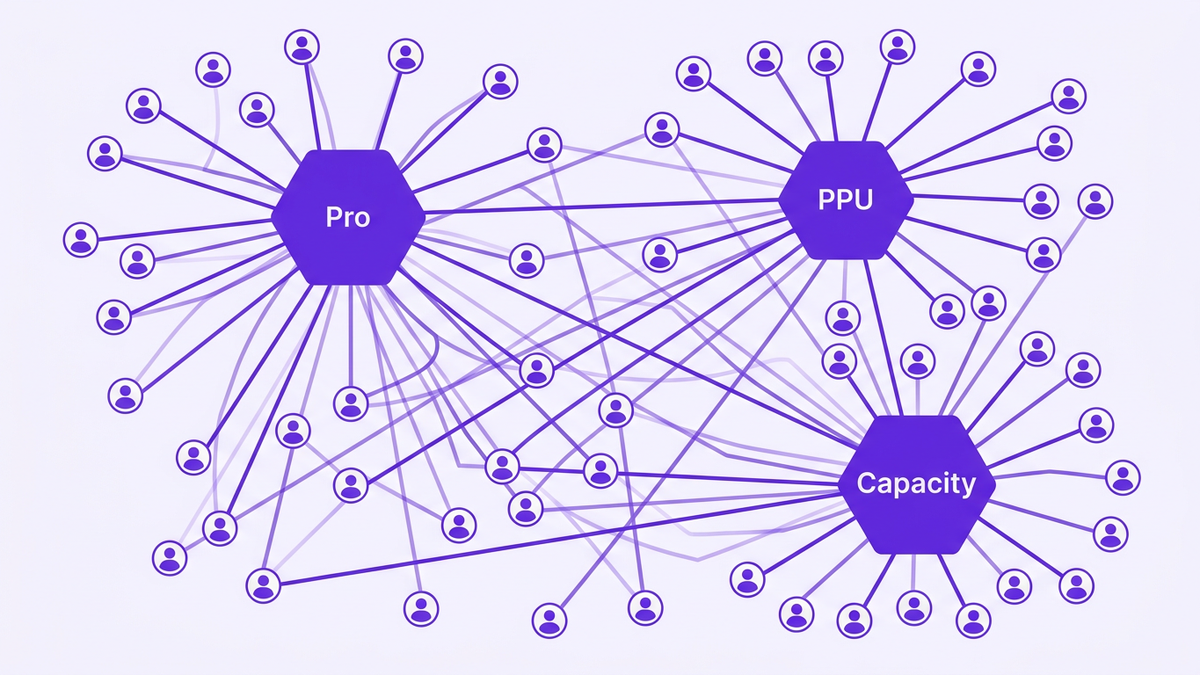
Three patterns show up repeatedly when analyzing Power BI cost optimization:
Hybrid Pro + PPU for the same users
Users retain Pro while being upgraded to PPU, or hold multiple SKUs across tenants.
Pro + Capacity overlap
Fabric Capacity covers workloads where viewers do not need Pro, but Pro assignments remain untouched.
Multi-tenant SaaS analytics confusion
ISVs and platform teams mix per-user licenses with capacity-based licensing, resulting in redundant Pro or PPU for embedded scenarios.
As Dr. Marie Walker, Chief Analyst at a FinOps research council, notes, "Misaligned Power BI licensing strategies, especially in hybrid Pro+PPU environments, are now the primary driver of wasted analytics spend at the enterprise scale" (2026).
To make a rational Power BI licensing decision, you need a precise understanding of what each option buys you. Think of it as three gears in the same transmission, each optimized for a different level of scale.
Power BI Pro is the baseline license, typically best for individual creators and smaller teams.
Key traits:
Per-user licensing
Standard sharing and collaboration
Suitable for departmental analytics
Viewers often require Pro if they consume shared content in many enterprise setups
Pro is usually the cheapest on a per-user basis, but it becomes inefficient once you start adding advanced workloads and wide distribution.
PPU builds on Pro by adding advanced capabilities for power users and teams with demanding workloads.
Typical benefits include:
Larger dataset and model size limits
Higher refresh limits and better performance for complex reports
Advanced AI features, such as some AutoML and dataflow capabilities
Features that are often referenced in "Power BI Pro vs PPU AI features" comparisons
PPU is more expensive per user than Pro. It shines when a limited number of users need high-end functionality, making power bi pro vs premium per user a tradeoff between scale and capability.
Fabric Capacity represents a shift from per-user to capacity-based licensing, where you pay for dedicated compute and memory rather than every viewer.
Core characteristics:
Capacity SKU (for example, F64) with "Power BI unlimited viewers Fabric F64"-style scenarios
Ideal for Power BI for enterprise analytics across thousands of users
Strong fit for embedded and multi-tenant SaaS analytics licensing models
Often aligns with broader Fabric workloads such as data engineering, data science, and real-time analytics
IDC projects that Fabric Capacity adoption will reach 38 percent of Power BI enterprise customers by the end of 2026, up from 11 percent in 2024 (IDC 2026). For enterprises with more than 500 analytics users, 80 percent plan to consolidate to Fabric Capacity by Q4 2026 (Microsoft Ignite Research 2026).
Instead of asking "Which license is best?", frame the problem as: Which license is best for this workload and audience size, at this point in our maturity?
Below is an actionable framework to structure that decision.
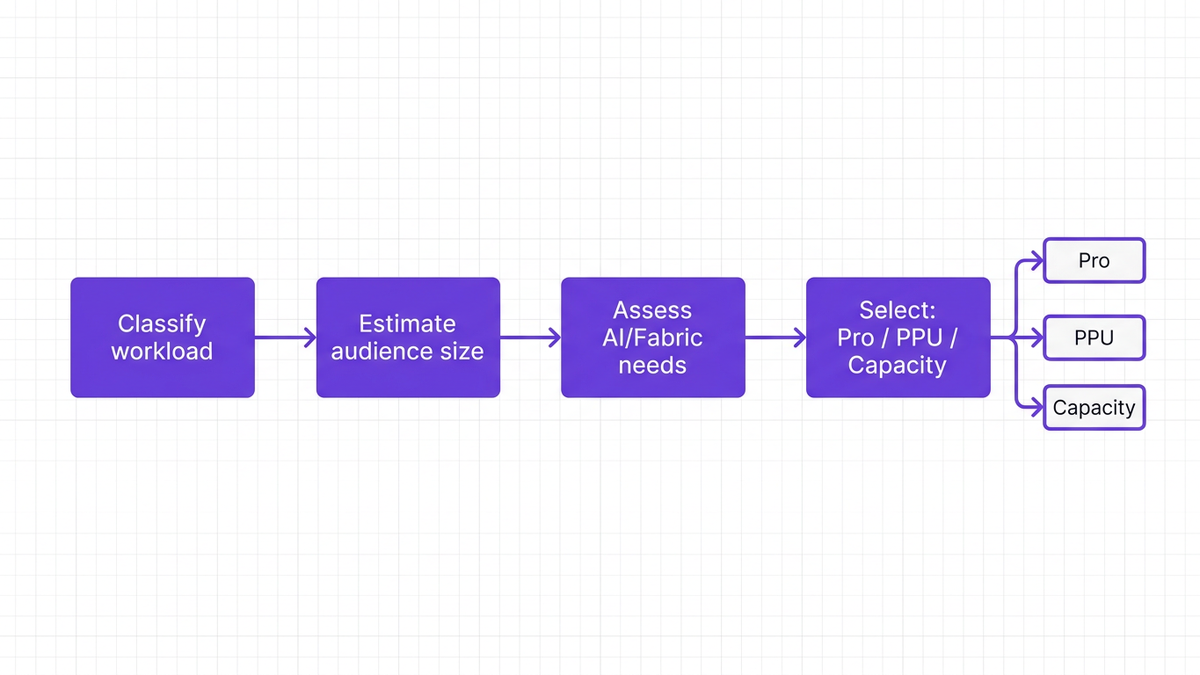
Start with a basic classification of each workspace or product workload:
Team analytics: small to mid-size teams, departmental dashboards
Enterprise analytics: cross-functional dashboards consumed by hundreds or thousands
External or embedded analytics: reports exposed to customers or partners
AI- and Fabric-heavy workloads: scenarios using advanced AI, data engineering pipelines, or cross-Fabric capabilities
Simple analogy: treat each workload like a fleet of vehicles. You do not buy the same vehicle for a city courier as for a cross-country freight route.
A practical mapping often looks like this:
Team analytics: Primarily Pro, with selective PPU for power users
Enterprise analytics: PPU for small to mid-size audiences, then Fabric Capacity when viewer counts surge
External or embedded analytics: Capacity-based licensing is usually cleaner than per-user
AI- and Fabric-heavy workloads: PPU initially, but Fabric Capacity as usage and data volumes grow
This mapping forms the backbone of your Power BI licensing guide 2026 and helps standardize decisions.
Research from the SaaS Management Institute (2026) indicates that the break-even point from PPU to Fabric Capacity is typically around 110 PPU-equivalent users under 2026 pricing models.
That means:
Below ~110 heavy users, PPU may be more cost-effective
Beyond that point, Fabric Capacity licensing often becomes cheaper per active user, especially if viewers are numerous
This is where power bi pro vs ppu break even and "power bi ppu vs premium capacity" analyses converge into a practical rule of thumb.
To avoid guesswork, finance and IT teams should jointly use a power bi licensing calculator that captures:
User counts by role (creators, contributors, viewers)
Workload intensity (refresh frequency, data sizes)
AI dependencies and Fabric workloads
External vs internal consumption
You can maintain this in a spreadsheet, or better, integrate it into your broader Microsoft license optimization practice through a SaaS management platform.
Price is not the only dimension. Governance for Power BI licenses must also cover:
Data residency and compliance constraints
Security controls and workspace governance
Tenant sprawl and cross-business-unit duplication
A capacity-centric model often simplifies control, especially for large organizations with sophisticated Power BI governance needs.
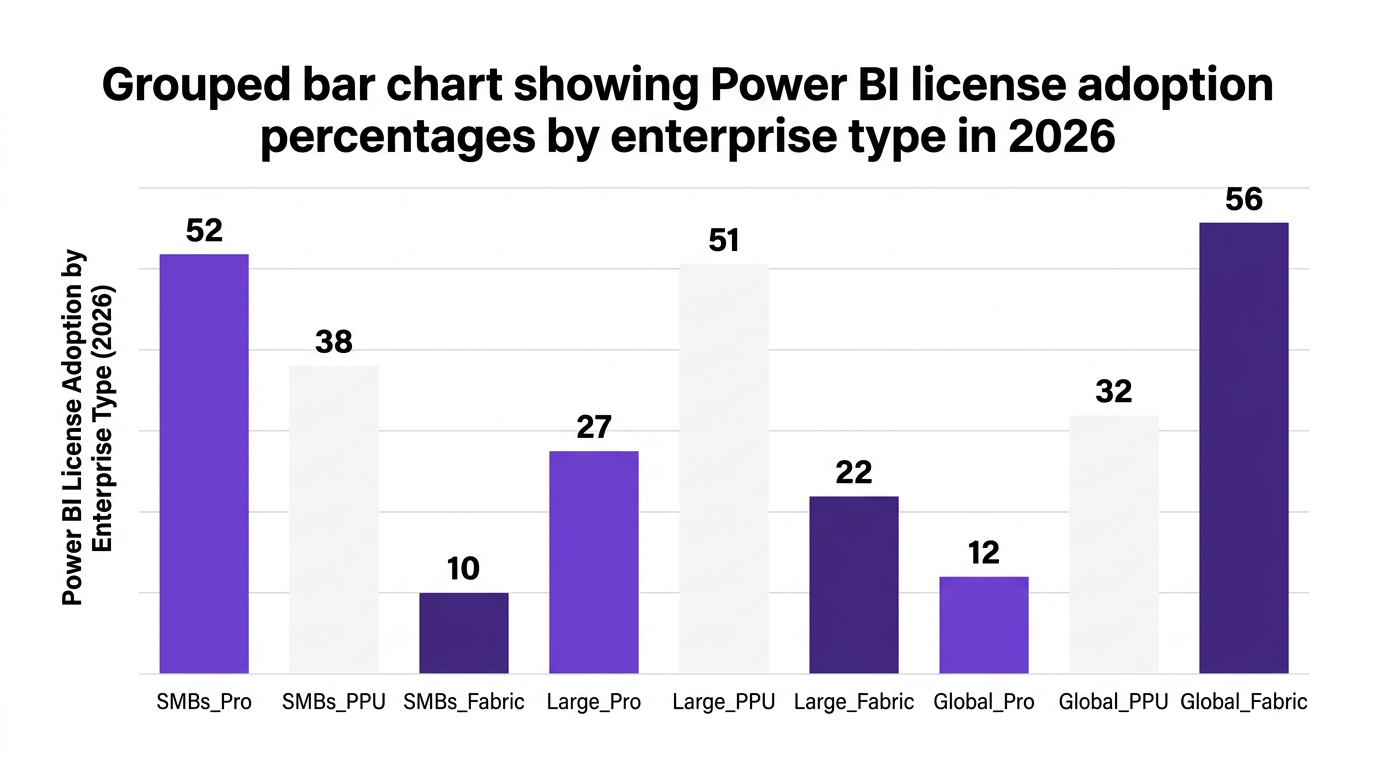
To make this more concrete, consider a simplified view of power bi pricing comparison trends.
A SaaS management institute compiled a PPU vs Fabric Capacity per user analysis (2026) with the following indicative pattern:
Interpretation:
At 25 to 50 heavy users, PPU usually wins on monthly cost
Around 100 to 150 users, the costs start to converge
From 200 users and above, Fabric Capacity usually provides a better per-user effective rate, especially when you consider unlimited viewers for some SKUs
This aligns with the guidance that the when to move from PPU to Fabric Capacity question is best answered by:
When you cross roughly 110 heavy analytics users on PPU, or when your viewer base grows to several hundred internal or external users.
Pro continues to matter, especially in three scenarios:
Small teams where power bi viewer licensing can be fully covered by Pro
Early-stage analytics functions that are still prototyping and not yet standardized
Edge cases in large organizations where isolated tenants or business units have specific compliance constraints
Counterargument: some leaders assume that Fabric Capacity will immediately replace Pro across the board. In practice, a mixed model is usually more efficient, with Pro reserved for small, self-contained teams and Fabric handling wide distribution.
For product and platform teams, the stakes are even higher. Mixing per-user and capacity models in multi-tenant SaaS analytics can rapidly lead to double-paying and unpredictable margins.
Typical failure patterns when teams try to optimize Power BI licensing in SaaS environment contexts include:
Assigning Pro or PPU to internal users who only view embedded reports that are already covered by capacity
Maintaining separate Pro or PPU pools across various dev, test, and customer tenants without central governance
Overbuying Fabric Capacity SKUs without consolidating internal analytics and external embedded workloads
These missteps directly affect unit economics and can erode the profitability of analytics-enabled products.
A more sustainable approach to power bi licensing for external customers often looks like this:
Use Fabric Capacity or Premium-style capacity as the foundation for embedded analytics.
Minimize direct Pro/PPU assignment to internal consumers of those same reports.
Track and attribute capacity costs by product, region, or customer segment using FinOps practices.
Periodically review SKUs with a power bi pricing 2026 perspective, adjusting capacity levels as usage grows.
This mirrors broader FinOps services principles, where usage data and cost allocation drive ongoing rightsizing.
Fabric Capacity and new analytics capabilities can be transformational, but only if your licensing model is under control. This is where CloudNuro brings governance, automation, and financial discipline together.
CloudNuro’s platform is built for enterprises that need to manage Power BI at scale across multiple tenants, business units, and product lines.
CloudNuro’s Unified Cloud Custodian consolidates:
All Power BI Pro, PPU, and Fabric Capacity assignments across tenants
Workspace-level mappings so you can see which workloads are backed by which licenses
Real-time utilization data to highlight underused and overlapping licenses
Enterprises that implemented SaaS management platforms for Power BI licensing saw 27 percent average reduction in redundant costs in 2026 (FinOps Foundation 2026). CloudNuro operationalizes this through automated discovery rather than manual spreadsheets.
CloudNuro’s AI Custodian uses policy engines and analytics to:
Flag users who hold both Pro and PPU, or PPU and capacity-backed access
Detect workspaces that should be migrated from PPU to Fabric Capacity based on usage thresholds
Provide power bi licensing decision guidance using built-in decision trees aligned to your policies
This makes it possible to standardize rules such as:
"If a workspace surpasses 120 heavy users, recommend migration to Fabric Capacity"
"If a viewer is covered by capacity, recommend removal of Pro unless explicitly exempt"
CloudNuro’s financial engines and IT asset management capabilities help IT and Finance teams:
Allocate Power BI and Fabric costs to departments or product lines
Track ppu cost versus capacity spend over time
Use chargeback to create accountability for license hoarding and oversizing
As Priya S., Director of Cloud Cost Optimization at an analyst firm, notes, "Automation in license usage tracking and chargeback is critical to avoid overspending as organizations move toward Fabric and unified analytics platforms" (IDC Insights 2026).
A global manufacturing leader, referred by a FinOps research study as "Synthex", adopted CloudNuro’s Unified Cloud Custodian in 2026 to rationalize its Power BI footprint.
Results:
32 percent reduction in unused licenses across Pro and PPU within 9 months
Automated identification of workspaces ready to move from PPU to Fabric Capacity
Structured chargeback that aligned analytics spend with actual consumption
This mirrors a broader trend highlighted in a Gartner case study, where a Fortune 100 financial services company reduced analytics licensing costs by 1.1 million dollars annually by consolidating into Fabric Capacity and removing double-paying patterns.
For organizations serious about Power BI cost optimization, platforms like CloudNuro become a central part of the SaaS management and FinOps toolchain.
To turn this into action, use the following checklist within your power bi licensing guide 2026 initiative.
Inventory everything
- Catalog all Pro, PPU, and Fabric Capacity licenses, across all tenants.
- Map them to users, workspaces, and applications.
Detect overlaps
- Identify users holding both Pro and PPU.
- Find workspaces accessible via both per-user and capacity models.
Classify workloads by audience size and criticality
- Distinguish team analytics, enterprise analytics, and external/embedded workloads.
- Mark AI-heavy or Fabric-centric workloads.
Apply break-even thresholds
- Use the ~110 heavy user break-even for power bi pro vs fabric capacity and PPU vs capacity decisions.
- Model costs using a power bi licensing calculator or your FinOps tooling.
Set governance policies
- Define when Pro is allowed vs when PPU or capacity is required.
- Establish approval workflows for new capacity purchases.
Automate ongoing optimization
- Integrate licensing insights into your broader FinOps maturity assessment.
- Use SaaS management automation to continuously reclaim unused and overlapping licenses.
A key caveat: optimization is not a one-time project. As Fabric capabilities expand and your analytics footprint grows, your optimal balance of Pro, PPU, and Capacity will shift. Treat this as a recurring FinOps motion, not a static decision.
Pro is a per-user license for standard creation and sharing within smaller teams.
PPU is also per-user but adds higher data limits, more refreshes, and advanced AI features.
Fabric Capacity is capacity-based, providing dedicated resources and supporting large numbers of internal and external viewers without per-viewer licensing.
You should consider Fabric Capacity when:
You have more than ~110 heavy PPU users and growing.
You need to support hundreds or thousands of viewers, especially for enterprise dashboards or customer-facing analytics.
You are consolidating broader Fabric workloads, such as data engineering and real-time analytics, under a single capacity.
For ISVs and platforms, per-user licenses become difficult to manage across tenants and customers. Capacity-based models, such as Fabric Capacity, usually provide a more predictable and scalable approach for power bi licensing for external customers.
You still may need Pro or PPU for internal report authors, but viewer access should be covered by capacity where possible to avoid double-paying.
Users holding both Pro and PPU licenses.
Maintaining Pro licenses for viewers whose access is already covered by Fabric Capacity.
Buying additional PPU licenses for workloads that have effectively outgrown per-user models and belong in capacity.
These issues stem from lack of centralized governance and poor visibility into actual license usage.
You can avoid double-paying by:
Running a full license inventory before and after capacity purchases.
Defining clear policies for when Pro and PPU are allowed, relative to capacity-backed workspaces.
Using automation through SaaS management tools to flag and remediate overlaps as users and workloads change.
CloudNuro supports these steps with automated discovery, optimization recommendations, and chargeback workflows tailored to Power BI for enterprise analytics.
The right balance of power bi pro vs ppu vs premium capacity is not a static choice. It is an ongoing FinOps and governance discipline that blends cost modeling, workload analysis, and automation.
Enterprises that treat Power BI and Fabric as strategic platforms, and that align licensing to clear policies and real usage data, are already avoiding the 15 to 22 percent overspend that Gartner projects for 2026.
CloudNuro helps you build that discipline across Power BI, Fabric, and your broader SaaS stack, unifying cost optimization, governance, and security into a single operating model. To move from theory to action, connect with CloudNuro and put this decision framework into practice.
CloudNuro is a leader in Enterprise SaaS Management Platforms, providing enterprises with unmatched visibility, governance, and cost optimization. Recognized twice in a row in the SaaS Management Platforms category and named a Leader in the SoftwareReviews Data Quadrant, CloudNuro is trusted by global enterprises and government agencies to bring financial discipline to SaaS, cloud, and AI. Trusted by enterprises such as Konica Minolta and Federal Signal, CloudNuro provides centralized SaaS inventory, license optimization, and renewal management along with advanced cost allocation and chargeback, giving IT and Finance leaders the visibility, control, and cost-conscious culture needed to drive financial discipline.
Request a no cost, no obligation free assessment —just 15 minutes to savings!
Get StartedPower BI licensing has quietly become one of the most expensive line items in many analytics budgets. The shift from Pro, to Premium Per User (PPU), and now to Fabric Capacity has created powerful options, but also serious risk of double-paying for the same workloads.
Gartner projects that organizations using Power BI will spend 15 to 22 percent more in 2026 vs. 2024 without proper license optimization, largely due to overlapping Pro, PPU, and Fabric Capacity subscriptions (Gartner 2026). At the same time, 64 percent of IT leaders say double-paying for Power BI licenses is their top analytics cost challenge (Forrester 2026).
This guide provides a practical, data-backed framework for deciding between Power BI Pro vs PPU vs Premium Capacity / Fabric Capacity, and for avoiding the most common license traps that drain budgets.
Most enterprises did not wake up one day and choose a messy licensing model. Instead, they accumulated Pro users, added PPU for advanced workloads, and then experimented with Fabric Capacity for AI and unified analytics.
The result is often a patchwork of:
Pro users in multiple tenants
A subset of PPU for power users and advanced features
One or more Fabric Capacity SKUs running critical workloads
A FinOps research body found that enterprises that implemented SaaS management platforms for Power BI licensing reduced redundant license costs by 27 percent on average in 2026 (FinOps Foundation 2026). That level of waste exists because few teams have an end-to-end Power BI licensing strategy 2026 anchored in governance and cost data.
Three patterns show up repeatedly when analyzing Power BI cost optimization:
Hybrid Pro + PPU for the same users
Users retain Pro while being upgraded to PPU, or hold multiple SKUs across tenants.
Pro + Capacity overlap
Fabric Capacity covers workloads where viewers do not need Pro, but Pro assignments remain untouched.
Multi-tenant SaaS analytics confusion
ISVs and platform teams mix per-user licenses with capacity-based licensing, resulting in redundant Pro or PPU for embedded scenarios.
As Dr. Marie Walker, Chief Analyst at a FinOps research council, notes, "Misaligned Power BI licensing strategies, especially in hybrid Pro+PPU environments, are now the primary driver of wasted analytics spend at the enterprise scale" (2026).
To make a rational Power BI licensing decision, you need a precise understanding of what each option buys you. Think of it as three gears in the same transmission, each optimized for a different level of scale.
Power BI Pro is the baseline license, typically best for individual creators and smaller teams.
Key traits:
Per-user licensing
Standard sharing and collaboration
Suitable for departmental analytics
Viewers often require Pro if they consume shared content in many enterprise setups
Pro is usually the cheapest on a per-user basis, but it becomes inefficient once you start adding advanced workloads and wide distribution.
PPU builds on Pro by adding advanced capabilities for power users and teams with demanding workloads.
Typical benefits include:
Larger dataset and model size limits
Higher refresh limits and better performance for complex reports
Advanced AI features, such as some AutoML and dataflow capabilities
Features that are often referenced in "Power BI Pro vs PPU AI features" comparisons
PPU is more expensive per user than Pro. It shines when a limited number of users need high-end functionality, making power bi pro vs premium per user a tradeoff between scale and capability.
Fabric Capacity represents a shift from per-user to capacity-based licensing, where you pay for dedicated compute and memory rather than every viewer.
Core characteristics:
Capacity SKU (for example, F64) with "Power BI unlimited viewers Fabric F64"-style scenarios
Ideal for Power BI for enterprise analytics across thousands of users
Strong fit for embedded and multi-tenant SaaS analytics licensing models
Often aligns with broader Fabric workloads such as data engineering, data science, and real-time analytics
IDC projects that Fabric Capacity adoption will reach 38 percent of Power BI enterprise customers by the end of 2026, up from 11 percent in 2024 (IDC 2026). For enterprises with more than 500 analytics users, 80 percent plan to consolidate to Fabric Capacity by Q4 2026 (Microsoft Ignite Research 2026).
Instead of asking "Which license is best?", frame the problem as: Which license is best for this workload and audience size, at this point in our maturity?
Below is an actionable framework to structure that decision.
Start with a basic classification of each workspace or product workload:
Team analytics: small to mid-size teams, departmental dashboards
Enterprise analytics: cross-functional dashboards consumed by hundreds or thousands
External or embedded analytics: reports exposed to customers or partners
AI- and Fabric-heavy workloads: scenarios using advanced AI, data engineering pipelines, or cross-Fabric capabilities
Simple analogy: treat each workload like a fleet of vehicles. You do not buy the same vehicle for a city courier as for a cross-country freight route.
A practical mapping often looks like this:
Team analytics: Primarily Pro, with selective PPU for power users
Enterprise analytics: PPU for small to mid-size audiences, then Fabric Capacity when viewer counts surge
External or embedded analytics: Capacity-based licensing is usually cleaner than per-user
AI- and Fabric-heavy workloads: PPU initially, but Fabric Capacity as usage and data volumes grow
This mapping forms the backbone of your Power BI licensing guide 2026 and helps standardize decisions.
Research from the SaaS Management Institute (2026) indicates that the break-even point from PPU to Fabric Capacity is typically around 110 PPU-equivalent users under 2026 pricing models.
That means:
Below ~110 heavy users, PPU may be more cost-effective
Beyond that point, Fabric Capacity licensing often becomes cheaper per active user, especially if viewers are numerous
This is where power bi pro vs ppu break even and "power bi ppu vs premium capacity" analyses converge into a practical rule of thumb.
To avoid guesswork, finance and IT teams should jointly use a power bi licensing calculator that captures:
User counts by role (creators, contributors, viewers)
Workload intensity (refresh frequency, data sizes)
AI dependencies and Fabric workloads
External vs internal consumption
You can maintain this in a spreadsheet, or better, integrate it into your broader Microsoft license optimization practice through a SaaS management platform.
Price is not the only dimension. Governance for Power BI licenses must also cover:
Data residency and compliance constraints
Security controls and workspace governance
Tenant sprawl and cross-business-unit duplication
A capacity-centric model often simplifies control, especially for large organizations with sophisticated Power BI governance needs.
To make this more concrete, consider a simplified view of power bi pricing comparison trends.
A SaaS management institute compiled a PPU vs Fabric Capacity per user analysis (2026) with the following indicative pattern:
Interpretation:
At 25 to 50 heavy users, PPU usually wins on monthly cost
Around 100 to 150 users, the costs start to converge
From 200 users and above, Fabric Capacity usually provides a better per-user effective rate, especially when you consider unlimited viewers for some SKUs
This aligns with the guidance that the when to move from PPU to Fabric Capacity question is best answered by:
When you cross roughly 110 heavy analytics users on PPU, or when your viewer base grows to several hundred internal or external users.
Pro continues to matter, especially in three scenarios:
Small teams where power bi viewer licensing can be fully covered by Pro
Early-stage analytics functions that are still prototyping and not yet standardized
Edge cases in large organizations where isolated tenants or business units have specific compliance constraints
Counterargument: some leaders assume that Fabric Capacity will immediately replace Pro across the board. In practice, a mixed model is usually more efficient, with Pro reserved for small, self-contained teams and Fabric handling wide distribution.
For product and platform teams, the stakes are even higher. Mixing per-user and capacity models in multi-tenant SaaS analytics can rapidly lead to double-paying and unpredictable margins.
Typical failure patterns when teams try to optimize Power BI licensing in SaaS environment contexts include:
Assigning Pro or PPU to internal users who only view embedded reports that are already covered by capacity
Maintaining separate Pro or PPU pools across various dev, test, and customer tenants without central governance
Overbuying Fabric Capacity SKUs without consolidating internal analytics and external embedded workloads
These missteps directly affect unit economics and can erode the profitability of analytics-enabled products.
A more sustainable approach to power bi licensing for external customers often looks like this:
Use Fabric Capacity or Premium-style capacity as the foundation for embedded analytics.
Minimize direct Pro/PPU assignment to internal consumers of those same reports.
Track and attribute capacity costs by product, region, or customer segment using FinOps practices.
Periodically review SKUs with a power bi pricing 2026 perspective, adjusting capacity levels as usage grows.
This mirrors broader FinOps services principles, where usage data and cost allocation drive ongoing rightsizing.
Fabric Capacity and new analytics capabilities can be transformational, but only if your licensing model is under control. This is where CloudNuro brings governance, automation, and financial discipline together.
CloudNuro’s platform is built for enterprises that need to manage Power BI at scale across multiple tenants, business units, and product lines.
CloudNuro’s Unified Cloud Custodian consolidates:
All Power BI Pro, PPU, and Fabric Capacity assignments across tenants
Workspace-level mappings so you can see which workloads are backed by which licenses
Real-time utilization data to highlight underused and overlapping licenses
Enterprises that implemented SaaS management platforms for Power BI licensing saw 27 percent average reduction in redundant costs in 2026 (FinOps Foundation 2026). CloudNuro operationalizes this through automated discovery rather than manual spreadsheets.
CloudNuro’s AI Custodian uses policy engines and analytics to:
Flag users who hold both Pro and PPU, or PPU and capacity-backed access
Detect workspaces that should be migrated from PPU to Fabric Capacity based on usage thresholds
Provide power bi licensing decision guidance using built-in decision trees aligned to your policies
This makes it possible to standardize rules such as:
"If a workspace surpasses 120 heavy users, recommend migration to Fabric Capacity"
"If a viewer is covered by capacity, recommend removal of Pro unless explicitly exempt"
CloudNuro’s financial engines and IT asset management capabilities help IT and Finance teams:
Allocate Power BI and Fabric costs to departments or product lines
Track ppu cost versus capacity spend over time
Use chargeback to create accountability for license hoarding and oversizing
As Priya S., Director of Cloud Cost Optimization at an analyst firm, notes, "Automation in license usage tracking and chargeback is critical to avoid overspending as organizations move toward Fabric and unified analytics platforms" (IDC Insights 2026).
A global manufacturing leader, referred by a FinOps research study as "Synthex", adopted CloudNuro’s Unified Cloud Custodian in 2026 to rationalize its Power BI footprint.
Results:
32 percent reduction in unused licenses across Pro and PPU within 9 months
Automated identification of workspaces ready to move from PPU to Fabric Capacity
Structured chargeback that aligned analytics spend with actual consumption
This mirrors a broader trend highlighted in a Gartner case study, where a Fortune 100 financial services company reduced analytics licensing costs by 1.1 million dollars annually by consolidating into Fabric Capacity and removing double-paying patterns.
For organizations serious about Power BI cost optimization, platforms like CloudNuro become a central part of the SaaS management and FinOps toolchain.
To turn this into action, use the following checklist within your power bi licensing guide 2026 initiative.
Inventory everything
- Catalog all Pro, PPU, and Fabric Capacity licenses, across all tenants.
- Map them to users, workspaces, and applications.
Detect overlaps
- Identify users holding both Pro and PPU.
- Find workspaces accessible via both per-user and capacity models.
Classify workloads by audience size and criticality
- Distinguish team analytics, enterprise analytics, and external/embedded workloads.
- Mark AI-heavy or Fabric-centric workloads.
Apply break-even thresholds
- Use the ~110 heavy user break-even for power bi pro vs fabric capacity and PPU vs capacity decisions.
- Model costs using a power bi licensing calculator or your FinOps tooling.
Set governance policies
- Define when Pro is allowed vs when PPU or capacity is required.
- Establish approval workflows for new capacity purchases.
Automate ongoing optimization
- Integrate licensing insights into your broader FinOps maturity assessment.
- Use SaaS management automation to continuously reclaim unused and overlapping licenses.
A key caveat: optimization is not a one-time project. As Fabric capabilities expand and your analytics footprint grows, your optimal balance of Pro, PPU, and Capacity will shift. Treat this as a recurring FinOps motion, not a static decision.
Pro is a per-user license for standard creation and sharing within smaller teams.
PPU is also per-user but adds higher data limits, more refreshes, and advanced AI features.
Fabric Capacity is capacity-based, providing dedicated resources and supporting large numbers of internal and external viewers without per-viewer licensing.
You should consider Fabric Capacity when:
You have more than ~110 heavy PPU users and growing.
You need to support hundreds or thousands of viewers, especially for enterprise dashboards or customer-facing analytics.
You are consolidating broader Fabric workloads, such as data engineering and real-time analytics, under a single capacity.
For ISVs and platforms, per-user licenses become difficult to manage across tenants and customers. Capacity-based models, such as Fabric Capacity, usually provide a more predictable and scalable approach for power bi licensing for external customers.
You still may need Pro or PPU for internal report authors, but viewer access should be covered by capacity where possible to avoid double-paying.
Users holding both Pro and PPU licenses.
Maintaining Pro licenses for viewers whose access is already covered by Fabric Capacity.
Buying additional PPU licenses for workloads that have effectively outgrown per-user models and belong in capacity.
These issues stem from lack of centralized governance and poor visibility into actual license usage.
You can avoid double-paying by:
Running a full license inventory before and after capacity purchases.
Defining clear policies for when Pro and PPU are allowed, relative to capacity-backed workspaces.
Using automation through SaaS management tools to flag and remediate overlaps as users and workloads change.
CloudNuro supports these steps with automated discovery, optimization recommendations, and chargeback workflows tailored to Power BI for enterprise analytics.
The right balance of power bi pro vs ppu vs premium capacity is not a static choice. It is an ongoing FinOps and governance discipline that blends cost modeling, workload analysis, and automation.
Enterprises that treat Power BI and Fabric as strategic platforms, and that align licensing to clear policies and real usage data, are already avoiding the 15 to 22 percent overspend that Gartner projects for 2026.
CloudNuro helps you build that discipline across Power BI, Fabric, and your broader SaaS stack, unifying cost optimization, governance, and security into a single operating model. To move from theory to action, connect with CloudNuro and put this decision framework into practice.
CloudNuro is a leader in Enterprise SaaS Management Platforms, providing enterprises with unmatched visibility, governance, and cost optimization. Recognized twice in a row in the SaaS Management Platforms category and named a Leader in the SoftwareReviews Data Quadrant, CloudNuro is trusted by global enterprises and government agencies to bring financial discipline to SaaS, cloud, and AI. Trusted by enterprises such as Konica Minolta and Federal Signal, CloudNuro provides centralized SaaS inventory, license optimization, and renewal management along with advanced cost allocation and chargeback, giving IT and Finance leaders the visibility, control, and cost-conscious culture needed to drive financial discipline.
Request a no cost, no obligation free assessment - just 15 minutes to savings!
Get StartedWe're offering complimentary ServiceNow license assessments to only 25 enterprises this quarter who want to unlock immediate savings without disrupting operations.
Get Free AssessmentGet Started




CloudNuro Corp
1755 Park St. Suite 207
Naperville, IL 60563
Phone : +1-630-277-9470
Email: info@cloudnuro.com





.webp)

Recognized Leader in SaaS Management Platforms by Info-Tech SoftwareReviews



.svg)