

Sign Up
Thank you for Submitting!
Zero-touch onboarding is quickly moving from a nice-to-have concept to a baseline expectation for enterprise IT. As SaaS footprints expand and hybrid work becomes standard, IT teams cannot afford to spend hours manually setting up every new hire.
According to Gartner, 48% of organizations that adopted zero-touch onboarding achieved a 60% reduction in onboarding time by 2026. Another study from Forrester found that 80% of enterprises with automated day-one access provisioning saw improved new hire productivity in the first week.
This article breaks down how zero-touch onboarding works, why it matters, and how to implement it with strong governance, compliance, and financial discipline.
Zero-touch onboarding is the practice of giving new employees all required IT access automatically, with no manual intervention from IT once workflows are configured. It connects HR triggers, identity systems, and SaaS applications into a single user lifecycle automation engine.
A simple way to picture it is like an airport moving walkway for IT. Once HR marks a new hire as joining, they step onto a predefined path of new hire provisioning events that run without human hands: accounts created, licenses assigned, and MFA enforced.
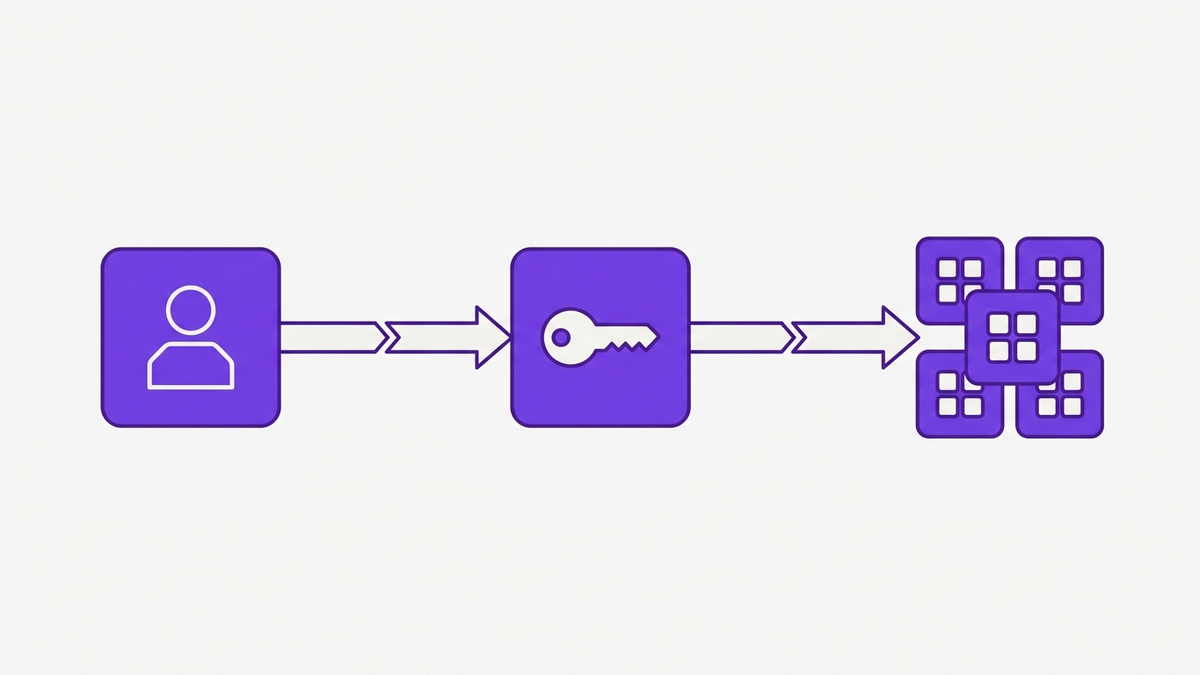
In a typical zero-touch onboarding pattern:
HRIS to IT automation picks up "hire" events from HR systems.
IdP provisioning rules create identities and group memberships.
Role-based access provisioning maps roles to app bundles.
SaaS onboarding automation provisions accounts, licenses, and permissions.
MFA enrollment automation and SSO onboarding ensure secure access.
As Dr. Rina Mehta from Gartner notes, "Zero-touch onboarding not only accelerates productivity but significantly minimizes human error and compliance risk during the critical new hire period" (2026).
Enterprises have long recognized that new employee onboarding is a critical moment. Yet many still rely on email threads, spreadsheets, and tickets for account provisioning automation.
This gap has real cost. IDC reported a 72% reduction in IT support tickets related to access provisioning in organizations that deployed zero-touch onboarding platforms by 2026.
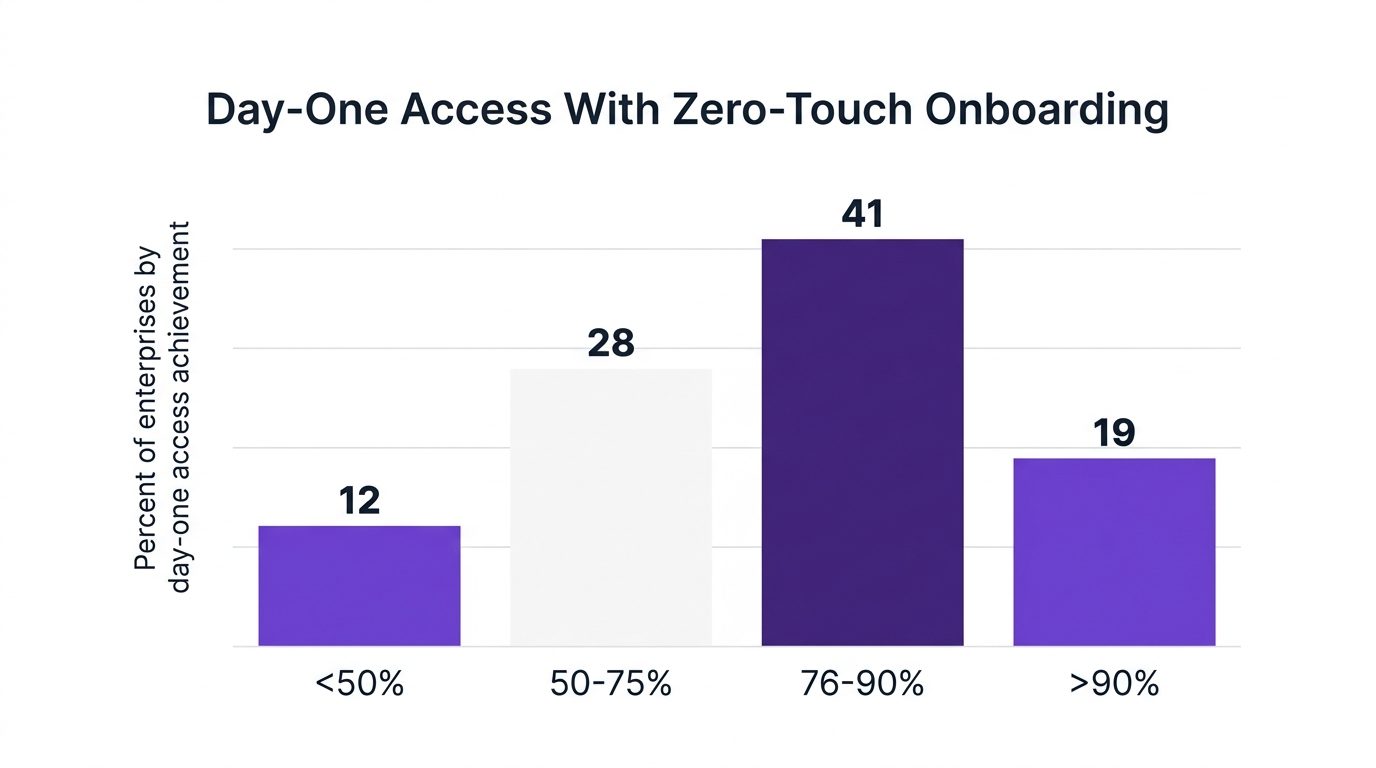
When day-one onboarding is automated and reliable, enterprises see benefits across three dimensions:
Productivity: Forrester found that 80% of enterprises with automated day-one access provisioning reported improved new hire productivity in week one.
Employee experience: New hires feel trusted and equipped when their laptops, logins, and apps are ready from hour one.
IT efficiency: Gartner reports that 48% of organizations achieved a 60% reduction in onboarding time with zero-touch workflows.
A global financial services firm studied by Forrester implemented zero-touch provisioning and reduced average new hire access setup from 3 days to under 2 hours. They saw a 45% lift in onboarding productivity and an 80% drop in provisioning errors.
Manual processes are not just slow, they are risky. Cybersecurity research shows that 63% of security breaches during onboarding stem from manual process errors.
This often looks like:
Granting more access than needed "just to be safe".
Forgetting to remove temporary or contractor access.
Missing approvals in long email chains.
Enterprises that implemented integrated SaaS onboarding automation saw 34% fewer onboarding-related compliance violations by 2026, according to SaaS Management Review. Automated policy enforcement and audit trails reduce both accidental over-provisioning and missed approvals.
To understand how IT onboarding automation functions, it helps to break the flow into discrete stages. Think of it as a joiner mover leaver automation pipeline that spans HR, identity, and SaaS.
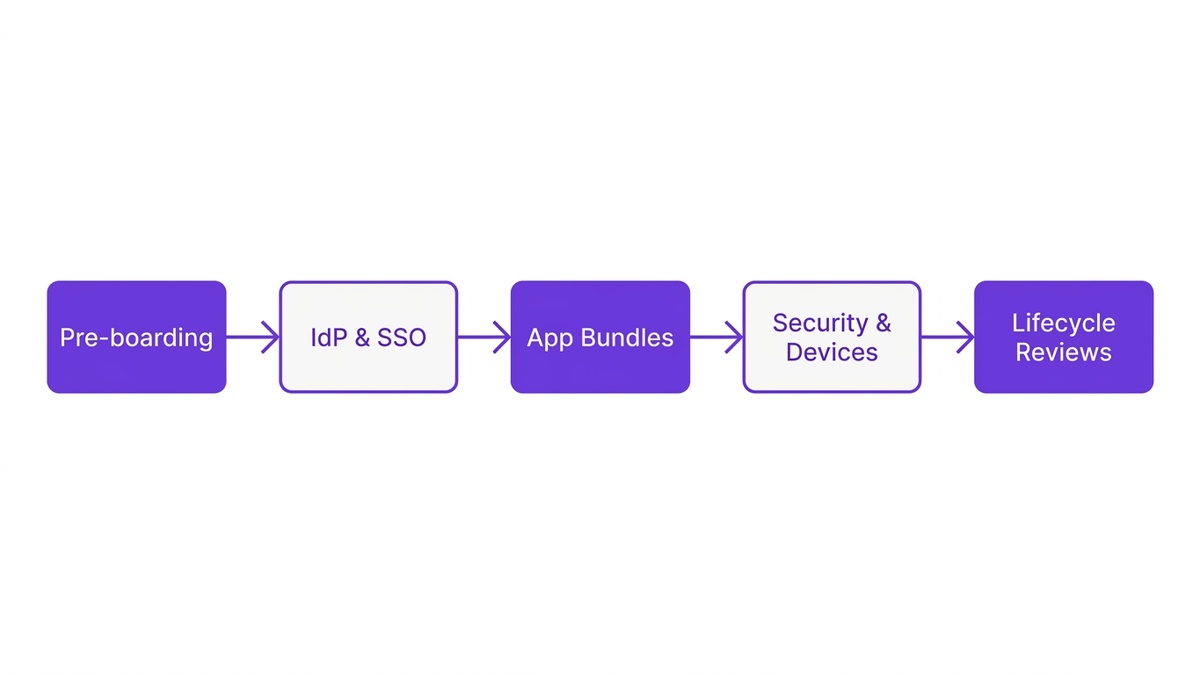
The journey begins before an employee's first day. Pre-boarding automation kicks in when HR creates a new hire record.
Key steps typically include:
Creating a user identity in the IdP.
Assigning department, manager, location, and job family.
Linking to cost centers for financial accountability.
At this stage, HRIS to IT automation ensures that structured data flows from HR to IT systems in real time, not via file uploads or emails.
Next, IdP provisioning builds the core foundation for access. Based on role, department, or geography, the IdP assigns group memberships that drive SSO onboarding.
Common patterns:
Default group for all employees (email, collaboration, HR self-service).
Department groups (sales, finance, engineering) mapped to specific SaaS tools.
Region or entity groups to manage data residency and compliance.
Automated IdP rules help enforce identity lifecycle management policies at scale and create a single source of truth for identities.
This is where role-based access provisioning meets SaaS license management.
Enterprises define standard app bundles such as:
Sales: CRM, sales engagement, e-signature, meeting tools.
Finance: ERP, expense management, procurement, analytics.
Engineering: code repositories, CI/CD, incident tools, documentation.
These bundles map to specific license SKUs and permission sets. Account provisioning automation then:
Creates app accounts for the new hire.
Assigns the right license tier for their role.
Applies default app access rights and policies.
When done well, this reduces both under-provisioning and over-licensing. It also sets a foundation for continuous license optimization.
Security must be built into user lifecycle management, not added after the fact.
Zero-touch flows typically include:
MFA enrollment automation triggered at first login.
Conditional access policies based on device posture or location.
Device provisioning workflows, including image deployment and configuration profiles.
A healthcare provider cited by Gartner implemented cloud-based IT onboarding automation and achieved 90% first-day access compliance while reducing compliance audit violations by 38%.
True zero-touch onboarding does not end on day one. It lives as continuous user lifecycle automation.
Key elements include:
Joiner mover leaver automation for internal transfers and exits.
Employee offboarding automation to remove all access on termination.
Periodic reviews to validate access governance and least-privilege.
As Chris Lau from Forrester notes, "Automated identity lifecycle workflows are the new baseline for secure, scalable workforce enablement in a SaaS-driven enterprise" (2026).
While the benefits of zero-touch onboarding are compelling, experienced IT leaders know that automation can fail if implemented poorly. It is worth addressing two common counterarguments.
Some enterprises worry that their mix of legacy systems, custom apps, and regulatory constraints makes IT onboarding automation unrealistic.
In practice, most organizations start with a hybrid model:
Automate commodity SaaS onboarding for standard roles.
Keep manual checks for high-risk roles or sensitive systems.
Gradually extend account provisioning automation as patterns stabilize.
This progressive approach reduces risk and builds trust in the automation engine. It also acknowledges that 100% automation may not be the goal, especially in heavily regulated environments.
The second concern is that SaaS onboarding automation will quietly grant too much access and make it harder to see who has what.
This can happen if workflows are configured without guardrails. To avoid this, enterprises should:
Anchor automation in a strong identity governance model.
Use policy engines to enforce least-privilege and approvals.
Run regular access and license reviews.
Linda Chavez from SaaS Management Review observes, "As SaaS sprawl intensifies, zero-touch provisioning is rapidly becoming essential to IT efficiency and governance" (2026). The key is to couple automation with transparent reporting and continuous compliance checks.
To move from theory to action, it helps to use a structured framework. One practical model is the "4R Zero-Touch Framework": Roles, Rules, Runbooks, and Reviews.
Start by rationalizing roles and profiles. This is the foundation for role-based access provisioning.
Questions to answer:
What are our core job families and levels?
Which apps and license tiers map to each role?
Which roles require special approvals or segregation of duties?
Documenting roles prevents one-off exceptions from undermining automation.
Next, codify rules that drive user lifecycle management.
Typical rules include:
HR attributes that trigger pre-boarding automation.
Group mappings in the IdP based on department, location, or job family.
Approval requirements for high-risk applications.
These rules should be maintained in a central IT automation platform, not scattered across spreadsheets or custom scripts.
Runbooks translate roles and rules into executable workflows.
Examples:
"When HR status = New Hire for Sales in Region A, create identity, assign Sales bundle, provision apps X and Y, enforce MFA, and notify manager."
"When status = Transfer from Department A to B, revoke bundle A, grant bundle B, and re-check approvals."
Runbooks define how automated app provisioning behaves for joiners, movers, and leavers.
Finally, automation must be monitored and tuned.
Best practices:
Quarterly reviews of user lifecycle automation outcomes.
Cross-checks between HR, IdP, and SaaS inventory.
Dashboards for SaaS license management and unused access.
This closes the loop and ensures automation continues to serve security, compliance, and cost goals.
CloudNuro is an AI-enabled enterprise SaaS management platform designed to make zero-touch onboarding practical for complex enterprises. It provides a single control plane that connects HR, identity, and SaaS ecosystems.
CloudNuro’s 360° discovery and self-service onboarding automations integrate with HRIS and IdP systems to deliver true new hire provisioning without manual effort.
CloudNuro continuously discovers SaaS, cloud, and AI applications across the enterprise. This unified inventory feeds SaaS onboarding automation and access governance decisions.
By connecting to over 400 SaaS and cloud systems, CloudNuro gives IT teams a current view of:
Active applications and tenants.
User accounts and roles.
License assignments and utilization.
This visibility supports both automation and cost optimization. You can explore this in more detail in the product overview.
CloudNuro plugs into HR systems to trigger HRIS to IT automation whenever a joiner, mover, or leaver event occurs. It then orchestrates IdP provisioning and group assignments.
Key capabilities:
Event-driven user lifecycle management based on HR updates.
Dynamic group assignments aligned to roles and policies.
Integration with SSO for consistent SSO onboarding.
This creates a reliable bridge between HR and IT, reducing manual data entry and timing mismatches.
CloudNuro’s modular "Custodian" products automate provisioning for critical SaaS platforms.
Microsoft 365 Custodian automates license discovery, rightsizing, and day-one access provisioning for collaboration tools.
Salesforce Custodian orchestrates account provisioning automation and access governance for CRM users.
Unified Cloud Custodian and AI Custodian extend workflows to cloud and AI applications.
These custodians ensure role-based access provisioning is consistent and compliant across your most important systems. For IT teams focused on operational excellence, the IT operations solutions page provides deeper context.
CloudNuro’s automation engine supports full joiner mover leaver automation.
Capabilities include:
Pre-boarding automation based on employment start dates.
Configurable IT onboarding automation workflows per region or business unit.
Employee offboarding automation that removes access, reclaims licenses, and updates audit logs.
This ensures that access is granted and removed at the right time, not days or weeks late.
CloudNuro is built on a governance-first architecture. It combines access governance, identity lifecycle management, and financial controls.
Key benefits:
Policy-driven least-privilege access with approvals and audit trails.
Chargeback, cost allocation, and optimization through FinOps Services.
Centralized SaaS inventory and IT asset management for compliance.
Enterprises can use CloudNuro to implement IT self-service portal experiences while maintaining strong guardrails. For a broader look at CloudNuro’s approach to SaaS control, visit the SaaS management overview or learn why customers choose CloudNuro on the Why CloudNuro page.
Zero-touch onboarding connects HR systems, identity providers, and SaaS applications through workflow automation. When HR creates a new hire record, that event triggers user lifecycle automation that creates identities, assigns groups, provisions app accounts, and enforces security controls.
Once configured, IT teams no longer need to manually create accounts or chase approvals for standard roles.
Automatic day-one access provisioning improves productivity, reduces support tickets, and strengthens compliance. Forrester found that 80% of enterprises with automated provisioning saw higher productivity in the first week, while IDC reported a 72% reduction in access-related IT tickets.
It also improves the employee experience and reduces risk from manual errors.
CloudNuro integrates with HRIS and IdP systems to trigger new hire provisioning workflows based on HR events. It uses application-specific custodians, such as Microsoft 365 Custodian and Salesforce Custodian, to automate account creation, license assignment, and app access rights.
These workflows are governed by policies and approvals, providing both automation and control across the SaaS estate.
Automated IT onboarding automation reduces risks related to over-provisioning, missed deprovisioning, and inconsistent approvals. Research indicates that 63% of security breaches during onboarding result from manual process errors.
By embedding policies, approvals, and audit trails into automated flows, enterprises reduce both security and compliance exposure.
Enterprises should anchor employee onboarding automation in a clear identity governance model. This includes defined roles, least-privilege policies, approval workflows, and regular reviews.
Platforms like CloudNuro enforce these controls in real time, while also maintaining detailed logs for audits and reporting.
Best practices include:
Standardizing roles and app bundles.
Using HR as the system of record for identity lifecycle management.
Integrating HRIS, IdP, and enterprise SaaS management platforms.
Automating joiner mover leaver automation with clear approvals.
Reviewing automation outcomes and access patterns regularly.
This ensures that automation remains aligned with evolving business and regulatory requirements.
Zero-touch onboarding is no longer just about convenience. It is a strategic capability that improves productivity, strengthens security, and brings financial discipline to day-one access provisioning.
With 94% of IT leaders planning to increase investment in employee onboarding automation by the end of 2026, according to TechRepublic, enterprises that act now can move ahead of the curve. CloudNuro provides the automation, governance, and cost optimization needed to make zero-touch onboarding a reality across SaaS, cloud, and AI.
To see how CloudNuro can help you deliver secure, automatic day-one access across your enterprise, request a personalized demo and explore the platform in action.
CloudNuro is a leader in Enterprise SaaS Management Platforms, providing enterprises with unmatched visibility, governance, and cost optimization. Recognized twice in a row in the SaaS Management Platforms category and named a Leader in the SoftwareReviews Data Quadrant, CloudNuro is trusted by global enterprises and government agencies to bring financial discipline to SaaS, cloud, and AI.
Trusted by enterprises such as Konica Minolta and Federal Signal, CloudNuro provides centralized SaaS inventory, license optimization, and renewal management along with advanced cost allocation and chargeback, giving IT and Finance leaders the visibility, control, and cost-conscious culture needed to drive financial discipline.
Request a no cost, no obligation free assessment —just 15 minutes to savings!
Get StartedZero-touch onboarding is quickly moving from a nice-to-have concept to a baseline expectation for enterprise IT. As SaaS footprints expand and hybrid work becomes standard, IT teams cannot afford to spend hours manually setting up every new hire.
According to Gartner, 48% of organizations that adopted zero-touch onboarding achieved a 60% reduction in onboarding time by 2026. Another study from Forrester found that 80% of enterprises with automated day-one access provisioning saw improved new hire productivity in the first week.
This article breaks down how zero-touch onboarding works, why it matters, and how to implement it with strong governance, compliance, and financial discipline.
Zero-touch onboarding is the practice of giving new employees all required IT access automatically, with no manual intervention from IT once workflows are configured. It connects HR triggers, identity systems, and SaaS applications into a single user lifecycle automation engine.
A simple way to picture it is like an airport moving walkway for IT. Once HR marks a new hire as joining, they step onto a predefined path of new hire provisioning events that run without human hands: accounts created, licenses assigned, and MFA enforced.
In a typical zero-touch onboarding pattern:
HRIS to IT automation picks up "hire" events from HR systems.
IdP provisioning rules create identities and group memberships.
Role-based access provisioning maps roles to app bundles.
SaaS onboarding automation provisions accounts, licenses, and permissions.
MFA enrollment automation and SSO onboarding ensure secure access.
As Dr. Rina Mehta from Gartner notes, "Zero-touch onboarding not only accelerates productivity but significantly minimizes human error and compliance risk during the critical new hire period" (2026).
Enterprises have long recognized that new employee onboarding is a critical moment. Yet many still rely on email threads, spreadsheets, and tickets for account provisioning automation.
This gap has real cost. IDC reported a 72% reduction in IT support tickets related to access provisioning in organizations that deployed zero-touch onboarding platforms by 2026.
When day-one onboarding is automated and reliable, enterprises see benefits across three dimensions:
Productivity: Forrester found that 80% of enterprises with automated day-one access provisioning reported improved new hire productivity in week one.
Employee experience: New hires feel trusted and equipped when their laptops, logins, and apps are ready from hour one.
IT efficiency: Gartner reports that 48% of organizations achieved a 60% reduction in onboarding time with zero-touch workflows.
A global financial services firm studied by Forrester implemented zero-touch provisioning and reduced average new hire access setup from 3 days to under 2 hours. They saw a 45% lift in onboarding productivity and an 80% drop in provisioning errors.
Manual processes are not just slow, they are risky. Cybersecurity research shows that 63% of security breaches during onboarding stem from manual process errors.
This often looks like:
Granting more access than needed "just to be safe".
Forgetting to remove temporary or contractor access.
Missing approvals in long email chains.
Enterprises that implemented integrated SaaS onboarding automation saw 34% fewer onboarding-related compliance violations by 2026, according to SaaS Management Review. Automated policy enforcement and audit trails reduce both accidental over-provisioning and missed approvals.
To understand how IT onboarding automation functions, it helps to break the flow into discrete stages. Think of it as a joiner mover leaver automation pipeline that spans HR, identity, and SaaS.
The journey begins before an employee's first day. Pre-boarding automation kicks in when HR creates a new hire record.
Key steps typically include:
Creating a user identity in the IdP.
Assigning department, manager, location, and job family.
Linking to cost centers for financial accountability.
At this stage, HRIS to IT automation ensures that structured data flows from HR to IT systems in real time, not via file uploads or emails.
Next, IdP provisioning builds the core foundation for access. Based on role, department, or geography, the IdP assigns group memberships that drive SSO onboarding.
Common patterns:
Default group for all employees (email, collaboration, HR self-service).
Department groups (sales, finance, engineering) mapped to specific SaaS tools.
Region or entity groups to manage data residency and compliance.
Automated IdP rules help enforce identity lifecycle management policies at scale and create a single source of truth for identities.
This is where role-based access provisioning meets SaaS license management.
Enterprises define standard app bundles such as:
Sales: CRM, sales engagement, e-signature, meeting tools.
Finance: ERP, expense management, procurement, analytics.
Engineering: code repositories, CI/CD, incident tools, documentation.
These bundles map to specific license SKUs and permission sets. Account provisioning automation then:
Creates app accounts for the new hire.
Assigns the right license tier for their role.
Applies default app access rights and policies.
When done well, this reduces both under-provisioning and over-licensing. It also sets a foundation for continuous license optimization.
Security must be built into user lifecycle management, not added after the fact.
Zero-touch flows typically include:
MFA enrollment automation triggered at first login.
Conditional access policies based on device posture or location.
Device provisioning workflows, including image deployment and configuration profiles.
A healthcare provider cited by Gartner implemented cloud-based IT onboarding automation and achieved 90% first-day access compliance while reducing compliance audit violations by 38%.
True zero-touch onboarding does not end on day one. It lives as continuous user lifecycle automation.
Key elements include:
Joiner mover leaver automation for internal transfers and exits.
Employee offboarding automation to remove all access on termination.
Periodic reviews to validate access governance and least-privilege.
As Chris Lau from Forrester notes, "Automated identity lifecycle workflows are the new baseline for secure, scalable workforce enablement in a SaaS-driven enterprise" (2026).
While the benefits of zero-touch onboarding are compelling, experienced IT leaders know that automation can fail if implemented poorly. It is worth addressing two common counterarguments.
Some enterprises worry that their mix of legacy systems, custom apps, and regulatory constraints makes IT onboarding automation unrealistic.
In practice, most organizations start with a hybrid model:
Automate commodity SaaS onboarding for standard roles.
Keep manual checks for high-risk roles or sensitive systems.
Gradually extend account provisioning automation as patterns stabilize.
This progressive approach reduces risk and builds trust in the automation engine. It also acknowledges that 100% automation may not be the goal, especially in heavily regulated environments.
The second concern is that SaaS onboarding automation will quietly grant too much access and make it harder to see who has what.
This can happen if workflows are configured without guardrails. To avoid this, enterprises should:
Anchor automation in a strong identity governance model.
Use policy engines to enforce least-privilege and approvals.
Run regular access and license reviews.
Linda Chavez from SaaS Management Review observes, "As SaaS sprawl intensifies, zero-touch provisioning is rapidly becoming essential to IT efficiency and governance" (2026). The key is to couple automation with transparent reporting and continuous compliance checks.
To move from theory to action, it helps to use a structured framework. One practical model is the "4R Zero-Touch Framework": Roles, Rules, Runbooks, and Reviews.
Start by rationalizing roles and profiles. This is the foundation for role-based access provisioning.
Questions to answer:
What are our core job families and levels?
Which apps and license tiers map to each role?
Which roles require special approvals or segregation of duties?
Documenting roles prevents one-off exceptions from undermining automation.
Next, codify rules that drive user lifecycle management.
Typical rules include:
HR attributes that trigger pre-boarding automation.
Group mappings in the IdP based on department, location, or job family.
Approval requirements for high-risk applications.
These rules should be maintained in a central IT automation platform, not scattered across spreadsheets or custom scripts.
Runbooks translate roles and rules into executable workflows.
Examples:
"When HR status = New Hire for Sales in Region A, create identity, assign Sales bundle, provision apps X and Y, enforce MFA, and notify manager."
"When status = Transfer from Department A to B, revoke bundle A, grant bundle B, and re-check approvals."
Runbooks define how automated app provisioning behaves for joiners, movers, and leavers.
Finally, automation must be monitored and tuned.
Best practices:
Quarterly reviews of user lifecycle automation outcomes.
Cross-checks between HR, IdP, and SaaS inventory.
Dashboards for SaaS license management and unused access.
This closes the loop and ensures automation continues to serve security, compliance, and cost goals.
CloudNuro is an AI-enabled enterprise SaaS management platform designed to make zero-touch onboarding practical for complex enterprises. It provides a single control plane that connects HR, identity, and SaaS ecosystems.
CloudNuro’s 360° discovery and self-service onboarding automations integrate with HRIS and IdP systems to deliver true new hire provisioning without manual effort.
CloudNuro continuously discovers SaaS, cloud, and AI applications across the enterprise. This unified inventory feeds SaaS onboarding automation and access governance decisions.
By connecting to over 400 SaaS and cloud systems, CloudNuro gives IT teams a current view of:
Active applications and tenants.
User accounts and roles.
License assignments and utilization.
This visibility supports both automation and cost optimization. You can explore this in more detail in the product overview.
CloudNuro plugs into HR systems to trigger HRIS to IT automation whenever a joiner, mover, or leaver event occurs. It then orchestrates IdP provisioning and group assignments.
Key capabilities:
Event-driven user lifecycle management based on HR updates.
Dynamic group assignments aligned to roles and policies.
Integration with SSO for consistent SSO onboarding.
This creates a reliable bridge between HR and IT, reducing manual data entry and timing mismatches.
CloudNuro’s modular "Custodian" products automate provisioning for critical SaaS platforms.
Microsoft 365 Custodian automates license discovery, rightsizing, and day-one access provisioning for collaboration tools.
Salesforce Custodian orchestrates account provisioning automation and access governance for CRM users.
Unified Cloud Custodian and AI Custodian extend workflows to cloud and AI applications.
These custodians ensure role-based access provisioning is consistent and compliant across your most important systems. For IT teams focused on operational excellence, the IT operations solutions page provides deeper context.
CloudNuro’s automation engine supports full joiner mover leaver automation.
Capabilities include:
Pre-boarding automation based on employment start dates.
Configurable IT onboarding automation workflows per region or business unit.
Employee offboarding automation that removes access, reclaims licenses, and updates audit logs.
This ensures that access is granted and removed at the right time, not days or weeks late.
CloudNuro is built on a governance-first architecture. It combines access governance, identity lifecycle management, and financial controls.
Key benefits:
Policy-driven least-privilege access with approvals and audit trails.
Chargeback, cost allocation, and optimization through FinOps Services.
Centralized SaaS inventory and IT asset management for compliance.
Enterprises can use CloudNuro to implement IT self-service portal experiences while maintaining strong guardrails. For a broader look at CloudNuro’s approach to SaaS control, visit the SaaS management overview or learn why customers choose CloudNuro on the Why CloudNuro page.
Zero-touch onboarding connects HR systems, identity providers, and SaaS applications through workflow automation. When HR creates a new hire record, that event triggers user lifecycle automation that creates identities, assigns groups, provisions app accounts, and enforces security controls.
Once configured, IT teams no longer need to manually create accounts or chase approvals for standard roles.
Automatic day-one access provisioning improves productivity, reduces support tickets, and strengthens compliance. Forrester found that 80% of enterprises with automated provisioning saw higher productivity in the first week, while IDC reported a 72% reduction in access-related IT tickets.
It also improves the employee experience and reduces risk from manual errors.
CloudNuro integrates with HRIS and IdP systems to trigger new hire provisioning workflows based on HR events. It uses application-specific custodians, such as Microsoft 365 Custodian and Salesforce Custodian, to automate account creation, license assignment, and app access rights.
These workflows are governed by policies and approvals, providing both automation and control across the SaaS estate.
Automated IT onboarding automation reduces risks related to over-provisioning, missed deprovisioning, and inconsistent approvals. Research indicates that 63% of security breaches during onboarding result from manual process errors.
By embedding policies, approvals, and audit trails into automated flows, enterprises reduce both security and compliance exposure.
Enterprises should anchor employee onboarding automation in a clear identity governance model. This includes defined roles, least-privilege policies, approval workflows, and regular reviews.
Platforms like CloudNuro enforce these controls in real time, while also maintaining detailed logs for audits and reporting.
Best practices include:
Standardizing roles and app bundles.
Using HR as the system of record for identity lifecycle management.
Integrating HRIS, IdP, and enterprise SaaS management platforms.
Automating joiner mover leaver automation with clear approvals.
Reviewing automation outcomes and access patterns regularly.
This ensures that automation remains aligned with evolving business and regulatory requirements.
Zero-touch onboarding is no longer just about convenience. It is a strategic capability that improves productivity, strengthens security, and brings financial discipline to day-one access provisioning.
With 94% of IT leaders planning to increase investment in employee onboarding automation by the end of 2026, according to TechRepublic, enterprises that act now can move ahead of the curve. CloudNuro provides the automation, governance, and cost optimization needed to make zero-touch onboarding a reality across SaaS, cloud, and AI.
To see how CloudNuro can help you deliver secure, automatic day-one access across your enterprise, request a personalized demo and explore the platform in action.
CloudNuro is a leader in Enterprise SaaS Management Platforms, providing enterprises with unmatched visibility, governance, and cost optimization. Recognized twice in a row in the SaaS Management Platforms category and named a Leader in the SoftwareReviews Data Quadrant, CloudNuro is trusted by global enterprises and government agencies to bring financial discipline to SaaS, cloud, and AI.
Trusted by enterprises such as Konica Minolta and Federal Signal, CloudNuro provides centralized SaaS inventory, license optimization, and renewal management along with advanced cost allocation and chargeback, giving IT and Finance leaders the visibility, control, and cost-conscious culture needed to drive financial discipline.
Request a no cost, no obligation free assessment - just 15 minutes to savings!
Get StartedWe're offering complimentary ServiceNow license assessments to only 25 enterprises this quarter who want to unlock immediate savings without disrupting operations.
Get Free AssessmentGet Started




CloudNuro Corp
1755 Park St. Suite 207
Naperville, IL 60563
Phone : +1-630-277-9470
Email: info@cloudnuro.com





.webp)

Recognized Leader in SaaS Management Platforms by Info-Tech SoftwareReviews


.svg)