

Sign Up
Thank you for Submitting!
User access reviews are no longer a box-ticking exercise. A well structured UAR report is now one of the primary ways CISOs, auditors, and IT leaders prove control over SaaS, cloud, and critical business systems.
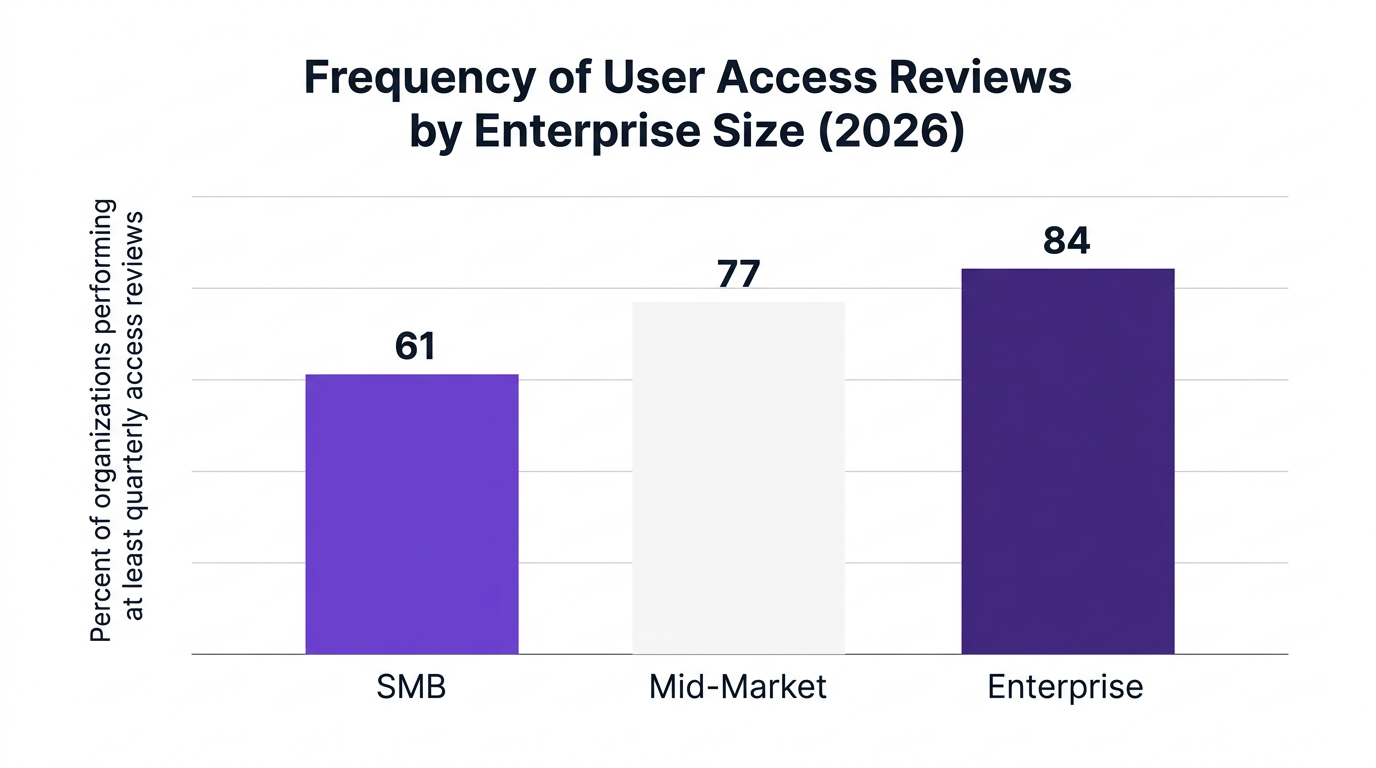
Gartner reports that 84% of enterprises conduct at least quarterly user access reviews across major SaaS platforms to meet regulatory mandates (Gartner, 2026). At the same time, Forrester notes that 70% of cloud compliance audit failures are tied to inadequate user access documentation (Forrester, 2026). The message is clear, if your user access review report is weak, your audit posture is weak.
This guide introduces a practical framework and four user access review report templates you can use immediately, while showing how automation and SaaS governance platforms like CloudNuro remove the manual burden.
A user access review report (UAR report) is the formal output of a review that validates which users have access to which systems, roles, and data, and whether that access is appropriate.
It provides audit-ready documentation that proves:
Who has access to what
Why they have that access
Who approved it
When it was last reviewed or changed
From a governance standpoint, UAR reports sit at the intersection of SaaS access governance, identity, and compliance. They support:
SOX access review and other regulatory access review mandates
Proof of least privilege principle and segregation of duties
Evidence for security compliance and IAM risk assessment
According to a major security research body, 91% of financial services firms cite user access review reporting as critical for passing SOX, PCI, and GDPR audits (Compliance Week, 2026). That same year, Info-Tech found that automated access review documentation cut audit prep time by 41% in regulated industries (Info-Tech, 2026).
Key takeaway: If it is not in a structured UAR report, auditors will treat it as if it did not happen.
Frequency is a core element of any UAR best practices program. Gartner notes that by 2026, 84% of enterprises schedule at least quarterly access reviews across major SaaS apps (Gartner, 2026).
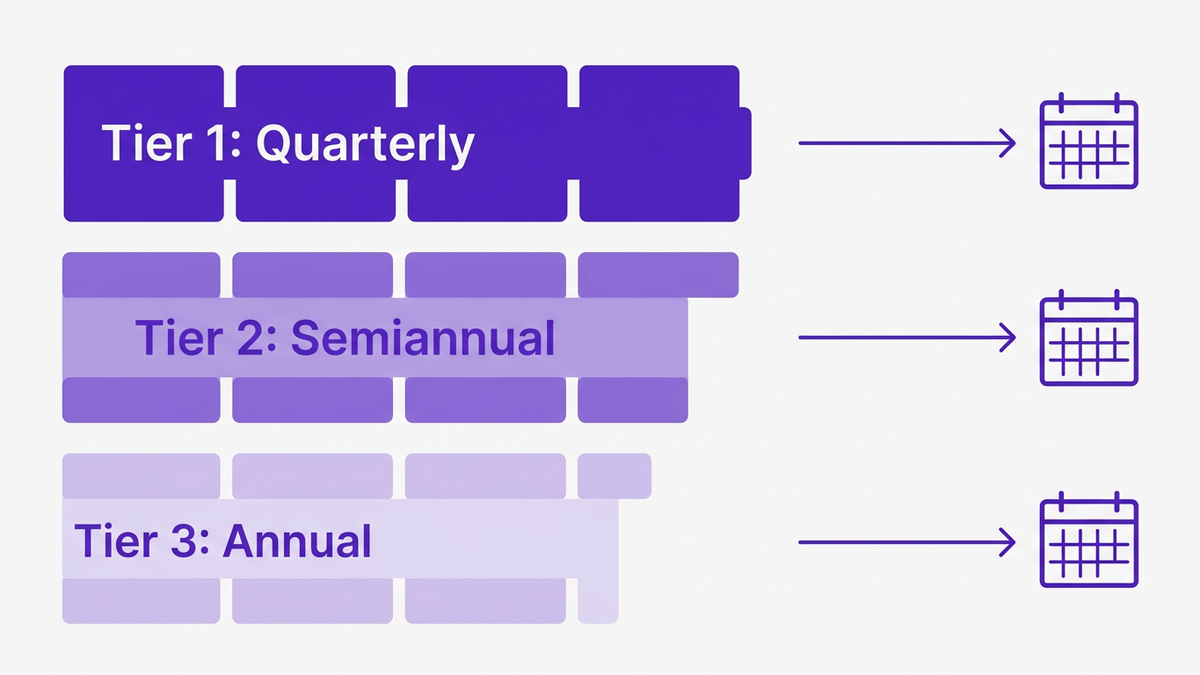
A practical cadence by risk level:
High risk systems (finance, HR, PHI, core SaaS): monthly or quarterly access reviews
Medium risk systems: quarterly or semiannual access reviews
Low risk systems: annual access reviews or event driven
However, time based reviews are not enough on their own. Mature teams also trigger event driven user access review cycles, for example:
M&A or major reorgs
New country or business unit launches
Critical incident or suspected breach
A leading research body notes that quarterly access reviews tied to cloud operations are moving from best practice to board level expectation (Forrester, 2026). That shift means your UAR report process must be:
Repeatable and standardized
Fast to produce
Consistent across systems and auditors
This is where a robust access review report template becomes invaluable.
To make UAR reporting repeatable, CloudNuro recommends a 4T framework:
Tier: System criticality and data sensitivity
Type: Business, technical, or privileged access
Trigger: Scheduled or event based review
Template: Standardized reporting format
Below are four practical user access review report templates that align to this framework and map directly to common audit scenarios.
Use this as the high level audit access report you submit to external auditors or the board.
Purpose: Provide a concise, risk focused view of access reviews across critical systems for a given period (usually quarterly or annual).
Core sections:
Scope and period
- Systems in scope (e.g., financial SaaS, HR platform, IAM)
- Review period (Q1 2026, FY 2026)
- Applicable regulations (SOX access review, HIPAA, GDPR)
Summary metrics
Include high level KPIs such as:
Total users reviewed
Percentage of access recertified
Percentage of access revoked or modified
Number of open access related findings
Risk and exceptions overview
- Count and severity of exceptions (e.g., orphaned accounts, excessive entitlements)
- Aging of unresolved exceptions
- Key segregation of duties violations identified
Compliance attestations
- Statements from system owners or data stewards
- Sign off from CISO or CIO
- Links to detailed access management report appendices
Action plan and deadlines
- Remediation steps, owners, target dates
- Planned improvements to user access review processes
Pro tip: Treat this as your flagship identity governance report. Keep it to 2 to 4 pages, and link to system level IAM report template outputs as appendices.
This is the workhorse user access review report template for individual systems like Microsoft 365, CRM, ITSM, or HR.
Purpose: Show, at the system level, which users have what access, who reviewed it, and what changed.
Core sections:
System profile
- System name and owner
- Data classification
- Criticality tier (1 to 3)
Review configuration
- Review type (scheduled quarterly access reviews, offboarding audit, privilege recertification)
- Reviewer groups (managers, application owners, security)
- Review dates and deadlines
User entitlements snapshot
Export or embed a structured table that covers:
User ID and department
Role based access control group or entitlement
Last login date
Business justification field
Reviewer decision (approve, revoke, modify)
Findings and actions
Summarize access decisions:
Total users reviewed
Count of revoked accesses (e.g., terminated users, role changes)
Number of permission downgrades to enforce least privilege principle
Pending actions with owners and dates
Compliance and audit notes
- System specific requirements (SOX, PCI, HIPAA)
- Evidence of control operation (screenshots, export references)
- Mapping to internal user provisioning audit and deprovisioning processes
This template directly supports SaaS audit evidence for auditors who want to trace from control description to actual access certification report outputs.
Privileged access is where most IAM risk assessment and security compliance concerns concentrate. This template focuses solely on high risk accounts.
Purpose: Give security and audit teams clear visibility into privileged users, admin roles, and toxic combinations.
Core sections:
Scope of privileged roles
- List of admin roles across systems
- Criteria used to classify accounts as privileged
Privileged account inventory
- User, role, system, data domain
- MFA status, last password rotation
- Last activity timestamp
Segregation of duties matrix
- Defined toxic combinations (e.g., requestor and approver in same process)
- Users violating SoD and risk scores
Review outcomes
- Number of privileged users recertified
- Admin roles removed or downgraded
- Orphaned or dormant admin accounts closed
Control enhancements
- New rules for privileged access management
- Changes to user permissions report thresholds or alerts
- Planned automated access review enhancements
This template is especially important for demonstrating regulatory access review discipline in finance and government environments.
Access risk often appears during employee transitions, not just in steady state. An offboarding audit and joiner-mover-leaver view is essential.
Purpose: Show that joiners are provisioned correctly, movers have access updated, and leavers are fully deprovisioned across SaaS.
Core sections:
Population in scope
- New hires, transfers, and leavers in the review period
- Business units, locations, or roles covered
Provisioning compliance checks
- Joiners: correct roles, least privilege, approvals documented
- Movers: legacy access removed, new access justified
- Leavers: accounts disabled or removed across systems
Exceptions and residual risk
- Accounts still active after termination date
- Leavers with active access to critical SaaS
- Delayed removal of privileged roles
Metrics and trends
- Percentage of leaver accounts closed within SLA
- Provisioning error rate for movers and joiners
- Trend line across previous review periods
Process improvement actions
- Integration between HRIS and IAM
- Updates to user access review checklist and workflows
- Training and communication plans
This template directly connects access reviews to IT operations efficiency and IT asset management accuracy.
Manual access reviews built on spreadsheets eventually fail. They are slow, error prone, and nearly impossible to keep consistent across hundreds of SaaS apps and business systems.
Market research highlights the shift toward automation:
A major research firm found that 65% of IT leaders ranked automation of user access reviews as a top three SaaS governance priority for 2026 (IDC, 2026).
Another study showed 41% reduction in audit prep time after adopting automated SaaS compliance reporting for access reviews (Info-Tech, 2026).
McKinsey reports that integrating access review data with SaaS operations led to an average 22% reduction in license waste (McKinsey, 2026).
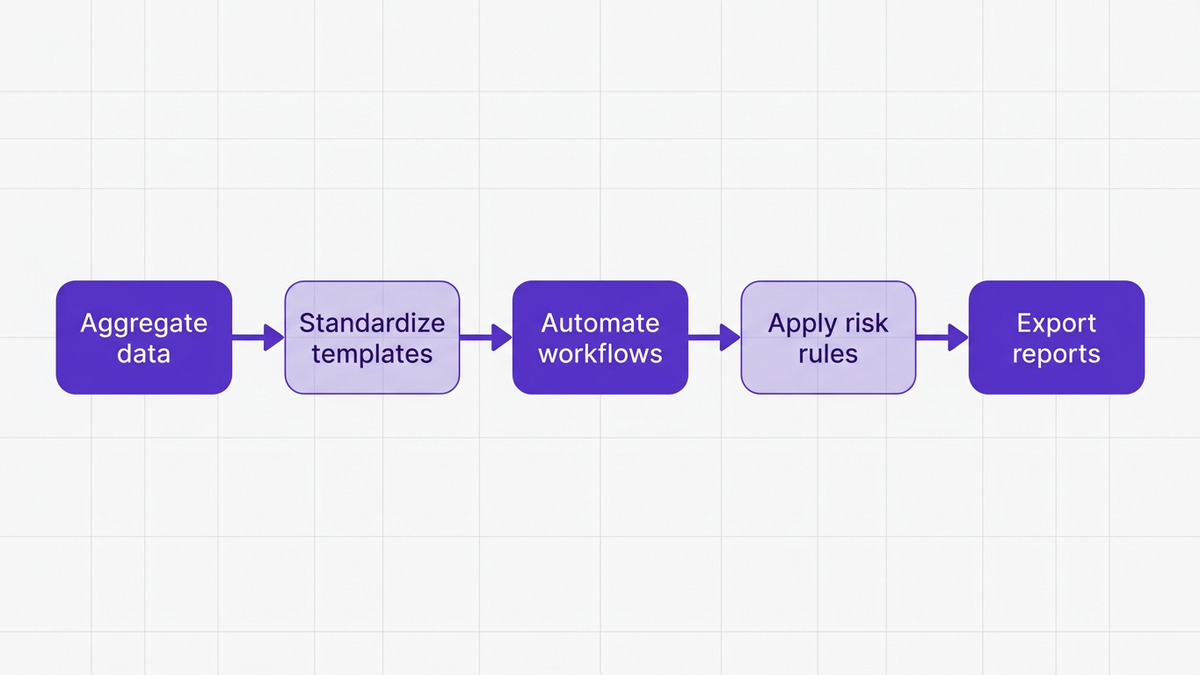
To move from manual to automated access management report workflows, most organizations follow this progression:
Centralize identity and entitlement data
Aggregate users, roles, and permissions from SaaS apps, IAM, and HR into a unified catalog.
Standardize templates and checklists
Use consistent user access review report template formats and a shared user access review checklist for all systems.
Automate reviewer workflows
Route review tasks to managers and system owners, set due dates, reminders, and escalation paths.
Embed policy and risk rules
Flag toxic combinations, dormant accounts, missing MFA, or violations of least privilege principle.
Generate audit ready evidence
Produce IT audit report template exports, access certification report summaries, and signed attestations on demand.
Tool without process
Implementing an IAM platform without defined review scopes, owners, and templates leads to inconsistent data and reviewer fatigue.
Compliance without security
Treating UAR as a checkbox exercise creates reports that please auditors but miss real entitlements risk, such as over privileged service accounts or unmanaged SaaS apps.
The remedy is a governance first approach that combines standardized templates, strong process ownership, and platforms designed for SaaS access governance.
CloudNuro is designed for enterprises that need consistent, automated UAR report workflows across Microsoft 365, CRM, ITSM, collaboration tools, and cloud platforms.
Using CloudNuro’s capabilities, CISOs and IT leaders can transform fragmented user permissions report exports into standardized, audit ready outputs.
CloudNuro provides:
Deep SaaS discovery and entitlement mapping
CloudNuro automatically discovers SaaS usage across the enterprise and builds a unified catalog of users, roles, and user entitlements. This is the foundation for high quality access review documentation.
Configurable UAR templates and workflows
IT and security teams can configure access review report template profiles aligned with the four templates above. Workflows support manager attestation, system owner sign off, and CISO approval.
AI powered anomaly detection
CloudNuro’s AI Custodian capabilities help surface unusual patterns, such as privilege creep, dormant accounts with high access, or inconsistent role assignments, which feed directly into identity governance report outputs.
Compliance dashboards and evidence exports
Real time compliance views show status across quarterly access reviews, offboarding audits, and privileged access recertifications. With one click, teams can export user access review audit report packages for internal or external auditors.
For IT leaders pursuing stronger IT security and SaaS management, CloudNuro creates a single source of truth that connects access reviews, financial accountability, and security operations.
A large healthcare organization, which had historically run UAR cycles in spreadsheets and email, implemented automated access review workflows and templates.
By centralizing their SaaS and IAM data, aligning on the four templates in this guide, and automating attestations, they:
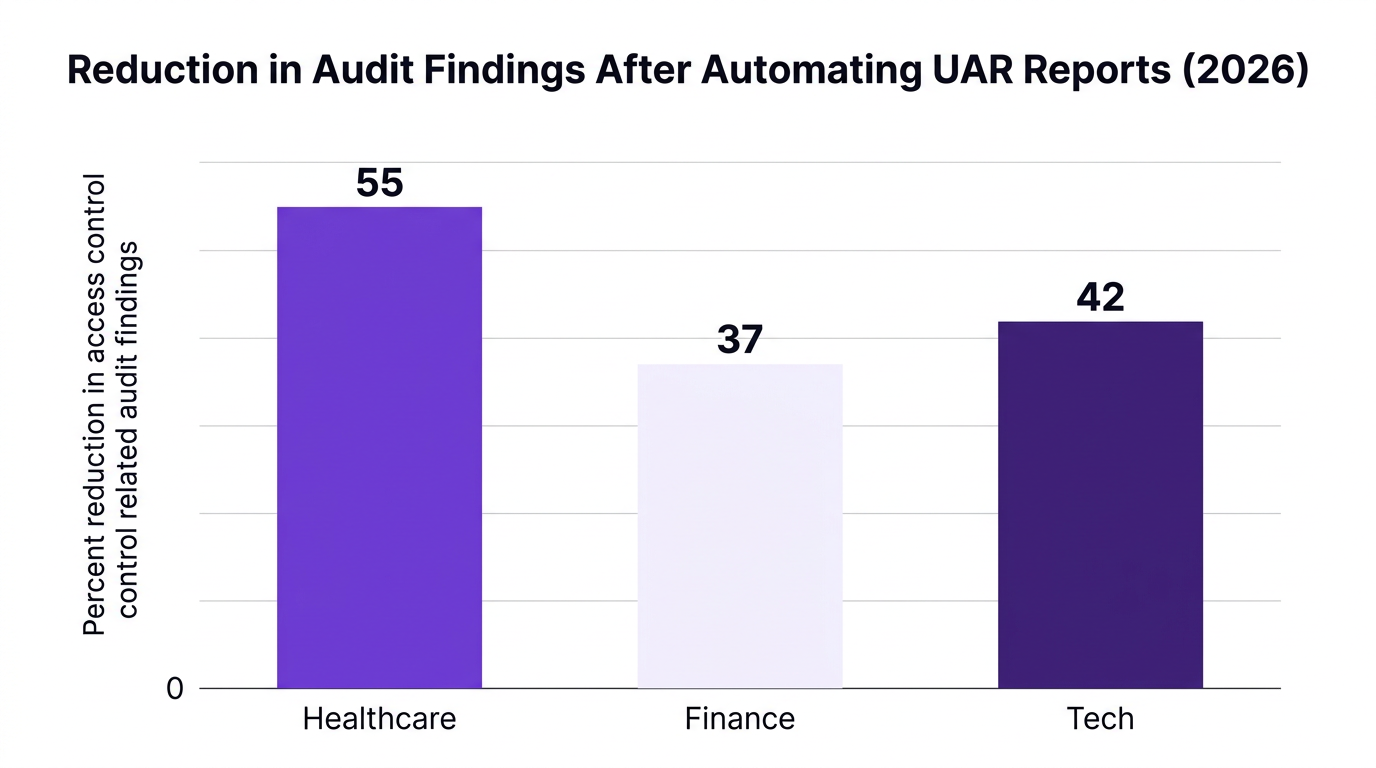
Reduced time to complete quarterly access reviews by 55% (Healthcare Tech Review, 2026)
Achieved full traceability from policy to reviewer decision
Demonstrated a clean offboarding audit for a major regulatory assessment
Similarly, a financial institution that standardized its user access review audit report across Microsoft 365 and CRM systems recorded a 37% drop in audit findings related to access controls after its next SOX review (Finance Compliance Journal, 2026).
CloudNuro’s Unified Cloud Custodian and AI Custodian modules make these results achievable at scale by merging SaaS access governance data, workflow, and reporting in a single platform. For IT operations and finance leaders, that same data supports cost optimization and chargeback, tying compliance directly to spend control.
To understand the full capabilities, review CloudNuro’s product overview and IT operations solutions.
Before you roll out or refresh your UAR program, validate your approach against a practical user access review checklist.
Scope and planning
Classify systems by criticality and data sensitivity
Define which regulations apply to each system
Map owners for every system and entitlement domain
Template and process design
Standardize on a limited set of IAM report template variants
Align templates to executives, auditors, system owners, and security teams
Document SLAs for user access review completion and exception handling
Execution and monitoring
Use automated workflows for task routing and reminders
Track completion rates and review quality metrics
Integrate UAR outcomes with IT asset management to clean up unused licenses
Evidence and continuous improvement
Maintain audit ready documentation for at least the required retention period
Run periodic IAM risk assessments based on UAR outcomes
Tune SoD rules and least privilege thresholds as the business evolves
When executed well, access reviews serve both security compliance and financial objectives by eliminating unused accounts and reducing license waste.
A user access review report typically includes the systems in scope, users and their entitlements, reviewer decisions, exceptions, and remediation status.
For auditors, the most valuable elements are clear ownership, timestamps, and evidence that decisions align with documented policies and risk appetite.
Quarterly access reviews mean four scheduled cycles per year for systems in scope.
Many organizations use a mix of quarterly reviews for high risk systems and annual reviews for lower risk platforms, supplemented with event driven reviews during reorganizations or incidents.
Regulations and frameworks that reference access review documentation include financial reporting rules, privacy regulations, healthcare regulations, and security control frameworks.
Auditors expect to see consistent audit access report evidence for any system that impacts financial statements, protected data, or critical operations.
An IT audit report template can cover a broad range of controls such as change management, backup, and incident response.
A UAR report is specifically focused on user identities, roles, entitlements, and the review decisions made by accountable owners.
Yes. When you connect user access review data with SaaS usage and billing, you identify dormant accounts and over provisioned roles.
Research suggests that organizations using access review outputs for license optimization see around 22% reduction in license waste (McKinsey, 2026).
A strong UAR report program is one of the most effective ways to strengthen security, prove compliance, and control SaaS costs.
By standardizing on four core templates, automating workflows, and integrating access reviews with SaaS management, you can turn a painful audit chore into a strategic governance capability.
CloudNuro is built to help enterprises achieve this by unifying SaaS access governance, compliance dashboards, and financial accountability in a single AI driven platform. To see how CloudNuro can operationalize your user access review report template library and automate evidence for every quarter:
Explore the CloudNuro platform and security capabilities
Review SaaS management use cases for access and cost optimization
Engage with CloudNuro experts to map your current UAR process to automated workflows
Strengthening your access review program now will pay dividends in audit readiness, risk reduction, and SaaS spend control for years to come.
CloudNuro is a leader in Enterprise SaaS Management Platforms, providing enterprises with unmatched visibility, governance, and cost optimization. Recognized twice in a row in the SaaS Management Platforms category and named a Leader in the SoftwareReviews Data Quadrant, CloudNuro is trusted by global enterprises and government agencies to bring financial discipline to SaaS, cloud, and AI. Trusted by enterprises such as Konica Minolta and Federal Signal, CloudNuro provides centralized SaaS inventory, license optimization, and renewal management along with advanced cost allocation and chargeback, giving IT and Finance leaders the visibility, control, and cost-conscious culture needed to drive financial discipline.
Request a no cost, no obligation free assessment —just 15 minutes to savings!
Get StartedUser access reviews are no longer a box-ticking exercise. A well structured UAR report is now one of the primary ways CISOs, auditors, and IT leaders prove control over SaaS, cloud, and critical business systems.
Gartner reports that 84% of enterprises conduct at least quarterly user access reviews across major SaaS platforms to meet regulatory mandates (Gartner, 2026). At the same time, Forrester notes that 70% of cloud compliance audit failures are tied to inadequate user access documentation (Forrester, 2026). The message is clear, if your user access review report is weak, your audit posture is weak.
This guide introduces a practical framework and four user access review report templates you can use immediately, while showing how automation and SaaS governance platforms like CloudNuro remove the manual burden.
A user access review report (UAR report) is the formal output of a review that validates which users have access to which systems, roles, and data, and whether that access is appropriate.
It provides audit-ready documentation that proves:
Who has access to what
Why they have that access
Who approved it
When it was last reviewed or changed
From a governance standpoint, UAR reports sit at the intersection of SaaS access governance, identity, and compliance. They support:
SOX access review and other regulatory access review mandates
Proof of least privilege principle and segregation of duties
Evidence for security compliance and IAM risk assessment
According to a major security research body, 91% of financial services firms cite user access review reporting as critical for passing SOX, PCI, and GDPR audits (Compliance Week, 2026). That same year, Info-Tech found that automated access review documentation cut audit prep time by 41% in regulated industries (Info-Tech, 2026).
Key takeaway: If it is not in a structured UAR report, auditors will treat it as if it did not happen.
Frequency is a core element of any UAR best practices program. Gartner notes that by 2026, 84% of enterprises schedule at least quarterly access reviews across major SaaS apps (Gartner, 2026).
A practical cadence by risk level:
High risk systems (finance, HR, PHI, core SaaS): monthly or quarterly access reviews
Medium risk systems: quarterly or semiannual access reviews
Low risk systems: annual access reviews or event driven
However, time based reviews are not enough on their own. Mature teams also trigger event driven user access review cycles, for example:
M&A or major reorgs
New country or business unit launches
Critical incident or suspected breach
A leading research body notes that quarterly access reviews tied to cloud operations are moving from best practice to board level expectation (Forrester, 2026). That shift means your UAR report process must be:
Repeatable and standardized
Fast to produce
Consistent across systems and auditors
This is where a robust access review report template becomes invaluable.
To make UAR reporting repeatable, CloudNuro recommends a 4T framework:
Tier: System criticality and data sensitivity
Type: Business, technical, or privileged access
Trigger: Scheduled or event based review
Template: Standardized reporting format
Below are four practical user access review report templates that align to this framework and map directly to common audit scenarios.
Use this as the high level audit access report you submit to external auditors or the board.
Purpose: Provide a concise, risk focused view of access reviews across critical systems for a given period (usually quarterly or annual).
Core sections:
Scope and period
- Systems in scope (e.g., financial SaaS, HR platform, IAM)
- Review period (Q1 2026, FY 2026)
- Applicable regulations (SOX access review, HIPAA, GDPR)
Summary metrics
Include high level KPIs such as:
Total users reviewed
Percentage of access recertified
Percentage of access revoked or modified
Number of open access related findings
Risk and exceptions overview
- Count and severity of exceptions (e.g., orphaned accounts, excessive entitlements)
- Aging of unresolved exceptions
- Key segregation of duties violations identified
Compliance attestations
- Statements from system owners or data stewards
- Sign off from CISO or CIO
- Links to detailed access management report appendices
Action plan and deadlines
- Remediation steps, owners, target dates
- Planned improvements to user access review processes
Pro tip: Treat this as your flagship identity governance report. Keep it to 2 to 4 pages, and link to system level IAM report template outputs as appendices.
This is the workhorse user access review report template for individual systems like Microsoft 365, CRM, ITSM, or HR.
Purpose: Show, at the system level, which users have what access, who reviewed it, and what changed.
Core sections:
System profile
- System name and owner
- Data classification
- Criticality tier (1 to 3)
Review configuration
- Review type (scheduled quarterly access reviews, offboarding audit, privilege recertification)
- Reviewer groups (managers, application owners, security)
- Review dates and deadlines
User entitlements snapshot
Export or embed a structured table that covers:
User ID and department
Role based access control group or entitlement
Last login date
Business justification field
Reviewer decision (approve, revoke, modify)
Findings and actions
Summarize access decisions:
Total users reviewed
Count of revoked accesses (e.g., terminated users, role changes)
Number of permission downgrades to enforce least privilege principle
Pending actions with owners and dates
Compliance and audit notes
- System specific requirements (SOX, PCI, HIPAA)
- Evidence of control operation (screenshots, export references)
- Mapping to internal user provisioning audit and deprovisioning processes
This template directly supports SaaS audit evidence for auditors who want to trace from control description to actual access certification report outputs.
Privileged access is where most IAM risk assessment and security compliance concerns concentrate. This template focuses solely on high risk accounts.
Purpose: Give security and audit teams clear visibility into privileged users, admin roles, and toxic combinations.
Core sections:
Scope of privileged roles
- List of admin roles across systems
- Criteria used to classify accounts as privileged
Privileged account inventory
- User, role, system, data domain
- MFA status, last password rotation
- Last activity timestamp
Segregation of duties matrix
- Defined toxic combinations (e.g., requestor and approver in same process)
- Users violating SoD and risk scores
Review outcomes
- Number of privileged users recertified
- Admin roles removed or downgraded
- Orphaned or dormant admin accounts closed
Control enhancements
- New rules for privileged access management
- Changes to user permissions report thresholds or alerts
- Planned automated access review enhancements
This template is especially important for demonstrating regulatory access review discipline in finance and government environments.
Access risk often appears during employee transitions, not just in steady state. An offboarding audit and joiner-mover-leaver view is essential.
Purpose: Show that joiners are provisioned correctly, movers have access updated, and leavers are fully deprovisioned across SaaS.
Core sections:
Population in scope
- New hires, transfers, and leavers in the review period
- Business units, locations, or roles covered
Provisioning compliance checks
- Joiners: correct roles, least privilege, approvals documented
- Movers: legacy access removed, new access justified
- Leavers: accounts disabled or removed across systems
Exceptions and residual risk
- Accounts still active after termination date
- Leavers with active access to critical SaaS
- Delayed removal of privileged roles
Metrics and trends
- Percentage of leaver accounts closed within SLA
- Provisioning error rate for movers and joiners
- Trend line across previous review periods
Process improvement actions
- Integration between HRIS and IAM
- Updates to user access review checklist and workflows
- Training and communication plans
This template directly connects access reviews to IT operations efficiency and IT asset management accuracy.
Manual access reviews built on spreadsheets eventually fail. They are slow, error prone, and nearly impossible to keep consistent across hundreds of SaaS apps and business systems.
Market research highlights the shift toward automation:
A major research firm found that 65% of IT leaders ranked automation of user access reviews as a top three SaaS governance priority for 2026 (IDC, 2026).
Another study showed 41% reduction in audit prep time after adopting automated SaaS compliance reporting for access reviews (Info-Tech, 2026).
McKinsey reports that integrating access review data with SaaS operations led to an average 22% reduction in license waste (McKinsey, 2026).
To move from manual to automated access management report workflows, most organizations follow this progression:
Centralize identity and entitlement data
Aggregate users, roles, and permissions from SaaS apps, IAM, and HR into a unified catalog.
Standardize templates and checklists
Use consistent user access review report template formats and a shared user access review checklist for all systems.
Automate reviewer workflows
Route review tasks to managers and system owners, set due dates, reminders, and escalation paths.
Embed policy and risk rules
Flag toxic combinations, dormant accounts, missing MFA, or violations of least privilege principle.
Generate audit ready evidence
Produce IT audit report template exports, access certification report summaries, and signed attestations on demand.
Tool without process
Implementing an IAM platform without defined review scopes, owners, and templates leads to inconsistent data and reviewer fatigue.
Compliance without security
Treating UAR as a checkbox exercise creates reports that please auditors but miss real entitlements risk, such as over privileged service accounts or unmanaged SaaS apps.
The remedy is a governance first approach that combines standardized templates, strong process ownership, and platforms designed for SaaS access governance.
CloudNuro is designed for enterprises that need consistent, automated UAR report workflows across Microsoft 365, CRM, ITSM, collaboration tools, and cloud platforms.
Using CloudNuro’s capabilities, CISOs and IT leaders can transform fragmented user permissions report exports into standardized, audit ready outputs.
CloudNuro provides:
Deep SaaS discovery and entitlement mapping
CloudNuro automatically discovers SaaS usage across the enterprise and builds a unified catalog of users, roles, and user entitlements. This is the foundation for high quality access review documentation.
Configurable UAR templates and workflows
IT and security teams can configure access review report template profiles aligned with the four templates above. Workflows support manager attestation, system owner sign off, and CISO approval.
AI powered anomaly detection
CloudNuro’s AI Custodian capabilities help surface unusual patterns, such as privilege creep, dormant accounts with high access, or inconsistent role assignments, which feed directly into identity governance report outputs.
Compliance dashboards and evidence exports
Real time compliance views show status across quarterly access reviews, offboarding audits, and privileged access recertifications. With one click, teams can export user access review audit report packages for internal or external auditors.
For IT leaders pursuing stronger IT security and SaaS management, CloudNuro creates a single source of truth that connects access reviews, financial accountability, and security operations.
A large healthcare organization, which had historically run UAR cycles in spreadsheets and email, implemented automated access review workflows and templates.
By centralizing their SaaS and IAM data, aligning on the four templates in this guide, and automating attestations, they:
Reduced time to complete quarterly access reviews by 55% (Healthcare Tech Review, 2026)
Achieved full traceability from policy to reviewer decision
Demonstrated a clean offboarding audit for a major regulatory assessment
Similarly, a financial institution that standardized its user access review audit report across Microsoft 365 and CRM systems recorded a 37% drop in audit findings related to access controls after its next SOX review (Finance Compliance Journal, 2026).
CloudNuro’s Unified Cloud Custodian and AI Custodian modules make these results achievable at scale by merging SaaS access governance data, workflow, and reporting in a single platform. For IT operations and finance leaders, that same data supports cost optimization and chargeback, tying compliance directly to spend control.
To understand the full capabilities, review CloudNuro’s product overview and IT operations solutions.
Before you roll out or refresh your UAR program, validate your approach against a practical user access review checklist.
Scope and planning
Classify systems by criticality and data sensitivity
Define which regulations apply to each system
Map owners for every system and entitlement domain
Template and process design
Standardize on a limited set of IAM report template variants
Align templates to executives, auditors, system owners, and security teams
Document SLAs for user access review completion and exception handling
Execution and monitoring
Use automated workflows for task routing and reminders
Track completion rates and review quality metrics
Integrate UAR outcomes with IT asset management to clean up unused licenses
Evidence and continuous improvement
Maintain audit ready documentation for at least the required retention period
Run periodic IAM risk assessments based on UAR outcomes
Tune SoD rules and least privilege thresholds as the business evolves
When executed well, access reviews serve both security compliance and financial objectives by eliminating unused accounts and reducing license waste.
A user access review report typically includes the systems in scope, users and their entitlements, reviewer decisions, exceptions, and remediation status.
For auditors, the most valuable elements are clear ownership, timestamps, and evidence that decisions align with documented policies and risk appetite.
Quarterly access reviews mean four scheduled cycles per year for systems in scope.
Many organizations use a mix of quarterly reviews for high risk systems and annual reviews for lower risk platforms, supplemented with event driven reviews during reorganizations or incidents.
Regulations and frameworks that reference access review documentation include financial reporting rules, privacy regulations, healthcare regulations, and security control frameworks.
Auditors expect to see consistent audit access report evidence for any system that impacts financial statements, protected data, or critical operations.
An IT audit report template can cover a broad range of controls such as change management, backup, and incident response.
A UAR report is specifically focused on user identities, roles, entitlements, and the review decisions made by accountable owners.
Yes. When you connect user access review data with SaaS usage and billing, you identify dormant accounts and over provisioned roles.
Research suggests that organizations using access review outputs for license optimization see around 22% reduction in license waste (McKinsey, 2026).
A strong UAR report program is one of the most effective ways to strengthen security, prove compliance, and control SaaS costs.
By standardizing on four core templates, automating workflows, and integrating access reviews with SaaS management, you can turn a painful audit chore into a strategic governance capability.
CloudNuro is built to help enterprises achieve this by unifying SaaS access governance, compliance dashboards, and financial accountability in a single AI driven platform. To see how CloudNuro can operationalize your user access review report template library and automate evidence for every quarter:
Explore the CloudNuro platform and security capabilities
Review SaaS management use cases for access and cost optimization
Engage with CloudNuro experts to map your current UAR process to automated workflows
Strengthening your access review program now will pay dividends in audit readiness, risk reduction, and SaaS spend control for years to come.
CloudNuro is a leader in Enterprise SaaS Management Platforms, providing enterprises with unmatched visibility, governance, and cost optimization. Recognized twice in a row in the SaaS Management Platforms category and named a Leader in the SoftwareReviews Data Quadrant, CloudNuro is trusted by global enterprises and government agencies to bring financial discipline to SaaS, cloud, and AI. Trusted by enterprises such as Konica Minolta and Federal Signal, CloudNuro provides centralized SaaS inventory, license optimization, and renewal management along with advanced cost allocation and chargeback, giving IT and Finance leaders the visibility, control, and cost-conscious culture needed to drive financial discipline.
Request a no cost, no obligation free assessment - just 15 minutes to savings!
Get StartedWe're offering complimentary ServiceNow license assessments to only 25 enterprises this quarter who want to unlock immediate savings without disrupting operations.
Get Free AssessmentGet Started




CloudNuro Corp
1755 Park St. Suite 207
Naperville, IL 60563
Phone : +1-630-277-9470
Email: info@cloudnuro.com





.webp)

Recognized Leader in SaaS Management Platforms by Info-Tech SoftwareReviews


.png)
.svg)